Calm UX in Healthcare

What Designing for Vulnerability Teaches Us About UX Everywhere

In the previous article, I explored how Calm UX becomes essential when digital products start predicting, recommending, and acting on users’ behalf. As systems grow more intelligent and autonomous, clarity, control, and psychological safety are no longer optional—they are prerequisites for trust.

Healthcare takes this one step further.

Healthcare is often treated as a special category in UX design—a domain with its own rules, constraints, and sensitivities. But it is not defined by different principles. It is defined by a different context of use. Healthcare doesn’t require new UX fundamentals; it requires existing ones to perform under pressure.

In healthcare contexts, users are rarely relaxed, curious, or exploratory. They interact with products while anxious, cognitively overloaded, emotionally vulnerable, or afraid of making mistakes. That makes healthcare products a powerful stress test for UX as a discipline.

If an interface fails under these conditions, it doesn’t fail because healthcare is “special.” It fails because the design was never truly calm, clear, or human-centered to begin with.

Healthcare as an Extreme UX Environment

Much of mainstream UX quietly assumes ideal conditions:

  • stable attention
  • emotional neutrality
  • tolerance for exploration
  • low cost of errors

Healthcare strips these assumptions away.

Users engage with health products while processing emotionally charged information, navigating uncertainty and risk, experiencing cognitive fatigue or distress, and fearing irreversible consequences. Under these conditions, even small ambiguities or unnecessary decisions can escalate into anxiety. This reveals a crucial insight:

Many interfaces rely on idealized users. Healthcare reveals real ones.

Calm UX becomes critical here not because healthcare is unique, but because it removes the safety buffer that often hides poor UX elsewhere. When attention is scarce and emotional stakes are high, only designs that genuinely reduce cognitive load and uncertainty can hold up.


Where Healthcare Reveals Broken UX Assumptions

Healthcare UX tends to fail in the same places where mainstream UX quietly struggles—but the consequences are far more visible. Designing for healthcare also means designing for neurodivergence and mental health, which exposes fundamental truths about how people actually interact with systems under strain.

Users with ADHD, anxiety, autism, or depression are more sensitive to cognitive load, less tolerant of ambiguity, more affected by interruptions, and more easily disoriented. These are often treated as edge cases, but they are not. They represent states that all users enter under stress—and healthcare places everyone in that state.

This is where many interfaces break down:

  • alarmist language that escalates uncertainty instead of explaining it
  • silent systems that leave users unsure whether an action succeeded
  • dense information displays that prioritize completeness over comprehension
  • binary outcomes presented without context or confidence framing

Outside healthcare, these issues cause frustration. Inside healthcare, they lead to anxiety, mistrust, and hesitation.

Calm UX reframes these moments by separating information from urgency, acknowledging uncertainty rather than hiding it, layering complexity instead of front-loading it, and reinforcing user agency at every step.

Calm UX as an Opportunity in Healthcare

In healthcare, Calm or Mindful UX is not about “being nice”—it’s about designing with a clear understanding of human limits. This means explicitly considering the user’s emotional and cognitive state: how much attention they can realistically give, how much information they can process, and how uncertainty might amplify fear or hesitation. It also means designing systems that reassure without misleading, guiding users without overwhelming them.

Focusing on Calm UX in healthcare doesn’t just improve health products. Much like accessibility features, it advances UX practice as a whole by grounding design decisions in real human constraints—and by bringing those improvements into everyday products where everyone can benefit.

My Conclusion to Calm UX and Calm Technology

The principles of Calm Technology are not a new discipline, but are already deeply embedded in established UX approaches—across digital and physical product design, and in domains such as healthcare and AI. UX has reached a level of maturity where the focus is no longer only on efficiency or fixing major usability issues, but on consciously considering people and their emotional experience throughout the process. Calm Technology makes this focus explicit, much like accessibility does, reminding us that user-centered design cannot meaningfully exist without these principles.

References:

AI Assistance Disclaimer:

AI tools were used to improve grammar and phrasing. The ideas, examples, and content remain entirely the author’s own.
Calm UX in AI-Driven Products

How Google’s and IBM’s AI Guidelines Help Reduce Cognitive Load

Artificial intelligence has become foundational in modern digital products, powering everything from search and recommendations to analytics and automation. But when AI is integrated carelessly, it doesn’t feel “helpful”, it feels unpredictable, opaque, or intrusive. That’s where Calm UX intersects directly with practical AI design.

To create AI experiences that feel reassuring rather than stressful, we need both behavioral guidelines and design patterns that embed calmness into interaction. Leading design frameworks from companies like Google and IBMarticulate such principles, explicitly tying usability, transparency, and control to trustworthy AI experiences.

Why Calm UX Matters in AI Systems

AI systems are fundamentally probabilistic, they make predictions, not certainties. Yet users instinctively seek clarity, control, and predictability when interacting with digital products. When an AI recommendation appears without context, or when a system acts before the user has given explicit consent, the interface can quickly feel noisy or demanding. The result is increased cognitive load: users must expend mental effort to interpret what the system did, why it did it, and whether they are still in control.

A familiar example is autocorrection. When it quietly suggests a word and allows the user to accept or ignore it, it feels helpful and unobtrusive. When it automatically replaces words without explanation or easy reversal, it creates friction, uncertainty, and frustration. The difference is not the intelligence of the system, but how its behavior is communicated and constrained.

Calm UX addresses this tension by deliberately reducing the mental work required to understand and manage AI behavior. It does so by:

  • clearly indicating when AI is active,
  • explaining why a suggestion or prediction is being made,
  • making it obvious how users can intervene, override, or undo an action,
  • and keeping AI signals in the periphery until the user chooses to engage.

This approach aligns closely with the core idea of Calm Technology: technology should inform without demanding attention. AI should participate quietly in the background, stepping into focus only when its input is meaningful, actionable, and invited.

How Google’s People + AI Guidebook Supports Calm UX

Google’s People + AI Guidebook provides a concrete set of principles and patterns for AI-enabled interfaces, emphasizing user understanding and control. Key patterns include:

1. Model Status and Confidence Indicators

Instead of presenting AI output as a definitive outcome, designers should surface confidence levels or uncertainty ranges (for example, “83% confidence”). Making uncertainty visible helps users better predict system behavior, build appropriate trust, and reduces anxiety when outcomes are not certain.

2. Recommendations with Rationale

AI suggestions should clearly communicate why they are offered. For example, by referencing past behavior or recent activity. Making this underlying logic visible provides essential context, reduces cognitive load, and helps avoid the “black box” effect that often undermines trust in AI systems.

3. Human-in-the-Loop Controls

Allowing users to accept, reject, edit, or refine AI suggestions keeps agency firmly with the user rather than with an opaque automated system. This sense of control builds confidence and reduces anxiety about unintended or irreversible outcomes.

Google’s guidance pitches these patterns not as optional add-ons but as core UX requirements when embedding AI into workflows, because clarity and control directly reduce cognitive demand.

IBM’s Approach to AI UX — Transparency, Trust, and Shared Agency

IBM’s AI design practice also emphasizes understanding and human-centered automation. Explainability helps users understand both the process and limitations of AI. In their guidelines, this approach is summarized in two key concepts:

1. Explainability as a UX Function

When systems articulate how and why they reached a specific conclusion—even at a high level—users can form a clear mental model of the AI’s behavior. This predictability reduces mental effort and helps prevent frustration caused by uncertainty.

2. Role Clarity Between User and AI

Users should always understand where human responsibility begins and where AI assistance ends. Clearly demarcating these boundaries in the interface minimizes anxiety by removing uncertainty about whether the system is acting autonomously or on the user’s behalf.

This emphasis echoes research suggesting that AI designers must address both model transparency and user understanding if they want trust and low friction in human-AI interaction.

Calm UX, Cognitive Load & Calm Technology

At its core, Calm UX in AI interfaces is about managing the mental effort users invest in understanding system behavior. It uses patterns that reduce ambiguity, promote transparency, and preserve control, all of which are directly supported by Google’s and IBM’s AI guidelines.

That alignment is not coincidental. Calm UX and Calm Technology principles converge around the same goal: Design systems that support human thinking — not overwhelm it.

When AI interfaces follow clear guidelines, from explainability to human-in-the-loop design, they become not just smarter, but calmer, more trustworthy, and easier to use.

References:
  • Weiser, M., Seely Brown, J. (1995): “Designing Calm Technology“, Xerox PARC
  • Weiser, M., Seely Brown, J. (1996): “The Coming Age of Calm Technology“, Xerox PARC
  • Case, A. (2015): “Calm Technology: Principles and Patterns for Non-Intrusive Design
  • Google PAIR – People + AI Guidebook https://pair.withgoogle.com/guidebook/
  • IBM – Explainable AI Design Guidelines https://www.ibm.com/design/ai/

AI Assistance Disclaimer:

AI tools were used to improve grammar and phrasing. The ideas, examples, and content remain entirely the author’s own.
Application of calm technology principles in Digital Product Design

Many digital products today are technically well designed. They pass usability tests, follow established patterns, and allow users to complete tasks efficiently. And yet, they still feel stressful to use. This tension points to a common misunderstanding in UX:

Usability alone does not guarantee a calm experience (Calm UX).

What users often struggle with is not failure, but mental strain — the quiet effort required to interpret, decide, remember, and stay oriented while interacting with an interface.

Cognitive Load Is the Invisible Friction

I realized that a key driver of user stress is cognitive load: the amount of mental effort required to process information and make decisions. Human working memory is limited. When interfaces demand too much attention, comparison, recall, or interpretation, users become fatigued and error-prone — even if nothing is technically “broken”.

Research by Nielsen Norman Group shows that cognitive load increases when users are forced to:

  • hold information in memory instead of recognizing it
  • make too many decisions at once
  • decode unclear labels or system states
  • recover from interruptions without guidance

Reducing cognitive load is not about removing functionality. It’s about removing unnecessary mental work.

Calm UX Goes Beyond Usability

Calm UX builds on classic usability principles but extends them into the emotional and psychological domain. As described in recent UX research and writing, calm experiences are those that reduce anxiety, uncertainty, and hesitation, especially in moments where users are unsure what the system is doing or what is expected of them.

According to UXmatters, much of the most damaging friction in digital products is not physical or functional, but psychological. Interfaces that rush users, provide ambiguous feedback, or escalate situations unnecessarily create stress — even when users ultimately succeed.

Calm UX asks different questions than traditional UX:

  • Do users feel in control?
  • Does the system behave predictably?
  • Is uncertainty acknowledged or ignored?
  • Does the interface reassure, or does it pressure?

Design Principles That Create Calm

Research from NN/g, UXmatters, and Calm Technology literature points to a small set of recurring principles that consistently reduce cognitive strain and user anxiety.

Minimize cognitive effort by default
Calm interfaces prioritize recognition over recall, limit information to what is immediately relevant, and use familiar, consistent patterns. Clear visual hierarchy and progressive disclosure help users stay oriented without unnecessary mental effort.

Communicate with clarity, not urgency
System messages are emotionally charged moments. Calm UX avoids alarmist language and explains what happened, why it matters, and what comes next—without blame, pressure, or artificial urgency.

Make system behavior visible
Uncertainty increases stress. Loading states, background processes, and validations should clearly communicate progress and outcomes, even when no action is required from the user.

Respect attention as a scarce resource
Notifications should interrupt only when they provide clear, timely value. Calm UX is quiet by default and intentional when asking for attention.

Introduce complexity gradually
Complex systems don’t need to feel complex upfront. Calm UX reveals detail only as it becomes relevant, reducing initial overwhelm and supporting user confidence.

These principles are not new rules. They are a reframing of established UX heuristics through the lens of Calm Technology—shifting the focus from efficiency alone to cognitive and emotional ease.

Design Patterns That Create Calm

In practice, these principles materialize through a set of recurring design patterns that can be used as tools to create calmer products.

Progressive Disclosure
Calm UX avoids presenting all information and options at once. Instead, complexity is revealed gradually, as it becomes relevant. This helps users orient themselves quickly and reduces initial cognitive load, especially in complex systems.

Recognition Over Recall
Rather than relying on users’ memory, calm interfaces surface choices, defaults, examples, and familiar patterns directly in the UI. This reduces mental effort and minimizes the anxiety that comes from uncertainty or second-guessing.

Visible System Status
Calm UX avoids silent systems. Loading states, background processes, and validation feedback clearly communicate what is happening and what to expect next, even when no action is required from the user.

Gentle Confirmation
Success and completion are communicated through subtle, inline feedback instead of disruptive modal dialogs. This reassures users without interrupting their flow or escalating the interaction unnecessarily.

Forgiving Interactions
Undo options, editable states, and non-destructive defaults make mistakes recoverable. When users know they can correct an action, they interact with greater confidence and less hesitation.

Predictable Interaction Patterns
Consistent layouts, control placement, and feedback behavior reduce the mental effort required to re-orient across screens. Calm interfaces prioritize familiarity over novelty.

Descriptive Microcopy
Clear, outcome-focused language replaces vague labels and technical jargon. Users understand what will happen before they act, reducing hesitation and cognitive strain.

Status Over Alerts
Whenever possible, calm systems communicate information through passive status indicators rather than interruptive alerts. Information remains available without demanding immediate attention.

Notification Gating
Notifications are used sparingly and intentionally. Calm UX is quiet by default and interrupts only when timely user action truly matters, treating attention as a limited resource.

Clear Exit Paths
Users can cancel, go back, or pause processes at any time. Knowing there is always a way out significantly reduces pressure and perceived risk.


Together, these patterns don’t eliminate complexity — they structure it, pace it, and communicate it with care. They shift UX from demanding attention to supporting orientation, from pushing users forward to helping them stay grounded.

As digital products increasingly incorporate AI-driven predictions, recommendations, and automation, these patterns become even more critical. When systems begin acting on users’ behalf, clarity, control, and calm are no longer optional — they are the foundation of trust. In the next article, I’ll explore how Calm UX principles apply specifically to AI-driven products, and how thoughtful design can make intelligent systems feel supportive rather than intrusive.

References:
  • Weiser, M., Seely Brown, J. (1995): “Designing Calm Technology“, Xerox PARC
  • Weiser, M., Seely Brown, J. (1996): “The Coming Age of Calm Technology“, Xerox PARC
  • Case, A. (2015): “Calm Technology: Principles and Patterns for Non-Intrusive Design

AI Assistance Disclaimer:

AI tools were used to improve grammar and phrasing. The ideas, examples, and content remain entirely the author’s own.
Drink Smart and Keep Calm: Technology that Stays in the Background – Part III

From Concept to Prototype: Planning a Calm, Tangible Drinking Reminder

After introducing ubiquitous computing, tangible user interfaces, and calm technology through the example of a smart water glass, the next step is to explore how such a concept could be translated into a physical prototype. Rather than focusing solely on technical feasibility, the planned smart coaster is intended as a design-driven experiment — one that combines physical prototyping with a human-centered design (HCD) process.

The goal is not to build a “perfect” product, but to create a functional artifact that allows the underlying interaction principles to be examined, questioned, and refined.

Framing the Problem in Its Usage Context

The initial motivation for the project stems from a common everyday situation: forgetting to drink water while working or studying. Existing solutions, such as hydration reminder apps, typically rely on push notifications, sounds, or vibrations. While effective in theory, these mechanisms often interrupt users at inopportune moments and shift attention away from the current task toward a screen.

Before committing to a specific technical solution, I would usually start the project by planning a usage context analysis. This would involve observing when and where drinking usually happens, how glasses are positioned in work environments, and how people react to reminders during focused tasks. As the design proposal has already been introduced, I move directly into this idea rather than conducting a full exploratory phase. The underlying assumption is that drinking is already embedded in physical routines and object interactions—making it a promising candidate for a tangible, environment-based interface.

Planned Human-Centered Design Approach

The development of the smart coaster is intended to follow a simplified human-centered design (HCD) process:

  1. Empathize & UnderstandThe process would begin with self-observation and informal conversations to gain insight into why drinking is often forgotten and how existing reminder systems are perceived in everyday situations.
  2. DefineBased on these initial insights, the core design challenge can be formulated as:How might a drinking reminder support hydration without interrupting or demanding attention?
  3. IdeateThe ideation phase would focus on identifying calm forms of feedback. Different modalities—such as light, sound, or subtle movement—would be explored and evaluated in terms of intrusiveness, social acceptability, and perceptibility in the periphery of attention.
  4. PrototypeA low- to mid-fidelity prototype of a smart coaster is planned as a tangible representation of these concepts, allowing interaction principles to be examined in a physical form.
  5. EvaluateShort, qualitative user testing sessions are intended to help validate assumptions and inform iterative refinement of the interaction and feedback design.

Technical Implementation as Design Medium

The planned prototype combines accessible digital fabrication and physical computing tools:

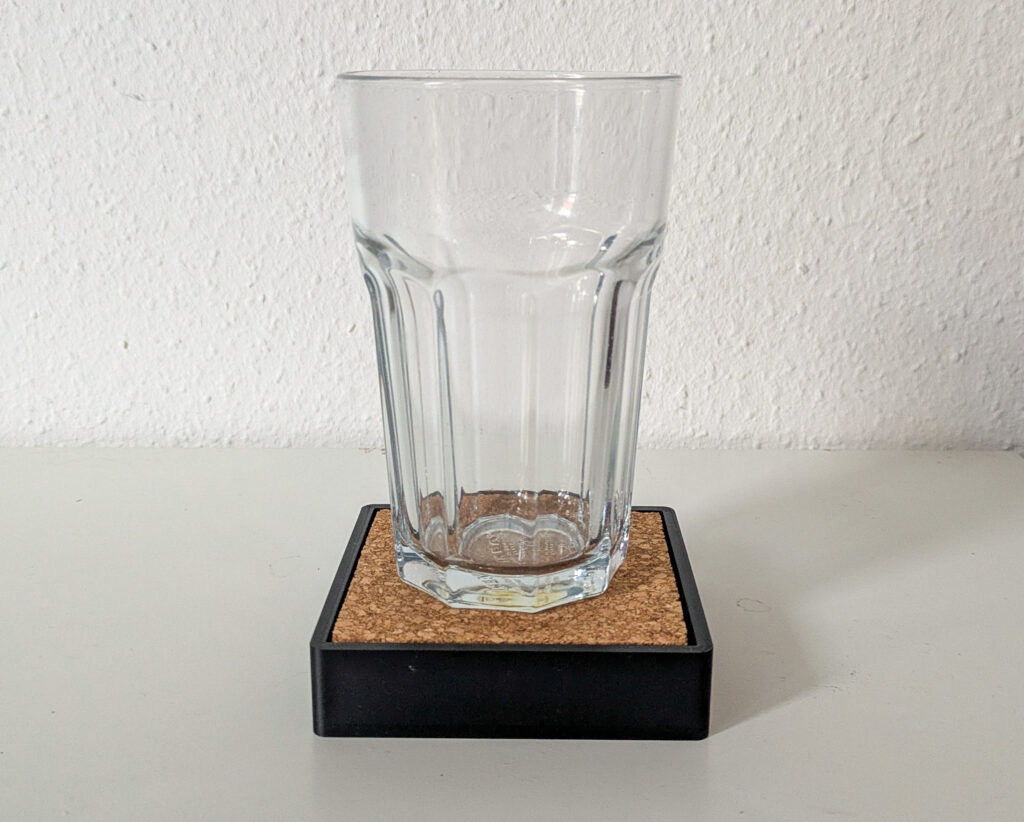
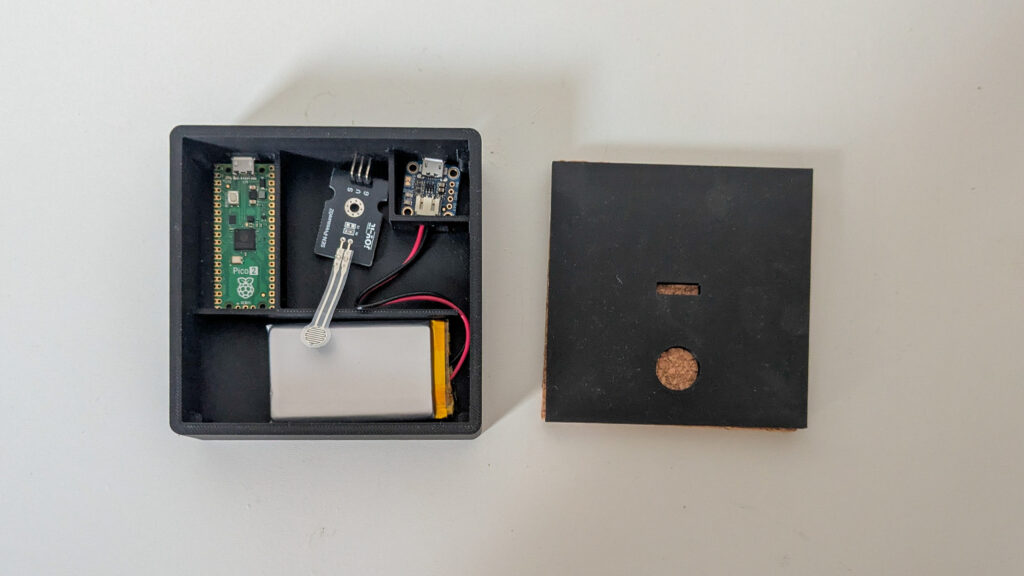
  • 3D-printed coaster, designed to visually blend into everyday environments.
  • pressure sensor to detect the presence or absence of a glass.
  • Raspberry Pi Pico as the microcontroller handling timing and state logic.
  • Subtle ambient feedback, such as low-intensity light, to communicate reminders without explicit alerts.

Importantly, the technical setup is intentionally kept minimal. This aligns with calm technology principles by reducing complexity and ensuring that the coaster remains usable even if the digital components fail.

Planned User Testing and Evaluation

Rather than large-scale usability testing, the project is intended to rely on small, qualitative user tests. Participants would use the coaster in desk-based work scenarios and reflect on their experience afterward.

The evaluation would focus less on performance metrics and more on experiential questions:

  • Was the reminder perceived as intrusive?
  • Did it remain in the periphery until needed?
  • How did it compare emotionally to phone-based reminders?

These observations are expected to inform whether the concept successfully embodies calm interaction.

Conceptual Comparison: Coaster vs. App

As part of the analysis, the smart coaster will be conceptually compared to traditional drinking reminder apps. While apps centralize interaction on a screen, the coaster distributes interaction into the environment. This comparison serves to highlight how tangible interfaces and ubiquitous computing shift responsibility from the user to the surrounding system.

Outlook

By planning the smart coaster as both a technical prototype and a research artifact, the project aims to explore how calm technology principles can be operationalized in everyday objects. The focus remains on how interaction feels, rather than how much functionality is added — reinforcing the idea that sometimes, the most effective technology is the one that stays quietly in the background.

References:
  • Weiser, M., Seely Brown, J. (1995): “Designing Calm Technology“, Xerox PARC
  • Weiser, M., Seely Brown, J. (1996): “The Coming Age of Calm Technology“, Xerox PARC
  • Case, A. (2015): “Calm Technology: Principles and Patterns for Non-Intrusive Design
  • https://calmtech.com
  • Human-Centered Design nach ISO 9241-210:2019

AI Assistance Disclaimer:

AI tools were used to improve grammar and phrasing. The ideas, examples, and content remain entirely the author’s own.
Calm Tech Institute Awards – Part II

In the last blog entry I looked into the calm alarm clock “Dreamie”. Another two award-winning examples are the Luma³ breathing companion and the Mudita Kompakt smartphone.

Luma³ breathing companion

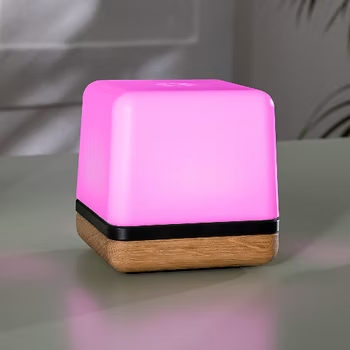
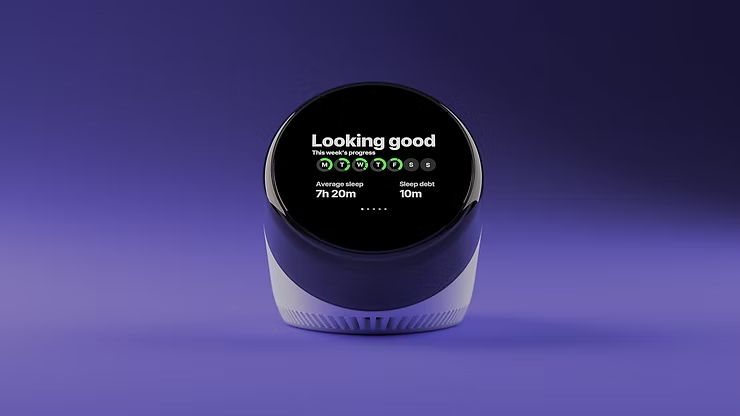
While most meditation apps add screen time and complexity, Luma³ is designed to guide conscious breathing without screens or apps, making it a calm and accessible tool for any environment. The device offers multiple scientifically backed breathing programs to support relaxation, balance, and stress relief, all delivered through light rather than screens or audio instructions.

Luma³ informs users and creates calm by guiding breathing without cognitive overload. It communicates without speaking, using light pulses to convey rhythm while allowing users to focus entirely on their breath. Its SteadyGlow™ mode provides a subtle presence in peripheral vision when not actively in use, creating a gentle, calming effect in the room. By leveraging ambient light, peripheral awareness, and simple physical presence, Luma³ demonstrates how devices can support mindfulness without adding mental strain.

Mudita Kompakt

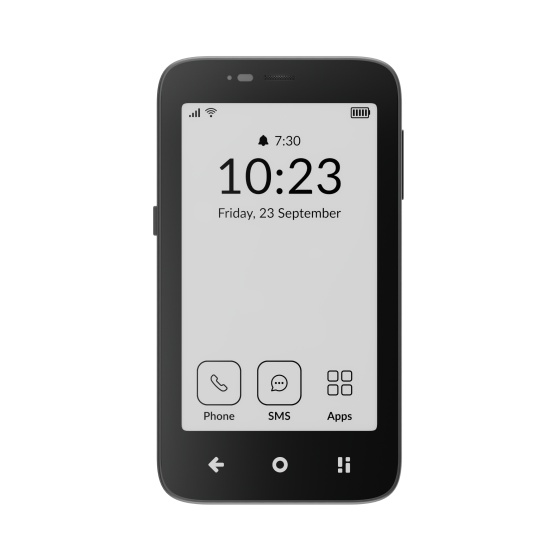
The Mudita Kompakt represents an attempt to create a calm smartphone, also recognized by the Calm Tech Institute. Unlike conventional smartphones designed to maximize engagement, the Kompakt focuses on focus, privacy, and freedom from digital distractions.

At its core is a paper-like E Ink display, which reduces blue light exposure, minimizes eye strain, and discourages prolonged screen time. Instead of offering endless apps and notifications, the phone runs on MuditaOS K, a minimalist operating system that includes only essential functions: calls, messages, calendar, notes, music, and offline maps—without ads, tracking, or attention-grabbing features.

A key feature is Offline+ Mode, allowing users to intentionally disconnect. Connectivity features such as cellular data, Wi-Fi, Bluetooth, microphones, and the camera are disabled, making disconnection a deliberate and trustworthy choice rather than a temporary workaround. This mode is controlled via a physical switch, so no unnecessary interaction with the screen is required, and it can even be engaged through passive, peripheral interaction, allowing users to disconnect without actively focusing on the device. By combining E Ink, minimal software, peripheral-friendly controls, and intentional offline modes, the Kompakt exemplifies how smartphones can support calm and attention-aware interaction.

Design Tools for Calm Technology

All three product examples use deliberate design tools to create calm interactions. Ambient light, E Ink displays, tactile physical controls, and peripheral cues help reduce cognitive load and minimize unnecessary engagement. Features such as light-guided breathing and an Offline Mode controlled by a physical switch allow users to interact naturally without being drawn into constant foreground attention, enabling interaction through the periphery rather than the screen.

In addition, the reduction of content and functionality, as seen in both the alarm clock and the smartphone, plays a key role. By keeping only the necessary features, these products remove extra choices users would otherwise have to make while trying to achieve a goal. This reduction in decision-making helps lower mental load and supports more focused, intentional use. Together, these design tools translate calm technology principles into concrete, user-centered experiences that genuinely support well-being.

Calm Tech Institute Awards as a Benchmark Tool

As the Calm Tech Institute Awards specifically focus on products designed with human attention in mind and curate them in a collection of awarded examples, they can serve as a valuable benchmark tool for technologies that serve the principles of calm technology. 

References:

AI Assistance Disclaimer:

AI tools were used to improve grammar and phrasing. The ideas, examples, and content remain entirely the author’s own

Calm Tech Institute Awards – Part I

As I started researching product examples that demonstrate how interactions could be designed in a calm and respectful way, I came across the Calm Tech Institute Awards. Through this initiative, the Calm Tech Institute recognizes products, services, and technologies that are designed according to the principles of calm technology. Products are evaluated through a 81-point criteria covering categories such as:

  • attention: Products are evaluated on how they work with (or against) human attention.
  • periphery: How does the product engage other senses through peripheral attention?
  • durability: How does the product break down? Does it offer support to customers in some way?
  • light: Does the product use warm lighting or harsh, blue lights?
  • sound: How does the product sound? For products with moving parts, what actions have been taken to prevent excess noise?
  • materials: What kinds of materials are used?

The award spans a wide range of product and service domains, including:

  • Smart Appliances
  • Transportation
  • Electronics
  • Artificial Intelligence
  • Automotive
  • Health
  • Homes
  • Vacation Rentals
  • Museums
  • Education
  • Websites and Apps

This framework shifts the focus away from novelty and constant engagement, instead emphasizing thoughtful, human-centered design.

In this and the next blog entry, I want to take a closer look at some of the products that have received this award and explore how they translate calm technology principles into real-world design.

“Dreamie” by Hello Ambient

Last year’s highest certified product is a bedside sleep companion called Dreamie. The device is designed to reduce phone usage in the bedroom. A space that should ideally be reserved for rest and recovery. Looking at sleep behavior research from the American Academy of Sleep Medicine (AASM), it quickly becomes clear why this is such a relevant use case for calm technology.

ccording to the AASM, 87% of adults keep a phone in their bedroom, and the majority of them report not getting enough sleep due to phone usage. Other studies show that just one hour of screen time after going to bed increases the likelihood of insomnia symptoms by more than 50%. Screen use at night is also associated with an average loss of 24 minutes of sleep. These numbers highlight a clear opportunity for a device that keeps technology present, but firmly in the background—supportive rather than disruptive.

Based on their research, the AASM recommends several habits to improve sleep quality:

  • Disconnect from devices at night
  • Leave your phone in another room
  • Follow a relaxing nighttime routine
  • Have a sleep schedule
  • Turn off push notifications

Dreamie, developed by Hello Ambient, directly addresses these recommendations and turns them into design requirements. Instead of asking users to rely on willpower alone, the device offers an alternative that fits naturally into existing bedtime routines.

At its core, Dreamie is more than a smart alarm clock—it is a carefully considered design solution. Recognizing how hard it can be to resist media consumption before sleep, the device provides calm, sleep-focused audio content. This creates a gentle alternative to scrolling through a bright, distraction-filled phone screen, helping users wind down rather than stay engaged.

In addition, Dreamie tracks sleep patterns without requiring wearable devices, reducing friction and discomfort. It also features a daylight-based alarm, which is widely considered to be a more natural and less jarring way to wake up compared to traditional sound alarms. Interactions are handled through tactile, physical controls, allowing for eyes-free adjustments in the dark—an intentional design choice that avoids bright screens and supports a calm, sleep-friendly environment.

Taken together, these features strongly align with calm technology principles. Dreamie avoids competing for attention, supports healthy sleep habits, and stays in the background when not needed—showing how research-driven insights and calm interaction design can address a widespread problem.

References:

AI Assistance Disclaimer:

AI tools were used to improve grammar and phrasing. The ideas, examples, and content remain entirely the author’s own.
How do Ubiquitous Computing and Calm Technology relate to the field of User Experience Design?

In my last blog post, I introduced the idea of calm technology. But what actually makes a technology feel calm? In their 1996 paper, Mark Weiser and John Seely Brown suggest that technology becomes calming when it:

  1. Places information in the periphery, letting us stay aware without being overloaded.
  2. Allows smooth movement from the periphery to the center of attention, giving us control when action or response is needed.

This balance increases awareness while keeping users in control, rather than dominating their attention. Designing for the periphery is therefore a key part of creating calm technology that genuinely supports people.

Weiser and Brown define calm technology through three characteristics:

  1. Smooth transitions between the center of attention and the periphery
  2. Expansion or Enhancement of peripheral perception and awareness
  3. “Locatedness”, which creates calm by fostering a connection to the environment enabling to act confidently within it

Technology feels calm when it works with, rather than against, the way human attention naturally functions. It empowers our periphery by quietly supporting awareness, giving more context and control without demanding attention. This creates a feeling of comfort, familiarity, and “being at home” in our environment. Technology achieves this calmness when it blends seamlessly into its surroundings and aligns with our expectations, allowing attention to flow uninterrupted. Just as grammar mistakes pull us out of a text or a rearranged kitchen disrupts the act of cooking, intrusive or poorly aligned technology breaks our focus. When technology preserves our flow of attention, it naturally feels calm.

How is Calm Technology connected to Ubiquitous Computing?

Both concepts are firstly introduced by Mark Weiser (and John Seely Brown). The early research on Ubiquitous computing inevitably led to the concept of calm technology. So both concepts are closely intertwined. Let me explain why:

Ubiquitous computing enables and requires calm technology at the same time. Once computers are everywhere, it will be crucial to consciously design interactions to ensure they do not overwhelm users. Calm technology is the design philosophy that ensures ubiquitous computing remains unobtrusive and supportive. At the same time, the fact that interactions with digital information can now take place anywhere creates an opportunity to design them in a more supportive way.

This means that ubiquitous computing is the technological vision, and calm technology is the human-centered design principle that guides how that vision should interact with people. They are intertwined because one sets the stage, and the other ensures it’s usable and fits with human needs.

How do Ubiquitous Computing and Calm Technology relate to Today’s field of User Experience Design?

Human Computer Interaction has evolved alongside the evolution of computing, which can be summarized in three stages. In the mainframe stage, computers were rare, expensive, and shared by multiple users. Interaction during this stage was driven primarily by technological possibilities rather than human capabilities. As computers became more accessible, the personal computing stage emerged, establishing one-to-one relationships between individuals and their machines. This shift brought technology closer to people and made user experience a central concern, moving the focus of interaction from the technology itself to the user.

In the following ubiquitous computing stage, people interact with numerous embedded computers throughout their daily lives, making calm technology not just desirable but necessary. The Internet has accelerated this evolution, raising questions about how pervasive technology may impact our environment and everyday experiences. In the state we are currently in, technology constantly competes for our attention. New technology is developed in a high speed and to keep up the pace user-tests are often skipped, resulting in bad user experience and usability (Monse-Maell, 2018). In response, many contemporary design trends have emerged, all based on the same underlying concept: Calm Technology. Within the design field, this idea is commonly framed in terms of attention and presence (Calm UXQuiet UXMindful UX), simplicity and reduction (Minimalist UXEffortless UXInvisible Design), spatial and peripheral interaction (Ambient UXPeripheral Interaction), and human well-being and pace (Well-being UXSlow Technology).

Sure you already heard of some of those terms and are familiar with the ideas behind it. They all come down to the same main idea. They take the philosophy of Calm Technology and translate them into concrete design practices. Calm Technology gives designers a philosophical and ethical grounding. The specification into one of those terms usually provides concrete methodologiespatterns, use cases and heuristics. That’s why it makes sense to engage with these fundamental ideas, as they form the basis for current design trends and shape much of today’s interaction design thinking.

Now that we’ve covered these fundamentals, I want to take a closer look at human–computer interaction and what types of interactions we can use to achieve calmer, more effortless technologies. In the next blog entry, I’ll explore how we intuitively understand how to use objects, how information is perceived in our periphery, and what this means for designing interfaces.

References:

AI Assistance Disclaimer:

AI tools were used to improve grammar and phrasing. The ideas, examples, and content remain entirely the author’s own.

Drink Smart and Keep Calm: Technology that Stays in the Background – Part II

In my previous blog post, I introduced the concepts of Ubiquitous Computing and Tangible User Interfaces through the example of a smart water glass. When we return to this example and look on the character of the interaction and the information flow, shifting our attention from the what it does to how it communicates, the principles of Calm Technology become visible.

What is Calm Technology?

Calm Technology is a design principle, that aims to keep devices at the periphery of our attention by offering information only when it is contextually relevant, and in a subtle, unobtrusive way. Instead of demanding focus, such technologies blend into the background of daily life and surface only when intervention is needed. In doing so, they seeks to reduce cognitive load, minimize stress, allowing people to remain focused and productive while staying connected with technology without feeling overwhelmed by it. (Weiser, Brown, 1995 & 1996) 

What is Periphery?

I just mentioned calm technologies aim to keep at the periphery – but what exactly does periphery mean? To understand how the principles of Calm Technology work, we first need to look at how interaction engages our attention. We can distinguish between the center of our attention and the periphery. The periphery describes everything that is not in our direct focus, yet still registered in the background.

For visual perception, for instance, the center of attention might be the text we are currently reading, while the surrounding room remains in the periphery. Our center of vision is optimized for detail, color, and object recognition. Peripheral vision, in contrast, detects motion, overall shapes, and spatial layout. It helps us sense changes in our environment and guides our attention when something becomes relevant.

Calm Technology makes intentional use of this dynamic. It works by allowing information to move fluidly between the center of attention and the periphery. The periphery is powerful and informative: it enables us to notice important changes while leaving us free to decide whether something should shift into the center of our attention—or remain quietly in the background.

The Principles of Calm Technology

Now let’s take a look at the eight principles of Calm Technology, which were developed as a framework for designing technology that works with human attention and use them to analyze our smart water glass.

  • 1. Technology should require the smallest possible amount of attention

Our water glass in general embodies this idea: it doesn’t beep, flash aggressively, or require deliberate interaction. Instead, it tracks the amount and frequency of drinking by itself and might glow softly when hydration is low. The glass communicates through presence rather than interruption.

  • 2. Technology should inform and create calm

Information is only given when required, therefore it gives people just the amount of information they need to solve their problem

  • 3. Technology should make use of the periphery

Because the output of our smart water glass is designed to be gentle and ambient, it can be perceived through peripheral attention rather than demanding direct focus. Its cues remain unobtrusive in the background, becoming noticeable only when needed.

  • 4. Technology should amplify the best of technology and the best of humanity

The smart water glass does not force the user to drink through disruptive notifications. Instead, it gently indicates how much time has passed since the last sip, helping the user remember to stay hydrated without imposing strict rules. This approach preserves the user’s autonomy: they remain in control, while the technology quietly supports their goals.

  • 5. Technology can communicate, but doesn’t need to speak

By informing the user peripherally through subtle ambient lighting, the smart water glass communicates its message without the need for sound or explicit verbal cues.

  • 6. Technology should work even when it fails

Even if the smart water glass fails to detect a drinking event, the user can still drink normally. The technology enhances the experience but does not prevent the core activity from occurring.

  • 7. The right amount of technology is the minimum needed to solve the problem

The smart water glass focuses solely on reminding the user to drink, without adding unrelated information or features. By limiting its functions to the immediate goal, it avoids overwhelming or confusing the user.

  • 8. Technology should respect social norms.

By keeping its output subtle and non-disruptive, even in the presence of other people, the smart water glass respects social norms and avoids drawing unwanted attention.

In summary, the smart water glass demonstrates how Calm Technology principles can guide the design of devices that are informative, unobtrusive, and supportive—enhancing human behavior while remaining in the background of daily life.

In the next blog entry, I will take a closer look at the characteristics that make technology truly calm and explore how and why we perceive certain technologies this way. I will also discuss the relationship between Ubiquitous Computing and Calm Technology, and what these ideas mean for the field of User Experience Design.

References:
  • Weiser, M., Seely Brown, J. (1995): “Designing Calm Technology“, Xerox PARC
  • Weiser, M., Seely Brown, J. (1996): “The Coming Age of Calm Technology“, Xerox PARC
  • Case, A. (2015): “Calm Technology: Principles and Patterns for Non-Intrusive Design
  • https://calmtech.com

AI Assistance Disclaimer:

AI tools were used to improve grammar and phrasing. The ideas, examples, and content remain entirely the author’s own.
Drink Smart and Keep Calm: Technology that Stays in the Background – Part I

While looking for an idea for my physical prototyping class, I came across a problem that I often encounter: I get myself a glass of water or a cup of tea and forget to drink it. So I designed a smart water glass, that reminds me to drink — but only when I actually forget to drink.

It was only in class that I realized I had subconsciously applied the principles of Calm Technology, enhancing my surroundings with computing in a subtle way. In doing so, I had also created a Tangible User Interface that supports the broader vision of Ubiquitous Computing.

This is a perfect example to dive deeper into my topic and take a closer look at the different concepts and how they come together in my smart water glass to create this type of interaction.

Ubiquitous Computing

Let’s start with the concept of Ubiquitous Computing, a vision first introduced by Mark Weiser.  Its main idea is to embed computation into the environment so seamlessly that computers become “invisible” to users. This vision emerged with the advancement of microelectronics and their widespread availability. Technology should move out of the direct focus and into the background. Instead of interacting with a single desktop device, interaction with technology happens everywhere — in everyday objects and the environment itself. (Weiser 1991)

Mark Weiser (1991, p. 2) describes ubiquitous computing as the opposite of virtual reality: “Virtual reality puts people inside a computer-generated world, ubiquitous computing forces the computer to live out here in the world with people.”

If we look back at the example from the beginning, this concept can be easily transferred. Instead of setting a drinking reminder on my cell phone or smartwatch, I can set the timer directly by interacting with the glass in my environment. This interaction can be designed to reflect the natural ways we as humans handle physical objects. And rather than being interrupted by a sound or vibration, the water glass responds to my interaction, subtly directing my peripheral attention to where it matters — the glass itself — rather than my smartphone.

Tangible User Interface

A concept closely related to ubiquitous computing—and one that fits the type of user interface used in our water glass example — is the tangible user interface, or TUI. While ubiquitous computing provides the guiding vision, TUIs represent a concrete implementation of that vision. In this sense, they can be seen as a subfield or application area of ubiquitous computing.

Inspired by the idea of embedding computation seamlessly into everyday life, TUIs aim to give digital information a physical form. They enable interaction through the real world and draw on modes of engagement that humans naturally use in their physical environments. These interactions are diverse and can involve multiple senses. TUIs are designed to enable the direct perception and physical manipulation of digital information. Their goal is to make computation both graspable and embodied. (Ishii and Ullmer 1997; Ullmer and Ishii 2000; Ishii 2008)

A TUI is a user interface in which the interaction elements are primarily haptic rather than graphical. TUIs link physical representations with digital information, allowing users to manipulate digital data by interacting with the corresponding physical object (Ullmer and Ishii 2000).

Tangible user interfaces enable users to interact through alternative input media, such as speech, gestures, or spatial position or movement. The system can provide feedback in various forms, including text, sound, vibration, or visual cues (Hornecker and Buur 2006).

TUI’s interaction model can be summarized in four key characteristics (Ullmer and Ishii 2000):

  • Physical representations are linked to digital information
  • Physical representations have mechanisms for interactive control.
  • The physical representation is perceptibly linked to the conveyed digital information.
  • The state of physical representation embodies key states of the digital system.

In the case of our smart water glass, the digital information being manipulated is the drinking-reminder timer, which automatically resets when the glass is lifted. By interacting with the glass as our physical object, I simultaneously interact with the digital layer connected to it — perfectly illustrating the essence of a tangible user interface.

This example shows how seamlessly the physical and digital worlds can merge when everyday objects become interactive. Yet as our surroundings grow smarter, an important question emerges: How can these technologies support us without demanding our constant attention?

In the next blog entry, we’ll take a closer look at the principles of Calm Technology and explore how our smart water glass applies them to create a quieter, less obtrusive interaction experience.

References:
  • Hornecker, Eva; Buur, Jacob (2006): Getting a grip on tangible interaction: a framework on physical space and social interaction.
  • Ishii, H., & Ullmer, B. (1997): “Tangible Bits: Towards Seamless Interfaces between People, Bits and Atoms
  • Ishii, H. (2008): “Tangible Bits: Beyond Pixels“, New York, NY: ACM.
  • Ullmer, B.; Ishii, H. (2000): Emerging frameworks for tangible user interfaces. In IBM Syst. J. 39 (3.4), pp. 915–931.
  • Weiser, M. (1991): “The Computer for the 21st Century”, Scientific American.

AI Assistance Disclaimer:

AI tools were used to improve grammar and phrasing. The ideas, examples, and content remain entirely the author’s own.

Don’t Grab My Attention: Technology that Moves Out of the Way (and Into Life)

Unsere menschliche Aufmerksamkeit ist eine limitierte Ressource. In der modernen Welt wird unsere Aufmerksamkeit durch permanente Benachrichtigungen, Informationsüberflutung und dauerhafte Erreichbarkeit ständig gefordert was zu kognitiver Überlastung und Stress führen kann. Die Interaktion mit Technologie und digitaler Information ist aus unserem Alltag nicht mehr wegzudenken. Dabei wird die Art und Weise, wie wir mit ihr interagieren grundlegend durch die eingesetzten Ein- und Ausgabemedien begrenzt.

Viele moderne Produkte und Technologien nutzen fast ausschließlich grafische Benutzerschnittstellen und sprechen dadurch hauptsächlich den visuellen Sinn des Nutzers an. Grafische Benutzerschnittstellen fordern konstant Aufmerksamkeit vom Nutzer und vernachlässigen die Fähigkeit des Menschen, Informationen im Hintergrund und über andere Sinne zu verarbeiten.

Diese eindimensionale Art der Interaktion hat mich schon während meinem Bachelor beschäftigt und mich dazu bewegt, mich mit alternativen Benutzerschnittstellen auseinanderzusetzen. Mein Fokus lag damals auf den greifbaren Benutzerschnittstellen (Tangible User Interface) durch deren Einsatz ich eine alternative Herangehensweise zeigen wollte, um dem immer stärkeren Verlust der realen Welt in Zeiten digitaler werdenen Lebensumstände entgegenzuwirken. Konkret ging es in meiner Abschlussarbeit um die Kommunikation im virtuellen Raum und wie eine greifbare Benutzerschnittstelle ein Gefühl der Präsenz und physischen Verbundenheit schaffen-, sowie die Informationsübermittlung positiv beeinflussen kann.

Durch diese Arbeit konnte ich bereits feststellen, welchen Einfluss die Wahrnehmung über unterschiedliche Sinne auf die User Experience -und die Fähigkeit Informationen zu verarbeiten haben kann. Anders als in meiner Abschlussarbeit wollte ich mich im Rahmen dieser Blogeinträge aber nicht nur auf greifbare Benutzerschnittstellen beschränken, sondern das Thema zunächst breiter umreißen.

Mit was genau möchte ich mich beschäftigen?

Um mein Thema einzuleiten möchte ich mit diesem Zitat von Mark Weiser beginnen: “The most profound technologies are those that disappear. They weave themselves into the fabric of everyday life until they are indistinguishable from it.”

Diese Zitat beschreibt den Prozess der Integration jeder größeren neuen Technologie. Zunächst ist sie Präsent und im Fokus unserer Aufmerksamkeit. Mit der Zeit wird sie Massentauglich und rückt immer mehr in den Hintergrund, und bereichert unsere Umgebung. Ein Beispiele hierfür ist die Erfindung des Buchdrucks. Zunächst nur für jene verfügbar, die die Fähigkeiten und Mittel hatten, mittlerweile findet sich Schrift überall in unserer physischen Welt wieder und vermittelt uns Informationen wo und wann wir sie brauchen, ohne dass wir aktiv darüber nachdenken müssen.

Die Computertechnologie hat ebenfalls so angefangen. Zunächst nur Unternehmen und Universitäten vorbehalten ist sie heute kleiner, günstiger, leistungsfähiger und so weitflächig verfügbar und wird immer stärker auch in Alltagsgeräten eingesetzt um diese smart zu machen. Beispiele hierfür sind Smart Devices (physische Objekte, die mit Sensoren und Kommunikationstechnologien ausgestattet sind) wie Lichter, Lautsprecher, Küchengeräte und vieles mehr. Dieses Konzept der Technologien, die in unsere Umgebung integriert sind, wird Ubiquitous Computing gennant.

Um nun einen Schritt weiter zu gehen, möchte ich kurz den Ansatz der Calm Technology anreißen. Hier geht es nicht mehr hauptsächlich um die Integration von Computertechnologie in die physische Welt oder die physische Interaktion im Allgemeinen, sondern um die Art und Weise wie Technologie mit uns Menschen kommuniziert. Calm Technologie formuliert Prinzipien, die im Designprozess berücksichtigt werden können, um Technologie so zu gestalten, dass sie nicht ständig die volle Aufmerksamkeit des Nutzers beansprucht. Informationen sollen erst dann übermittelt werden, wenn sie gebraucht werden und den Nutzer nicht in seinem Flow stören, sondern unterstützten indem sich auf die peripheren Sinne konzentriert wird.

Research Fokus

Für meinen Research wird das Prinzip der Calm Technology die grundlegende Richtung vorgeben. Dabei möchte ich mich mit dem Einsatz von alternativen Interaktionskonzepten beschäftigen, welche potentiell die Informationslast für den Nutzer verringern – und die Technologie mehr in den Hintergrund rücken lassen kann.

Auf diese Weise kann unsere Umgebung durch Technologie bereichert werden ohne zu stören oder abzulenken. Meine zentrale Frage wird dabei sein:

Wie können Systeme digitales Feedback an den Nutzer übermitteln, ohne die Aufmerksamkeit unnötig zu belasten?

  • Wie kann die Fähigkeit des Menschen, Informationen im Hintergrund und über andere Sinne zu verarbeiten genutzt werden, um Informationen zu vermitteln?
  • Wie können Interaktionen mit der physischen Welt als Nutzereingaben verwendet werden, um die Interaktion mit einem digitalen System unterschwelliger zu machen und Systemfeedback/Informationen zu den benötigten Zeitpunkten zu vermitteln?
  • Welche Arten der Interaktionsschnittstellen bestehen und wie werden sie aktuell als Eingabemedium und im Hinblick auf Systemfeedback eingesetzt?

Mögliche Einsatzgebiete

Um meinen Research etwas einzuschränken habe ich mir überlegt, in welchen Bereichen ich einen besonderen Mehrwert alternativer bzw. physischer Interaktionsformen sehe.

Zum einen finde ich den Einsatz im Bereich Accessibility interessant, da es dort in einigen Fällen üblich ist, bestehende digitale Anwendungen durch haptische Add-ons zu erweitern oder nach den eigenen Bedürfnissen anzupassen. Zudem ermöglichen physische Interaktionen mehr Nutzern mit einer digitalen Anwendung zu interagieren oder die Interaktion mehr an die persönlichen Fähigkeiten und Präferenzen anzupassen. So ergibt sich eine Vielzahl neuer Interaktionswege. Dies kann nicht nur für Menschen mit Beeinträchtigungen hilfreich sein, sondern die Interaktion zwischen Mensch und Technik im Allgemeinen bereichern. Dies hat sich bereits in der Vergangenheit zum Beispiel mit der Einführung von Untertiteln gezeigt. Diese werden heute auch von hörenden Menschen gerne verwenden.

Zum anderen bietet sich auch der Bereich der Medizintechnik an. Dort ist oft eines der Ziele eine Verhaltensänderung beim Patienten zu erreichen. Diese Art des Designs fällt unter das Konzept des behavioural Designs. Hier könnte untersucht werden, inwiefern sich das Konzept von physischen Interaktionen mit Prinzipien des behavioural Design kombinieren lassen, um eine Verhaltenänderung beim Nutzer hervorzurufen.

Relevanz für Design

Alternative, unkonventionelle Interaktionskonzepte und Ansätze wie das Ubiquitous Computing und Calm Technology können eingesetzt werden, um die Grenzen herkömmlicher Interaktionsweisen aufzubrechen und ein Umdenken zu provizieren. So können neue Lösungen für bestehende Probleme gefunden werden. Die fortschreitende Entwicklung digitaler Systeme muss nicht zwangsläufig zu einem Verlust der interaktion mit der physischen Welt führen, sondern kann durch die Verschmelzung beider Welten zu einer Bereicherung der Mensch-Computer-Interaktion beitragen.

References:
  • Weiser, M. (1991): “The Computer for the 21st Century”, Scientific American.
  • Weiser, M., Seely Brown, J. (1995): “Designing Calm Technology“, Xerox PARC
  • Weiser, M., Seely Brown, J. (1996): “The Coming Age of Calm Technology“, Xerox PARC
  • Ishii, H., & Ullmer, B. (1997): “Tangible Bits: Towards Seamless Interfaces between People, Bits and Atoms
  • Ishii, H. (2008): “Tangible Bits: Beyond Pixels“, New York, NY: ACM.
  • Case, A. (2015): “Calm Technology: Principles and Patterns for Non-Intrusive Design
  • Wickens (2008): “Multiple Resources and Mental Workload
  • Lipp, Lauritz L. (2004): “Interaktion zwischen Mensch und Computer im ubiquitous computing. Alternative Ein- und Ausgabemöglichkiten für allgegenwärtige Informationstechnologien.” 1. Aufl. Münster: Lit Verlag (Publizistik, Bd. 13).
  • https://calmtech.com/about
  • https://www.calmtech.institute/calm-tech-principles
  • https://tangible.media.mit.edu/project/tangible-bits/
  • https://inclusive.microsoft.design