Author: lucia.hossainova
#5 Testing the Radicalization Feed Simulation
he heuristic evaluation in the last post named five UX patterns and grounded each one in a mechanism and a source. But naming a pattern in a research document and getting someone to actually recognize it while scrolling are two different problems. To close that gap, I built something more concrete than a catalogue: a wireframed prototype that simulates the experience of being algorithmically escalated, and then tests whether people can spot what just happened to them.
The prototype is a fictional social media feed, structured in two phases.
Phase one is a straight scroll through five posts(in a more refined version probably more), with no annotation or warning. The content itself escalates in a deliberate sequence: it opens with something completely mundane (a weekend BBQ post), moves through generic economic frustration (a rising energy bill, “does this ever stop?”), into nostalgic in-group framing (“our grandparents built this country… share if you see it too”), into outrage-framed conspiracy (“the media won’t cover this, ask yourself why”), and ends on an explicit call to join a named movement. Two things escalate in parallel with the content itself: the engagement numbers (from 235 likes and 15 comments on the first post to over 74,000 likes and 8,400 comments on the last) and the comment threads underneath each post, which shift from neutral to increasingly validating (“finally someone saying this,” “I knew it,” “count me in”).
After the scroll, users hit a short reflection screen: “What did you just notice?”, with three answer options. It’s there to test whether the escalation registers consciously at all, or whether it just works on people the way it’s designed to.
Phase two replays the identical feed, but now the posts carry annotation boxes naming the specific mechanism, for example, labeling the energy-bill post as an “Emotional Trigger” (frustration without a named target, which the algorithm treats as highly relevant because it drives comment activity), the grandparents post as “Social Validation + Frictionless Sharing” (the like count signaling consensus, the oversized share button removing any pause before spreading it further), and the media-conspiracy post as “False Credibility + Outrage Architecture” (borrowing the visual language of legitimate news to make a vague accusation feel credible). This second pass is the direct, hands-on version of the heuristic evaluation from the previous post, the same three mechanisms (amplification, validation, frictionlessness) made visible on the exact content that used them.
At this moment, this prototype has only been walked through informally with three fellow design students, not yet with any of the young people the tool is actually meant for.
Still I gained valuable feedback from my peers:
- The engagement-number escalation is probably the easiest thing to miss. Peers who read UX interfaces daily are likely to focus on the text of the posts rather than the like/share/comment counts sitting quietly to the side, meaning even a design-literate tester might land on “the content got more extreme” while missing “the posts had more and more likes,” even though both are true and both are the point.
- The “Join the Group” call-to-action is probably the moment that lands hardest. Everything before it is observational; that button asks for an action. It’s a reasonable guess that this is where testers would say the discomfort became concrete.
- The annotated second pass likely produces a genuine “oh” reaction, precisely because pass one deliberately withholds any framing. The value of the two-pass structure is exactly this contrast. But it also means the specific wording of the annotations (how technical vs. plain the labels are) probably deserves the most iteration.
- Peers may find the labels (“Emotional Trigger,” “Outrage Architecture”) a bit academic for a tool aimed at teenagers. As they are now, they are very technical and too complex for my actual target group.
Outlook: Testing With Actual Young People
In my next steps I would refine my current prototype and start testings with my actual target group. This could look like the following:
- Small workshop groups (4–6 participants, ages roughly 14–17) rather than one-on-one sessions, since group discussion after the reflection question is likely to surface disagreement about what counted as “extreme” or “unusual”.
- Co-facilitation with a media-literacy or extremism-prevention professional, given that even a fictional simulation of this content needs someone in the room who can handle a participant reacting more strongly than expected, and a clear opt-out built into the session, not just offered at the start and forgotten.
- Interviews with people that are part of the extremist movement. This is one part of which I am very unsure of, but I believe I could gain valuable insight from people that are on the political right. Understanding how they got there could help me create a tool for prevention. This part requires the most preparation, as I would need to find a way for people to talk to me in the first place.
#4 Naming the Pattern
The context review in the last post mapped out where and when algorithmic radicalization has been documented across YouTube, TikTok, and X. This post does the actual evaluation: taking Gray et al.’s (2018) dark pattern taxonomy, nagging, obstruction, sneaking, interface interference, and forced action, and adapting it into a working heuristic grid, then applying that grid to five specific interface elements drawn from the platforms reviewed above.
Rather than asking the standard usability question (“does this help the user complete their task efficiently?”), each element below is evaluated against three project-specific criteria derived from LaCroix and Berkovits’ (2026) pipeline model (see Post 2):
- Amplification: Does the element systematically increase exposure to escalating content?
- Validation: Does the element convert exposure into a social signal of identity or belonging?
- Frictionlessness: Does the element remove the pause a user would need to reconsider before acting?
Autoplay Chaining (YouTube)
Autoplay queues the next video automatically, based on the recommendation model, without requiring any user action. Against the grid: high amplification, low validation (it’s not a social action), high frictionlessness (zero taps required to keep watching). In Gray et al.’s taxonomy, this most closely resembles forced action combined with a passive form of nagging, the system continues the experience on the user’s behalf unless they actively intervene.
The “For You” Feed Reset (TikTok)
Unlike a subscription feed, TikTok’s FYP has no stable “unsubscribe”. Every swipe is a fresh optimization pass. Baumann et al. (2025) found strong content amplification setting in within roughly 200 videos. Against the grid: very high amplification, low validation, very high frictionlessness (a swipe requires less effort than a click). This is closer to interface interference, the feed’s ranking logic is invisible to the user, so there’s no way to see, let alone interrupt, the drift while it’s happening.
Engagement Counters and Like Badges (cross-platform)
Visible like/share/comment counts turn viewing into a public scoreboard. This is the element LaCroix and Berkovits identify as converting resentment into performative identity. Against the grid: low direct amplification, very high validation (the entire function of the element is social signaling), moderate frictionlessness (liking is one tap, but the effect persists after the tap). This overlaps with social proof exploitation, a pattern documented across e-commerce dark pattern research (Mathur et al., 2019) that maps cleanly onto political content: a high counter tells a new viewer “many people already validated this,” which lowers their own threshold for engaging further.
One-Tap Resharing
The mechanical simplicity of turning a private reaction into a public post. Moderate amplification (it multiplies existing content rather than generating new exposure), high validation (sharing is itself an identity act), maximal frictionlessness, this is the exact mechanism LaCroix and Berkovits single out as removing “cognitive friction” between private conviction and public propagation. In dark pattern terms, this is the near-total absence of what Gray et al. would call a deliberate obstruction, most dark pattern research studies obstruction added to slow users down (e.g., making cancellation hard); here the notable design choice is the deliberate removal of a step that would ordinarily exist.
“Trending” and “Recommended for You” Badges
A badge asserting that content is popular or personally relevant, regardless of how that judgment was computed. Against the grid: moderate-to-high amplification (badges are themselves a ranking signal shown back to the user), high validation (trending implies social consensus), high frictionlessness (the badge pre-empts the user’s own evaluation of the content). The actual basis for “trending” (engagement velocity, not necessarily quality or accuracy) is concealed behind a label that implies broad, neutral endorsement.
#3 A Context Review of Where This Research Actually Looks
It was tempting, once I’ve decided to study radicalizing UX patterns, to jump straight into cataloguing dark patterns. Screenshot a manipulative feed, label it, move on to the next one. But before any pattern can be named responsibly, I needed to understand the context, and that’s where a context review comes in.
Before naming any concrete UX pattern, this project ran a context review across three platforms, YouTube, TikTok, and X (formerly Twitter), to understand when, how, and under what conditions these dynamics were actually documented. Patterns don’t mean the same thing in every era; a review has to establish what changed, and when.
YouTube
The earliest and still most cited empirical anchor here is Ribeiro et al.’s 2020 audit of YouTube’s recommendation system. The researchers tracked user migration across three overlapping communities, the Intellectual Dark Web (I.D.W.), the Alt-lite, and the Alt-right, using more than 72 million comments and over 2 million video and channel recommendations collected between May and July 2019. The context matters: this was the period when “algorithmic rabbit hole” had already become a popular metaphor (helped along by public testimony from former YouTube viewer Caleb Cain about his own radicalization), but there was no large-scale empirical confirmation of how the pathway actually worked mechanically. Ribeiro et al. supplied that: users measurably migrated from milder I.D.W. content toward more extreme Alt-right content over time, and channel recommendations, more than video recommendations, were the specific mechanism connecting Alt-lite audiences to Alt-right channels.
Later audits (e.g. Hosseinmardi et al., 2021; Ledwich & Zaitsev, 2020) complicated this picture, finding smaller or more contested effects depending on methodology. For a context review, that disagreement is itself useful information: it tells us the “pipeline” isn’t a fixed, permanent feature of YouTube’s algorithm, but something that varies with the specific recommendation model in place at a given time, and with how the audit itself is designed.
TikTok
TikTok’s context is different in almost every respect: newer platform, shorter content, faster iteration cycles. Media Matters’ 2021 investigation seeded a fresh account with exclusively transphobic content and, within a few hundred recommended videos, found the “For You” page surfacing extremist and far-right material, including content referencing violent figures. That single-account case study was followed by more rigorous quantitative work: Baumann et al. (2025) ran a sock-puppet audit and found that TikTok’s algorithm produces strong content amplification along a bot’s expressed interests within the first 200 videos watched, with content diversity declining sharply after that point. Shin and Jitkajornwanich (2024) reverse-engineered TikTok’s recommendation logic specifically for far-right content and found multiple distinct pathways feeding it, largely traceable to platform recommendations rather than active user searching.
The context here, a platform built entirely around a single, extremely responsive short-video feed, optimized almost exclusively for watch time, helps explain why the numbers look faster and starker than YouTube’s: 200 videos on TikTok is an afternoon, not months of viewing history.
X
X’s context is the most politically visible of the three, partly because ownership and moderation policy changed dramatically after the platform’s 2022 acquisition. Huszár et al.’s 2022 study (discussed in Post 1) predates that change and already found algorithmic amplification of right-leaning content in six of seven countries studied. More recent investigative work, including a 2026 cross-platform audit by People vs. Big Tech comparing X and TikTok in the French political context, found continued asymmetric visibility for far-right and radical-left accounts relative to moderate parties, independent of follower counts. The context review here has to hold two things at once: the underlying amplification dynamic Huszár et al. identified pre-dates the platform’s ownership change, and post-change investigations suggest it has, if anything, become more visible rather than less.
Running this review rules out treating “algorithmic radicalization” as one uniform phenomenon with one uniform UX signature. YouTube’s pattern is slow and comment-thread-mediated; TikTok’s is fast and almost entirely feed-driven; X’s is amplification-plus-visibility in a much more overtly contested political environment. Any pattern catalogue this project produces needs to specify which platform context it was observed in, and roughly when, otherwise a pattern documented on 2019 YouTube gets silently treated as if it still describes 2026 TikTok, which the context review shows is simply not a safe assumption.
#2 The Digital Radical
In the first post of this series, we established that UX design is never politically neutral. But amplification is only half the story. The more unsettling question is what happens after someone starts seeing more of this content: how do they go from scrolling to sharing, from watching to believing, from believing to spreading?
LaCroix and Berkovits (2026) offer a useful concept for this: the Digital Radical, an individual who has made the transition from passive consumer of extremist content to active propagator of it. Their argument is that this transition isn’t purely psychological or ideological. It is actively encouraged by the architecture of social platforms.
They break this process down into a kind of pipeline, each stage powered by a specific design feature:
- Recommendation engines move users from generic, everyday frustration toward ideologically charged resentment. The frustration was already there, the algorithm gives it a direction and a villain.
- Like and share systems convert that resentment into performative identity. Engaging with extreme content becomes a public signal of who you are.
- One-click sharing removes the last barrier. What used to be a private conviction becomes public propagation, instantly, without any cognitive friction to slow the person down and make them reconsider.
The conclusion LaCroix and Berkovits draw is blunt: the interface itself is the medium of radicalization. Not the ideology alone. Not the individual alone. The interface.
This is arguably the most design-relevant insight in the whole framework. Radicalization researchers have long focused on content and community. But LaCroix and Berkovits point to something UX designers understand intuitively: friction, or its absence, determines behavior. Every “are you sure?” prompt, every extra tap, every moment of pause is a design decision. Removing friction isn’t inherently sinister; it’s usually done to boost engagement metrics. But when the content being frictionlessly shared is extremist, the design choice that was meant to drive growth ends up driving radicalization instead.
It would be a mistake, and an oversimplification this project wants to explicitly avoid, to conclude that platform design causes right-wing extremism. It doesn’t, at least not on its own. Radicalization emerges from an interplay of individual vulnerabilities, social context, and political crises (Youngblood, 2020; Banywana, 2026). Digital infrastructure is an increasingly important factor in that interplay, not a standalone explanation for it.
But “not the sole cause” doesn’t mean “not worth studying.” Digital platforms are, for a growing share of the population, the primary place where political information is absorbed, social identity is formed, and civic participation happens. Whoever doesn’t understand the design logic behind that space is simply at its mercy. Whoever does understand it can start to question it as a user, as a designer, or as a policymaker.
This is the communicative and educational ambition behind the project: building awareness of how platform design encourages radicalization, as a precondition for pushing back against it, individually, and at the level of policy and platform design itself. Concretely, this means identifying and classifying radicalization patterns in interface design, and eventually building a tool that strengthens users’ digital media literacy, aimed especially at young people, whose critical awareness of digital media still needs active support.
#1 UX Design Is Not Neutral: How Interfaces Shape Political Radicalization
When we talk about right-wing radicalization online, the conversation usually centers on content: which videos, which posts, which influencers. What gets less attention is interface itself. This blog series starts from a simple but often overlooked claim: UX design is not politically neutral.
Every digital platform is built on thousands of small design decisions. How a feed is ordered, what gets a notification, how easy it is to share something with one tap, none of these choices are accidents, and none of them are ideologically empty. They are the product of algorithmic personalization, social validation mechanisms, and platform architecture. Together, these design layers quietly shape what we see, how we react to it, and who we become as users.
The most extensive study on algorithmic amplification of political content comes from Huszár et al. (2022), who analyzed how Twitter’s recommendation algorithm treated political content across seven countries. Their findings showed, that in six of the seven countries studied, right-leaning and conservative accounts were amplified more strongly by the algorithm than their left-leaning counterparts. The differences in reach were statistically significant and consistent across contexts.
What’s important here is why this matters for design research specifically. The study doesn’t tell us definitively why this asymmetry exists, the underlying mechanism is still debated. But it tells us something arguably more important: the design of the algorithm produces this inequality, regardless of what its engineers intended. Nobody needs to sit down and decide “let’s amplify right-wing content” for a system to end up doing exactly that. The outcome emerges from the architecture itself.
This is the core problem with treating UX design as a purely technical, apolitical discipline. A recommendation engine has to rank content somehow. A feed has to be ordered somehow. There is no version of these systems that makes zero choices, “neutrality” isn’t actually real nor feasible in this context. Every design decision has political consequences, whether the designers intended them or not, and whether they’re even aware of them or not.
For a master’s project sitting at the intersection of design and political radicalization, this reframing matters. It shifts the question away from “did designers mean to help radicalize people?” (usually no) and toward “what does this specific interface structure do, mechanically, to the people using it?” That’s a question we can actually study, pattern by pattern.
If design decisions produce measurable political effects, regardless of intent, then understanding which decisions produce which effects becomes a genuinely urgent task. That’s the gap this project is trying to fill: not just showing that platforms behave asymmetrically, but building a vocabulary that names exactly which design choices drive which radicalization dynamics.
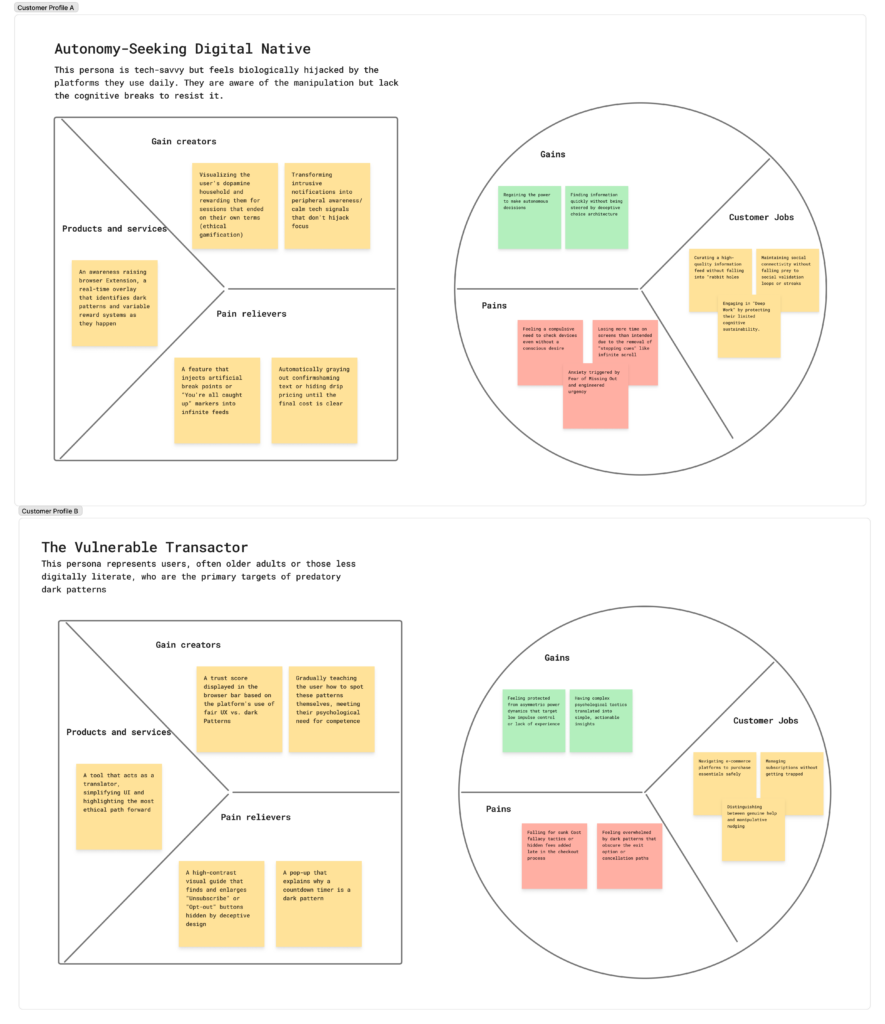
Value proposition canvas
Business idea
Digital platforms use dopamine sensitive patterns to exploit your biological reward systems. Software functions as a dopamine dispensing machine. This blogpost introduces a tool to reclaim your mental energy and autonomy.
The Problem
Addictive design removes natural stopping cues. Features like infinite scroll and autoplay bypass your conscious decision making, deceptive tactics appear in 97 percent of popular mobile apps. These dark patterns steer behavior through obscured information or emotional manipulation. Mechanisms operate below conscious awareness, you often attribute high consumption to personal weakness instead of recognizing intentional design.
Why You Should Care
Manipulation causes psychological distress as constant reward seeking erodes your dopamine household. This leads to stress and anxiety and diminishes your capacity for deep focus and can even lead to financial loss. Algorithms prioritize engagement over wellbeing, they take your attention hostage and degrade collective thought.
The Solution
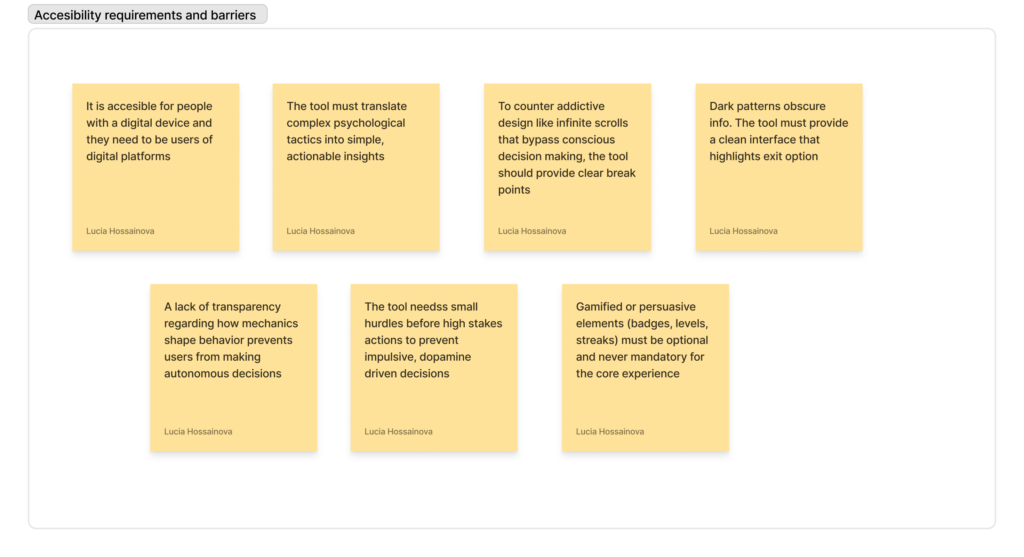
The Tool is a cross platform tool, it acts as a translator between manipulative code and your mind. The tool identifies black hat gamification, it detects countdown timers and streaks that use fear of loss to coerce engagement. The tool injects constructive friction and provides prompts after 30 minutes of scrolling to bring your conscious mind back into the loop. A transparency layer highlights exit options and translates psychological tactics into actionable insights. Calm tech integration shifts non urgent information to the periphery which respects your right to be undisturbed.
Target Audience
- The Autonomy Seeker (User): Digital natives who feel burned out by social media and want to reclaim their cognitive sustainability
- The Vulnerable Transactor (User): Individuals (like children or the elderly) who are often targeted by predatory patterns due to low impulse control or digital literacy
- The Ethical Brand (Customer): Companies looking to move toward Fair UX to build long-term trust, which is becoming a more valuable asset than short-term screen time
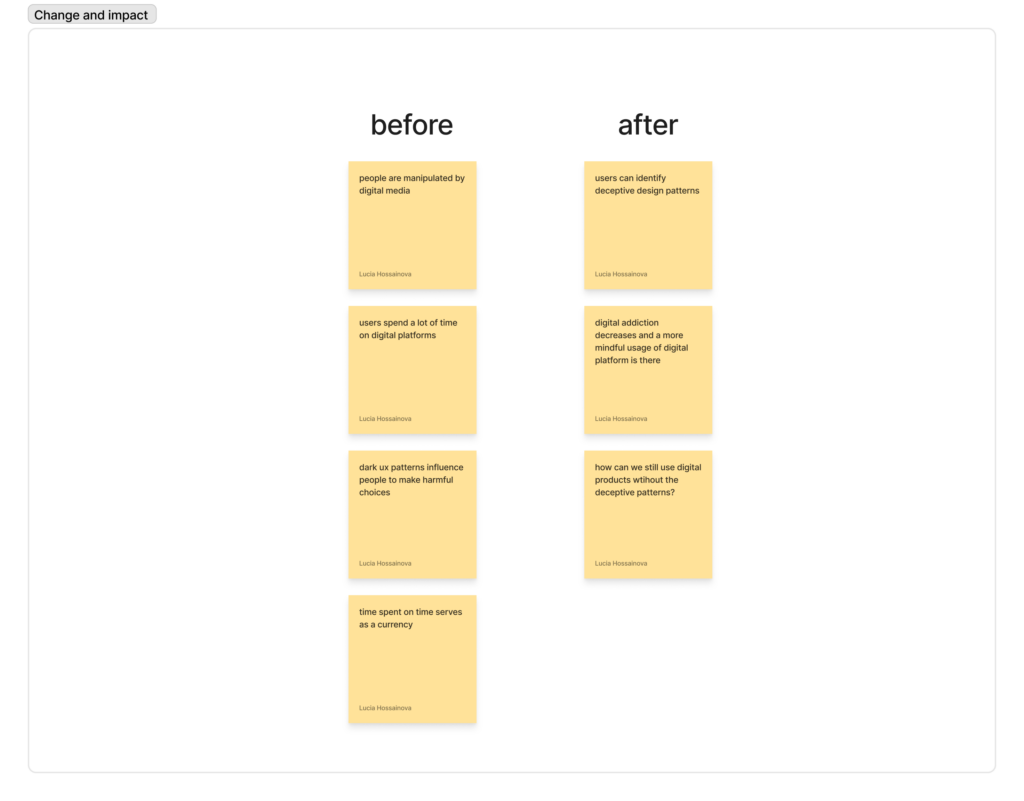
Change and Impact
The product transitions technology from an extractive model to a humane model:
- Users regain autonomy. Eliminating persuasive elements reduces unwanted screen time by 37 to 65 percent.
- Making dark patterns visible creates market demand for Fair UX. This forces companies to prioritize your wellbeing over engagement metrics.
Accesibility requirements and barriers
Change and impact