In 3D graphics, textures are an essential tool for artists to portray their worlds and stories. In the early days, this did not only come with the complexity of having textures visualize information in three-dimensional space, but also hardware restriction, as textures tend to be on the larger side regarding file size when compared to other files used in games and computer graphics. This chapter focuses on how artists and engineers mastered using textures and what workarounds they used for optimization.
What are textures and how are they used?
The first thing to clarify, when talking about textures is, what are textures? Specifically in 3D computer graphics, a texture is a 2D image, that “wraps” around the surface of the 3D model, adding more detail to the mesh that do not have to be sculpted such as woven cloth, increasing the visual fidelity of the 3D model without much of a performance decrease.
The textures are basically wrapped around the 3D object in a similar manner to very elaborate Christmas present wrapping. Of course, it is important how complex the geometry is, that the texture is supposed to wrap around, as a cube is much easier to wrap than a moped.

Instead of wrapping the 2D image around the object, for textures to be displayed on the 3D object, the geometry itself needs to be cut up into two-dimensional shapes. A very easy visual to try to imagine this process is the way a cube would be unwrapped.
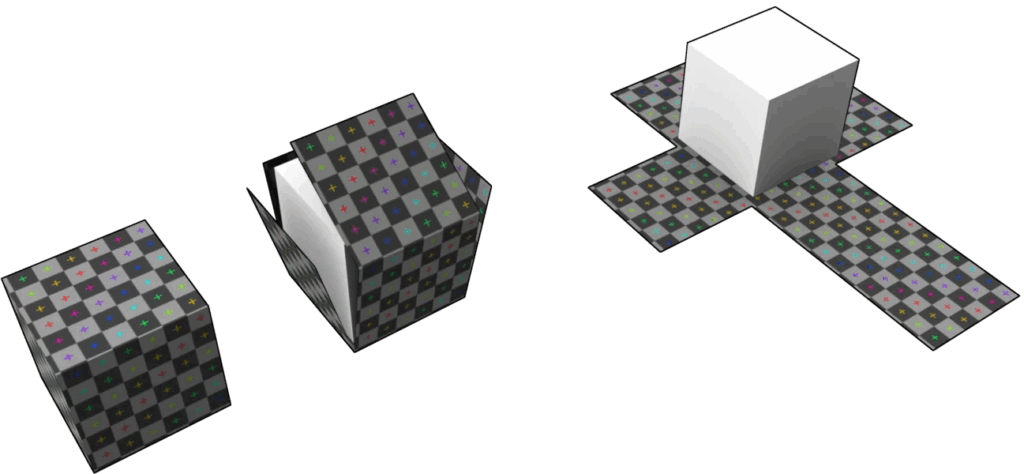
This process is called UV Mapping or UV Unwrapping. The term UV is abbreviated from the 2D matrix it is based on where U are the rows and V are the columns.
The Material of an object is usually made up of multiple maps that each use a texture. For example the Albedo Map or sometimes called Diffuse Map, also known as the base colour, represents the raw colours of the object, for example the shades of red and white in the Christmas wrapping paper. Depending on what rendering workflows are used, different types of maps are needed in order to create an objects visuals. Staying with the wrapping paper example, another map that is needed is the roughness or glossiness map. This map affects how light interacts with the surface, or how shiny the object is going to look. A mirror for example has a very low roughness, whereas a cushion would require a much higher roughness map. Other maps include normal maps, metallic maps, ambient occlusion maps and height/displacement maps.
For the texture creation, often times tools like Substance 3D Painter, Substance 3D Designer or ZBrush are used as they offer many great tools such as individual workflows for procedural texture generation, simple drawing and editing or even modelling surface imperfections.
Why is it important to optimize textures in games?
As games run in real time, there is a limiting factor of computing power that is required to enable the game to run smooth. Most of the heavy lifting is done by the VRAM (Video Random Access Memory) that stores most resources required for rendering such as textures, meshes, etc. It is the memory of the GPU (Graphics Processing Unit) and it is often the limiting factor that computer graphics run into when wanting to achieve performance. Additionally, with the mobile and computer market, the uncertainty that all computers could have a different graphics card is a major factor as companies don’t only need to optimize for a single type of GPU but for a broad bandwidth of VRAM. Textures are usually among the most resource-intensive elements, which is why it is very important to optimize them as much as possible.

How can textures be optimized for 3D games?
Before beginning to optimize textures, let’s first look at a parameter to see how draining a texture is: the cost of a texture. As mentioned before, any given graphics card has a limited amount of VRAM space. Modern day graphics cards range from 2GB to 8GB of VRAM, and every single pixel that needs to be sent to it has a cost regarding memory. To determine the cost of a texture there are two main factors that are relevant. The textures dimensions, so how large the texture is, and its bit depth, which is the amount of colours that are included in the image. For example, an 8-bit image uses 8 bits per color channel producing up to 16.7 million different colours whereas a 16-bit image can use 16 bits per channel resulting in almost 300 trillion different shades of colour.

Now to figure out how any given texture costs, the pixel count and the bit depth need to be multiplied together. So a 2048×2048 texture with a 8-bit colour space would be the pixel count, so 2048×2048 which is 4,194,304 pixels multiplied by the number of bits every pixel has. As the 8-bit colour space has 3 colour channels with 8 bits each, any given pixel has the bit-depth of 24. So we just need to multiply 4,194,304 with 24 to get 100,663,296 bits. Any given bit is made up of 8 individual bytes so we have to divide the result by 8. Finishing our calculation, our textures size would be 12,582,912 bytes or exactly 12MB.
It is important to keep in mind that the cost for the GPU is not the same as the file size of the image!
This one texture itself doesn’t really seem to pose a problem, but as already explained, objects in games often have multiple textures to represent the full material. So a basic object can have up to six maps (colour, normal, metallic, roughness, ambient occlusion, height). If every map uses a 2K (2048×2048) texture, the total load for the one object would already be 72MB.
Some of the easiest optimization regarding textures is the resolution of an image. If we reduce the resolution from 2K to 1K for example, the cost of the texture would be reduced to 3MB. Halving the resolution of an image results in 75% less GPU load. So it is important to keep in mind how large the object is going to be visible for the player.

SOURCES
1: https://www.lenovo.com/us/en/glossary/texture-mapping
2: https://playgama.com/blog/general/mastering-texture-and-sprite-techniques-for-stunning-visuals/
3: https://www.adobe.com/products/substance3d/discover/how-to-create-3d-textures.html
4: https://ieeexplore.ieee.org/abstract/document/10311399
5: https://www.proceduralpixels.com/blog/vram-bandwidth-and-its-big-role-in-optimization
6: https://forum.game-guru.com/thread/222504
7: https://www.theledstudio.co.uk/blog/colour-bit-depth-and-grayscale
8: https://www.tourboxtech.com/en/news/bit-depth-explained.html
