When working with WebGL or WebGPU through engines like Three.js or Babylon.js, it is easy to think of models as abstract objects that just make the scenes “appear” on screen. Underneath the hood of these engines, there is however a very concrete flow of data from JavaScript into GPU memory. Understanding how buffers, attributes and uniforms work, helps explain why certain operations are cheap and others can quickly lead to performance issues, especially in complex 3D scenes.
What are Buffers
At the core of GPU data flow are buffer objects, which is a block of memory on the GPU that stores raw data such as vertex positions, normals, texture coordinates or indices. Instead of sending vertex data for every frame, WebGL and WebGPU allow developers to upload this data into a buffer and then reference it many times during rendering. This is critical for performance because communicating with the GPU from JavaScript is pretty expensive compared to the GPU reading data that is already on it.
Most meshes rely on two main types of buffers, vertex buffers and index buffers. A vertex buffer holds attributes for each vertex, such as 3D position, surface normal and UV coordinates. An index buffer holds integer indices that reference those vertices in a specific order, allowing the GPU to reuse vertex data when constructing triangles. For example, a rectangle drawn with two triangles can use four unique vertices but six indices, avoiding duplication in the vertex buffer and reducing memory usage.
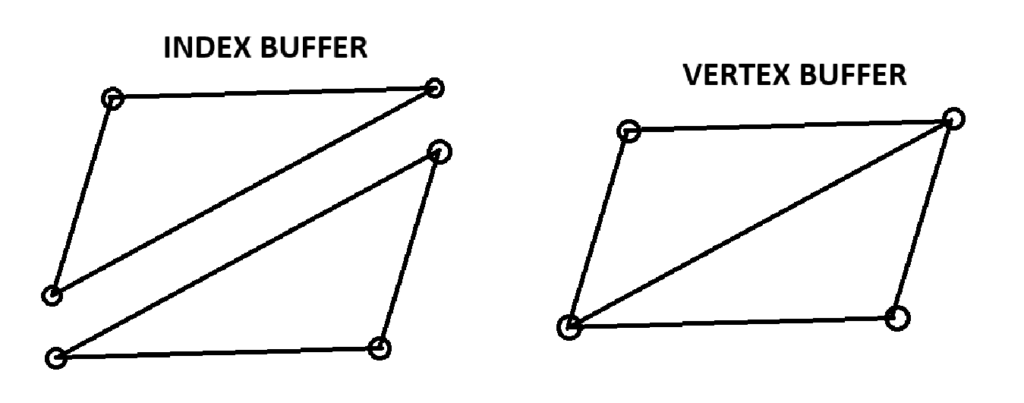
Using index buffers becomes increasingly important as meshes grow more complex. Without indices, every triangle must define all three of its vertices independently, even if those vertices are shared with neighboring triangles. With the help of indices, a vertex that belongs to multiple triangles can be stored once inside of a vertex buffer and referenced multiple times from the index buffer.
It also matters how the data is laid out inside of the buffers. Attributes can be stored in an interleaved fashion or in separate buffers. Interleaved buffers pack normal and UV data together for each vertex individually, which often reduces state changes because the GPU can fetch all attributes for a vertex in one swoop. Separate buffers can be beneficial when different passes only need a subset of data or if some attributes change more frequently than others, but they might lead to a larger overhead.
Blocks and UBOs
On top of vertex data, the GPU also needs per-draw and per-material parameters. These include transformation matrices, colors and light properties and are provided through uniforms. Uniforms represent constant values across all vertices or fragments in a single draw call. For example, the model-view-projection matrix, a base color, and a light direction might be sent as uniforms and then read in both the vertex and fragment shaders. As scenes become more and more complex, managing dozens of individual uniforms across multiple shaders can also become a bottleneck. This is where uniform blocks and UBOs (Uniform Buffer Objects) enter the picture. Instead of setting a large number of uniforms one by one, a UBO allows developers to pack related uniform data (for example all lighting parameters) into a dedicated buffer on the GPU. Then, multiple programs can then share that UBO which drastically reduces the number of calls needed to update data each frame. WebGL and WebGPU both support this pattern, and real-world projects use it to centralize camera and lighting information for many draw calls.
Attribute layouts, strides and offsets control how the GPU interprets data inside of a vertex buffer. When setting up attributes, the number of components each attribute has, the stride between consecutive vertices and the offset of each attribute within the vertex structure is determined. This is vital as a single mistake in stride or offset can produce corrupted geometry. Once attribute bindings are configured, they are often stored in Vertex Array Objects (VAO), making it possible to re-bind all attribute and index changes with a single draw call.
Static and Dynamic Data
From a performance standpoint, the important distinction for data is between static and dynamic data. Static geometry, such as the environment, should be uploaded once and reused across frames, with buffers created with specific notations for a static element. Dynamic geometry on the other hand, such as particle systems, may require buffer updates every frame, which is more expensive. In these cases, careful strategies like updating only parts of a buffer or offloading some updates to the GPU with compute or transform feedback can help keep performance in check.
SOURCES
1: https://learnwebgl.brown37.net/rendering/buffer_object_primer.html
2: https://www.geeksforgeeks.org/javascript/how-to-create-and-use-buffers-in-webgl/
3: https://www.siltutorials.com/opentkbasics/4
4: https://webgpufundamentals.org/webgpu/lessons/webgpu-vertex-buffers.html
5: https://webgl2fundamentals.org/webgl/lessons/webgl2-whats-new.html
6: https://webglfundamentals.org/webgl/lessons/webgl-how-it-works.html
