★4 Design Research – From Project to Product

Customer Profiles

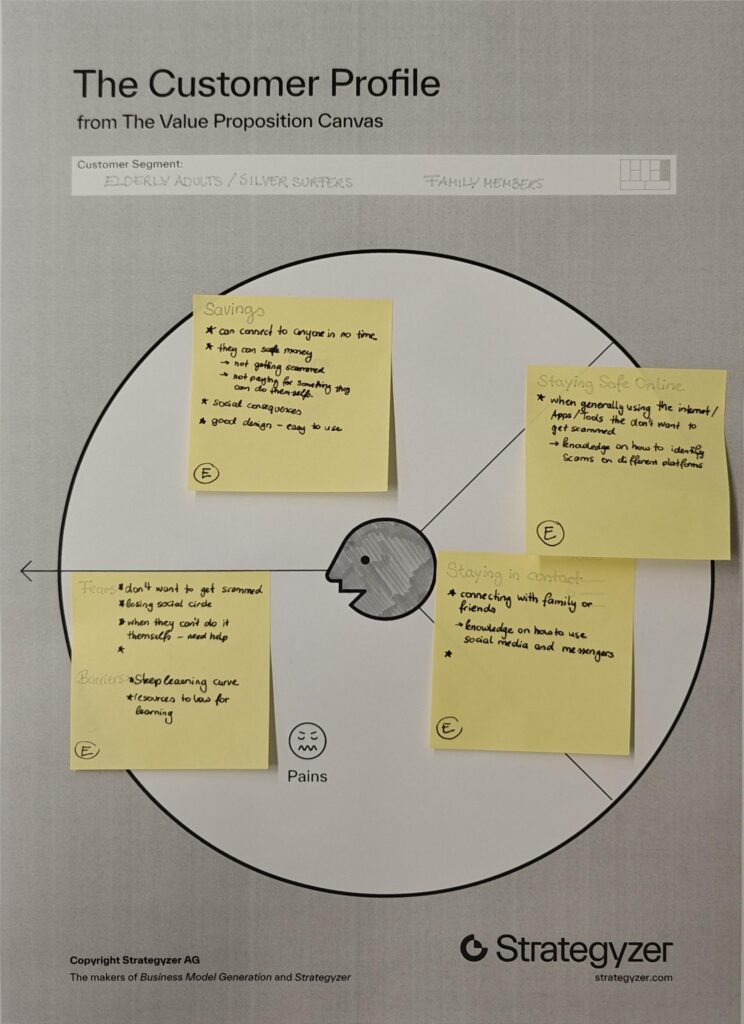
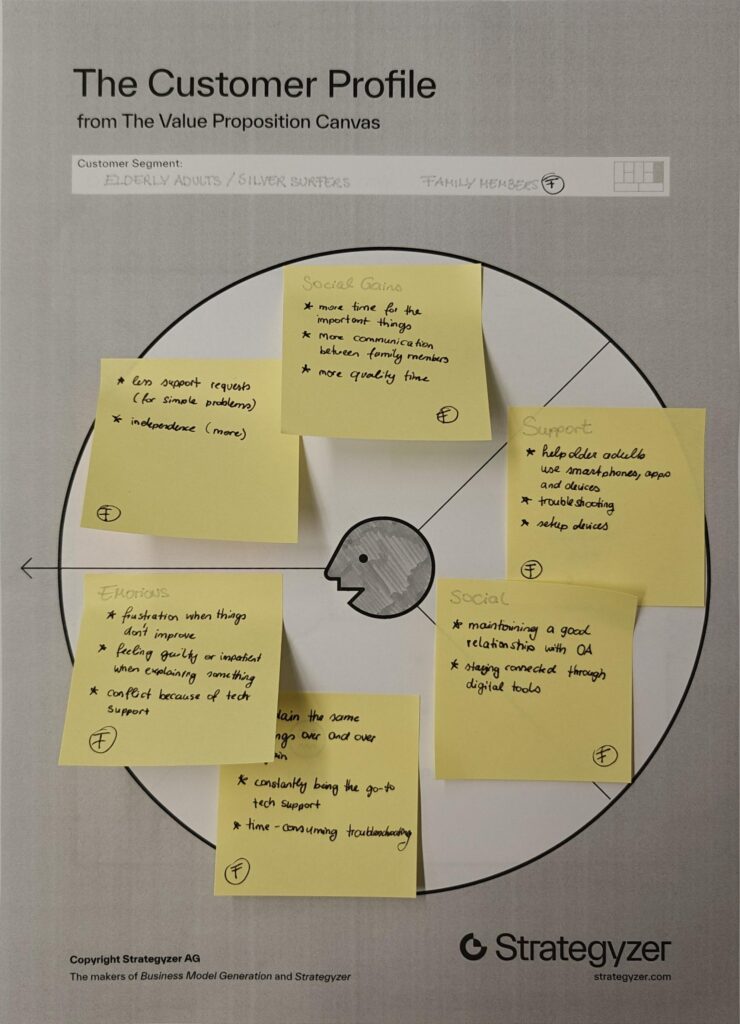
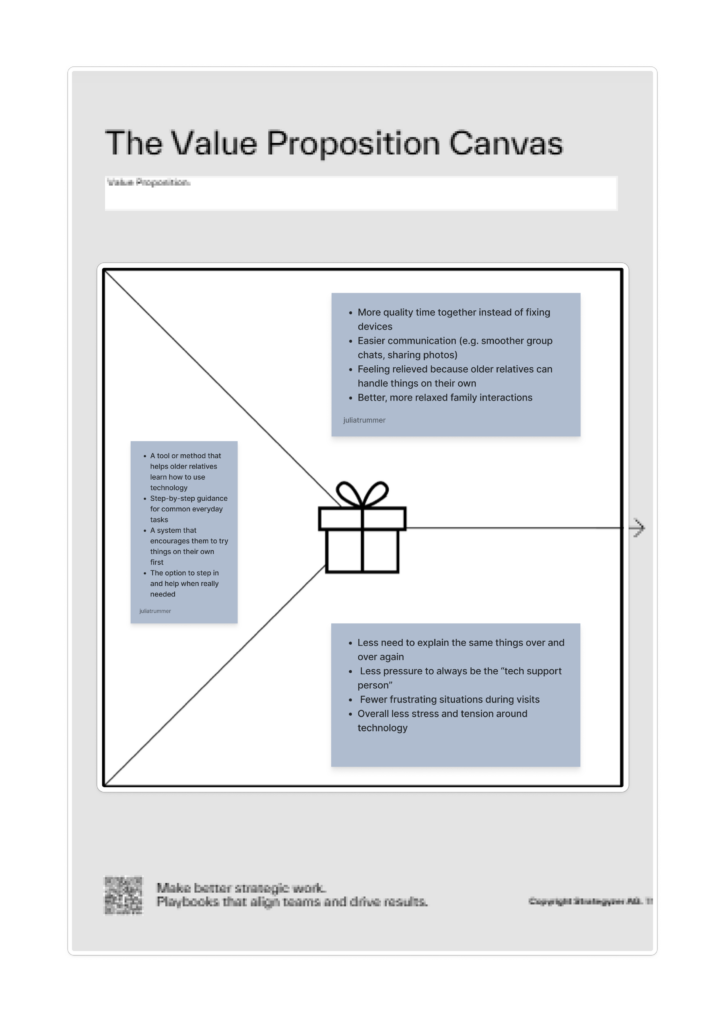
I chose two customer profiles that complement each other well, as they are closely connected in everyday life. Many younger people share the experience of being the “family tech support,” where interactions with older relatives often revolve around fixing devices or explaining the same things repeatedly. This dynamic can become frustrating over time and often takes away from the opportunity to spend more quality time together.

By looking at both older adults and their family members, it becomes clear that the problem is not one-sided but affects both groups.

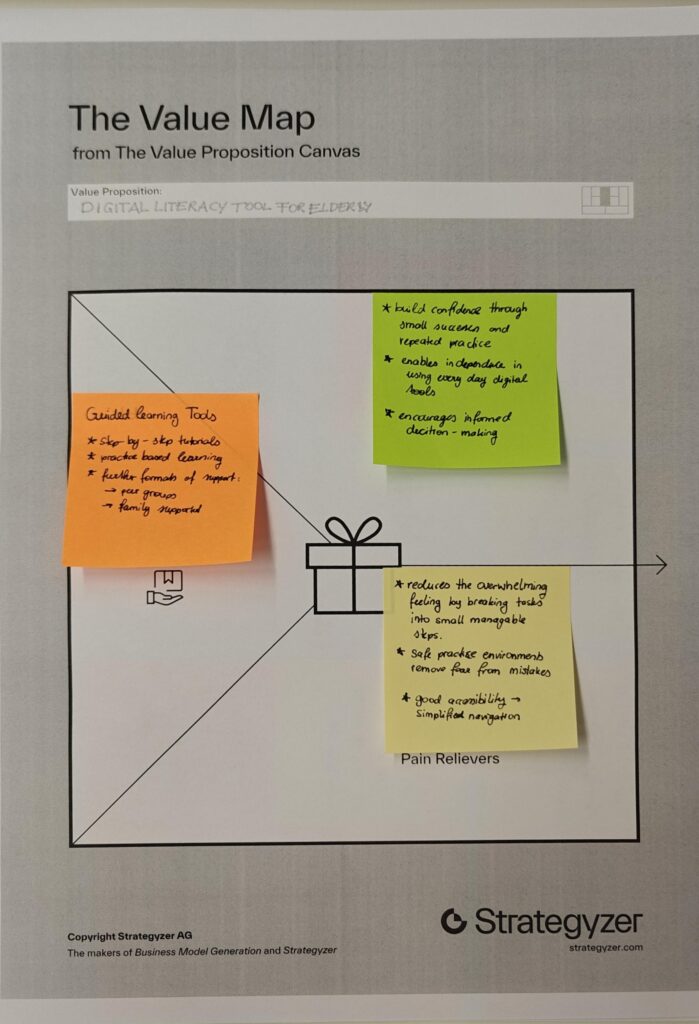
Value Proposition

Product/Business Ideas

Which Problem are you solving?

  • Problem of digital literacy in elderly people.
  • Many older adults struggle to use digital technologies, which makes it difficult for them to participate in everyday online life. This can lead to social isolation, limited access to information, and increased vulnerability to scams or misinformation.

Why is it important to care about it?

  • Because there will be more and more elderly people in the future.
  • People are going to work until a later age.
  • Older Adults should be able to be independent as long as possible.

What is the solution you are offering? How does it work?

  • The solution is a tool or method that helps older adults learn how to use technology in a simple, structured and accessible way.

Who is the target audience? Who is the customer?

  • The primary target audience is older adults (silver surfers) who are not digital natives and need support in understanding and using technology. Secondary users include their family members, who benefit from reduced support burden and improved quality time.

What is going to happen? (Change & Impact)

  • The tool or method aims to increase confidence and independence among older adults, enabling them to actively participate in digital life. This can lead to stronger social connections, better access to information and safer online behavior.

How are you securing accessibilty and inclusion, and for whom?

  • Accessibility is a core part of the concept. The tool should to accommodate different needs, including visual, auditory and motor limitations.

★3 Design Research – From Project to Product

Accessibility Requirements & Barriers

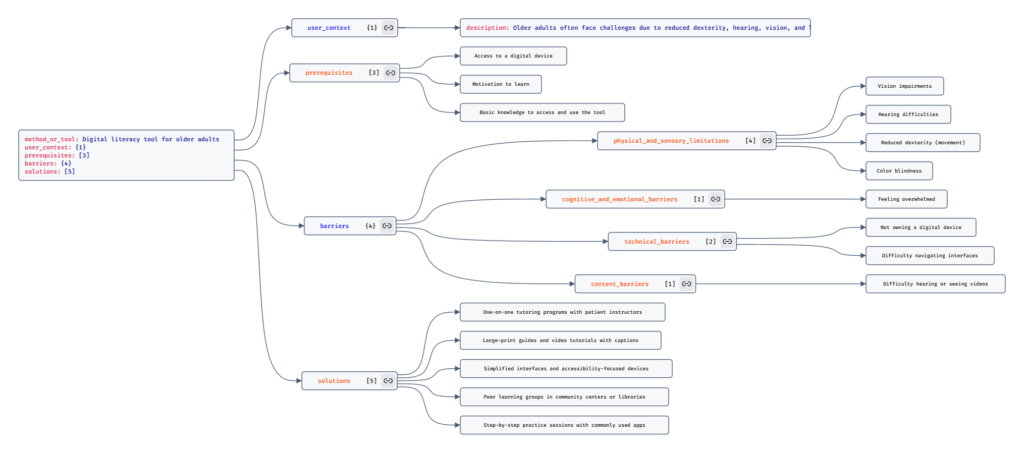
In the end, I also thought about the potential barriers of my tool or method. Since it is designed as a learning tool, users would need to be able to rely on at least one sense, such as hearing or seeing, to interact with it. At the same time, current developments show that accessibility is still not fully considered in many digital tools, which can create additional challenges.

To address this, I plan to base my approach on the strategies of the W3C Accessibility Guidelines, ensuring that the tool or method is as inclusive and accessible as possible.

★2 Design Research – From Project to Product

Discovered Change and Impact

Next, I started thinking about what my method or tool would actually improve. I believe that many family members get frustrated because they are always the first point of support when it comes to technology, constantly having to explain or fix things for older relatives.

With my method or tool, elderly users would be encouraged to first try and find a solution on their own instead of immediately relying on someone else. This could really improve family dynamics, as it allows people to spend more quality time together instead of using that time to troubleshoot devices.

I also thought about how many older adults lack the means to independently access and explore information. This can lead to an incomplete or sometimes biased understanding of current events.

With my tool or method, elderly users would be able to access information more confidently and see a bigger picture, helping them form their own opinions and make more informed decisions about current topics.

Another point is that many older adults have limited ways to stay connected with family or peers beyond phone calls. They often struggle to access or use tools like group chats, which makes it harder to stay involved in everyday communication.

With my tool or method, older adults would be able to understand and use digital tools more easily, allowing them to stay connected, take part in conversations and feel more included in their social circles.

★1 Design Research – From Project to Product

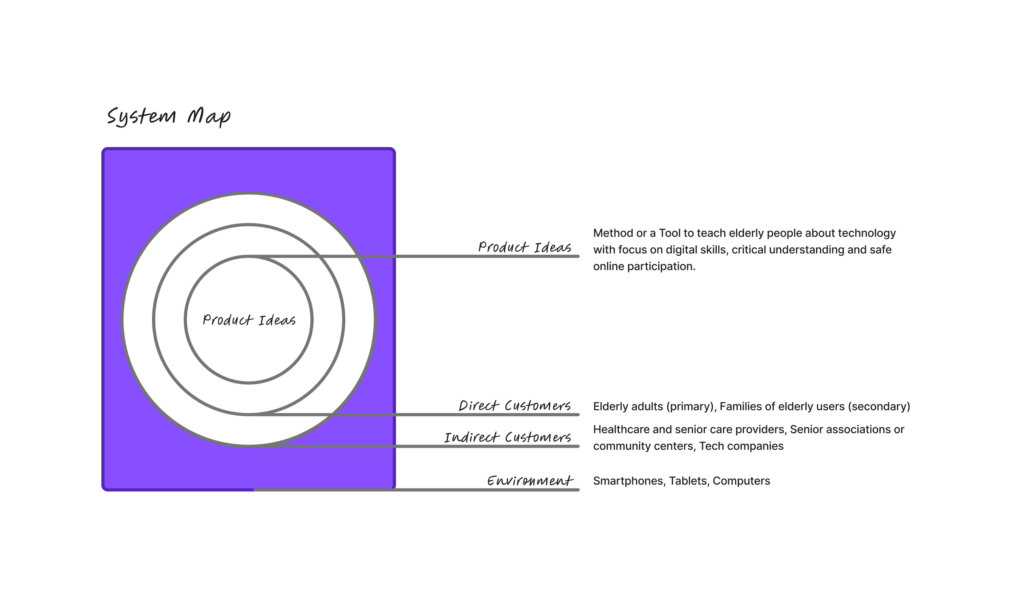
Today we had an intro to Project to Product and really started digging into the background and key info for our Master’s projects. First, we put together a system map that looked at our ideas, direct and indirect customers and the environment. We also thought about who might influence our product, tool or method.

For the system map, my product idea is a tool or method to teach elderly people how to use technology. I see this as particularly important because many older adults today are unable to fully take part in online life, which can lead to social isolation and limit their access to family and friends. Beyond that, many struggle to find the information they need or fall victim to online scams.

Direct customers (Primary Users) are elderly or older adults who are not digital natives and need guidance to understand and use technology. Secondary users are their families, since many younger family members often end up constantly helping their elders with tech. This can be exhausting and frustrating, as visits become focused on troubleshooting devices instead of enjoying quality time together.

Indirect customers could include retirement homes, healthcare providers, senior associations or community groups and even tech companies. These groups might support, implement, or benefit from the tool by helping elderly users engage with technology more safely and confidently.

The environment includes devices, apps and platforms that older adults interact with, as well as the social and cultural side, like how people think about aging, technology and communication between generations. Rules and safety issues, such as accessibility laws, data privacy and online security.

✿1 Design & Research 2

Step 0 – 1st March 2026

The next two weeks will be focused on developing three different prototypes. My main goal is to explore how interfaces can be designed to better support older adults, especially those who didn’t grow up with digital technology. But before diving into design, I need to ask myself some questions: what is the real problem here? What do older users struggle with the most? Is it that apps and websites are simply too complex, with too many steps and features? Or is it that digital interfaces don’t match the way they expect things to work? Or perhaps it’s not the design at all, but a broader question of digital literacy, understanding how devices, apps and online systems actually function.

Step 1 – 8th March 2026

At the beginning I thought the main challenge would be designing intuitive, accessible interfaces. But as I began talking to people, I realized the picture is much bigger. Many of the people I asked weren’t just struggling with specific apps, they were struggling with digital literacy itself.

This opened my eyes to an important distinction: while good design can make apps easier to use, it can’t replace the need to teach fundamental digital skills. Tasks like navigating menus, understanding security warnings, or even recognizing phishing emails require guidance and practice.

I focused on brainstorming what the digital learning platform should actually teach and how it should support older adults in learning digital skills. Instead of starting directly with the design, I tried to map out the most important areas of digital literacy that the platform could cover. These include basic device skills such as navigating smartphones or adjusting settings, understanding common apps and websites, learning fundamental digital concepts like cloud storage or files, as well as topics related to online security, communication and everyday digital tasks.

While collecting these topics, it also became clear that the platform should not only provide information but guide users through learning in a structured way. One idea that was to create a “Today’s Lesson” feature. Instead of presenting users with many options at once, the platform could suggest one small learning session per day. This approach could help reduce decision fatigue.

Prototype 1

Prototype 2

Prototype 3 – Final Prototype

With the last prototype I tried to move away from the “dashboard” layout a bit and instead focus on something much clearer. Rather than showing lots of different options right away, the interface tries to guide the user through what to do next.

The “Today’s Lesson” feature became the main focus of the layout. It’s the first full-width card right after the hero section and noticeably larger than everything else on the page. The idea is that the most important action of the day should require zero searching. Many older users don’t scan pages the same way younger users do. Instead, they read from top to bottom.

Another element I tried out is a progress tracker with color-coded topics. Each topic has its own color instead of everything looking the same. The idea behind this is that color can become a kind of memory anchor. Over time users might remember something like “orange was the security lessons” without needing to read every label again.

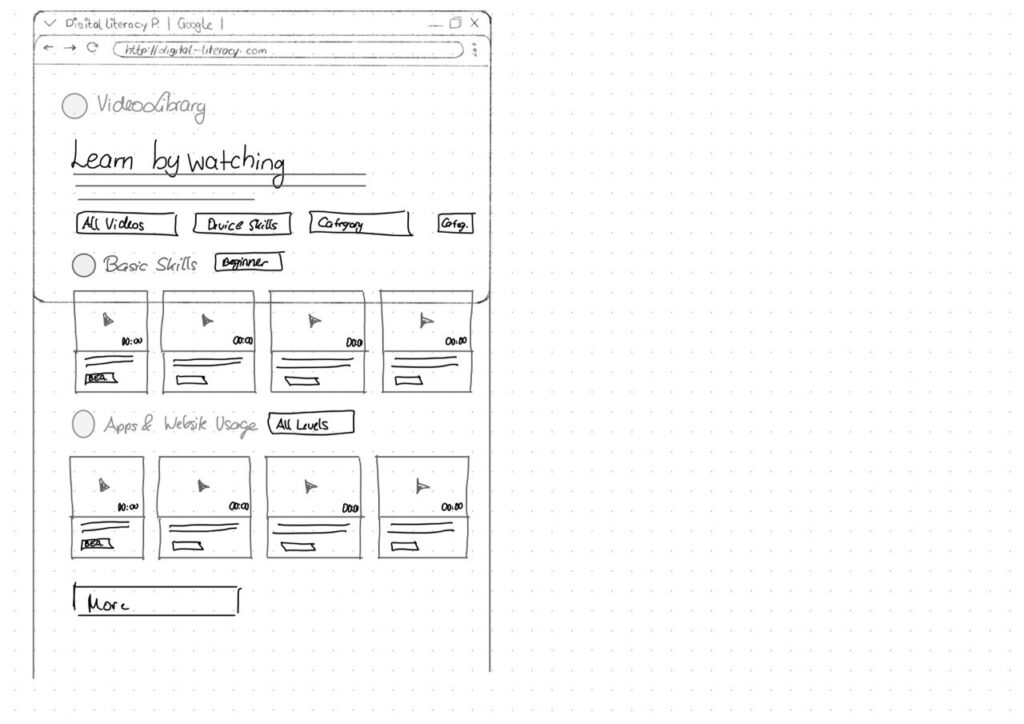
For the lesson library I created video cards that show the duration and difficulty level right away.

Another thing I want to add is an accessibility toolbar directly in the Navigationbar. Instead of hiding text size or contrast settings somewhere deep in a settings menu, the controls (A / A+ / A++ and a contrast toggle) are always visible. My thought here was: if someone needs larger text, they probably need it immediately, not after navigating through several menus they might already struggle to read.

Interaction in Sounddesign

For this first blog post, I had to step a bit outside my comfort zone because we’ve started collaborating with sound designers on a music interface. That alone is already an interesting project. For the first blog post we had to research on nime.com and I came across a study about agency and creativity in musical interaction for people living with dementia and cognitive decline. I find this topic really interesting, especially since it connects in some ways to what I’m considering exploring in my master’s thesis.

Bild von jotoya auf Pixabay

Agency and Creativity in Musical Interaction for those living with Dementia and Cognitive Decline

Dementia is an umbrella term for a range of progressive conditions that affect the brain. These conditions can cause challenges with memory, problem solving, cognitive function and decision making. For people living with dementia, musical interventions have been shown to support important aspects of life, such as the sense of self. Sustained engagement with music can have a positive impact despite these challenges.

In this context, agency refers to the sense of control or ownership an individual feels over their actions and the resulting consequences. It describes the experience of being the initiator of one’s actions rather than just responding to external direction.

For people living with dementia, agency is often considered to be diminished. In research, dementia is frequently approached through a biomedical deficit model that focuses primarily on the skills and memories a person has lost. This perspective can lead to the assumption that because language and memory are impaired, agency must also be lost. However, this connection is often taken for granted rather than critically examined.

As a consequence, people living with dementia are frequently viewed as passive participants in therapeutic activities and are often expected to engage only in relatively basic tasks. In the study referenced, for example, participants were limited to playing simple instruments such as percussion while following the lead of experts. This setup reflects and reinforces the assumption that their role is primarily responsive rather than self-directed.

Biomedical deficit model

The biomedical deficit model is a framework commonly used in dementia research that focuses primarily on the skills lost by individuals and the tasks they are no longer able to achieve. This model prioritizes the identification of cognitive impairments, such as challenges with memory, language and problem-solving.

This paper proposed and tested a procedural music platform called the “SliderBox”, which was specifically created for people living with dementia. The goal of the project was to allow people with dementia to go beyond basic interactions to create sound and provide tools that facilitate unguided musical experiences and enabling them to actively participate music activities.

Source: J. Pigrem, J. Christensen, A. McPherson, R. Timmers, L. de Witte, and J. MacRitchie

The Hardware: The SliderBox is an accessible MIDI controller made of wood, with eight analogue sliders and eight push-buttons. It provides multi-modal feedback through LED light strips and buttons to help guide the user.

Conclusion

Some participants were struggling when there were more then two possible actions. This also directly related to the engagement, whereas less people would engage with the prototype, when it had to many possible actions.

The researchers also observed that the SliderBox had a high engagement and lack of negative behaviors, showing the potential for those platforms.

In this experiment concludes that it is absolutely possible to facilitate engaging musical interactions that also foster agency and creativity for those with cognitive decline.

Sources

[1] J. Pigrem, J. Christensen, A. McPherson, R. Timmers, L. de Witte, and J. MacRitchie, ‘Agency and Creativity in Musical Interaction for those living with Dementia and Cognitive Decline’, in Proceedings of the International Conference on New Interfaces for Musical Expression, 2024, pp. 315–323.

#9 (10) Final Post

In this final post of the semester, I want to come back to some of the research questions I defined at the beginning of this journey, especially the two different directions this topic can take. I believe the challenge of older adults struggling with technology can be approached in two ways: one focuses on how interaction design can support them in learning digital skills, while the other asks how we, as designers, can make digital systems easier to understand in the first place.

Interaction design can support older adults in learning digital skills by acting as a something like a cognitive guide that reduces mental effort, aligns with their unique conceptual frameworks and fosters the trust for experimentation.

As Designers we can try:

1. Aligning with Seniors’ Mental Models

  • Older adults conceptual models of technology often differ significantly from the screen-centered logic used by younger generations. [1]
  • Linear Logic over Screen-Based Logic: Seniors frequently intuitively adopt a linear, storytelling-like approach to interactions. Interaction design can support learning by using step-by-step narratives rather than multi-layered, interactive screens that can be disorienting. [1]
  • Contextual Clarity: Older users may confuse similar UI elements, such as address bars and search fields. Design should use explicit, consistent wording and “polite” system feedback, to align with their social expectations and provide a sense of security. [1]
  • Separating Interface from Implementation: Seniors often struggle to distinguish between the frontend (what they see) and the backend (how it works). Design that clearly defines the interface as a “method of communication” might help them grasp the abstract nature of software. [1]

2. Teaching Strategies

Secondly it would be possible to teach elderly people about systems and how they work. Instruction for older adults is most successful when it moves away from standard methods and aligns with the cognitive preferences of the age group.[1]

  • Align with Linear Mental Models: Seniors often approach technology through a “storytelling” or linear logic rather than the screen-based, multi-layered logic common in modern software. Designing learning paths that follow a step-by-step narrative can help them internalise abstract concepts.[1]
  • Abstract Thinking Exercises: Before diving into software, starting with exercises like drawing symbols for abstract terms can prepare seniors for the conceptual nature of digital interfaces. [3]
  • Minimise Cognitive Friction: Instruction should focus on minimising friction by reducing the number of steps required to complete an action, which supports those who process fewer “discrete information bits” at one time. [4]
  • Provide Task Support: Using external cues, reminders and labels, known as environmental support, can compensate for memory decline and improve performance to the level of younger learners. [2]

Next Steps

I already have some ideas for the next steps. I’d like to dive deeper into the interaction side of this topic and as mentioned in the presentation, I’m also considering running a workshop. While researching similar projects, I found that when working with older adults, confidence and trust are often bigger hurdles than the technology itself.

Sources

[1] D. Orzeszek et al., ‘Beyond Participatory Design: Towards a Model for Teaching Seniors Application Design’, arXiv [cs.CY]. 2017.

[2] F. Craik, ‘Memory Changes in Normal Aging’, Current Directions in Psychological Science – CURR DIRECTIONS PSYCHOL SCI, vol. 3, pp. 155–158, 10 1994.
[3] Thefinchdesignagency, “Building User Trust in UX Design: Proven Strategies for Better Engagement,” Medium, Feb. 05, 2025. https://medium.com/@thefinchdesignagency/building-user-trust-in-ux-design-proven-strategies-for-better-engagement-c975aa381516

[4] G. A. Wildenbos, L. Peute, and M. Jaspers, “Aging barriers influencing mobile health usability for older adults: A literature based framework (MOLD-US),” International Journal of Medical Informatics, vol. 114, pp. 66–75, Jun. 2018, doi: https://doi.org/10.1016/j.ijmedinf.2018.03.012.

[5] N. Halmdienst, M. Radhuber, and R. Winter-Ebmer, “Attitudes of elderly Austrians towards new technologies: communication and entertainment versus health and support use,” European Journal of Ageing, vol. 16, no. 4, pp. 513–523, Apr. 2019, doi: https://doi.org/10.1007/s10433-019-00508-y.

[6] F. Craik, ‘Memory Changes in Normal Aging’, Current Directions in Psychological Science – CURR DIRECTIONS PSYCHOL SCI, vol. 3, pp. 155–158, 10 1994.
#8 Older Adults Approach to Learning

Update

So last week we had our peer review and I got some really interesting insights into what I could have done better with my blog posts. One big takeaway was that I probably should have stuck closer to the research question I set at the beginning of the course. That said, I think I needed that phase where I went more into “research mode” and just explored what’s already out there and what other people have worked on. I wanted to check whether the things I was talking about actually made sense in the first place. And yeah, they kind of did, but I can definitely see that I need to go much deeper into the topic of interaction design for the ageing population. This topic feels like a natural extension of accessibility and it’s especially important to me because I truly believe that access to digital products can help everyone.

This is why I will use these last two blog entries to cover my initial research questions.

How do older adults approach learning?

I asked myself this questions because sometimes I see elderly that

Older adults’ approach to learning is an active process of adaptation and integration, in which new information is filtered through many years of existing knowledge and personal mental models [1]. Their learning approach is often characterised by a preference for environmental support and immediate practical utility, which helps compensate for age-related changes in cognitive processing capacity [1].

Environmental Support refers to the external stimuli, tools or contextual cues that interact with an individual’s internal mental and physical operations to facilitate successful functioning. [2]

Cognitive Strategies and Processing

While for most older adults the desire to learn remains strong, the biological and cognitive mechanisms used to acquire those new skills undergo significant shifts. [1]

  • Processing Resources: Learning is often influenced by reductions in processing speed, working memory capacity and attentional focus. Because of that, older learners generally require more time to master new skills compared to younger adults. [1]
  • Strategy Selection: Older adults tend to initiate effective learning strategies less spontaneously than younger generations. They often perform a “cost-benefit” analysis, dropping strategies that are perceived as too effortful relative to their perceived efficacy. [1]
  • Thoroughness vs. Scanning: When searching for information, seniors often demonstrate greater thoroughness, for instance, examining multiple hyperlinks in detail rather than scanning and clicking only a few. [3]
  • Self-Initiated Processing: Deficits in learning are most apparent in tasks requiring effortful “self-initiated” processing, such as the active reorganisation of new material. [1]

Unique Mental Models

Older adults possess distinct mental models that shape how they conceptualise and interact with new information, particularly in technology.

  • Linear Logic (Storytelling): Seniors often intuitively adopt a linear, text-based approach to learning, resembling a storytelling session. This frequently clashes with modern digital design, which relies on multi-layered, screen-based logic. [3]
  • Focus on Social Norms: Older learners often prioritise social norms and “politeness” within their mental models. For example, in design workshops, some seniors insisted that digital interfaces should “thank” the user, sometimes valuing this politeness over technical accessibility features like font size. [3]
  • Contextual Challenges: Learning can be hindered by contextual confusion, where similar-looking elements (such as a search bar and an address field in a browser) are mistaken for one another. [3]

Sources

[1] I. Tournier, ‘Learning and adaptation in older adults: An overview of main methods and theories’, Learning, Culture and Social Interaction, vol. 37, p. 100466, 2022.

[2] F. Craik, ‘Memory Changes in Normal Aging’, Current Directions in Psychological Science – CURR DIRECTIONS PSYCHOL SCI, vol. 3, pp. 155–158, 10 1994.
[3] D. Orzeszek et al., ‘Beyond Participatory Design: Towards a Model for Teaching Seniors Application Design’, arXiv [cs.CY]. 2017.

[4] G. A. Wildenbos, L. Peute, and M. Jaspers, “Aging barriers influencing mobile health usability for older adults: A literature based framework (MOLD-US),” Int. J. Med. Inform., vol. 114, pp. 66–75, 2018, doi: 10.1016/j.ijmedinf.2018.03.012.

#7 Decision fatigue

Update

Here’s a small update on the last blog post where I mentioned that elderly people don’t really use technology for entertainment. Some family members recently got a new TV and were complaining that Netflix is installed everywhere. I talked to them about it and they told me they don’t really understand why it’s there at all. They said they don’t need it and would rather just watch whatever is on TV something random, without having to think about it.

They also mentioned that on Netflix they often don’t even know what they would search for, which makes the whole experience feel unnecessary. With TV, something is always already playing. It feels like they just want to watch without having to decide first and the topic itself doesn’t matter that much. This is something i found quite interesting and will do some research on.

I beliefe this phenomenon might be explained by the following:

Reduced Processing Capacity and Cognitive Effort

  1. As individuals age, their available processing capacity and attentional resources decline, meaning they can process fewer discrete bits of information in a given time. [1]
    • Self-Initiated Processing: Digital entertainment often requires “self-initiated” processing, such as navigating complex menus or reorganising information in working memory, which shows substantial losses with age. [1]
    • Cognitive Load: If a digital interface is cluttered or complex, it demands high cognitive effort to navigate. When the effort required to make decisions within an app (such as choosing content or managing settings) exceeds the user’s available resources, it leads to frustration and a desire to stop using the technology. [2]

The Relationship Between Ease of Use and Usefulness

  1. For older adults, perceived usefulness is deeply linked to ease of use.
    • Immediate Benefits: Older adults are less likely to perceive a technology as useful if its benefits do not manifest easily and quickly during actual use. [3]
    • The “Visual Gymnastics” Effect: Users who have already spent a long day performing “visual gymnastics” to focus on digital content may find it harder to engage with non-standard or complex designs. If a digital entertainment platform requires unnecessary cognitive effort to understand its navigation, it disrupts the user’s mental model and erodes trust. [4]

Age Patterns in Entertainment Attitudes

  1. There is a pronounced age effect specifically regarding communication and entertainment devices (such as tablets and social networks), where positive attitudes towards them fall significantly as age increases. [3]
    • Significant Decline: Compared to those in their 50s, individuals aged 80+ are 47 to 48 percentage points less likely to value entertainment devices. [4]
    • Experience vs. Effort: This decline is partly attributed to older generations having less acquaintance and experience with these devices. Consequently, every interaction requires more “learning” effort, which can be exhausting, leading to a lower perception of the technology’s overall usefulness. [4]

Usability Barriers as a Deterrent

  1. Design flaws that increase decision-making friction directly impact perceived usefulness:
    • Navigation Issues: Confusing or cluttered navigation leads to hesitation and abandonment. [4]
    • Information Overload: Seniors are often more thorough in searching for information but are more prone to being distracted by irrelevant details and losing focus. [5]
    • Numeric and Spatial Fluence: A decline in numeracy can make it difficult for older adults to interpret data-heavy interfaces (like those found in complex gaming or streaming settings), further complicating their ability to see the technology as a “help” or “value”. [2]

Summary Table: Effort vs. Perceived Usefulness

BarrierImpact on Perceived Usefulness
Complex InterfacesIncreases cognitive load, leading to user errors and frustration.
Delayed RewardsIf benefits aren’t immediate, the user views the tool as cumbersome rather than useful.
Working Memory DeclineMakes active updating and navigation effortful and “costly” to carry out.
Lack of ConsistencyDisrupts mental models, causing hesitation and a loss of confidence.

Sources

[1] F. Craik, ‘Memory Changes in Normal Aging’, Current Directions in Psychological Science – CURR DIRECTIONS PSYCHOL SCI, vol. 3, pp. 155–158, 10 1994.
[2] G. A. Wildenbos, L. Peute, and M. Jaspers, “Aging barriers influencing mobile health usability for older adults: A literature based framework (MOLD-US),” International Journal of Medical Informatics, vol. 114, pp. 66–75, Jun. 2018, doi: https://doi.org/10.1016/j.ijmedinf.2018.03.012.

[3] N. Halmdienst, M. Radhuber, and R. Winter-Ebmer, “Attitudes of elderly Austrians towards new technologies: communication and entertainment versus health and support use,” European Journal of Ageing, vol. 16, no. 4, pp. 513–523, Apr. 2019, doi: https://doi.org/10.1007/s10433-019-00508-y.

[4] Thefinchdesignagency, “Building User Trust in UX Design: Proven Strategies for Better Engagement,” Medium, Feb. 05, 2025. https://medium.com/@thefinchdesignagency/building-user-trust-in-ux-design-proven-strategies-for-better-engagement-c975aa381516

[5] D. Orzeszek et al., ‘Beyond participatory design: Towards a model for teaching seniors application design’, arXiv preprint arXiv:1707. 05667, 2017.

#6 Technology Acceptance Across Ageing Societies

Central and Northern Europe: Austria, Finland and the Netherlands

In many European nations, the digital gap is defined by a sharp decline in internet use as individuals enter their late 70s and 80s.

  • Austria: A significant gap persists between younger and older cohorts. While 95% of Austrians aged 16 to 74 used the internet in 2023, only 53.8% of those aged 75 to 84 were online. Within this older group, the gap widens further: 64% of 75- to 79-year-olds are online, compared to just 43% of those aged 80 to 84. [3]
  • Finland: Research highlights that the gap is not just age-dependent but linked to frailty. While 80% of non-frail Finnish individuals have internet access, this drops to 46% among those considered frail, indicating that health status is a primary driver of the digital divide in this region. [4]
  • The Netherlands: Studies here show that technology use is negatively associated with lower social status and physical functioning, though gender differences in ICT use were not significantly observed in Dutch samples. [4]

Japan: Leading with Followers

Japan is a unique case due to its position as a world leader in demographic ageing, which has turned the country into a global laboratory for technology adoption.

  • Necessity as a Driver: Unlike other nations where technology may be viewed as a luxury, Japan’s acute labour shortages in agriculture and caregiving have forced a higher acceptance of automation. For example, the average age of a Japanese farmer is 68.4 years, leading to the widespread deployment of ICT-enabled heavy machinery to augment the skills of an ageing workforce. [1]
  • Psychological Drivers: A comparative study between Japan and the UK regarding online public services found that self-efficacy and ageing satisfaction were more prominent determinants of technology readiness and usage in the Japanese elderly population. [1]

What is ICT-enabled heavy machinery?

At its core, heavy tech machinery refers to large, powerful equipment integrated with modern technologies like GPS, telematics, IoT (Internet of Things) sensors and advanced software. Unlike their purely mechanical predecessors, these machines can communicate, self-diagnose and perform tasks with a high level of accuracy. [2]

The United States: Sociodemographic and Racial Patterns

In the United States, the digital age gap is heavily influenced by a combination of sociodemographic factors and physical health.

  • Patterns of Use: US data indicates that technology use among older adults is strongly correlated with younger age, male gender, white race, higher education and being married. [4]
  • Health as a Barrier: Also physical fitness is a major hurdle; more than 75% of the American population aged 65+ reports difficulties in physical functioning, which correlates with decreased technology use. Furthermore, approximately 21% of US seniors have visual impairments that complicate digital screen interaction. [4]

Developing Countries: China and Bangladesh

In developing regions, the gap is often influenced by cultural norms and the speed of infrastructure development.

  • China: This region has seen a surge in research, particularly regarding smartphone acceptance. However, findings suggest that Chinese seniors under 65 are more likely to adopt these technologies, while older cohorts remain more resistant. [5]
  • Bangladesh: A distinct cultural gap exists here; older adults traditionally use mobile phones only for typical voice calls. The concept of receiving health care advice via a phone is a relatively new and daunting concept, leading to higher levels of technology anxiety compared to developed nations. [5]

Sources

[1] K. Kushida, “Japan’s Aging Society as a Technological Opportunity,” 2024. Accessed: Dec. 23, 2025. [Online]. Available: https://carnegie-production-assets.s3.amazonaws.com/static/files/ Kushida_Demographics%20and%20Tech%20Trajectories_final.pdf#page=23.21

[2] “What Exactly is Heavy Tech Machinery?,” Heavytechservices.ca, 2025. https://www.heavytechservices.ca/what-exactly-is-heavy-tech-machinery (accessed Jan. 05, 2026).

[3] N. Djahangiri, V. Kropfreiter, and J. Peterbauer, Internetnutzung von älteren Menschen in Österreich: Ergebnisse der Erhebung zum Einsatz von Informations- und Kommunikationstechnologien in Haushalten 2023. Wien, Austria: Statistik Austria, 2023.

[4] N. Halmdienst, M. Radhuber, and R. Winter-Ebmer, “Attitudes of elderly Austrians towards new technologies: communication and entertainment versus health and support use,” European Journal of Ageing, vol. 16, no. 4, pp. 513–523, Apr. 2019, doi: https://doi.org/10.1007/s10433-019-00508-y.

[5] Y.-Y. Yap, S.-H. Tan, and S.-W. Choon, “Elderly’s intention to use technologies: A systematic literature review,” Heliyon, vol. 8, no. 1, p. e08765, Jan. 2022, doi: https://doi.org/10.1016/j.heliyon.2022.e08765.