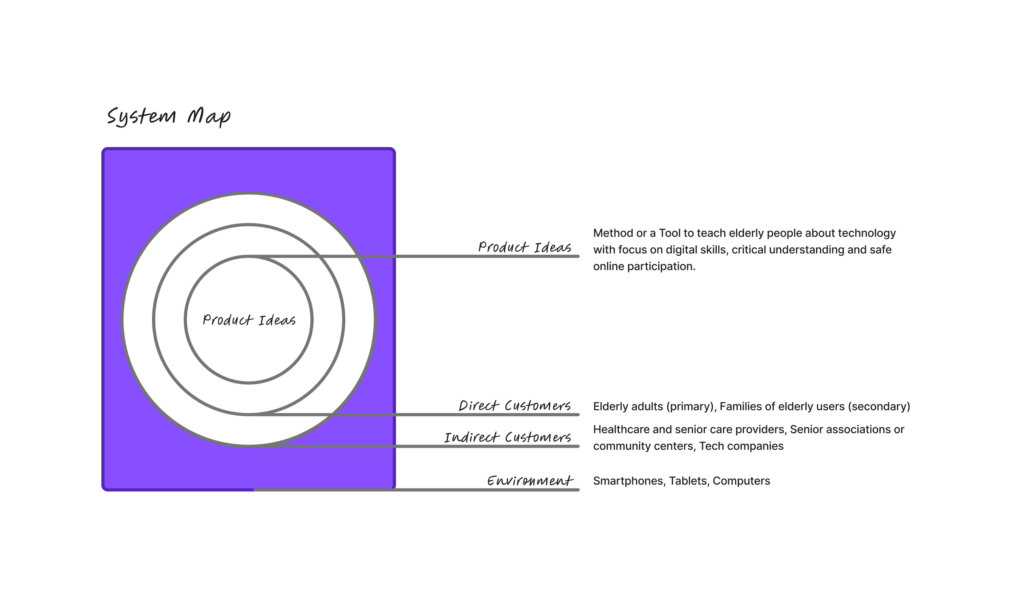
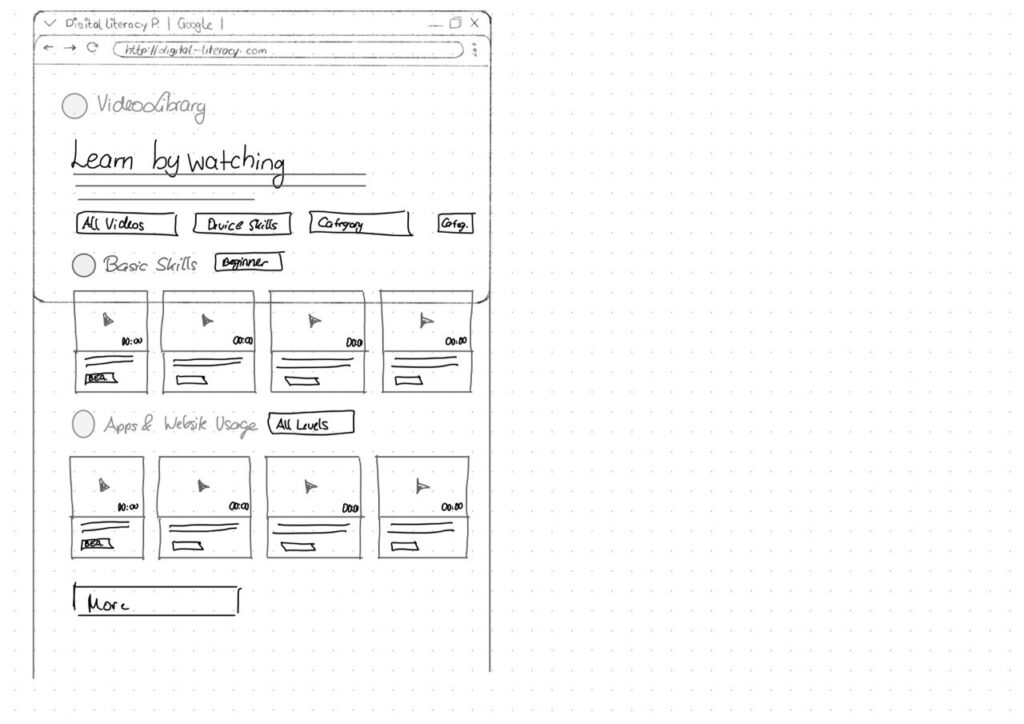
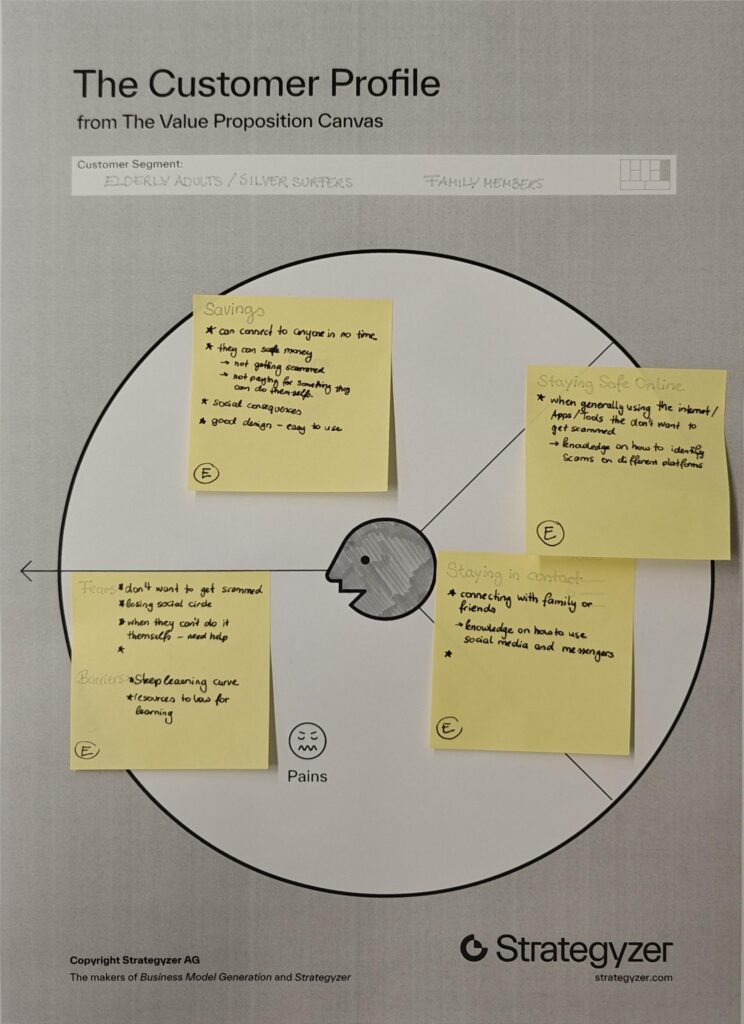
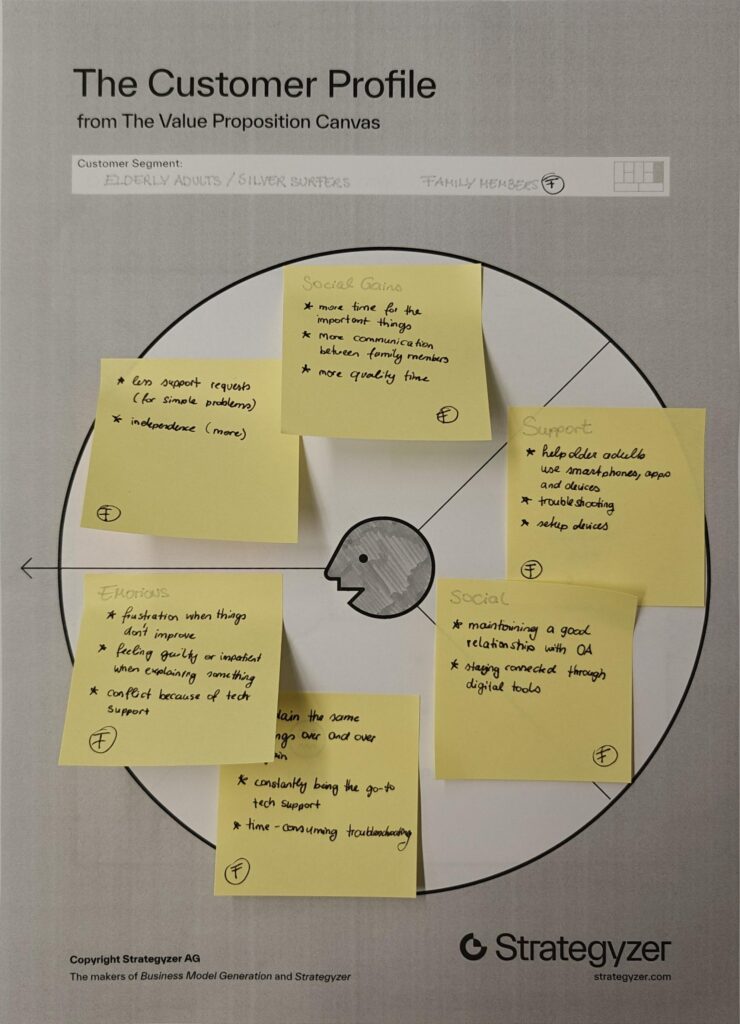
✿1 Design & Research 2

Step 0 – 1st March 2026

The next two weeks will be focused on developing three different prototypes. My main goal is to explore how interfaces can be designed to better support older adults, especially those who didn’t grow up with digital technology. But before diving into design, I need to ask myself some questions: What is the real problem here? What do older users struggle with the most? Is it that apps and websites are simply too complex, with too many steps and features? Or is it that digital interfaces don’t match the way they expect things to work? Or perhaps it’s not the design at all, but a broader question of digital literacy, understanding how devices, apps and online systems actually function.

Step 1 – 8th March 2026

At the beginning, I thought the main challenge would be designing intuitive and accessible interfaces. However, after talking to different people, I realized that the issue is much broader. Many of the people I spoke with were not only struggling with specific apps or websites, but with digital literacy itself.

This made me realize there was an important difference. While good design can make digital products easier to use, it cannot replace the need for basic digital education. Tasks such as navigating menus, understanding security warnings or recognizing phishing emails require knowledge and practice that go beyond interface design.

Because of this, I started thinking less about the visual design of a platform and more about what it should actually teach. Before creating concepts or features, I wanted to identify the most important areas of digital literacy that could be covered. These include basic device skills, such as using a smartphone or changing settings, understanding common apps and websites, learning fundamental concepts like files and cloud storage, as well as topics related to online communication and security.

While collecting these topics, it also became clear that the platform should not simply provide information. Instead, it should support users throughout the learning process and guide them step by step. One idea that came to mind was a “Today’s Lesson” feature. Rather than presenting users with many different options at once, the platform could recommend one short learning session each day.

Prototype 1

Prototype 2

Prototype 3 – Final Prototype

With the last prototype I tried to move away from the “dashboard” layout a bit and instead focus on something much clearer. Rather than showing lots of different options right away, the interface tries to guide the user through what to do next.

The “Today’s Lesson” feature became the main focus of the layout. It’s the first full-width card right after the hero section and noticeably larger than everything else on the page. The idea is that the most important action of the day should require zero searching. Many older users don’t scan pages the same way younger users do. Instead, they read from top to bottom.

Another element I tried out is a progress tracker with color-coded topics. Each topic has its own color instead of everything looking the same. The idea behind this is that color can become a kind of memory anchor. Over time users might remember something like “orange was the security lessons” without needing to read every label again.

For the lesson library I created video cards that show the duration and difficulty level right away.

Another thing I want to add is an accessibility toolbar directly in the Navigationbar. Instead of hiding text size or contrast settings somewhere deep in a settings menu, the controls (A / A+ / A++ and a contrast toggle) are always visible. My thought here was: if someone needs larger text, they probably need it immediately, not after navigating through several menus they might already struggle to read.

Interaction in Sounddesign

For this first blog post, I had to step a bit outside my comfort zone because we’ve started collaborating with sound designers on a music interface. That alone is already an interesting project. For the first blog post we had to research on nime.com and I came across a study about agency and creativity in musical interaction for people living with dementia and cognitive decline. I find this topic really interesting, especially since it connects in some ways to what I’m considering exploring in my master’s thesis.

Bild von jotoya auf Pixabay

Agency and Creativity in Musical Interaction for those living with Dementia and Cognitive Decline

Dementia is an umbrella term for a range of progressive conditions that affect the brain. These conditions can cause challenges with memory, problem solving, cognitive function and decision making. For people living with dementia, musical interventions have been shown to support important aspects of life, such as the sense of self. Sustained engagement with music can have a positive impact despite these challenges.

In this context, agency refers to the sense of control or ownership an individual feels over their actions and the resulting consequences. It describes the experience of being the initiator of one’s actions rather than just responding to external direction.

For people living with dementia, agency is often considered to be diminished. In research, dementia is frequently approached through a biomedical deficit model that focuses primarily on the skills and memories a person has lost. This perspective can lead to the assumption that because language and memory are impaired, agency must also be lost. However, this connection is often taken for granted rather than critically examined.

As a consequence, people living with dementia are frequently viewed as passive participants in therapeutic activities and are often expected to engage only in relatively basic tasks. In the study referenced, for example, participants were limited to playing simple instruments such as percussion while following the lead of experts. This setup reflects and reinforces the assumption that their role is primarily responsive rather than self-directed.

Biomedical deficit model

The biomedical deficit model is a framework commonly used in dementia research that focuses primarily on the skills lost by individuals and the tasks they are no longer able to achieve. This model prioritizes the identification of cognitive impairments, such as challenges with memory, language and problem-solving.

This paper proposed and tested a procedural music platform called the “SliderBox”, which was specifically created for people living with dementia. The goal of the project was to allow people with dementia to go beyond basic interactions to create sound and provide tools that facilitate unguided musical experiences and enabling them to actively participate music activities.

Source: J. Pigrem, J. Christensen, A. McPherson, R. Timmers, L. de Witte, and J. MacRitchie

The Hardware: The SliderBox is an accessible MIDI controller made of wood, with eight analogue sliders and eight push-buttons. It provides multi-modal feedback through LED light strips and buttons to help guide the user.

Conclusion

Some participants were struggling when there were more then two possible actions. This also directly related to the engagement, whereas less people would engage with the prototype, when it had to many possible actions.

The researchers also observed that the SliderBox had a high engagement and lack of negative behaviors, showing the potential for those platforms.

In this experiment concludes that it is absolutely possible to facilitate engaging musical interactions that also foster agency and creativity for those with cognitive decline.

Sources

[1] J. Pigrem, J. Christensen, A. McPherson, R. Timmers, L. de Witte, and J. MacRitchie, ‘Agency and Creativity in Musical Interaction for those living with Dementia and Cognitive Decline’, in Proceedings of the International Conference on New Interfaces for Musical Expression, 2024, pp. 315–323.

#9 (10) Final Post

In this final post of the semester, I want to come back to some of the research questions I defined at the beginning of this journey, especially the two different directions this topic can take. I believe the challenge of older adults struggling with technology can be approached in two ways: one focuses on how interaction design can support them in learning digital skills, while the other asks how we, as designers, can make digital systems easier to understand in the first place.

Interaction design can support older adults in learning digital skills by acting as a something like a cognitive guide that reduces mental effort, aligns with their unique conceptual frameworks and fosters the trust for experimentation.

As Designers we can try:

1. Aligning with Seniors’ Mental Models

  • Older adults conceptual models of technology often differ significantly from the screen-centered logic used by younger generations. [1]
  • Linear Logic over Screen-Based Logic: Seniors frequently intuitively adopt a linear, storytelling-like approach to interactions. Interaction design can support learning by using step-by-step narratives rather than multi-layered, interactive screens that can be disorienting. [1]
  • Contextual Clarity: Older users may confuse similar UI elements, such as address bars and search fields. Design should use explicit, consistent wording and “polite” system feedback, to align with their social expectations and provide a sense of security. [1]
  • Separating Interface from Implementation: Seniors often struggle to distinguish between the frontend (what they see) and the backend (how it works). Design that clearly defines the interface as a “method of communication” might help them grasp the abstract nature of software. [1]

2. Teaching Strategies

Secondly it would be possible to teach elderly people about systems and how they work. Instruction for older adults is most successful when it moves away from standard methods and aligns with the cognitive preferences of the age group.[1]

  • Align with Linear Mental Models: Seniors often approach technology through a “storytelling” or linear logic rather than the screen-based, multi-layered logic common in modern software. Designing learning paths that follow a step-by-step narrative can help them internalise abstract concepts.[1]
  • Abstract Thinking Exercises: Before diving into software, starting with exercises like drawing symbols for abstract terms can prepare seniors for the conceptual nature of digital interfaces. [3]
  • Minimise Cognitive Friction: Instruction should focus on minimising friction by reducing the number of steps required to complete an action, which supports those who process fewer “discrete information bits” at one time. [4]
  • Provide Task Support: Using external cues, reminders and labels, known as environmental support, can compensate for memory decline and improve performance to the level of younger learners. [2]

Next Steps

I already have some ideas for the next steps. I’d like to dive deeper into the interaction side of this topic and as mentioned in the presentation, I’m also considering running a workshop. While researching similar projects, I found that when working with older adults, confidence and trust are often bigger hurdles than the technology itself.

Sources

[1] D. Orzeszek et al., ‘Beyond Participatory Design: Towards a Model for Teaching Seniors Application Design’, arXiv [cs.CY]. 2017.

[2] F. Craik, ‘Memory Changes in Normal Aging’, Current Directions in Psychological Science – CURR DIRECTIONS PSYCHOL SCI, vol. 3, pp. 155–158, 10 1994.
[3] Thefinchdesignagency, “Building User Trust in UX Design: Proven Strategies for Better Engagement,” Medium, Feb. 05, 2025. https://medium.com/@thefinchdesignagency/building-user-trust-in-ux-design-proven-strategies-for-better-engagement-c975aa381516

[4] G. A. Wildenbos, L. Peute, and M. Jaspers, “Aging barriers influencing mobile health usability for older adults: A literature based framework (MOLD-US),” International Journal of Medical Informatics, vol. 114, pp. 66–75, Jun. 2018, doi: https://doi.org/10.1016/j.ijmedinf.2018.03.012.

[5] N. Halmdienst, M. Radhuber, and R. Winter-Ebmer, “Attitudes of elderly Austrians towards new technologies: communication and entertainment versus health and support use,” European Journal of Ageing, vol. 16, no. 4, pp. 513–523, Apr. 2019, doi: https://doi.org/10.1007/s10433-019-00508-y.

[6] F. Craik, ‘Memory Changes in Normal Aging’, Current Directions in Psychological Science – CURR DIRECTIONS PSYCHOL SCI, vol. 3, pp. 155–158, 10 1994.
#8 Older Adults Approach to Learning

Update

So last week we had our peer review and I got some really interesting insights into what I could have done better with my blog posts. One big takeaway was that I probably should have stuck closer to the research question I set at the beginning of the course. That said, I think I needed that phase where I went more into “research mode” and just explored what’s already out there and what other people have worked on. I wanted to check whether the things I was talking about actually made sense in the first place. And yeah, they kind of did, but I can definitely see that I need to go much deeper into the topic of interaction design for the ageing population. This topic feels like a natural extension of accessibility and it’s especially important to me because I truly believe that access to digital products can help everyone.

This is why I will use these last two blog entries to cover my initial research questions.

How do older adults approach learning?

I asked myself this questions because sometimes I see elderly that

Older adults’ approach to learning is an active process of adaptation and integration, in which new information is filtered through many years of existing knowledge and personal mental models [1]. Their learning approach is often characterised by a preference for environmental support and immediate practical utility, which helps compensate for age-related changes in cognitive processing capacity [1].

Environmental Support refers to the external stimuli, tools or contextual cues that interact with an individual’s internal mental and physical operations to facilitate successful functioning. [2]

Cognitive Strategies and Processing

While for most older adults the desire to learn remains strong, the biological and cognitive mechanisms used to acquire those new skills undergo significant shifts. [1]

  • Processing Resources: Learning is often influenced by reductions in processing speed, working memory capacity and attentional focus. Because of that, older learners generally require more time to master new skills compared to younger adults. [1]
  • Strategy Selection: Older adults tend to initiate effective learning strategies less spontaneously than younger generations. They often perform a “cost-benefit” analysis, dropping strategies that are perceived as too effortful relative to their perceived efficacy. [1]
  • Thoroughness vs. Scanning: When searching for information, seniors often demonstrate greater thoroughness, for instance, examining multiple hyperlinks in detail rather than scanning and clicking only a few. [3]
  • Self-Initiated Processing: Deficits in learning are most apparent in tasks requiring effortful “self-initiated” processing, such as the active reorganisation of new material. [1]

Unique Mental Models

Older adults possess distinct mental models that shape how they conceptualise and interact with new information, particularly in technology.

  • Linear Logic (Storytelling): Seniors often intuitively adopt a linear, text-based approach to learning, resembling a storytelling session. This frequently clashes with modern digital design, which relies on multi-layered, screen-based logic. [3]
  • Focus on Social Norms: Older learners often prioritise social norms and “politeness” within their mental models. For example, in design workshops, some seniors insisted that digital interfaces should “thank” the user, sometimes valuing this politeness over technical accessibility features like font size. [3]
  • Contextual Challenges: Learning can be hindered by contextual confusion, where similar-looking elements (such as a search bar and an address field in a browser) are mistaken for one another. [3]

Sources

[1] I. Tournier, ‘Learning and adaptation in older adults: An overview of main methods and theories’, Learning, Culture and Social Interaction, vol. 37, p. 100466, 2022.

[2] F. Craik, ‘Memory Changes in Normal Aging’, Current Directions in Psychological Science – CURR DIRECTIONS PSYCHOL SCI, vol. 3, pp. 155–158, 10 1994.
[3] D. Orzeszek et al., ‘Beyond Participatory Design: Towards a Model for Teaching Seniors Application Design’, arXiv [cs.CY]. 2017.

[4] G. A. Wildenbos, L. Peute, and M. Jaspers, “Aging barriers influencing mobile health usability for older adults: A literature based framework (MOLD-US),” Int. J. Med. Inform., vol. 114, pp. 66–75, 2018, doi: 10.1016/j.ijmedinf.2018.03.012.

#7 Decision fatigue

Update

Here’s a small update on the last blog post where I mentioned that elderly people don’t really use technology for entertainment. Some family members recently got a new TV and were complaining that Netflix is installed everywhere. I talked to them about it and they told me they don’t really understand why it’s there at all. They said they don’t need it and would rather just watch whatever is on TV something random, without having to think about it.

They also mentioned that on Netflix they often don’t even know what they would search for, which makes the whole experience feel unnecessary. With TV, something is always already playing. It feels like they just want to watch without having to decide first and the topic itself doesn’t matter that much. This is something i found quite interesting and will do some research on.

I beliefe this phenomenon might be explained by the following:

Reduced Processing Capacity and Cognitive Effort

  1. As individuals age, their available processing capacity and attentional resources decline, meaning they can process fewer discrete bits of information in a given time. [1]
    • Self-Initiated Processing: Digital entertainment often requires “self-initiated” processing, such as navigating complex menus or reorganising information in working memory, which shows substantial losses with age. [1]
    • Cognitive Load: If a digital interface is cluttered or complex, it demands high cognitive effort to navigate. When the effort required to make decisions within an app (such as choosing content or managing settings) exceeds the user’s available resources, it leads to frustration and a desire to stop using the technology. [2]

The Relationship Between Ease of Use and Usefulness

  1. For older adults, perceived usefulness is deeply linked to ease of use.
    • Immediate Benefits: Older adults are less likely to perceive a technology as useful if its benefits do not manifest easily and quickly during actual use. [3]
    • The “Visual Gymnastics” Effect: Users who have already spent a long day performing “visual gymnastics” to focus on digital content may find it harder to engage with non-standard or complex designs. If a digital entertainment platform requires unnecessary cognitive effort to understand its navigation, it disrupts the user’s mental model and erodes trust. [4]

Age Patterns in Entertainment Attitudes

  1. There is a pronounced age effect specifically regarding communication and entertainment devices (such as tablets and social networks), where positive attitudes towards them fall significantly as age increases. [3]
    • Significant Decline: Compared to those in their 50s, individuals aged 80+ are 47 to 48 percentage points less likely to value entertainment devices. [4]
    • Experience vs. Effort: This decline is partly attributed to older generations having less acquaintance and experience with these devices. Consequently, every interaction requires more “learning” effort, which can be exhausting, leading to a lower perception of the technology’s overall usefulness. [4]

Usability Barriers as a Deterrent

  1. Design flaws that increase decision-making friction directly impact perceived usefulness:
    • Navigation Issues: Confusing or cluttered navigation leads to hesitation and abandonment. [4]
    • Information Overload: Seniors are often more thorough in searching for information but are more prone to being distracted by irrelevant details and losing focus. [5]
    • Numeric and Spatial Fluence: A decline in numeracy can make it difficult for older adults to interpret data-heavy interfaces (like those found in complex gaming or streaming settings), further complicating their ability to see the technology as a “help” or “value”. [2]

Summary Table: Effort vs. Perceived Usefulness

BarrierImpact on Perceived Usefulness
Complex InterfacesIncreases cognitive load, leading to user errors and frustration.
Delayed RewardsIf benefits aren’t immediate, the user views the tool as cumbersome rather than useful.
Working Memory DeclineMakes active updating and navigation effortful and “costly” to carry out.
Lack of ConsistencyDisrupts mental models, causing hesitation and a loss of confidence.

Sources

[1] F. Craik, ‘Memory Changes in Normal Aging’, Current Directions in Psychological Science – CURR DIRECTIONS PSYCHOL SCI, vol. 3, pp. 155–158, 10 1994.
[2] G. A. Wildenbos, L. Peute, and M. Jaspers, “Aging barriers influencing mobile health usability for older adults: A literature based framework (MOLD-US),” International Journal of Medical Informatics, vol. 114, pp. 66–75, Jun. 2018, doi: https://doi.org/10.1016/j.ijmedinf.2018.03.012.

[3] N. Halmdienst, M. Radhuber, and R. Winter-Ebmer, “Attitudes of elderly Austrians towards new technologies: communication and entertainment versus health and support use,” European Journal of Ageing, vol. 16, no. 4, pp. 513–523, Apr. 2019, doi: https://doi.org/10.1007/s10433-019-00508-y.

[4] Thefinchdesignagency, “Building User Trust in UX Design: Proven Strategies for Better Engagement,” Medium, Feb. 05, 2025. https://medium.com/@thefinchdesignagency/building-user-trust-in-ux-design-proven-strategies-for-better-engagement-c975aa381516

[5] D. Orzeszek et al., ‘Beyond participatory design: Towards a model for teaching seniors application design’, arXiv preprint arXiv:1707. 05667, 2017.

#6 Technology Acceptance Across Ageing Societies

Central and Northern Europe: Austria, Finland and the Netherlands

In many European nations, the digital gap is defined by a sharp decline in internet use as individuals enter their late 70s and 80s.

  • Austria: A significant gap persists between younger and older cohorts. While 95% of Austrians aged 16 to 74 used the internet in 2023, only 53.8% of those aged 75 to 84 were online. Within this older group, the gap widens further: 64% of 75- to 79-year-olds are online, compared to just 43% of those aged 80 to 84. [3]
  • Finland: Research highlights that the gap is not just age-dependent but linked to frailty. While 80% of non-frail Finnish individuals have internet access, this drops to 46% among those considered frail, indicating that health status is a primary driver of the digital divide in this region. [4]
  • The Netherlands: Studies here show that technology use is negatively associated with lower social status and physical functioning, though gender differences in ICT use were not significantly observed in Dutch samples. [4]

Japan: Leading with Followers

Japan is a unique case due to its position as a world leader in demographic ageing, which has turned the country into a global laboratory for technology adoption.

  • Necessity as a Driver: Unlike other nations where technology may be viewed as a luxury, Japan’s acute labour shortages in agriculture and caregiving have forced a higher acceptance of automation. For example, the average age of a Japanese farmer is 68.4 years, leading to the widespread deployment of ICT-enabled heavy machinery to augment the skills of an ageing workforce. [1]
  • Psychological Drivers: A comparative study between Japan and the UK regarding online public services found that self-efficacy and ageing satisfaction were more prominent determinants of technology readiness and usage in the Japanese elderly population. [1]

What is ICT-enabled heavy machinery?

At its core, heavy tech machinery refers to large, powerful equipment integrated with modern technologies like GPS, telematics, IoT (Internet of Things) sensors and advanced software. Unlike their purely mechanical predecessors, these machines can communicate, self-diagnose and perform tasks with a high level of accuracy. [2]

The United States: Sociodemographic and Racial Patterns

In the United States, the digital age gap is heavily influenced by a combination of sociodemographic factors and physical health.

  • Patterns of Use: US data indicates that technology use among older adults is strongly correlated with younger age, male gender, white race, higher education and being married. [4]
  • Health as a Barrier: Also physical fitness is a major hurdle; more than 75% of the American population aged 65+ reports difficulties in physical functioning, which correlates with decreased technology use. Furthermore, approximately 21% of US seniors have visual impairments that complicate digital screen interaction. [4]

Developing Countries: China and Bangladesh

In developing regions, the gap is often influenced by cultural norms and the speed of infrastructure development.

  • China: This region has seen a surge in research, particularly regarding smartphone acceptance. However, findings suggest that Chinese seniors under 65 are more likely to adopt these technologies, while older cohorts remain more resistant. [5]
  • Bangladesh: A distinct cultural gap exists here; older adults traditionally use mobile phones only for typical voice calls. The concept of receiving health care advice via a phone is a relatively new and daunting concept, leading to higher levels of technology anxiety compared to developed nations. [5]

Sources

[1] K. Kushida, “Japan’s Aging Society as a Technological Opportunity,” 2024. Accessed: Dec. 23, 2025. [Online]. Available: https://carnegie-production-assets.s3.amazonaws.com/static/files/ Kushida_Demographics%20and%20Tech%20Trajectories_final.pdf#page=23.21

[2] “What Exactly is Heavy Tech Machinery?,” Heavytechservices.ca, 2025. https://www.heavytechservices.ca/what-exactly-is-heavy-tech-machinery (accessed Jan. 05, 2026).

[3] N. Djahangiri, V. Kropfreiter, and J. Peterbauer, Internetnutzung von älteren Menschen in Österreich: Ergebnisse der Erhebung zum Einsatz von Informations- und Kommunikationstechnologien in Haushalten 2023. Wien, Austria: Statistik Austria, 2023.

[4] N. Halmdienst, M. Radhuber, and R. Winter-Ebmer, “Attitudes of elderly Austrians towards new technologies: communication and entertainment versus health and support use,” European Journal of Ageing, vol. 16, no. 4, pp. 513–523, Apr. 2019, doi: https://doi.org/10.1007/s10433-019-00508-y.

[5] Y.-Y. Yap, S.-H. Tan, and S.-W. Choon, “Elderly’s intention to use technologies: A systematic literature review,” Heliyon, vol. 8, no. 1, p. e08765, Jan. 2022, doi: https://doi.org/10.1016/j.heliyon.2022.e08765.

#5 Accessibilty and UI/UX Design

In the context of technology use among the elderly, accessibility acts as a fundamental pillar of trustworthy design, a facilitator for independent living and a critical bridge between an individual’s diminishing physical or cognitive abilities. [1]

The Foundation for Trust and Engagement

Accessibility is one of the four foundational pillars, alongside consistency, transparency and security that build user trust. For elderly users, a lack of accessibility leads to cognitive effort, frustration and hesitation, which are major barriers to trust. If users struggle to find information or complete tasks due to poor accessibility, their confidence in the platform diminishes and often leads them to abandon the technology entirely. [1]

Four foundational pillars of trustworthy UX

The four foundational pillars of trustworthy user experience (UX) design are consistency, transparency, security and usability. These elements work in coordination to create a seamless digital experience that helps users feel confident, in control and valued.

Accommodating the “Aging Barriers” (MOLD-US Framework)

Accessibility is the primary method for addressing the physical and functional barriers inherent to the ageing process. The MOLD-US framework identifies four key categories where accessibility is crucial:

  • Perception (Vision and Audition): Accessibility features must compensate for the decline in the ability to resolve detail, focus on close objects, and detect contrast. [2]
  • Physical Ability: Aging often leads to slower reflexes, stiffer joints and tremors. [2]
  • Cognition: Because older adults process fewer bits of information at a time, accessible design requires minimizing friction and reducing the number of steps to complete a task. [2]
  • Motivation: If the benefits of a technology are not easily determined through an accessible interface, users become frustrated and unmotivated. [2]

Promoting Independent Living and “Aging in Place”

The primary objective of technology for the elderly is to enable them to continue their daily lives independently for as long as possible. Accessibility plays a vital role here by:

  • Resolving Mobility Gaps: For elderly individuals with limited mobility, accessible technology reduces the need for difficult travel for medical treatments. [3]
  • Inclusive Design aims to create designs that are flexible enough to be usable by people with various functional limitations, thereby assisting and prolonging independent living.[3]

Influencing Attitudes Toward Specific Technologies

In studies of elderly Austrians, accessibility specifically in the form of functional support was found to drive positive attitudes.

  • Support and Health Devices: Technologies such as personal alarms and tracking systems enjoy high acceptance across all age groups because they provide concrete, accessible help for health-threatening situations. [4]
  • Compensating for Age Effects: Interestingly, while interest in entertainment technology declines with age, the interest in support and health devices does not. [4]

Sources

[1] Thefinchdesignagency, “Building User Trust in UX Design: Proven Strategies for Better Engagement,” Medium, Feb. 05, 2025. https://medium.com/@thefinchdesignagency/building-user-trust

[2] G. A. Wildenbos, L. Peute, and M. Jaspers, “Aging barriers influencing mobile health usability for older adults: A literature based framework (MOLD-US),” International Journal of Medical Informatics, vol. 114, pp. 66–75, Jun. 2018, doi: https://doi.org/10.1016/j.ijmedinf.2018.03.012.

[3] Y.-Y. Yap, S.-H. Tan, and S.-W. Choon, “Elderly’s intention to use technologies: A systematic literature review,” Heliyon, vol. 8, no. 1, p. e08765, Jan. 2022, doi: https://doi.org/10.1016/j.heliyon.2022.e08765.

[4] N. Halmdienst, M. Radhuber, and R. Winter-Ebmer, “Attitudes of elderly Austrians towards new technologies: communication and entertainment versus health and support use,” European Journal of Ageing, vol. 16, no. 4, pp. 513–523, Apr. 2019, doi: https://doi.org/10.1007/s10433-019-00508-y.

#4 Mental Models

As I realized that the problem might lie in the mental models of older people, I wanted to research this topic more deeply to understand what’s really behind it.

The mental models of technology held by elderly individuals differ significantly from those used by younger generations and software designers, largely due to their unique past experiences, cognitive capabilities and learning processes. [1]

Conceptual Models of Interaction and Interfaces

Older adults’ conceptual models of user interfaces and human-computer interaction, are generally influenced by their accumulated knowledge, skills and past experiences. This results in models that often diverge from modern application design:

  • Linear, Text-Based Prototypes (Storytelling Approach): Participants, particularly in the beginners group but also evident in the advanced group, demonstrated a tendency to produce linear, text-based prototypes resembling the transcription of a storytelling session rather than screen-based, UI-oriented solutions. [1]
  • Difficulty Separating Frontend from Backend: Seniors struggled with the abstract concept of application design by finding it difficult to separate the frontend from the backend (technical implementation) and the possibility of designing them separately.[1]
  • Focus on Detailed Wording and Politeness: When discussing UI elements, seniors often paid immense attention to the wording used in the interface and thoroughly debated it.[1]

Conceptualizing System Functionality

When interacting with or designing technology, the elderly’s mental models reveal specific patterns regarding scope and detail:

  • Over-Generalization and Scope Limitation Issues: Both groups found it challenging to prioritize usage scenarios and limit the scope of their solutions to address only the most important use cases.[1]
  • Focus on External Familiarity: Novice technology users, when designing an ATM interface, first attempted to recreate the interface based on the limited knowledge they had about real ATMs (e.g., from observing younger people use them) and only later tried to design their own solutions.[1]
  • bsence of Error Handling in Models: While focusing heavily on wording and usability issues they deemed relevant (like card insertion direction), seniors generally did not consciously look for corner cases or pay much attention to error handling (e.g., providing a way for the user to undo an action) in their prototypes.[1]

Understanding Abstract Concepts and Tools

  • Struggles with Abstract Design Concepts: When learning UI design, seniors often struggled with abstract concepts.[1] (What are abstract concepts?)
  • Confusing Similar UI Elements: Older adults may not grasp different contexts and thus confuse similar UI elements (e.g., the search and address fields in a web browser). [1]
  • Viewing Prototyping Tools as Graphic Editors: Even after instruction, at least one senior viewed the prototyping tool (Adobe XD) as a graphics editor rather than a prototyping tool that connects interactive screens.[1]

Sources

[1] D. Orzeszek et al., ‘Beyond Participatory Design: Towards a Model for Teaching Seniors Application Design’, arXiv [cs.CY]. 2017.

[2] L. Kane, “Usability for Seniors: Challenges and Changes,” Nielsen Norman Group, Sep. 08, 2019. https://www.nngroup.com/articles/usability-for-senior-citizens/

[3] G. A. Wildenbos, L. Peute, and M. Jaspers, ‘Aging barriers influencing mobile health usability for older adults: A literature based framework (MOLD-US)’, International Journal of Medical Informatics, vol. 114, pp. 66–75, 2018.

[4] J. Nielsen, “Usability for Senior Citizens: Improved, But Still Lacking,” Nielsen Norman Group, May 28, 2013. https://www.nngroup.com/articles/usability-seniors-improvements/

[5] Thefinchdesignagency, “Building User Trust in UX Design: Proven Strategies for Better Engagement,” Medium, Feb. 05, 2025. https://medium.com/@thefinchdesignagency/building-user-trust-in-ux-design-proven-strategies-for-better-engagement-c975aa381516

#3 Testing and Research

Background

This week I had a situation that perfectly illustrated why I chose this topic. I was explaining some functionalities of a new app to my grandfather. He has always been very tech-savvy, he still works on his own website but even he struggles with certain concepts from time to time. He often tells me that everything takes him much longer than it used to and even when I show him a quicker or easier way to do something, he still sticks to the method he already knows. I believe this is partly a matter of habit and partly a reluctance to change something that “still works.”

What surprised me most was watching him interact with the app after my explanation. I assumed that once I had shown him how the app worked, it would be straightforward. But when he tried it on his own, he had to stop and ask for help at many points. It made me realize how much prior knowledge and digital literacy designers unconsciously expect from users, even when the interface seems simple to us.

This small moment showed exactly why designing for older adults matters: even motivated users with experience and interest in technology can struggle when interactions are not intuitive, forgiving or aligned with their mental models.

But here comes the real question: Is the problem rooted in the design of digital products or in the mental models that older adults bring with them? In other words, should we focus on improving the interfaces or on helping older people build the conceptual frameworks they need to understand how technology works in the first place?

Research

Problems older adults face with technology usually come from two sides: the design of the technology and the way older people understand and process information. When these two sides don’t match, it leads to confusion and mistakes. [1][3]

Many digital products simply aren’t designed with older adults in mind. This creates barriers that make technology hard to use.

  • Interfaces that feel cluttered or complicated: When apps have too many features or unclear layouts, older adults struggle to find what they need.[3]
  • Physical design that clashes with age-related changes: Small buttons, close-together touch targets or gestures like pinching and swiping can be difficult due to reduced vision, motor skills or dexterity.[3]
  • Unclear icons: Small, abstract or unfamiliar icons can be hard to recognize. Older adults often expect bigger, more descriptive labels instead of symbolic icons. [3]
  • Inconsistent design: If the interface doesn’t behave in predictable ways, it breaks the user’s expectations. This lowers trust and makes people feel unsure about what will happen next. [5]

(Planned) Sources

[1] D. Orzeszek et al., ‘Beyond Participatory Design: Towards a Model for Teaching Seniors Application Design’, arXiv [cs.CY]. 2017.

[2] L. Kane, “Usability for Seniors: Challenges and Changes,” Nielsen Norman Group, Sep. 08, 2019. https://www.nngroup.com/articles/usability-for-senior-citizens/

[3] G. A. Wildenbos, L. Peute, and M. Jaspers, ‘Aging barriers influencing mobile health usability for older adults: A literature based framework (MOLD-US)’, International Journal of Medical Informatics, vol. 114, pp. 66–75, 2018.

[4] J. Nielsen, “Usability for Senior Citizens: Improved, But Still Lacking,” Nielsen Norman Group, May 28, 2013. https://www.nngroup.com/articles/usability-seniors-improvements/

[5] Thefinchdesignagency, “Building User Trust in UX Design: Proven Strategies for Better Engagement,” Medium, Feb. 05, 2025. https://medium.com/@thefinchdesignagency/building-user-trust-in-ux-design-proven-strategies-for-better-engagement-c975aa381516

#2 Research

Image by chriszwettler from Pixabay

This week I was looking into the Austrian side of things. I was interested how many elderly are using technology in Austria. Based on a survey that was conducted by the Statistics Austria in 2023 the adoption of technology, specifically looking at the internet usage was around 53.8% for people that were aged 75 – 84 years old. [2]

More interestingly that internet use declines as age increases.

  • 63.8% of 75- to 79-year-olds use the internet
  • 42.8% of 80- to 84-year-olds use the internet

The study was also focusing on the attitudes of elderly Austrians towards new technologies and categorized two main groups: Communication and Entertainment and Support and Health. In this case the study was talking about Tablet, Smartphone, Social Networks and Voice-Controlled PC in the first category of Communication and Entertainment. The second category Support and Health contained technology (Devices) like Tracking Systems, Auto Fall Alerts, Personal Alarms and Auto Cookers. [2]

Support and Health Devices

As previously mention this category contains devices like Emergency Tracking Systems. Around 77% of elderly (50+) had a positive attitude towards one of these technologies in this category.

  • 69% of elderly thought positive about the personal alarm systems
  • 62% of elderly thought positive about the auto fall alerts
  • 60% of elderly though positive about the tracking systems

This values indicate, like previously mentioned, that elderly are interested in technology if they see a clear benefit.

Advantages of using technology

Technology can enable the elderly to continue their daily life and be independent for as long as possible. [2]

  1. Support and Health Technology
    • Safety Assistance: Let’s the elderly still life independently and still be save with devices like Auto Fall Alerts. [2]
    • Maintain Health: With aging cognitive, physical and sensory impairments increase, this is where technology can improve mental and physical health. [1]
    • Lessens Medical related travel problems: Technology can help assist elderly that have limited mobility or need to go to medical facilities regularly. [1]
  2. Technology in Communication and Wellbeing
    • Technology can decrease loneliness and improve well-being. [2]
    • Elderly that access to the internet are often socially more connected. [2]
    • The use of ICT has a direct correlation to an improvement of Life Quality and Cognitive Function. [2]

What are ICTs?

Next Steps: Technology Adoption Models

  1. Technology Acceptance Model
  2. Unified Theory of Acceptance and Use of Theory [1]

Sources

[1] Y.-Y. Yap, S.-H. Tan, and S.-W. Choon, ‘Elderly’s intention to use technologies: A systematic literature review’, Heliyon, vol. 8, no. 1, p. e08765, 2022.

[2] N. Halmdienst, M. Radhuber, and R. Winter-Ebmer, ‘Attitudes of elderly Austrians towards new technologies: communication and entertainment versus health and support use’, European Journal of Ageing, vol. 16, 12 2019.