Looking back at this semester, I think the biggest challenge for me was figuring out what I actually wanted to focus on for my master’s thesis. At the beginning, I only knew that I wanted to work with older adults and that I was interested in topics like digital literacy, education and tangible interaction. It took a lot of reading, observing and prototyping before these pieces slowly started to come together.
Even though I only really found my direction during the last couple of weeks, I don’t see that as wasted time anymore. Exploring different ideas helped me understand what actually interests me and, just as importantly, what doesn’t.
One thing I definitely discovered this semester is how much I enjoy working with tangible interfaces. Designing something physical that interacts with the digital side feels like a really exciting topic to explore, especially in the context of accessibility and older adults. At the same time, I still enjoy the technical side of interaction design and would love to combine both in my master’s thesis.
The NFC book is only an early prototype, but I think it has shown me a direction that I want to continue exploring. Over the next semester, I would like to test this concept with older adults.
Since I came up with the idea of creating a physical phone book in my last blog post, I decided to ask ten older adults, all around the age of 65, what they actually like to use their phones for. This time, the conversations went much better than my previous ones. Everyone was able to tell me quite clearly what they regularly use their phones for.
What I found even more interesting was that many participants started talking about their frustrations with smartphones on their own. While answering questions about their everyday phone use, they often mentioned situations where they felt confused.
For this very short interview, which was more of a questionnaire, I simply asked participants what they use their phones for most often. The most common answers were: making phone calls and using WhatsApp, either for texting or sending voice messages. Other frequently mentioned activities included looking at photos, checking the weather and reading the news. Some participants also said that they regularly listen to music, radio stations or playlists using apps on their phones.
These results were somewhat interesting for me because they support my idea that older adults often use a relatively small set of functions very frequently. This made me think that focusing on simplifying these tasks, rather than trying to simplify the entire smartphone experience, could be a direction for my research.
Activity
Participants (n = 10)
Percentage
Calling (normal)
10
100%
Watching Photos and Videos
10
100%
Taking Photos
10
100%
Calling (video)
8
80%
Sending Messages (WhatsApp)
7
70%
Listening to Music
6
60%
Checking the Weather
5
50%
Reading News
4
40%
Listening to Radio
3
30%
Since many of the people I interviewed mentioned that they mainly use their phones to stay in touch with family and friends, it became clear that social connection plays a very important role for them.
Importance
Access to digital technology plays an important role in the lives of many older adults, as it can significantly influence their quality of life, social participation and ability to manage their health and well-being. Social isolation is a significant concern for the elderly population which is often caused by shrinking social circles either because of retirement, illness or death. [1]
As a result, maintaining social connections becomes increasingly important in older age. One of the most important benefits of digital technologies is that they can help reduce social isolation and loneliness. Through video calls and social media, older adults can stay connected with family and friends and continue to participate in social life. [1] Regular social interaction through digital technologies is also associated with better subjective health and overall well-being. [2]
Beyond supporting social connections, digital technologies can also help older adults maintain their independence and quality of life. They can support everyday tasks, promote cognitive engagement and enable older adults to remain active and participate in society longer. [3]
These findings are also in line with the interview results, where participants mentioned that they mainly use technologies such as smartphones to stay in contact with family and friends.
Prototyping – The PhoneBook
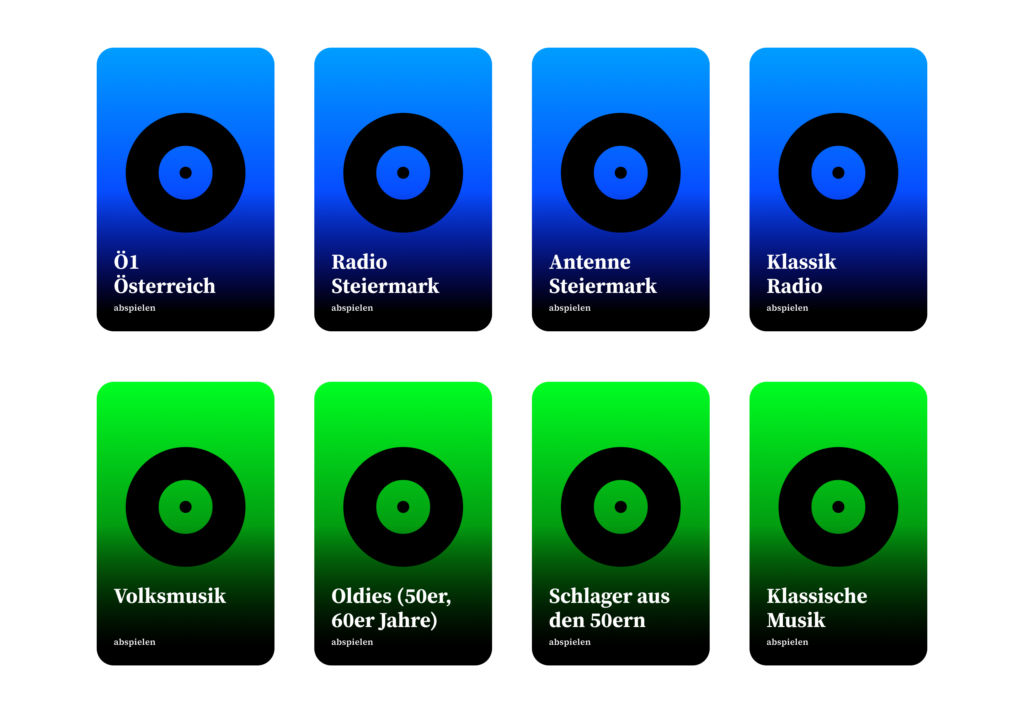
After trying out different ideas, I ended up focusing on the NFC phone book. The idea came from my observations and the short interviews I did. Most of them told me that they only use a handful of functions on their phones regularly, mainly calling family and friends, looking at photos, listening to music or checking the weather. That made me think: instead of trying to simplify the whole smartphone, why not just make these everyday tasks easier to access?
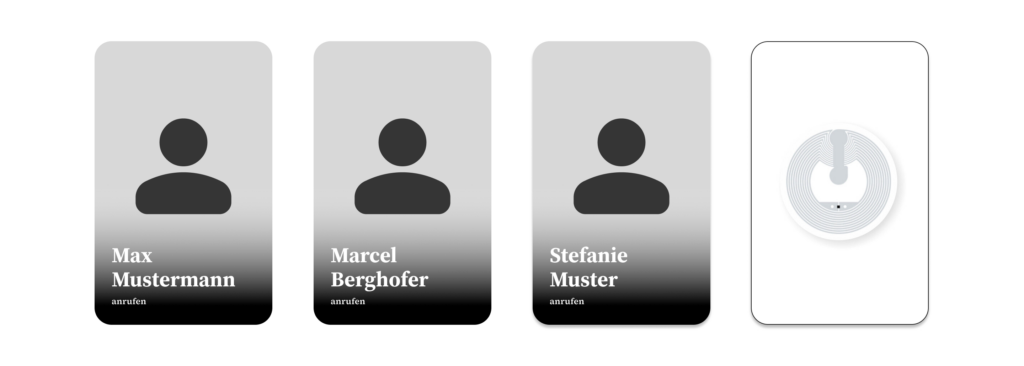
The book is divided into different sections based on most used functionalities, like calling family, listening to music or viewing photos. Every page contains pictures or symbols with NFC tags hidden inside. To perform an action, users simply open the page they need and hold their phone over the corresponding picture. For example, holding the phone over a picture of their daughter would automatically start a phone call.
I decided to go with a book because it feels familiar. Earlier, I experimented with individual NFC objects, but I realized that they could easily get lost and would need to be stored somewhere. A book keeps everything in one place and also gives clear instructions.
At this stage, the prototype is mainly meant to explore whether a familiar object like a phone book can make smartphone interactions feel simpler. Instead of navigating through apps and menus, users interact with pictures and pages, which hopefully reduces some of the barriers that older adults experience when using smartphones.
Update from 6.7.2026
I already tested it with my grandmother. Her comment: “It feels like magic!”
Sources
[1] P. Bhowmick and E. Stolterman Bergqvist, ‘Exploring Tangible User Interface Design for Social Connection Among Older Adults: A Preliminary Review’, in Extended Abstracts of the 2023 CHI Conference on Human Factors in Computing Systems, Hamburg, Germany, 2023.
[2] Y. Liu and R. Tamura, ‘How can smart home help “New elders” aging in place and building connectivity’, 07 2020, pp. 100–107.
[3] P. Bhowmick and E. Stolterman Bergqvist, ‘Exploring Tangible User Interface Design for Social Connection Among Older Adults: A Preliminary Review’, in Extended Abstracts of the 2023 CHI Conference on Human Factors in Computing Systems, Hamburg, Germany, 2023.
Since my last update, I’ve been trying to pay more attention to how older adults actually use their phones. One thing that I found interesting was that many of them were actually very comfortable using WhatsApp. They understood what was happening, could explain different functions and generally navigated the app without too many problems.
While observing these interactions, I started thinking about whether some of the actions older adults struggle with could be simplified. Instead of trying to redesign entire interfaces, what if I could take specific tasks or frequently used functions and break them down into a much simpler interaction?
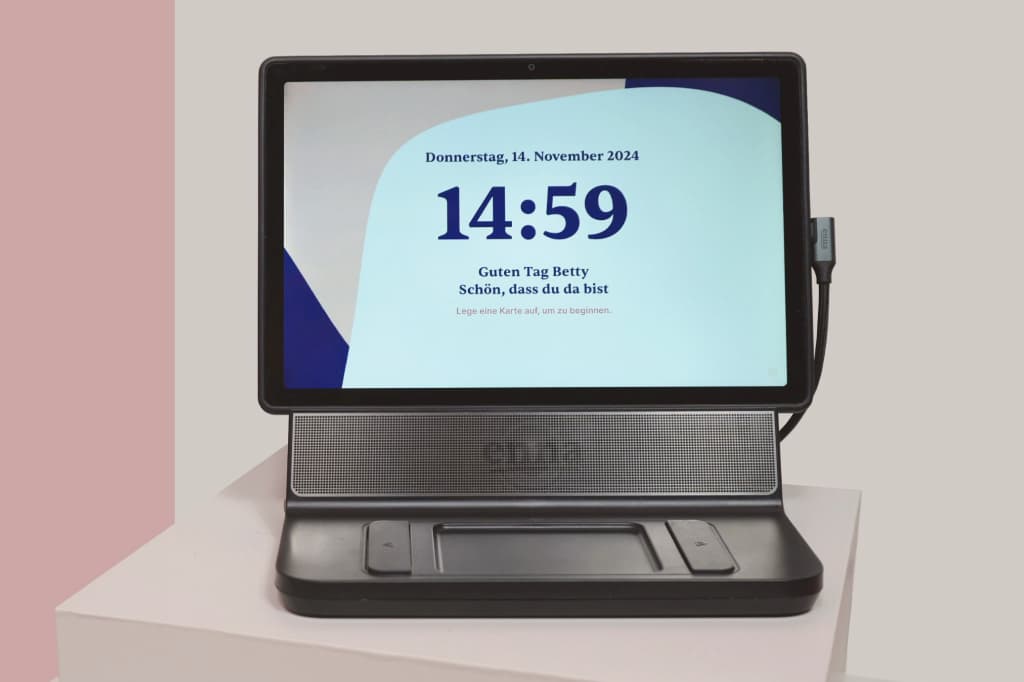
This led me to explore more tangible interactions, specifically NFC technology. Most smartphones already support NFC and I got some inspiration by some already existing products like the ENA Care, which use physical objects to trigger digital actions. The idea of replacing complex digital interactions with simple physical actions seemed actually interesting.
It actually took me some time to figure out what I wanted to focus on more. To get there, I started experimenting and creating some small prototypes.
My first step was to try out an NFC-based tangible interaction system myself. Luckily, I already had some NFC tags and cards lying around at home.. Before getting started, I did some research and found that there are already many tutorials explaining how to set up NFC routines on smartphones. One resource I found particularly helpful was: https://www.wakdev.com/en/apps/nfc-tools-android.html
Setting everything up was actually much easier than I expected because most smartphones already support reading and writing NFC tags. Using some old NFC cards I had at home, I created my first simple prototype based on existing NFC automation. This initial experiment helped me understand possible ways of interaction for digital tasks for older adults.
Prototyping
The first thing I had to figure out was which tools I could use for working with NFC tags. After some research, I decided to use NFC Tools by Wakdev writing the tags. Additionally, I had to install another app called NFC Tasks, also by Wakdev, to create automated actions.
However, while setting everything up, I already started thinking about older and less experienced users. Even though the process was easy for me, I don’t think many older adults would be able to configure such a system on their own. This made me think that there might be a need for an all-in-one application that simplifies the setup and guides users through it.
After getting the technical side working, I started experimenting with the interaciton. Since the NFC tags I had at home were just small stickers, I wanted to create a more tangible and easier way to interact with them. In my case I thought of basically two ways of using NFC: either bringing the NFC tag to the phone or bringing the phone to the NFC object. To try this, I designed and 3D printed several different variants that I would like to test further.
While prototyping, I ran into a few problems. One thing I noticed was that the distance between the NFC tag and the smartphone can’t be very large, meaning the tag has to be placed almost directly on the surface of the object. The more I thought about it, the more I realized that small physical objects might not be ideal for older adults. They can be difficult to pick up, especially for elderly people and they also need to be stored somewhere. On top of that, they could easily get lost.
First draft of the NFC Object
While experimenting with these prototypes, I came up with an idea: creating a physical phone book based on NFC interactions. Instead of navigating through contacts and menus, users could simply hold their phone to a physical card or object and immediately call them. In addition, this phonebook could also contain other tasks.
When I started looking into digital literacy among older adults, I thought the easiest way to find out where the problems are would be to simply ask people. So, taking some previous feedback into account, I spoke to around ten older people and asked questions like: What do you struggle with when using technology? What was easier back in the day? Is there anything you’d like to get better at?
(Not) to my surprise, I didn’t get many useful answers.
Most people either said they didn’t really have any problems or found it difficult to explain what exactly they struggled with. Thinking about it afterwards, that actually makes a lot of sense. Many issues only appear while someone is actively using a device or trying to complete a task. Once the moment has passed, it can be hard to remember what happened.
Because of that, I started wondering if directly asking people about their problems is even the best approach. Maybe observing people while they use technology would show much more than interviews alone. Since I didn’t get many concrete insights from those conversations, I started asking colleagues and friends about their experiences with parents, grandparents and other older relatives. Almost everyone had some kind of story. It became clear that many younger people end up being the unofficial tech support person in their family.
Interview Results
One thing that stood out was how important familiarity seems to be. One colleague told me that their mother shops online all the time and actually prefers doing it on her phone rather than on a computer. For me that sounded a little backwards, since a larger screen and analoge input usually feels easier to navigate. But because she’s used to her phone, that’s simply the device she feels most comfortable with.
Another interesting example was someone working as a secretary. They use digital tools all day long at work, manage documents, handle bookings and deal with various systems without any issues. But when it comes to doing similar things in their private life, like booking a flight for themselves, they would rather avoid it. At work there is always a process, a colleague or someone responsible for helping. At home, that safety net isn’t there. It made me think that confidence might also sometimes be a bigger factor than actual technical skills.
Some observations weren’t really about technology itself but about how people communicate online. Multiple colleagues mentioned that their parents or grandparents completely ignore grammar, punctuation and spelling when sending text messages. As some young people do as well. The goal seems to be getting the message across rather than worrying about how it looks.
Trust was another topic that appeared again and again. Several people mentioned that their parents or grandparents still prefer traditional banking methods. Instead of making a transfer online, they would rather fill out a paper form at the bank. Whether that’s actually safer isn’t really the point. The important thing is that it feels safer and more understandable to them.
Communication preferences also seem to differ quite a bit. According to several people, older adults often prefer calling someone instead of sending an email or a message. A phone call gives immediate feedback. You know the other person received the information and understood it. With emails or messages, there’s always a bit more uncertainty.
One thing I found particularly interesting was the role curiosity seems to play. People who are naturally curious often continue exploring technology regardless of their age. They click around, try things out and aren’t afraid of making mistakes. Others seem much less interested in learning something new, not necessarily because it’s difficult, but because they don’t see enough value in putting in the effort.
At this point, these are still just observations rather than real conclusions. But they already change some of my assumptions. Maybe the issue isn’t simply that digital products are too complicated. Familiarity, confidence, trust, habits, motivation and curiosity all seem to have a huge influence on how people interact with technology.
For the next step, I think it would be much more useful to actually observe people while they perform digital tasks instead of only asking them about their experiences afterwards. I also already have a direction I would like to go to.
In my last blog post I was already thinking about a final product, but since then I came to realize that I might need to do some more research.
This week, I came across a tablet-based system called Enna Care, a product created in Germany that uses NFC cards as a “physical” way of interacting with digital content. Instead of navigating a touchscreen interface, users simply place a card on the device to trigger a specific action.
When I first looked at the system, it raised an interesting question: Should the challenges elderly people face with digital technology be solved entirely through digital solutions or should designers also consider combining digital and analog interaction?
From the research I reviewed, it became clear that many seniors experience difficulties when using touchscreen interfaces. Age-related changes in motor and cognitive abilities, such as reduced dexterity, attention and memory, can make digital interaction more challenging. [1]
This is where tangible user interfaces become particularly interesting. Instead of relying solely on abstract digital elements, they connect digital functions to physical objects that users can touch. Research shows that NFC-based systems seem to be well accepted by seniors and can encourage greater engagement with digital technology. Because the interaction is linked to familiar physical actions, users can rely on existing knowledge and experiences rather than learning entirely new interaction patterns. [2]
What I found particularly interesting about Enna Care is that it does not try to force users to adapt to technology. Instead, it adapts the technology to the users. By using NFC cards as physical objects that relate to digital functions, the system reduces complexity and makes interaction feel more familiar.
When designing for elderly people, the goal might not always be to simplify existing digital interfaces. In some cases, it may be more effective to rethink the interaction itself and build on users’ existing mental models. Maybe also a hybrid interface that combines analog and digital interaction could be a solution.
Sources
[1] G. A. Wildenbos, L. Peute, and M. Jaspers, “Aging barriers influencing mobile health usability for older adults: A literature based framework (MOLD-US),” International Journal of Medical Informatics, vol. 114, pp. 66–75, Jun. 2018, doi: https://doi.org/10.1016/j.ijmedinf.2018.03.012.
[2] E. de la Guía, M. D. Lozano, and V. M. R. Penichet, ‘Increasing engagement in elderly people through tangible and distributed user interfaces’, in Proceedings of the 8th International Conference on Pervasive Computing Technologies for Healthcare, Oldenburg, Germany, 2014, pp. 390–393.
I believe everyone knows this situation: you go home to visit your family and within the first five minutes someone says, “I deleted the internet,” “Can you fix my phone,” or “I got this email from the ÖGK again, I don’t understand it.” And before you know it, you’ve spent the next five hours solving technical problems instead of actually spending time with your loved ones.
Many people over the age of 50 today do not have sufficient digital literacy for basic everyday tasks. This includes using common communication tools, identifying misleading information or scams and independently accessing information to form their own opinions about what is happening in the world. As a result, they often depend on others for support and miss the opportunity to fully participate in digital society.
This raises an important question: how can we support this generation in becoming more confident and independent in the digital world?
My idea is a dedicated learning platform that teaches digital literacy to older adults in an accessible and supportive way. Instead of overwhelming users with complex interfaces, it focuses on small, everyday learning steps that are easy to understand and immediately applicable. The platform could combine short guided lessons, interactive exercises and real-life scenarios, such as recognizing scams, using messaging apps or navigating government services online. It also provides on-demand help when users get stuck, so learning becomes part of daily life rather than a separate, intimidating process.
This platform would not only improve individual confidence and independence, but also reduce the constant need for family members to provide technical support. This allows families to shift their time and energy from troubleshooting problems to spending more meaningful time together. Ultimately, the goal is not just to teach technology, but to enable participation, confidence and connection in a digital society.
I chose two customer profiles that complement each other well, as they are closely connected in everyday life. Many younger people share the experience of being the “family tech support,” where interactions with older relatives often revolve around fixing devices or explaining the same things repeatedly. This dynamic can become frustrating over time and often takes away from the opportunity to spend more quality time together.
By looking at both older adults and their family members, it becomes clear that the problem is not one-sided but affects both groups.
Value Proposition
Product/Business Ideas
Which Problem are you solving?
Problem of digital literacy in elderly people.
Many older adults struggle to use digital technologies, which makes it difficult for them to participate in everyday online life. This can lead to social isolation, limited access to information, and increased vulnerability to scams or misinformation.
Why is it important to care about it?
Because there will be more and more elderly people in the future.
People are going to work until a later age.
Older Adults should be able to be independent as long as possible.
What is the solution you are offering? How does it work?
The solution is a tool or method that helps older adults learn how to use technology in a simple, structured and accessible way.
Who is the target audience? Who is the customer?
The primary target audience is older adults (silver surfers) who are not digital natives and need support in understanding and using technology. Secondary users include their family members, who benefit from reduced support burden and improved quality time.
What is going to happen? (Change & Impact)
The tool or method aims to increase confidence and independence among older adults, enabling them to actively participate in digital life. This can lead to stronger social connections, better access to information and safer online behavior.
How are you securing accessibilty and inclusion, and for whom?
Accessibility is a core part of the concept. The tool should to accommodate different needs, including visual, auditory and motor limitations.
In the end, I also thought about the potential barriers of my tool or method. Since it is designed as a learning tool, users would need to be able to rely on at least one sense, such as hearing or seeing, to interact with it. At the same time, current developments show that accessibility is still not fully considered in many digital tools, which can create additional challenges.
To address this, I plan to base my approach on the strategies of the W3C Accessibility Guidelines, ensuring that the tool or method is as inclusive and accessible as possible.
Next, I started thinking about what my method or tool would actually improve. I believe that many family members get frustrated because they are always the first point of support when it comes to technology, constantly having to explain or fix things for older relatives.
With my method or tool, elderly users would be encouraged to first try and find a solution on their own instead of immediately relying on someone else. This could really improve family dynamics, as it allows people to spend more quality time together instead of using that time to troubleshoot devices.
I also thought about how many older adults lack the means to independently access and explore information. This can lead to an incomplete or sometimes biased understanding of current events.
With my tool or method, elderly users would be able to access information more confidently and see a bigger picture, helping them form their own opinions and make more informed decisions about current topics.
Another point is that many older adults have limited ways to stay connected with family or peers beyond phone calls. They often struggle to access or use tools like group chats, which makes it harder to stay involved in everyday communication.
With my tool or method, older adults would be able to understand and use digital tools more easily, allowing them to stay connected, take part in conversations and feel more included in their social circles.
Today we had an intro to Project to Product and really started digging into the background and key info for our Master’s projects. First, we put together a system map that looked at our ideas, direct and indirect customers and the environment. We also thought about who might influence our product, tool or method.
For the system map, my product idea is a tool or method to teach elderly people how to use technology. I see this as particularly important because many older adults today are unable to fully take part in online life, which can lead to social isolation and limit their access to family and friends. Beyond that, many struggle to find the information they need or fall victim to online scams.
Direct customers (Primary Users) are elderly or older adults who are not digital natives and need guidance to understand and use technology. Secondary users are their families, since many younger family members often end up constantly helping their elders with tech. This can be exhausting and frustrating, as visits become focused on troubleshooting devices instead of enjoying quality time together.
Indirect customers could include retirement homes, healthcare providers, senior associations or community groups and even tech companies. These groups might support, implement, or benefit from the tool by helping elderly users engage with technology more safely and confidently.
The environment includes devices, apps and platforms that older adults interact with, as well as the social and cultural side, like how people think about aging, technology and communication between generations. Rules and safety issues, such as accessibility laws, data privacy and online security.