Don’t Grab My Attention: Technology that Moves Out of the Way (and Into Life)

Unsere menschliche Aufmerksamkeit ist eine limitierte Ressource. In der modernen Welt wird unsere Aufmerksamkeit durch permanente Benachrichtigungen, Informationsüberflutung und dauerhafte Erreichbarkeit ständig gefordert was zu kognitiver Überlastung und Stress führen kann. Die Interaktion mit Technologie und digitaler Information ist aus unserem Alltag nicht mehr wegzudenken. Dabei wird die Art und Weise, wie wir mit ihr interagieren grundlegend durch die eingesetzten Ein- und Ausgabemedien begrenzt.

Viele moderne Produkte und Technologien nutzen fast ausschließlich grafische Benutzerschnittstellen und sprechen dadurch hauptsächlich den visuellen Sinn des Nutzers an. Grafische Benutzerschnittstellen fordern konstant Aufmerksamkeit vom Nutzer und vernachlässigen die Fähigkeit des Menschen, Informationen im Hintergrund und über andere Sinne zu verarbeiten.

Diese eindimensionale Art der Interaktion hat mich schon während meinem Bachelor beschäftigt und mich dazu bewegt, mich mit alternativen Benutzerschnittstellen auseinanderzusetzen. Mein Fokus lag damals auf den greifbaren Benutzerschnittstellen (Tangible User Interface) durch deren Einsatz ich eine alternative Herangehensweise zeigen wollte, um dem immer stärkeren Verlust der realen Welt in Zeiten digitaler werdenen Lebensumstände entgegenzuwirken. Konkret ging es in meiner Abschlussarbeit um die Kommunikation im virtuellen Raum und wie eine greifbare Benutzerschnittstelle ein Gefühl der Präsenz und physischen Verbundenheit schaffen-, sowie die Informationsübermittlung positiv beeinflussen kann.

Durch diese Arbeit konnte ich bereits feststellen, welchen Einfluss die Wahrnehmung über unterschiedliche Sinne auf die User Experience -und die Fähigkeit Informationen zu verarbeiten haben kann. Anders als in meiner Abschlussarbeit wollte ich mich im Rahmen dieser Blogeinträge aber nicht nur auf greifbare Benutzerschnittstellen beschränken, sondern das Thema zunächst breiter umreißen.

Mit was genau möchte ich mich beschäftigen?

Um mein Thema einzuleiten möchte ich mit diesem Zitat von Mark Weiser beginnen: “The most profound technologies are those that disappear. They weave themselves into the fabric of everyday life until they are indistinguishable from it.”

Diese Zitat beschreibt den Prozess der Integration jeder größeren neuen Technologie. Zunächst ist sie Präsent und im Fokus unserer Aufmerksamkeit. Mit der Zeit wird sie Massentauglich und rückt immer mehr in den Hintergrund, und bereichert unsere Umgebung. Ein Beispiele hierfür ist die Erfindung des Buchdrucks. Zunächst nur für jene verfügbar, die die Fähigkeiten und Mittel hatten, mittlerweile findet sich Schrift überall in unserer physischen Welt wieder und vermittelt uns Informationen wo und wann wir sie brauchen, ohne dass wir aktiv darüber nachdenken müssen.

Die Computertechnologie hat ebenfalls so angefangen. Zunächst nur Unternehmen und Universitäten vorbehalten ist sie heute kleiner, günstiger, leistungsfähiger und so weitflächig verfügbar und wird immer stärker auch in Alltagsgeräten eingesetzt um diese smart zu machen. Beispiele hierfür sind Smart Devices (physische Objekte, die mit Sensoren und Kommunikationstechnologien ausgestattet sind) wie Lichter, Lautsprecher, Küchengeräte und vieles mehr. Dieses Konzept der Technologien, die in unsere Umgebung integriert sind, wird Ubiquitous Computing gennant.

Um nun einen Schritt weiter zu gehen, möchte ich kurz den Ansatz der Calm Technology anreißen. Hier geht es nicht mehr hauptsächlich um die Integration von Computertechnologie in die physische Welt oder die physische Interaktion im Allgemeinen, sondern um die Art und Weise wie Technologie mit uns Menschen kommuniziert. Calm Technologie formuliert Prinzipien, die im Designprozess berücksichtigt werden können, um Technologie so zu gestalten, dass sie nicht ständig die volle Aufmerksamkeit des Nutzers beansprucht. Informationen sollen erst dann übermittelt werden, wenn sie gebraucht werden und den Nutzer nicht in seinem Flow stören, sondern unterstützten indem sich auf die peripheren Sinne konzentriert wird.

Research Fokus

Für meinen Research wird das Prinzip der Calm Technology die grundlegende Richtung vorgeben. Dabei möchte ich mich mit dem Einsatz von alternativen Interaktionskonzepten beschäftigen, welche potentiell die Informationslast für den Nutzer verringern – und die Technologie mehr in den Hintergrund rücken lassen kann.

Auf diese Weise kann unsere Umgebung durch Technologie bereichert werden ohne zu stören oder abzulenken. Meine zentrale Frage wird dabei sein:

Wie können Systeme digitales Feedback an den Nutzer übermitteln, ohne die Aufmerksamkeit unnötig zu belasten?

  • Wie kann die Fähigkeit des Menschen, Informationen im Hintergrund und über andere Sinne zu verarbeiten genutzt werden, um Informationen zu vermitteln?
  • Wie können Interaktionen mit der physischen Welt als Nutzereingaben verwendet werden, um die Interaktion mit einem digitalen System unterschwelliger zu machen und Systemfeedback/Informationen zu den benötigten Zeitpunkten zu vermitteln?
  • Welche Arten der Interaktionsschnittstellen bestehen und wie werden sie aktuell als Eingabemedium und im Hinblick auf Systemfeedback eingesetzt?

Mögliche Einsatzgebiete

Um meinen Research etwas einzuschränken habe ich mir überlegt, in welchen Bereichen ich einen besonderen Mehrwert alternativer bzw. physischer Interaktionsformen sehe.

Zum einen finde ich den Einsatz im Bereich Accessibility interessant, da es dort in einigen Fällen üblich ist, bestehende digitale Anwendungen durch haptische Add-ons zu erweitern oder nach den eigenen Bedürfnissen anzupassen. Zudem ermöglichen physische Interaktionen mehr Nutzern mit einer digitalen Anwendung zu interagieren oder die Interaktion mehr an die persönlichen Fähigkeiten und Präferenzen anzupassen. So ergibt sich eine Vielzahl neuer Interaktionswege. Dies kann nicht nur für Menschen mit Beeinträchtigungen hilfreich sein, sondern die Interaktion zwischen Mensch und Technik im Allgemeinen bereichern. Dies hat sich bereits in der Vergangenheit zum Beispiel mit der Einführung von Untertiteln gezeigt. Diese werden heute auch von hörenden Menschen gerne verwenden.

Zum anderen bietet sich auch der Bereich der Medizintechnik an. Dort ist oft eines der Ziele eine Verhaltensänderung beim Patienten zu erreichen. Diese Art des Designs fällt unter das Konzept des behavioural Designs. Hier könnte untersucht werden, inwiefern sich das Konzept von physischen Interaktionen mit Prinzipien des behavioural Design kombinieren lassen, um eine Verhaltenänderung beim Nutzer hervorzurufen.

Relevanz für Design

Alternative, unkonventionelle Interaktionskonzepte und Ansätze wie das Ubiquitous Computing und Calm Technology können eingesetzt werden, um die Grenzen herkömmlicher Interaktionsweisen aufzubrechen und ein Umdenken zu provizieren. So können neue Lösungen für bestehende Probleme gefunden werden. Die fortschreitende Entwicklung digitaler Systeme muss nicht zwangsläufig zu einem Verlust der interaktion mit der physischen Welt führen, sondern kann durch die Verschmelzung beider Welten zu einer Bereicherung der Mensch-Computer-Interaktion beitragen.

References:
  • Weiser, M. (1991): “The Computer for the 21st Century”, Scientific American.
  • Weiser, M., Seely Brown, J. (1995): “Designing Calm Technology“, Xerox PARC
  • Weiser, M., Seely Brown, J. (1996): “The Coming Age of Calm Technology“, Xerox PARC
  • Ishii, H., & Ullmer, B. (1997): “Tangible Bits: Towards Seamless Interfaces between People, Bits and Atoms
  • Ishii, H. (2008): “Tangible Bits: Beyond Pixels“, New York, NY: ACM.
  • Case, A. (2015): “Calm Technology: Principles and Patterns for Non-Intrusive Design
  • Wickens (2008): “Multiple Resources and Mental Workload
  • Lipp, Lauritz L. (2004): “Interaktion zwischen Mensch und Computer im ubiquitous computing. Alternative Ein- und Ausgabemöglichkiten für allgegenwärtige Informationstechnologien.” 1. Aufl. Münster: Lit Verlag (Publizistik, Bd. 13).
  • https://calmtech.com/about
  • https://www.calmtech.institute/calm-tech-principles
  • https://tangible.media.mit.edu/project/tangible-bits/
  • https://inclusive.microsoft.design

User Interfaces in Video Games

User Interfaces in Video GamesThe quest for genre-appropriate and usable game UI

This thesis would explore the relationship between video games, user interfaces and users, in the context of genres and usability. It would place a focus on the history, genres and UI elements and their functions in games, as well as examine accessibility options and overall usability. Some games have interfaces with very small text, which is a result of no standardised guidelines. Some games also have user interfaces that are completely divorced from the style of the game, making them look jarring and potentially taking away from the overall user experience.

At the beginning, UI wasn’t an established field in the game development industry, but has since evolved to slowly include not only UI but also UX [1]. I want to explore how UX/UI manifests itself in this medium while taking a look at the industry, past and present.

  • How can user interfaces in video games harmonise with the aesthetics of the game and to provide a seamless experience? How do they become one with the game?
  • How do genre conventions influence user interface design choices in video games?
  • Should games sacrifice functionality for style and vice versa? Do accessibility options affect the art being made?
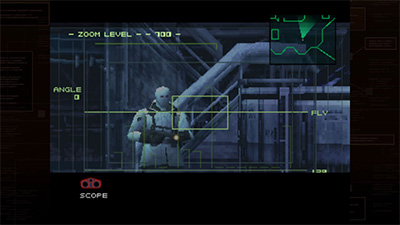
Figure 1: MGS1 Screenshot
Source: [2]
Figure 2: Persona 3 Portable Screenshot
Source: [3]

The relevance of this topic comes down to the different ways UX/UI principles can be reinforced within games, a huge medium that often gets ignored in academic contexts for being too playful.

Human-centered design bases itself on, among other things, existing patterns . These patterns can be hard to grasp in more complex interfaces such as games, where standardisation isn’t reinforced, or expected, in the same way it is with websites. Regulations don’t exist for games like they do for websites, because websites are an essential part of everyday life, but games aren’t. I still think that they are an important everyday medium that should be accessible to anyone and not shut anyone out.

It’s also relevant to examine the aesthetics, personality and style of these interfaces which is the more graphical angle to approaching game user interfaces. Knowing how to ride the line can be difficult. So, should games sacrifice functionality for style and vice versa?

Interaction design could help to deal with these issues by using existing knowledge, guidelines and research about usable interfaces and cross examining them with game interfaces. User experience design would help with making sure the interfaces are usable and clear, while user interface (and general graphic design) would help with making them aesthetic and cohesive.

The biggest challenge I have right now is to narrow down the scope of the project and see a clear path. Theres many things I want to touch upon, and I’m not sure yet how they will come together. Initially, I wanted to also examine the “responsive” angle of video game user interfaces, by exploring desktop, mobile and console games. While I’m still interested in this and the differences in developing interfaces for such varying screen and control schemes, I’m not sure where the focus would lie in the end.

Another challenge would be how to produce qualitative and quantitative data from my analysis efforts, and if I will actually find discrepancies and scientific value. The biggest challenge I will have in the future is deciding on an outcome/workpiece, as I’m not sure how to target this overall research into a design outcome.

In my next steps I would like to:

  • start actual research and try to build my literature collection on the topic
  • gain proper knowledge on the history of games, UI elements and their functions as well as accessibility issues
  • familiarise myself with the current state and find best practice examples
  • maybe even play games and note down experiences

My personal motivation lies in my immense enjoyment of games in the past year. They have improved my quality of life ten-fold, became a part of my routine and, for that reason, I would love to make games a good experience for everyone. I’ve been noticing that games have accessibility options such as subtitles available but then the subtitles are incredibly hard to read due to their size, font choices or contrast. This always bothered me and eventually I started thinking about how most people even play games when the interfaces don’t help but rather distract. I would love to combine my passion for usable user interfaces with games, which are full of interface elements.

Game UI Database – initially, building a database was also part of my probable outcome, but since I have come across this giant database of screenshots of various menus and game states for thousands of games

Bridging the Gap 

Image by congerdesign from Pixabay

#digital-literacy #trust #interactiondesign #inclusive-design #older-adults #usability #accessibility 

With the current development of technology, our world is becoming more digital every day. As a result, digital literacy, the ability to use, understand and critically engage with digital technologies, is becoming essential for full participation in society. 

However, a significant portion of older adults rarely or never use digital technology in their everyday lives. This is not simply a matter of disinterest, but often the result of exclusion: many digital products are not designed to meet their needs. Age-related changes such as declining vision, hearing, motor skills and cognitive flexibility make it more difficult to learn and adapt to new systems. When technology assumes prior experience or fast learning, it unintentionally leaves many older users behind. 

Yet, digital literacy offers clear benefits for older adults. It can strengthen social connections by allowing them to stay in touch with family and friends, thereby supporting mental well-being. Beyond that, digital engagement can foster independence, stimulate cognitive activity, help overcome physical barriers and even support a sense of identity and belonging in an increasingly digital world. 

Still, psychological barriers remain. Many older adults believe they are “too old” to learn new technologies or lack confidence in their ability to do so.  

Interestingly, digital exclusion is not only an issue of age. Anyone, regardless of generation, can experience it if they lack access, confidence, or understanding of digital systems. The topic, therefore, is not about age alone but about how design can make technology inclusive, trustworthy and empowering for all users. 

Research Focus

Main Questions

How can interaction design support older adults in learning digital skills and becoming more digitally literate?

How can design make digital systems understandable, transparent and trustworthy for older users?

SubQuestions

  • How do older adults approach learning?
  • How do older adults approach learning new digital technologies?
  • What barriers (cognitive, emotional, or physical) affect their ability to learn digital skills?
  • What teaching or onboarding methods are effective for older adults?
  • What competencies are essential for older adults to be digitally literate?
  • How does digital literacy affect older adults’ independence, social participation and well-being?

Relevance for Design Fields

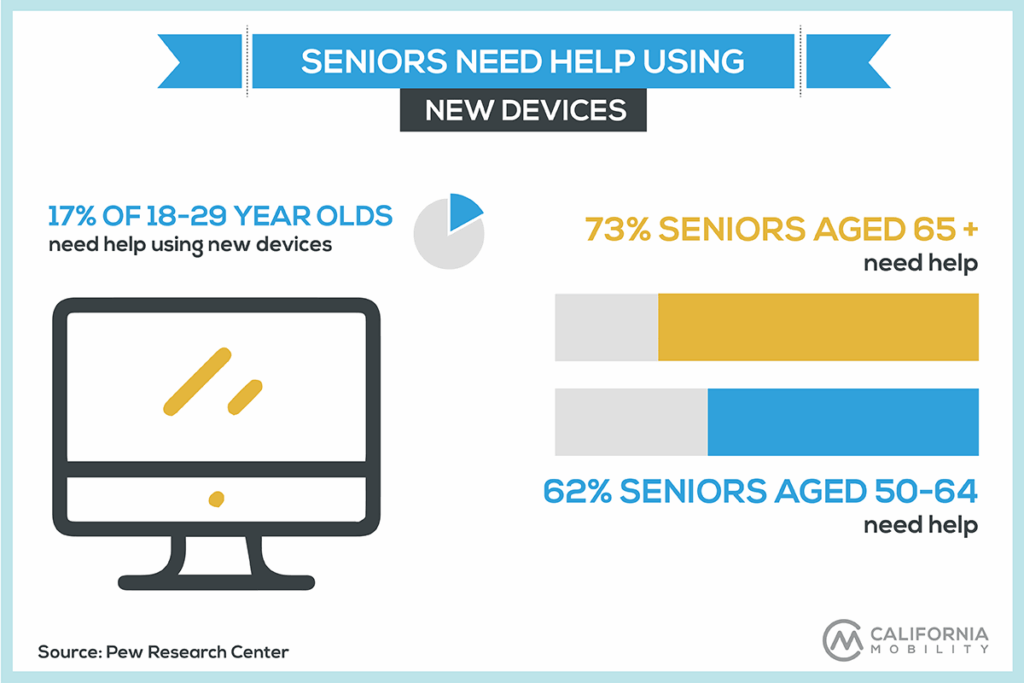
In many wealthy countries, people aged 65 and older are the fastest-growing demographic. With increasing life expectancy, older adults are living longer, staying active and continuing to pursue personal interests well into late life. They want to manage their finances, shop online, research topics and stay in touch with friends and family. However, age brings physical and cognitive changes. Hearing, vision and dexterity often decline, making interaction with technology more challenging. Most websites and apps are designed by and for younger users, which can make them inaccessible for older adults.

Digital literacy is a fundamental factor when designing interfaces for products and services. The level of digital competence within a user base guides decisions about interface complexity, navigation and functionality. For users with limited digital literacy such as older adults, interfaces need to be clear, predictable and forgiving, providing guidance and feedback that supports learning.

Possible Solutions

  • Integrating older people in the design process from the beginning.
  • Combining digital interactions with real life interactions.
  • Teaching basic digital literacy.

Challenges

Recruiting participants for my research may be challenging, especially ensuring a great range of experience levels. Motivating older adults to engage in learning and actively work on improving their digital literacy can also be difficult. Additionally, designing interfaces and interactions that effectively accommodate users with different levels of digital literacy is complicated.

Preview

In my next step I would like to already integrate some interviews with people. I want to grasp what the problem for them really is. I also plan to go deeper into the research of digital literacy for older people, read up on education and learning for the aging population.

Personal Motivation

As I was working on the topic of accessibility for my bachelor’s thesis, I became especially interested in how digital products can be made more inclusive. This is also when I found out that older adults often struggle to understand the functionality of websites, apps or other digital tools. I like to think that, one day, everyone has equal access to digital products, regardless of age or ability. I chose this topic because I believe good design should leave no one behind. Older adults should be able to use digital products independently, without relying on others and feel empowered while doing so. Being able to navigate technology confidently helps them participate more fully in social life, explore new interests and stay connected with friends and family. This is not just about convenience, it’s also about mental well-being, as social inclusion plays a key role in maintaining cognitive and emotional health. I’m also curious about how older adults’ social networks (family and friends) can play a role in spreading digital literacy. If friends, family, or community members can support each other, it could create a positive effect, helping even more people gain the skills and confidence to engage with technology. Ultimately, my focus is on designing solutions that empower, include and connect older adults in the digital world.

Another thing that really opened my eyes came from a talk at the WUC. I learned that many older adults would be happy to use technology if someone simply showed them how (guidance through interaction design). Surveys presented at the talk highlighted that 20% of older adults would use digital products more often if they were easier to use and 19% would engage more if they could see a clear benefit. These findings made me realize that, for many older users, the barrier is not disinterest, it’s accessibility, guidance and perceived value.

Index

Grabowski, S. (2024, October 2). A guide to interface design for older adults. Adchitects. https://adchitects.co/blog/guide-to-interface-design-for-older-adults

Kane, L. (2019, September 8). Usability for older adults: Challenges and changes. Nielsen Norman Group. https://www.nngroup.com/articles/usability-for-senior-citizens/

Landra, A. (2021). Impact of digital literacy on mobile user interfaces: A process for outlining UI design guidelines for people with low digital literacy (Master’s thesis, Politecnico di Milano, Scuola del Design). Politecnico di Milano.

Vercruyssen, A., Schirmer, W., Geerts, N., & Mortelmans, D. (2023). How “basic” is basic digital literacy for older adults? Insights from digital skills instructors. Frontiers in Education8–2023. doi:10.3389/feduc.2023.1231701

Weck, M., & Afanassieva, M. (2020). AGEING PEOPLE’S TRUST IN DIGITAL ASSISTIVE TECHNOLOGY: INITIAL TRUST FORMATION.