Author: anja.kljajic
I really like playing games.
D&R2 BIRGIT – The Human Element 5/6
For my final post I’d like to talk about the preparation for the guerrilla testing session, as well as the results.
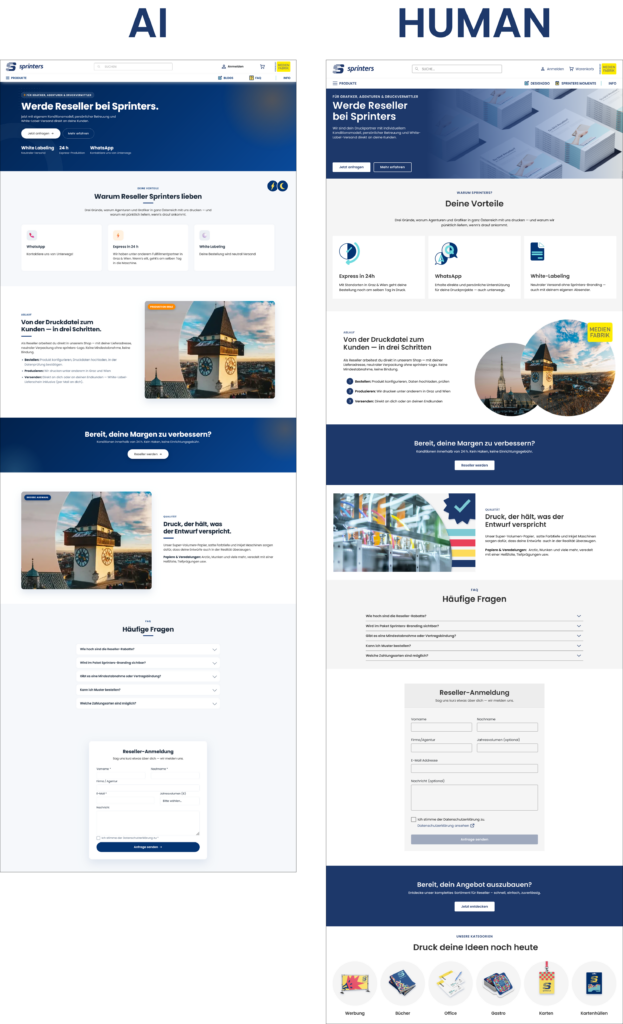
The prime target for this was a dedicated webpage for Resellers on the sprinters.at website. My story from the introductory post was actually based on this outcome. I was already working on some complex interfaces behind the scenes that would be utilised for this feature, such as a completely new address system for multiple recipients. However, when it comes to the informational webpage that serves as the sign-up hub for this feature, a completely AI-generated design was used without my knowledge.
Prototyping
Since my topic is all about how workflows change with the advent of AI, I decided to actually work with the situation instead of wallowing in it. The primary focus of this redesign was to simply use the existing design system and corporate design.
What was a new experience to me about this prototyping session was that I worked with the AI-generated design, keeping the overall structure and content as inspiration but rewording what I thought was necessary as well as keeping the design philosophy in mind. I still made everything from scratch, but used the design as heavy inspiration.
Guerrilla Testing
To test this, I took both the AI-generated and the human-redesigned version and presented them. The test happened with two participants and consisted of simple questions about brand context, visual consistency and a more personal “is this ready to ship?” question.
1. The Brand Context & Transition Feel
When going from the landing page to the reseller page, Participant 1 noted that the AI version felt “cramped and crowded” in the hero section, while the human-redesigned version felt more “clean and organised”. Participant 2 agreed with this, saying that the AI version had “no personality” and was “more business”, while the human one felt “more similar and personal”.
2. Visual Consistency
This question was aimed more at looking more closely at individual components and elements (such as icons, buttons and images). Jakob Nielsen fourth heuristic, Consistency and Standards, describes the need for recurring elements in a user interface like language, icons, symbolism to be consistent across different tasks [1]. This was the biggest blunder of the AI design.
When talking about the AI version, both participants pointed out that “the icons don’t go with it“, “the images don’t look intentional“ and that “spacing was different from the homepage and cramped to the border“. One participant also noticed that the “buttons are rounded, when they’re more square on the main page“. This participant also mentioned that the icons in the human version are “great, because the colours are the same as the brand“.
One thing Participant 1 also mentioned on the machine-translated version of the AI version, was that the texts “tell you to do it, but not what it is“, while Participant 2 said that the text feels generic.
3. Ready to ship?
When the participants were asked if they would consider this as ready to ship as part of the same product (if they were the UX/UI designer responsible), they gave dividing responses. Participant 1 gave a hard “NO!”, pointing to the inconsistent spacing and icons, and added: “Why put something bad online when could can give me some time to improve it?”
Participant 2 gave a more nuanced answer, stating that “if the priority is to ship, then yes, its functional and still intuitive, but not the same brand”. They said they would “feel bad as a designer”, because the first impact of the brand is the most important.
Conclusion/Reflection
In conclusion, I gathered some data on what stands out to designers from two other designers. I particularly found the comments about the “texts telling you what to do, but not what it is” interesting, and for further testing I’m definitely going to take care to provide English versions of my prototype as well so this could be compared. I worked on the Reseller feature for weeks, so I had to understand it myself by asking multiple people within the company. AI didn’t have this simple human advantage, and thus the end result was what it was.
However, this isn’t about “AI being bad”, and I’d like to wrap up my research journey for this semester with this quote from IDEO (the design agency which developed design thinking):
How many things were meant to be great big breakthroughs, but they just don’t work because they don’t take into account what humans want from the technology? […] AI is far too important to leave just to the technologists—human-centered design is a crucial part of it. [2]
References
- [1] Interaction Design Foundation, “What Is Heuristic Evaluation?,” Interaction Design Foundation. [Online]. Available: https://ixdf.org/literature/topics/heuristic-evaluation. [Accessed: Jul. 4, 2026].
- [2] D. Kelley and D. Robson, “In the Age of AI, Human-Centered Design Is More Crucial Than Ever,” IDEO, Feb. 20, 2025. [Online]. Available: https://www.ideo.com/journal/in-the-age-of-ai-human-centered-design-is-more-crucial-than-ever. [Accessed: Jul. 3, 2026].
D&R2 BIRGIT – The Human Element 4/6
S. E. Thomas [1] states that “interviews with experienced people are useful in UX research because they provide nuanced insight, reveal blind spots, and reduce assumptions when making design decisions.” Since I didn’t want to be in a vacuum I decided to do a short interview with a fellow UX/UI designer who is also currently studying Interaction Design while working in an AI startup.
Interviewee
The interviewee is a 28-year-old UX/UI designer working in a small startup here in Graz. Their role includes the full process from early research and structuring user flows to final UI design and prototyping for development handoff. This already shows how blurred the boundaries of UX roles are, where “designing screens” is only a small part of the expected responsibilities.
Do you use AI in your workflow?
When talking about AI in their workflow, they described it as something that increases productivity rather than replacing their actual design thinking. They use AI mostly for UX writing and for exploring variations when they feel less confident with wording. In that situation AI becomes a kind of assistant, but not something they would rely on for final decisions. They also mentioned that AI-generated interfaces (like from Figma Make) are “not to great” at the moment and therefore not ready to immediately go online.
From this answer it seemed that the final judgment still lies with the designer.
What is the future of UX/UI design?
When confronted with their feelings about the future of UX/UI design, the interview said that real creativity may actually become more valuable and that designers will still be needed for high quality and original interfaces but AI might take over more standardised or repetitive design tasks and typical products. This makes it clear that there’s a tension between efficiency and originality as well.
So when talking about the role of designers she believes that we won’t become “approval machines” or get replaced. Rather than becoming obsolete, the role seems to be shifting toward refining, filtering or curating AI-generated interfaces.
Designers vs Developers using AI
One of the more interesting points came up when comparing designers and developers using AI tools. The interviewee said that it’s okay for developers to use AI for user interface design but only if they are also trained in it. One can very easily spot when a design is made by a developer and it’s very obvious. It’s always functional but not always usable. This emphasised how usability isn’t the same as functionality and that disconnect comes from lack of knowledge. However, this goes both ways, as they mentioned that understanding both the tech and design side is a big advantage for designers.
They also mentioned that they haven’t had an experience like mine (with AI being used to replace her), because “the developers want to keep their jobs too”.
Conclusion/Reflection
The interview made the main tension in my research feel more tangible. AI can definitely speed up parts of the design process, but it doesn’t replace the kind of contextual thinking that human-centered design is built upon. At the same time, it didn’t feel like a simple story of replacement. It felt more like things are still changing and designers are figuring out how to work with these tools in practice, especially within a team. I found the “we want to keep our jobs” comment really interesting as well, because it also points to a sort of on-purpose reduced usage for the sake of job security.
References
- [1] S. E. Thomas, “Expert Interviews,” The Practical Guide to Experience Design. [Online]. Available: https://www.practical.guide/experiencedesign/expertinterviews. [Accessed: Jul. 3, 2026].
D&R2 BIRGIT – The Human Element 3/6
For this post I wanted to sit down and do some good old fashioned literature and resource research. I want to understand what I’m talking about, start with building a bibliography and also research into resources I hadn’t thought of before as a junior designer because I didn’t have the time to sit down and research about my profession in such a way. I find research fun!
AI in the workplace
The World Economic Forum reports that UX/UI designers are among the fastest-growing professions globally, with a 45% projected growth by 2030, while Graphic Designers are on the decline . When it comes to generative AI, they state that it “enables users to interact with it as though they were conversing with a human, considerably reducing barriers to usage and the need for specialized technical knowledge”. It also states however, that “without appropriate decision-making frameworks, economic incentive structures and, possibly, government regulations, there remains a risk that technological development will be focused on replacing human work, which could increase inequality and unemployment.” [1].
What I took out of this is that AI isn’t something I can just ignore, especially as someone who works in close proximity of developers. But it also validates my feelings of uncertainty, especially with the lack of government regulations. I’m also conflicted about the ethics of it all as well considering the replacing human work part. This isn’t something I’m alone in.
I found another paper on this topic where the authors state that while AI helps new employees, when it comes to high-skill employees, they tend to see small gains in speed and small declines in quality [2]. This all the more proves that for good quality results, there has to be extra care taken when working with it.
DesignOps + Resources
As I’ve already worked for a while and am currently in my masters, I found it important to take my workflow more seriously and evolve. After some research into streamlined workflows I came across the term Design Ops (short for Design Operations). Kate Kaplan of the Nielsen Norman Group describes it as “the orchestration and optimization of people, processes, and craft in order to amplify design’s value and impact at scale.” [3].
The way I understood this is that it’s the “behind the scenes” teamwork organisation that helps designers do their best work. This means organising files, design systems and taking care of handovers between designers and developers. I only recently noticed just how messy and hard to navigate my file is now to developers, because it grew in size exponentially.
C. R. A. Nisslmüller provided this useful checklist [4] in his article about design system mastery which goes into the organisational value of Design Ops:
- Are all scalable values defined as variables (no hardcoded values left)?
- Are variable names systematic, semantic, and globally unique?
- Are all variables type-correct (Number, Color, String, etc.)?
- Is there a String variant for every variable that needs direct CSS or output?
- Are composite/array variables grouped and documented?
- Is accessibility covered (contrast, motion, focus, scaling)?
- Are tokens versioned and audit logs maintained?
- Is there a governance structure and regular review cycle?
- Are APIs/automation in place for handoff and code sync?
- Is AI/automation used for linting, doc generation, and compliance?
I also researched for Figma resources for easier implementation. I found this workbook on Figma’s community page which I’d like to try implementing at an appropriate time: https://www.figma.com/community/file/1246508925181507765
I also found this plug-in which automates this process for anyone else who would like to try: https://www.figma.com/community/plugin/1603703295257406223/designops
References
- [1] World Economic Forum, The Future of Jobs Report 2025. Geneva, Switzerland: World Economic Forum, Jan. 2025. [Online]. Available: https://reports.weforum.org/docs/WEF_Future_of_Jobs_Report_2025.pdf. [Accessed: Jul. 3, 2026].
- [2] E. Brynjolfsson, D. Li, and L. R. Raymond, “Generative AI at Work,” arXiv preprint, Apr. 2023. [Online]. Available: https://arxiv.org/abs/2304.11771
- [3] K. Kaplan, “Design Operations 101,” Nielsen Norman Group, Jul. 21, 2019. [Online]. Available: https://www.nngroup.com/articles/design-operations-101/. [Accessed: Jul. 3, 2026].
- [4] C. R. A. Nisslmüller, “Design System Mastery with Figma Variables: The 2025/2026 Best-Practice Playbook,” Design Systems Collective, 2025. [Online]. Available: https://www.designsystemscollective.com/design-system-mastery-with-figma-variables-the-2025-2026-best-practice-playbook-da0500ca0e66. [Accessed: Jul. 3, 2026].
D&R2 BIRGIT – The Human Element: AI and the Evolving UX/UI Designer 2/6
I’d like to take this opportunity to do a reintroduction into the direction I’d like to take my masters topic after much deliberation. My bachelors topic had a lot to do with how it actually is to do a job as an UX/UI designer, since all the confusion around our profession was overwhelming even at the time.
Recently, something happened at my workplace where I had to take a step back ask myself that question all over again. The lead programmer fed my Figma design file into Claude Design, without asking me or even consulting with me. The design that came out wasn’t even bad! To be frank, I was quite shocked and I asked myself the question: “If AI can generate UI instantly, what even is my job anymore?
The Human Element: AI and the Evolving UX/UI Designer
The relationship between generative AI and product design is moving and changing constantly at a scary pace. Teams are adopting these tools fast in the name of efficiency and results. While these technologies really do make a difference in time spent, they often don’t take corporate design consistency and human experience into account. This thesis would explore how this would change the responsibilities, workflows and attitudes of the human designer within a team.
Research questions
How can AI-generated design outputs be responsibly reviewed and refined within a professional UX/UI workflow?
How can generative AI be integrated into professional UX/UI design workflows while maintaining human-centered design principles?
What does a healthy co-creation workflow look like between a designer, a developer and an AI agent?
How can UX/UI designers maintain a human-centered approach in AI-assisted design workflows?
- How do we navigate the ethics of feeding proprietary design assets into models for quick corporate efficiency?
Design Relevance
This topic is very relevant to the design field, as it’s becoming a core part of most workplaces. In workplaces where UX efforts aren’t supported already, UI designers have essentially switched gears from tinkering in Figma and looking at every pixel for perfection, to kind of auditors or reviewers of AI-generated designs. This change is new and deserves addressing in the academic field, where we were taught that manual work that is now seems to be becoming obsolete (or is it?).
This isn’t just my own personal crisis, it’s an important moment for the entire design field. If we let non-designers or developers blindly push out pure AI outputs just because it’s faster, we’re gonna to end up with an internet full of broken, generic and not human-centered websites and interfaces. I actually really like the internet so I’d like to research and navigate this newfound blunder somehow.
Challenges
I see a lot of challenges with this topic, but the most obvious one to me is navigating questions of ethics. What’s ethical within design and workplaces, does it matter? Those theoretical or philosophical questions pique my interest, but are hard to visualise scientifically. Another challenge is finding a fair perspective myself with developers and business owners. Developers love AI because it helps with tedious manual coding tasks and bosses love it because of the efficiency and features going online faster and faster. I want to make sure that my point is helpful to future designers, because I do believe we’re still needed and not replaceable.
Upcoming Research Steps
My upcoming research steps are as follows:
- guerrilla testing and/or interviews with my peers to gather primary data
- keeping an “AI interaction diary“, where I write down my experiences with AI in the workplace and if they help me save or lose time in different contexts
- researching papers and facts to help me out when writing the thesis in the future by building a bibliography already
- developing the idea of the “governance framework” or something which acts as my work piece in the end
Personal Motivation
My personal motivation was briefly touched upon in the first two paragraphs of this blog and it’s all about my reality as a designer shifting. This topic would also compliment my bachelor’s thesis nicely, given it was all about the hard skills of from-scratch, manual UI design. It was focused on UI design and making a pretty prototype, but totally missed out on the UX part thanks to workplace constrains. This time I want to use my workplace experience and do it properly (with UX methods too) while ensuring that the human empathy doesn’t become “automated away”.
Relevant Institutions
The Interaction Design Foundation: This academic website is something I’ve used before, but now has a big “Get the skills that employers want most: Combine AI skills with timeless design expertise that AI can’t replace.” tagline.
D&R2 SED D3 – Pitch
Imagine you’ve just bought the biggest game of the year. You sit down, you turn it on, and realize you actually can’t read anything that’s on the screen. The text is too small, the colors blend together, and no matter how much you squint, the game keeps on being a blur. For millions of players, this isn’t just a “What if?” scenario, it’s reality. Right now, most game UIs are “one-size fits all”. Designers want to help, but they’re overwhelmed by technical rules or tight deadlines. This results in cluttered UI that’s a hassle for everyone.
My solution is an interactive design toolkit that acts as a digital sandbox for game UI designers. They can drag and drop elements that are already optimized for accessibility. And it’s not just sight, it also provides a framework for haptics and audio cues. What makes it special is that it turns accessibility from a complex chore into a standard with a creative workflow. It makes games more inclusive, but also really helps designers.
I’m doing this is because games have personally improved my quality of life immensely and I’m very passionate about them and about UI design. I want to make sure that people all around the world, regardless of their physical abilities, can have the opportunity to enjoy games as much as I do and be immersed in these worlds as much as I am.
D&R2 SED D2 – Business Idea 2/2
What Problem are you solving?
Most game interfaces are static and cluttered, creating massive legibility and navigation barriers for visually impaired players. Designers often lack the time or specialized tools to implement complex WCAG-like standards and multi-sensory feedback.
Why should we care about it?
Accessibility isn’t just a “feature”, it is a fundamental right to play. When games like Black Myth: Wukong launch with unreadable text, it excludes millions of players and hurts the game’s reputation and reach.
What is the solution? How does it work?
An interactive design engine that acts as a “Canva for Game UI.” It allows designers to drag-and-drop modular HUD elements and automatically checks them against accessibility rules while providing a library of haptic and audio logic.
Who is the target audience/customer?
The target audience is the visually impaired gaming community who needs better tools to play. The paying customer is the UX/UI Designer and Game Studio looking to streamline their workflow and meet professional standards.
What is going to happen? (Change & Impact)
We will move from a “one-size-fits-all” UI to a Modular Era where games are playable by everyone from day one. This shift reduces “design guesswork” for studios and replaces frustration with independence and mastery for players.
Bonus: How can this make money?
The platform will operate on a Freemium SaaS model, offering a free basic toolkit for students and indies, while charging Enterprise Subscription fees to large studios for advanced simulation tools and custom haptic libraries.
D&R2 SED D2 – Customer Profiles 1/2
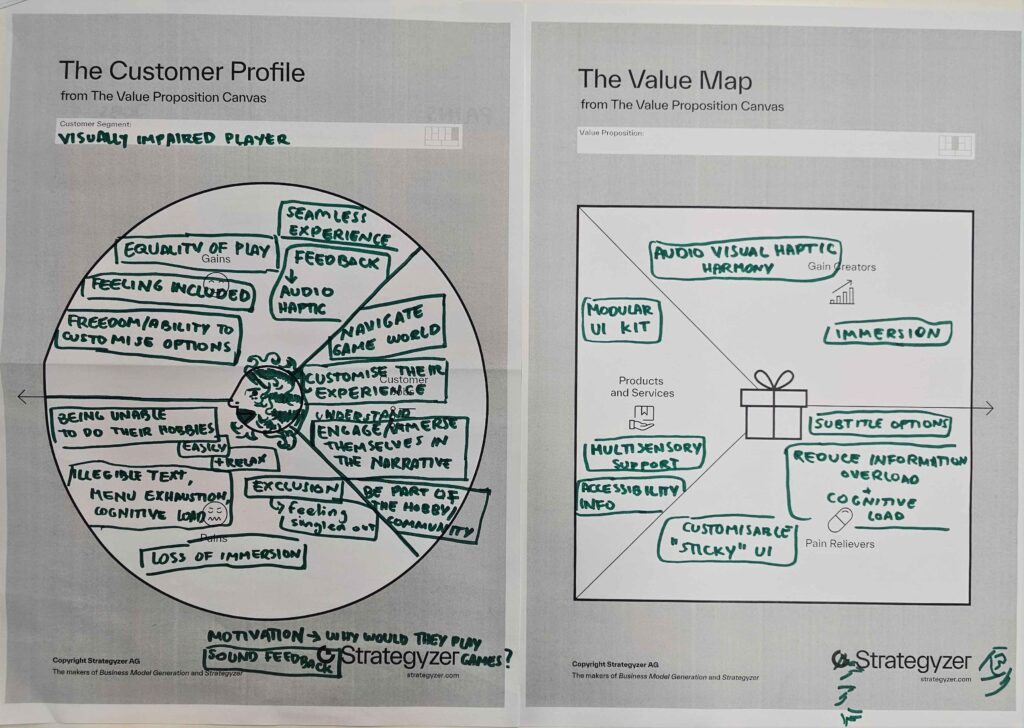
Customer Profile 1: Visually Impaired Player
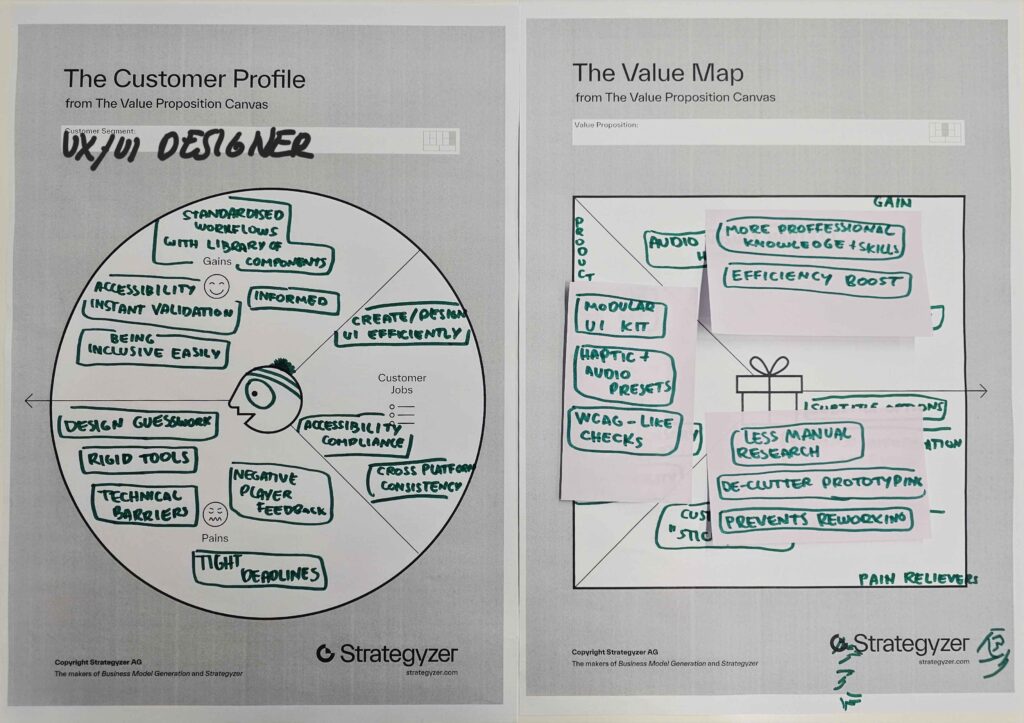
Customer Profile 2: UX/UI Designer
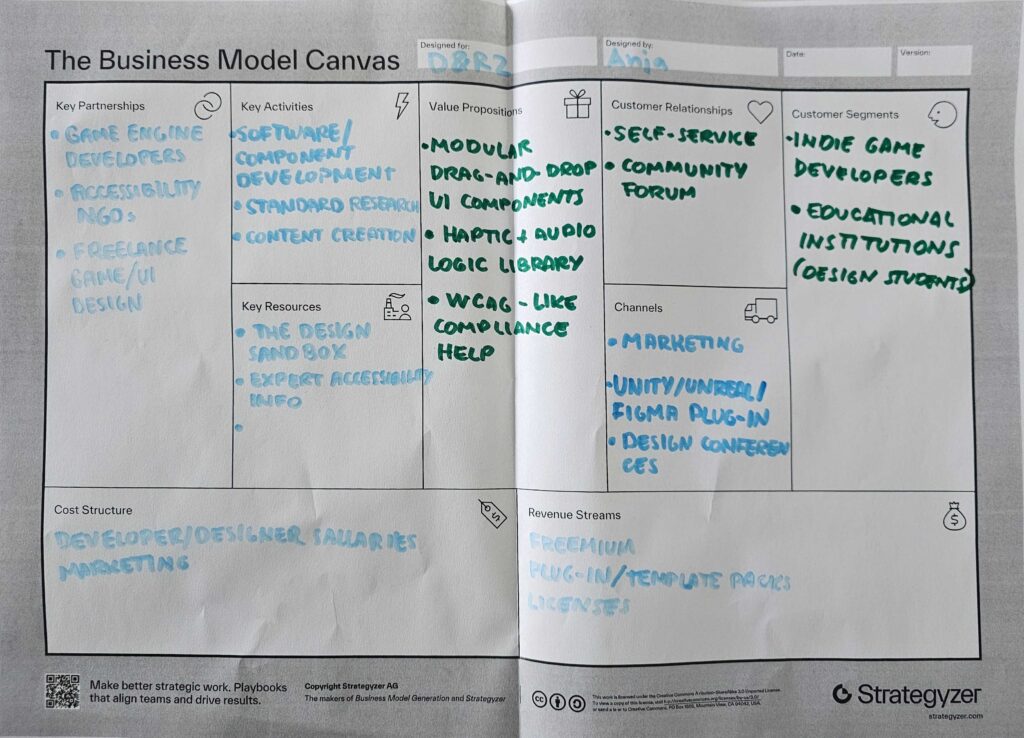
Business Model Canvas:
D&R2 SED – Inclusion & Accessibility 3/3

On a functional and sensory level, creating inclusion requires identifying exactly where the barriers are. For a player to be truly included, the design must look beyond just visuals and incorporate haptic feedback/vibration and audio cues to support those with different sensory abilities. As seen in the exploration of colorblindness, a major barrier is often a reliance on a single channel of information (like color) to communicate vital game data.
Identifying these barriers makes it evident that participation in a game world is shaped by how much information is “translated” across different senses. The “Who and How” of inclusion depends on moving away from a “one-size-fits-all” visual approach and instead providing multi-sensory tools—like vibration and sound—that allow players to navigate the game regardless of their visual or physical constraints.
D&R2 SED – Change and Impact 2/3
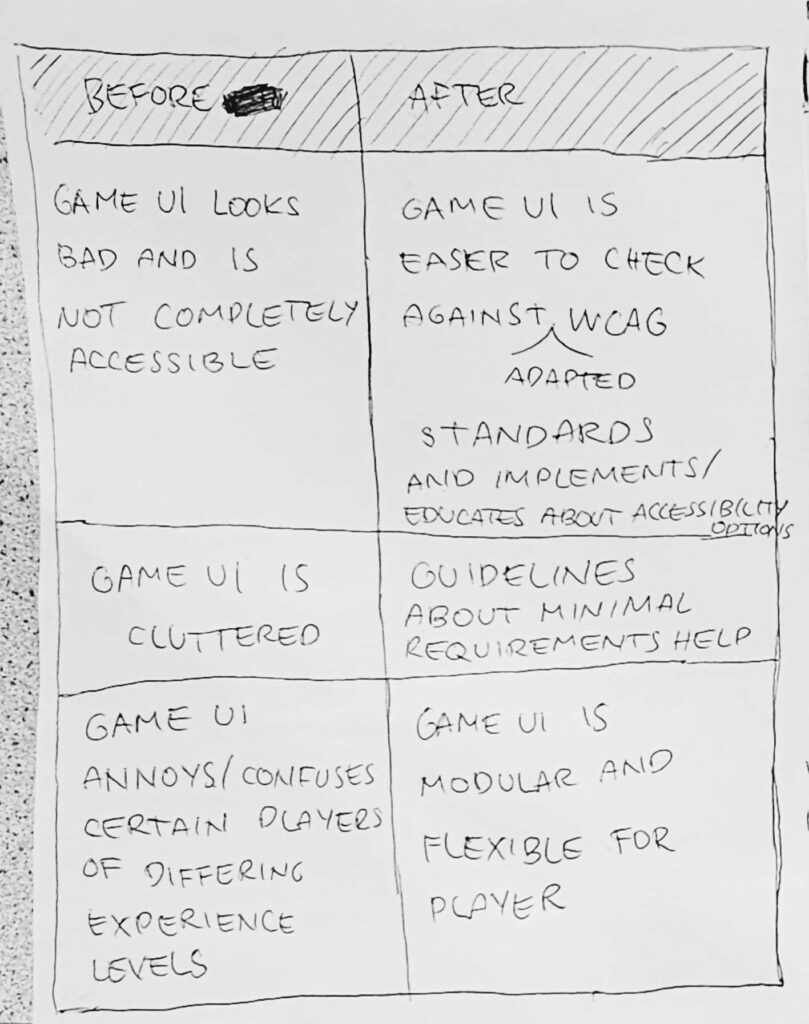
In the “before” scenario, Game UI is often static, cluttered, and not completely accessible. Design decisions are frequently made without a standardized framework, resulting in interfaces that annoy or confuse players of differing experience levels. These “standard” UIs look “bad” in the sense that they fail to meet the functional needs of everyone, leading to a disconnected and frustrating user experience.
In contrast, the “after” scenario highlights a shift toward a more scientific and flexible approach. By adapting and checking designs against WCAG (Web Content Accessibility Guidelines), the UI becomes a tool for education as well as interaction. The impact is a “Modular and Flexible” UI that uses minimal requirement guidelines to reduce clutter. This shift ensures the player is no longer fighting the interface but is instead empowered by a system that adapts to their specific level of experience and physical needs.