
#digital-literacy #trust #interactiondesign #inclusive-design #older-adults #usability #accessibility
With the current development of technology, our world is becoming more digital every day. As a result, digital literacy, the ability to use, understand and critically engage with digital technologies, is becoming essential for full participation in society.
However, a significant portion of older adults rarely or never use digital technology in their everyday lives. This is not simply a matter of disinterest, but often the result of exclusion: many digital products are not designed to meet their needs. Age-related changes such as declining vision, hearing, motor skills and cognitive flexibility make it more difficult to learn and adapt to new systems. When technology assumes prior experience or fast learning, it unintentionally leaves many older users behind.
Yet, digital literacy offers clear benefits for older adults. It can strengthen social connections by allowing them to stay in touch with family and friends, thereby supporting mental well-being. Beyond that, digital engagement can foster independence, stimulate cognitive activity, help overcome physical barriers and even support a sense of identity and belonging in an increasingly digital world.
Still, psychological barriers remain. Many older adults believe they are “too old” to learn new technologies or lack confidence in their ability to do so.
Interestingly, digital exclusion is not only an issue of age. Anyone, regardless of generation, can experience it if they lack access, confidence, or understanding of digital systems. The topic, therefore, is not about age alone but about how design can make technology inclusive, trustworthy and empowering for all users.
Research Focus
Main Questions
How can interaction design support older adults in learning digital skills and becoming more digitally literate?
How can design make digital systems understandable, transparent and trustworthy for older users?
SubQuestions
- How do older adults approach learning?
- How do older adults approach learning new digital technologies?
- What barriers (cognitive, emotional, or physical) affect their ability to learn digital skills?
- What teaching or onboarding methods are effective for older adults?
- What competencies are essential for older adults to be digitally literate?
- How does digital literacy affect older adults’ independence, social participation and well-being?
Examples and Links
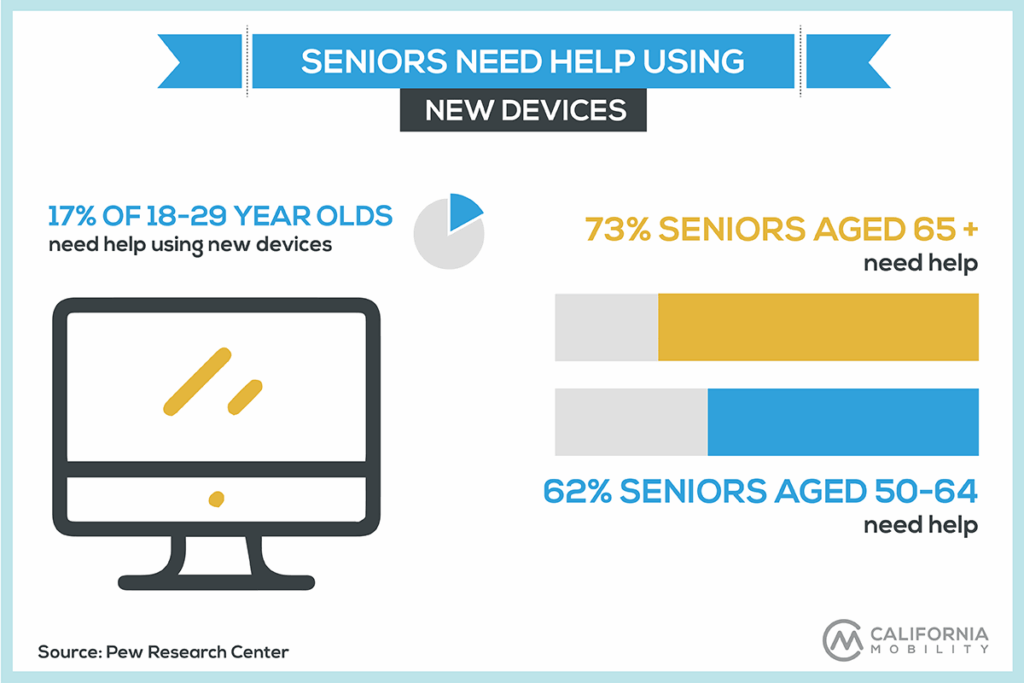

- https://pmc.ncbi.nlm.nih.gov/articles/PMC10150999
- https://abilitynet.org.uk/news-blogs/survey-reveals-what-older-people-want-do-tech
- https://adchitects.co/blog/guide-to-interface-design-for-older-adults
- https://www.frontiersin.org/journals/education/articles/10.3389/feduc.2023.1231701/full
- https://www.pewresearch.org/internet/2014/04/03/older-adults-and-technology-use/
Relevance for Design Fields
In many wealthy countries, people aged 65 and older are the fastest-growing demographic. With increasing life expectancy, older adults are living longer, staying active and continuing to pursue personal interests well into late life. They want to manage their finances, shop online, research topics and stay in touch with friends and family. However, age brings physical and cognitive changes. Hearing, vision and dexterity often decline, making interaction with technology more challenging. Most websites and apps are designed by and for younger users, which can make them inaccessible for older adults.
Digital literacy is a fundamental factor when designing interfaces for products and services. The level of digital competence within a user base guides decisions about interface complexity, navigation and functionality. For users with limited digital literacy such as older adults, interfaces need to be clear, predictable and forgiving, providing guidance and feedback that supports learning.
Possible Solutions
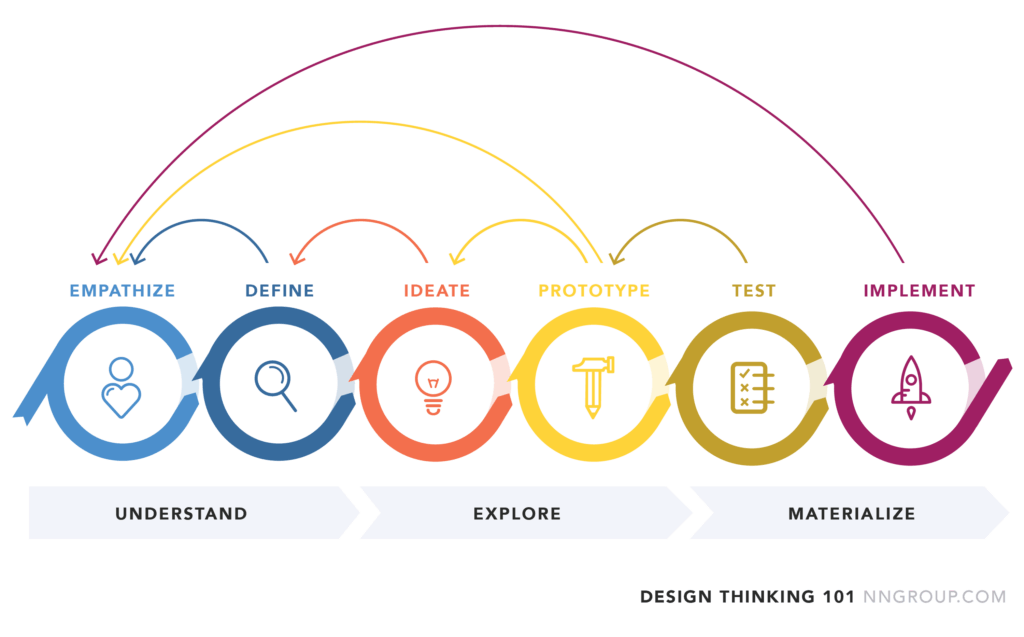
- Integrating older people in the design process from the beginning.
- Combining digital interactions with real life interactions.
- Teaching basic digital literacy.
Challenges
Recruiting participants for my research may be challenging, especially ensuring a great range of experience levels. Motivating older adults to engage in learning and actively work on improving their digital literacy can also be difficult. Additionally, designing interfaces and interactions that effectively accommodate users with different levels of digital literacy is complicated.
Preview
In my next step I would like to already integrate some interviews with people. I want to grasp what the problem for them really is. I also plan to go deeper into the research of digital literacy for older people, read up on education and learning for the aging population.
Personal Motivation
As I was working on the topic of accessibility for my bachelor’s thesis, I became especially interested in how digital products can be made more inclusive. This is also when I found out that older adults often struggle to understand the functionality of websites, apps or other digital tools. I like to think that, one day, everyone has equal access to digital products, regardless of age or ability. I chose this topic because I believe good design should leave no one behind. Older adults should be able to use digital products independently, without relying on others and feel empowered while doing so. Being able to navigate technology confidently helps them participate more fully in social life, explore new interests and stay connected with friends and family. This is not just about convenience, it’s also about mental well-being, as social inclusion plays a key role in maintaining cognitive and emotional health. I’m also curious about how older adults’ social networks (family and friends) can play a role in spreading digital literacy. If friends, family, or community members can support each other, it could create a positive effect, helping even more people gain the skills and confidence to engage with technology. Ultimately, my focus is on designing solutions that empower, include and connect older adults in the digital world.
Another thing that really opened my eyes came from a talk at the WUC. I learned that many older adults would be happy to use technology if someone simply showed them how (guidance through interaction design). Surveys presented at the talk highlighted that 20% of older adults would use digital products more often if they were easier to use and 19% would engage more if they could see a clear benefit. These findings made me realize that, for many older users, the barrier is not disinterest, it’s accessibility, guidance and perceived value.
Index
Grabowski, S. (2024, October 2). A guide to interface design for older adults. Adchitects. https://adchitects.co/blog/guide-to-interface-design-for-older-adults
Kane, L. (2019, September 8). Usability for older adults: Challenges and changes. Nielsen Norman Group. https://www.nngroup.com/articles/usability-for-senior-citizens/
Landra, A. (2021). Impact of digital literacy on mobile user interfaces: A process for outlining UI design guidelines for people with low digital literacy (Master’s thesis, Politecnico di Milano, Scuola del Design). Politecnico di Milano.
Vercruyssen, A., Schirmer, W., Geerts, N., & Mortelmans, D. (2023). How “basic” is basic digital literacy for older adults? Insights from digital skills instructors. Frontiers in Education, 8–2023. doi:10.3389/feduc.2023.1231701
Weck, M., & Afanassieva, M. (2020). AGEING PEOPLE’S TRUST IN DIGITAL ASSISTIVE TECHNOLOGY: INITIAL TRUST FORMATION.
