User Interfaces in Video Games – The quest for genre-appropriate and usable game UI
So far I’ve introduced some history, UI elements, their visual representations and common game genres. Now I’d like to take a look at the “Should games sacrifice functionality for style and vice versa? Do accessibility options affect the art being made?” question that popped up in my introductory blog post.
Aesthetic vs Function
One of the most difficult parts of game UI design is the “battle” between aesthetics and functionality. In my gaming journey so far, I’ve seen both sides of the coin: games that are beautiful but hard to navigate, and games that are perfectly functional but look like sterile, uninspired and out of place.
“Form follows function” is a famous phrase coined by Louis Sullivan which has been applied to many different types of design that deals with this topic [1]. This means that the way something looks is influenced by what it’s supposed to do. The function of game UI is to communicate states, so it should adapt itself to what users actually need to function within the game. The common questions are “Where am I?”, “How much health do I have?” and “Am I winning?”. These are answered with mini-maps, health bars and scores, all of which have evolved through necessity to communicate status.
So can style actually improve function? Why do I enjoy stylish UI in games if minimalist UI also does the job? Thinking about this led me to the Aesthetic-Usability Effect, which is defined in the book Universal Principles of Design. The Aesthetic-Usability Effect is described as “a phenomenon in which people perceive more aesthetic designs as easier to use than less-aesthetic designs – whether they are or not.” [2] This means that if a player loves the look of a menu, they’re more inclined to keep using it, and thus learn how to use it.
A personal example I’d like to showcase is the difference between the Metal Gear Solid: Peace Walker (2011) and Metal Gear Solid V (2015) staff management menus. In Metal Gear Solid: Peace Walker I learned to navigate the menu thanks to the more simplified information and “military file” aesthetic which fit the game world, being set in the 70s.
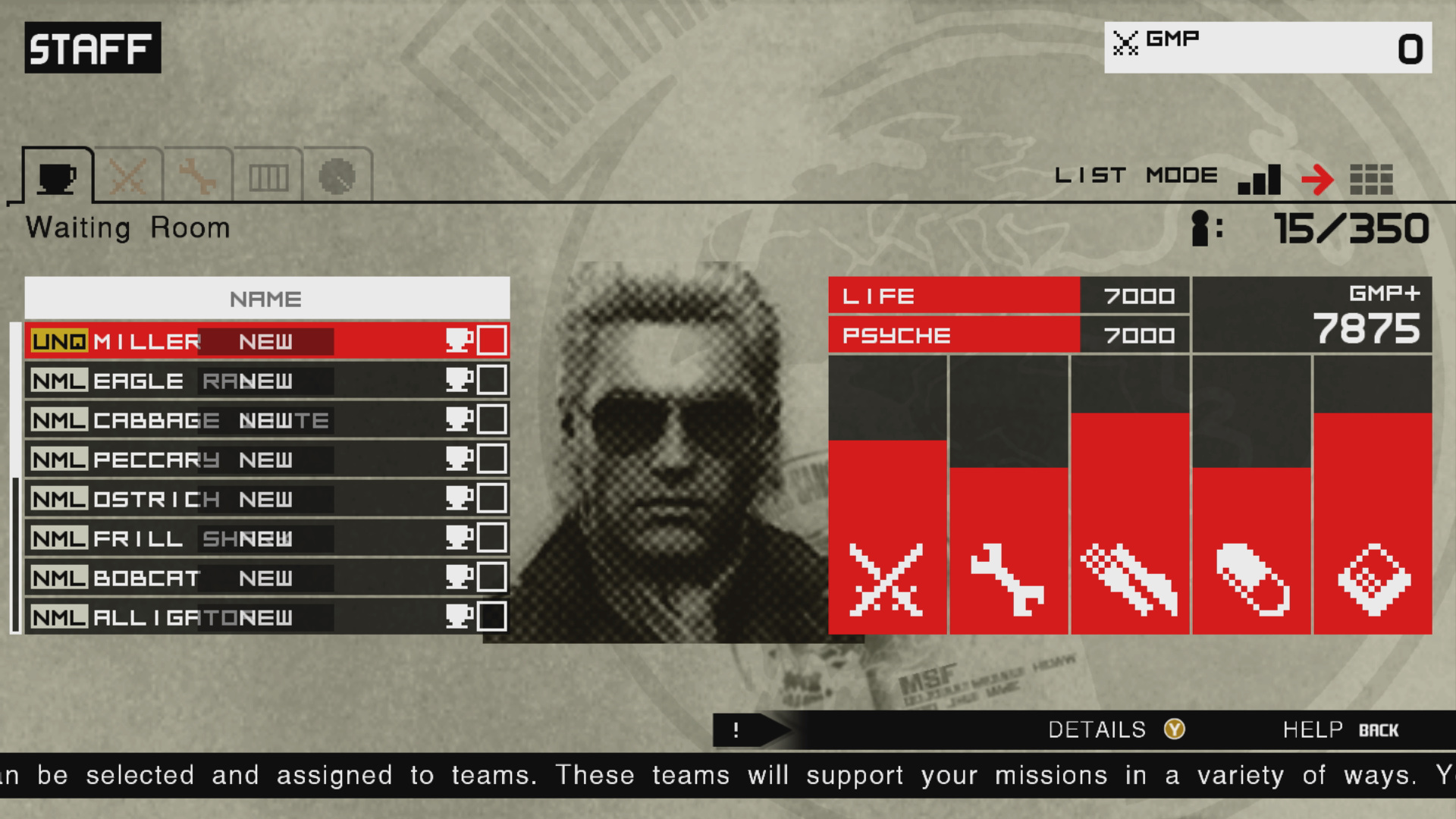
Metal Gear Solid: Peace Walker HD
Source: [3]

Source: [4]
Metal Gear Solid V, which was released 4 years later, features a virtually identical menu, but goes for an angled look which is supposed to be a hologram from the device the character is holding in his hand. This takes away real estate for the sake of diegetic immersion. This, however, clutters the UI with more information displayed. I would have been overwhelmed with this menu had I not already “trained” myself with the previous game. I knew which information to ignore and what the actual function of the menu is. The aesthetic is also lost within this blue, minimalist, hologram look which clashes with the fact the game is set in the 80s.
This leads me to believe that style shouldn’t be sacrificed for function or vice versa.
A visual style is first determined for the game experience overall. Then, the information is made to come across in the most immediate and understandable way. Finally, both form a framework for the user interface aesthetics. The visuals shouldn’t drive the function, but they can certainly bend and influence it. – Stieg Hedlund [5]
In my next blog post, I want to dive deeper into the usability aspect of this debate by exploring the topic of Accessibility.
References
- [1] L. H. Sullivan, The Tall Office Building Artistically Considered. Philadelphia, PA, USA: J. B. Lippincott, 1896.
- [2] W. Lidwell, K. Holden, and J. Butler, Universal Principles of Design: A Cross-Disciplinary Reference. Gloucester, MA, USA: Rockport Publishers, 2003.
- [3] Game UI Database, “Metal Gear Solid: Peace Walker HD,” Game UI Database. Accessed: Feb. 06, 2026. [Online.] Available: https://www.gameuidatabase.com/gameData.php?id=530
- [4] Game UI Database, “Metal Gear Solid V: The Phantom Pain,” Game UI Database. Accessed: Feb. 06, 2026. [Online.] Available: https://www.gameuidatabase.com/gameData.php?id=98
- [5] K. Saunders and J. Novak, Game Development Essentials: Game Interface Design. Clifton Park, NY, USA: Thomson Delmar Learning, 2007.
