Building performant 3D experiences on the web requires understanding how browsers, GPUs, and JavaScript interact. Even with optimized models and textures, poor draw call management causes stuttering.
What is a Draw Dall and why is it Important?
A draw call is the communication between the CPU and the GPU, more like single commands from the CPU saying “make this” or “draw this”. Each visible mesh generates one draw call. When issuing a draw call, the CPU prepares render state, binding vertex buffers, setting shaders, configuring textures, and managing memory. GPUs themselves are extremely efficient, rendering the triangles that make up models almost in an instant, but CPUs often cannot handle that much information, especially in such short time. Every draw call between creates a communication overhead, basically a cost required to make the communication between CPU and GPU happen. And if there are too many draw calls, the CPU is overwhelmed by the amount of data while the GPU sits there, doing nothing and waiting for instructions from the CPU.
This is why the resolution of a model does not matter as much as draw call count. A mesh with 200.000 triangles could render smoothly while 200 small meshes with 1.000 triangles each could overload the CPU leading to stuttering due to the overhead. Three.js projects usually maintain 60fps with around 100 draw calls per frame and at 500+ calls, even powerful hardware starts to struggle.
By focusing on draw calls, web developers can fix many performance issues that are not obvious from looking at mesh density or material count alone. Keeping the number of calls low through these steps ensures that the CPU can keep up with the GPU, resulting in smoother interaction and a more responsive 3D experience.
How to Reduce Draw Calls?
Merging
One of the most effective optimization methods is to merge static geometry. The objects in the environments that do not need to move, for example pieces of a building, such as floor tiles, wall segments, furniture can often be combined into a single larger mesh. This simple step turns many small draw calls into one large one. Even though the total amount of information has not changed, the scene will run much smoother as the communication overhead only needs to happen once for the combined mesh instead of once for each of the individual pieces.
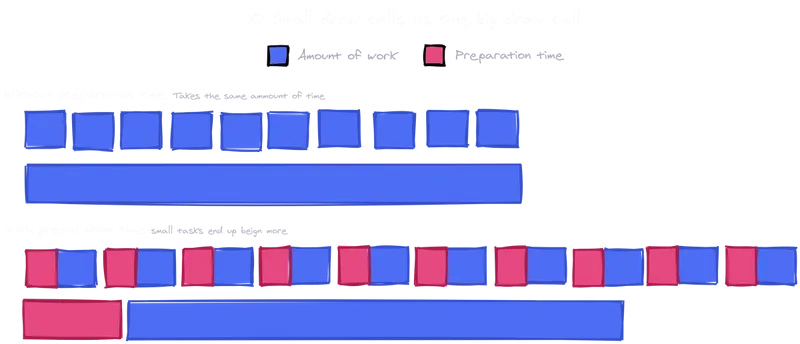
The only drawback of this method is, that these parts need to be fully static, so it is not a good method for pieces that need to move individually or that can be interacted with. After merging only the whole merged mesh can be transformed, not the smaller parts of it.
Instanced Mesh
Another powerful tool is instancing. If the scene features 200 small meshes for example that are identical, these meshes can be instanced instead of duplicated. This allows the CPU to only send a single draw call, with the GPU handling the positioning of the object afterwards. This technique is ideal for repeated objects like trees, chairs, street lamps, bolts, and many more that share the same mesh and material but appear in different positions and rotations. A real estate visualization demo reduced draw calls from 9000 to 300 by converting chairs and props to instances, improving performance from 20 to 60 frames per second.
Batched Mesh
When focusing on draw calls, not only meshes are important, materials and textures are too. Every time the renderer needs to switch materials, it disrupts batching and usually triggers a new draw call. Sharing materials across meshes and using texture atlases where possible can help keep the draw calls lower. For example, several props that could be represented with a single atlas can be drawn together using the same material, with the UVs selecting the appropriate part of the texture for each object. This reduces both material state changes and draw call counts, especially in engines like Three.js that can batch geometry sharing a material, enabling them to combine multiple different geometries that share a single material into a single draw call.
Vision
Another reduction method that is often forgotten is on the visibility side through techniques like frustum culling. Most engines automatically skip objects that are not visible to the camera’s view frustum (the are that is currently visible to the camera) but manually culling or grouping specific objects together can help reduce calls. For example, hiding entire sections of a scene when the user is in a different area. This is especially useful in large scenes with different rooms or zones that the user cannot see all at once.
SOURCES
https://www.utsubo.com/blog/threejs-best-practices-100-tips
https://velasquezdaniel.com/blog/rendering-100k-spheres-instantianing-and-draw-calls/
https://stackoverflow.com/questions/41783047/how-many-webgl-draw-calls-does-three-js-make-for-a-given-number-of-geometries-ma
https://discourse.threejs.org/t/three-js-instancing-how-does-it-work/32664