[DesRes 1] Agile_x_SelfCheckout No. 3: Creating User-Centered Strategies that align with Business and IT Goals in an innovative Agile Environment

As mentioned in my last blog entry I will continue by doing a first literature screening. Today I have focused on the book Management 3.0 [2]. In order to get insights from lots of different types of sources I have also decided to listen to various podcasts every now and then. The first podcast episode I will share my insights of will be NNgroup – Episode Nr. 27. Customer Journey Management. [1]

Management 3.0  – Basics

For now, I have decided not to do an explicit deep dive into the literature. I started out by simply reading the introduction part of the book Management 3.0 and scanning the table of contents.

Jurgen Appelo, the author, points out that management is the number one enabler for successful transformation to an agile culture. There are in total six different perspectives on the concept of management 3.0 that are being explained within the chapters of the book. A significant part of the book is also about the value of leadership.

Furthermore, it has to be mentioned, that the book and the structure behind it are called Management 3.0 for a reason. Management 1.0 in contrast heavily relies on hierarchy in organisations and deals with the arc between the people in top positions and those with less responsibility. By simply adding a few more methods Management 2.0 was defined. Management 3.0 however promises to adapt its concept innovatively. While hierarchies clearly exist within organisations Management 3.0 also points out that networks and the social complexity in organisations must also be considered.

All in all, I have gotten the impression that this book is a trustworthy source I feel confident using. I highly appreciate the way the author combines theory and reality. A topic is usually combined and broken down into two chapters. The first explains everything theoretically and in detail while the follow up chapter displays practical approaches and methods. The authors methods and expertise are often based on what he has found out via an online forum via his blog.

Customer Journey Management

In this podcast the host Therese Fessenden has invited Kim Salazar, a fellow colleague from the Nielsen Norman Group, and Jochem van der Veer, CEO at TheyDo. In the episode the three experts put a lot of emphasize on the reason why Customer Journey Mapping is being done in the first place: to make things tangible and therefore visible. It is a powerful tool to detect, communicate and most of all set the status quo on user interactions. This is the case not just when working in a team but especially when working within the whole business context. It’s an effective way to attract stakeholders’ attention and drive their understanding of certain topics and issues. What I have found interesting is how all of them shared a common opinion of how important it is to view Customer Journey Maps within a larger context. A user experience isn’t necessarily linear and might be influenced by a lot of outside factors. Especially considering the fact that a lot of these experiences are happening on smartphones nowadays. While someone might buy a ticket for a concert while reading a book at home they might receive the notification reminder via email during their working hours in the office.

On that account it is essential to manage different journey maps and similar artefacts accordingly. In this context the host and her guests also discussed that the way teams are organized plays a significant role in this exchange of data. Last but not least, the importance of building bonds with allies in the company (most likely stakeholder’s and other decision makers) was emphasized by the guests.

Although I only check out this specific episode of the podcast because I wanted to gain more perspectives on Customer Journey Mapping the host and the guests often mentioned how and why this tool is being integrated in company workflows. This gives me approval that I am conducting my research efficiently.

References:

[1]

NNgroup, “27. Customer Journey Management (ft. Kim Salazar and Jochem van der Veer),” YouTube, Oct. 02, 2023. https://www.youtube.com/watch?v=LN6DtdSu8sc (accessed Dec. 08, 2025).

‌[2]

Jurgen Appelo, Management 3.0. Pearson Education, 2010.

How design promotes doomscrolling

This week i conducted secondary research on specific ways design can promote doomscrolling. The key words i used to find research were:  

  • Manipulation 
  • Ethical design  
  • Design thchniques  
  • Balance  
  • Addictive design 

Doomscrolling is a central topic in discussions surrounding digital well-being. While personal tendencies and social factors play a role, some research suggests that doomscrolling is not merely a product of user psychology but is significantly shaped by deliberate platform design choices. Researchers within human-computer interaction, media studies, and digital ethics argue that certain interface features, algorithmic systems, and persuasive design strategies encourage extended engagement, reduce self-regulation, and foster behaviors similar to addiction.  

This secondary research synthesizes findings from four key studies: Design Frictions on Social Media, Do Persuasive Designs Make Smartphones More Addictive?, Algorithmic Addiction by Design, and Dark Patterns and Addictive Designs (Weizenbaum Institute Journal).  

Can design promote doomscrolling?

Collectively, the refered studies argue strongly that, yes, digital design can and does greatly promote doomscrolling.  

The Weizenbaum Institute article Dark Patterns and Addictive Designs argues that many modern platforms intentionally employ manipulative design features that push users towards compulsive, prolonged usage. These “addictive designs”, which the author classifies as a subset of dark patterns operate by exploiting cognitive vulnerabilities and behavioural biases.  

Similarly, Algorithmic Addiction by Design argues that doomscrolling is not an accidental side effect of the digital ecosystem, but rather a predictable outcome of systems that are engineered to maximize attention and maintain corporate market dominance. This paper highlights how algorithmic feeds that prioritize emotionally charged and negative content increase the likelihood of users continuing to scroll, reinforcing doomscrolling loops.  

In short, across the academic literature, there i strong agreement that doomscrolling is largely design driven, not user driven. Interface choices and algorithms create conditions where users remain trapped in cycles of passive, prolonged, and often harmful content consumption. 

How design promotes doomscrolling

The mechanisms design promotes doomscrolling through can be divided into three overlapping categories: interface features, algorithmic systems, and persuasive feedback loops. 

  1. Interface Features that Reduce Friction

Classic doomscrolling enabling design patterns include infinite scroll, autoplay, and constant content availability. Dark Patterns and Addictive Designs emphasize that these features undermine user autonomy by removing natural stopping cues. When platforms eliminate the user’s friction, they eliminate opportunities for users to reflect or disengage. 

Research in Design Frictions on Social Media underlines this by adding small “micro-boundaries,” such as requiring a reaction before moving to the next post, reduces mindless scrolling and increases user awareness. This study provides evidence that frictionless interfaces directly encourage dissociation and passive content intake, core components of doomscrolling. 

2. Algorithmic Personalization and Content Curation 

Algorithmic Addiction by Design gives a detailed analysis of how AI-driven recommending systems promotes doomscrolling. Algorithms prioritize content that maximizes engagement, often selecting emotionally intense, sensational, or negative material, which research shows people are more likely to keep scrolling through. The resulting feedback loop increases exposure to negative content, prolonging the users doomscrolling. 

This aligns with arguments in Do Persuasive Designs Make Smartphones More Addictive?, where interviews reported that recommendation engines and personalized feeds were among the most powerful triggers for compulsive use, especially on apps like short-video platforms and social networks. 

3. Persuasive Design and Reward Mechanisms 

The smartphone addiction study describes persuasive design as including notifications, social feedback, rewards, and habit-forming triggers. Users reported that these features extended their screen time, reinforced checking their phone, and made it difficult to stop consuming content, even when they recognized the negative effects. 

When combined with negative or emotional content feeds, these mechanisms contribute directly to doomscrolling by keeping users in heightened emotional cognitive states while removing opportunities for easy disengagement. 

Posible solutions

The literature gives several solutions to dealing with doomscrollin, like design level interventions, regulatory frameworks, and alternative platform architectures. 

1. Introducing Design Frictions 

Design Frictions on Social Media shows that adding small interruptions like requiring user input before loading new content significantly improves content recall and disrupts the mindless browsing. Though users may find such frictions frustrating, they are effective at reducing dissociative states and at breaking doomscrolling loops. 

Possible friction-based solutions: 

  • Natural stopping points instead of infinite scroll 
  • “Are you still scrolling?” checkpoints 
  • Manual content loading 
  • Time-based reminders or breaks 

2. Regulating Addictive and Manipulative Design 

Both Algorithmic Addiction by Design and the Weizenbaum Institute article argue that systemic solutions are necessary as doomscrolling is structurally motivated by engagement-driven business models.  

Solutions: 

  • Banning or limiting dark patterns associated with compulsive use 
  • Transparency requirements for recommender systems 
  • Restrictions on exploitative design for minors 
  • Integrating well-being standards into digital services regulation 

These approaches shift responsibility away from individuals and onto the designers, platforms and governments. 

3. Alternative Algorithmic and Platform Designs 

Solutions discussed across the literature include: 

  • Chronological feeds instead of algorithmic feeds 
  • User-controlled recommendation systems 
  • “Well-being optimized” recommender algorithms 

These alternatives aim to realign platform incentives with user autonomy and mental health. 

Conclusion

Across all four articles, there is strong evidence that design not only promotes doomscrolling but is one of its primary causes. Interface patterns, algorithmic content curation, and persuasive design mechanisms all work together to keep users emotionally activated, cognitively overloaded, and scrolling for longer than they intend. Doomscrolling is therefore best understood as a structural design outcome, not merely a personal failing. 

At the same time, research also shows that design can be part of the solution. Introducing friction, regulating dark patterns, and creating alternative architectures that emphasize user well-being can meaningfully reduce doomscrolling’s impact. Together, these studies highlight both the challenges and opportunities for building healthier digital environments. 

How environmentally friendly is street lighting in Graz?

illuminated billboard with a clothing shop ad at night in Graz
An illuminated billboard, Ankünder

Last week I researched dark sky places, this week I have taken a look at how light pollution is tackled in urban areas, specifically in Graz.

First of all, I researched national laws. The Tyrol Competence Center on Light Pollution and Dark Skies lists Austrian regulations on light pollution. As opposed to other EU countries, Austria has no explicit legal requirement to operate street lighting, but these can be derived from various standards and legal norms, such as:

  • ÖNORM EN 13201, Part 2-5 Road Lighting (2004), which lists standards used for planning public lighting systems in all EU countries;
  • ÖNORM O 1055 Road lighting – Selection of lighting classes – Rules for the implementation of CEN/TR 13201-1 (2017), which includes provisions for dimming during off-peak periods;
  • ÖNORM O 1051 Road lighting – Lighting of Conflict Areas (2007), which contains recommendations for lighs illuminating zebra crossings, roundabouts, car parks, etc.;
  • RVS (Guidelines and Regulations for Highways) 05.06.11 and 05.06.12, which includes limit values and criteria to avoid undesired effects of artificial lighting on drivers.

According to Energie Graz, which operates the public lighting system of the city, a total of 28,802 lights illuminated the city as of 2021. Due to the population increase and in order to improve the feeling of safety, in previous years the light system has been expanded by 21%, which corresponds to 98 lights per 1,000 inhabitants. One might think that this would have led to an increase in energy consumption, but actually it fell by over 11% between 2004 and 2021, thanks to the conversion to modern LED street lighting. This has been the case of around 31% or almost 9,000 light points on streets, squares, parks, footpaths and cycle paths of Graz. Apart from having a significantly lower energy consumption, modern LED lights have lower maintenance costs, a long service life, reduced CO₂ emissions, and less light spill, contributing to less light pollution. 

LED street lighting also adapts to the needs of citizens in a smart way. For example, when footpaths and cycle paths are not used at night, the lights are dimmed to 10% of their usual brightness.

During the public meeting of the municipal council on 15 February 2024, it was mentioned that Ankünder GmbH, the leading provider of outdoor advertising media in Styria, had been switching off all illuminated advertising signs from midnight to 5 a.m., except at bus stops for a year.

During the course of the meeting, KPÖ municipal councillor Max Zirngast asked the city to collaborate with the Chamber of Commerce (WKO) to develop a concept to limit light pollution. It motivates Graz-based companies to minimise their light emissions from illuminated advertising and illuminated displays. Most parties voted in favour, but I have not been able to find follow-up information about the proposal’s realisation.

Energie Graz, being responsible for the public lighting in Graz, can be contacted to report faults and problems with street lights. This can be done via e-mail, call or by downloading the “Schau auf Graz” app.

In the next article, I would like to research more about this app and other ways to raise your voice about light pollution in Graz.

A short survey on consumers experience and thoughts on Street Newspapers

Last week we looked at interviews from street magazine sellers, identifying their experience with selling the magazine, their habits, location and interactions. This week we will look at possible customer behaviours. In order to investigate this I created a survey that I spread on platforms such as discord and WhatsApp, and the survey was open for a time period of five days. The survey only had one demographic question (nation), and consisted of only multiple choice, but with the option of answering “other” where it was deemed natural.

The survey involved the following questions:

  • Where are you based/located?
  • Have you bought one or more Street newspapers where you are located?
  • (If yes)
    • Why did you buy it/them?
    • Where did you buy it/them?
    • Did you read the magazine(s)?
    • Did you enjoy its/their content?
      • (if yes) What did you enjoy about them?
  • (If no)
    • Why not?
    • Where do you mostly pass Street Newspaper sellers+
  • What would you like to see and read about in a Street Newspaper?
  • Does the design of the cover impact whether or not you consider buying a magazine? (any magazine)
  • Have you ever bought a magazine purely because of the cover? (any magazine)

Limitations

One limitation with the survey were the few demographic questions.

Results

There were a total of 13 submissions. The participants were located in Norway (n=6) and Austria (n=7). Out of the 13 submissions, only one participant had bought at least one Street Newspaper where they are located, this participant is currently located in Norway. The participant bought the magazine(s) due to two reasons; “I wanted to help/support” and “The seller was friendly”, but the participant did not read the magazine(s). The magazine(s) were bought “Outside the metro/trainstation/etc.”, “Outside a grocery store” and “On a busy street”.

As for the rest of the participants who have yet not bought a Street Newspaper, the number one reason was that “I am not interested in reading magazines” (n=6). Reasons number two were “Don’t know” (n=3) and “The magazines do not look interesting” (n=3). Following up is the answers “I never have time to stop” (n=2) and two replies to “Other” were that they had not noticed or been approached by a seller, “I am not sure who gets the money” (n=2), and “I felt annoyed” (n=2). Lastly we have “I am not sure what they will use the money on” (n=1), and one answer to “Other” being that they were scared by the people selling them “especially the drug addicts”. Most of these participants pass Street Newspaper sellers “Outside the metro/trainstation/etc.” (n=7) or “Outside a grocery store” (n=4). Others were “Outside a mall” (n=3), “On a busy street” (n=2), “Near a tourist attraction” (n=2), “outside of university” (n=1), and “Don’t remember” (n=2). 

Getting to the results of the participants’ thoughts we will first look at what they would like to see and read about. Most would like to read about “Art & Culture” (n=6), following up with “Hobbies” (n=4) and “Posters to rip out” (n=4). Others were “The people selling the magazines” (n=3), “Nature” (n=2), “News & Politics” (n=2), “All of the above” (n=2), “Sports” (n=1), and one participant said they “wouldn’t”. Nine of the participants said the design impacts whether or not they consider buying a magazine, while eight also said they have bought a magazine purely because of its cover.

Discussion

The results of the participant who bought the magazine aligns with some of what was said in one of the interviews that were discussed last week. This comes to show that some people do in fact buy magazines purely to support the seller, but do not actually read the magazines themselves. 

When it comes to participants’ reasons to not buy a Street Newspaper, the primary reason was that they were not interested in reading magazines. What the reason for this is is not clear, there could be many reasons, for example general uninterest or a reflection of the decline in reading for fun (Lee, 2025). Some weren’t sure who gets the money, which displays a general lack of knowledge about the Street Magazines. A few also mentioned some uncertainty about where the money would be spent or fear from the sellers, which could have a connection to the lack of knowledge discussed in previous blog posts that can be associated with homeless and drug users (Barse, 2017). Two participants also felt annoyed, which could be a result of sales tactics, or personal frustration. An interviewee from the previous blogpost mentioned the importance of not nagging the potential customers (Skyrud, 2025b). One interesting answer was that the magazine did not look interesting, assuming they did not take the time to do more than look at the cover. We could link this to the last two questions regarding the thoughts around magazine buying behaviour. Over half of the participants said the cover impacted their consideration of buying a magazine or directly made them purchase a magazine. In the previous blogpost it was also mentioned how one seller noticed a magazine with a hand drawn cover sold better than the others (Skyrud, 2025a). 

The participants of this survey would preferably like to read about art and culture in Street Newspapers, with hobbies following closely and some would also like some posters to rip out. Only three participants would like to read about the people who actually sell the magazines, which may differ from the experience of one of the interviewees in the previous blogpost who had received feedback that people enjoyed reading about the sellers of the magazine (Skyrud, 2025a). 

Most participants would pass Street Newspaper sellers outside of public transport, hotspots and grocery stores. These are typically crowded places or where there are a lot of passerbys, aligning with the different location tactics mentioned in the previous blogpost. 

In short, to conclude, there does not seem to be much interest in reading magazines and if they were to read one it would be preferred for it to be about arts and culture. We see some similar observations from the interviews from last week and this week’s survey. One example being that it seems like the design of the magazine itself could have an impact on the number of sales. This tells us that the part of the service that could be focused on is the design of the magazine itself. There also seems to be a little lack of awareness behind the lack of interest in buying, which could also possibly be improved by focusing on creating awareness of what the service is and who the sellers are through other communication channels.

References

#4 Mental Models

As I realized that the problem might lie in the mental models of older people, I wanted to research this topic more deeply to understand what’s really behind it.

The mental models of technology held by elderly individuals differ significantly from those used by younger generations and software designers, largely due to their unique past experiences, cognitive capabilities and learning processes. [1]

Conceptual Models of Interaction and Interfaces

Older adults’ conceptual models of user interfaces and human-computer interaction, are generally influenced by their accumulated knowledge, skills and past experiences. This results in models that often diverge from modern application design:

  • Linear, Text-Based Prototypes (Storytelling Approach): Participants, particularly in the beginners group but also evident in the advanced group, demonstrated a tendency to produce linear, text-based prototypes resembling the transcription of a storytelling session rather than screen-based, UI-oriented solutions. [1]
  • Difficulty Separating Frontend from Backend: Seniors struggled with the abstract concept of application design by finding it difficult to separate the frontend from the backend (technical implementation) and the possibility of designing them separately.[1]
  • Focus on Detailed Wording and Politeness: When discussing UI elements, seniors often paid immense attention to the wording used in the interface and thoroughly debated it.[1]

Conceptualizing System Functionality

When interacting with or designing technology, the elderly’s mental models reveal specific patterns regarding scope and detail:

  • Over-Generalization and Scope Limitation Issues: Both groups found it challenging to prioritize usage scenarios and limit the scope of their solutions to address only the most important use cases.[1]
  • Focus on External Familiarity: Novice technology users, when designing an ATM interface, first attempted to recreate the interface based on the limited knowledge they had about real ATMs (e.g., from observing younger people use them) and only later tried to design their own solutions.[1]
  • bsence of Error Handling in Models: While focusing heavily on wording and usability issues they deemed relevant (like card insertion direction), seniors generally did not consciously look for corner cases or pay much attention to error handling (e.g., providing a way for the user to undo an action) in their prototypes.[1]

Understanding Abstract Concepts and Tools

  • Struggles with Abstract Design Concepts: When learning UI design, seniors often struggled with abstract concepts.[1] (What are abstract concepts?)
  • Confusing Similar UI Elements: Older adults may not grasp different contexts and thus confuse similar UI elements (e.g., the search and address fields in a web browser). [1]
  • Viewing Prototyping Tools as Graphic Editors: Even after instruction, at least one senior viewed the prototyping tool (Adobe XD) as a graphics editor rather than a prototyping tool that connects interactive screens.[1]

Sources

[1] D. Orzeszek et al., ‘Beyond Participatory Design: Towards a Model for Teaching Seniors Application Design’, arXiv [cs.CY]. 2017.

[2] L. Kane, “Usability for Seniors: Challenges and Changes,” Nielsen Norman Group, Sep. 08, 2019. https://www.nngroup.com/articles/usability-for-senior-citizens/

[3] G. A. Wildenbos, L. Peute, and M. Jaspers, ‘Aging barriers influencing mobile health usability for older adults: A literature based framework (MOLD-US)’, International Journal of Medical Informatics, vol. 114, pp. 66–75, 2018.

[4] J. Nielsen, “Usability for Senior Citizens: Improved, But Still Lacking,” Nielsen Norman Group, May 28, 2013. https://www.nngroup.com/articles/usability-seniors-improvements/

[5] Thefinchdesignagency, “Building User Trust in UX Design: Proven Strategies for Better Engagement,” Medium, Feb. 05, 2025. https://medium.com/@thefinchdesignagency/building-user-trust-in-ux-design-proven-strategies-for-better-engagement-c975aa381516

Designing for Speed: How Fast Interfaces Shape Our Digital Behavior 3/10

Understanding Flow Theory in User Experience

I first encountered Mihaly Csikszentmihalyi’s work during my second bachelor’s degree in Game Design. We discussed his theories alongside the work of Johan Huizinga on play theory, specifically the idea that serious institutions often start as games or contexts for goal-directed action. Now, revisiting his work for this research, I want to focus on how relevant these psychological concepts are for general user experience (UX) and interaction design.

Defining Optimal Experience

As designers we often talk about “frictionless” experiences or engagement metrics. However, the psychological state we are actually aiming for is what Csikszentmihalyi calls “optimal experience”.3 In his research he defines flow as a state of concentration so focused that it amounts to absolute absorption in an activity.

It is a common misconception that this state is about relaxation or passivity. Flow actually occurs when a person’s body or mind is stretched to its limits in a voluntary effort to accomplish something difficult and worthwhile.4 People in flow typically feel strong, alert, in effortless control and unselfconscious. For interaction design this means we aren’t just trying to make things “easy.” We are trying to facilitate a specific type of intense engagement.

The Architecture of Flow in Design

What makes this theory so useful for my research is that Csikszentmihalyi deconstructs the conditions required to enter this state. He identifies several key elements that generate flow and some of them read almost like a checklist for good interface design:

  • Clear Goals: The user must have a clear understanding of what needs to be done. In a digital system ambiguity is the enemy of flow.3
  • Immediate Feedback: Action and awareness must merge. When a user acts the system must provide immediate feedback to confirm the action was successful.3
  • Balance Between Challenge and Skill: This is perhaps the most critical component for my research. Flow requires a balance between the challenges perceived in a situation and the skills a person brings to it.3

If an interaction is too simple relative to the user’s skill the result is boredom. If the challenge is too high the result is anxiety. In my proposal I noted that games manage this balance well through adaptive difficulty but productivity software often fails here, stucked between boring repetition and frustrating complexity.

The Paradox of Work and Play

One of the most surprising insights I found in the readings is that flow actually happens more often at work than during free time. In an interview Csikszentmihalyi explained that this is because work is structured much more like a game than everyday life is. Work usually has the clear goals, rules and feedback loops that generate flow whereas unstructured leisure time can lead to boredom or apathy.1

This is a crucial realization for my research into interruptions. When we design interactive systems we are essentially building a structure for the user’s attention. If we design these structures poorly or if we allow interruptions to shatter the structure we create “psychic entropy”, a state of disorder in consciousness where the self becomes impaired.3

Attention as a Limited Resource

To understand why interruptions are so damaging to this state we have to look at the biological limits of our attention. Csikszentmihalyi notes that the human nervous system has a limited capacity to process information, estimated at about 126 bits per second.2 This infinite amount of “psychic energy” must be allocated carefully to accomplish any task. When we are in flow our attention is so fully invested in the activity that there is no psychic energy left over for distractions or even for the sense of self. A digital interruption forces the brain to reallocate this scarce resource, breaking the coherent order of consciousness and introducing “noise” into the system.

The Autotelic Nature of Experience

Ultimately the goal of understanding flow in design is to foster what Csikszentmihalyi calls “autotelic” experiences, activities that are worth doing for their own sake. The term comes from the Greek auto (self) and telos (goal), referring to a self-contained activity where the doing itself is the reward.5 In Interaction Design we often focus heavily on the output of a system, such as sending an email or finishing a report. However, Flow theory suggests that the process of interaction is just as important as the result. If we can design interfaces that transform necessary tasks into autotelic experiences we can turn potential sources of frustration into moments of order and enjoyment.

References

  1. Beard, K. S. (2015). Theoretically Speaking: An Interview with Mihaly Csikszentmihalyi on Flow Theory Development and Its Usefulness in Addressing Contemporary Challenges in Education. Educational Psychology Review, 27(2), 353–364.
  2. Cherry, K. (2023, March 23). Mihaly Csikszentmihalyi: The Father of ‘Flow’. PositivePsychology.com. https://positivepsychology.com/mihaly-csikszentmihalyi-father-of-flow/
  3. Csikszentmihalyi, M. (1988). The flow experience and its significance for human psychology. In M. Csikszentmihalyi & I. S. Csikszentmihalyi (Eds.), Optimal experience: Psychological studies of flow in consciousness (pp. 15–35). Cambridge University Press.
  4. Csikszentmihalyi, M. (2000). Flow: The Psychology of Optimal Experience. Harper & Row.
  5. Peifer, C. (2012). Flow theory. In Encyclopedia of human behavior (2nd ed.). Elsevier. https://www.sciencedirect.com/topics/psychology/flow-theory

AI Assistance Disclaimer:
AI tools were used at certain stages of the research process, primarily for source exploration, grammar refinement and structural editing. All conceptual development, analysis and final writing were made by the author.

Drink Smart and Keep Calm: Technology that Stays in the Background – Part II

In my previous blog post, I introduced the concepts of Ubiquitous Computing and Tangible User Interfaces through the example of a smart water glass. When we return to this example and look on the character of the interaction and the information flow, shifting our attention from the what it does to how it communicates, the principles of Calm Technology become visible.

What is Calm Technology?

Calm Technology is a design principle, that aims to keep devices at the periphery of our attention by offering information only when it is contextually relevant, and in a subtle, unobtrusive way. Instead of demanding focus, such technologies blend into the background of daily life and surface only when intervention is needed. In doing so, they seeks to reduce cognitive load, minimize stress, allowing people to remain focused and productive while staying connected with technology without feeling overwhelmed by it. (Weiser, Brown, 1995 & 1996) 

What is Periphery?

I just mentioned calm technologies aim to keep at the periphery – but what exactly does periphery mean? To understand how the principles of Calm Technology work, we first need to look at how interaction engages our attention. We can distinguish between the center of our attention and the periphery. The periphery describes everything that is not in our direct focus, yet still registered in the background.

For visual perception, for instance, the center of attention might be the text we are currently reading, while the surrounding room remains in the periphery. Our center of vision is optimized for detail, color, and object recognition. Peripheral vision, in contrast, detects motion, overall shapes, and spatial layout. It helps us sense changes in our environment and guides our attention when something becomes relevant.

Calm Technology makes intentional use of this dynamic. It works by allowing information to move fluidly between the center of attention and the periphery. The periphery is powerful and informative: it enables us to notice important changes while leaving us free to decide whether something should shift into the center of our attention—or remain quietly in the background.

The Principles of Calm Technology

Now let’s take a look at the eight principles of Calm Technology, which were developed as a framework for designing technology that works with human attention and use them to analyze our smart water glass.

  • 1. Technology should require the smallest possible amount of attention

Our water glass in general embodies this idea: it doesn’t beep, flash aggressively, or require deliberate interaction. Instead, it tracks the amount and frequency of drinking by itself and might glow softly when hydration is low. The glass communicates through presence rather than interruption.

  • 2. Technology should inform and create calm

Information is only given when required, therefore it gives people just the amount of information they need to solve their problem

  • 3. Technology should make use of the periphery

Because the output of our smart water glass is designed to be gentle and ambient, it can be perceived through peripheral attention rather than demanding direct focus. Its cues remain unobtrusive in the background, becoming noticeable only when needed.

  • 4. Technology should amplify the best of technology and the best of humanity

The smart water glass does not force the user to drink through disruptive notifications. Instead, it gently indicates how much time has passed since the last sip, helping the user remember to stay hydrated without imposing strict rules. This approach preserves the user’s autonomy: they remain in control, while the technology quietly supports their goals.

  • 5. Technology can communicate, but doesn’t need to speak

By informing the user peripherally through subtle ambient lighting, the smart water glass communicates its message without the need for sound or explicit verbal cues.

  • 6. Technology should work even when it fails

Even if the smart water glass fails to detect a drinking event, the user can still drink normally. The technology enhances the experience but does not prevent the core activity from occurring.

  • 7. The right amount of technology is the minimum needed to solve the problem

The smart water glass focuses solely on reminding the user to drink, without adding unrelated information or features. By limiting its functions to the immediate goal, it avoids overwhelming or confusing the user.

  • 8. Technology should respect social norms.

By keeping its output subtle and non-disruptive, even in the presence of other people, the smart water glass respects social norms and avoids drawing unwanted attention.

In summary, the smart water glass demonstrates how Calm Technology principles can guide the design of devices that are informative, unobtrusive, and supportive—enhancing human behavior while remaining in the background of daily life.

In the next blog entry, I will take a closer look at the characteristics that make technology truly calm and explore how and why we perceive certain technologies this way. I will also discuss the relationship between Ubiquitous Computing and Calm Technology, and what these ideas mean for the field of User Experience Design.

References:
  • Weiser, M., Seely Brown, J. (1995): “Designing Calm Technology“, Xerox PARC
  • Weiser, M., Seely Brown, J. (1996): “The Coming Age of Calm Technology“, Xerox PARC
  • Case, A. (2015): “Calm Technology: Principles and Patterns for Non-Intrusive Design
  • https://calmtech.com

AI Assistance Disclaimer:

AI tools were used to improve grammar and phrasing. The ideas, examples, and content remain entirely the author’s own.

International Dark Sky Places

picture of the night sky with Milky Way and mountain landscape
The Attersee-Traunsee Nature Park in Upper Austria, photo from their website

DarkSky is a worldwide organisation combating light pollution. It offers certifications for protected areas and facilities that preserve dark skies through responsible lighting policies and public education. The existence of dark areas allows us to stay connected with nature and protect ecologically sensitive zones.

It all started when Flagstaff, Arizona, was named the first International Dark Sky City in 2001. Now there are over 200 places in 22 countries of the world and a total of 160,000 square kilometers of protected land certified by the International Dark Sky Places (IDSP) program.

The certifications DarkSky confers are six: International Dark Sky Parks, International Dark Sky Sanctuaries, International Dark Sky Reserves, Urban Night Sky Places, International Dark Sky Communities and DarkSky Approved Lodging. Additionally, they also have a list of approved luminaires and retailers, together with outdoor sports lighting guidelines.

To request a certification, there is an application process consisting in an initial inquiry, a formal application finally a certification if all criteria are met.

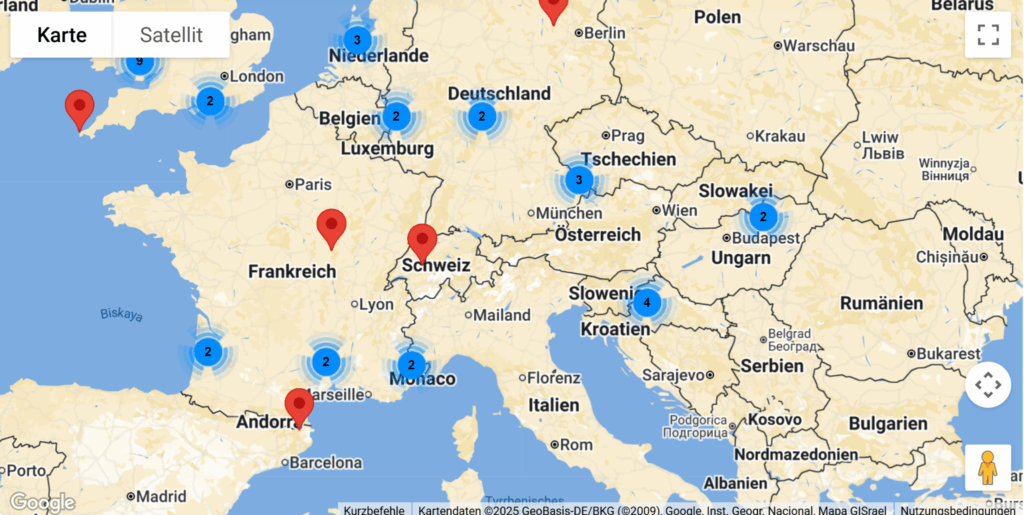
I used DarkSky’s map to find International Dark Sky Places in my countries, Austria and Italy. I found Naturpark Attersee-Traunsee in Upper Austria, but was surprised to find out that there are none in Italy

An overview of International Dark Sky Places in Europe, from DarkSky

In fact, according to an article published in the magazine Science Advances in 2016, Italy and South Korea are some of the countries of G20 with the brightest night skies, with the Pianura Padana being the most polluted Italian area. Efforts have been made to certify dark areas such as South Tyrol, Maremma (Tuscany), and the Saint-Barthélemy valley (Aosta Valley), but without any results.

The Attersee-Traunsee Nature Park is the largest natural park in Upper Austria with some of the darkest night skies remaining in central Europe. With the size of 77 square kilometers, it lies between the lakes Attersee and Traunsee and spans across the eponymous Traun and Atterseer Flysch Mountains. It was certified as International Dark Sky Park in 2021. On its website the certification is not mentioned, but there is a separate one dedicated to the “star park“.

#3 Testing and Research

Background

This week I had a situation that perfectly illustrated why I chose this topic. I was explaining some functionalities of a new app to my grandfather. He has always been very tech-savvy, he still works on his own website but even he struggles with certain concepts from time to time. He often tells me that everything takes him much longer than it used to and even when I show him a quicker or easier way to do something, he still sticks to the method he already knows. I believe this is partly a matter of habit and partly a reluctance to change something that “still works.”

What surprised me most was watching him interact with the app after my explanation. I assumed that once I had shown him how the app worked, it would be straightforward. But when he tried it on his own, he had to stop and ask for help at many points. It made me realize how much prior knowledge and digital literacy designers unconsciously expect from users, even when the interface seems simple to us.

This small moment showed exactly why designing for older adults matters: even motivated users with experience and interest in technology can struggle when interactions are not intuitive, forgiving or aligned with their mental models.

But here comes the real question: Is the problem rooted in the design of digital products or in the mental models that older adults bring with them? In other words, should we focus on improving the interfaces or on helping older people build the conceptual frameworks they need to understand how technology works in the first place?

Research

Problems older adults face with technology usually come from two sides: the design of the technology and the way older people understand and process information. When these two sides don’t match, it leads to confusion and mistakes. [1][3]

Many digital products simply aren’t designed with older adults in mind. This creates barriers that make technology hard to use.

  • Interfaces that feel cluttered or complicated: When apps have too many features or unclear layouts, older adults struggle to find what they need.[3]
  • Physical design that clashes with age-related changes: Small buttons, close-together touch targets or gestures like pinching and swiping can be difficult due to reduced vision, motor skills or dexterity.[3]
  • Unclear icons: Small, abstract or unfamiliar icons can be hard to recognize. Older adults often expect bigger, more descriptive labels instead of symbolic icons. [3]
  • Inconsistent design: If the interface doesn’t behave in predictable ways, it breaks the user’s expectations. This lowers trust and makes people feel unsure about what will happen next. [5]

(Planned) Sources

[1] D. Orzeszek et al., ‘Beyond Participatory Design: Towards a Model for Teaching Seniors Application Design’, arXiv [cs.CY]. 2017.

[2] L. Kane, “Usability for Seniors: Challenges and Changes,” Nielsen Norman Group, Sep. 08, 2019. https://www.nngroup.com/articles/usability-for-senior-citizens/

[3] G. A. Wildenbos, L. Peute, and M. Jaspers, ‘Aging barriers influencing mobile health usability for older adults: A literature based framework (MOLD-US)’, International Journal of Medical Informatics, vol. 114, pp. 66–75, 2018.

[4] J. Nielsen, “Usability for Senior Citizens: Improved, But Still Lacking,” Nielsen Norman Group, May 28, 2013. https://www.nngroup.com/articles/usability-seniors-improvements/

[5] Thefinchdesignagency, “Building User Trust in UX Design: Proven Strategies for Better Engagement,” Medium, Feb. 05, 2025. https://medium.com/@thefinchdesignagency/building-user-trust-in-ux-design-proven-strategies-for-better-engagement-c975aa381516