Discovering influence and impact

The second step to visualise who is involved in my project was to create various “before” and “after” scenarios, which I summarise below.

Before

  1. Scientists wonder about light pollution in a certain area
  2. Sleep experts wonder if there is a correlation between some sleep patterns and the light pollution of a certain area
  3. The government or the European Union do not direct their funds towards this problem due to lack of awareness
  4. Citizens feel helpless in front of environmental issues

After

  1. Nature lovers submit data about the night sky during their outdoor adventures
  2. Thanks to data collected by the Globe at Night Project, universities can research correlation between some sleep patterns and the light pollution of a certain area
  3. Thanks to collected data and awareness, young people concerned about the environment raise their voice and draw the institutions’ attention
  4. Thanks to a easy reporting feature, citizens can help scientists with small actions
System map

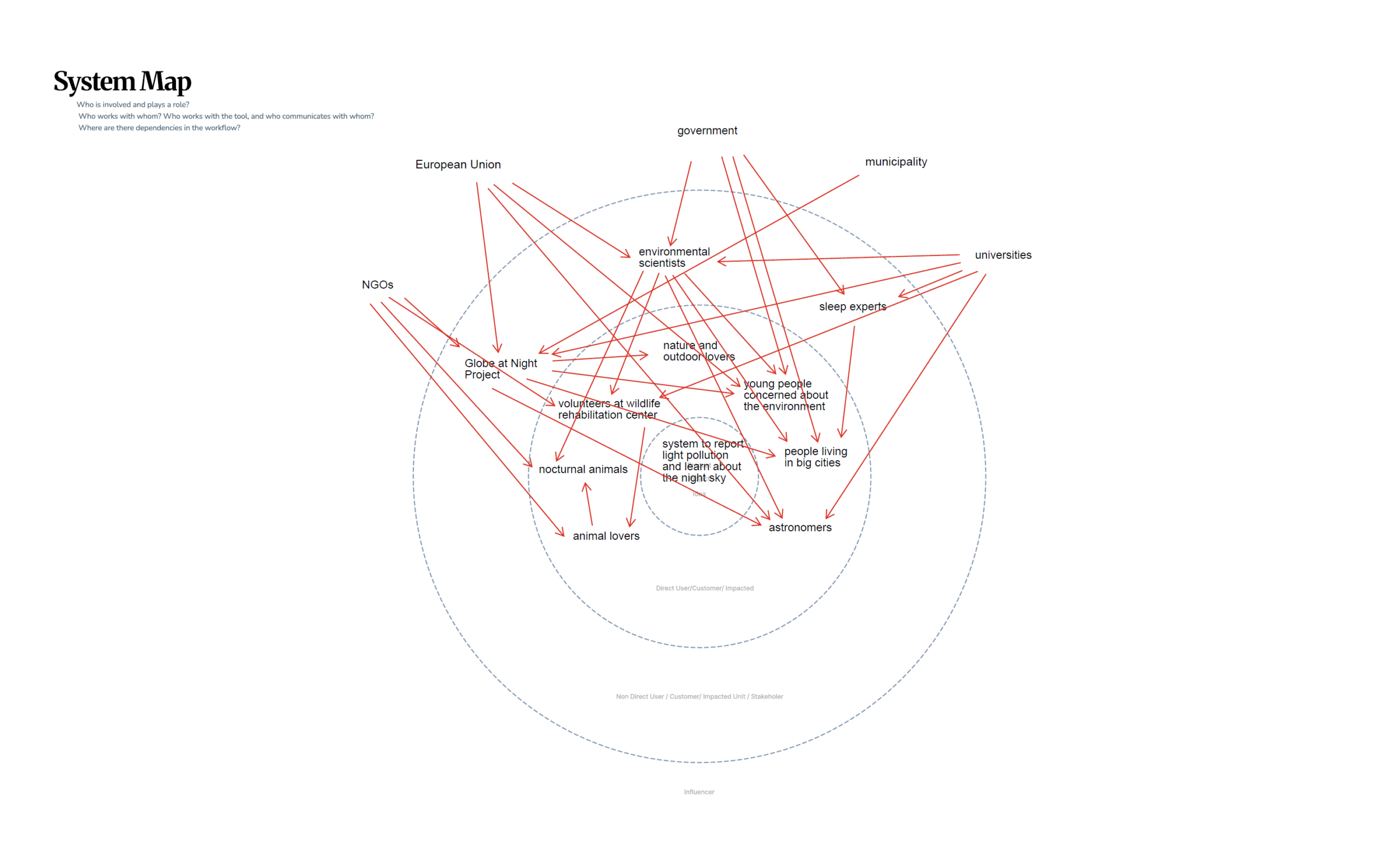
For my idea of a system to report light pollution and learn about the night sky I created a system map. It is used to visalise direct users, indirect users and influencers of the project. After filling out the map, I drew connections between the people and institutions involved.

★2 Design Research – From Project to Product

Discovered Change and Impact

Next, I started thinking about what my method or tool would actually improve. I believe that many family members get frustrated because they are always the first point of support when it comes to technology, constantly having to explain or fix things for older relatives.

With my method or tool, elderly users would be encouraged to first try and find a solution on their own instead of immediately relying on someone else. This could really improve family dynamics, as it allows people to spend more quality time together instead of using that time to troubleshoot devices.

I also thought about how many older adults lack the means to independently access and explore information. This can lead to an incomplete or sometimes biased understanding of current events.

With my tool or method, elderly users would be able to access information more confidently and see a bigger picture, helping them form their own opinions and make more informed decisions about current topics.

Another point is that many older adults have limited ways to stay connected with family or peers beyond phone calls. They often struggle to access or use tools like group chats, which makes it harder to stay involved in everyday communication.

With my tool or method, older adults would be able to understand and use digital tools more easily, allowing them to stay connected, take part in conversations and feel more included in their social circles.

★1 Design Research – From Project to Product

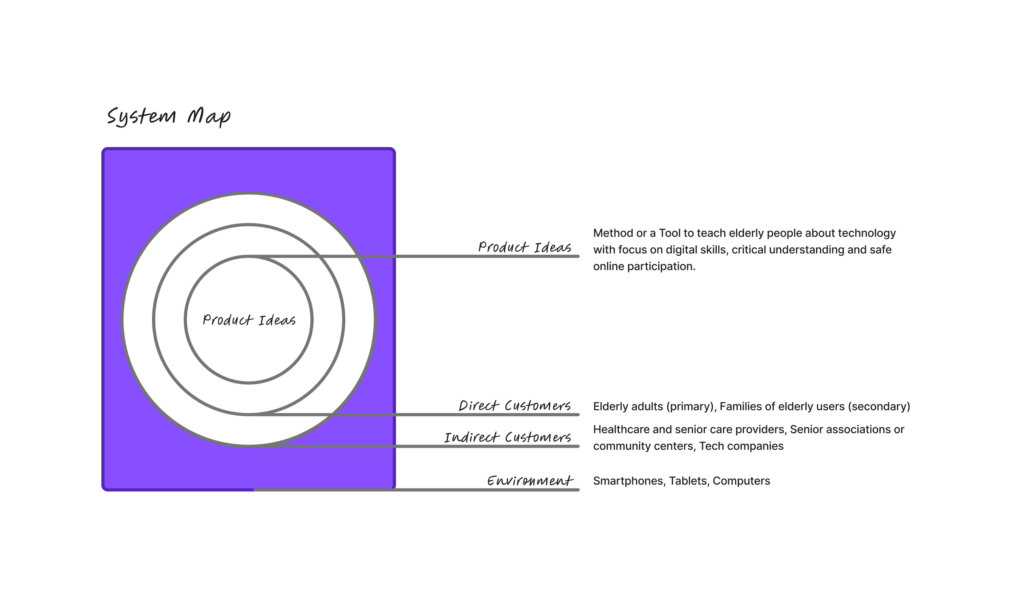
Today we had an intro to Project to Product and really started digging into the background and key info for our Master’s projects. First, we put together a system map that looked at our ideas, direct and indirect customers and the environment. We also thought about who might influence our product, tool or method.

For the system map, my product idea is a tool or method to teach elderly people how to use technology. I see this as particularly important because many older adults today are unable to fully take part in online life, which can lead to social isolation and limit their access to family and friends. Beyond that, many struggle to find the information they need or fall victim to online scams.

Direct customers (Primary Users) are elderly or older adults who are not digital natives and need guidance to understand and use technology. Secondary users are their families, since many younger family members often end up constantly helping their elders with tech. This can be exhausting and frustrating, as visits become focused on troubleshooting devices instead of enjoying quality time together.

Indirect customers could include retirement homes, healthcare providers, senior associations or community groups and even tech companies. These groups might support, implement, or benefit from the tool by helping elderly users engage with technology more safely and confidently.

The environment includes devices, apps and platforms that older adults interact with, as well as the social and cultural side, like how people think about aging, technology and communication between generations. Rules and safety issues, such as accessibility laws, data privacy and online security.

D&R2 Lo-Fi prototyping

Going into this prototyping session, I was a little unsure if I wanted to continue with my theme from Des&Res1, so I created prototypes in three different areas.

Scroll prevetion:

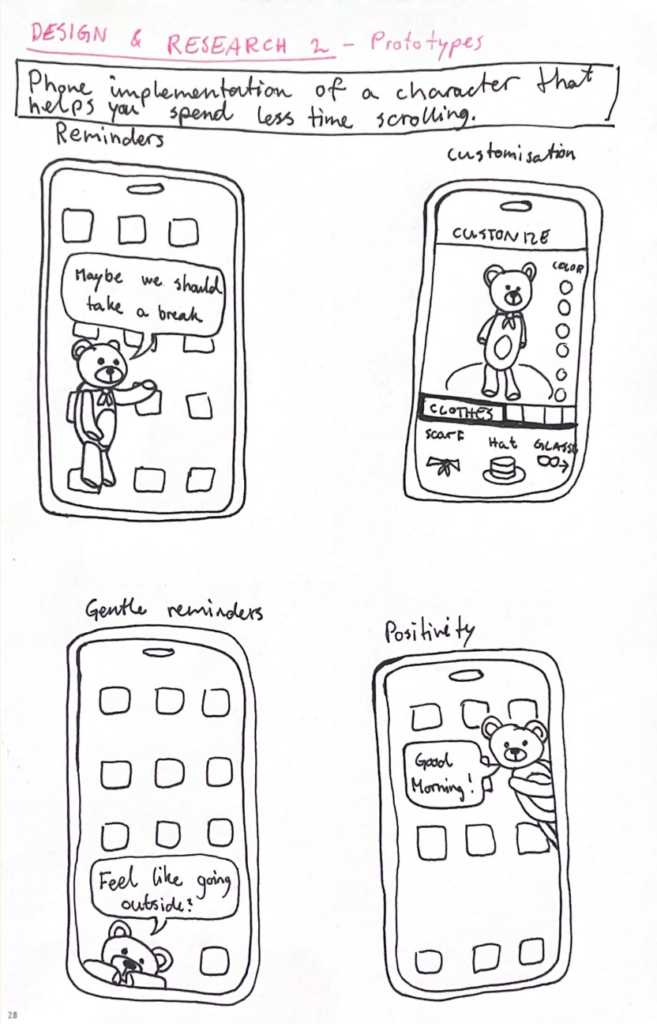
The first one was a continuation of my work with doomscrolling prevention from last semester. The idea is to implement a customizable character into your phone that pops up on your screen from time to time to remind you to take breaks from scrolling and encourage you to do other things. The character’s appearance and personality would be fully customizable so that it feels personal and gives you a sense of care for it. During the peer feedback session in class, I received feedback expressing concern that the character might become annoying over time, and that users could grow to dislike it if it keeps appearing at inconvenient moments. I agree with this, so I think it would be a good idea to make the frequency and persistence customizable as well, giving the user full control over how pushy the implementation is. The idea received a lot of positive feedback, and several people said they would consider using it.

Reuse website:

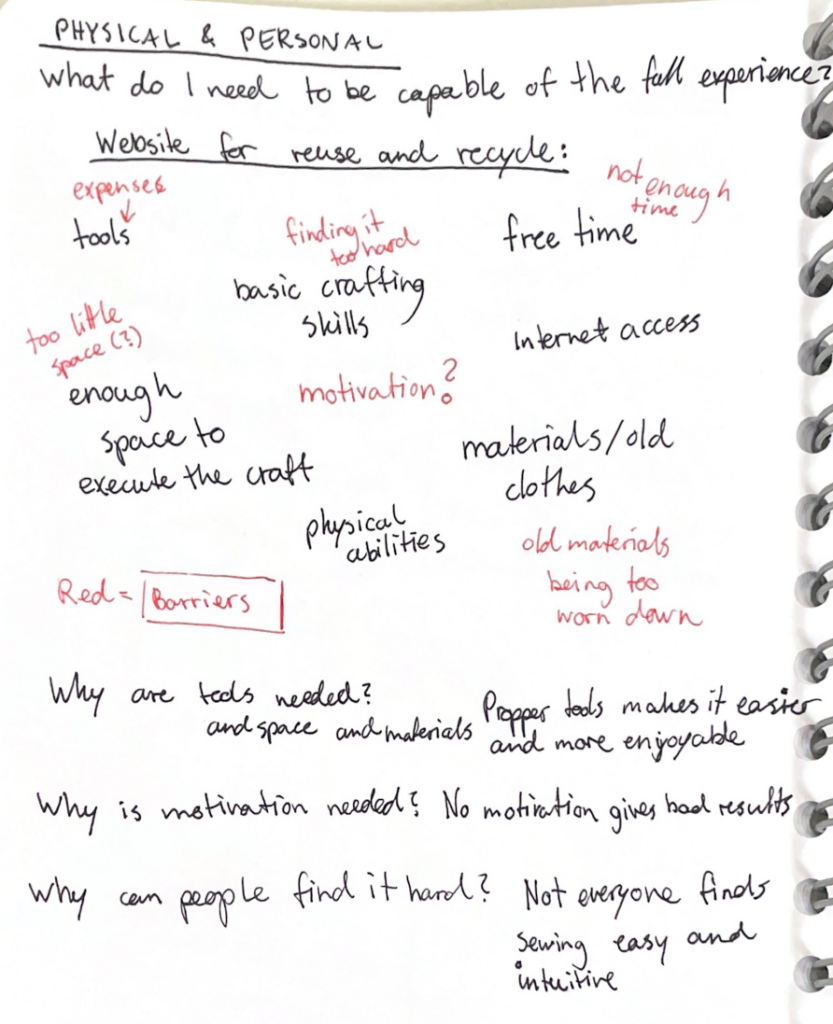
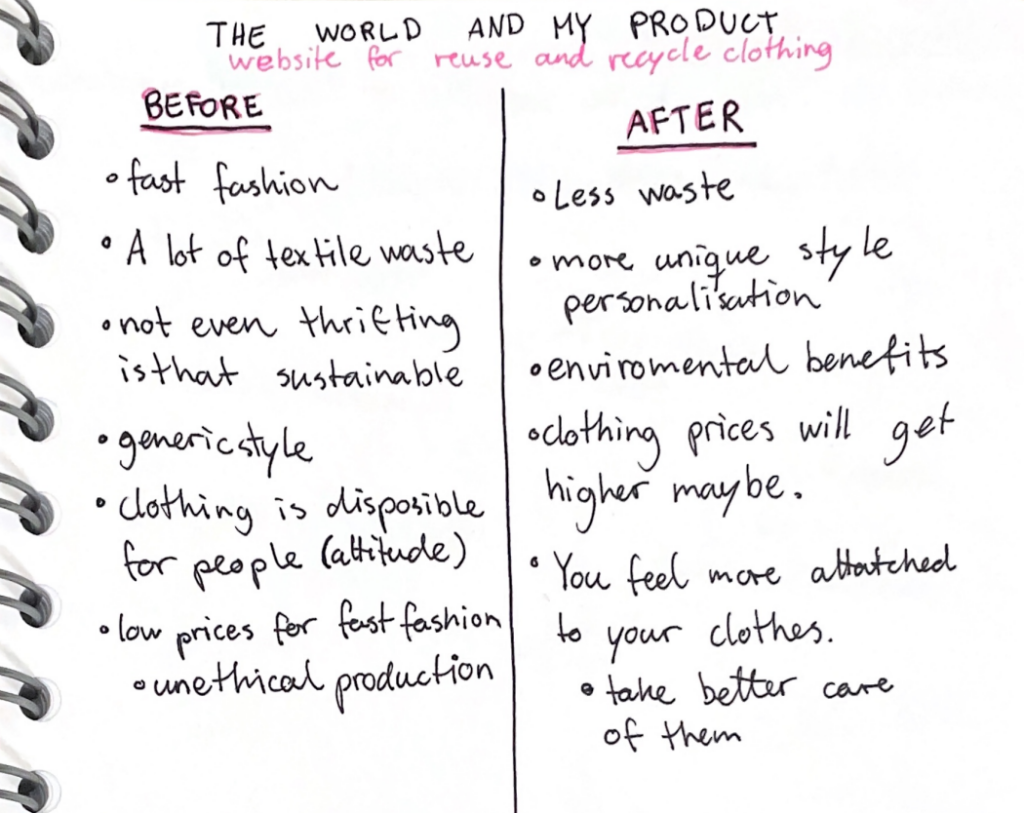
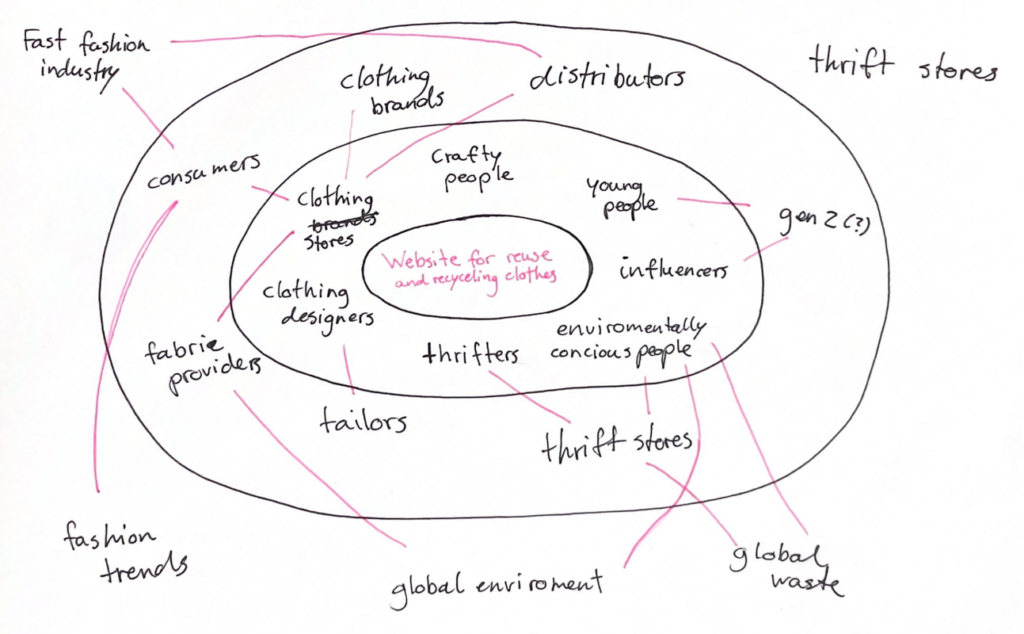
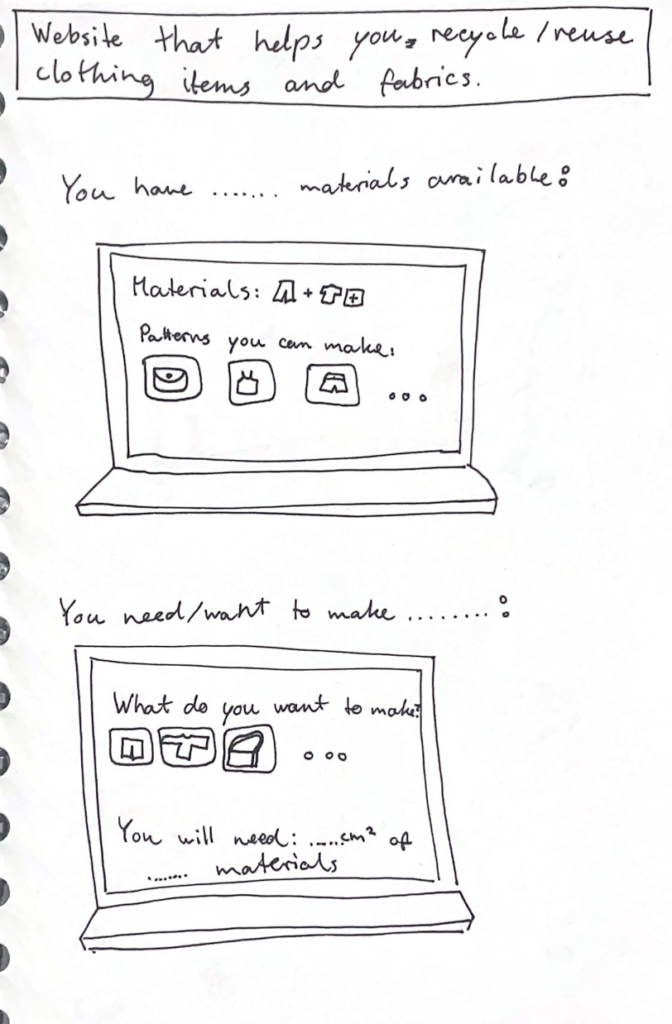
My second prototype is not as well developed yet, but I think it is my favorite so far. I am passionate about recycling and reusing old clothes and fabrics, so I wanted to create something within that theme. I made a rough prototype of wireframes for a website that helps users reuse their old materials. It can be used to input the materials you have available and then generate ideas for what you can make from them, including patterns you can use. It could also be used the other way around: you specify what you want to make, and it provides suitable patterns along with information about which materials are needed and how much is required. The feedback I received on this prototype was also very positive. I got a recommendation to include different filters to make it more manageable—for example, filters for which tools you have available, or how skilled and experienced you are in sewing and crafting.

Scroll distraction:

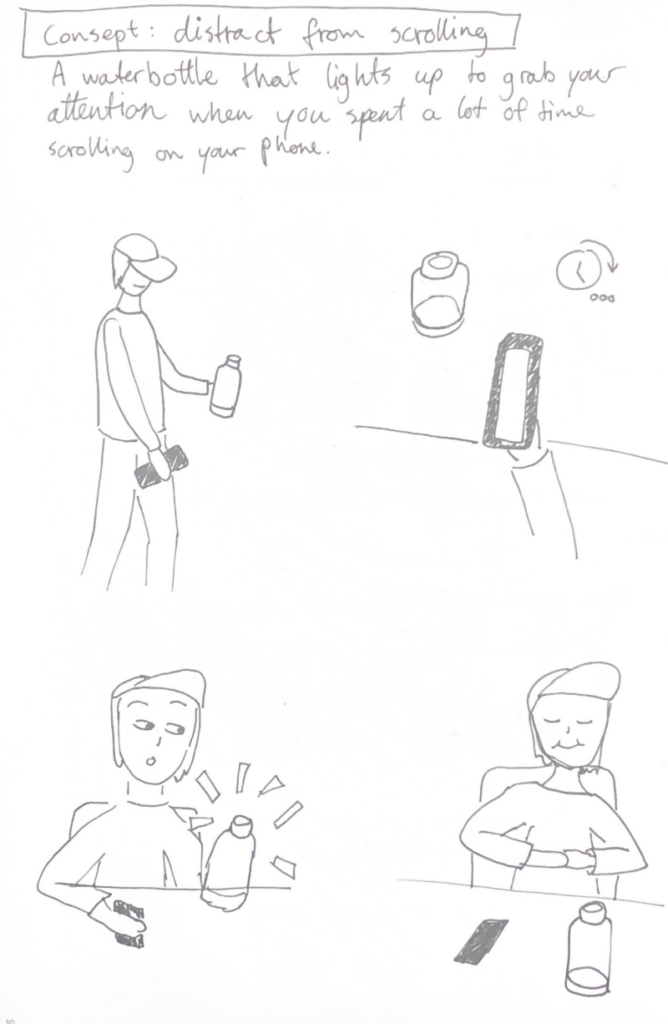
My third and final prototype returns to the idea of preventing doomscrolling. It is a water bottle that connects to your phone and lights up to distract you when you have spent a lot of time scrolling. I thought it could be interesting to have the preventative element exist as a physical object rather than within the device itself. Sometimes, a reminder of the outside world can help break the scrolling cycle and bring you back to “real life.”The water bottle distracts you by lighting up or even making a sound to make you aware of your scrolling behavior. One downside to this product is that you would have to keep the bottle with you at all times, but for people who already do that, it could be an effective tool.

ID1 NIME Article Review – Drawing Space with Rain: The Umbrella as a Flow Interface

The paper introduces an interactive system that transforms an umbrella from a normal everyday object into a musical and spatial interface. A spatial audio image is created by representing the raindrops hitting the interface and the movements of the raindrops across it. It is supposed to allow the user to perceive and interact with their surrounding space through sound rather than vision.  

The soundscape is created by not only using the impact of raindrops, but also the continuous flow of water, which they track by using a dense network of capacitive sensors embedded in the umbrella. The data is processed in real time and is sent to a virtual unity model where each drop of water triggers sounds. As a result, the user hears the movement of the raindrops as they move down the umbrella, drawing a spatial image of the space and external environment.  

This study caught my interest because it stands out within the NIME research by combining interaction with both a natural phenomenon and spatial audio. Instead of creating artificial sound environments, it generates real rain into a musical expression.  

The authors/designers conducted a pilot study that suggested that the system can enhance users awareness of spatial boundaries and create a sense of personal space. The testers experienced emotion responses to the product such as relaxation and curiosity, many actively exploring the interface by moving the umbrella around.  

The article presents some practical limitations to the project, such as the weight of the umbrella with the finished interface, latency in the sound feedback, and limited variety of sounds. These challenges show the difficulty of trying to balance complex technicality with usability in a  interactive musical device.  

In conclusion, the paper presents an innovative approach to interface design by reimagining a common familiar product, creating a instrument for spatial perception and musical expression. The concept is compelling and opens interesting directions for future projects in interactive sound development.  

NIME Paper Review

MetaBow: Gesture Mapping in Immersive Sonic Environments

The MetaBow project investigates how an augmented violin bow equipped with Inertial Measurement Units can link traditional performance techniques with digital sound processing in immersive speaker setups. The authors address the challenge of mapping complex motion data to audio without overwhelming the musician by opting for a hybrid strategy that pairs direct mappings for predictability with machine learning for more nuanced spatial control. From a design perspective, the value lies in leveraging the deeply ingrained muscle memory of the performer instead of forcing them to adopt a completely foreign interface. This approach aims for a high level of transparency where the bow remains a familiar tool even as its capabilities expand. The use of machine learning introduces a specific tension regarding control; the system must feel responsive rather than autonomous to maintain the performer’s trust. By using the bow to direct sound within a three dimensional array, the interaction moves beyond the physical instrument to treat the entire performance space as a manipulable environment. The performer essentially uses the bow to paint sound across the room. The success of such a system hinges on managing the cognitive demands placed on the artist, ensuring that the added digital layers enhance expression rather than creating a distraction. This integration suggests a future where digital and acoustic elements are woven together through the physical gestures of the performer and the specific acoustics of the environment.

Source:
https://nime.org/proceedings/2025/nime2025_62.pdf