What Makes Music Interesting? The Psychology Behind Ear Candy

Have you ever listened to a song for the tenth time and suddenly noticed a sound that you had never heard before?

Maybe it’s unusual vocal chops hidden in the background, a reversed cymbal leading into the chorus, or a delay effect that only appears on the last word of a phrase. These are the kinds of details that producers often refer to as ear candy: small sonic elements that reward attentive listening and make a track feel richer with every replay.

But why do these tiny details have such a big impact?

As part of my semester project, I explored this question by looking at research on sound perception and music psychology. While there is no single formula for making music engaging, several recurring ideas appeared throughout the literature.

Our Brains Love Surprise

One of the most important aspects of engaging music is novelty.

If every section of a song sounds exactly the same, our brains quickly learn what to expect. Once everything becomes predictable, it’s much easier for our attention to drift elsewhere. But this doesn’t mean that music should constantly surprise us. Too much unpredictability can become confusing rather than exciting. Instead, engaging music often balances familiarity with small, unexpected moments.

These moments don’t have to be dramatic. Sometimes a subtle reversed sound before a chorus or a short vocal effect between two lines is enough to catch the listener’s attention without interrupting the flow of the song.

This balance between expectation and surprise is one of the reasons why certain songs remain interesting even after repeated listening.

Contrast Creates Attention

Another recurring idea in sound design research is contrast.

Imagine listening to a piece where every sound has the same loudness, the same texture, and the same amount of reverb. Even if the composition itself is good, the overall listening experience would likely become monotonous.

Contrast can appear in many different forms: A quiet section can make the following chorus feel more powerful. A dry vocal can suddenly open into a large reverberant space. A rough, distorted texture can become even more effective when it is surrounded by clean sounds.

Even silence can become an important design tool. Rather than treating silence as the absence of sound, many composers use it to create anticipation and direct the listener’s attention. Sometimes allowing a long reverb tail to fade naturally creates more emotional impact than immediately introducing the next musical idea.

Sound Can Tell Stories

One of the concepts I found quite valuable during my research was the idea that sounds can imply relationships with one another. Our brains naturally search for patterns and causes. If one sound appears to trigger another, we instinctively begin constructing a narrative, even if we are not consciously aware of it.

This principle is used extensively in film sound design, but it can also make music more engaging. Sounds can appear to merge, split apart, or gradually evolve into entirely new textures. These subtle interactions help create a sense of movement and progression instead of presenting isolated sonic events.

Although listeners might not actively analyze these relationships, they often contribute to the feeling that a piece of music is “alive.”

Space Is Part of the Composition

When we think about music, we often focus on melody, harmony, or rhythm. However, another important dimension is space. Reverb, delay, panning, and other spatial effects influence how we perceive the environment in which a sound exists. A dry recording can feel intimate and close, while a long reverb may suggest a cathedral, a cave, or an enormous empty hall.

These effects don’t simply make sounds “prettier.” They shape the listener’s emotional experience by creating a sense of distance, movement, and immersion.

This is one of the reasons why reverb became one of the first interactive modules I implemented on my ear candy website. By changing only a few parameters, users can immediately hear how spatial processing changes the emotional character of the exact same sound.

There Is No Universal Recipe

One thing became very clear during my research: there is no checklist for creating ear candy.

A sound that one listener finds exciting might feel distracting to someone else. Different musical genres rely on different production techniques, and personal taste always plays an important role. Rather than searching for one perfect formula, I think ear candy is better understood as a way of encouraging curiosity. It invites listeners to discover small details that might otherwise go unnoticed and rewards them for listening closely.

Perhaps that’s what makes certain songs feel timeless. Even after countless listens, they still have something new left to reveal.

The next blog post will be about how you can improve your listening skills as a sound designer.


References

Collins, K. (2020). Studying Sound: A Theory and Practice of Sound Design. MIT Press.

Høier, S. (2014). Surrounded by Ear Candy? Nordicom Review, 35(s1), 251–262. https://doi.org/10.2478/nor-2014-0116

Roads, C. (2015). Composing Electronic Music: A New Aesthetic. Oxford University Press.
Why I Built an Interactive Website Instead of Writing Another Paper

After spending weeks researching ear candy, I finally had a working definition of the concept. I had read books about sound perception, analyzed educational YouTube videos, and collected examples of techniques that producers commonly associate with ear candy. But then I realized something:

Simply reading about sound design isn’t the same as experiencing it.

You can explain what reverb does in a paragraph, but hearing the difference between a short room reverb and a long ambient tail immediately makes the concept much easier to understand. The same applies to delay, arpeggiators, layering, and many other production techniques. Sound is something we experience, not something we only read about.

Learning by Experimenting

Most educational resources on music production follow a similar format. They explain a technique, show a few examples, and then leave it up to the learner to recreate the process inside their own DAW.

While this approach certainly works, I wondered whether there was another way.

What if users could immediately experiment with a sound while they were learning about it? Instead of watching someone else move a parameter, they could adjust it themselves and instantly hear how the sound changes.

That idea became the foundation of my semester project: an interactive educational website dedicated to exploring ear candy techniques.

Rather than creating another collection of written explanations, I wanted to build a space where curiosity could drive the learning process. Users wouldn’t need to understand every technical detail before they started experimenting. Instead, they could explore different parameters, listen to the results, and gradually develop an intuition for how these effects influence a sound.

Designing for Beginners

One of my primary goals was to create something that would be suitable for beginners.

When I started my sound design studies, I got easily overwhelmed by all the resources and options out there. Audio software often contains hundreds of parameters, unfamiliar terminology, and complex routing systems. While these tools are powerful, they can also make experimentation intimidating.

For that reason, I wanted the website to feel as simple and inviting as possible. So I picked some design principles to guide me in the development:

  • Keep the interface clean and easy to navigate.
  • Provide immediate auditory feedback whenever a parameter changes.
  • Encourage playful experimentation instead of “correct” answers.
  • Explain technical concepts in an accessible way.

Instead of expecting users to memorize definitions, I wanted them to discover how different effects behaved simply by interacting with them.

Small Changes That Made a Big Difference

As the project evolved, I regularly discussed the prototype with my supervisor Astrid Drechsler. These conversations helped shift my focus away from simply creating interesting audio effects and toward creating a better learning experience.

One suggestion that significantly improved the website was the addition of information panels. Rather than assuming users already understood terms like wet/dry mix or decay time, each effect now includes a small information icon. By hovering over it, users can read a short explanation of what the parameter does and how it influences the resulting sound.

Although this seems like a relatively minor design change, it made the website much more approachable for people who are new to sound design.

Another useful piece of feedback concerned the reverb module. Initially, users could only process their own uploaded audio files. My supervisor suggested adding generated sound sources, such as a short noise, so users could immediately start experimenting without having to prepare audio material first.

Looking back, these changes reinforced an important lesson: educational design is often about removing unnecessary barriers. The easier it is to start experimenting, the more likely people are to stay curious.

The Goal Was Never Just the Website

At times, I found myself becoming completely absorbed in solving technical problems. Making browser audio work reliably, implementing interactive controls, and debugging unexpected behavior consumed a large part of the semester.

Whenever that happened, I had to remind myself why I had started this project in the first place. The website was never the only goal. It was simply a tool for answering my research question:

Can an interactive web application help beginner sound designers learn and explore ear candy techniques?

Although the current prototype is still a work in progress, I believe that interactivity offers something that static explanations cannot. Reading about sound design is valuable, but actively hearing the results of your own decisions makes the learning process much more immediate and engaging.

Sometimes the best way to understand sound isn’t by reading another paragraph—it’s by turning a knob and listening to what happens.

In the next post, I’ll dive into the psychology behind ear candy and explore why certain sounds immediately capture our attention while others fade into the background.


References

Collins, K. (2020). Studying Sound: A Theory and Practice of Sound Design. MIT Press.

Roads, C. (2015). Composing Electronic Music: A New Aesthetic. Oxford University Press.
What Even Is “Ear Candy”? Why I Spent a Semester Trying to Define It

If you’ve spent any time watching music production tutorials on YouTube, you’ve probably come across the term ear candy. Producers mention it all the time. They tell you to “add some ear candy” to make your track more interesting or to keep the listener engaged. But what exactly does that mean?

That was the question that started my semester project.

The phrase ear candy seemed to appear everywhere, yet every creator described it a little differently. Some talked about vocal chops, others focused on creative effects like reverb automation or reverse sounds, while others used the term for almost any small detail that made a song feel more exciting. Surprisingly, nobody seemed to agree on a clear definition.

At first, I assumed that I simply hadn’t looked hard enough. Surely there had to be a proper explanation somewhere. However, once I started researching, I discovered that the situation was more complicated than I expected.

Looking Beyond YouTube

One of the first things I noticed was that ear candy is discussed far more often by practitioners than by researchers. While academic literature contains countless books and papers about sound perception, emotion, spatial audio, and music production, the term ear candy itself appears only rarely. Even when it does, authors tend to describe different aspects of the phenomenon rather than agreeing on one shared definition.

This immediately raised another interesting question. If so much knowledge in sound design is shared through YouTube videos, online communities, and professional discussions, should these sources also be considered when trying to understand a concept like ear candy?

I decided that they should.

Rather than relying exclusively on academic publications, I combined both scholarly literature and practitioner knowledge. I analyzed educational videos by creators such as Andrew Huang, Jono Buchanan, and Axel Lundström alongside books on sound design and sonic perception. While these sources naturally have different levels of academic rigor, they all contribute to the way sound designers learn, communicate, and develop their creative workflows today.

So… What Is Ear Candy?

Although every creator explained it differently, I began to notice several recurring ideas.

Most descriptions had very little to do with the fundamental structure of a song. Ear candy was rarely about the melody, harmony, or rhythm itself. Instead, it referred to the small sonic details that make a composition feel richer, more engaging, or more rewarding to listen to.

These details can take many forms. A subtle reverb automation at the end of a vocal phrase, a reversed cymbal leading into a chorus, an unexpected synth layer, a creative delay throw, or even a tiny sound that many listeners only notice after hearing the song several times. None of these elements carry the song on their own, but together they contribute to the overall listening experience.

One comparison that particularly stood out to me described ear candy as the musical equivalent of an Easter egg. The first listen might already be enjoyable, but repeated listening reveals additional details that reward attentive listeners.

Based on my research, I eventually developed a working definition that guided the rest of my project:

Ear candy consists of sonic elements that make a composition more interesting and engaging without being part of its primary structural components.

I intentionally kept this definition broad. What one listener considers ear candy might simply feel distracting to someone else. Musical genres, artistic intention, and personal taste all influence how these details are perceived. Instead of searching for one universally correct definition, I wanted to establish a practical framework that could support further exploration.

From Research Question to Project

Once I had a clearer understanding of the concept, another question emerged.

If beginners struggle to understand ear candy because the available explanations are scattered across countless videos and articles, could an interactive learning tool make these techniques easier to explore?

That question eventually became the foundation of my semester project. Instead of creating another document that simply explains different production techniques, I decided to develop an interactive website where users could experiment with selected ear candy techniques themselves and immediately hear the results.

In the next post, I’ll explain why I decided to build an interactive website instead of writing a traditional paper and why I believe sound design is something you learn best by hearing and experimenting.


References

Buchanan, J. (2023, September 6). LOGIC PRO X – How to create Ear Candy Tricks. YouTube. https://www.youtube.com/watch?v=klgexvg7Uks

Collins, K. (2020). Studying Sound: A Theory and Practice of Sound Design. MIT Press.

Huang, A. (2022, March 24). This always makes a huge improvement on any song. YouTube. https://www.youtube.com/watch?v=q96csLYzPN8

Lundström, A. (2025, March 13). every trick to EAR CANDY. YouTube. https://www.youtube.com/watch?v=MqqKtwdHAGw

Roads, C. (2015). Composing Electronic Music: A New Aesthetic. Oxford University Press.
Paris – IRCAM – Tape Workshop

The main reason we travelled to Paris was to attend a series of talks and workshops at the Institut de recherche et coordination acoustique/musique (IRCAM). The program covered a wide range of topics. Most of the talks I attended were given either by practitioners developing tools for sound design, music production, or performance, or by researchers working within specific disciplines. This created a productive balance between technical innovation and theoretical inquiry, and provided insight into current developments in the field.

In addition to the talks, several workshops were offered, one of which I found particularly memorable. It was led by the artist Stegonaute. His workshop focused on the use of tape loops as both a physical and musical practice. He works primarily with compact audio cassettes, not just as carriers of sound, but as instruments in their own right. Starting from commercially produced tapes, he repurposes and transforms them, shifting their function from storage media into tools for composition and performance.

A central part of the workshop involved physically manipulating the cassette tapes. By dismantling, cutting, and reassembling them, participants were able to create continuous tape loops. These loops introduce elements such as repetition, phase shifting, instability, and gradual degradation, all of which become defining musical parameters rather than imperfections. This approach reframes what might traditionally be considered technical limitations as creative opportunities.

He also demonstrated how recording onto these loops produces unpredictable results. Because there is no precise synchronization, timing drifts naturally, and the resulting textures evolve in ways that are difficult to control. This unpredictability is one of the reasons why the method is particularly well suited to ambient music, where strict rhythmic structures are less important and sonic layers tend to blend into one another.

Another important aspect of the workshop was the exploration of analog recording technologies, specifically vintage 4-track cassette recorders such as those produced by Tascam and Fostex. These machines introduce characteristics such as noise, saturation, dropouts, and fluctuations in pitch (commonly referred to as wow and flutter). Rather than attempting to eliminate these artifacts, Stegonaute emphasized their expressive potential and encouraged participants to incorporate them into their compositions.

He also introduced simple but effective modifications to the recording process. For example, placing a small piece of aluminum foil over the erase head prevents previously recorded material from being removed, allowing for continuous overdubbing and the creation of dense, layered textures. Additionally, because these machines operate in a single direction, reversing the tape physically enables reverse playback without any digital processing, resulting in altered envelopes and unfamiliar temporal structures.

Beyond the technical aspects, the workshop also addressed broader conceptual ideas. The reuse of old and often discarded cassettes raises ecological and historical questions, challenging more linear narratives of technological progress. Tape loops, in this context, can be understood as carriers of memory, where fragments of previous recordings are preserved, transformed, and recontextualized over time.

The workshop was structured as a combination of hands-on experimentation, collective listening, and improvisation. Participants created their own loops, shared them with the group, and explored layering and live manipulation techniques. The emphasis was not on technical precision, but rather on developing a more attentive and sensitive relationship to sound, material, and time. Prior to attending this workshop, I had very little knowledge of cassettes or looping techniques, so I learned a great deal from the experience. One aspect that particularly surprised me was the fact that a cassette can contain multiple independent tracks, which further expands its potential as a compositional tool.

Paris Excursion – Hotel de la Marine

When my study colleagues and I went to Paris this year in March, we visited the Hôtel de la Marine, and it turned out to be a engaging experience, especially from an audio perspective. It was my first time encountering an audio guide that was intentionally designed as part of the narrative rather than just an informational add-on.

What struck me most was how the experience leaned into immersion. The exhibition encouraged visual exploration. As far as I can remember, there were no physical interaction elements in the traditional sense, but your movement itself became the input that kept the story moving forward. That said, the system relied heavily on spatial progression, and this is where things occasionally became confusing. At certain points, there were multiple possible paths, and it was not always clear which one would continue the intended narrative. I’m quite sure I took a wrong turn at one point, which disrupted the flow of the story and left me slightly disoriented. This mismatch created a subtle tension between exploration and orientation: while I appreciated the freedom to wander, I sometimes lacked the guidance needed to stay aligned with the story.

The audio quality itself was decent, though not exceptional. It was clearly a step above the typical low-fidelity museum audio guides, but it did not reach the level of clarity or depth I am used to from my own headphones. The spatial audio aspect was present, but I would not describe it as particularly striking (engaging? Yes. Striking? No.). It supported the experience rather than elevating it.

Still, the concept of being embedded in a narrative through sound was compelling. It highlighted how powerful guided listening can be when it is integrated into a space rather than layered on top of it. Even without highly interactive elements, the experience demonstrated how audio alone can shape perception and engagement in meaningful ways.

I was able to follow the content for most of the exhibition, although my attention started to drift towards the final third. This was likely influenced by a combination of factors: I was there with study colleagues, which naturally introduced moments of interaction, and I was also not feeling entirely well that day. I suspect that experiencing the exhibition alone, and in better physical condition, would have allowed for a deeper level of focus and immersion.

Overall, I would describe the visit as interesting, particularly because it offered a different perspective on what an audio guide can be. It was not flawless; especially in terms of navigation clarity and audio quality, but it succeeded in creating a narrative environment that stayed with me beyond the visit itself.

Piezoelectric floor sensor

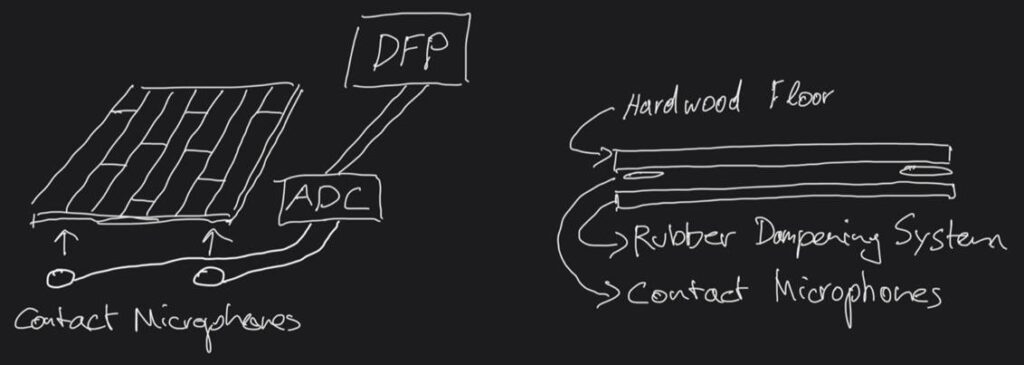
While computer vision serves as a highly viable mechanism for translating kinetic energy into digital control data, relying on hardware sensors might be a clever decision to gain more accuracy and reliability at the slight expense of convenience. Since this project revolves around footsteps, it makes perfect sense to integrate data-receiving tools into a mobile floor surface, effectively creating a modernized, digital Foley pit.

This proposed device would consist of multiple layers, measuring approximately one square meter in size. The top layer would feature a hard acoustic surface, such as a premium hardwood floor, while the bottom would be heavily decoupled from the surrounding environment using a sophisticated rubber and foam dampening system. This acoustic isolation is crucial to prevent the system from picking up ambient room interference that could trigger the digital signal chain unintentionally. Sandwiched between these two layers would be multiple piezoelectric contact microphones designed to instantly pick up the physical impacts and route them straight into the plugdata environment.

Personal sketch of the piezoelectric floor sensor device

By implementing this hardware approach, it could trigger the exact footstep timing and velocity by performing actual steps on the surface. This physical connection would inherently lead to a much more natural human gait reproduction. At the same time, both of the performer’s hands would remain entirely free to execute subtle real-time changes to the acoustic parameters via computer vision, seamlessly morphing surface textures or shoe materials while completely eliminating the slight latency associated with camera-based motion tracking.

Realtime Audio Variational autoEncoder (RAVE)

One of the main challenges faced during the early conception of this project was the potential for latency to ruin the user experience. Fortunately, the slight delay from the physical hand input to the audible result becomes largely irrelevant once the user practices and finds the rhythm. However, while directly synthesizing sounds via math achieved superb results in terms of responsiveness, it sometimes lacked perceived authenticity and organic realism.

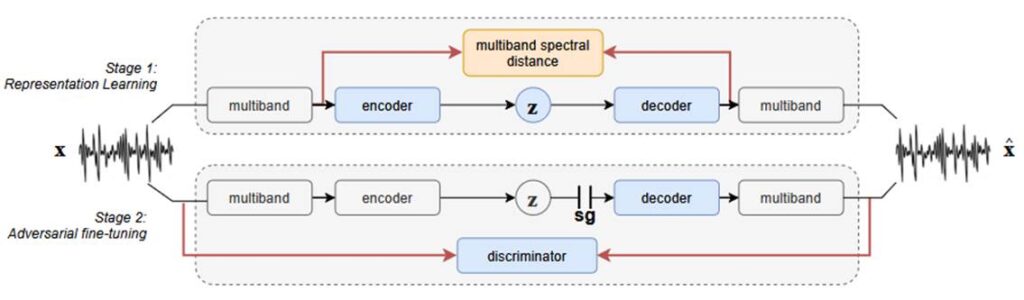
To bridge this gap, I initiated experiments using the Realtime Audio Variational autoEncoder, a generative artificial intelligence model designed for real-time, high-quality neural audio synthesis. This model relies on a clever two-stage training architecture that compresses complex audio into low-dimensional latent spaces, allowing it to generate stunning acoustic results with incredibly low CPU usage. These learned representations can be adjusted instantaneously to manipulate the audio signal on the fly.

Functionality of RAVE model. Caillon and Esling 2021, 2

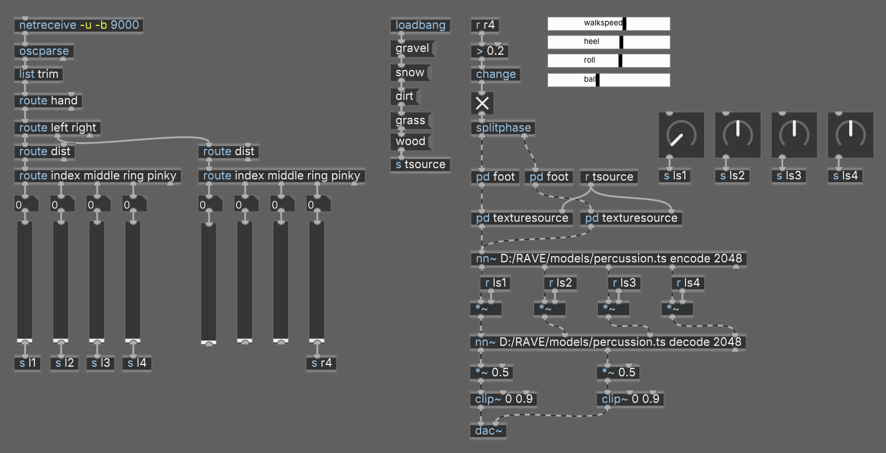
I tested this by loading a pre-trained neural percussion model directly into the audio pipeline using a dedicated neural network module. After synthesizing the footsteps in the texture generator, the signal feeds into the encoder, gets manipulated inside the latent space, and flows back out through the decoder to produce the final audio signal.

Patch with nn~ module and percussion model

The initial results have been incredibly successful, proving that manipulating parameters in the latent spaces via gestural control feels highly intuitive and delivers pristine audio quality. Moving into the next semester, I plan to thoroughly explore the idea of training custom models on specific ground surface textures or even raw footstep recordings to completely replace the synthesized patches with genuine AI-driven acoustic realism.

Caillon, Antoine, and Philippe Esling. arxiv.org. December 15, 2021. https://doi.org/10.48550/arXiv.2111.05011 (accessed June 22, 2026).

Current state of the project

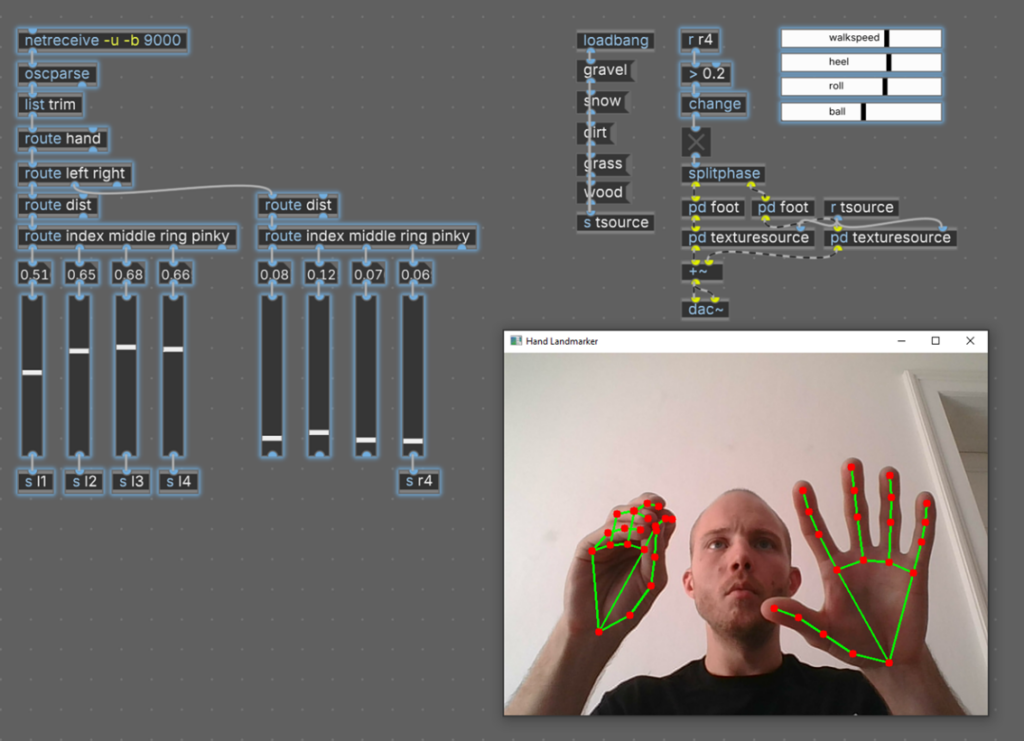
Incorporating Andy Farnell’s procedural architecture provided a sophisticated solution to many of the project’s challenges and served as an excellent starting point. Building on top of this existing structure proved incredibly valuable, allowing me to adopt key functional elements while heavily modifying the critical signal flow to suit my specific needs. The core idea in this current version is to generate the footsteps using gestural computer vision input running through a Python script.

To achieve this, the data coming from the MediaPipe hand-tracking model had to be optimized. Instead of tracking the hand’s absolute position on the camera screen, the most intuitive and ergonomic mapping measures the relative distance between the tip of the thumb and the other four fingers on one hand. This approach turns the hand into a fully closed control system, regardless of its position in the camera frame. The algorithm automatically calculates the maximum distance and scales the values seamlessly between zero and one, transmitting them to plugdata via the OSC protocol.

Current state of the project in plugdata

In the updated patch, closing the distance between the fingertips decreases the values, while opening the palm increases them. Under the current mapping scheme, the right hand triggers the foot phase generator, while the left hand controls the individual parameters of the heel, roll, and ball phases. This allows the user to perform the rhythm of the footsteps single-handedly while manipulating the intricate acoustic nuances with the unoccupied hand.

To improve interactive capabilities, the continuous walking loop from the original patch was removed. Instead, an opening and closing threshold mechanism was introduced. Whenever the distance between the right thumb and pinky crosses a specific numeric threshold, a digital impulse activates the first part of the foot phase, and crossing it again triggers the rest of the roll-off. When this gets performed in a continuous rhythm, the resulting synthesized footstep signal offers highly refined, expressive control over all temporal parameters.

Experiments in the digital environment

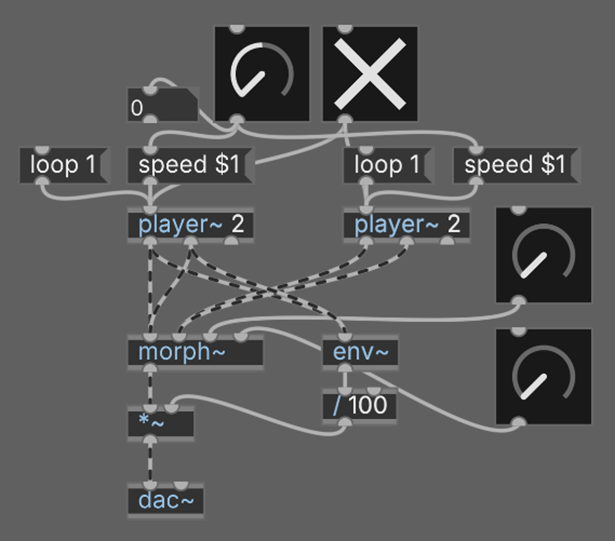
After exploring the theoretical and physical principles behind the footstep phenomenon, it was time to bring the concept into the digital realm using signal processing and computer vision. The first experiments of this project took place in the plugdata environment and dealt with manipulating the playback speed and amplitude envelope curves of pre-recorded footstep samples.

First sample based test patch

Slowing down and speeding up a sample during playback was not a practical long-term approach, but it served as a quick first sketch to develop the concept upon. At this stage, it became clear that I needed to construct a control interface capable of taking very detailed control over the timing of the heel, roll, and toe stages. I also attempted a spectral morphing process to combine a footstep sample with a constant texture sound, but it lacked the organic feel I was aiming for.

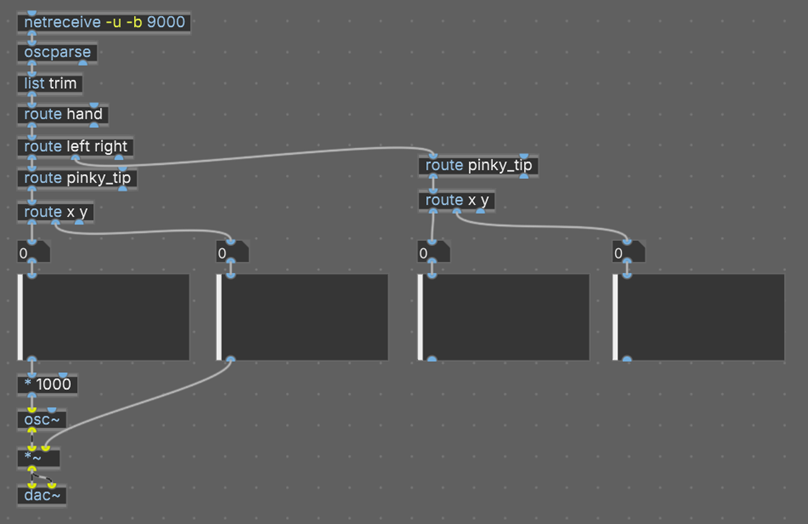
Another early trial involved receiving Open Sound Control messages from a computer vision Python script for the very first time. I mapped the outer fingertips of the user’s pinky fingers on an X and Y axis across the webcam frame, allowing hand movements to manipulate the frequency and amplitude of a simple sine wave.

First plugdata patch to receive OSC messages from Computer Vision

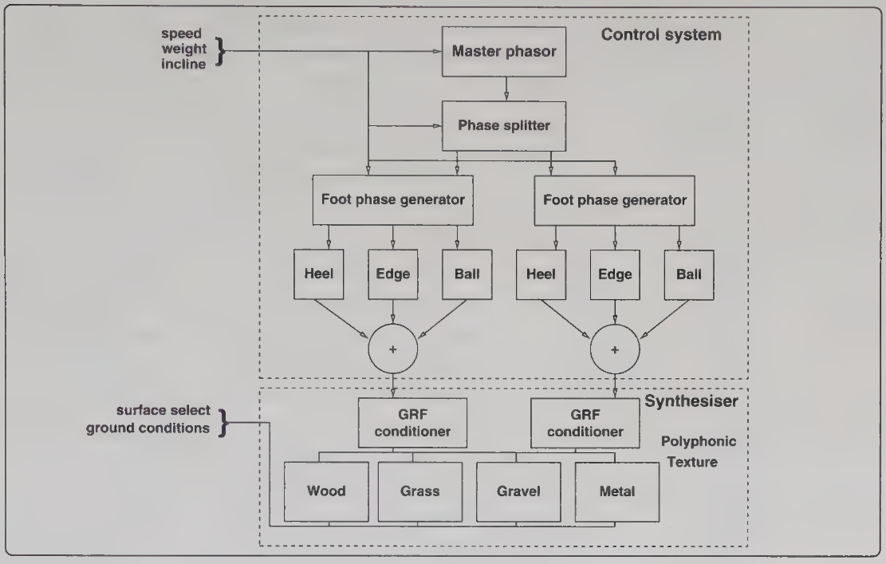
A major milestone in this process was translating these theoretical concepts into the project using Andy Farnell’s procedural model for footsteps. His method divides the architecture into an upper control mechanism and a two-stage synthesis section. In the first stage, a master phase signal acts as the main driver, splitting into independent foot phase controls to activate the correct locomotion muscles. If the simulated walking speed exceeds a certain amount, the overlap of the phases diminishes, automatically transitioning the system from a walk into a run. In the second stage, this control signal gets translated into a physical ground response force, which is then fed into dedicated sound-generating patches designed to mathematically synthesize specific textures like snow, dirt, or gravel.

Overview footstep pd patch. Farnell 2010, 551


Farnell, Andy. Designing Sound. Cambridge: The MIT Press, 2010.

Footsteps II

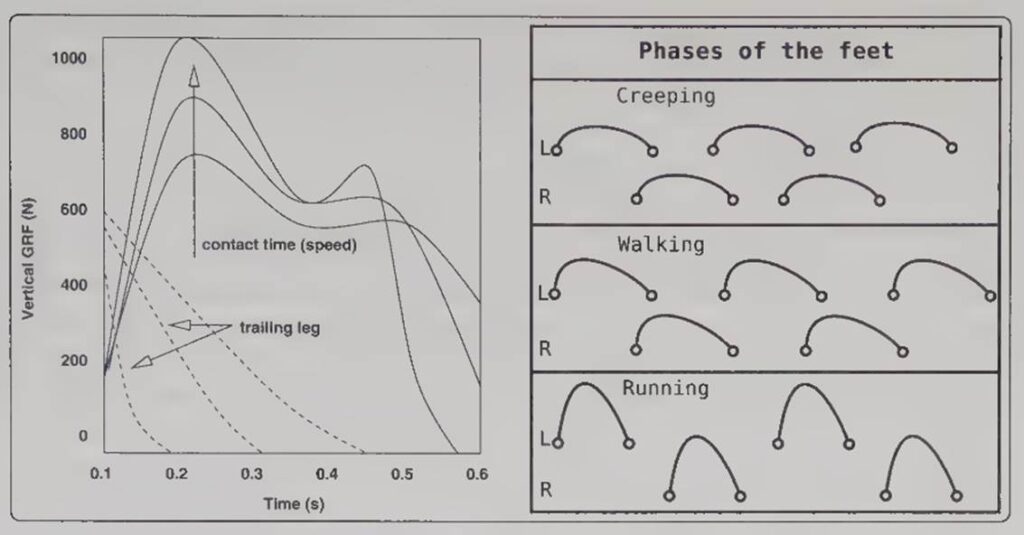
Furthermore, the type of movement has a direct influence on these phases. Creeping keeps both feet anchored to the ground longer, reducing friction and sound generation. Running increases efficiency but slams more explosive force into the ground. Walking sits exactly in the middle, creating a pendulum movement where energy transforms into gravitational motion, resulting in a predictable rhythmic pressure pattern.

Foot phase changes with actor speed. Farnell 2010, 549

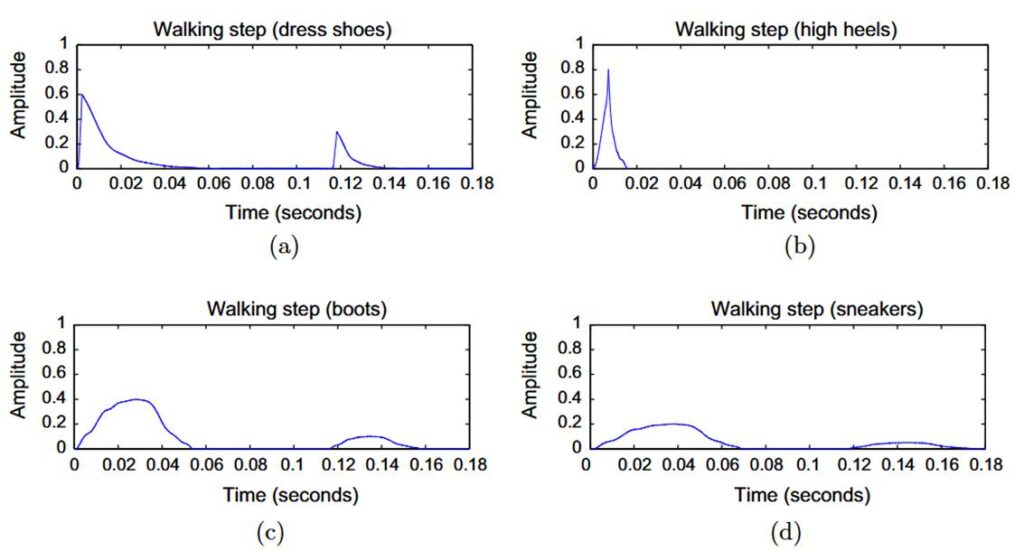
Foley artists must also think about the materials and textures of their shoes and the ground surfaces. Ground textures generally fall into four acoustic categories: solid floors known for stiffness, aggregate floors characterized by granularity and friction, liquid surfaces defined by viscosity, and hybrid materials that combine multiple traits. When you combine these surface textures with the structural makeup of a shoe, such as sole hardness, squeaky materials, or metallic buckles, you get an incredibly complex acoustic signature.

Comparison amplitude envelope for shoe types. Turchet 2016, 51

Farnell, Andy. Designing Sound. Cambridge: The MIT Press, 2010.

Turchet, Luca. “Footstep sounds synthesis: Design, implementation, and evaluation.” Applied Acoustics 107, 2016: 46-68.