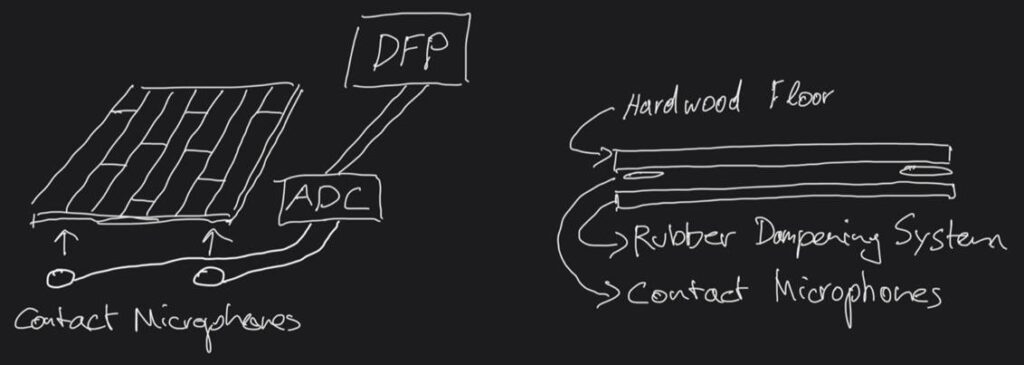
While computer vision serves as a highly viable mechanism for translating kinetic energy into digital control data, relying on hardware sensors might be a clever decision to gain more accuracy and reliability at the slight expense of convenience. Since this project revolves around footsteps, it makes perfect sense to integrate data-receiving tools into a mobile floor surface, effectively creating a modernized, digital Foley pit.
This proposed device would consist of multiple layers, measuring approximately one square meter in size. The top layer would feature a hard acoustic surface, such as a premium hardwood floor, while the bottom would be heavily decoupled from the surrounding environment using a sophisticated rubber and foam dampening system. This acoustic isolation is crucial to prevent the system from picking up ambient room interference that could trigger the digital signal chain unintentionally. Sandwiched between these two layers would be multiple piezoelectric contact microphones designed to instantly pick up the physical impacts and route them straight into the plugdata environment.
Personal sketch of the piezoelectric floor sensor device
By implementing this hardware approach, it could trigger the exact footstep timing and velocity by performing actual steps on the surface. This physical connection would inherently lead to a much more natural human gait reproduction. At the same time, both of the performer’s hands would remain entirely free to execute subtle real-time changes to the acoustic parameters via computer vision, seamlessly morphing surface textures or shoe materials while completely eliminating the slight latency associated with camera-based motion tracking.
One of the main challenges faced during the early conception of this project was the potential for latency to ruin the user experience. Fortunately, the slight delay from the physical hand input to the audible result becomes largely irrelevant once the user practices and finds the rhythm. However, while directly synthesizing sounds via math achieved superb results in terms of responsiveness, it sometimes lacked perceived authenticity and organic realism.
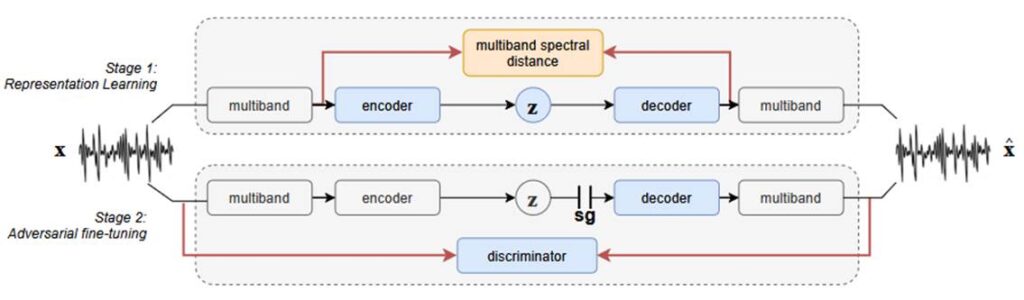
To bridge this gap, I initiated experiments using the Realtime Audio Variational autoEncoder, a generative artificial intelligence model designed for real-time, high-quality neural audio synthesis. This model relies on a clever two-stage training architecture that compresses complex audio into low-dimensional latent spaces, allowing it to generate stunning acoustic results with incredibly low CPU usage. These learned representations can be adjusted instantaneously to manipulate the audio signal on the fly.
Functionality of RAVE model. Caillon and Esling 2021, 2
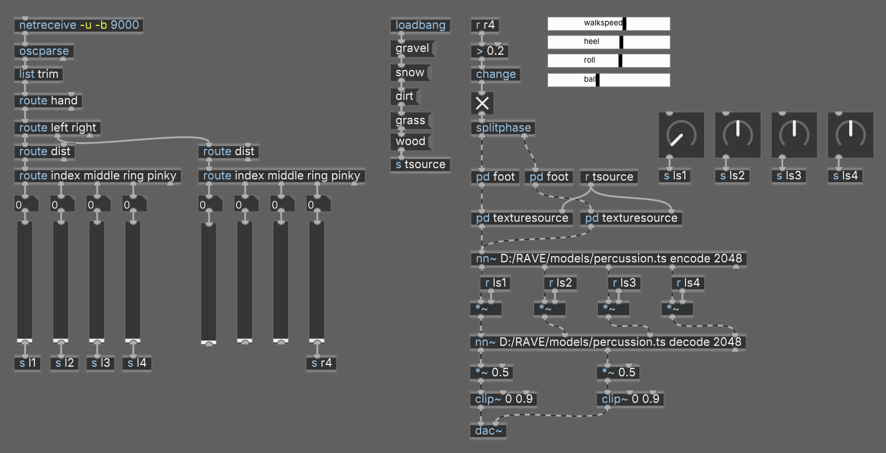
I tested this by loading a pre-trained neural percussion model directly into the audio pipeline using a dedicated neural network module. After synthesizing the footsteps in the texture generator, the signal feeds into the encoder, gets manipulated inside the latent space, and flows back out through the decoder to produce the final audio signal.
Patch with nn~ module and percussion model
The initial results have been incredibly successful, proving that manipulating parameters in the latent spaces via gestural control feels highly intuitive and delivers pristine audio quality. Moving into the next semester, I plan to thoroughly explore the idea of training custom models on specific ground surface textures or even raw footstep recordings to completely replace the synthesized patches with genuine AI-driven acoustic realism.
Caillon, Antoine, and Philippe Esling. arxiv.org. December 15, 2021. https://doi.org/10.48550/arXiv.2111.05011 (accessed June 22, 2026).
Incorporating Andy Farnell’s procedural architecture provided a sophisticated solution to many of the project’s challenges and served as an excellent starting point. Building on top of this existing structure proved incredibly valuable, allowing me to adopt key functional elements while heavily modifying the critical signal flow to suit my specific needs. The core idea in this current version is to generate the footsteps using gestural computer vision input running through a Python script.
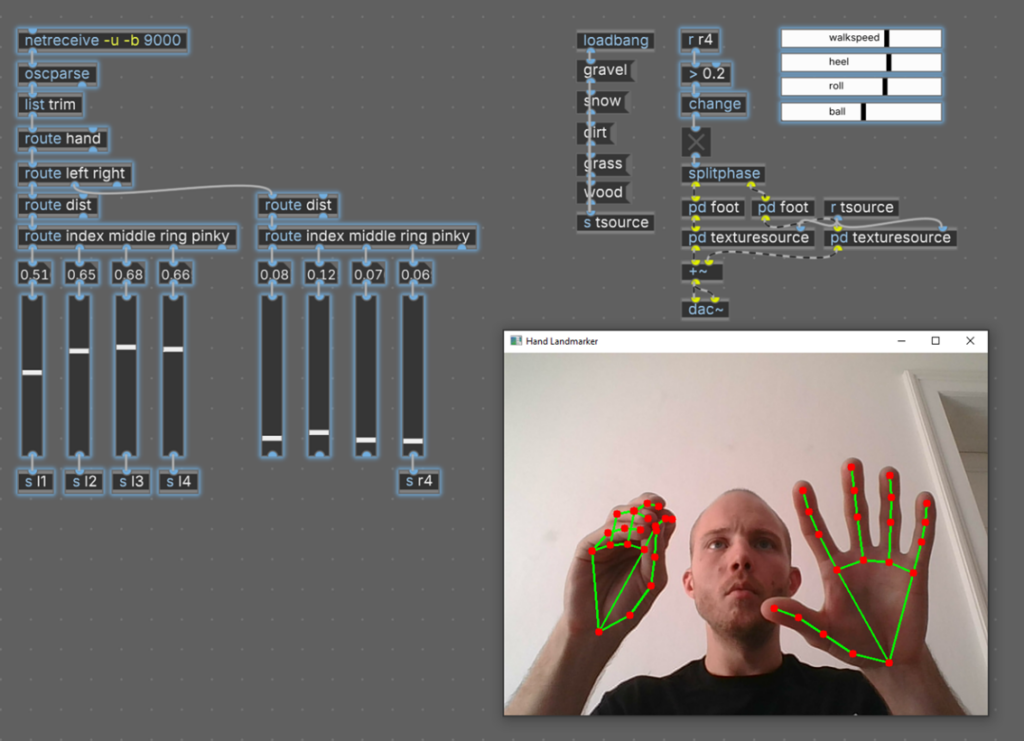
To achieve this, the data coming from the MediaPipe hand-tracking model had to be optimized. Instead of tracking the hand’s absolute position on the camera screen, the most intuitive and ergonomic mapping measures the relative distance between the tip of the thumb and the other four fingers on one hand. This approach turns the hand into a fully closed control system, regardless of its position in the camera frame. The algorithm automatically calculates the maximum distance and scales the values seamlessly between zero and one, transmitting them to plugdata via the OSC protocol.
Current state of the project in plugdata
In the updated patch, closing the distance between the fingertips decreases the values, while opening the palm increases them. Under the current mapping scheme, the right hand triggers the foot phase generator, while the left hand controls the individual parameters of the heel, roll, and ball phases. This allows the user to perform the rhythm of the footsteps single-handedly while manipulating the intricate acoustic nuances with the unoccupied hand.
To improve interactive capabilities, the continuous walking loop from the original patch was removed. Instead, an opening and closing threshold mechanism was introduced. Whenever the distance between the right thumb and pinky crosses a specific numeric threshold, a digital impulse activates the first part of the foot phase, and crossing it again triggers the rest of the roll-off. When this gets performed in a continuous rhythm, the resulting synthesized footstep signal offers highly refined, expressive control over all temporal parameters.
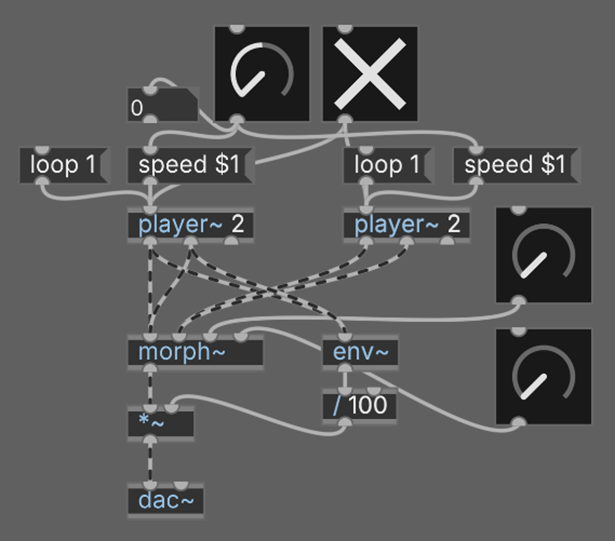
After exploring the theoretical and physical principles behind the footstep phenomenon, it was time to bring the concept into the digital realm using signal processing and computer vision. The first experiments of this project took place in the plugdata environment and dealt with manipulating the playback speed and amplitude envelope curves of pre-recorded footstep samples.
First sample based test patch
Slowing down and speeding up a sample during playback was not a practical long-term approach, but it served as a quick first sketch to develop the concept upon. At this stage, it became clear that I needed to construct a control interface capable of taking very detailed control over the timing of the heel, roll, and toe stages. I also attempted a spectral morphing process to combine a footstep sample with a constant texture sound, but it lacked the organic feel I was aiming for.
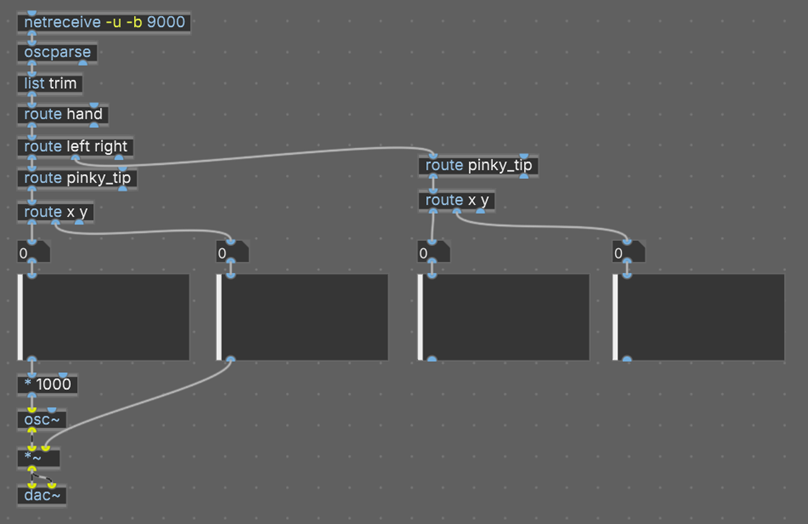
Another early trial involved receiving Open Sound Control messages from a computer vision Python script for the very first time. I mapped the outer fingertips of the user’s pinky fingers on an X and Y axis across the webcam frame, allowing hand movements to manipulate the frequency and amplitude of a simple sine wave.
First plugdata patch to receive OSC messages from Computer Vision
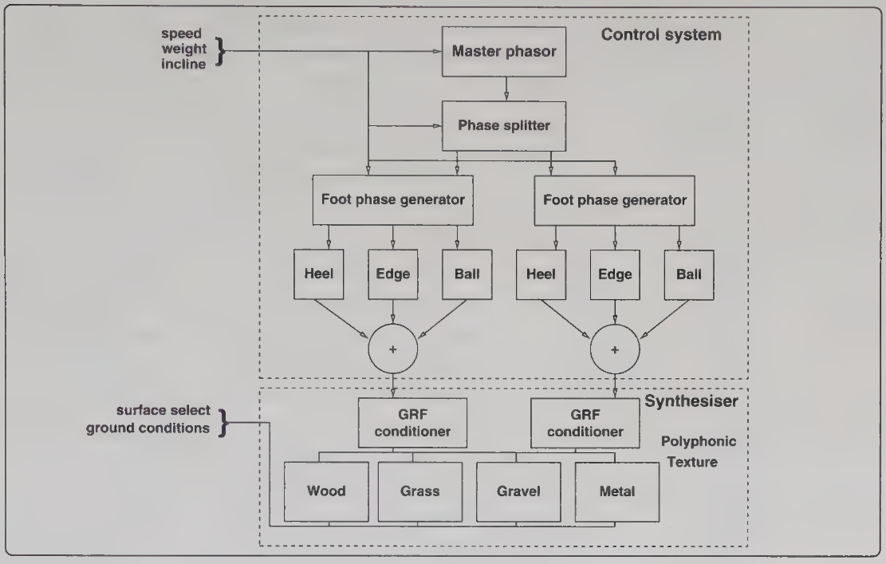
A major milestone in this process was translating these theoretical concepts into the project using Andy Farnell’s procedural model for footsteps. His method divides the architecture into an upper control mechanism and a two-stage synthesis section. In the first stage, a master phase signal acts as the main driver, splitting into independent foot phase controls to activate the correct locomotion muscles. If the simulated walking speed exceeds a certain amount, the overlap of the phases diminishes, automatically transitioning the system from a walk into a run. In the second stage, this control signal gets translated into a physical ground response force, which is then fed into dedicated sound-generating patches designed to mathematically synthesize specific textures like snow, dirt, or gravel.
Overview footstep pd patch. Farnell 2010, 551
Farnell, Andy. Designing Sound. Cambridge: The MIT Press, 2010.
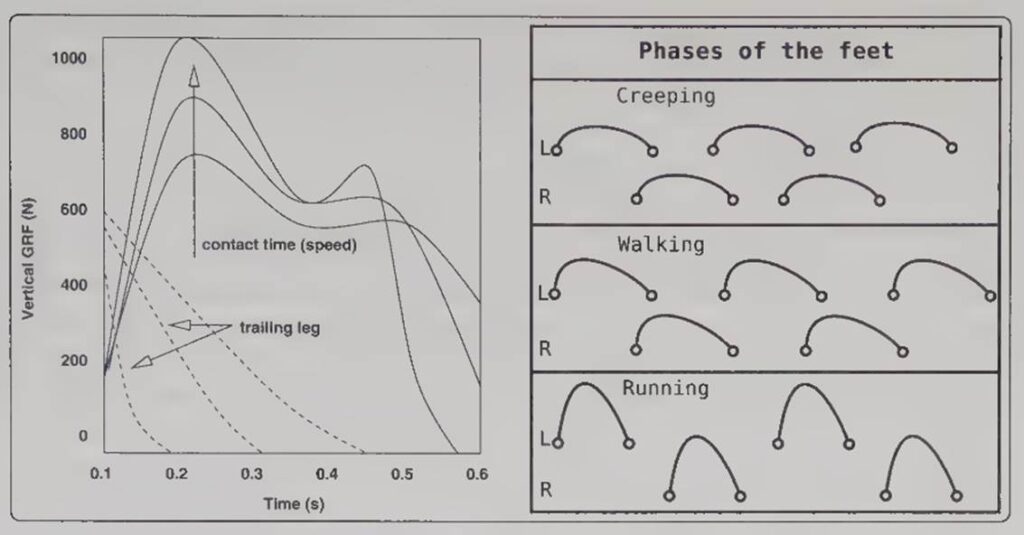
Furthermore, the type of movement has a direct influence on these phases. Creeping keeps both feet anchored to the ground longer, reducing friction and sound generation. Running increases efficiency but slams more explosive force into the ground. Walking sits exactly in the middle, creating a pendulum movement where energy transforms into gravitational motion, resulting in a predictable rhythmic pressure pattern.
Foot phase changes with actor speed. Farnell 2010, 549
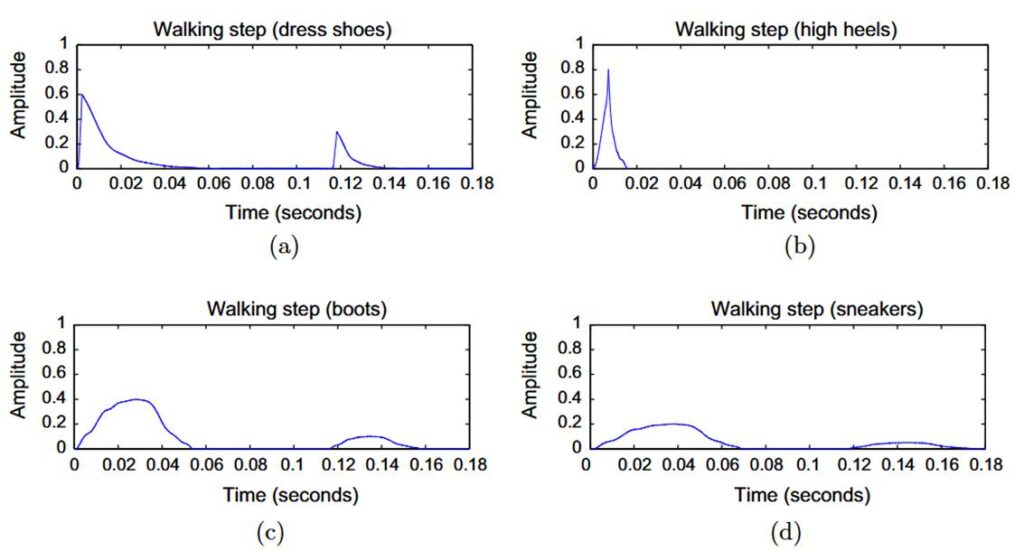
Foley artists must also think about the materials and textures of their shoes and the ground surfaces. Ground textures generally fall into four acoustic categories: solid floors known for stiffness, aggregate floors characterized by granularity and friction, liquid surfaces defined by viscosity, and hybrid materials that combine multiple traits. When you combine these surface textures with the structural makeup of a shoe, such as sole hardness, squeaky materials, or metallic buckles, you get an incredibly complex acoustic signature.
Comparison amplitude envelope for shoe types. Turchet 2016, 51
Farnell, Andy. Designing Sound. Cambridge: The MIT Press, 2010.
In the early days of film sound, Foley artists were often called Foley walkers or steppers. This historical nickname stems from their deep focus on replacing footsteps, which remains the absolute bedrock of the craft. Synthesizing these sounds is not simply about matching the timing of a foot hitting the ground, but about telling a story about the character. The sound of the footstep itself is a multifaceted interplay of different key factors, originating through foot-to-floor interaction, which is strongly influenced by the type of surfaces involved as well as the physical properties of the person walking.
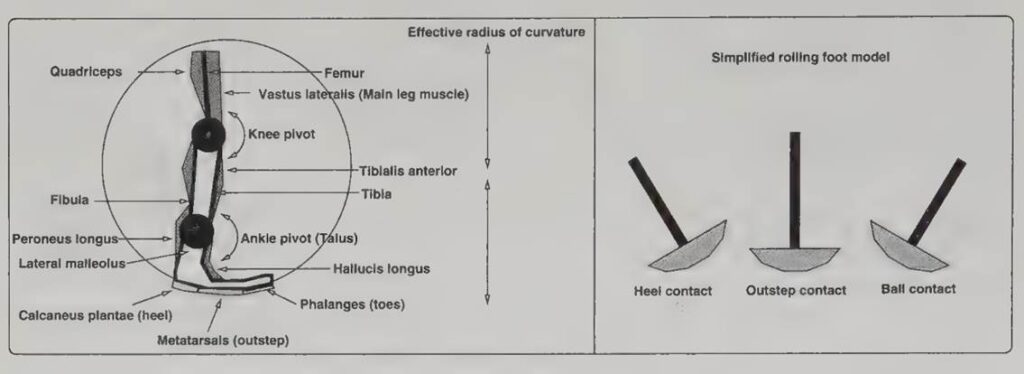
Simplification of the foot during walking. Farnell 2010, 548
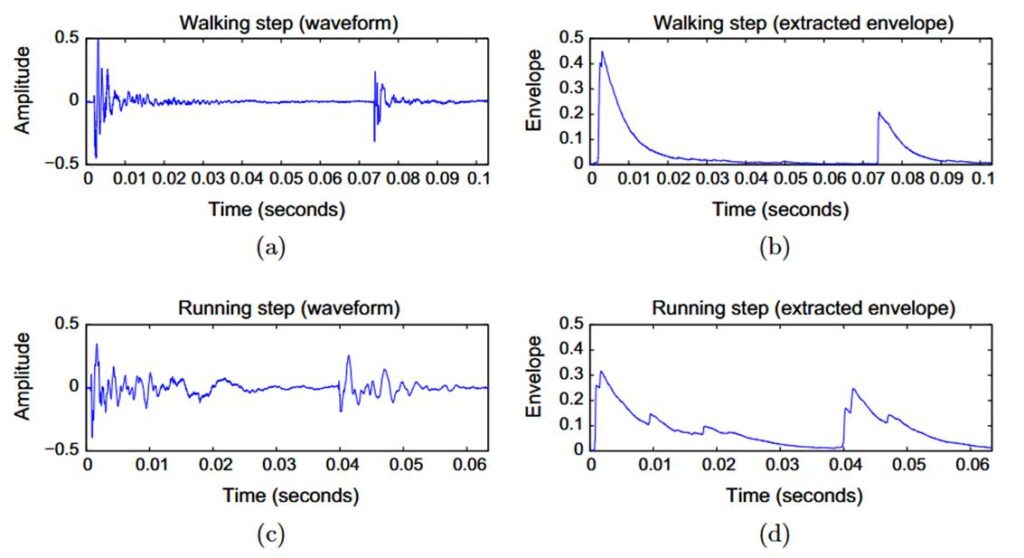
An analysis of the step presents three distinct phases of ground contact. The first and hardest contact stems from the heel, where the calcaneus bone touches the surface. Thereafter, the weight smoothly shifts towards the metatarsal and rolls off to the toes. During this shift, the downward pressure applied to the ground is opposed by a complementary force from the ground to keep the body balanced. The two main considerations are the impact of the step in the first phase, followed by the friction produced by the shoe rolling over into the third phase. Together, these form the ground response force, which increases when the surface area decreases. This is why high heels exert much more intense pressure on the floor than a completely flat sole.
Waveform and amplitude envelope comparison. Turchet 2016, 50
Farnell, Andy. Designing Sound. Cambridge: The MIT Press, 2010.
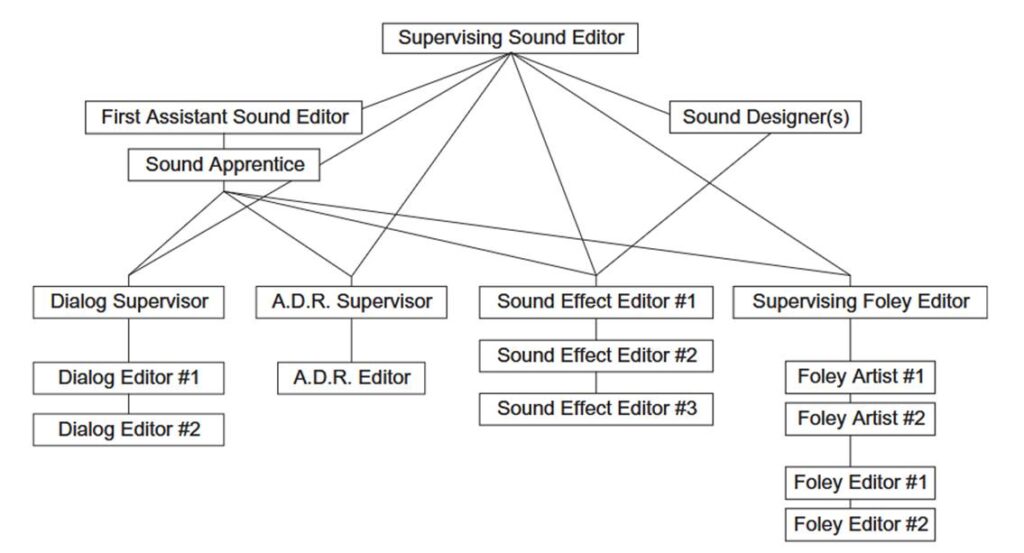
When starting this project, there was only a vague idea what sounds the system should reproduce. To make those decisions, it is incredibly helpful to look at how professional motion picture sound teams operate. Motion picture sound is generally split into four distinct categories, each with a specialized team. On one side, you have the production dialog recorded on set and the automated dialogue replacement used to fix missing or inaudible lines.
On the other side, you have the sound effects department and the Foley crew. The sound effects editors primarily cut and edit pre-recorded sounds from massive audio libraries to match the picture. They handle all the sounds a scene needs that do not directly revolve around the actors’ physical performances. In contrast, Foley artists perform sounds live to the picture.
Their main task is to give subtle nuances and characterization to an actor by performing their footsteps, movements, and the handling of everyday objects. They deliver a sonic performance to support the acting, whether through a naturalistic style or a hyper-realistic cinematic approach.
Reflecting on the sounds created in the Foley booth, this project’s desired audio output narrows down to footsteps, body movements, and object handling. Because handling objects encompasses such a broad variation of acoustic attributes, I decided to focus even further. While watching Foley artists perform footsteps, I noticed that the delicate movements of the hand captured via computer vision directly mimic the visual similarities of moving foot muscles. These intricate hand gestures can likely be directly translated to solve the physical challenges of synthesizing footsteps.
Yewdall, David Lewis. Practical Art of Motion Picture Sound 4th ed. Oxford: Focal Press, 2012.
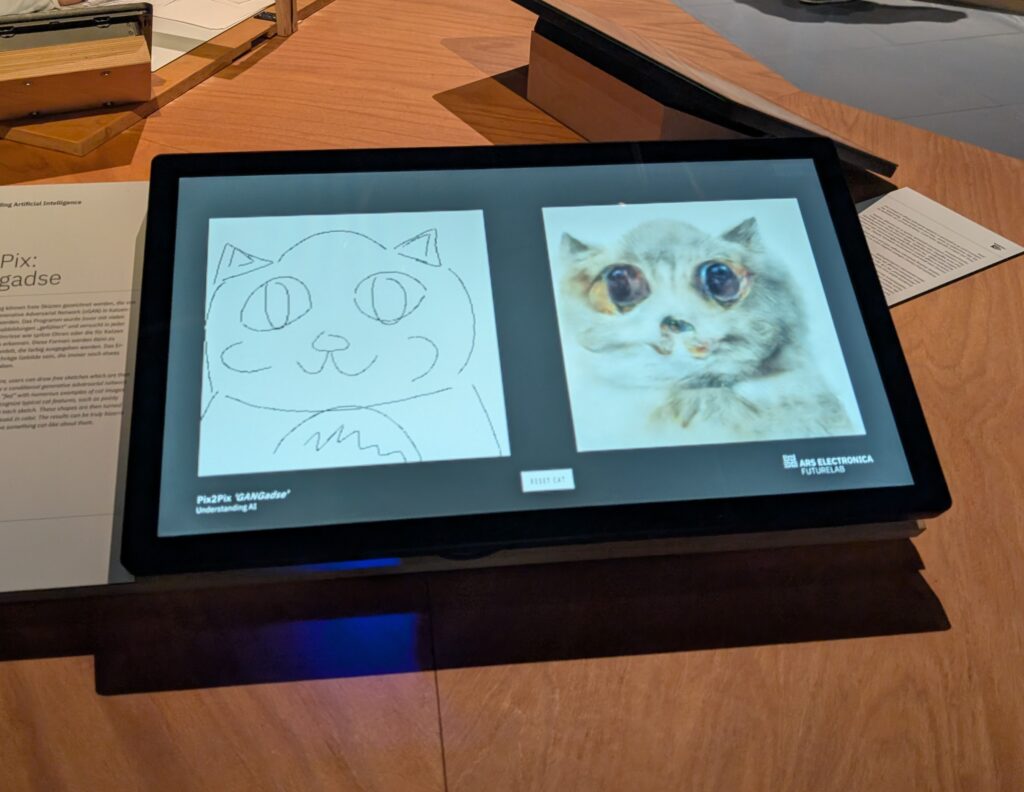
When I stood in front of the interactive screen at the Ars Electronica Center, there was one thing that sparked my interest immediately. The installation invites you to do something incredibly simple: pick up a digital pen, sketch a few lines, and watch a machine learning system immediately try to transform your doodles into a fully rendered, colorful cat. The piece plays on a popular piece of German internet slang for a cat, setting a lighthearted tone for what is actually an existential encounter with artificial intelligence. I drew a few shaky, anatomically questionable lines, and almost instantly, a furry, slightly cursed digital creature arose on the screen.
Beneath the humor of creating these accidental monsters lies a fascinating look into how modern generative AI interprets human input. The engine driving this transformation is an advanced neural network known as a Conditional Generative Adversarial Network. To understand how it brought my terrible drawings to life, I found it helpful to picture a high-stakes creative competition happening inside the computer. The system splits into two competing algorithms: a Generator and a Discriminator. The Generator acts like an art forger, starting with no knowledge of what a cat looks like and trying to create one from scratch. The Discriminator acts as a detective, comparing the forger’s creations against thousands of real cat photos it memorized during training. They push each other until the fake images become astonishingly detailed.
What makes this specific setup so fascinating to interact with is the conditional part of the tech, which is designed for image-to-image translation. In a standard setup, you press a button, and the AI spits out a random, perfect image. Here, the system is given a strict blueprint: a simple sketch. The Generator is forced to translate my exact lines, curves, and mistakes into the final image. It looks at the brushstrokes and figures out how to cram the textures of fur, whiskers, and shadows into the bizarre boundaries provided.
This translation process relies on the network’s ability to recognize spatial patterns. For my first attempt, captured in the image above, I tried to play along and drew a relatively standard, cartoonish cat face with big round eyes and pointed ears. Because the drawing roughly aligned with what the AI expected, it tried its best to map realistic textures over those specific regions. However, you can see how it over-interpreted the massive eyes I drew, filling them with an unsettlingly realistic, glossy depth that makes the final output look incredibly intense, yet undeniably feline.
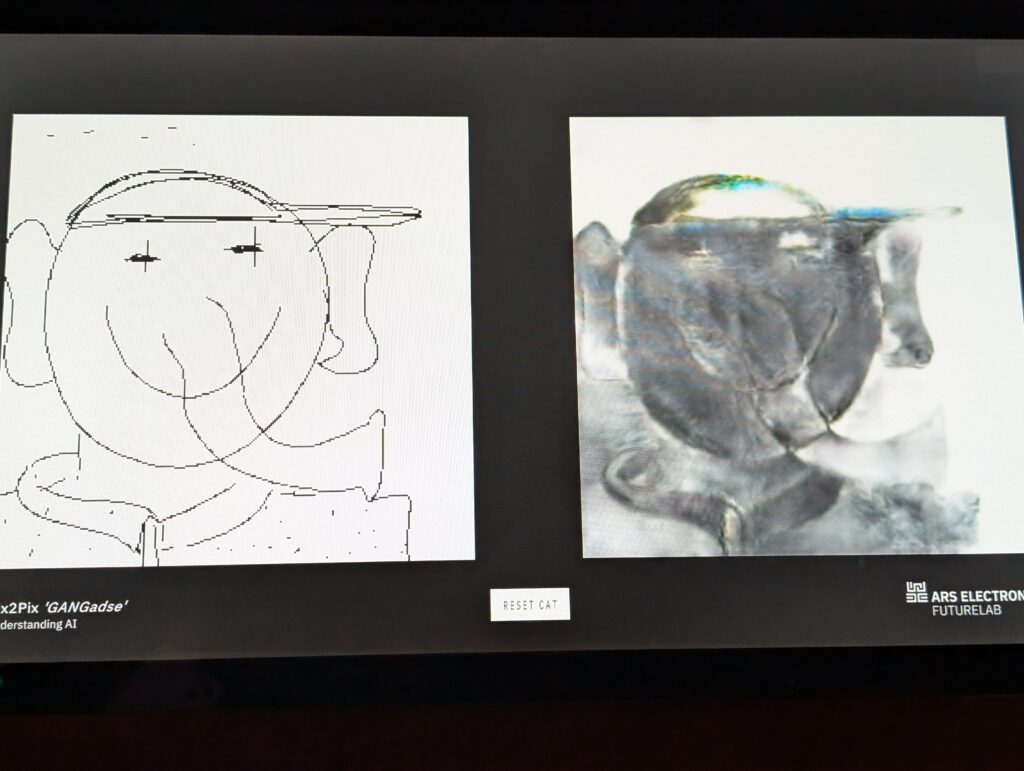
Because this network was trained exclusively on felines, it possesses a hilarious, stubborn blindness. It is completely incapable of seeing anything else. If you try to draw a house, a car, or something else entirely, the system will still desperately search your lines for pointy ears or whiskers, forcing cat attributes onto absolutely everything. I decided to test the absolute limits of this bias with my next drawing, which you can see in the image below. Instead of a cat, I drew a stylized character wearing a backwards cap, sporting giant elephant-like ears, and a long trunk-like shape on its face. The AI was completely unfazed by my lack of cooperation. It looked at the round head and the brim of the hat and somehow translated those shapes into a furry, shadowy texture, attempting to force the contours of an animal coat onto human streetwear.
This rigid worldview is exactly why the final drawings turn out so beautifully bizarre. The machine has no conceptual understanding of biology, anatomy, clothing, or what a living creature actually is; it only understands pixel statistics. When I drew an impossible, abstract shape, the network faithfully attempted to render photorealistic fur, depth, and organic lighting over my nonsensical geometry. The result was a surreal hybrid—a digital creature that looked like a cubist painting brought to life with organic textures.
Walking away from the screen, I realized the installation is a brilliant educational tool wrapped in a playful artistic experience. It peels back the layers of the mysterious AI black box and lets you see firsthand how these algorithms interpret, distort, and reconstruct our world. It left me thinking about a future where human-machine collaboration looks exactly like this: we provide the messy, creative spark through a simple sketch, and the machine handles the complex, data-driven task of rendering it into reality.
In the second part of my blog series from the IRCAM Forum, I will summarize 2 workshops and performances, where I found similarities and approaches that could be interesting for my own research project.
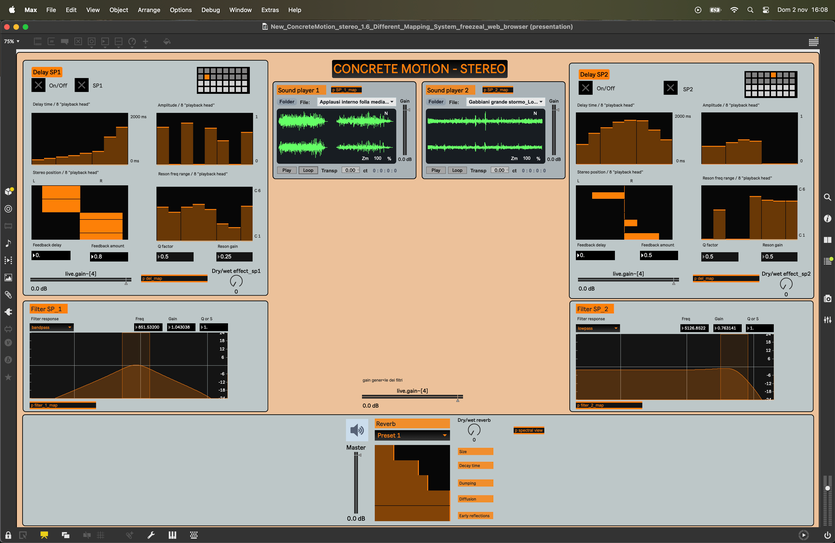
Concrete Motion is an experimental tool designed for educational settings that facilitates the study and creation of sound-based music through physical movement. The system integrates the flexible audio processing of Max/MSP combined with Google MediaPipe body-tracking, within the TouchDesigner environment. By leveraging these technologies, it establishes an interactive digital space where listening and electroacoustic analysis are mediated through the user’s bodily gestures. This approach aims to bridge the gap between abstract musical concepts and tangible, physical interaction for learners and creators alike. While the objectives in this project’s research lies in educational ambitions, the fact it is using gestural interaction to create an accessible environment, can be directly translated into my own idea of an accessible interface for my project. A main difference in the technical construction would be, that the MediaPipe Hand Landmarker is running directly through Touchdesigner. I am not sure if there is an additional latency involved or if this could also be an idea for my project. Especially if I plan to get some additional visualisation on the gestures and processed audio.
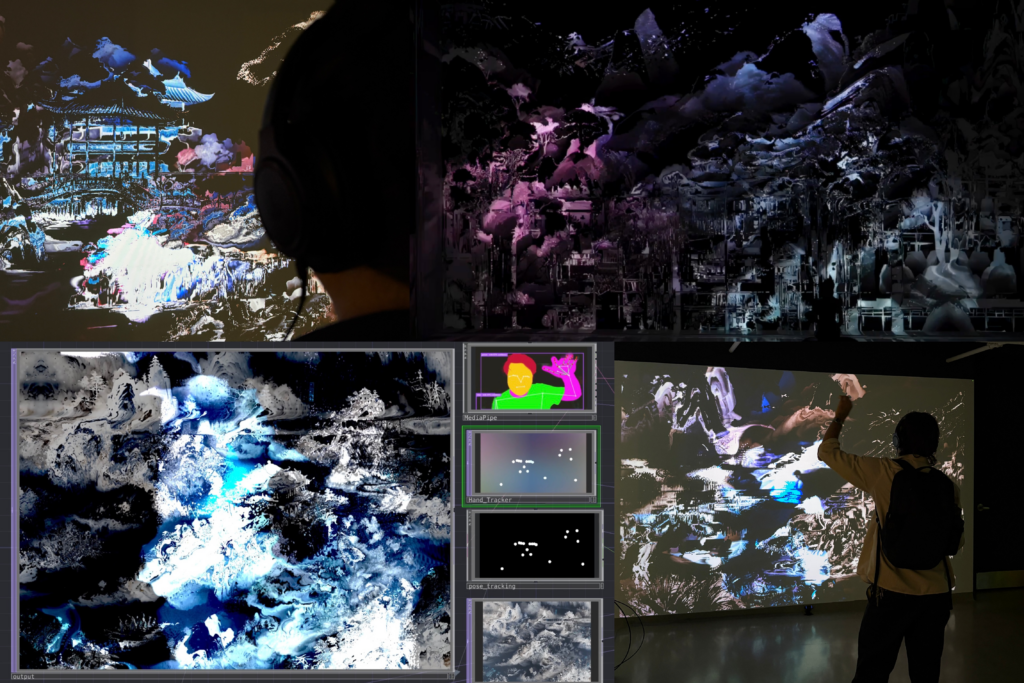
Liminal is an interactive installation that moves beyond traditional control-based models to explore a “liminal” space where agency is shared between humans and AI. In this environment, human gestures do not function as direct commands but instead serve as contextual information that influences the system’s evolving behavior over time. The architecture uses real-time computer vision and a Python-based decision layer to ensure that audiovisual changes emerge through gradual modulation and probabilistic weighting rather than immediate cause-and-effect. By distributing authorship across both the participant and the machine, the work transforms interaction into a sustained, meditative dialogue shaped by accumulated history and continuous negotiation. I visited the performance and workshop, as this is as well a similar approach from a gestural interaction to audio creation philosophy. In comparison to other projects of this theme, I found the bidirectional interaction and decision making between the human input and the models system. Maybe this could also be seen as an anecdote to how future work will, if not already, operate in all daily activities. On a technical level, the computer vision was also implemented through Touchdesigner, as in the other project mentioned earlier.
Both projects incorporate most technicalities I strive to achieve in my own project, hence why it was interesting listening to the approaches and talking about the ideas involved. While I will head towards a different end goal with my product, they are still good examples to compare the technical feasibility and workflow. All in all, our days at IRCAM Forum brought me exciting insights and takeaways from diverse fields of audio focussed research.
Last week we attended the IRCAM Forum in Paris as part of our semester excursion. Overall it was an interesting couple of days, where we had the chance to experience a lot of the latest research and techniques in various fields of audio and sound. Within this post I will try to summarise my main takeaways on some chosen talks, workshops and performances I have attended.
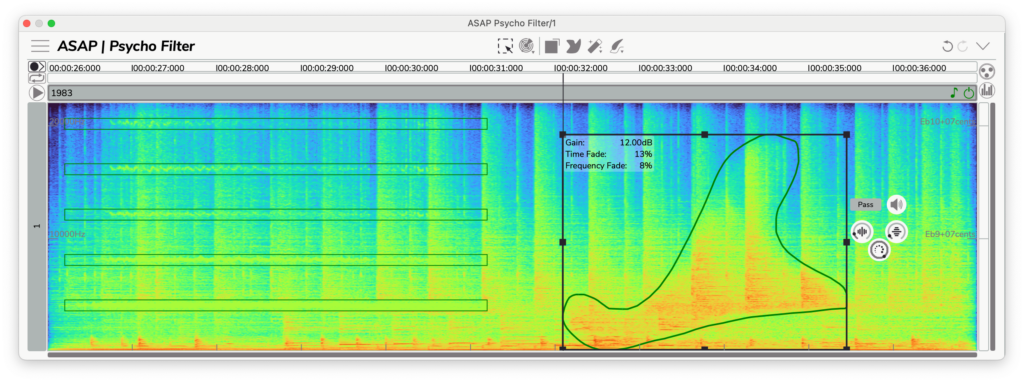
I visited a talk and workshop by Pierre Guillot, which showed updates and news from the tools Partiels and ASAP. Partiels is a software dedicated to analysing audio signals and retrieving useful data for signal processing and sound design applications. One of the new interesting developments involved a direct python integration to access analysed data directly. The ASAP tools are more a direct creative solution to manipulate audio in various applications. The three major tools mentioned would be the Psycho Filter – allowing to apply spectral filters directly to a source, the Pitches Brew – an advanced pitch and formant manipulation via interactive frequency curve editing, and Stretch Life – a time manipulation tool for compressing and stretching sound dynamically. Further notable mentions have been the Spectral Morphing and Spectral Crossing tool, which allows to combine and ‘morph’ two audio sources on the spectral domain. All together these seem to be interesting tools, cleverly designed and quite accessible for most users I would imagine.
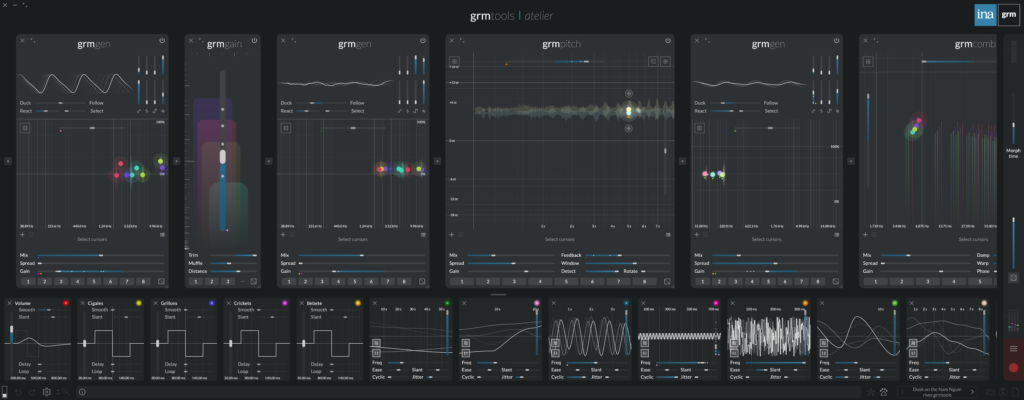
Another interesting workshop was the presentation of the GRM Tools Atelier software. It is a sound processing and synthesis environment working for real-time and multichannel productions, both in a live or studio application. I really liked the modular approach and the quick and intuitive randomisation capabilities, which allows for a fast agitation of multiple parameters at once. This can be an interesting choice for sound artists wanting to work with only one standalone software and dealing with more graphically intuitive controls than for example puredata or Max/Msp. As I already own some similar synthesizer software of a similar modular system, without the multichannel capabilities, I will for now stick to these though.
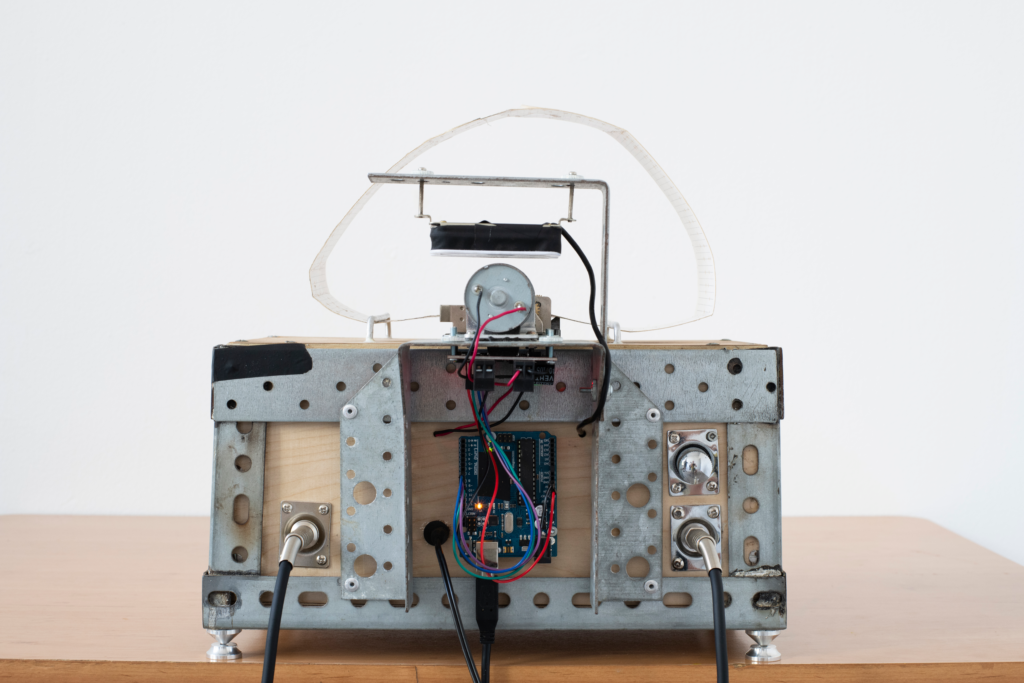
I also experienced a performance of VASE by composer Yuval Seeberger. The device is a motorized music-box installation that performs a 12-minute, semi-algorithmic composition by integrating a physical punched paper score with advanced digital processing. The system utilizes a specialized “ensemble” consisting of an acoustic-mechanical music-box, an analog motor, Max/MSP synthesis, and RAVE neural audio models to create a rich, layered sonic environment. While the structure follows a formal organization, the irregular communication between the computer and the mechanical hardware ensures that each loop cycle contains subtle, unpredictable variations. Through the use of Piezo and magnetic rail-coil pickups, the piece effectively bridges the gap between tactile mechanical movement and real-time AI-driven sound generation. I was quite fascinated by the various soundscapes it was able to produce and also how the random interaction by the composer influenced the installation.