✿1 Design & Research 2

Step 0 – 1st March 2026

The next two weeks will be focused on developing three different prototypes. My main goal is to explore how interfaces can be designed to better support older adults, especially those who didn’t grow up with digital technology. But before diving into design, I need to ask myself some questions: what is the real problem here? What do older users struggle with the most? Is it that apps and websites are simply too complex, with too many steps and features? Or is it that digital interfaces don’t match the way they expect things to work? Or perhaps it’s not the design at all, but a broader question of digital literacy, understanding how devices, apps and online systems actually function.

Step 1 – 8th March 2026

At the beginning I thought the main challenge would be designing intuitive, accessible interfaces. But as I began talking to people, I realized the picture is much bigger. Many of the people I asked weren’t just struggling with specific apps, they were struggling with digital literacy itself.

This opened my eyes to an important distinction: while good design can make apps easier to use, it can’t replace the need to teach fundamental digital skills. Tasks like navigating menus, understanding security warnings, or even recognizing phishing emails require guidance and practice.

I focused on brainstorming what the digital learning platform should actually teach and how it should support older adults in learning digital skills. Instead of starting directly with the design, I tried to map out the most important areas of digital literacy that the platform could cover. These include basic device skills such as navigating smartphones or adjusting settings, understanding common apps and websites, learning fundamental digital concepts like cloud storage or files, as well as topics related to online security, communication and everyday digital tasks.

While collecting these topics, it also became clear that the platform should not only provide information but guide users through learning in a structured way. One idea that was to create a “Today’s Lesson” feature. Instead of presenting users with many options at once, the platform could suggest one small learning session per day. This approach could help reduce decision fatigue.

Prototype 1

Prototype 2

Prototype 3 – Final Prototype

With the last prototype I tried to move away from the “dashboard” layout a bit and instead focus on something much clearer. Rather than showing lots of different options right away, the interface tries to guide the user through what to do next.

The “Today’s Lesson” feature became the main focus of the layout. It’s the first full-width card right after the hero section and noticeably larger than everything else on the page. The idea is that the most important action of the day should require zero searching. Many older users don’t scan pages the same way younger users do. Instead, they read from top to bottom.

Another element I tried out is a progress tracker with color-coded topics. Each topic has its own color instead of everything looking the same. The idea behind this is that color can become a kind of memory anchor. Over time users might remember something like “orange was the security lessons” without needing to read every label again.

For the lesson library I created video cards that show the duration and difficulty level right away.

Another thing I want to add is an accessibility toolbar directly in the Navigationbar. Instead of hiding text size or contrast settings somewhere deep in a settings menu, the controls (A / A+ / A++ and a contrast toggle) are always visible. My thought here was: if someone needs larger text, they probably need it immediately, not after navigating through several menus they might already struggle to read.

Interaction in Sounddesign

For this first blog post, I had to step a bit outside my comfort zone because we’ve started collaborating with sound designers on a music interface. That alone is already an interesting project. For the first blog post we had to research on nime.com and I came across a study about agency and creativity in musical interaction for people living with dementia and cognitive decline. I find this topic really interesting, especially since it connects in some ways to what I’m considering exploring in my master’s thesis.

Bild von jotoya auf Pixabay

Agency and Creativity in Musical Interaction for those living with Dementia and Cognitive Decline

Dementia is an umbrella term for a range of progressive conditions that affect the brain. These conditions can cause challenges with memory, problem solving, cognitive function and decision making. For people living with dementia, musical interventions have been shown to support important aspects of life, such as the sense of self. Sustained engagement with music can have a positive impact despite these challenges.

In this context, agency refers to the sense of control or ownership an individual feels over their actions and the resulting consequences. It describes the experience of being the initiator of one’s actions rather than just responding to external direction.

For people living with dementia, agency is often considered to be diminished. In research, dementia is frequently approached through a biomedical deficit model that focuses primarily on the skills and memories a person has lost. This perspective can lead to the assumption that because language and memory are impaired, agency must also be lost. However, this connection is often taken for granted rather than critically examined.

As a consequence, people living with dementia are frequently viewed as passive participants in therapeutic activities and are often expected to engage only in relatively basic tasks. In the study referenced, for example, participants were limited to playing simple instruments such as percussion while following the lead of experts. This setup reflects and reinforces the assumption that their role is primarily responsive rather than self-directed.

Biomedical deficit model

The biomedical deficit model is a framework commonly used in dementia research that focuses primarily on the skills lost by individuals and the tasks they are no longer able to achieve. This model prioritizes the identification of cognitive impairments, such as challenges with memory, language and problem-solving.

This paper proposed and tested a procedural music platform called the “SliderBox”, which was specifically created for people living with dementia. The goal of the project was to allow people with dementia to go beyond basic interactions to create sound and provide tools that facilitate unguided musical experiences and enabling them to actively participate music activities.

Source: J. Pigrem, J. Christensen, A. McPherson, R. Timmers, L. de Witte, and J. MacRitchie

The Hardware: The SliderBox is an accessible MIDI controller made of wood, with eight analogue sliders and eight push-buttons. It provides multi-modal feedback through LED light strips and buttons to help guide the user.

Conclusion

Some participants were struggling when there were more then two possible actions. This also directly related to the engagement, whereas less people would engage with the prototype, when it had to many possible actions.

The researchers also observed that the SliderBox had a high engagement and lack of negative behaviors, showing the potential for those platforms.

In this experiment concludes that it is absolutely possible to facilitate engaging musical interactions that also foster agency and creativity for those with cognitive decline.

Sources

[1] J. Pigrem, J. Christensen, A. McPherson, R. Timmers, L. de Witte, and J. MacRitchie, ‘Agency and Creativity in Musical Interaction for those living with Dementia and Cognitive Decline’, in Proceedings of the International Conference on New Interfaces for Musical Expression, 2024, pp. 315–323.

Calm UX in Healthcare

What Designing for Vulnerability Teaches Us About UX Everywhere

In the previous article, I explored how Calm UX becomes essential when digital products start predicting, recommending, and acting on users’ behalf. As systems grow more intelligent and autonomous, clarity, control, and psychological safety are no longer optional—they are prerequisites for trust.

Healthcare takes this one step further.

Healthcare is often treated as a special category in UX design—a domain with its own rules, constraints, and sensitivities. But it is not defined by different principles. It is defined by a different context of use. Healthcare doesn’t require new UX fundamentals; it requires existing ones to perform under pressure.

In healthcare contexts, users are rarely relaxed, curious, or exploratory. They interact with products while anxious, cognitively overloaded, emotionally vulnerable, or afraid of making mistakes. That makes healthcare products a powerful stress test for UX as a discipline.

If an interface fails under these conditions, it doesn’t fail because healthcare is “special.” It fails because the design was never truly calm, clear, or human-centered to begin with.

Healthcare as an Extreme UX Environment

Much of mainstream UX quietly assumes ideal conditions:

  • stable attention
  • emotional neutrality
  • tolerance for exploration
  • low cost of errors

Healthcare strips these assumptions away.

Users engage with health products while processing emotionally charged information, navigating uncertainty and risk, experiencing cognitive fatigue or distress, and fearing irreversible consequences. Under these conditions, even small ambiguities or unnecessary decisions can escalate into anxiety. This reveals a crucial insight:

Many interfaces rely on idealized users. Healthcare reveals real ones.

Calm UX becomes critical here not because healthcare is unique, but because it removes the safety buffer that often hides poor UX elsewhere. When attention is scarce and emotional stakes are high, only designs that genuinely reduce cognitive load and uncertainty can hold up.


Where Healthcare Reveals Broken UX Assumptions

Healthcare UX tends to fail in the same places where mainstream UX quietly struggles—but the consequences are far more visible. Designing for healthcare also means designing for neurodivergence and mental health, which exposes fundamental truths about how people actually interact with systems under strain.

Users with ADHD, anxiety, autism, or depression are more sensitive to cognitive load, less tolerant of ambiguity, more affected by interruptions, and more easily disoriented. These are often treated as edge cases, but they are not. They represent states that all users enter under stress—and healthcare places everyone in that state.

This is where many interfaces break down:

  • alarmist language that escalates uncertainty instead of explaining it
  • silent systems that leave users unsure whether an action succeeded
  • dense information displays that prioritize completeness over comprehension
  • binary outcomes presented without context or confidence framing

Outside healthcare, these issues cause frustration. Inside healthcare, they lead to anxiety, mistrust, and hesitation.

Calm UX reframes these moments by separating information from urgency, acknowledging uncertainty rather than hiding it, layering complexity instead of front-loading it, and reinforcing user agency at every step.

Calm UX as an Opportunity in Healthcare

In healthcare, Calm or Mindful UX is not about “being nice”—it’s about designing with a clear understanding of human limits. This means explicitly considering the user’s emotional and cognitive state: how much attention they can realistically give, how much information they can process, and how uncertainty might amplify fear or hesitation. It also means designing systems that reassure without misleading, guiding users without overwhelming them.

Focusing on Calm UX in healthcare doesn’t just improve health products. Much like accessibility features, it advances UX practice as a whole by grounding design decisions in real human constraints—and by bringing those improvements into everyday products where everyone can benefit.

My Conclusion to Calm UX and Calm Technology

The principles of Calm Technology are not a new discipline, but are already deeply embedded in established UX approaches—across digital and physical product design, and in domains such as healthcare and AI. UX has reached a level of maturity where the focus is no longer only on efficiency or fixing major usability issues, but on consciously considering people and their emotional experience throughout the process. Calm Technology makes this focus explicit, much like accessibility does, reminding us that user-centered design cannot meaningfully exist without these principles.

References:

AI Assistance Disclaimer:

AI tools were used to improve grammar and phrasing. The ideas, examples, and content remain entirely the author’s own.

Calm UX in AI-Driven Products

How Google’s and IBM’s AI Guidelines Help Reduce Cognitive Load

Artificial intelligence has become foundational in modern digital products, powering everything from search and recommendations to analytics and automation. But when AI is integrated carelessly, it doesn’t feel “helpful”, it feels unpredictable, opaque, or intrusive. That’s where Calm UX intersects directly with practical AI design.

To create AI experiences that feel reassuring rather than stressful, we need both behavioral guidelines and design patterns that embed calmness into interaction. Leading design frameworks from companies like Google and IBMarticulate such principles, explicitly tying usability, transparency, and control to trustworthy AI experiences.

Why Calm UX Matters in AI Systems

AI systems are fundamentally probabilistic, they make predictions, not certainties. Yet users instinctively seek clarity, control, and predictability when interacting with digital products. When an AI recommendation appears without context, or when a system acts before the user has given explicit consent, the interface can quickly feel noisy or demanding. The result is increased cognitive load: users must expend mental effort to interpret what the system did, why it did it, and whether they are still in control.

A familiar example is autocorrection. When it quietly suggests a word and allows the user to accept or ignore it, it feels helpful and unobtrusive. When it automatically replaces words without explanation or easy reversal, it creates friction, uncertainty, and frustration. The difference is not the intelligence of the system, but how its behavior is communicated and constrained.

Calm UX addresses this tension by deliberately reducing the mental work required to understand and manage AI behavior. It does so by:

  • clearly indicating when AI is active,
  • explaining why a suggestion or prediction is being made,
  • making it obvious how users can intervene, override, or undo an action,
  • and keeping AI signals in the periphery until the user chooses to engage.

This approach aligns closely with the core idea of Calm Technology: technology should inform without demanding attention. AI should participate quietly in the background, stepping into focus only when its input is meaningful, actionable, and invited.

How Google’s People + AI Guidebook Supports Calm UX

Google’s People + AI Guidebook provides a concrete set of principles and patterns for AI-enabled interfaces, emphasizing user understanding and control. Key patterns include:

1. Model Status and Confidence Indicators

Instead of presenting AI output as a definitive outcome, designers should surface confidence levels or uncertainty ranges (for example, “83% confidence”). Making uncertainty visible helps users better predict system behavior, build appropriate trust, and reduces anxiety when outcomes are not certain.

2. Recommendations with Rationale

AI suggestions should clearly communicate why they are offered. For example, by referencing past behavior or recent activity. Making this underlying logic visible provides essential context, reduces cognitive load, and helps avoid the “black box” effect that often undermines trust in AI systems.

3. Human-in-the-Loop Controls

Allowing users to accept, reject, edit, or refine AI suggestions keeps agency firmly with the user rather than with an opaque automated system. This sense of control builds confidence and reduces anxiety about unintended or irreversible outcomes.

Google’s guidance pitches these patterns not as optional add-ons but as core UX requirements when embedding AI into workflows, because clarity and control directly reduce cognitive demand.

IBM’s Approach to AI UX — Transparency, Trust, and Shared Agency

IBM’s AI design practice also emphasizes understanding and human-centered automation. Explainability helps users understand both the process and limitations of AI. In their guidelines, this approach is summarized in two key concepts:

1. Explainability as a UX Function

When systems articulate how and why they reached a specific conclusion—even at a high level—users can form a clear mental model of the AI’s behavior. This predictability reduces mental effort and helps prevent frustration caused by uncertainty.

2. Role Clarity Between User and AI

Users should always understand where human responsibility begins and where AI assistance ends. Clearly demarcating these boundaries in the interface minimizes anxiety by removing uncertainty about whether the system is acting autonomously or on the user’s behalf.

This emphasis echoes research suggesting that AI designers must address both model transparency and user understanding if they want trust and low friction in human-AI interaction.

Calm UX, Cognitive Load & Calm Technology

At its core, Calm UX in AI interfaces is about managing the mental effort users invest in understanding system behavior. It uses patterns that reduce ambiguity, promote transparency, and preserve control, all of which are directly supported by Google’s and IBM’s AI guidelines.

That alignment is not coincidental. Calm UX and Calm Technology principles converge around the same goal: Design systems that support human thinking — not overwhelm it.

When AI interfaces follow clear guidelines, from explainability to human-in-the-loop design, they become not just smarter, but calmer, more trustworthy, and easier to use.

References:
  • Weiser, M., Seely Brown, J. (1995): “Designing Calm Technology“, Xerox PARC
  • Weiser, M., Seely Brown, J. (1996): “The Coming Age of Calm Technology“, Xerox PARC
  • Case, A. (2015): “Calm Technology: Principles and Patterns for Non-Intrusive Design
  • Google PAIR – People + AI Guidebook https://pair.withgoogle.com/guidebook/
  • IBM – Explainable AI Design Guidelines https://www.ibm.com/design/ai/

AI Assistance Disclaimer:

AI tools were used to improve grammar and phrasing. The ideas, examples, and content remain entirely the author’s own.

Application of calm technology principles in Digital Product Design

Many digital products today are technically well designed. They pass usability tests, follow established patterns, and allow users to complete tasks efficiently. And yet, they still feel stressful to use. This tension points to a common misunderstanding in UX:

Usability alone does not guarantee a calm experience (Calm UX).

What users often struggle with is not failure, but mental strain — the quiet effort required to interpret, decide, remember, and stay oriented while interacting with an interface.

Cognitive Load Is the Invisible Friction

I realized that a key driver of user stress is cognitive load: the amount of mental effort required to process information and make decisions. Human working memory is limited. When interfaces demand too much attention, comparison, recall, or interpretation, users become fatigued and error-prone — even if nothing is technically “broken”.

Research by Nielsen Norman Group shows that cognitive load increases when users are forced to:

  • hold information in memory instead of recognizing it
  • make too many decisions at once
  • decode unclear labels or system states
  • recover from interruptions without guidance

Reducing cognitive load is not about removing functionality. It’s about removing unnecessary mental work.

Calm UX Goes Beyond Usability

Calm UX builds on classic usability principles but extends them into the emotional and psychological domain. As described in recent UX research and writing, calm experiences are those that reduce anxiety, uncertainty, and hesitation, especially in moments where users are unsure what the system is doing or what is expected of them.

According to UXmatters, much of the most damaging friction in digital products is not physical or functional, but psychological. Interfaces that rush users, provide ambiguous feedback, or escalate situations unnecessarily create stress — even when users ultimately succeed.

Calm UX asks different questions than traditional UX:

  • Do users feel in control?
  • Does the system behave predictably?
  • Is uncertainty acknowledged or ignored?
  • Does the interface reassure, or does it pressure?

Design Principles That Create Calm

Research from NN/g, UXmatters, and Calm Technology literature points to a small set of recurring principles that consistently reduce cognitive strain and user anxiety.

Minimize cognitive effort by default
Calm interfaces prioritize recognition over recall, limit information to what is immediately relevant, and use familiar, consistent patterns. Clear visual hierarchy and progressive disclosure help users stay oriented without unnecessary mental effort.

Communicate with clarity, not urgency
System messages are emotionally charged moments. Calm UX avoids alarmist language and explains what happened, why it matters, and what comes next—without blame, pressure, or artificial urgency.

Make system behavior visible
Uncertainty increases stress. Loading states, background processes, and validations should clearly communicate progress and outcomes, even when no action is required from the user.

Respect attention as a scarce resource
Notifications should interrupt only when they provide clear, timely value. Calm UX is quiet by default and intentional when asking for attention.

Introduce complexity gradually
Complex systems don’t need to feel complex upfront. Calm UX reveals detail only as it becomes relevant, reducing initial overwhelm and supporting user confidence.

These principles are not new rules. They are a reframing of established UX heuristics through the lens of Calm Technology—shifting the focus from efficiency alone to cognitive and emotional ease.

Design Patterns That Create Calm

In practice, these principles materialize through a set of recurring design patterns that can be used as tools to create calmer products.

Progressive Disclosure
Calm UX avoids presenting all information and options at once. Instead, complexity is revealed gradually, as it becomes relevant. This helps users orient themselves quickly and reduces initial cognitive load, especially in complex systems.

Recognition Over Recall
Rather than relying on users’ memory, calm interfaces surface choices, defaults, examples, and familiar patterns directly in the UI. This reduces mental effort and minimizes the anxiety that comes from uncertainty or second-guessing.

Visible System Status
Calm UX avoids silent systems. Loading states, background processes, and validation feedback clearly communicate what is happening and what to expect next, even when no action is required from the user.

Gentle Confirmation
Success and completion are communicated through subtle, inline feedback instead of disruptive modal dialogs. This reassures users without interrupting their flow or escalating the interaction unnecessarily.

Forgiving Interactions
Undo options, editable states, and non-destructive defaults make mistakes recoverable. When users know they can correct an action, they interact with greater confidence and less hesitation.

Predictable Interaction Patterns
Consistent layouts, control placement, and feedback behavior reduce the mental effort required to re-orient across screens. Calm interfaces prioritize familiarity over novelty.

Descriptive Microcopy
Clear, outcome-focused language replaces vague labels and technical jargon. Users understand what will happen before they act, reducing hesitation and cognitive strain.

Status Over Alerts
Whenever possible, calm systems communicate information through passive status indicators rather than interruptive alerts. Information remains available without demanding immediate attention.

Notification Gating
Notifications are used sparingly and intentionally. Calm UX is quiet by default and interrupts only when timely user action truly matters, treating attention as a limited resource.

Clear Exit Paths
Users can cancel, go back, or pause processes at any time. Knowing there is always a way out significantly reduces pressure and perceived risk.


Together, these patterns don’t eliminate complexity — they structure it, pace it, and communicate it with care. They shift UX from demanding attention to supporting orientation, from pushing users forward to helping them stay grounded.

As digital products increasingly incorporate AI-driven predictions, recommendations, and automation, these patterns become even more critical. When systems begin acting on users’ behalf, clarity, control, and calm are no longer optional — they are the foundation of trust. In the next article, I’ll explore how Calm UX principles apply specifically to AI-driven products, and how thoughtful design can make intelligent systems feel supportive rather than intrusive.

References:
  • Weiser, M., Seely Brown, J. (1995): “Designing Calm Technology“, Xerox PARC
  • Weiser, M., Seely Brown, J. (1996): “The Coming Age of Calm Technology“, Xerox PARC
  • Case, A. (2015): “Calm Technology: Principles and Patterns for Non-Intrusive Design

AI Assistance Disclaimer:

AI tools were used to improve grammar and phrasing. The ideas, examples, and content remain entirely the author’s own.

Drink Smart and Keep Calm: Technology that Stays in the Background – Part III

From Concept to Prototype: Planning a Calm, Tangible Drinking Reminder

After introducing ubiquitous computing, tangible user interfaces, and calm technology through the example of a smart water glass, the next step is to explore how such a concept could be translated into a physical prototype. Rather than focusing solely on technical feasibility, the planned smart coaster is intended as a design-driven experiment — one that combines physical prototyping with a human-centered design (HCD) process.

The goal is not to build a “perfect” product, but to create a functional artifact that allows the underlying interaction principles to be examined, questioned, and refined.

Framing the Problem in Its Usage Context

The initial motivation for the project stems from a common everyday situation: forgetting to drink water while working or studying. Existing solutions, such as hydration reminder apps, typically rely on push notifications, sounds, or vibrations. While effective in theory, these mechanisms often interrupt users at inopportune moments and shift attention away from the current task toward a screen.

Before committing to a specific technical solution, I would usually start the project by planning a usage context analysis. This would involve observing when and where drinking usually happens, how glasses are positioned in work environments, and how people react to reminders during focused tasks. As the design proposal has already been introduced, I move directly into this idea rather than conducting a full exploratory phase. The underlying assumption is that drinking is already embedded in physical routines and object interactions—making it a promising candidate for a tangible, environment-based interface.

Planned Human-Centered Design Approach

The development of the smart coaster is intended to follow a simplified human-centered design (HCD) process:

  1. Empathize & UnderstandThe process would begin with self-observation and informal conversations to gain insight into why drinking is often forgotten and how existing reminder systems are perceived in everyday situations.
  2. DefineBased on these initial insights, the core design challenge can be formulated as:How might a drinking reminder support hydration without interrupting or demanding attention?
  3. IdeateThe ideation phase would focus on identifying calm forms of feedback. Different modalities—such as light, sound, or subtle movement—would be explored and evaluated in terms of intrusiveness, social acceptability, and perceptibility in the periphery of attention.
  4. PrototypeA low- to mid-fidelity prototype of a smart coaster is planned as a tangible representation of these concepts, allowing interaction principles to be examined in a physical form.
  5. EvaluateShort, qualitative user testing sessions are intended to help validate assumptions and inform iterative refinement of the interaction and feedback design.

Technical Implementation as Design Medium

The planned prototype combines accessible digital fabrication and physical computing tools:

  • 3D-printed coaster, designed to visually blend into everyday environments.
  • pressure sensor to detect the presence or absence of a glass.
  • Raspberry Pi Pico as the microcontroller handling timing and state logic.
  • Subtle ambient feedback, such as low-intensity light, to communicate reminders without explicit alerts.

Importantly, the technical setup is intentionally kept minimal. This aligns with calm technology principles by reducing complexity and ensuring that the coaster remains usable even if the digital components fail.

Planned User Testing and Evaluation

Rather than large-scale usability testing, the project is intended to rely on small, qualitative user tests. Participants would use the coaster in desk-based work scenarios and reflect on their experience afterward.

The evaluation would focus less on performance metrics and more on experiential questions:

  • Was the reminder perceived as intrusive?
  • Did it remain in the periphery until needed?
  • How did it compare emotionally to phone-based reminders?

These observations are expected to inform whether the concept successfully embodies calm interaction.

Conceptual Comparison: Coaster vs. App

As part of the analysis, the smart coaster will be conceptually compared to traditional drinking reminder apps. While apps centralize interaction on a screen, the coaster distributes interaction into the environment. This comparison serves to highlight how tangible interfaces and ubiquitous computing shift responsibility from the user to the surrounding system.

Outlook

By planning the smart coaster as both a technical prototype and a research artifact, the project aims to explore how calm technology principles can be operationalized in everyday objects. The focus remains on how interaction feels, rather than how much functionality is added — reinforcing the idea that sometimes, the most effective technology is the one that stays quietly in the background.

References:
  • Weiser, M., Seely Brown, J. (1995): “Designing Calm Technology“, Xerox PARC
  • Weiser, M., Seely Brown, J. (1996): “The Coming Age of Calm Technology“, Xerox PARC
  • Case, A. (2015): “Calm Technology: Principles and Patterns for Non-Intrusive Design
  • https://calmtech.com
  • Human-Centered Design nach ISO 9241-210:2019

AI Assistance Disclaimer:

AI tools were used to improve grammar and phrasing. The ideas, examples, and content remain entirely the author’s own.

#9 (10) Final Post

In this final post of the semester, I want to come back to some of the research questions I defined at the beginning of this journey, especially the two different directions this topic can take. I believe the challenge of older adults struggling with technology can be approached in two ways: one focuses on how interaction design can support them in learning digital skills, while the other asks how we, as designers, can make digital systems easier to understand in the first place.

Interaction design can support older adults in learning digital skills by acting as a something like a cognitive guide that reduces mental effort, aligns with their unique conceptual frameworks and fosters the trust for experimentation.

As Designers we can try:

1. Aligning with Seniors’ Mental Models

  • Older adults conceptual models of technology often differ significantly from the screen-centered logic used by younger generations. [1]
  • Linear Logic over Screen-Based Logic: Seniors frequently intuitively adopt a linear, storytelling-like approach to interactions. Interaction design can support learning by using step-by-step narratives rather than multi-layered, interactive screens that can be disorienting. [1]
  • Contextual Clarity: Older users may confuse similar UI elements, such as address bars and search fields. Design should use explicit, consistent wording and “polite” system feedback, to align with their social expectations and provide a sense of security. [1]
  • Separating Interface from Implementation: Seniors often struggle to distinguish between the frontend (what they see) and the backend (how it works). Design that clearly defines the interface as a “method of communication” might help them grasp the abstract nature of software. [1]

2. Teaching Strategies

Secondly it would be possible to teach elderly people about systems and how they work. Instruction for older adults is most successful when it moves away from standard methods and aligns with the cognitive preferences of the age group.[1]

  • Align with Linear Mental Models: Seniors often approach technology through a “storytelling” or linear logic rather than the screen-based, multi-layered logic common in modern software. Designing learning paths that follow a step-by-step narrative can help them internalise abstract concepts.[1]
  • Abstract Thinking Exercises: Before diving into software, starting with exercises like drawing symbols for abstract terms can prepare seniors for the conceptual nature of digital interfaces. [3]
  • Minimise Cognitive Friction: Instruction should focus on minimising friction by reducing the number of steps required to complete an action, which supports those who process fewer “discrete information bits” at one time. [4]
  • Provide Task Support: Using external cues, reminders and labels, known as environmental support, can compensate for memory decline and improve performance to the level of younger learners. [2]

Next Steps

I already have some ideas for the next steps. I’d like to dive deeper into the interaction side of this topic and as mentioned in the presentation, I’m also considering running a workshop. While researching similar projects, I found that when working with older adults, confidence and trust are often bigger hurdles than the technology itself.

Sources

[1] D. Orzeszek et al., ‘Beyond Participatory Design: Towards a Model for Teaching Seniors Application Design’, arXiv [cs.CY]. 2017.

[2] F. Craik, ‘Memory Changes in Normal Aging’, Current Directions in Psychological Science – CURR DIRECTIONS PSYCHOL SCI, vol. 3, pp. 155–158, 10 1994.

[3] Thefinchdesignagency, “Building User Trust in UX Design: Proven Strategies for Better Engagement,” Medium, Feb. 05, 2025. https://medium.com/@thefinchdesignagency/building-user-trust-in-ux-design-proven-strategies-for-better-engagement-c975aa381516

[4] G. A. Wildenbos, L. Peute, and M. Jaspers, “Aging barriers influencing mobile health usability for older adults: A literature based framework (MOLD-US),” International Journal of Medical Informatics, vol. 114, pp. 66–75, Jun. 2018, doi: https://doi.org/10.1016/j.ijmedinf.2018.03.012.

[5] N. Halmdienst, M. Radhuber, and R. Winter-Ebmer, “Attitudes of elderly Austrians towards new technologies: communication and entertainment versus health and support use,” European Journal of Ageing, vol. 16, no. 4, pp. 513–523, Apr. 2019, doi: https://doi.org/10.1007/s10433-019-00508-y.

[6] F. Craik, ‘Memory Changes in Normal Aging’, Current Directions in Psychological Science – CURR DIRECTIONS PSYCHOL SCI, vol. 3, pp. 155–158, 10 1994.

The City as a Designed System: Architecture, Space, and Pace 8/10

The Trap of Perfection: Why “Easy” is the Enemy

Design & Research | Master Thesis Log 09

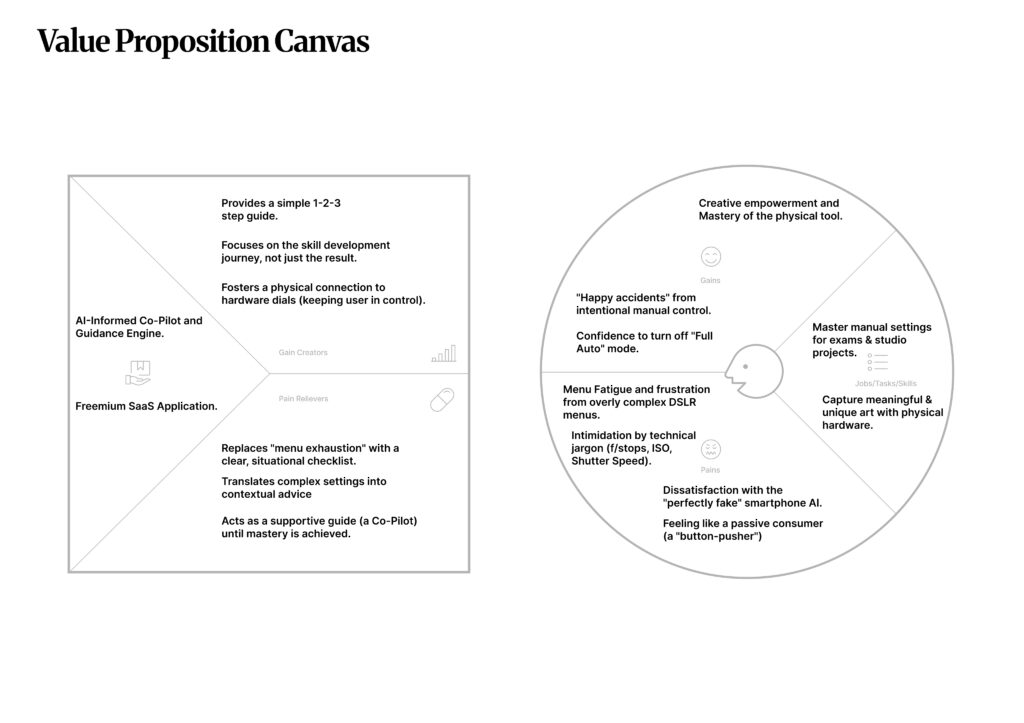
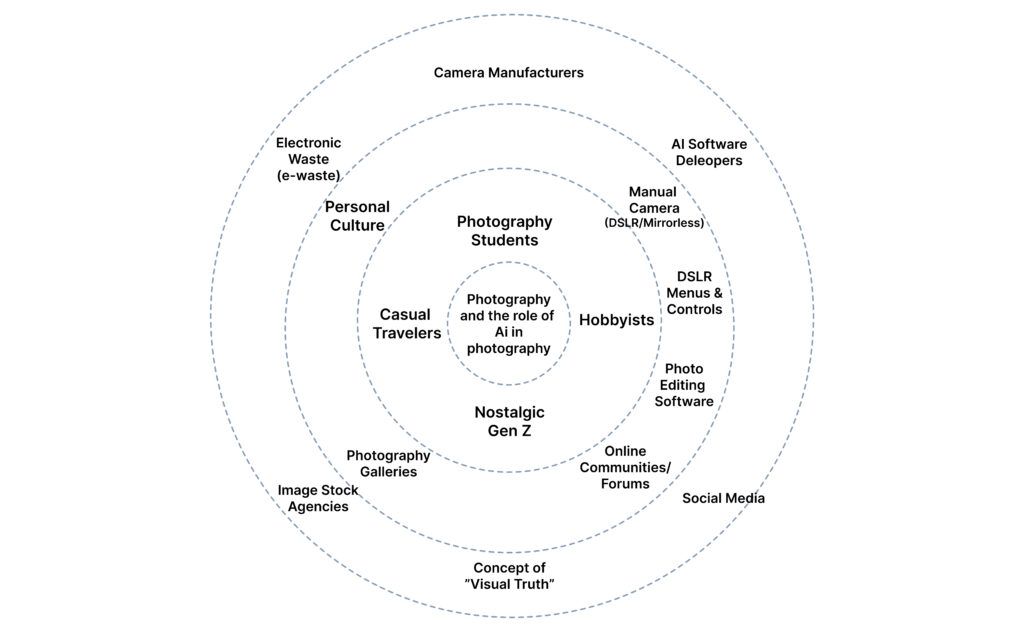
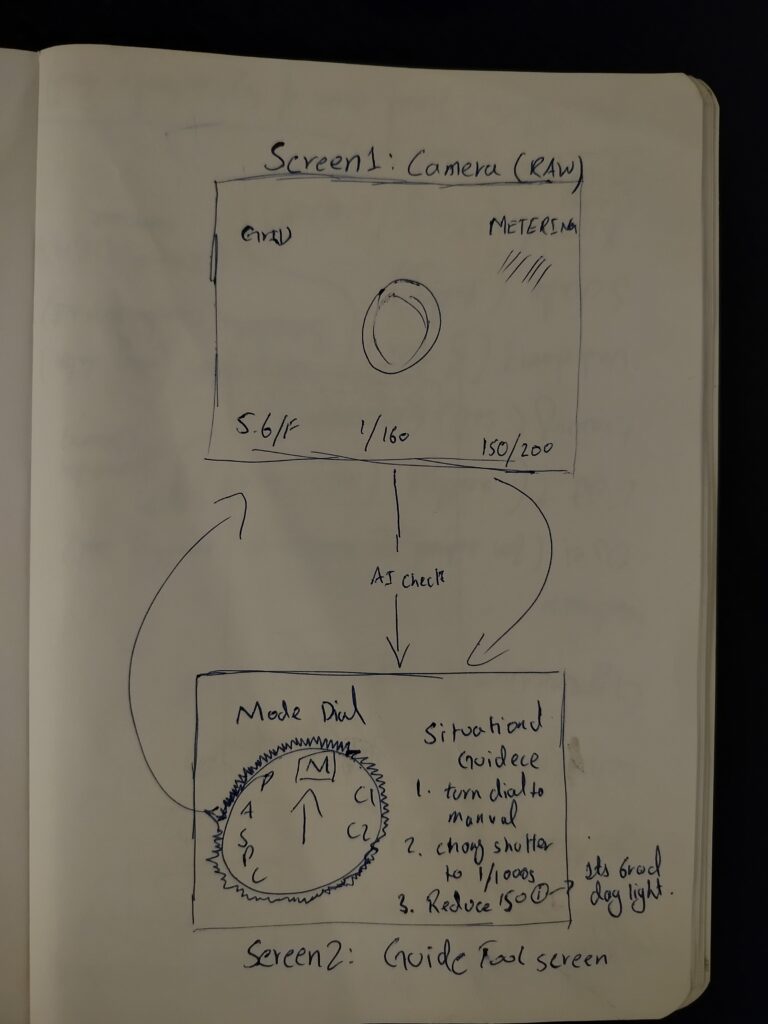
In my last post, I told you I was going to spend some time experimenting with my smartphone camera—really pushing the AI settings to see what they could do. I wanted to see if I could find a way to love the automation.

Well, I tried. And I found something interesting: I hated it.

The Experiment I went out with just my phone. No heavy gear, no lenses, just the device in my pocket. I took pictures of architecture, people, and shadows.

Technically? The photos were incredible. The AI balanced the highlights perfectly. The “Night Mode” saw things my eyes couldn’t even see. The colors were vibrant and sharp. I didn’t have to think about shutter speed or ISO. I just tapped the screen.
It was effortless. It was perfect.
And that is exactly the problem.

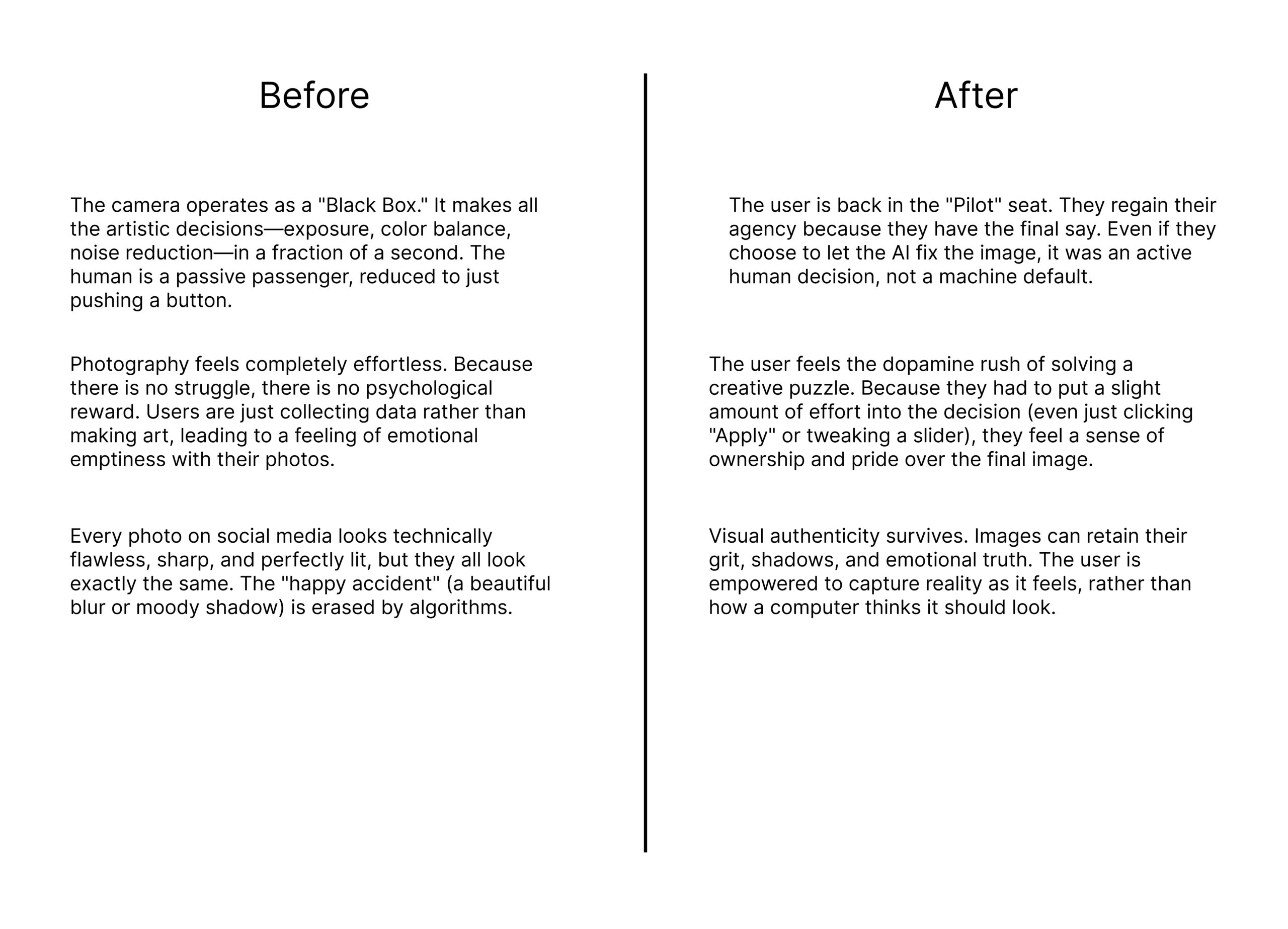
The Missing Ingredient I realized that when the camera does everything, the satisfaction disappears.

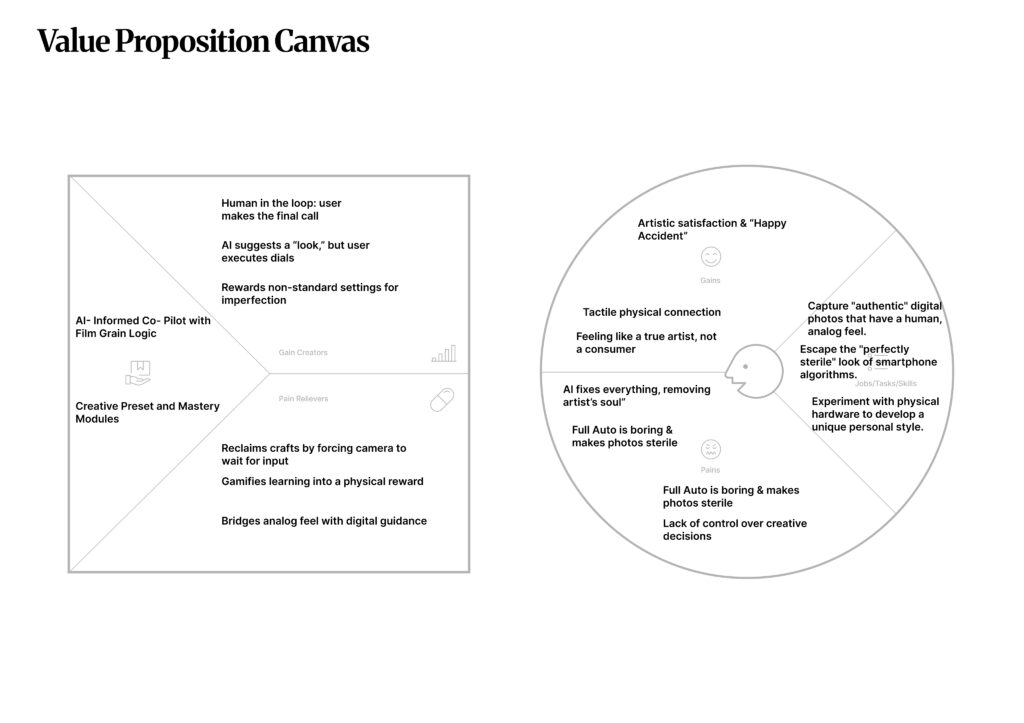
When I use my manual camera, I am constantly solving problems. Is the light too harsh? Do I need to lower the shutter speed? Is the focus right? When I finally get the shot, I feel a rush of dopamine because I solved the puzzle.

With the AI phone camera, there was no puzzle. It was just… consumption. I wasn’t making an image; I was just collecting one.

The “Happy Accident” I also realized that automation kills the “happy accident.”

Some of my best photos happened because I made a mistake. Maybe the shutter was too slow and created a beautiful blur. Maybe the exposure was dark and created a moody silhouette.

My phone refused to let me make those mistakes. It “fixed” everything instantly. It sanitized the creativity right out of the process.

The Realization This experiment taught me more than any interview could. It taught me that friction is necessary for art.

We don’t play video games that are impossible to lose. We don’t watch movies where everything goes perfectly for the hero. We need the struggle.

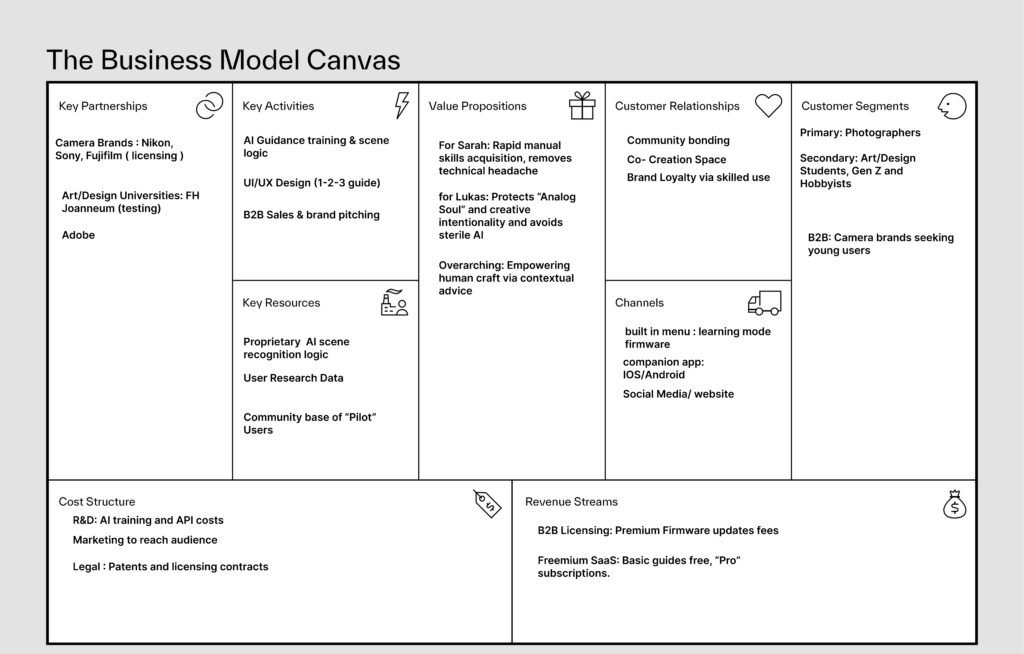
So, as I move toward my final design concept, I know one thing for sure: My solution cannot just be “easier.” It has to be “harder” in the right way. We need to bring the struggle back.

Missed Connections and Surprise Conversations

Design & Research | Master Thesis Log 08

Research rarely goes according to plan.

In my last post, I told you I was hitting the “pause” button on the pressure. I promised myself I would stop forcing results and just let the process happen. And honestly? It’s working.

I had planned to share a deep-dive interview this week with a “Hybrid Shooter”—someone who mixes film and digital workflows. Unfortunately, due to scheduling conflicts, we couldn’t make it happen yet. A few weeks ago, that would have panicked me. I would have scrambled to find a backup or faked a conclusion.
But today? I’m okay with it.

Testing Without Pressure Instead of stressing about the missing interview, I’ve been using this time to experiment on my own. I’ve been walking around with just my phone, playing with the AI settings I usually ignore. I’m trying to see exactly what the software is doing to my images—where it helps, and where it takes over. It’s different when you are just “playing” versus “researching.” You notice more.

A Random Encounter: Donnie Jacob Then, something serendipitous happened.

I hopped onto an Instagram Live with Donnie Jacob, the content creator known for approaching strangers and taking their portraits. It wasn’t planned, but I got the chance to ask him directly about his take on AI in photography.

His answer was incredibly grounding.
He reminded me that “AI” isn’t actually new. He pointed out that we’ve had tools like the Magic Brush and content-aware fill in Photoshop for years. The technology has been here a long time; only the terms have changed.

He admitted that while we can’t run from the change—it’s inevitable—it might be too soon to make a final judgment on where it’s all going. But he shared one strong belief that really stuck with me:

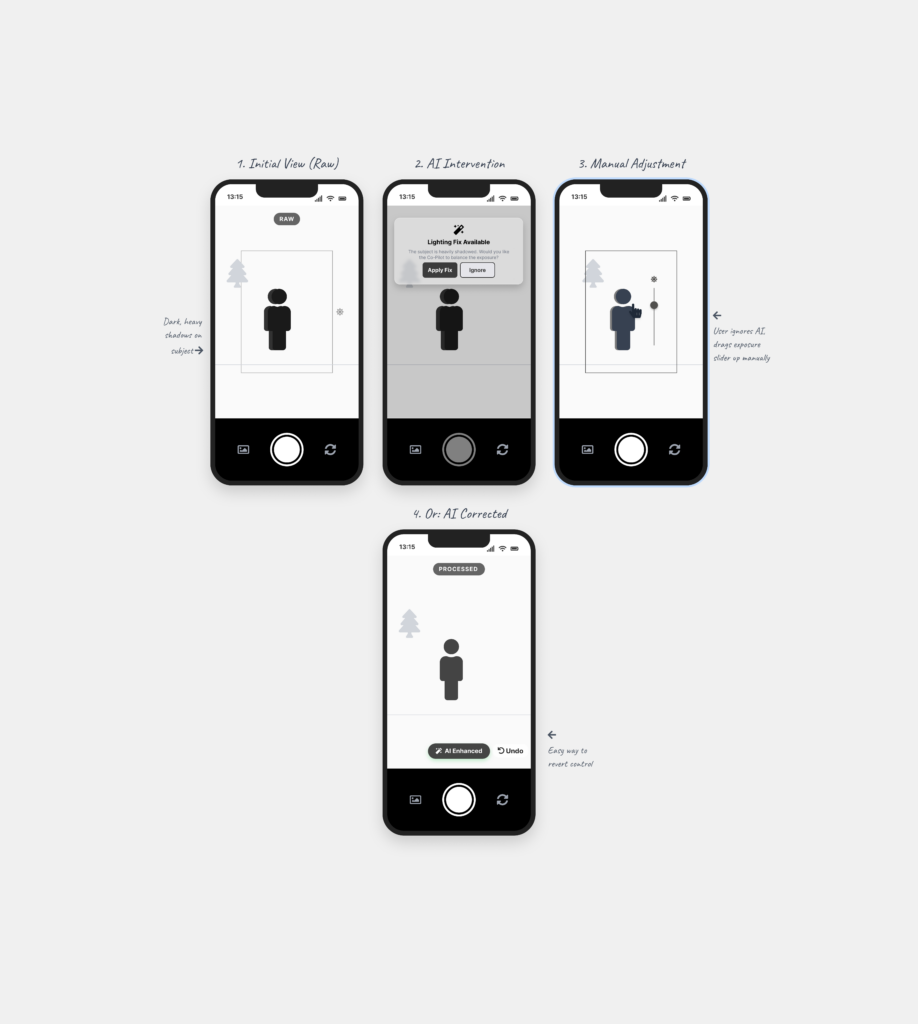
He believes we have to embrace the change—we can’t hide from it—but we must never let it take control over us. The photographer has to remain the one in the driver’s seat.

It confirms what I’ve been feeling: The future isn’t about fighting the technology. It’s about knowing who is in charge.