Part 1: How to Mixer
A Video Mixer in Resolume Arena enables smooth transitions between clips by blending two video sources in real time. Instead, hard cutting from one clip to another, it interpolates between them using adjustable blend or transition modes such as crossfade, Add, Wipe or Slide. The transition duration and blend mode are customizable, allowing for seamless visual continuity or more stylized scene changes during live performances.
Having learnt about this feature, I thought I’d try making my own mixer in Resolume Wire.
Here is the Wire patch:
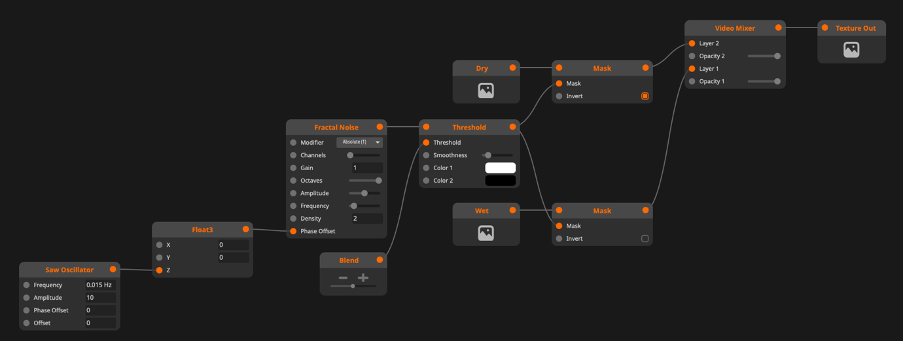
Node explanations:
A Saw Oscillator generates a repeating sawtooth waveform that ramps linearly from its minimum to maximum value before instantly resetting. It can be used to create continuous animations by driving parameters such as position or opacity at a controllable frequency.
The Fractal Noise generates procedural noise by combining multiple frequencies to create organic patterns. There is no need for pre-recorded or -rendered media.
The patch I created mainly works with these two nodes. As you might be able to imagine already, the transition look is blending between images with a fractal noise mask.
