User Interfaces in Video Games 6/10

User Interfaces in Video GamesThe quest for genre-appropriate and usable game UI

In my last post I introduced the concept of diegetic, non-diegetic, spatial and meta interfaces. You may have noticed that some of them were mostly tied to specific genres, and since my thesis would like to explore how interfaces can be genre-appropriate, I thought it would be appropriate to introduce these genres.

The following graph [1] shows the most played game genres in the 2nd quarter of 2025. There’s a wide range of genres from shooters to puzzles and what I find interesting is that the most successful genres would have the most people, which means that the UI probably also caters to the masses.

Graph 1: Share of video gamers worldwide who have played games in select gaming genres in the past 12 months as of 2nd quarter 2025
Source: [1]

Now let’s take a look at some of the most important genres as well as a few visual examples of them to get a good idea of the UI elements and styles.

Figure 1:
The Legend of Zelda: Breath of the Wild
Source: [3]
Figure 2: Grand Theft Auto V
Source: [4]

Puzzle – Another genre that relies on hand-eye coordination, albeit very different in style. Puzzle games rely on simple logic and have thus seen a big audience within the casual mobile games scene. Brighter colours help with differentiation for quick mental grouping of objects.

Figure 3: Candy Crush Saga
Source: [5]
Figure 4: Tetris Ultimate
Source: [6]

Racing – Racing games rely on mini-maps to mirror navigational devices inside the car. Another important UI element within the HUD is the speed, position and lap indicators. Racing games increasingly use minimal and generic design, especially in other screens such as customisation screens.

Figure 5: Forza Horizon 5
Source: [7]
Figure 6: Need for Speed Heat
Source: [8]

RPG (Role-Playing Game) – Role-playing games came from table-top games, where statuses, inventories and treasure finding are important. They’ve come a long way from the classical parchment style of fantasy games to more daring and modern UI with JRPGs. Inventories and managing them play a big role, which is why designing them in an intuitive way can make or break the immersion.

Figure 7: Baldur’s Gate II
Source: [9]
Figure 8: Persona 5
Source: [10]
Figure 9: Call of Duty: WWII
Source: [11]
Figure 10: Fortnite
Source: [12]
Figure 11: Microsoft Flight Simulator 2024
Source: [13]
Figure 12: Sims 4
Source: [14]
Figure 13: Civilization V
Source: [15]
Figure 14: Age of Empires II: Definitive Edition
Source: [16]

Analysis of migraine tracking apps Pt.1 – Migräne App

You may ask yourself why I have been mentioning migraine tracking apps since the first blog post. The reason is that as already explained the triggers for migraine attacks are individual and differ in most patients. And since m

Common Triggers

Although triggers are different for everyone who lives with migraine, common triggers include:

  • Environmental: weather changes, heat, smoking, strong smells, loud sounds, and bright or flashing lights
  • Hormonal: fluctuations in hormones, which can occur around menstruation, pregnancy, or menopause
  • Lifestyle: stress or the letdown of stress, too much or too little sleep, poor sleep quality, changes in sleep schedule, neck pain, overexertion, sexual activity
  • Dietary: skipped meals, dehydration, alcohol, and certain foods

For a state of the art research I will analyze and compare two different migraine apps. In this blog post the first Apps will be analyzed and the second one in the next two to provide a clear overview and comparison.

Migräne App by the pain clinic Kiel

This app was recommended to me by my neurologist since it provides lots of features. It was developed by the pain clinic Kiel which focus on diagnosis, treatment, and research of neurological pain disorders, migraine, and other headaches in order to further improve future treatment. The first feature is the calendar to track migraine attacks and consulation hours with neurologists.

Home screen

To quickly create an entry of an attack there is a button to open a new screen where the intensity, the type and date, medication data etc. can be filled out.

Quick entry screen

Simulation feature

One feature that caught my attention when I first used it is the simulation feauture the app provides. There are three different ones. The first one uses the phone’s camera to simulate a gradually increasing aura with flashing zig zag figures and pink blind spots that stays at the same spot even when the camera moves.

Aura simulation screen

This feature seems suitable to show a person that has never had a migraine attack before how it looks like when you’re sight suddenly gets blocked by flashing lights and blind spots. However, I personally have to say that my aura doesn’t look as subtle or pinkish but hurts way more when you look at it since the speed of the flashing is so fast that it feels unbearable and uncomfortable. And my aura usually blocks more of my eyesight, mostly the center of where I am trying to look at. But the idea behind this simulation using your camera to put you into the shoes of a migraineur could be a great method to increase emapthy and understanding.

The other two options are video demos that demonstrate the sudden start of an aura while driving a car and while sitting in front of a river. They are great options if you just want to demonstrate two different visualizations in different settings. This idea again seems really convincing since migraine attacks for most migraineurs start suddenly without warning signs so they really could occur in every possible situation such as driving or in the park.

Benefits

  • fast test feature to identify if your headache is considered migraine by answering questions
  • Risk of chronicity test to identify how high the risk of having a migraine attack by answering questions related to nutrition, free time and work
Chronicity test screen

The following feature also seems very useful. Users can quickly create a generated document with an overview of a month within the App to export the data. This action can be found on the Calendar screen and could be very helpful when visiting a neurologist if you have entered your data consistenly in the App!

Progressive muscle relaxation feature

A guided progressive muscle relaxation session where the user clicks on play and the audio starts to give instructions on how to breathe and relax your muscles. A very simple feature within the application which I have tried out. But I would prefer to be able to change some settings e.g. the voice or speed of the speaker. After trying this feature a third time I got pretty bored since it was very monotone.

Progressive muscle relaxation screen

Cons

The overall design is very similar to an old Windows version and looks sort of outdated. I don’t know how others perceive this app but it the look of it distracted me from the actual meaningful features.

Many information features (“Schmerzklinik Kiel aktuell” media library, “Kopfschmerzwissen”, “Kopfschmerz-Klassifikation, Headbook community, live chat, …) are external links to websites or YouTube which breaks the user flow by pulling users out of the application without prior warning. The links aren’t clearly labeled as links you just see a new tab open after clicking on them.

Menu Screen
Quick entry screen

The entry options for the rating of the impact of migraine also was a bit unexpected. I would prefer to rate the impact with numbers from 1-10 or with adjectives and not with “less than a half”, “half and more”, etc.

Conclusion

All in all the features of this app developed by the pain clinic are mostly very meaningful and the benefit for each included feature is clear. The app is intended solely for information, documentation, and personal organization purposes. It helps you keep track of your own entries in a structured way and maintain an overview of your individual progress.

However the design may feel a bit off and not up-to-date to people who use other apps and care about the visual parts as well.

The End of the Beginning – What I’ve Learned So Far

Design & Research | Master Thesis Log 10

In research, there is rarely a clean “The End.” There are just checkpoints.

So, this is my checkpoint.

When I started this journey, I was looking for data. I wanted to know how many people use Auto Mode vs. Manual Mode. I wanted to know technical details about sensors and algorithms. But over the last few weeks—through the interviews, the failed experiments, and the late-night confusion—I found something much more important.

I found the emotional core of the problem.

The Thief of Joy My biggest realization so far is not about technology; it’s about psychology.

I have come to believe that AI is a thief. It doesn’t steal our jobs (at least, not yet). It steals something more subtle. It steals the joy of the mistake.

In my experiments, I realized that when the camera makes everything perfect, it robs us of the curiosity in the process. It takes away that “happy accident”—the blurry, imperfect, messy shot that somehow captures the feeling better than a sharp image ever could. When we remove the struggle, we remove the satisfaction.

Where I Am Going Next So, where does that leave me?

I am not done. I still have more research to do. I need to dig deeper into how we can bring that struggle back without making photography impossible. I need to talk to more designers and photographers and maybe even build some prototypes.

But I do have a compass now.

My direction for the next phase of my research is the concept of the “Co-Pilot.” I don’t have the solution built yet. I don’t know exactly what it looks like. But I know that the future shouldn’t be about the machine taking over. It should be about a partnership where the human stays in charge of the art, and the machine just helps us get there.

The blog series for this session ends here, but the work is just getting started.

Thank you for reading my messy, imperfect thoughts. Now, I’m going back to the research.

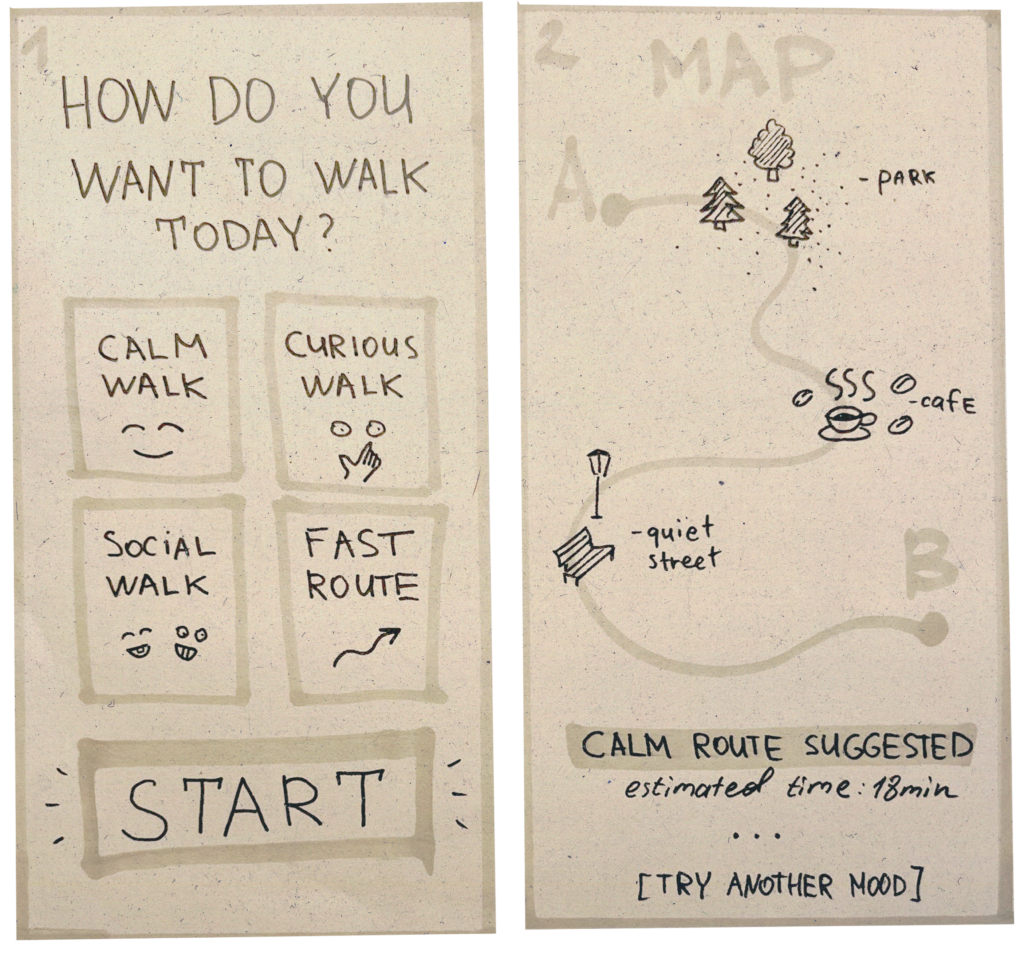
Finding our way without rushing 10/10

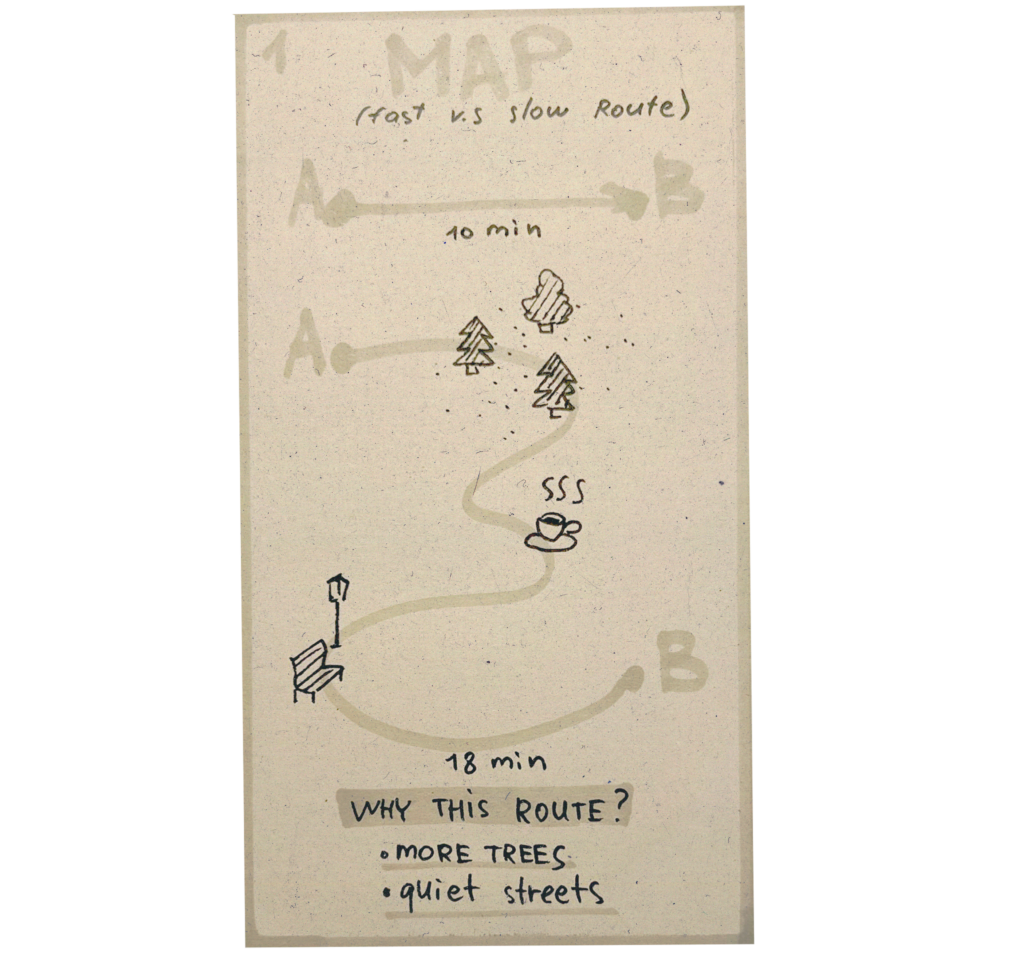
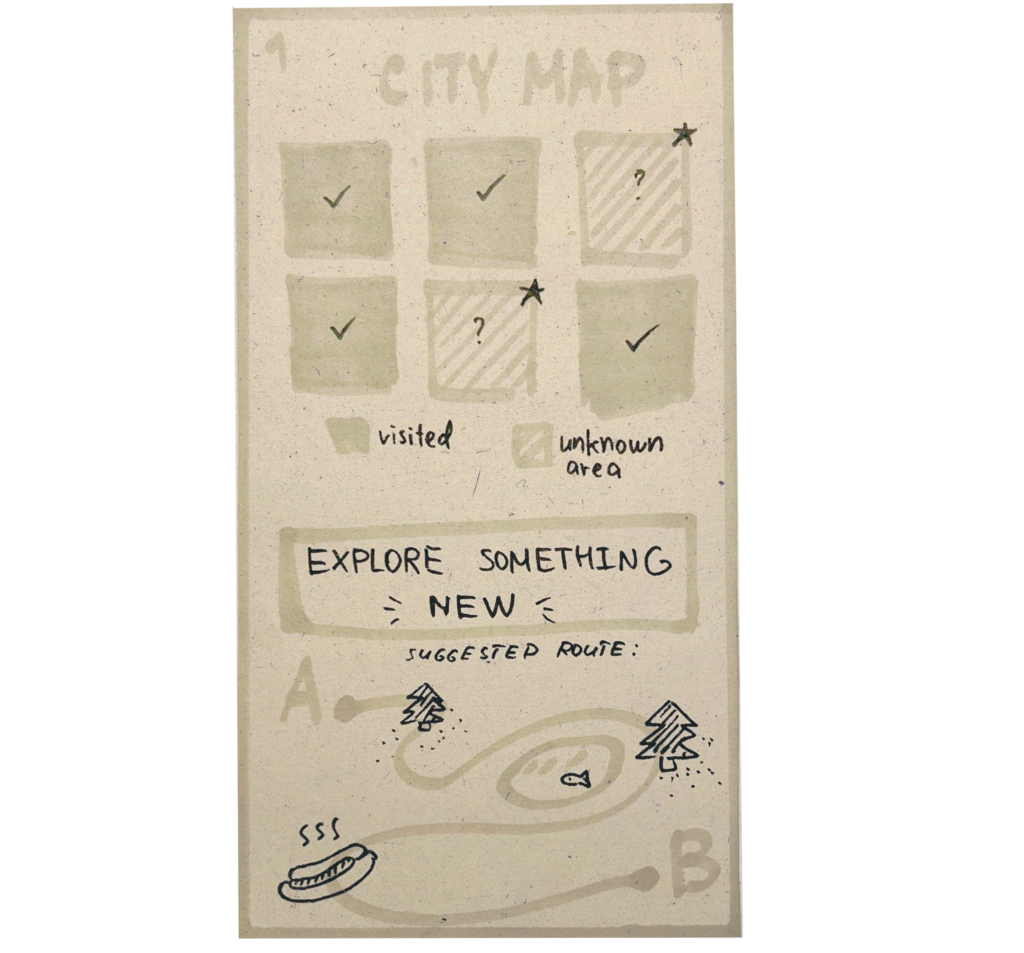
Slowness in Navigation: How Maps Shape the Way We Move 9/10

Disadvantages:
➖ As a rule, it supports a functional rhythm focused on daily travel: fast, straightforward, problem-solving.

Google maps
Yandex maps
Mapy.cz

Evaluating survey about migraine

In the last post I created a short survey with the goal to find out more about the different individual experiences of migraine and gather more information about struggles and possible tools and solutions.

Participants

After creating the survey with nine questions on SurveyMonkey I shared it with people I know that also suffer from migraine with or without aura. During the peer review in class a fellow student told me that they could share this survey with a friend as well. So in total, I collected answers from six participants.

Evaluation of results

Visual aura

Half of the participants experience an aura, while one person just experiences it sometimes and one particpant doesn’t.

In this survey zig-zag lines or flashing lights and temporary vision loss e.g. blind spots are experienced by 67%. Difficulty speaking or and other symptoms were experienced by 33%. The two people responded with “Other” specified their answer in their own words. One of them mentionend that prior to their migraine led lights have a multiplier effect. If they see them during or after an tattack they see bright colors with something close to the shape of the tiny lights all over the place. Another response was they perceive a change of taste, a weird sensation in the mouth/saliva.

Biggest pain

The answers about the most difficult part of living with migraines show similiar topics. Some contestants stated that not being able to predict or control a migraine attack as the worst. Others mentioned the enduring headache pain or sufferment for two days. While other participants explained that feeling paralysed, uncapable physically and mentally and not being able to speak, think or work is their biggest pain point. One person also wrote that sleep is the only effective “medicine” for them although sleeping during an attack hurts.

Migraine prevention

Two people knew about the importance of regular meals and sleep routines. One person mentioned their diet. Two participants said that they try to drink lots of water and to take it slow and taking enough breaks. One also takes magnesium supplements. Another responded that they avoid strong lights such as cars at night while driving or the light of screens.

One person answered that they don’t do anything to prevent attacks anymore. They used to take pills especially for migraines as soon as they noticed the beginning of a migraine. But this wasn’t a guaranteed help.

Influenced life areas by migraine

The area that was the majority of 66% of participants voted for is the career/ productivity. On second place is mental health, followed by social life and family life. One person specified their answer with “struggles and stress” although this could be generalized with the mental health area.

Migraine tracking

Four migraine patients don’t track any of their symtoms or pain days. One person answered that they used to but currently doesn’t and only one of the six participants actually uses an App called “Garmin connect”.

Feeling understood by non-migraineurs

The majority doesn’t feel understood by people who don’t suffer from migraines. 50% answered with “disagree” and 33% with “strongly disagree”. One person gave a neutral rating.

However, 67% “strongly agreed” with the helpfulness of talking to migraineurs and 33% with “agree”. Showing that all of them appreciates sharing or listening to other people with migraine.

Preferred medium for a migraine aura simulation

The majority (83%) prefers an inmersive art installation for a simulation of migraine aura. Followed by VR on second place (50%).

One person added a comment that they think it’s essential that the simulation could be experienced at random, unexpected moments like in a meeting, at school, at university, on a date or at an event.

And one migraine paitient responded that they would be afraid that these simulations would trigger an attack.

Interpretation of the results

The survey results highlight a significant “empathy gap” between migraineurs and society . While participants struggle most with the unpredictability and physical paralysis of attacks, they feel largely misunderstood by those around them who have never had an attack.

Besides, an interesting finding is that tracking methods (apps or Websites) are not used, suggesting a need for more seamless or rewarding monitoring.

All of the participants value peer-to-peer connection which could indicate that community-based solutions could be more effective than isolated self-management.

The high interest in an aura simulation, specifically one that mimics the unexpected timing of an attack, reflects a desire to communicate the loss of control that defines the condition.

Limitation of this survey

For future reserach more participants would have to answer the questions to offer significant quantitative results and to prove the mentioned findings.

Tool

I realized during the creation of the survey that the free version of the SurveyMonkey tool only offered nine questions and no questions with answers in Likert scale format. However, I found a way to work around these limitations and create a short version of my survey.

[DesRes 1] Agile_x_SelfCheckout No. 10: Next Steps

No. 10: Next steps

After one semester I’m still happy with my chosen topic, or rather say topics (plural). I still believe that my thesis will make sense by combining the agile topic with the use case of cash registers. As one might already tell, simply by looking at blog entries, I had some struggle outlining and combining these two perspectives. Overall I think the working title Agile_x_SelfCheckout is a good approach to sum up what I’m working on.

Dividing the topics more clearly

For the future I have decided to cover each topic separately in my research. So for example in the first half of the next semester I will cover the “agile” perspective, and in the second half it will be all about the findings concerning the cash registers.

Collaboration with REWE Digital

I have started my student job at REWE Digital some weeks ago. I already have a better perspective now on my responsibilities at work. The biggest benefit of collaborating with this company is that I have the access to the test systems and could perform detailed user tests, even including pseudo payments.

Disclosure and sensitive information

As for the blog entries this means that I have to be really careful about what information I am allowed to include in each entry. I have to make sure not to expose disclosed information that is to be kept a secret within the company.

Self Checkout or Served Solutions

So far I have put a lot of focus on self checkout solutions. However, it depends on my specific tasks and goals as an employee of REWE digital, which prototypes I will get to work on.

One things remains: whatever artifact I will be working on, I know that I will have the possibility to cover something relevant to the whole service design process.

Accessibility?

The topic of accessibility remains my biggest concern. I would love to cover it, but once again, due to the possibilities within my employment, it still needs to be decided wether or not, this is a relevant topic or not.

Next Semester

I am looking forward to continuing working on this project and increase my expertise concerning agile project management, as well as getting a better understanding of the struggles users of both served as well as self checkout registers are exposed to.

I will kick off the next semester by adapting my research question to open more possibilities.

Final Post: Process reflections & recap

Process reflections

It has been a difficult task to do research and write weekly blog posts. I have previously been more used to a scientific paper based approach to research, where you take your time to lay out a plan first before worrying about producing an output. As I am used to this process taking time, I now felt more rushed to figure out the direction of where I am going, how I would do it etc. each week. This often left me feeling paralyzed, procrastinating, leaving the work to the last minute. I found myself not producing anything helpful, neither for me or others reading the blog posts later. 

Coming from a university with less modules and lectures to focus on also made this shift difficult in balancing and managing the workload of the different modules. This in turn affected the blog post, which often fell at the back of my head. With this in mind I take with me the importance of laying out a temporary plan for what research methods one thinks would be fitting for the topic and focusing on one thing at the time. Swapping topics also led me to having to start all over and it was limited what I was able to do with the short amount of time with each, although I could definitely have dug a little deeper.

I believe I could have done research using more varied methods than simply looking at previous research, surveys, analysing and some of my own thoughts and experiences. For example some interviews, user testing, maybe try to create some user journeys to see where changes could’ve been made. 

Recap

To summarize what the previous blog posts consisted of, we know that EBSN connects people through activities rather than direct matchmaking. This we can see in Meetup, an EBSN that prioritizes events and groups over individual connections and has limited personalization of your profile. With the previously mentioned loneliness epidemic I see EBSN or matchmaking applications being a potential helper in battling this epidemic. However, it feels as if the matchmaking applications are often not encouraging real meetups, but just there to offer another game to play. While the EBSN has a more community and event focus, rather than individual connections. I believe one needs to work on bridging the gap between the offline and online world, and by lowering the stress and tempo of the individual connection to let people connect on a deeper level.

The matchmaking design

This topic of designing for better connections has also been studied in relation to videogames. Johnson and Mitchell (2016) reviewed different kinds of matchmaking systems in videogames that go beyond matchmaking based on skills. Overdog was a matchmaking service for Xbox One that matched players based on their interest, although it seems as though its activity was low. They also found that matchmaking based on location was important for the gaming community (Johnson & Mitchell, 2016). Most matchmaking applications do follow the location principle either restricting users to see people in their area based on their location data or a location picked by their choice. Although the latter makes it possible for users to choose locations in which they are actually not in, losing some of its purpose. 

In one way matchmaking apps that are available today are not that different from a game. The swiping almost feels like a game in the way that one is making rapid decisions based on brief and direct information, and receiving celebratory animations once there is a match. From some interviews about Bumble and Bumble BF some found this rapid swiping positive in order to find compatible people based on interests, and “eliminating” those who do not share the same interests, while others felt like there is too little information. Although the function already existed, some wished it would be possible to filter who you see based on their interest tags. This comes to show that this function has not been designed to be visible enough for users to easily find in the app (Capelli, 2025).

This rapid swiping and having to send a message 72 hours after matching made the participant feel stressed while using the app. Participants felt like they did not take the time to get to know people properly as one would in real life. Based on this, and more,  Capelli suggests that this suggests that the participants wished for the interactions of the app to be closer to what one would normally do in real life settings. Some participants that were interviewed tried to meet as early as possible offline and move the connection from being digital to more real (Capelli, 2025). Perhaps these applications should get better in pushing and supporting meetings quicker, than simply opening up a chat and letting the people themselves take it from there. As taking this next step is not as easy for everyone.

Bumble does actually offer a function that allows for offline meetups. Here users can create and join events. Some participants said they enjoyed this function as it allowed for meeting a more varied group of people, instead of just getting stuck on swiping people with the same interest. Leaving people more open to meet more people beyond their own hobbies, and doing so in real life (Capelli, 2025). Such functions should definitely be more included in matchmaking apps in order to bridge the offline and online connection better. What is also something that should be more looked into is how to design the matchmaking to feel more like how you meet people in the offline world to make it feel less like a game and another task to do.

Resources

Capelli, I. (2025). Tensions in Curating Connections Online: Exploring FLINTA* Users’ Experiences with the Platonic Matchmaking App Bumble For Friends. https://www.diva-portal.org/smash/record.jsf?pid=diva2%3A1971122&dswid=-1870 

Horton, E., Johnson, D., & Mitchell, J. (2016, November). Finding and building connections: moving beyond skill-based matchmaking in videogames. In Proceedings of the 28th Australian Conference on Computer-Human Interaction (pp. 656-658). https://doi.org/10.1145/3010915.3011857 

#9 (10) Final Post

In this final post of the semester, I want to come back to some of the research questions I defined at the beginning of this journey, especially the two different directions this topic can take. I believe the challenge of older adults struggling with technology can be approached in two ways: one focuses on how interaction design can support them in learning digital skills, while the other asks how we, as designers, can make digital systems easier to understand in the first place.

Interaction design can support older adults in learning digital skills by acting as a something like a cognitive guide that reduces mental effort, aligns with their unique conceptual frameworks and fosters the trust for experimentation.

As Designers we can try:

1. Aligning with Seniors’ Mental Models

  • Older adults conceptual models of technology often differ significantly from the screen-centered logic used by younger generations. [1]
  • Linear Logic over Screen-Based Logic: Seniors frequently intuitively adopt a linear, storytelling-like approach to interactions. Interaction design can support learning by using step-by-step narratives rather than multi-layered, interactive screens that can be disorienting. [1]
  • Contextual Clarity: Older users may confuse similar UI elements, such as address bars and search fields. Design should use explicit, consistent wording and “polite” system feedback, to align with their social expectations and provide a sense of security. [1]
  • Separating Interface from Implementation: Seniors often struggle to distinguish between the frontend (what they see) and the backend (how it works). Design that clearly defines the interface as a “method of communication” might help them grasp the abstract nature of software. [1]

2. Teaching Strategies

Secondly it would be possible to teach elderly people about systems and how they work. Instruction for older adults is most successful when it moves away from standard methods and aligns with the cognitive preferences of the age group.[1]

  • Align with Linear Mental Models: Seniors often approach technology through a “storytelling” or linear logic rather than the screen-based, multi-layered logic common in modern software. Designing learning paths that follow a step-by-step narrative can help them internalise abstract concepts.[1]
  • Abstract Thinking Exercises: Before diving into software, starting with exercises like drawing symbols for abstract terms can prepare seniors for the conceptual nature of digital interfaces. [3]
  • Minimise Cognitive Friction: Instruction should focus on minimising friction by reducing the number of steps required to complete an action, which supports those who process fewer “discrete information bits” at one time. [4]
  • Provide Task Support: Using external cues, reminders and labels, known as environmental support, can compensate for memory decline and improve performance to the level of younger learners. [2]

Next Steps

I already have some ideas for the next steps. I’d like to dive deeper into the interaction side of this topic and as mentioned in the presentation, I’m also considering running a workshop. While researching similar projects, I found that when working with older adults, confidence and trust are often bigger hurdles than the technology itself.

Sources

[1] D. Orzeszek et al., ‘Beyond Participatory Design: Towards a Model for Teaching Seniors Application Design’, arXiv [cs.CY]. 2017.

[2] F. Craik, ‘Memory Changes in Normal Aging’, Current Directions in Psychological Science – CURR DIRECTIONS PSYCHOL SCI, vol. 3, pp. 155–158, 10 1994.

[3] Thefinchdesignagency, “Building User Trust in UX Design: Proven Strategies for Better Engagement,” Medium, Feb. 05, 2025. https://medium.com/@thefinchdesignagency/building-user-trust-in-ux-design-proven-strategies-for-better-engagement-c975aa381516

[4] G. A. Wildenbos, L. Peute, and M. Jaspers, “Aging barriers influencing mobile health usability for older adults: A literature based framework (MOLD-US),” International Journal of Medical Informatics, vol. 114, pp. 66–75, Jun. 2018, doi: https://doi.org/10.1016/j.ijmedinf.2018.03.012.

[5] N. Halmdienst, M. Radhuber, and R. Winter-Ebmer, “Attitudes of elderly Austrians towards new technologies: communication and entertainment versus health and support use,” European Journal of Ageing, vol. 16, no. 4, pp. 513–523, Apr. 2019, doi: https://doi.org/10.1007/s10433-019-00508-y.

[6] F. Craik, ‘Memory Changes in Normal Aging’, Current Directions in Psychological Science – CURR DIRECTIONS PSYCHOL SCI, vol. 3, pp. 155–158, 10 1994.