Application of calm technology principles in Digital Product Design

Many digital products today are technically well designed. They pass usability tests, follow established patterns, and allow users to complete tasks efficiently. And yet, they still feel stressful to use. This tension points to a common misunderstanding in UX:

Usability alone does not guarantee a calm experience (Calm UX).

What users often struggle with is not failure, but mental strain — the quiet effort required to interpret, decide, remember, and stay oriented while interacting with an interface.

Cognitive Load Is the Invisible Friction

I realized that a key driver of user stress is cognitive load: the amount of mental effort required to process information and make decisions. Human working memory is limited. When interfaces demand too much attention, comparison, recall, or interpretation, users become fatigued and error-prone — even if nothing is technically “broken”.

Research by Nielsen Norman Group shows that cognitive load increases when users are forced to:

  • hold information in memory instead of recognizing it
  • make too many decisions at once
  • decode unclear labels or system states
  • recover from interruptions without guidance

Reducing cognitive load is not about removing functionality. It’s about removing unnecessary mental work.

Calm UX Goes Beyond Usability

Calm UX builds on classic usability principles but extends them into the emotional and psychological domain. As described in recent UX research and writing, calm experiences are those that reduce anxiety, uncertainty, and hesitation, especially in moments where users are unsure what the system is doing or what is expected of them.

According to UXmatters, much of the most damaging friction in digital products is not physical or functional, but psychological. Interfaces that rush users, provide ambiguous feedback, or escalate situations unnecessarily create stress — even when users ultimately succeed.

Calm UX asks different questions than traditional UX:

  • Do users feel in control?
  • Does the system behave predictably?
  • Is uncertainty acknowledged or ignored?
  • Does the interface reassure, or does it pressure?

Design Principles That Create Calm

Research from NN/g, UXmatters, and Calm Technology literature points to a small set of recurring principles that consistently reduce cognitive strain and user anxiety.

Minimize cognitive effort by default
Calm interfaces prioritize recognition over recall, limit information to what is immediately relevant, and use familiar, consistent patterns. Clear visual hierarchy and progressive disclosure help users stay oriented without unnecessary mental effort.

Communicate with clarity, not urgency
System messages are emotionally charged moments. Calm UX avoids alarmist language and explains what happened, why it matters, and what comes next—without blame, pressure, or artificial urgency.

Make system behavior visible
Uncertainty increases stress. Loading states, background processes, and validations should clearly communicate progress and outcomes, even when no action is required from the user.

Respect attention as a scarce resource
Notifications should interrupt only when they provide clear, timely value. Calm UX is quiet by default and intentional when asking for attention.

Introduce complexity gradually
Complex systems don’t need to feel complex upfront. Calm UX reveals detail only as it becomes relevant, reducing initial overwhelm and supporting user confidence.

These principles are not new rules. They are a reframing of established UX heuristics through the lens of Calm Technology—shifting the focus from efficiency alone to cognitive and emotional ease.

Design Patterns That Create Calm

In practice, these principles materialize through a set of recurring design patterns that can be used as tools to create calmer products.

Progressive Disclosure
Calm UX avoids presenting all information and options at once. Instead, complexity is revealed gradually, as it becomes relevant. This helps users orient themselves quickly and reduces initial cognitive load, especially in complex systems.

Recognition Over Recall
Rather than relying on users’ memory, calm interfaces surface choices, defaults, examples, and familiar patterns directly in the UI. This reduces mental effort and minimizes the anxiety that comes from uncertainty or second-guessing.

Visible System Status
Calm UX avoids silent systems. Loading states, background processes, and validation feedback clearly communicate what is happening and what to expect next, even when no action is required from the user.

Gentle Confirmation
Success and completion are communicated through subtle, inline feedback instead of disruptive modal dialogs. This reassures users without interrupting their flow or escalating the interaction unnecessarily.

Forgiving Interactions
Undo options, editable states, and non-destructive defaults make mistakes recoverable. When users know they can correct an action, they interact with greater confidence and less hesitation.

Predictable Interaction Patterns
Consistent layouts, control placement, and feedback behavior reduce the mental effort required to re-orient across screens. Calm interfaces prioritize familiarity over novelty.

Descriptive Microcopy
Clear, outcome-focused language replaces vague labels and technical jargon. Users understand what will happen before they act, reducing hesitation and cognitive strain.

Status Over Alerts
Whenever possible, calm systems communicate information through passive status indicators rather than interruptive alerts. Information remains available without demanding immediate attention.

Notification Gating
Notifications are used sparingly and intentionally. Calm UX is quiet by default and interrupts only when timely user action truly matters, treating attention as a limited resource.

Clear Exit Paths
Users can cancel, go back, or pause processes at any time. Knowing there is always a way out significantly reduces pressure and perceived risk.


Together, these patterns don’t eliminate complexity — they structure it, pace it, and communicate it with care. They shift UX from demanding attention to supporting orientation, from pushing users forward to helping them stay grounded.

As digital products increasingly incorporate AI-driven predictions, recommendations, and automation, these patterns become even more critical. When systems begin acting on users’ behalf, clarity, control, and calm are no longer optional — they are the foundation of trust. In the next article, I’ll explore how Calm UX principles apply specifically to AI-driven products, and how thoughtful design can make intelligent systems feel supportive rather than intrusive.

References:
  • Weiser, M., Seely Brown, J. (1995): “Designing Calm Technology“, Xerox PARC
  • Weiser, M., Seely Brown, J. (1996): “The Coming Age of Calm Technology“, Xerox PARC
  • Case, A. (2015): “Calm Technology: Principles and Patterns for Non-Intrusive Design

AI Assistance Disclaimer:

AI tools were used to improve grammar and phrasing. The ideas, examples, and content remain entirely the author’s own.
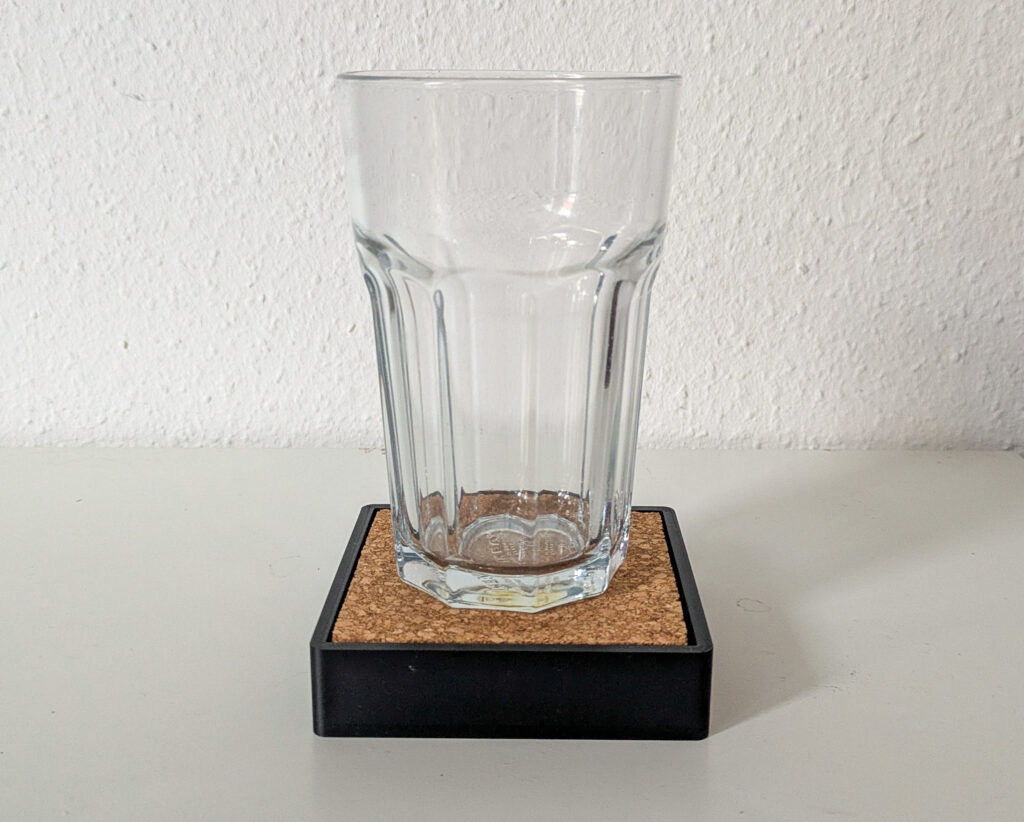
Drink Smart and Keep Calm: Technology that Stays in the Background – Part III

From Concept to Prototype: Planning a Calm, Tangible Drinking Reminder

After introducing ubiquitous computing, tangible user interfaces, and calm technology through the example of a smart water glass, the next step is to explore how such a concept could be translated into a physical prototype. Rather than focusing solely on technical feasibility, the planned smart coaster is intended as a design-driven experiment — one that combines physical prototyping with a human-centered design (HCD) process.

The goal is not to build a “perfect” product, but to create a functional artifact that allows the underlying interaction principles to be examined, questioned, and refined.

Framing the Problem in Its Usage Context

The initial motivation for the project stems from a common everyday situation: forgetting to drink water while working or studying. Existing solutions, such as hydration reminder apps, typically rely on push notifications, sounds, or vibrations. While effective in theory, these mechanisms often interrupt users at inopportune moments and shift attention away from the current task toward a screen.

Before committing to a specific technical solution, I would usually start the project by planning a usage context analysis. This would involve observing when and where drinking usually happens, how glasses are positioned in work environments, and how people react to reminders during focused tasks. As the design proposal has already been introduced, I move directly into this idea rather than conducting a full exploratory phase. The underlying assumption is that drinking is already embedded in physical routines and object interactions—making it a promising candidate for a tangible, environment-based interface.

Planned Human-Centered Design Approach

The development of the smart coaster is intended to follow a simplified human-centered design (HCD) process:

  1. Empathize & UnderstandThe process would begin with self-observation and informal conversations to gain insight into why drinking is often forgotten and how existing reminder systems are perceived in everyday situations.
  2. DefineBased on these initial insights, the core design challenge can be formulated as:How might a drinking reminder support hydration without interrupting or demanding attention?
  3. IdeateThe ideation phase would focus on identifying calm forms of feedback. Different modalities—such as light, sound, or subtle movement—would be explored and evaluated in terms of intrusiveness, social acceptability, and perceptibility in the periphery of attention.
  4. PrototypeA low- to mid-fidelity prototype of a smart coaster is planned as a tangible representation of these concepts, allowing interaction principles to be examined in a physical form.
  5. EvaluateShort, qualitative user testing sessions are intended to help validate assumptions and inform iterative refinement of the interaction and feedback design.

Technical Implementation as Design Medium

The planned prototype combines accessible digital fabrication and physical computing tools:

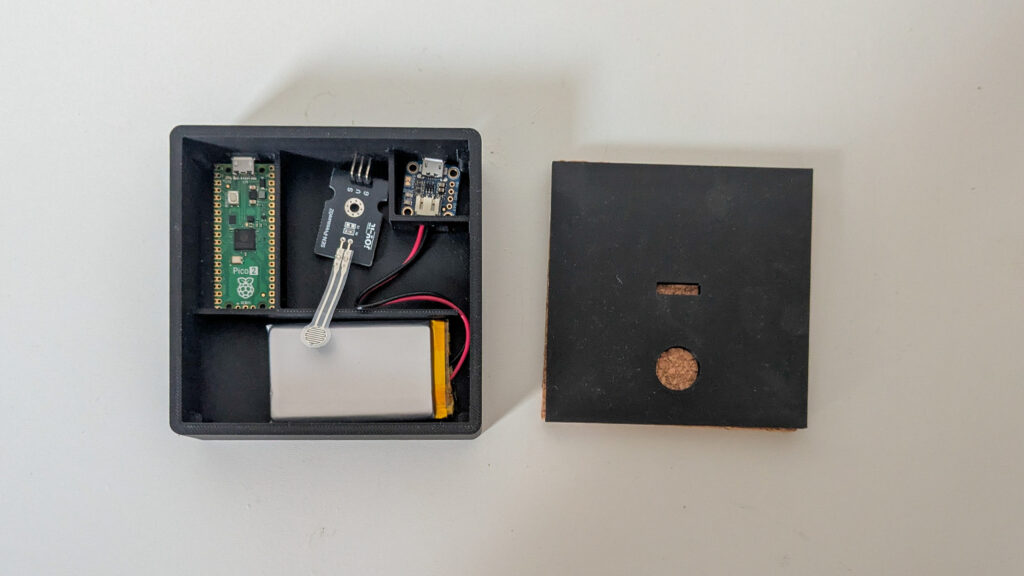
  • 3D-printed coaster, designed to visually blend into everyday environments.
  • pressure sensor to detect the presence or absence of a glass.
  • Raspberry Pi Pico as the microcontroller handling timing and state logic.
  • Subtle ambient feedback, such as low-intensity light, to communicate reminders without explicit alerts.

Importantly, the technical setup is intentionally kept minimal. This aligns with calm technology principles by reducing complexity and ensuring that the coaster remains usable even if the digital components fail.

Planned User Testing and Evaluation

Rather than large-scale usability testing, the project is intended to rely on small, qualitative user tests. Participants would use the coaster in desk-based work scenarios and reflect on their experience afterward.

The evaluation would focus less on performance metrics and more on experiential questions:

  • Was the reminder perceived as intrusive?
  • Did it remain in the periphery until needed?
  • How did it compare emotionally to phone-based reminders?

These observations are expected to inform whether the concept successfully embodies calm interaction.

Conceptual Comparison: Coaster vs. App

As part of the analysis, the smart coaster will be conceptually compared to traditional drinking reminder apps. While apps centralize interaction on a screen, the coaster distributes interaction into the environment. This comparison serves to highlight how tangible interfaces and ubiquitous computing shift responsibility from the user to the surrounding system.

Outlook

By planning the smart coaster as both a technical prototype and a research artifact, the project aims to explore how calm technology principles can be operationalized in everyday objects. The focus remains on how interaction feels, rather than how much functionality is added — reinforcing the idea that sometimes, the most effective technology is the one that stays quietly in the background.

References:
  • Weiser, M., Seely Brown, J. (1995): “Designing Calm Technology“, Xerox PARC
  • Weiser, M., Seely Brown, J. (1996): “The Coming Age of Calm Technology“, Xerox PARC
  • Case, A. (2015): “Calm Technology: Principles and Patterns for Non-Intrusive Design
  • https://calmtech.com
  • Human-Centered Design nach ISO 9241-210:2019

AI Assistance Disclaimer:

AI tools were used to improve grammar and phrasing. The ideas, examples, and content remain entirely the author’s own.
Forms of interaction

In order to better understand the interactions that take place in the game and in class, I examined interaction on a theoretical level and initially focused my research primarily on social interaction. Apart from the findings summarized below, I also looked at the principle of re-enactment or scenic understanding by Alfred Lorenzer and the associated transference and countertransference. However, due to its lack of relevance to the topic of physical education, I will refrain from elaborating on my findings in this blog article.

Forms of interaction

“Interaction (from Latin inter ‘between’ and actio ‘activity’, ‘action’) refers to the mutual influence of actors or systemsSocial interaction.” (Wikipedia: Interaktion. URL: https://de.wikipedia.org/wiki/Interaktion, last opened 07.02.2026)

Social Interaction

“Social interaction refers to processes of mutual influence, e.g., through communication and social reciprocal exchange relationships between individuals and social groups (social influence), as well as the resulting change in, for example, behaviors and attitudes (attitude change).” (Wikipedia: Interaktion. URL: https://de.wikipedia.org/wiki/Soziale_Interaktion, last opened 07.02.2026)

The term communication is sometimes used as a synonym for social interaction, but communication can also be one-sided, i.e., only from the sender to the receiver, whereas interaction always involves both parties. It therefore involves a response from the receiver to the content sent or parts thereof. Interaction can therefore be described as a symmetrical process and communication as either a symmetrical or asymmetrical process. [1]

Theme-centered interaction according to Ruth Cohn

Thematic-centered interaction (TCI) is a model for working in groups that was developed in the mid-1950s by American psychoanalyst and psychologist Ruth Cohn and therapists Norman Liberman, Yitzchak Zieman, and other representatives of humanistic psychology. Its goal is to promote social learning, personal development, and progress in the subject area [2]. It is used in the fields of education, leadership, social work, counseling, and social engagement. [3]

“TCI was developed against the theoretical backdrop of psychoanalysis, group therapy, and humanistic psychology, and takes into account experiences from Gestalt therapy and group dynamics.” (Wikipedia: Themenzentrierte Interaktion. URL: https://de.wikipedia.org/wiki/Themenzentrierte_Interaktion, last opened 08.02.2026)

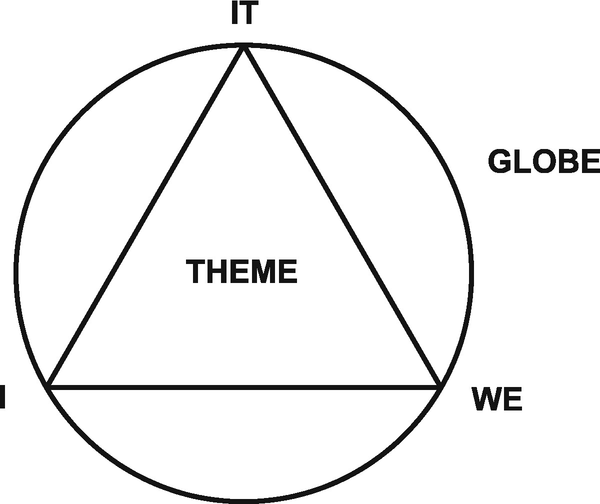
According to theme-centered interaction, there are four factors that influence interaction: the individuals (I), their relationships (we), the shared task (it), and the environment (globe). For successful interaction, it is essential that these factors are in balance. [3]

TCI is also based on a humanistic worldview that can be formulated in three axioms:

“1. Human beings are psycho-biological entities. They are also part of the universe. They are therefore both autonomous and interdependent. The more aware individuals are of their interdependence with everyone and everything, the greater their autonomy.

2. Respect is due to all living things and their becoming (and passing away). Respect for growth requires evaluative decisions. The humane is valuable, the inhuman threatens value.

3. Free decision-making takes place within conditioning internal and external boundaries; expansion of these boundaries is possible.”

(Ruth Cohn Institut: Themenzentrierte Interaktion. Werte und Menschenbild. URL: https://ruth-cohn-institute.org/themenzentrierte-interaktion-tzi/, last opened 08.02.2026)

Another key aspect of theme-centered interaction is that there is a theme that sets the goal for the group and is formulated in such a way that all group members can identify with it. The group leader has a moderating role, but is also a participant, so that cooperation on an equal footing can develop. [3]

The two postulates of TCI:

“1. The chairperson postulate: Lead yourself—become aware of your inner and outer reality, use your senses, make decisions, and take responsibility.

2. The disturbance postulate: Disturbances take precedence – obstacles, concerns, and conflicts require attention and should be taken seriously and dealt with so that the group remains capable of working and learning.”

(Ruth Cohn Institut: Themenzentrierte Interaktion. Postulate. URL: https://ruth-cohn-institute.org/themenzentrierte-interaktion-tzi/, last opened 08.02.2026)

Furthermore, the following rules are formulated in TCI:

1. Represent yourself in your statements; speak using “I” rather than ‘we’ or “one.”
2. When you ask a question, explain why you are asking and what your question means to you. Express yourself and avoid interviewing.
3. Be authentic and selective in your communications!
4. Refrain from interpreting others. Instead, express your personal reactions.
5. Be cautious with generalizations.
6. When you say something about another person, also say what it means to you.
7. Side conversations take precedence. They are disruptive and usually important.
8. Only one person at a time, please!

(Ruth Cohn Institut: Themenzentrierte Interaktion. Hilfsregeln. URL: https://ruth-cohn-institute.org/themenzentrierte-interaktion-tzi/, last opened 08.02.2026)

Interaction and pedagogy

Interaction serves to socialize individuals and plays a major role in psychosocial development. In social situations, skills such as role distance, empathy, tolerance of ambiguity, and identity representation can be acquired. In an educational context, a distinction is made between actions among peers and interaction between children and adults. Adults should create opportunities for children to interact. [1]

Sources

[1] Wikipedia: Interaktion. URL: https://de.wikipedia.org/wiki/Soziale_Interaktion, last opened 07.02.2026

[2] Wikipedia: Themenzentrierte Interaktion. URL: https://de.wikipedia.org/wiki/Themenzentrierte_Interaktion, last opened 08.02.2026

[3] Ruth Cohn Institut: Themenzentrierte Interaktion. URL: https://ruth-cohn-institute.org/themenzentrierte-interaktion-tzi/, last opened 08.02.2026

Image: https://media.springernature.com/lw685/springer-static/image/chp%3A10.1007%2F978-3-030-01048-5_2/MediaObjects/460965_1_En_2_Fig1_HTML.png

User Interfaces in Video Games 10/10

User Interfaces in Video GamesThe quest for genre-appropriate and usable game UI

Over the last nine blog posts, I’ve went from the oscilloscope screens of 1958 to visual representations of game UI to the modular, accessible hardware of today. Now I’d like to wrap up my journey with a short reflection.

This research diary started with a fairly open topic that I had no idea how to navigate. After my research, I can safely say that I’ve learned a lot about games, their interfaces and the interaction design behind it.

I learned that game UI has a history worth respecting. Going back to the oscilloscope screens of the 50s and the early arcade days of Space Invaders was interesting because I realised that the simple high score was an innovation at the time and was the start of the complex feedback loops we have now.

I learned how to categorise the visual representations of game UI. Breaking down the four types of UI completely changed how I look at game screens. I now see how a UI can either be overlayed on top of a game or be woven directly into the world, with the player character being aware of it.

I learned that style can actually drive usability. Exploring the Aesthetic-Usability Effect showed me that when a game aesthetic, it isn’t just for show. I learned that if a menu feels like it belongs in the game’s world, players are more likely to find it intuitive and engaging, which holds water with my personal gaming journey.

I learned that accessibility is a fundamental responsibility. From my struggle with tiny subtitles to the impact of the QuadStick, I learned that game UI design isn’t just an aesthetic choice but also about inclusion. This coincides with the fact that I’d like games to be enjoyed as many people since they made my life much better.

In the end, through all these learnings and this, to be honest, hard journey I realised that designing a game user interface is a way, way, way, way more complicated and diverse topic than I anticipated. When I picked this topic I was mostly just focusing on the simple thought of “cool, stylish UI that also respects users” and kept a narrow focus on the visual part, the user interface design of it all.

However, through this research diary and through a conversation with the Senior UX/UI Designer at Bongfish, I’ve realised that game user interface designers are responsible for way more than the graphical menus and HUDs. The 60 accessibility options of The Last of Us Part II kind of blew me away with the use haptics, audio cues and difficulty settings.

If I continued with this (now daunting) topic, I’d have to consider narrowing down the research to specific devices (PC, console, mobile or VR/AR etc.). Placing emphasis on just the visuals doesn’t really work for this topic, as evidenced by this extensive journey of many sub-topics, so finding a focus area could be hard. Either way, I’d say it was a valuable journey and I’ve collected some actual knowledge on my newfound love: games.

User Interfaces in Video Games 9/10

User Interfaces in Video GamesThe quest for genre-appropriate and usable game UI

To continue with the accessibility topic of my last blog post, in this one I would like to dive deeper into how this complex interaction of playing video games is for people with disabilities.

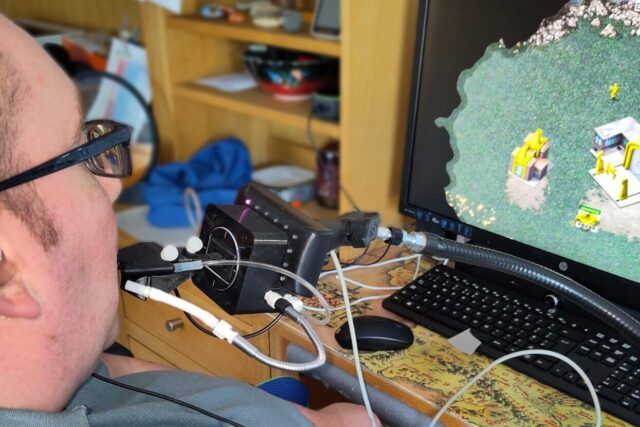
Beyond the screen and graphical user interface, we have to consider the physical interface players control the game with. While reading the Saunders and Novak book Game Development Essentials: Game Interface Design, I was really moved by the story of Robert Florio, a quadriplegic artist. He uses a “mouth stick” to play games like Devil May Cry 3, a fast paced action game with complex combos [1]. It made me realise that an accessible interface isn’t just about ease of use, but it’s also about giving someone control over a world they can’t physically interact with anymore. When a designer adds the option of remappable buttons, they aren’t just making a “setting”, they’re opening doors for people who wouldn’t be able to interact with the product at all otherwise.

The “mouth stick” in question was an early model of the QuadStick, pictured on Figure 1. This is a mouth-operated controller produced by an independent manufacturer. It acts as an “add-on” to existing consoles or PCs, using sip-and-puff sensors to translate breath and lip movements into complex game inputs [2].

Figure 1:
Quadstick
Source: [3]

A major sign that the industry is finally taking this seriously is that console manufacturers are now building these solutions themselves. The PlayStation Access Controller is a modular kit designed specifically to be accessible out of the box. It moves away from the “fixed” shape of a standard controller, allowing players to create a layout that works for their specific hand strength or range of motion. This further emphasises the importance of customisable and remappable inputs in games.

Figure 2: Playstation 5 Access Controller
Source: [4]

This is where one really sees how interacting with games goes beyond the user interface. It’s also about the user experience and overall interaction design. I already mentioned The Last of Us Part II in my last blog post, focusing on the vast variety of subtitle adjustment options. This is just one out of over 60 different accessibility options [5].

Their design philosophy follows a “sensory redundancy” model. This means that if a player can’t see the path, Navigation Assistance uses haptic pings and 3D audio cues to guide them. If a player can’t hear an enemy, Awareness Indicators and Combat Vibration Cues translate sound into visual and tactile data. This really showed me how expansive this theme can get once we look at the broader spectrum of the interaction between the game and the player.

User Interfaces in Video Games 8/10

User Interfaces in Video GamesThe quest for genre-appropriate and usable game UI

The question proposed in my last blog post is a big can of worms that has many aspects influencing it. One big aspect of interfaces being usable is accessibility, which I took a look at in this blog post.

In my research, I’ve found that many people treat accessibility as a “bonus feature,” but as Saunders and Novak point out in Game Development Essentials: Game Interface Design, it’s a fundamental responsibility. Since there are no strict government regulations for games, it’s up to developers to self-regulate to meet the needs of those with disabilities [1].

In my introductory blog post, I mentioned the frustration of games having subtitles but them being too small to read, often with bad contrast. Subtitles are a perfect example of where game UI often has issues. In many modern AAA games, the text is optimised for someone sitting in front of a high-resolution monitor. But for a console player sitting on a couch 3 meters from a TV, that text becomes unreadable.

I noticed this in many games but want to point out Black Myth: Wukong as an example, pictured on Figure 1. The text is so tiny that even at my monitor I could barely read it, especially on white backgrounds where it lacked contrast in addition to it’s small size. It really dampened my experience because I played the game with the Chinese dub, but this would be an even worse experience for someone who’s, for example, deaf.

Figure 1: Black Myth: Wukong
Source: [2]

To combat this, the choice of typeface is important. Sans Serif fonts (like Arial or Verdana) are preferred for difficult viewing conditions because they don’t have the tiny “cross strokes” (serifs) that can blur together at low resolutions [1]. Simply testing the legibility on different devices and positions during development would already make a huge difference.

A best practice example for dealing with subtitles can be seen in The Last of Us Part II. They provide incredibly adjustable subtitle options where players themselves can massively increase the text size, change the color of the names to identify speakers, and add a dark semi-transparent backing box behind the text. This means that no matter how bright the game world is, the text is still legible.

Figure 1: The Last of Us Part II
Source: [3]

Another aspect to consider is colour-blindness. Around 8% of men (1 in 12) and 0.5% of women (1 in 12) are affected [4]. Considering this data, its vital to never use color as the only way to give information. A health bar shouldn’t just change from green to red; it should also change in length so a color-blind player can still read the state of the game [1]. Likewise, if a game uses only red and green to signal “enemy” versus “friend”, a significant portion of the audience is excluded.

Case Example: Baupiloten

Kindergarten Taka-Tuka-Land, Berlin

A strong example of including children in the design process can be found in the work of Baupiloten, a Berlin-based architecture and design collective known for their participatory approach. Baupiloten involve children from the very early stages of design, especially in projects related to schools and playgrounds. Instead of relying on formal interviews or verbal explanations, they use playful and interactive methods such as drawing sessions, storytelling, role-playing, and model-making.

These activities allow children to express ideas through movement, imagination, and play rather than language alone. In this process, designers act as facilitators, creating situations where children’s experiences and perspectives can surface naturally. The insights gathered from these interactions directly influence design decisions, including spatial organization, atmosphere, and types of play supported by the environment.

Baupiloten’s approach demonstrates how interaction design methods can translate children’s playful expressions into meaningful design input. Their work shows that when children are treated as co-designers rather than passive users, the resulting spaces are more responsive to their needs and more supportive of creativity and exploration. This makes Baupiloten a relevant and inspiring example for exploring how interaction design can help include children in the playground design process, particularly within a German-speaking cultural context.

References

What Comes Next: Planned Research Steps

After clarifying my research focus and framing playground design as a wicked problem, the next phase of my thesis will concentrate on practice-based research methods. These steps are intended to help me better understand how children can be meaningfully included in the playground design process through interaction design approaches.

One of the main steps will be conducting workshops with children. These workshops will use playful and interactive methods such as drawing, simple prototyping, storytelling, and role-playing. Rather than relying on verbal explanations, these activities aim to create spaces where children can express ideas through play, movement, and imagination. This approach aligns closely with interaction design principles and allows children to participate in ways that feel natural to them.

In addition to working with children, I plan to conduct interviews with parents. Parents play an important role in shaping children’s play experiences, especially through their views on safety, risk, and supervision. These interviews will help me understand adult perspectives and expectations surrounding playgrounds, and how they may influence design decisions.

Another key step will be on-site observations in playgrounds. By observing how children interact with existing play spaces, I aim to gain insights into their behavior, social interactions, and patterns of play. Observations will help ground my research in real-world contexts and reveal aspects of play that may not emerge through workshops or interviews alone.

Alongside these practical methods, I will continue my literature review throughout the research process. Revisiting existing theories, case studies, and design frameworks will allow me to reflect on my findings and situate them within a broader academic context. This ongoing dialogue between theory and practice is essential for developing a well-rounded and reflective thesis.

Together, these steps represent an iterative and exploratory research journey. Rather than following a fixed path, the process will remain flexible, allowing insights from each phase to inform the next. This approach reflects both the complexity of playground design and the values of interaction design, where learning emerges through engagement, reflection, and participation.

User Interfaces in Video Games 7/10

User Interfaces in Video GamesThe quest for genre-appropriate and usable game UI

So far I’ve introduced some history, UI elements, their visual representations and common game genres. Now I’d like to take a look at the “Should games sacrifice functionality for style and vice versa? Do accessibility options affect the art being made?” question that popped up in my introductory blog post.

One of the most difficult parts of game UI design is the “battle” between aesthetics and functionality. In my gaming journey so far, I’ve seen both sides of the coin: games that are beautiful but hard to navigate, and games that are perfectly functional but look like sterile, uninspired and out of place.

Form follows function” is a famous phrase coined by Louis Sullivan which has been applied to many different types of design that deals with this topic [1]. This means that the way something looks is influenced by what it’s supposed to do. The function of game UI is to communicate states, so it should adapt itself to what users actually need to function within the game. The common questions are “Where am I?”, “How much health do I have?” and “Am I winning?”. These are answered with mini-maps, health bars and scores, all of which have evolved through necessity to communicate status.

So can style actually improve function? Why do I enjoy stylish UI in games if minimalist UI also does the job? Thinking about this led me to the Aesthetic-Usability Effect, which is defined in the book Universal Principles of Design. The Aesthetic-Usability Effect is described as “a phenomenon in which people perceive more aesthetic designs as easier to use than less-aesthetic designs – whether they are or not.” [2] This means that if a player loves the look of a menu, they’re more inclined to keep using it, and thus learn how to use it.

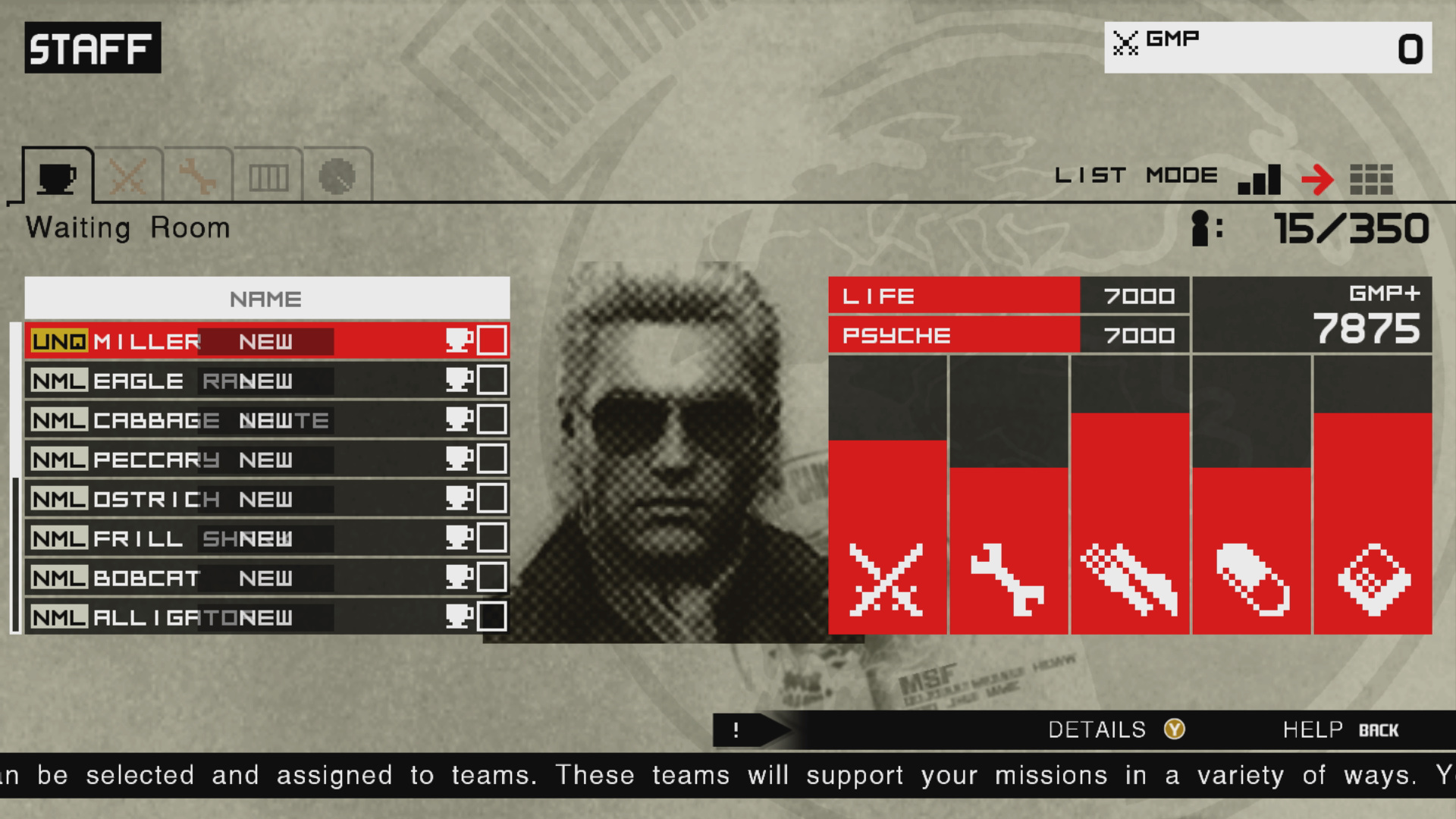
A personal example I’d like to showcase is the difference between the Metal Gear Solid: Peace Walker (2011) and Metal Gear Solid V (2015) staff management menus. In Metal Gear Solid: Peace Walker I learned to navigate the menu thanks to the more simplified information and “military file” aesthetic which fit the game world, being set in the 70s.

Figure 1:
Metal Gear Solid: Peace Walker HD
Source: [3]
Figure 2: Metal Gear Solid V
Source: [4]

Metal Gear Solid V, which was released 4 years later, features a virtually identical menu, but goes for an angled look which is supposed to be a hologram from the device the character is holding in his hand. This takes away real estate for the sake of diegetic immersion. This, however, clutters the UI with more information displayed. I would have been overwhelmed with this menu had I not already “trained” myself with the previous game. I knew which information to ignore and what the actual function of the menu is. The aesthetic is also lost within this blue, minimalist, hologram look which clashes with the fact the game is set in the 80s.

This leads me to believe that style shouldn’t be sacrificed for function or vice versa.

A visual style is first determined for the game experience overall. Then, the information is made to come across in the most immediate and understandable way. Finally, both form a framework for the user interface aesthetics. The visuals shouldn’t drive the function, but they can certainly bend and influence it. – Stieg Hedlund [5]

In my next blog post, I want to dive deeper into the usability aspect of this debate by exploring the topic of Accessibility.

  • [1] L. H. Sullivan, The Tall Office Building Artistically Considered. Philadelphia, PA, USA: J. B. Lippincott, 1896.
  • [2] W. Lidwell, K. Holden, and J. Butler, Universal Principles of Design: A Cross-Disciplinary Reference. Gloucester, MA, USA: Rockport Publishers, 2003.
  • [3] Game UI Database, “Metal Gear Solid: Peace Walker HD,” Game UI Database. Accessed: Feb. 06, 2026. [Online.] Available: https://www.gameuidatabase.com/gameData.php?id=530
  • [4] Game UI Database, “Metal Gear Solid V: The Phantom Pain,” Game UI Database. Accessed: Feb. 06, 2026. [Online.] Available: https://www.gameuidatabase.com/gameData.php?id=98
  • [5] K. Saunders and J. Novak, Game Development Essentials: Game Interface Design. Clifton Park, NY, USA: Thomson Delmar Learning, 2007.

User Interfaces in Video Games 6/10

User Interfaces in Video GamesThe quest for genre-appropriate and usable game UI

In my last post I introduced the concept of diegetic, non-diegetic, spatial and meta interfaces. You may have noticed that some of them were mostly tied to specific genres, and since my thesis would like to explore how interfaces can be genre-appropriate, I thought it would be appropriate to introduce these genres.

The following graph [1] shows the most played game genres in the 2nd quarter of 2025. There’s a wide range of genres from shooters to puzzles and what I find interesting is that the most successful genres would have the most people, which means that the UI probably also caters to the masses.

Graph 1: Share of video gamers worldwide who have played games in select gaming genres in the past 12 months as of 2nd quarter 2025
Source: [1]

Now let’s take a look at some of the most important genres as well as a few visual examples of them to get a good idea of the UI elements and styles.

Figure 1:
The Legend of Zelda: Breath of the Wild
Source: [3]
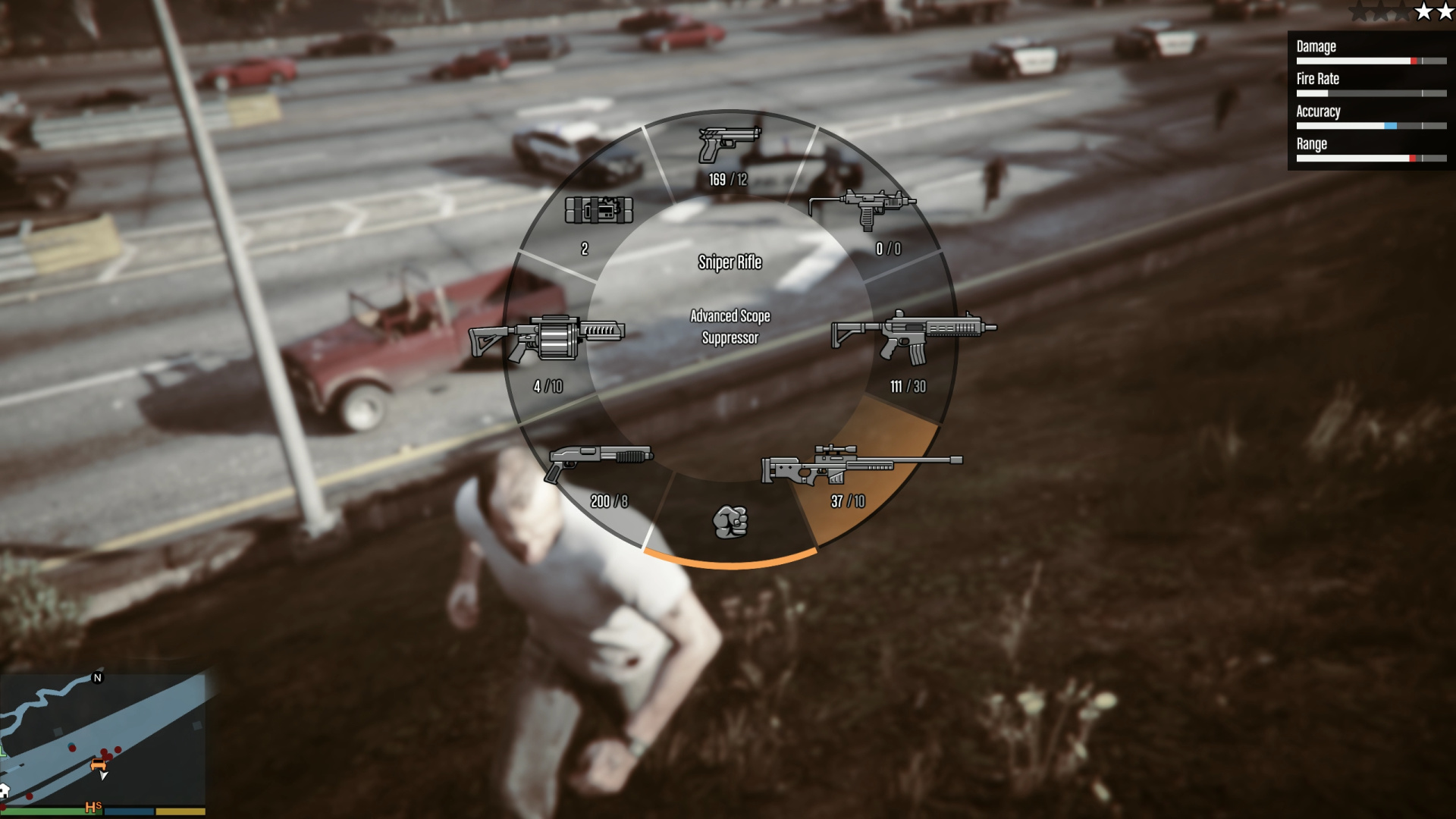
Figure 2: Grand Theft Auto V
Source: [4]

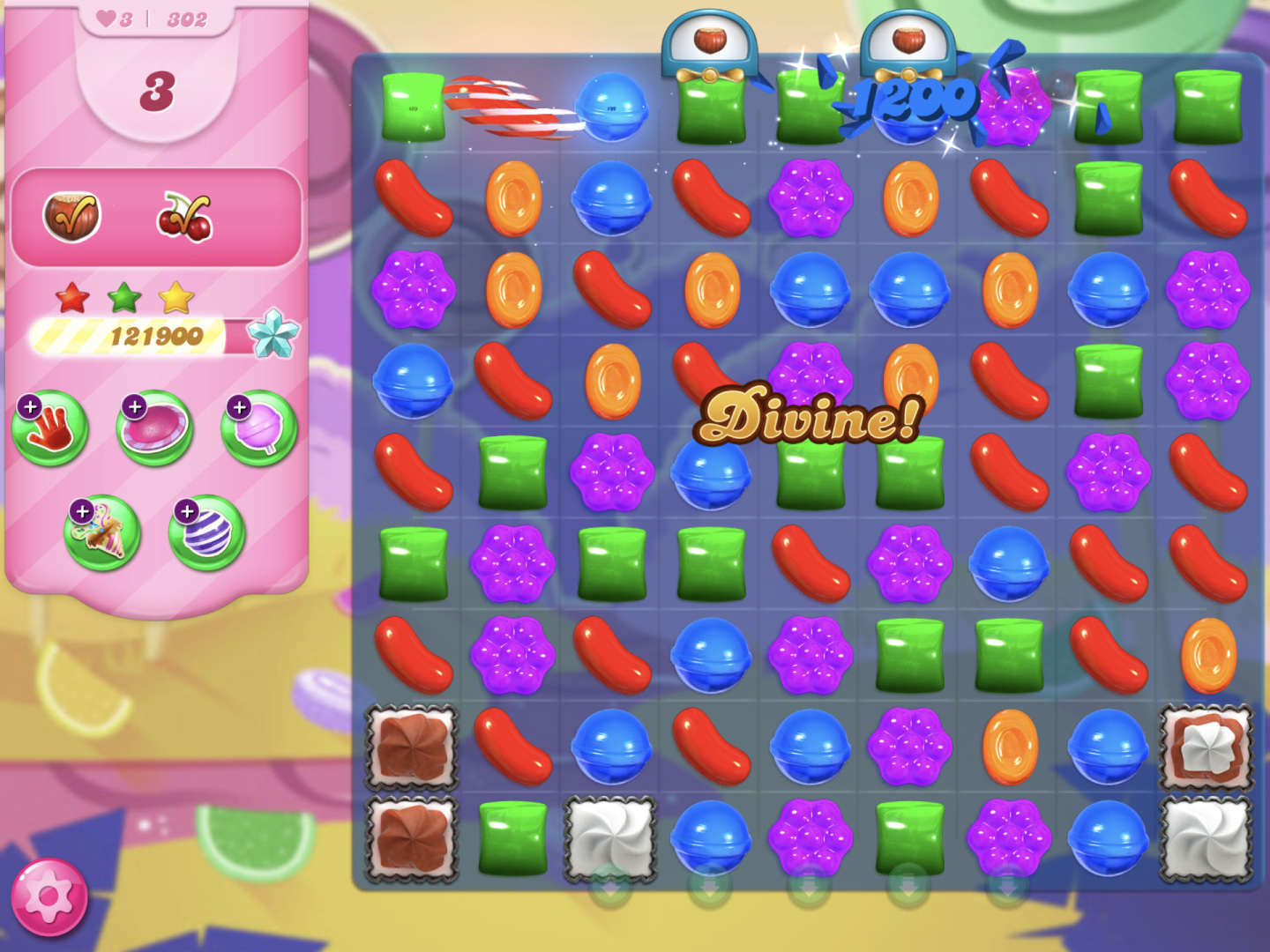
Puzzle – Another genre that relies on hand-eye coordination, albeit very different in style. Puzzle games rely on simple logic and have thus seen a big audience within the casual mobile games scene. Brighter colours help with differentiation for quick mental grouping of objects.

Figure 3: Candy Crush Saga
Source: [5]
Figure 4: Tetris Ultimate
Source: [6]

Racing – Racing games rely on mini-maps to mirror navigational devices inside the car. Another important UI element within the HUD is the speed, position and lap indicators. Racing games increasingly use minimal and generic design, especially in other screens such as customisation screens.

Figure 5: Forza Horizon 5
Source: [7]
Figure 6: Need for Speed Heat
Source: [8]

RPG (Role-Playing Game) – Role-playing games came from table-top games, where statuses, inventories and treasure finding are important. They’ve come a long way from the classical parchment style of fantasy games to more daring and modern UI with JRPGs. Inventories and managing them play a big role, which is why designing them in an intuitive way can make or break the immersion.

Figure 7: Baldur’s Gate II
Source: [9]
Figure 8: Persona 5
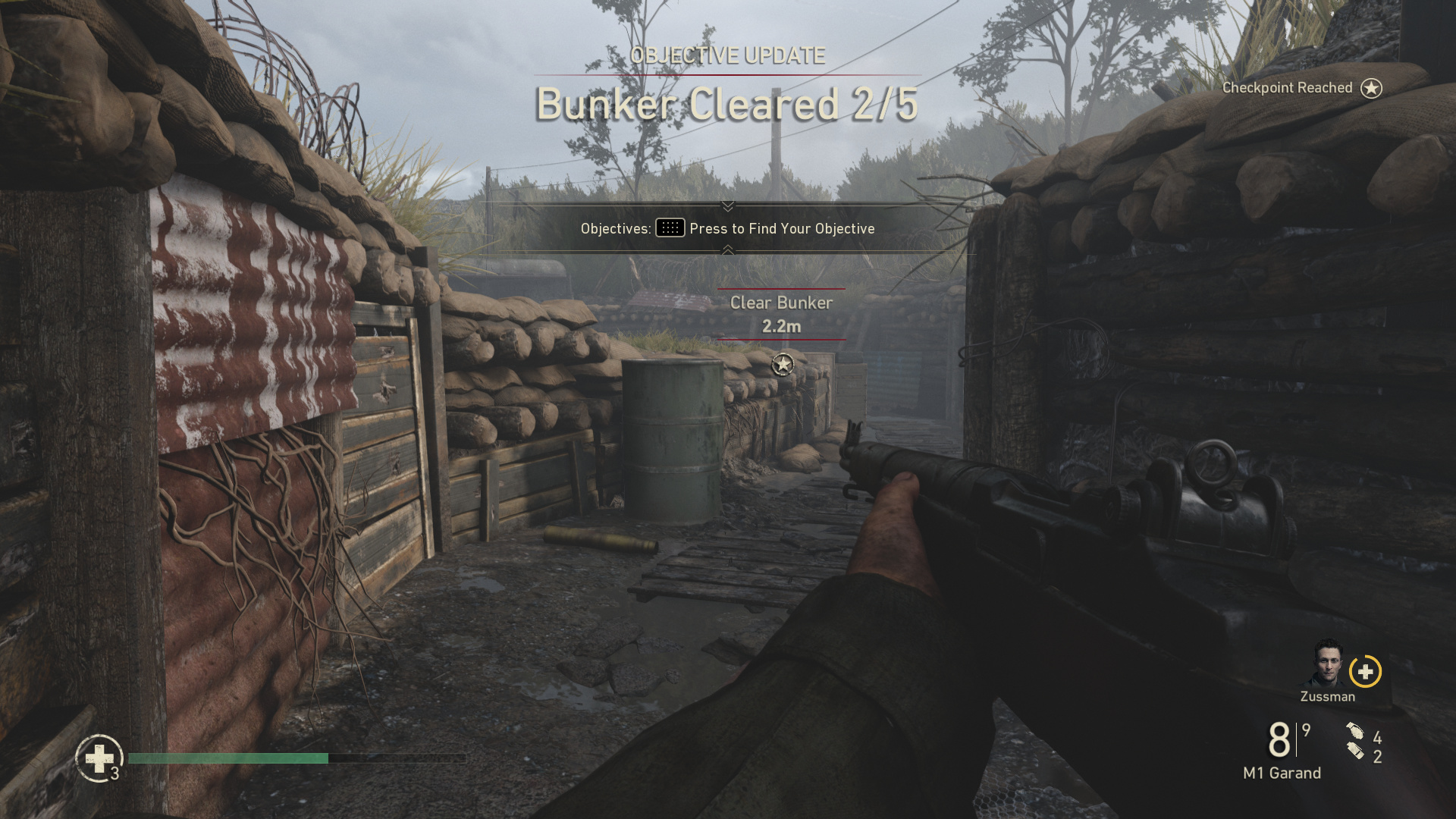
Source: [10]
Figure 9: Call of Duty: WWII
Source: [11]
Figure 10: Fortnite
Source: [12]
Figure 11: Microsoft Flight Simulator 2024
Source: [13]
Figure 12: Sims 4
Source: [14]
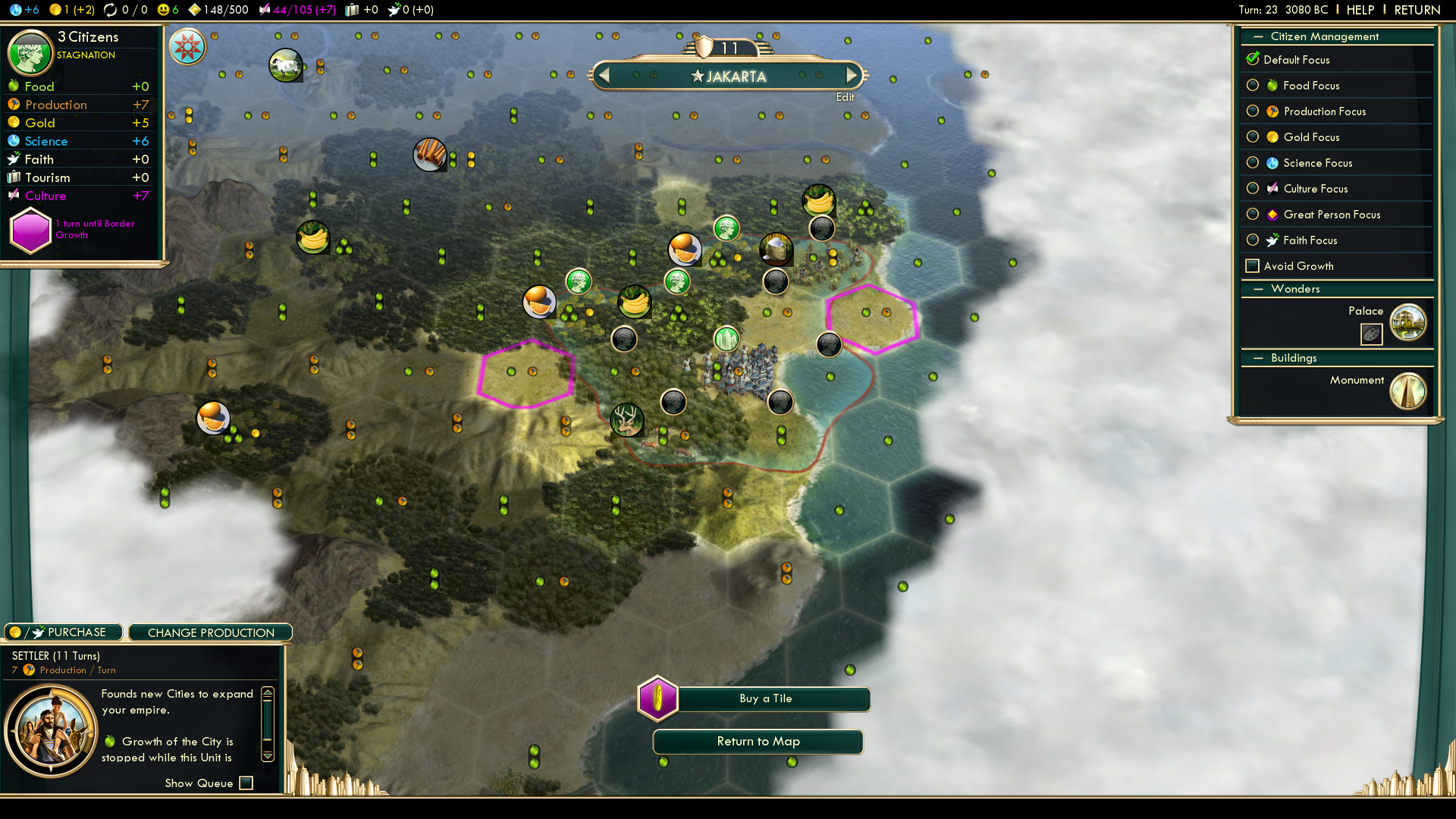
Figure 13: Civilization V
Source: [15]
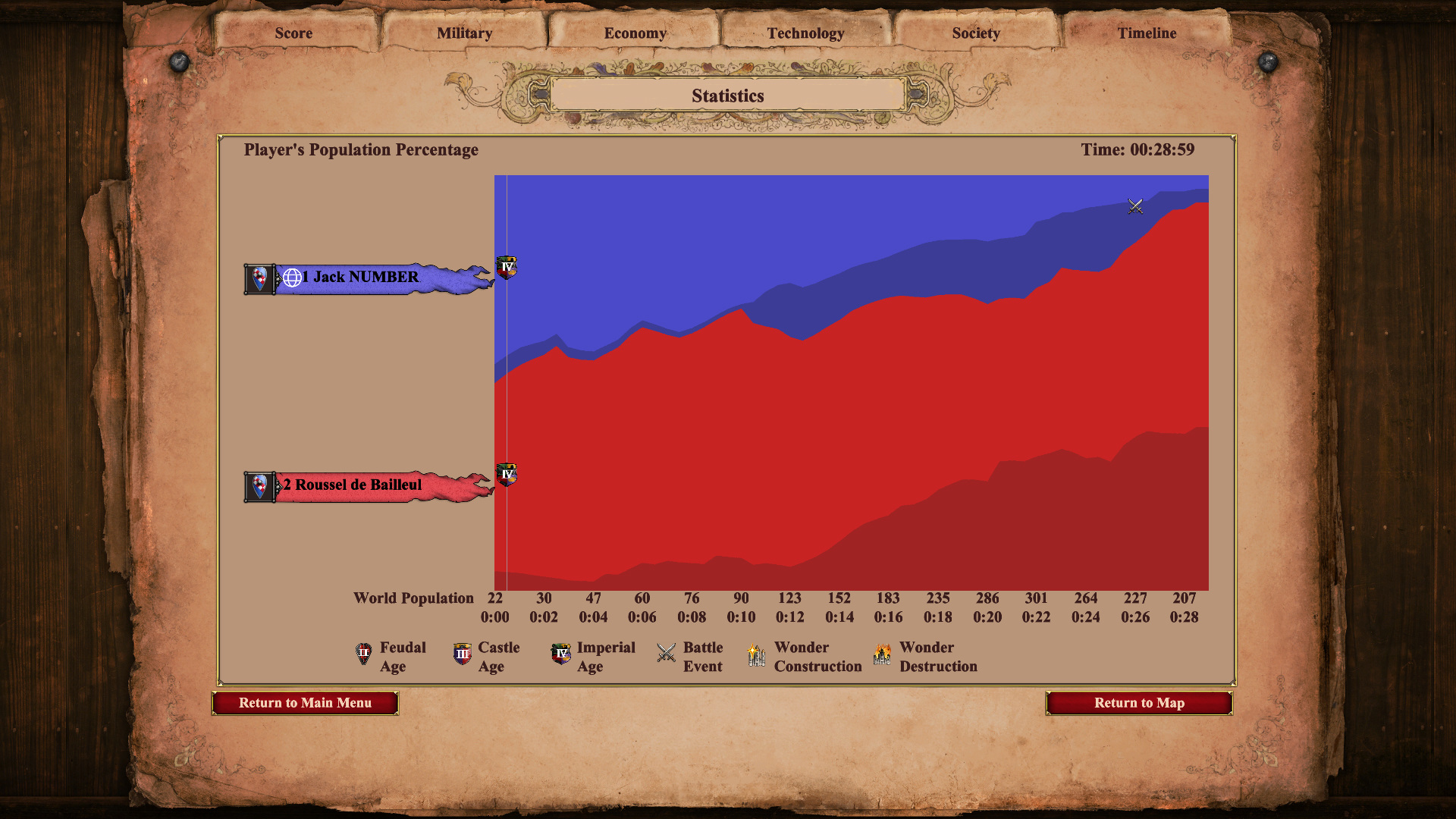
Figure 14: Age of Empires II: Definitive Edition
Source: [16]