Part 3: Complementary Colorize and Glow
After my Generate26 VJ performance, I felt like it was time to update my “Dancing Lines” Wire patch.
Updated Version:
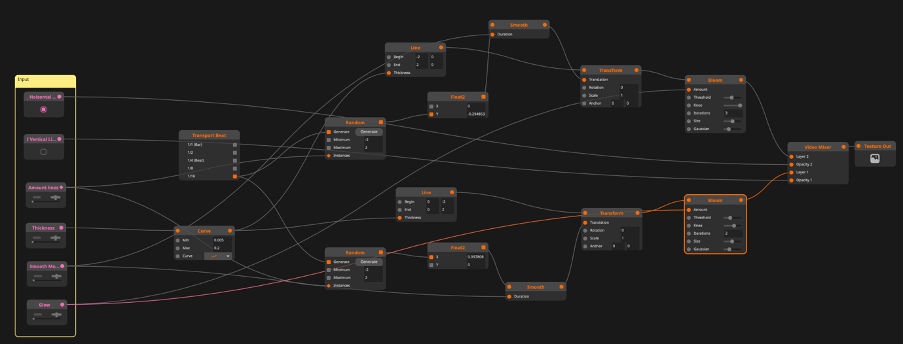
Through the performance, I myself thought this patch is lacking diversity. Since making a patch that is always adjustable was the whole point, I went back into Wire and began experimenting. Eventually, instead of trying out each and every node and see what happens, I took a step back and thought about what I’ve learned in regular (good) old After Effects. There, I’ve learned that it is ok to cheat about anything and everything and that the name of an effect doesn’t indicate all its possibilities.
Then I thought maybe a blur could create a fake glow effect. Thus, I did some research about Wire nodes and found out that the so-called “Bloom” node is basically just an adjustable Gaussian blur. This quickly created the effect I wanted. However, I wasn’t fully satisfied with the look yet. As the dancing lines were still just white even with the new glow effect.
To change this, I started a new patch. This time, an effect patch for Arena instead of a source because I want to use the effect for multiple projects in the future.
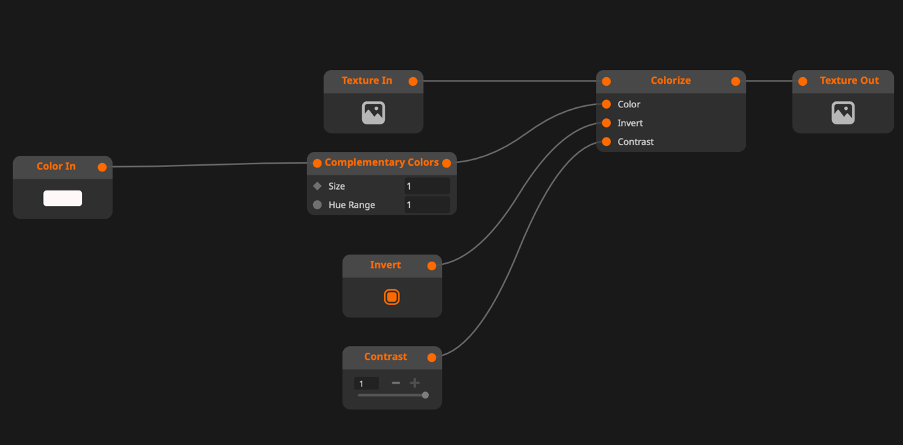
This effect patch entails a way to pick a color in the color picker feature I built into the Wire patch. The idea of the effect is not to pick a color like blue and then receive, e.g., blue dancing lines but to receive the complementary color of the picked color. So when the club lights are blue, I pick the color blue, and the dancing lines become orange or yellow, depending on the shade of blue I pick.
Here is a short video that shows the updates:
