User Interfaces in Video Games 2/10

User Interfaces in Video GamesThe quest for genre-appropriate and usable game UI

To start off with my research I decided to research the history of video games and, by extension, their user interfaces. I’m interested in how people interacted with early interfaces with technical limitations.

My first thought was Pong, a game that many people consider the first game, but upon research I found out that this wasn’t the case and that there’s no clear consensus.
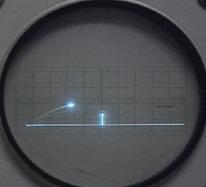
Figure 1: Tennis for Two
Source: [1]
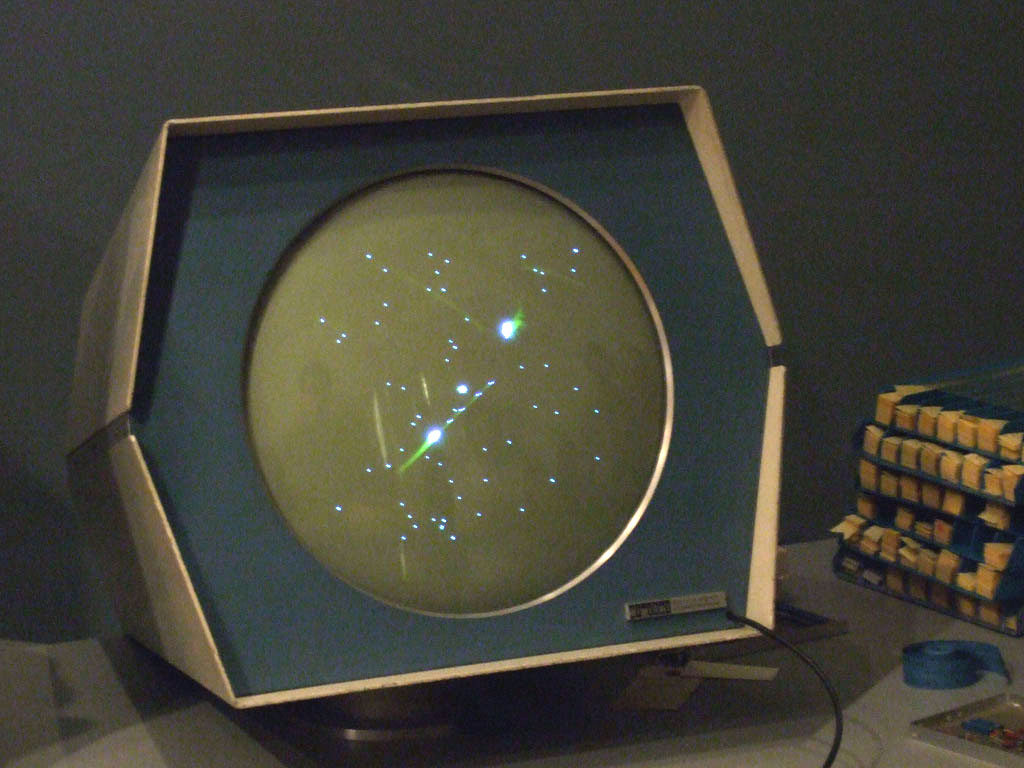
Figure 2: Spacewar!
Source: [2]

Released 14 years before Pong, Tennis for Two was developed by William Higinbotham and it was made using an analogue computer with a oscilloscope screen and two separate controllers [3]. I found a recreation of it you can play in your browser here, which shows well how limited the interaction elements were, namely a pair of dials/control knobs and buttons.

This video also talks about Tennis for Two as the first video game and shows the control scheme

Tennis for Two shows that the way people interact with video games has always involved input devices. These input devices provide the point of interaction between the human and machine. However, some sources argue that it isn’t the first video game because it wasn’t displayed on a video screen, which is a technicality [3]. Other sources argue that “While this appears to be the first interactive game, it is an isolated instance” [4], claiming that the creator of the upcoming game I will mention didn’t know of it’s existence.

Released a few years after Tennis for Two, Spacewar! was developed by Steve Russel and it was made using a PDP-1 computer [4]. This made it the first computer game, originally using toggle switches built into the computer, but eventually getting dedicated remote controllers developed. Spacewar! is widely considered the first video game, showing a very similar interaction principle albeit with more complex controls.

At 13:45 you can see Spacewar! being played

While Tennis for Two had one adjustable knob and one button for aiming and throwing, Spacewar! had much more complex controls with the objective was for each player to maneuver a spaceship and score by firing missiles at their opponent [5].

Whats interesting in observing these interfaces is that they have no traditional visual UI elements, such as high scores or menu screens. The game itself doesn’t guide the player intrinsically, but the aspect of two identical controllers suggests that two players can somehow interact with the game.

User Interfaces in Video Games

User Interfaces in Video GamesThe quest for genre-appropriate and usable game UI

This thesis would explore the relationship between video games, user interfaces and users, in the context of genres and usability. It would place a focus on the history, genres and UI elements and their functions in games, as well as examine accessibility options and overall usability. Some games have interfaces with very small text, which is a result of no standardised guidelines. Some games also have user interfaces that are completely divorced from the style of the game, making them look jarring and potentially taking away from the overall user experience.

At the beginning, UI wasn’t an established field in the game development industry, but has since evolved to slowly include not only UI but also UX [1]. I want to explore how UX/UI manifests itself in this medium while taking a look at the industry, past and present.

  • How can user interfaces in video games harmonise with the aesthetics of the game and to provide a seamless experience? How do they become one with the game?
  • How do genre conventions influence user interface design choices in video games?
  • Should games sacrifice functionality for style and vice versa? Do accessibility options affect the art being made?
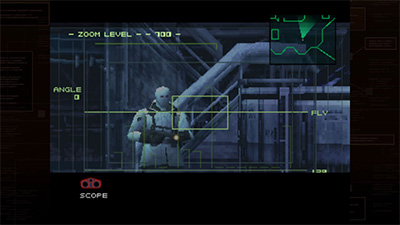
Figure 1: MGS1 Screenshot
Source: [2]
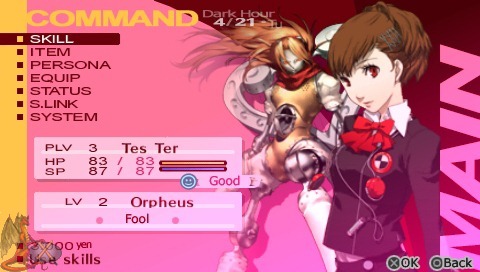
Figure 2: Persona 3 Portable Screenshot
Source: [3]

The relevance of this topic comes down to the different ways UX/UI principles can be reinforced within games, a huge medium that often gets ignored in academic contexts for being too playful.

Human-centered design bases itself on, among other things, existing patterns . These patterns can be hard to grasp in more complex interfaces such as games, where standardisation isn’t reinforced, or expected, in the same way it is with websites. Regulations don’t exist for games like they do for websites, because websites are an essential part of everyday life, but games aren’t. I still think that they are an important everyday medium that should be accessible to anyone and not shut anyone out.

It’s also relevant to examine the aesthetics, personality and style of these interfaces which is the more graphical angle to approaching game user interfaces. Knowing how to ride the line can be difficult. So, should games sacrifice functionality for style and vice versa?

Interaction design could help to deal with these issues by using existing knowledge, guidelines and research about usable interfaces and cross examining them with game interfaces. User experience design would help with making sure the interfaces are usable and clear, while user interface (and general graphic design) would help with making them aesthetic and cohesive.

The biggest challenge I have right now is to narrow down the scope of the project and see a clear path. Theres many things I want to touch upon, and I’m not sure yet how they will come together. Initially, I wanted to also examine the “responsive” angle of video game user interfaces, by exploring desktop, mobile and console games. While I’m still interested in this and the differences in developing interfaces for such varying screen and control schemes, I’m not sure where the focus would lie in the end.

Another challenge would be how to produce qualitative and quantitative data from my analysis efforts, and if I will actually find discrepancies and scientific value. The biggest challenge I will have in the future is deciding on an outcome/workpiece, as I’m not sure how to target this overall research into a design outcome.

In my next steps I would like to:

  • start actual research and try to build my literature collection on the topic
  • gain proper knowledge on the history of games, UI elements and their functions as well as accessibility issues
  • familiarise myself with the current state and find best practice examples
  • maybe even play games and note down experiences

My personal motivation lies in my immense enjoyment of games in the past year. They have improved my quality of life ten-fold, became a part of my routine and, for that reason, I would love to make games a good experience for everyone. I’ve been noticing that games have accessibility options such as subtitles available but then the subtitles are incredibly hard to read due to their size, font choices or contrast. This always bothered me and eventually I started thinking about how most people even play games when the interfaces don’t help but rather distract. I would love to combine my passion for usable user interfaces with games, which are full of interface elements.

Game UI Database – initially, building a database was also part of my probable outcome, but since I have come across this giant database of screenshots of various menus and game states for thousands of games