#2 Research

Image by chriszwettler from Pixabay

This week I was looking into the Austrian side of things. I was interested how many elderly are using technology in Austria. Based on a survey that was conducted by the Statistics Austria in 2023 the adoption of technology, specifically looking at the internet usage was around 53.8% for people that were aged 75 – 84 years old. [2]

More interestingly that internet use declines as age increases.

  • 63.8% of 75- to 79-year-olds use the internet
  • 42.8% of 80- to 84-year-olds use the internet

The study was also focusing on the attitudes of elderly Austrians towards new technologies and categorized two main groups: Communication and Entertainment and Support and Health. In this case the study was talking about Tablet, Smartphone, Social Networks and Voice-Controlled PC in the first category of Communication and Entertainment. The second category Support and Health contained technology (Devices) like Tracking Systems, Auto Fall Alerts, Personal Alarms and Auto Cookers. [2]

Support and Health Devices

As previously mention this category contains devices like Emergency Tracking Systems. Around 77% of elderly (50+) had a positive attitude towards one of these technologies in this category.

  • 69% of elderly thought positive about the personal alarm systems
  • 62% of elderly thought positive about the auto fall alerts
  • 60% of elderly though positive about the tracking systems

This values indicate, like previously mentioned, that elderly are interested in technology if they see a clear benefit.

Advantages of using technology

Technology can enable the elderly to continue their daily life and be independent for as long as possible. [2]

  1. Support and Health Technology
    • Safety Assistance: Let’s the elderly still life independently and still be save with devices like Auto Fall Alerts. [2]
    • Maintain Health: With aging cognitive, physical and sensory impairments increase, this is where technology can improve mental and physical health. [1]
    • Lessens Medical related travel problems: Technology can help assist elderly that have limited mobility or need to go to medical facilities regularly. [1]
  2. Technology in Communication and Wellbeing
    • Technology can decrease loneliness and improve well-being. [2]
    • Elderly that access to the internet are often socially more connected. [2]
    • The use of ICT has a direct correlation to an improvement of Life Quality and Cognitive Function. [2]

What are ICTs?

Next Steps: Technology Adoption Models

  1. Technology Acceptance Model
  2. Unified Theory of Acceptance and Use of Theory [1]

Sources

[1] Y.-Y. Yap, S.-H. Tan, and S.-W. Choon, ‘Elderly’s intention to use technologies: A systematic literature review’, Heliyon, vol. 8, no. 1, p. e08765, 2022.

[2] N. Halmdienst, M. Radhuber, and R. Winter-Ebmer, ‘Attitudes of elderly Austrians towards new technologies: communication and entertainment versus health and support use’, European Journal of Ageing, vol. 16, 12 2019.

Is Photography Dead? Rethinking Creative Authenticity in the Age of AI

Design & Research | Master Thesis Log 01

The mechanical eye vs. the digital brain. (Source: Unsplash)

I still remember the first time I developed a roll of film. There was a specific anxiety in waiting to see if the shot came out right—the grain, the slightly missed focus, the “happy accidents.”

Today, that anxiety is gone. We are witnessing the death of the “snapshot” and the birth of the “computed image.” With the release of tools like Google’s Magic Editor and Adobe’s Generative Fill, the definition of photography has shifted from capturing light to processing data.

As an Interaction Design student coming from a background where photography was about documenting reality, this shift fascinates and terrifies me. If an algorithm frames the shot, adjusts the lighting, and even generates missing details, who is the creator? The user or the system? My Master’s research topic, “Rethinking Creative Authenticity,” investigates this exact tension.

The Visual Conflict

This image has “noise.” It has grain. It captures a fleeting moment that might never happen again. It feels human because it is flawed. (Source: Unsplash)
Computed Perfection
Clean, optimized, and statistically average. AI tools push us toward this aesthetic—images that look “correct” but feel empty. (Source: Unsplash)

The Research Framework

Central Research Question

How can interaction design redefine or preserve creativity within automated camera systems and AI-enhanced photography tools?

To answer this, I am breaking the problem down into three sub-areas:

  1. Perception: Do users perceive a “technically perfect” AI image as less authentic than a flawed human image? Where is the threshold?
  2. Agency: Can we design interfaces that force the user to make creative decisions rather than relying on auto-pilot?
  3. Collaboration: How can AI act as a “Creative Coach” (guiding composition) rather than a “Servant” (fixing mistakes)?

Why This Matters for Design

In Interaction Design, we often talk about removing “friction.” We want apps to be easy, fast, and seamless. However, in creative tools, friction is often where the art happens. The struggle to get the focus right, or the decision to underexpose a shot for mood—that is creative intent.

If we design cameras that remove all struggle, we risk atrophying human creativity. We create a “Push Button, Get Art” culture [1]. My goal is to find the “sweet spot” where automation supports the user without replacing them.

My Approach: Research through Design

I don’t just want to write about this; I want to build a solution. My approach involves “Speculative Prototyping.” I intend to design a camera interface that resists total automation—a tool that asks you “Why?” before you shoot, rather than just fixing the “How.”

Early phase: Sketching interfaces that bring the human back into the loop. (Source: Unsplash)
  1. Literature Review: Deep dive into “Computational Photography” ethics.
  2. Interviews: Conducting qualitative sessions with photographers to understand their fears regarding AI.

References (IEEE)

[1] L. Manovich, “AI Aesthetics,” Manovich.net, 2018. [Online]. Available: http://manovich.net/index.php/projects/ai-aesthetics

[2] A. Agarwala et al., “Photographic stills from video,” ACM Transactions on Graphics (TOG), vol. 23, no. 3, pp. 585-594, 2004.

[3] H. Steyerl, “In Defense of the Poor Image,” e-flux journal, no. 10, 2009.

AI Declaration: This blog post was drafted with the assistance of an LLM to structure my initial thoughts and ensure academic formatting. The personal motivation, image selection, and research direction are entirely my own.

What does “Slowness” actually mean? 2/10

Exploring Problems & Solutions

Problems

The obvious problems that exist when it comes to homelessness is the need for a roof over their head, food, and access to basic hygiene and healthcare. Another problem is how to prevent homelessness, what to do when someone is at risk of ending up on the street or couch surfing between friends and family. The homeless also face a lot of stigma, where they can often be seen as lazy or dirty (Unity Parenting, n.d.). Some are also worried that the money the homeless are given or earned will be used on drug misuse (Forskning.no, 2017). This creates a barrier that prevents others from helping entirely, or creates a barrier which makes it difficult to know how to best help without indirectly inflicting more harm. Which is the last problem I’ve decided to bring up; the lack of awareness or knowledge on how to help the homeless or people in need. In Norway only 10% said that they understand the current situation regarding homelessness in Norway (Frelsesarmeen, n.d.). 

Limitations

In order to limit the scope of the coming research I have looked at what demographics I wish to focus on. Demographics to consider is location, which environment/group, and age. My interest primarily lies in looking at Norway and/or Austria with a primary focus on looking at the homeless and those of us who are lucky to have a roof over our heads.  

Moving forward I would like to focus on the topic of service design and look at how the services that the homeless are a part of creating help contribute to bringing them back to society and the local community. While also exploring the possible combination of existing design or the design of new services that can make it easier for the local community to help and/or to meet and create connections with those who are in need.

Todays solutions

Stigma and not knowing how to help are two problems that go hand-in-hand, where people are worried where the money will go and not sure what to do instead. In an article from forskining.no Allan Andersen advised one could simply give food instead. Which is a good thing to do, but it does not help them out of the situation more than their current hunger. In some areas there are also food services provided by organizations where the homeless can come in for meals or pick up groceries. Another service that contributes to food distribution is Billas donating scheme where they donate food to partner organizations (Billa, n.d.). In some stores it is also possible for customers to buy and donate food by leaving it in the donation containers in the stores.

However, what I believe could be a possible downside to this food distribution is that it takes away some of their independence. Perhaps they would like to be able to go to a store and buy groceries like everyone else and cook their own meal as any other would do. SNAP in the US allows for this where they are given an electronic card, similar to a credit card, that can for example be used to get food from soup kitchens or to buy groceries (United States Department of Agriculture, n.d.). This is a service that in a way is designed to help people in need to be able to have the freedom and independence to go buy what they need when they need it. However, without a kitchen to cook in, one is limited to buying pre-prepped meals even in the stores. Adding the availability for open community kitchens, where one can come to cook or learn how to cook, would be a good addition to the service as a whole. 

There are also services provided by organizations that allow for homeless or people in need to gain work experience and money. Most commonly is the selling of newspapers on the street. This is a service that is offered to those in need where they can buy magazines for a small price, and sell it for more. This allows those in need to also provide a service for others. In an article Claudia Magallanes-Blanco & Juan Antonio Pérez-Bermúdez (2009) discuss how such a service can help to empower the homeless. It does so through the employment itself, being able to share their story with others, and by creating networks. From the interviews it is brought forward how the selling of the magazines offers a space where they can talk to and meet others, becoming a part of society and integrating with the community surrounding them. Unfortunately for the street magazines in Norway, there has been a decline in the amount of sellers since they first started. Although they are unsure of the cause, the editor of Erlik, who produces the magazine =Oslo, saw that a lot of sellers who weren’t returning were those actively taking drugs (NTB, 2024).

The organization Erlik also runs a coffee shop where the staff primarily consists of people with a background of drug use. In an interview from 2017 the environmental therapist and barista at =Kaffe, Gunvor Hægstad, said that people would usually be quite social and talk with strangers while having a coffee at =Kaffe (Tanase, 2017). In the same interview Hæstag also mentions that they have more employees working at the same time as it might run a little slower than most coffee shops. These are good examples of how they have adjusted their process in order to keep up with demand, and how they have managed to create a welcoming and safe atmosphere. 

References

How do we stop doomscrolling?

19.11.2025, Second research blog

Update on current research:  

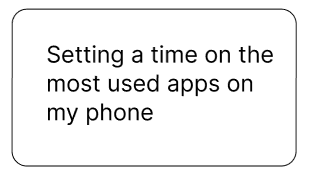
Findings: I did not manage to stick to it at all. When you are in the app and you have reached your daily limit a widget pops up saying that you have reached the limit you have set. Then you have two options: “OK” that takes you out of the app, and “ignore” where you can choose how long you wish to ignore it for. For me I found it way too easy to just ignore the limit. Especially when I was in the middle of a video or of reading something, and I did not really feel any consequences of ignoring it in the moment. The time limit did not help me reduce my screen time at all.  

Moving forwards: I will keep the time limit on my phone, but I will extend it to 45 minutes and see if that makes it more manageable to uphold.

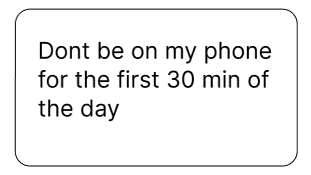
Findings: I myself subconsciously reaching for my phone a lot, but in contrast to setting the time limit I moves my phone out of my immediate reach which made it much more effective. I did manage to stick to staying off social media for the first part of my day, and defaulting to reaching for my phone reduced after a while. I found having a phone free morning very nice and freeing, and I started the day feeling lighter. After I while I would have to start using my phone for checking things like emails and messages and stuff, and I would go back to my normal use pretty quickly so it did not really reduced my scrolling through the rest of my day, but for my morning while getting ready and having breakfast it definitely worked.  

Moving forwards: I will continue with this experiment and see if It can affect my daily use over time, and if I can become more aware of my using patterns.  

Upcomming research

This week I will start trying to dedicate 30 min of screen time every evening to see if having a preset time for scrolling makes it easier to stick to only using social media within that frame.

I will also conduct more secondary research about the affects of doomscrolling. I will also research other people who have conducted similar experiments to mine and compare their findings to mine. 

Moving in the Air ≠ Moving on the Ground 

In traditional performing arts and circus arts (dance, acrobatics, gymnastics, etc.), people’s bodies move relative to the ground; however, in aerial silks, people are suspended in the air – making this an art in which the natural, ground-based restrictions aren’t present [1]. Additionally, in silks, artists must understand their own body not in relation to a fixed position, but rather in relation to themselves and the moving silks. Head orientation, limb placement, and proprioception play a key role in mastering different figures or sequences [1].  

In order to successfully perform a figure or individual movement, teachers must explain to students what both their body and the silk must do. This differs from other circus arts like hoop or pole and even from other, more defined sports like gymnastics, since in these areas the apparatus is heavily limited by gravity and statically positioned. In contrast, silks explanations have to take into account also how the apparatus must be placed. 

According to [2], “The silk can be viewed as an extension of the body so that the aerialists can tacitly learn how to execute the movements without analyzing the exact distance between their body, silk tail, and ground.” As such, embodied learning is paramount to silks, using somatic methods in combination with verbal language to transfer information, especially regarding one’s physical safety [2]. 

In my own experience as an aerial silks student, especially since I have been a student of many different teachers with different teaching styles, most of the new figures I (and my classmates) learn have to be explained in at least 2 ways: both shown in the air by the teacher, and with verbal step-by-step instructions given while the figure is made. Usually, this means that a student (specifically beginners, as in my class) must see a figure 2 or 3 times in order to finally understand what he or she needs to do (through observational learning). 

However, observational learning is not the only thing at play here. Some students, even when understanding the technical theory of what they need to do, still struggle with their own body awareness and silk awareness while off the ground. Currently, according to 3 different teachers I talked to, the only way to overcome this is through practice. But, I wonder, have there been experimental tests to try to overcome this in a different way? (The short answer is yes, but the long answer will be explored in the next blog post) 

Furthermore, this week’s class observation I conducted yielded interesting results: in gymnastics class, instead of learning how to do a Running Front Tuck directly on the apparatus it should be performed on and trying to complete it on the first try, the teacher first instructed the gymnasts to run and jump straight up on a mini trampoline. Then, the next step was running, jumping, and doing a normal forward roll. Next, it was a handless forward roll, finally resembling the proper move. However, none of the gymnasts were able to land on their feet, and instead, the teacher was happy with them understanding the movement and landing on the mat, even if it was still in the tuck position (step 4 of the image) [3].  

Image from Gymnastics HQ, 2024 [3]. 

In contrast, in the silks class, the teacher explained a Metronome Drop (unstandardized name, but it’s what this teacher called it) by showing it, giving some verbal instructions and trusting the student to understand. Then, the student tried it out unsuccessfully twice, and finally was able to understand the knots on the third try. There was no gradual incrementation of steps as in gymnastics, rather the aerial student had to grasp the full movement from the beginning, without any progressions. 

– 

[1]  L. Froehlich, “Enhancing Aerial Circus Training Practices using a Synthesis of Traditional Coaching, Laban Movement Analysis, and Alexander Technique Frameworks,” B.A. dissertation, Dept. Dance, Scripps College, Claremont, CA, 2020.  

[2] M. Kosma, N. Erickson, C.J. Savoie, and M. Gibson, “Skill Development Versus Performativity Among Beginners in Aerial Practice: An Embodied and Meaningful Learning Experience,” International Quarterly of Community Health Education, vol. 41, pp. 173-187, January 2021. 

[3] “How to Do a Front Tuck: Drills and Exercises to learn a Front Flip in Gymnastics,” Gymnastics HQ. Accessed: Nov. 19, 2025. [Online.] Available: https://gymnasticshq.com/how-to-do-a-front-tuck/ 

Drink Smart and Keep Calm: Technology that Stays in the Background – Part I

While looking for an idea for my physical prototyping class, I came across a problem that I often encounter: I get myself a glass of water or a cup of tea and forget to drink it. So I designed a smart water glass, that reminds me to drink — but only when I actually forget to drink.

It was only in class that I realized I had subconsciously applied the principles of Calm Technology, enhancing my surroundings with computing in a subtle way. In doing so, I had also created a Tangible User Interface that supports the broader vision of Ubiquitous Computing.

This is a perfect example to dive deeper into my topic and take a closer look at the different concepts and how they come together in my smart water glass to create this type of interaction.

Ubiquitous Computing

Let’s start with the concept of Ubiquitous Computing, a vision first introduced by Mark Weiser.  Its main idea is to embed computation into the environment so seamlessly that computers become “invisible” to users. This vision emerged with the advancement of microelectronics and their widespread availability. Technology should move out of the direct focus and into the background. Instead of interacting with a single desktop device, interaction with technology happens everywhere — in everyday objects and the environment itself. (Weiser 1991)

Mark Weiser (1991, p. 2) describes ubiquitous computing as the opposite of virtual reality: “Virtual reality puts people inside a computer-generated world, ubiquitous computing forces the computer to live out here in the world with people.”

If we look back at the example from the beginning, this concept can be easily transferred. Instead of setting a drinking reminder on my cell phone or smartwatch, I can set the timer directly by interacting with the glass in my environment. This interaction can be designed to reflect the natural ways we as humans handle physical objects. And rather than being interrupted by a sound or vibration, the water glass responds to my interaction, subtly directing my peripheral attention to where it matters — the glass itself — rather than my smartphone.

Tangible User Interface

A concept closely related to ubiquitous computing—and one that fits the type of user interface used in our water glass example — is the tangible user interface, or TUI. While ubiquitous computing provides the guiding vision, TUIs represent a concrete implementation of that vision. In this sense, they can be seen as a subfield or application area of ubiquitous computing.

Inspired by the idea of embedding computation seamlessly into everyday life, TUIs aim to give digital information a physical form. They enable interaction through the real world and draw on modes of engagement that humans naturally use in their physical environments. These interactions are diverse and can involve multiple senses. TUIs are designed to enable the direct perception and physical manipulation of digital information. Their goal is to make computation both graspable and embodied. (Ishii and Ullmer 1997; Ullmer and Ishii 2000; Ishii 2008)

A TUI is a user interface in which the interaction elements are primarily haptic rather than graphical. TUIs link physical representations with digital information, allowing users to manipulate digital data by interacting with the corresponding physical object (Ullmer and Ishii 2000).

Tangible user interfaces enable users to interact through alternative input media, such as speech, gestures, or spatial position or movement. The system can provide feedback in various forms, including text, sound, vibration, or visual cues (Hornecker and Buur 2006).

TUI’s interaction model can be summarized in four key characteristics (Ullmer and Ishii 2000):

  • Physical representations are linked to digital information
  • Physical representations have mechanisms for interactive control.
  • The physical representation is perceptibly linked to the conveyed digital information.
  • The state of physical representation embodies key states of the digital system.

In the case of our smart water glass, the digital information being manipulated is the drinking-reminder timer, which automatically resets when the glass is lifted. By interacting with the glass as our physical object, I simultaneously interact with the digital layer connected to it — perfectly illustrating the essence of a tangible user interface.

This example shows how seamlessly the physical and digital worlds can merge when everyday objects become interactive. Yet as our surroundings grow smarter, an important question emerges: How can these technologies support us without demanding our constant attention?

In the next blog entry, we’ll take a closer look at the principles of Calm Technology and explore how our smart water glass applies them to create a quieter, less obtrusive interaction experience.

References:
  • Hornecker, Eva; Buur, Jacob (2006): Getting a grip on tangible interaction: a framework on physical space and social interaction.
  • Ishii, H., & Ullmer, B. (1997): “Tangible Bits: Towards Seamless Interfaces between People, Bits and Atoms
  • Ishii, H. (2008): “Tangible Bits: Beyond Pixels“, New York, NY: ACM.
  • Ullmer, B.; Ishii, H. (2000): Emerging frameworks for tangible user interfaces. In IBM Syst. J. 39 (3.4), pp. 915–931.
  • Weiser, M. (1991): “The Computer for the 21st Century”, Scientific American.

AI Assistance Disclaimer:

AI tools were used to improve grammar and phrasing. The ideas, examples, and content remain entirely the author’s own.

Globe at Night project — Testing discoverability and usability

Last week I asked myself “How can interaction design combat light pollution?”. This week I researched one way to raise awareness for the cause, which is citizen science. It involves regular people, who can submit measurements of the night sky brightness. This way, they support scientific projects in an interactive and educational way. I found out that there are several campaigns that deal with this theme, but the majority of people are not aware of them and I wonder why.

To get to the root of the problem, I selected the Globe at Night project and tested its discoverability and usability. According to its website, Globe at Night is the most successful light pollution awareness campaign to date, thanks to over 200,000 measurements from people in 180 countries over the last 14 years.

The research method I used was usability testing. I started out by defining two tasks I would present to each participant:

  1. You want to report data about light pollution in the sky. Find a service on the Internet (app or website) that allows you to send data to scientists.
  2. Report the condition of the sky right now to the Globe at Night project.

I tried to include people of different ages, nationalities and levels of digital competency. Ideally, everyone who has a smartphone or a pc and access to the Internet is part of my target group, but I chose to narrow it down to people interested in science or nature lovers. I was able to find 5 people, who performed the tests on pc and on smartphone.

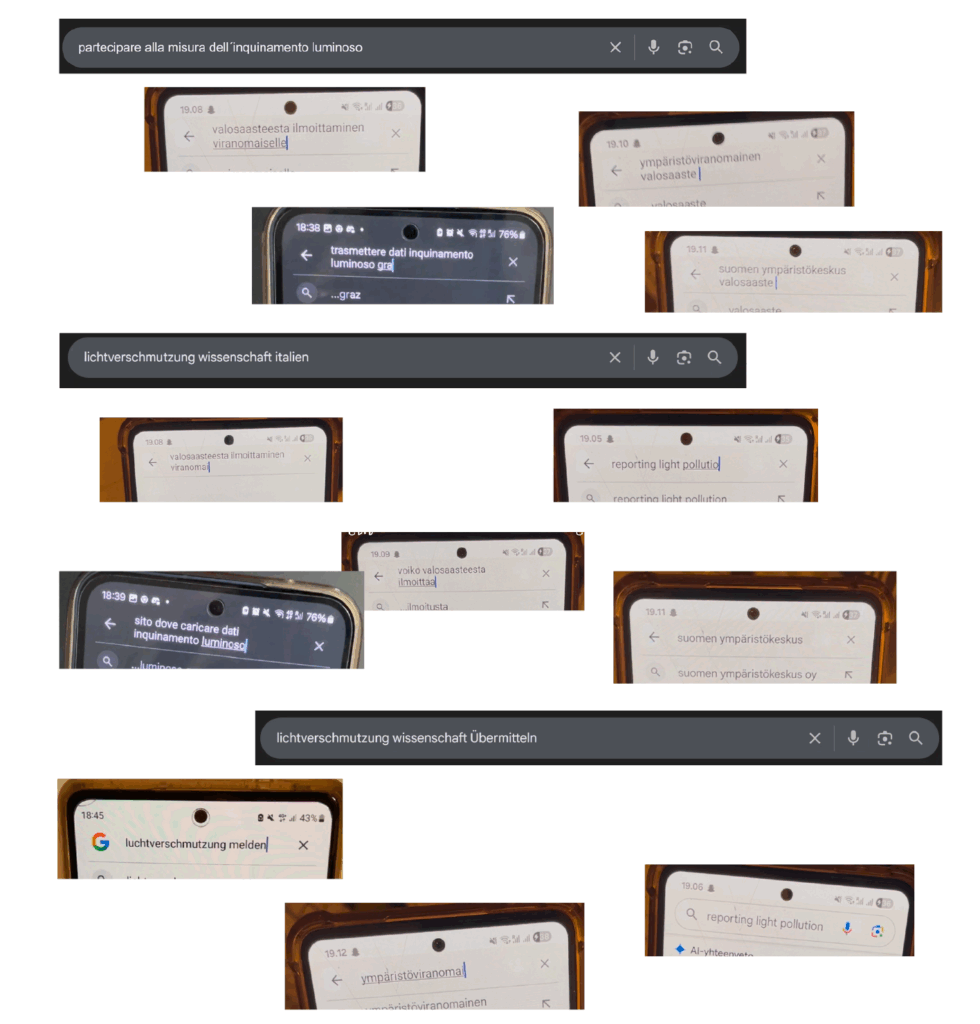
It is not easy to find a service that allows you to report data about light pollution to scientists. People tend to search in their own language for a service in their city and country. Many websites were found but no one was convinced of their result. The Globe at Night project claims to be the biggest of its kind, but it remains hidden by the search engine, even when searching for keywords like “report light pollution”. I think that this problem could be solved by improving the Search engine optimisation and taking into account the internationality of searches.

screenshots of different Google searches
Some Google searches of the participants. Only one found the Globe at Night website.

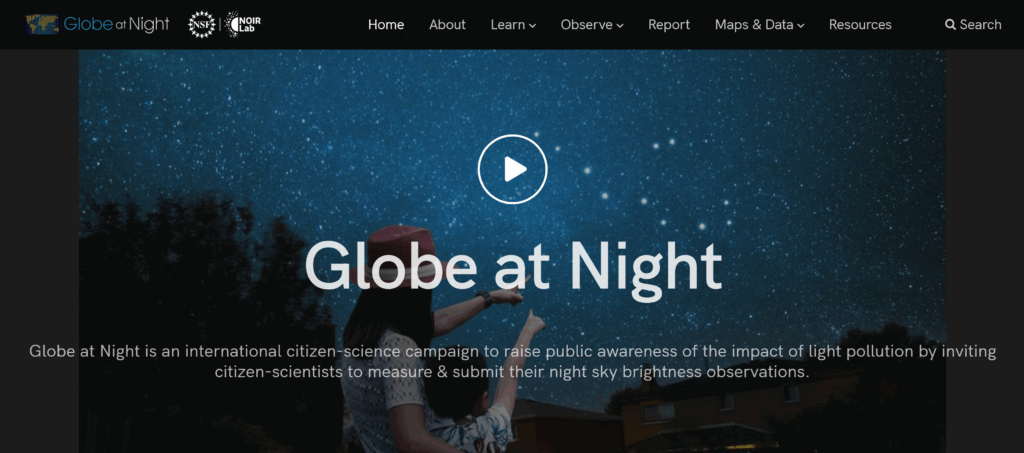
With respect to the Globe at Night website, I detected various technical issues. While the report form exists in many different languages, the homepage is only in English, making it difficult to find how to report data for non speakers, especially those belonging to older generations.

Globe at Night homepage
The homepage is only available in English.

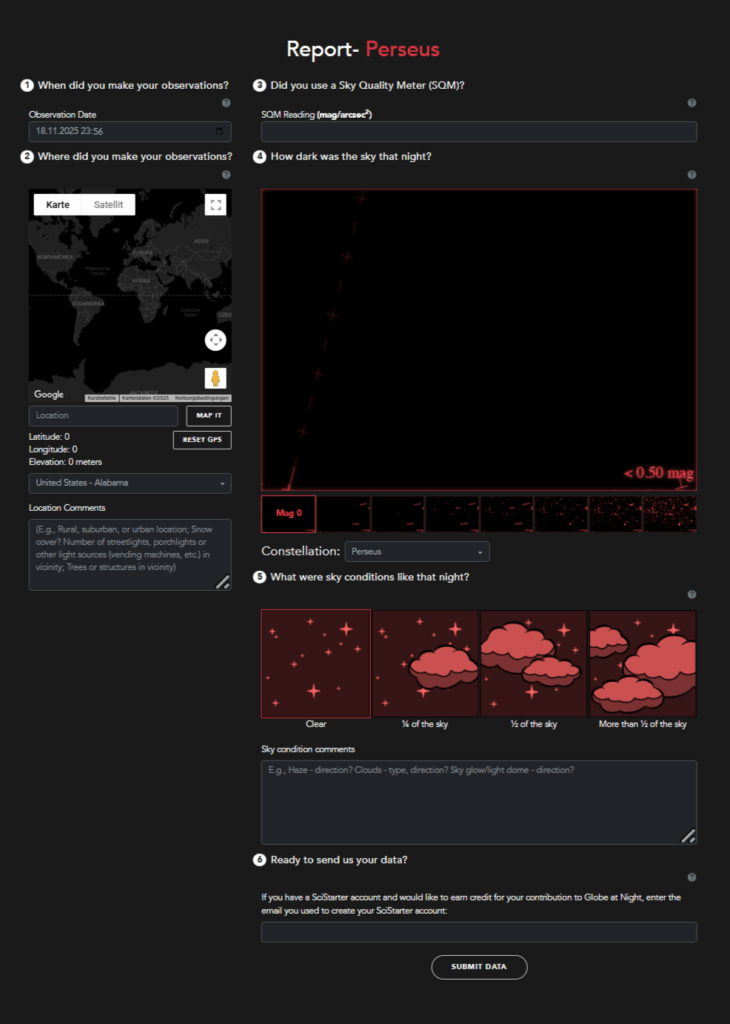
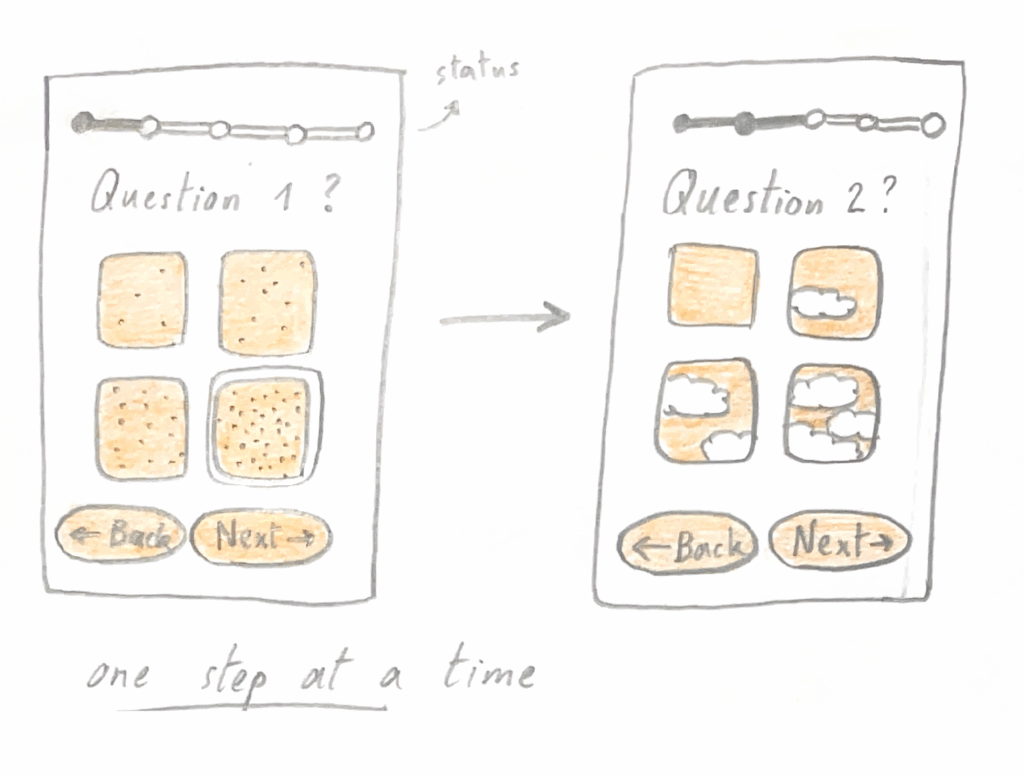
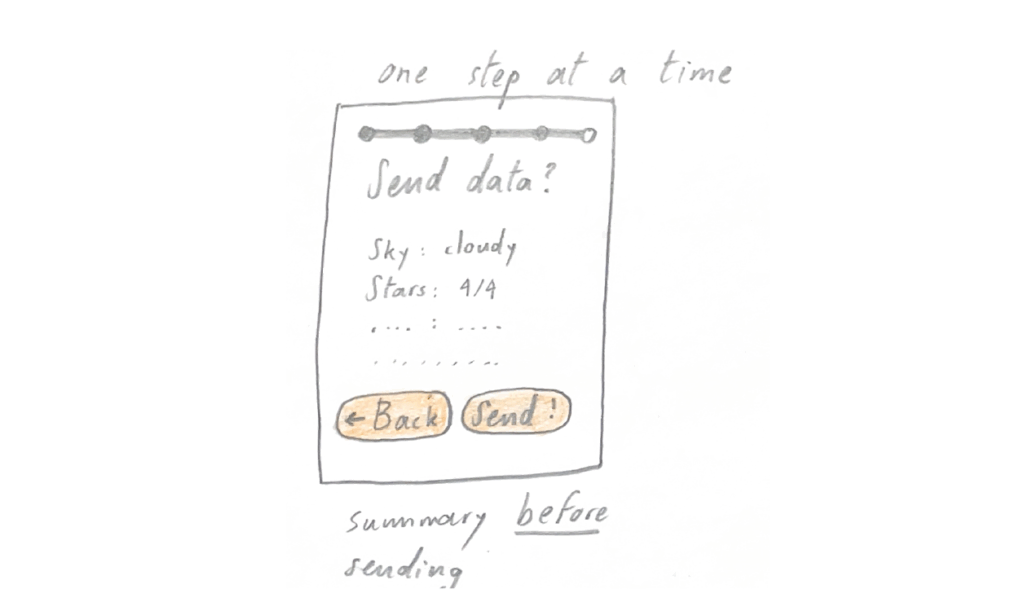
On the desktop version, due to the disposition of the steps in space, some are overseen, while on mobile it was easier to follow them all. Some participants noticed that they forgot to fill out some areas after submitting the results. I believe that the process could be improved by separating the steps or showing them one under the other while scrolling down. A recap should be visible before submitting data, not after.

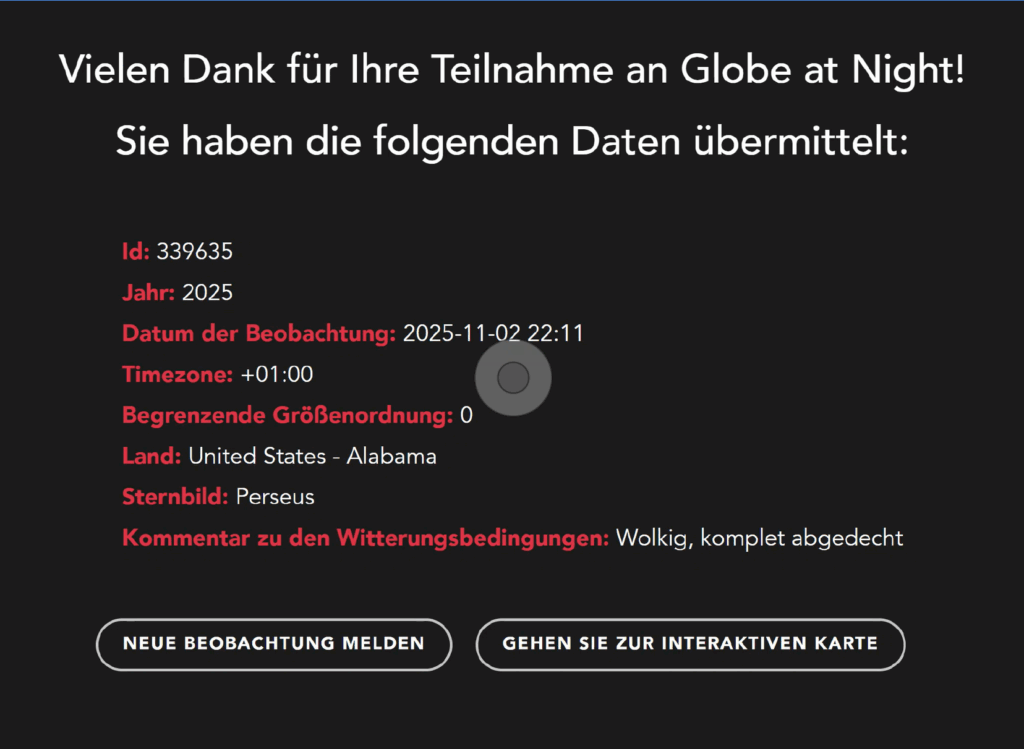
An aspect that created many issues was the location. Since all of the participants allowed location sharing, they expected the data to be correct, which was not the case.

report form with many questions on two columns
The report form
recap after submitting data
A recap is shown after submitting data. At this point it was too late to change the country.
sketch where the questions are separated and not all on the same screen
A suggestion to separate the questions, which could help the users to focus on every step.
sketch where a recap is shown before submitting, as a final step
A recap before submitting data could help prevent mistakes.

Finally, some participants felt overwhelmed when confronted with specific questions. One was whether they used a Sky Quality Meter to measure the brightness of the sky and the other concerned what constellation they were looking at. The project claims to be “citizen science” but these questions are not accessible to people lacking astronomical knowledge. I reckon they should be omitted, explained better or only shown after the user has demonstrated to posess the required knowledge in a previous answer.

There is a chance Globe at Night has never performed usability tests on their website, and this project could help them improve their service. I might consider contacting them, while I research other ways interaction design can help fight light pollution.