Accessibility requirements and barriers – Aerial silk teaching tool 

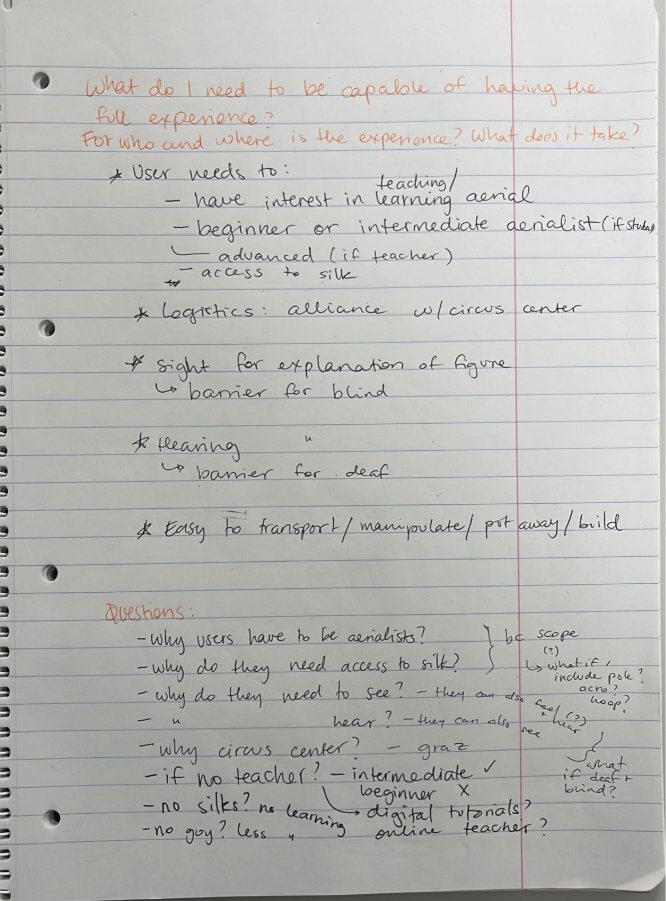
The following is a representation of the accessibility requirements and barriers of my prototype. 

Own image. 

The most interesting insight to come out of this exercise was the question: “does it have to be for aerial?” When thinking about this for the first time, my answer was “yes of course, that’s what my topic is about and the limit of the scope.” However, after thinking about the question a second time, and narrowing down my product from “any tool” to specifically “the third prototype (named ‘little guy’) I made”, I realized that while yes, my tool couldn’t be used for running or swimming or the like, but why not make additional attachments (instead of the external mini-silks) to represent other apparatuses, like floor pole, aerial pole, aerial hoop, trapeze, rope, hammock, straps, or similar apparatus. 

— 

Source: 

Own ideation 

Change and impact – Aerial silk teaching tool 

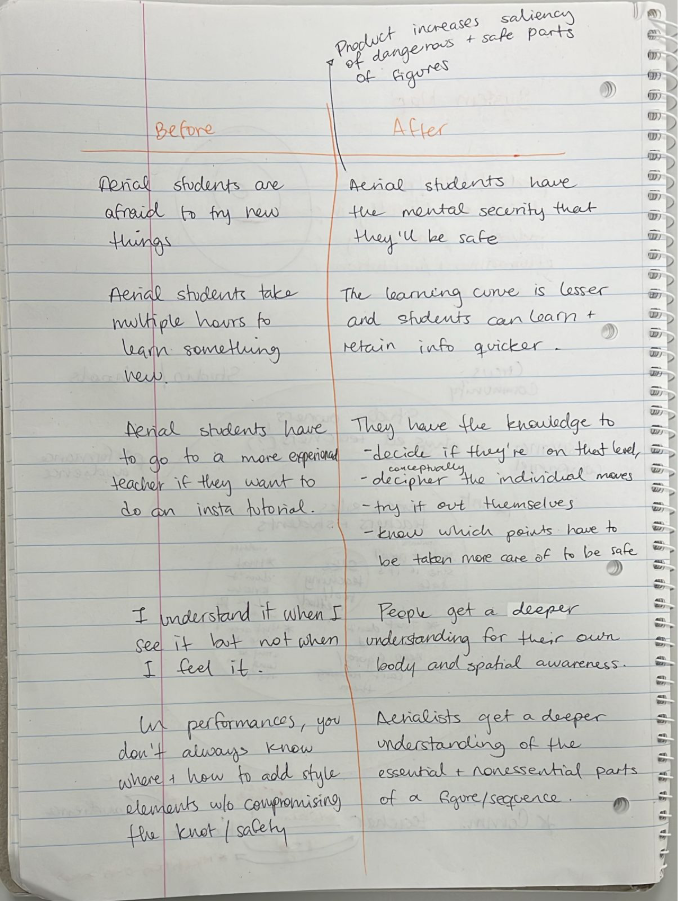
The following is a representation of the change and impact of my prototype. 

Own image. 

As mentioned before, my tool is designed to help in the understanding of figures, but it also has the added benefit of increasing the visibility of how small changes in body position can lead to different outcomes, for example (but hopefully not) falling.  

A specifically interesting part of this diagram is the 4th “before” statement, which is a direct quote from one of my aerial classmates who was a beginner in silks (but has the physical strength because of pole dance and acrobatics). “I understand it when I see it but not when I feel it,” she said once. I will know my tool succeeded if this statement is uttered less (or hopefully not at all) by students learning new tricks on the silk. 

— 

Source: 

Own ideation 

System Map – Aerial silk teaching tool 

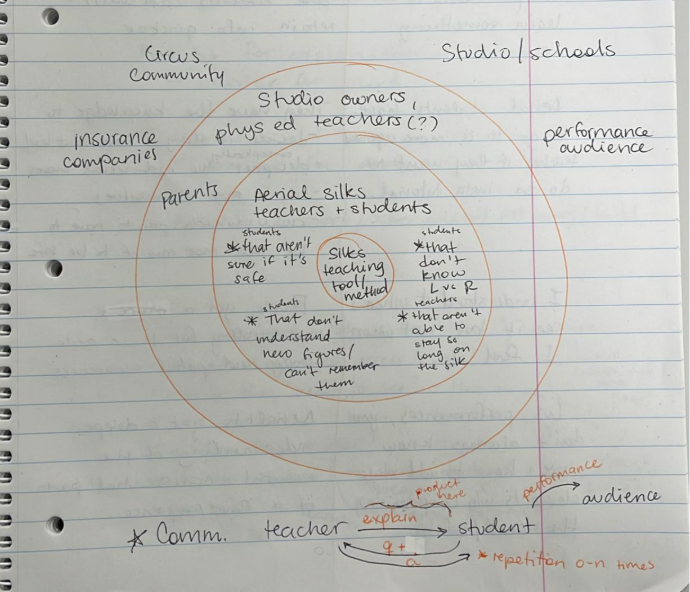
The following is a representation of the system map of my prototype. 

Own image. 

My tool is specifically designed to help in the teaching of proprioception in the area of aerial silks, and as such the directly impacted people are the aerial silks students (who want to make sure a figure is safe, who don’t understand immediately the new figures, and who don’t know their left from their right) and the teacher (who are not able to stay all day on top of the silk, and who would like to make the teaching process easier). The main communication happens between these 2 actors, as depicted on the lower part of the diagram, where the teacher explains and then subsequently answers any questions the student might have. 

Another aspect to this diagram can be seen in the safety aspect, as parents of students would feel better knowing their children are safe in class and being taken care of, and as such insurance companies or hospitals would not have to be called for any injuries (as I had to do just 2 months ago because of a miscommunication between the aerial teacher and me, the student).  

Plus, a third aspect can be seen in the fact that after learning a figure, aerialists can also figure out how to communicate artistic value to an audience through their performance. This aspect is furthered explored in the next post. 

— 

Source: 

Own ideation 

D&R2 Lo-Fi prototyping

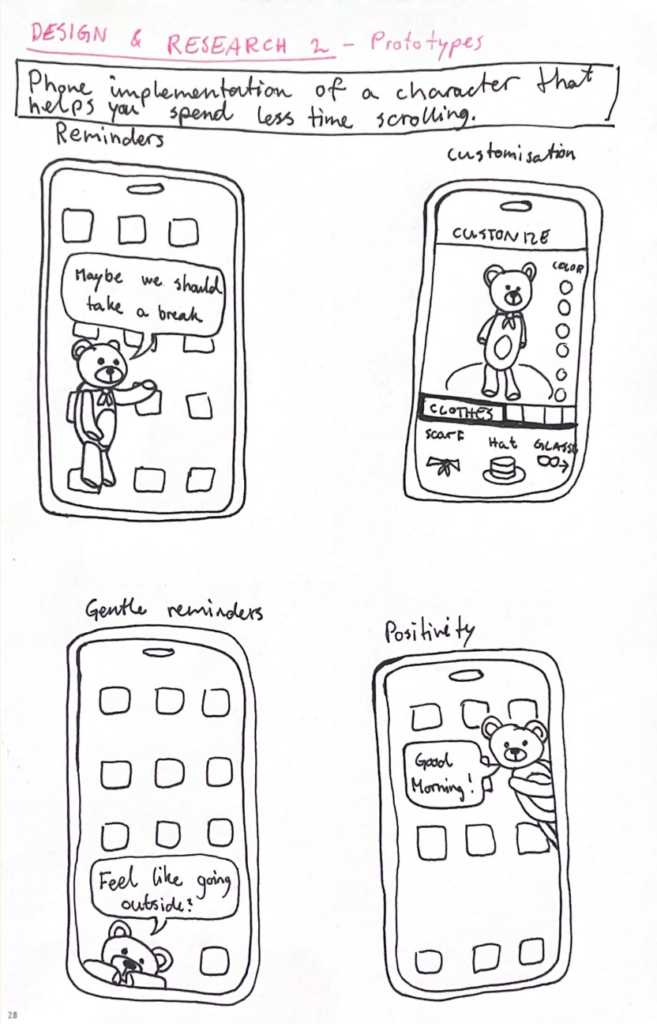
Going into this prototyping session, I was a little unsure if I wanted to continue with my theme from Des&Res1, so I created prototypes in three different areas.

Scroll prevetion:

The first one was a continuation of my work with doomscrolling prevention from last semester. The idea is to implement a customizable character into your phone that pops up on your screen from time to time to remind you to take breaks from scrolling and encourage you to do other things. The character’s appearance and personality would be fully customizable so that it feels personal and gives you a sense of care for it. During the peer feedback session in class, I received feedback expressing concern that the character might become annoying over time, and that users could grow to dislike it if it keeps appearing at inconvenient moments. I agree with this, so I think it would be a good idea to make the frequency and persistence customizable as well, giving the user full control over how pushy the implementation is. The idea received a lot of positive feedback, and several people said they would consider using it.

Reuse website:

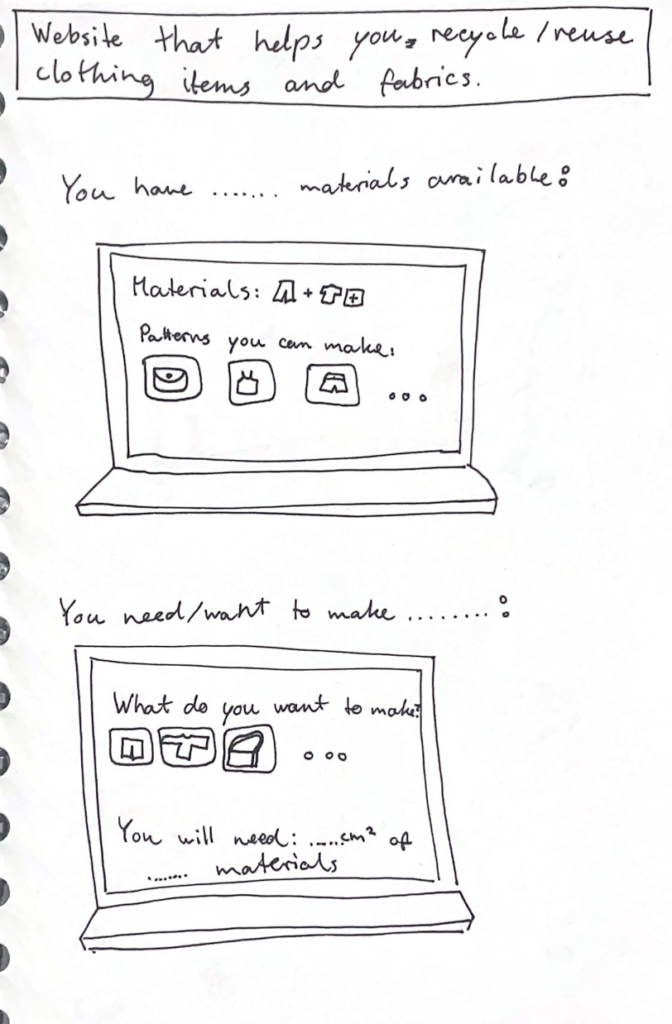
My second prototype is not as well developed yet, but I think it is my favorite so far. I am passionate about recycling and reusing old clothes and fabrics, so I wanted to create something within that theme. I made a rough prototype of wireframes for a website that helps users reuse their old materials. It can be used to input the materials you have available and then generate ideas for what you can make from them, including patterns you can use. It could also be used the other way around: you specify what you want to make, and it provides suitable patterns along with information about which materials are needed and how much is required. The feedback I received on this prototype was also very positive. I got a recommendation to include different filters to make it more manageable—for example, filters for which tools you have available, or how skilled and experienced you are in sewing and crafting.

Scroll distraction:

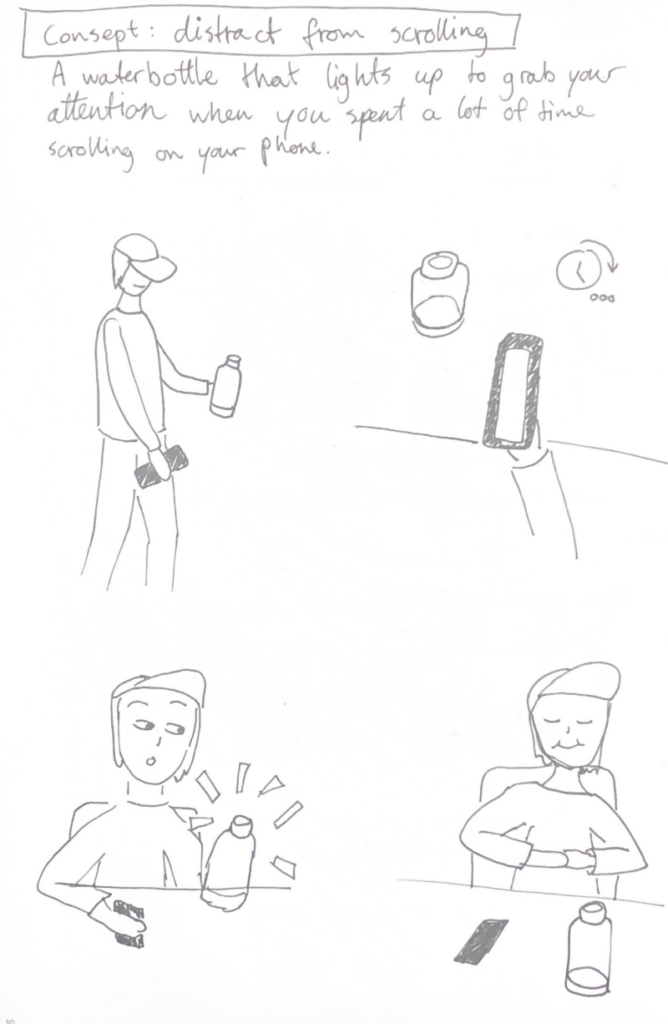
My third and final prototype returns to the idea of preventing doomscrolling. It is a water bottle that connects to your phone and lights up to distract you when you have spent a lot of time scrolling. I thought it could be interesting to have the preventative element exist as a physical object rather than within the device itself. Sometimes, a reminder of the outside world can help break the scrolling cycle and bring you back to “real life.”The water bottle distracts you by lighting up or even making a sound to make you aware of your scrolling behavior. One downside to this product is that you would have to keep the bottle with you at all times, but for people who already do that, it could be an effective tool.

ID1 NIME Article Review – Drawing Space with Rain: The Umbrella as a Flow Interface

The paper introduces an interactive system that transforms an umbrella from a normal everyday object into a musical and spatial interface. A spatial audio image is created by representing the raindrops hitting the interface and the movements of the raindrops across it. It is supposed to allow the user to perceive and interact with their surrounding space through sound rather than vision.  

The soundscape is created by not only using the impact of raindrops, but also the continuous flow of water, which they track by using a dense network of capacitive sensors embedded in the umbrella. The data is processed in real time and is sent to a virtual unity model where each drop of water triggers sounds. As a result, the user hears the movement of the raindrops as they move down the umbrella, drawing a spatial image of the space and external environment.  

This study caught my interest because it stands out within the NIME research by combining interaction with both a natural phenomenon and spatial audio. Instead of creating artificial sound environments, it generates real rain into a musical expression.  

The authors/designers conducted a pilot study that suggested that the system can enhance users awareness of spatial boundaries and create a sense of personal space. The testers experienced emotion responses to the product such as relaxation and curiosity, many actively exploring the interface by moving the umbrella around.  

The article presents some practical limitations to the project, such as the weight of the umbrella with the finished interface, latency in the sound feedback, and limited variety of sounds. These challenges show the difficulty of trying to balance complex technicality with usability in a  interactive musical device.  

In conclusion, the paper presents an innovative approach to interface design by reimagining a common familiar product, creating a instrument for spatial perception and musical expression. The concept is compelling and opens interesting directions for future projects in interactive sound development.  

Zentrale Merkmale von Sportdokumentationen 

Während die Auswahl der Sportart für das Werkstück dieser Blogbeitragsreihe noch ansteht, ist es für das Konzept des One-Shot-Videos wichtig, die zentralen Aspekte und Merkmale von Sportdokumentationen zu kennen. Vor allem in den letzten Jahren hat sich das Genre zu einem festen Bestandteil der audiovisuellen Medienlandschaft, aber auch in der sportlichen Welt entwickelt. Bei Sportdokumentationen werden reale Ereignisse mit narrativen, aus fiktionalen Filmen bekannten Strukturen verknüpft, wodurch Spannung, Authentizität und eine dramaturgische Inszenierung entstehen.

Storytelling: Sport als Geschichte

Wie bereits erwähnt, sind narrative Strukturen und Storytelling ein essenzielles Merkmal von Sportdokumentationen. Wie eben auch viele andere Filmgenres, folgen sie einem klassischen Storytelling-Aufbau mit einem Konflikt und dessen (Auf-) Lösung. Dabei steht der sportliche Wettkampf oft im Mittelpunkt und wird als erzählerischer Kern genutzt. Dies erzeugt Spannung und schafft gleichzeitig eine emotionale Bindung. Gleichzeitig ist die Personalisierung der Sportler:innen ein weiterer wichtiger Aspekt. Die Athlet:innen werden wie Schauspieler:innen inszeniert und ihre Persönlichkeit bzw. ihre persönlichen Geschichten stehen oft im Vordergrund. Diese Individualisierung führt dazu, dass sich das Publikum mit den Sportler:innen identifizieren kann. Außerdem können so Konflikte nicht nur auf der sportlichen, sondern auch auf der persönlichen Ebene durch Verletzungen, Rivalen oder Leistungsdruck behandelt werden. 

Andererseits ist die Balance zwischen Authentizität und Inszenierung ein zentraler Kritikpunkt bei Sportdokumentationen. Es muss ein guter Kompromiss zwischen Realität und das Einsetzen von filmischen Mitteln gefunden werden, um weder den Sport falsch darzustellen noch die erzählerische Wirkung zu verlieren. Oft ist dies in Sportdokumentationen eine Mischung aus Original- oder On-Board-Aufnahmen, sowie Behind-the-Scenes-Material und gezielten Techniken, wie beispielsweise Schnitt, Musik oder Sound-Effekte. 

Das Storytelling wird auch in bei dem Werkstück dieser Blogbeiträge eine entscheidende Rolle spielen. Dabei wird der Fokus daraufgelegt, wie man den Sport durch die One-Shot-Einstellungen und Storytelling möglichst gut inszenieren und emotionalisieren kann. 

Visuelle Gestaltung 

Ein wesentliches Merkmal des Genres ist die dynamische, aktive visuelle Gestaltung: Sportdokumentationen zeichnen sich durch eine intensive und oft einzigartige bzw. innovative Kameraführung aus. Oft werden bewegte Kameras, Slow Motions oder auch Nahaufnahmen gewählt, um die physische Intensität einer Sportart spür- und sichtbarer zu machen. Dabei dient die Bildsprache nicht nur zur Informationsvermittlung, sondern auch der Emotionalität. Zeitlupen werden beispielsweise dann eingesetzt, wenn entscheidende Momente stärker hervorgehoben werden sollen oder mehr Details für das Publikum sichtbar gemacht werden wollen. Ungewöhnliche Perspektiven, wie beispielsweise Kameras in den Helmen von Formel 1-Fahrern erzeugen Immersion, während wiederum andere Einstellungen, wie Kameras auf Augenhöhe, Nähe zu den Sportler:innen schaffen. 

Der Ton macht die Musik: die Rolle von Interviews

In fast allen Sportdokumentationen gelten Interviews als zentrales Stilmittel. Sie begleiten bzw. untermalen die dynamischen Aufnahmen und bringen wichtige Hintergrundinformationen. Außerdem werden dadurch Emotionen besser vermittelt und die narrative Struktur sowie das Storytelling unterstützt. Gleichzeitig spiegeln sie die Persönlichkeit der Athlet:innen wider. Oft werden Interviews mit anderen Szenen, beispielsweise aus dem Archivmaterial oder aber auch Action-Szenen, kombiniert, um eine Verbindung zwischen Vergangenheit und Gegenwart herzustellen. 

Vor allem für die Planung des Werkstücks ist das von großer Bedeutung. Durch die One-Shot-Einstellung ist es schwierig gleichzeitig ein Interview-Setting zu gestalten. Deshalb soll das Footage von einer Audio im Hintergrund begleitet bzw. unterlegt sein, um auch diesen Part von Sportdokumentationen wieder aufzugreifen.

Emotionalität und Identifikation 

Eines der wesentlichen Ziele von Sportdokumentationen ist die Erzeugung von emotionalen Reaktionen und Identifikation. Diese wird durch verschiedene Aspekte erzeugt, darunter die Musik und Sound-Effekte, der Schnitt oder die dramaturgische Inszenierung. Insbesondere die Darstellung von Höhe-, Tief- oder Wendepunkten spielt dabei eine zentrale Rolle: Sowohl Siege als auch Niederlagen werden in Sportdokumentationen oft gezielt inszeniert, um eine maximale emotionale Wirkung zu erzielen. Oft wird auch mit Gegensätzen bzw. Kontrasten gearbeitet: Erfolg steht Misserfolg gegenüber, sowie die Hoffnung der Enttäuschung. Durch diese persönlichen Einblicke und emotionale Momente wird Nähe geschaffen, die über den Sport hinausgeht. Somit identifiziert sich das Publikum mit den Athlet:innen.

Der Einfluss der Serien 

In den letzten Jahren gab es vermehrt Sportdokumentationen im Serienformat auf Streaming-Plattformen. Ein Beispiel dafür ist Drive to Survive oder aber auch Break Point. Diese ermöglichen dem Publikum eine noch tiefere Auseinandersetzung mit dem Sport, seinen Akteur:innen und den behandelten bzw. dargestellten Themen. Durch die episodische Struktur können Entwicklungen, (Miss-) Erfolge und Ereignisse ausführlicher dargestellt werden, was zu einer stärkeren Publikumsbindung führt. Außerdem können auch die Athlet:innen besser und näher kennengelernt werden, was wiederum zu einer höheren Identifikation führt. Durch das moderne Serienformat verstärkt sich jedoch auch der Dokus auf narrative Dramaturgie, wodurch die Grenzen zwischen Dokumentation und Unterhaltung weiter verschwimmen.  

Wiederkehrende Themen 

Zusammenfassend lässt sich festhalten, dass das Genre „Sportdokumentation“ durch wiederkehrende Merkmale geprägt ist. Dazu gehören eine klare narrative Struktur und Storytelling, eine Kombination zwischen Authentizität und Inszenierung, eine dynamische und prägende visuelle Gestaltung sowie der gezielte Einsatz von emotionaler Dramaturgie. Sportdokumentationen erfüllen zwei Funktionen gleichzeitig: Sie dokumentieren reale sportliche Ereignisse und interpretieren diese zugleich auf eine emotionale, ansprechende Weise. 

Quellen: 

University of Waterloo. (o. J.). Kinema article. https://openjournals.uwaterloo.ca/index.php/kinema/article/download/1320/1730?inline

Factual America. (o. J.). The art of the sports documentary. https://www.factualamerica.com/filmmaking/the-art-of-the-sports-documentary

Morton, R. C. (o. J.). How to shoot a sports documentary. https://www.robertcmorton.com/how-to-shoot-a-sports-documentary/

Neal, R. (o. J.). [PDF article]. Southwestern University. https://people.southwestern.edu/~bednarb/capstone/capstone_materials/neal-reading.pdf

Melrose, J. (2025, July 19). Top tips shooting sports documentaries. https://www.jamesmelrosedop.com/2025/07/19/top-tips-shooting-sports-documentaries/

The Guardian. (2025, March 12). Formula 1: Drive to Survive … apex of TV documentaries. https://www.theguardian.com/tv-and-radio/2025/mar/12/formula-1-drive-to-survive-netfllix-apex-of-tv-documentaries

TasteRay. (o. J.). Sports documentary movies. https://www.tasteray.com/articles/sports-documentary-movies

Dieser Text basiert auf Literaturvorschlägen von Perplexity pro und wurde von ChatGPT korrigiert. Alle Inhalte wurden von mir selbst auf Richtigkeit und Relevanz überprüft und der Text selbst wurde von mir erstellt.

NIME Article Review – SALTO: A System for Musical Expression in the Aerial Arts

This article presented a novel approach to sound integration in the aerial arts through SALTO (Sonic Aerialist eLecTrOacoustic system), a MaxMSP-based system that translates movement data from the Myo Armband sent via Bluetooth and OSC [1]. Christiana Rose, the author of the paper, worked with Katharine Geber, an aerial artist and choreographer, and together they created a hybrid visual and sound piece called “Splinter” as a proof of concept of SALTO [1]. 

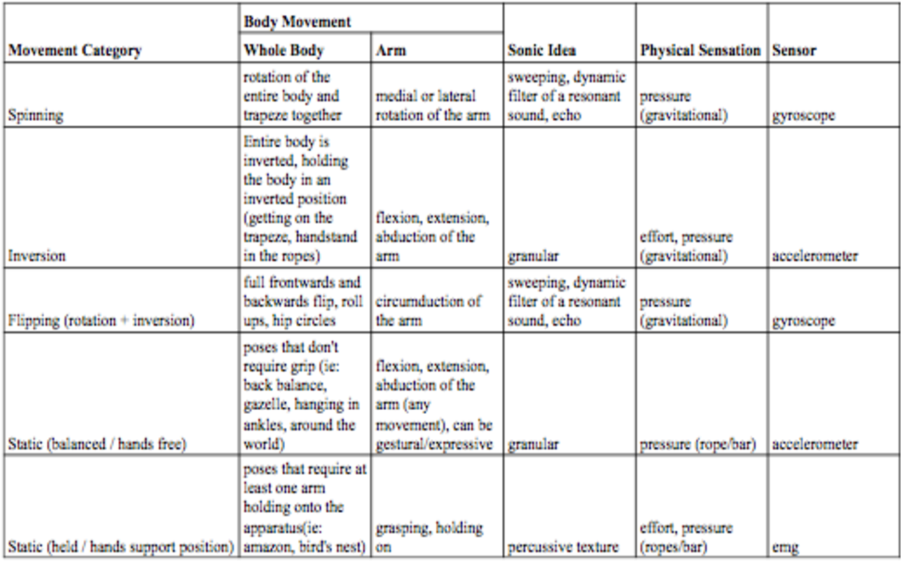
Rose uses the MAX objects of click~ (an impulse generator), a resonant filter, and a spectral delay to translate emg signals into short percussion sounds. She also uses the accelerometer values to control the MAX grainstretch~ object’s grain size, speed, and pitch. Furthermore, she uses iosc~ and cascade~ MAX objects to sonify the gyroscope data, which controls the frequency and gain of recordings loaded into the oscillator bank. 

What’s interesting about this article, in the technical sense, is that both the aerialist and the author worked together in mapping each arm movement (medial or lateral rotation; flextion, extension, and abduction; circumduction; and grasping or holding on) into a different sonic idea, as shown in the table below [1]. 

What’s interesting about this article, in the conceptual sense and relating to my own topic of investigation, is how they were able to translate internal bodily sensations into sound, so that the audience could get a modicum of understanding what it feels like to be up on the apparatus (in the paper’s case, trapeze) [1]. 

Rose even states that “An aerialist’s perception of sound during performance is unique in the way it is filtered by the body. (…) Often viewers have limited, if any, embodied idea of this kinesonic experience. Geber and I aimed to blend movement and music using the internal kinesonic experience of the performer to sonify those elements.” [1]. 

My specific area of research aims to do just that, figure out how to communicate the tacit knowledge of a performer’s physical bodily experience on the aerial silk. However, the SALTO tool proposed by Rose is limited in its scope as it was specifically designed for the trapeze and, not only that, but for this specific performance with this specific aerialist. SALTO might be a useful tool for capturing the audience’s interest, but I believe that, rather than being a potential solution to my research question, it is a valuable proof of concept showing how to implement an auditory interface into aerial dance. 

— 

Source: 

[1] C. Rose, “SALTO: A System for Musical Expression in the Aerial Arts,” Proceedings of the International Conference on New Interfaces for Musical Expression, pp. 302-306, 2017, doi: 10.5281/zenodo.1176260 

NIME Paper Review

MetaBow: Gesture Mapping in Immersive Sonic Environments

The MetaBow project investigates how an augmented violin bow equipped with Inertial Measurement Units can link traditional performance techniques with digital sound processing in immersive speaker setups. The authors address the challenge of mapping complex motion data to audio without overwhelming the musician by opting for a hybrid strategy that pairs direct mappings for predictability with machine learning for more nuanced spatial control. From a design perspective, the value lies in leveraging the deeply ingrained muscle memory of the performer instead of forcing them to adopt a completely foreign interface. This approach aims for a high level of transparency where the bow remains a familiar tool even as its capabilities expand. The use of machine learning introduces a specific tension regarding control; the system must feel responsive rather than autonomous to maintain the performer’s trust. By using the bow to direct sound within a three dimensional array, the interaction moves beyond the physical instrument to treat the entire performance space as a manipulable environment. The performer essentially uses the bow to paint sound across the room. The success of such a system hinges on managing the cognitive demands placed on the artist, ensuring that the added digital layers enhance expression rather than creating a distraction. This integration suggests a future where digital and acoustic elements are woven together through the physical gestures of the performer and the specific acoustics of the environment.

Source:
https://nime.org/proceedings/2025/nime2025_62.pdf

Blog Post 1: Prototyping

Prototyping is an important step in the design and development process. A prototype can be described as an early sample, model, or version of a product that is built in order to test a concept or process. It is typically used to validate a product’s design and functionality and to gather feedback from potential users before investing in mass production. In addition, prototypes help define the specifications and requirements for the final product (Arena, 2026). Because of this, prototyping often serves as a valuable starting point for projects that aim to create digital or physical products.

Within the field of design, prototypes are commonly categorized into three different stages: low, medium, and high fidelity. In this context, the term fidelity refers to the level of detail, accuracy, and realism of a prototype in comparison to the final product (Sorodoc, 2025). A low-fidelity prototype is intended to provide a rough representation of an idea and to communicate the basic concept of a product. These prototypes are usually simple, inexpensive, and quick to produce, which allows designers to visualize ideas and gather early feedback without the risk of significant costs.

Medium-fidelity prototypes contain more accurate and detailed elements and begin to demonstrate specific functions and interactions. At this stage, the prototype offers a clearer impression of how the product might look and behave, making it suitable for more structured user testing and feedback.

High-fidelity prototypes represent the stage closest to the final product. They contain a high level of visual detail and interactive elements and allow realistic testing before final production decisions are made. Due to their complexity, these prototypes typically require the greatest investment of time and resources.

The current research project focuses on user experience design at German train stations and investigates how the experience on train platforms could be improved for passengers. After examining the theoretical background of this topic over the past six months and building a solid foundation of knowledge about the relevant parameters, design considerations, and possible approaches, it is now a logical next step to move toward more practical exploration. Prototyping offers the opportunity to translate theoretical insights into tangible experiments and to explore how the project’s ideas could be implemented in practice.

Low fidelity prototype

To explore this practical dimension, three different low-fidelity prototypes were conceptualized and developed. Each prototype approaches the same problem from a slightly different perspective while using different materials and forms of interaction. The first prototype was created as a paper prototype, which is a simple yet effective method for developing an early representation of an idea using inexpensive and easily accessible materials. Paper prototyping allows designers to test concepts quickly and to discard or modify them easily while still gathering useful insights and feedback (msg, 2026). For this prototype, a sketch of a train platform was created to represent the situation of a train arriving at a station. Participants were asked to place circles representing different passenger groups on the platform drawing. The task was to indicate where they believed these users would position themselves in order to board the train. This exercise aims to identify whether there are recognizable patterns in passenger placement and whether the current signage and orientation systems on train platforms provide enough information for users to intuitively position themselves.

The second prototype also uses paper as the main material but aims to create a more interactive and flexible representation of the scenario. In this version, a simple model of a train platform was built that includes small figures representing passengers. Participants can move these figures around the platform in order to simulate their behavior when a train arrives. Similar to the first prototype, the central question concerns the positioning of passengers and the information they might need to find an optimal location for boarding. After completing the task, participants are invited to draw directly on the prototype to indicate where additional signage, markings, or guidance systems could improve the clarity and usability of the platform. This approach allows users not only to demonstrate their behavior but also to actively propose potential design improvements.

The third low-fidelity prototype explores a digital approach instead of a physical one. For this prototype, the collaborative digital workspace Miro was used. Miro functions as an online whiteboard that allows multiple users to interact with visual elements in a shared digital environment (Miro, 2026). Within this digital workspace, a simplified representation of a train platform was created. Participants join the Miro board and are asked to place themselves within the platform layout in the position where they would choose to wait for an approaching train. After this initial round, participants are allowed to add visual guidance elements such as lines, colors, signs, or other indicators that they believe would help clarify where passengers should stand. Once these elements have been added, the task is repeated so that the results can be compared, and it can be observed whether the additional guidance elements improve user behavior and decision-making.

Those three prototype will be tested and the results and observations will be evaluated to see whether one of the approaches could be beneficial and whether one of the prototypes has the potential for further improvement.

Information gathered

Exploring these different prototyping approaches has provided a deeper understanding of the role prototypes play in the design process. Prototypes are not only useful for testing digital interfaces but can also be applied to spatial and physical interaction scenarios such as those found in public transportation environments. Through the upcoming testing phase, valuable insights are expected to emerge regarding how passengers interpret spatial information on train platforms and which design interventions could help improve clarity and usability. These findings will contribute to the broader investigation of user experience design in railway environments.

Next Steps

The next step in the project will involve testing the three prototypes with participants in order to gather feedback and behavioural observations. The collected information will then be analysed to determine whether one of the approaches proves particularly effective and whether any of the prototypes show potential for further development. Based on the insights gained during this phase, the most promising concept may be refined and further developed into a medium-fidelity prototype that allows for more detailed testing and continued exploration of improved user experience design solutions for train platforms.

Reference

Arena. (2026). What is a Prototype? Von Arena: https://www.arenasolutions.com/resources/glossary/prototype/ abgerufen

Miro. (2026). Von Miro: https://miro.com/de/ abgerufen

msg. (2026). Paper prototype. Von User Experience Methods Catalogue: https://user-experience-methods.com/en/04_design/paper-prototype.html abgerufen

Sorodoc, I. (11. March 2025). Low-Fidelity vs. High-Fidelity Prototyping: Key Differences Explained. Von ProtoPie: https://www.protopie.io/blog/low-fidelity-vs-high-fidelity-prototyping abgerufen

Three prototypes: Solving (or trying to) the communication problem

Last semester, I concluded the blog posts with some insights about what ideas could work for beginners and advanced students. Following up on that, I created my 3 prototypes. 

  1. Hanger silk 

Some aerial knots are easier to explain time and time again when the teacher doesn’t have to continually do them in the air. In my class observations, I’ve noticed that teachers often mimic the movement of legs or feet with their hands, like so: 

Own video. 

In order to improve this communication, I designed a prototype using 2 simple materials I already had at home: a hanger and a scarf. 

Own image. 

Own video. 

With this, I would be able to more clearly explain base knots, by using the smaller silk with my hands. The following is an explanatory video showing how this would work, specifically for demonstrating the difference between a  basic footlock and a dancer’s footlock.  

Own video. 

  1. Neon sleeves 

One of my findings of the past semester’s interviews was that a lot of people weren’t able to very clearly differentiate their right from their left. To solve this problem, I created a prototype using scissors and a 5€ thrifted sport jacket (since all of my old sports clothes are in Mexico, and I didn’t want to cut up one of my newer garments). 

Own image. 

Own video. 

With the sleeves, I would be able to quickly and efficiently demonstrate the core idea that needs to be communicated with figures. This is because, while it is possible to explain figures with left and right, what is actually important in aerial silks figures is if you’re using the same leg and arm or the opposing leg and arm. The following is a use suggestion in order to be able to differentiate sleeved side and normal side. 

Own image. 

  1. Little guy 

Last semester I also talked about having a 3D model of a person as a potential aid in teaching complex figures. A possible solution for a 3D model prototype is using a ready-made doll; however, the options available in thrift stores don’t satisfy the need that they should be articulated and able to bend both arms and legs; plus, new options would be too expensive. As such, I decided to prototype this using wood sticks, UHU Patafix, and some ribbon, all of which I already had in my house. 

Own image. 

Own video. 

Using this model, it’s possible to convey the physical movements needed for a specific figure, without needing to expense so much physical energy. Plus, students are able to see the same knot in different spatial perspective variations, improving their knowledge of the theory behind the knots and making observational learning in the future easier. An added advantage is that it’s easier to convey what effect that small bodily position changes will have on the outcome of a figure, especially as it pertains to safety. In the following example, I demonstrate how bending towards your knees while doing a hip key is the safety lock you need in order to stay in place, while if you stay straight you will fall, just like the little guy. 

Own video. 

– 

Sources: 

Own data.