7. Social Media and Neurodivergence

The hashtag #ADHD now has over 227,000 posts on Instagram alone. About two years ago, ADHD suddenly blew up online it was everywhere. Videos titled “If you do these five things, you might have ADHD” went viral. People shared stories about late diagnoses, sudden realizations, and a new understanding of their daily struggles.

At first glance, this looks like progress: more visibility, more awareness, and more people recognizing long-overlooked symptoms. And indeed, research shows that women and adults have historically been underdiagnosed, partly because ADHD has often been associated with the stereotypical “hyperactive boy” image. But the viral attention also has a dark side. The more popular the topic becomes, the blurrier the line between self-awareness and self-diagnosis gets.

When Short Videos Oversimplify Complexity

The problem isn’t that social media creators mean harm, most want to inform and destigmatize. But platform logic rewards simplicity. Ninety seconds just isn’t enough to explain the complexity of a neurodevelopmental condition. As a result, catchy “five signs” videos dominate our feeds.

That leads to a paradox: more reach doesn’t mean more understanding.
Short clips make information accessible, but they also spread misconceptions. Everyone can relate to being forgetful or disorganized sometimes yet ADHD goes much deeper. It affects attention, impulse control, emotion regulation, motivation, and even time perception, often to a degree that causes real disruption in everyday life.

For many diagnosed adults, the real relief comes from finally understanding how these symptoms interconnect, beyond what an algorithm can compress into a viral soundbite.

Between Self-Diagnosis and Real Support

Another big development is the rise of self-diagnosis culture online. Influencers share their personal experiences, helping others feel seen and less ashamed. In some cases, that sparks genuine reflection and motivates people to seek professional help.

However, a clinical ADHD diagnosis is a multi-step process involving medical, psychological, and behavioral evaluations. Specialists consider case histories, developmental backgrounds, and standardized assessments. In other words: a viral video can’t replace a conversation with a trained professional.

Yet, this digital movement still has a positive side, it signals growing awareness of neurodiversity and a more open public dialogue about it.

Awareness Without Clickbait

Fortunately, there are credible voices online too. Experts such as psychologist Dr. Alina Maerker (host of Psychologie to go!) and neurodivergent educators provide accessible, evidence-based insights to counter misinformation. Still, the algorithm favors emotional, simplified content over detailed explanations.

Psychologically, that makes sense: our brains crave quick rewards and certainty, while accurate education takes time and nuance. The challenge is finding ways to make accuracy engaging.

The Next Step: Experiencing ADHD

Videos inform, but they rarely create deep empathy. What’s missing are interactive tools that help non-ADHD individuals understand what living with this condition feels like.

Recent research is starting to explore this idea. Virtual reality (VR) simulations and learning apps are being tested to recreate experiences such as overstimulation, distractibility, or distorted time perception.

These technologies could redefine how we teach about ADHD, moving from observation to immersion. Understanding wouldn’t just mean knowing the facts; it would mean feeling what daily life might be like for someone with ADHD.

Conclusion

The social media hype around ADHD shows how deeply digital culture shapes our perception of mental health. Awareness is important, but education needs depth. Between trending and therapeutic, there’s a space where real understanding can grow.

Perhaps it’s time to nurture that space, with accurate information, genuine empathy, and new ways to not just talk about ADHD, but to understand it.

References

  • American Psychiatric Association (2022). Diagnostic and Statistical Manual of Mental Disorders (5th ed., Text Revision). APA Publishing.
  • Kooij, J. J. S. et al. (2019). European consensus statement on diagnosis and treatment of adult ADHD. European Psychiatry, 56: 14–34.
  • Messinger, M. A., et al. (2023). Immersive simulations as tools for empathy and education in neurodiverse conditions. Frontiers in Psychology, 14: 1205158.
  • Maerker, A. (2022). Psychologie to go! Podcast. Spotify.

Note: This text was developed with the assistance of artificial intelligence for research purposes and to refine the linguistic clarity and flow of the final draft.
PBR: Physically Based Rendering on the Web

Physically Based Rendering (PBR) has become the standard for modern 3D graphics because it produces materials that look believable under any lighting conditions. Unlike older empirical models like Phong or Lambert, PBR follows real-world physical principles, ensuring that metal reflects like metal and plastic looks like plastic, regardless of environment. In web based 3D engines like Three.js and Babylon.js, PBR is implemented as a complete pipeline from texture authoring to shader evaluation.

Textures

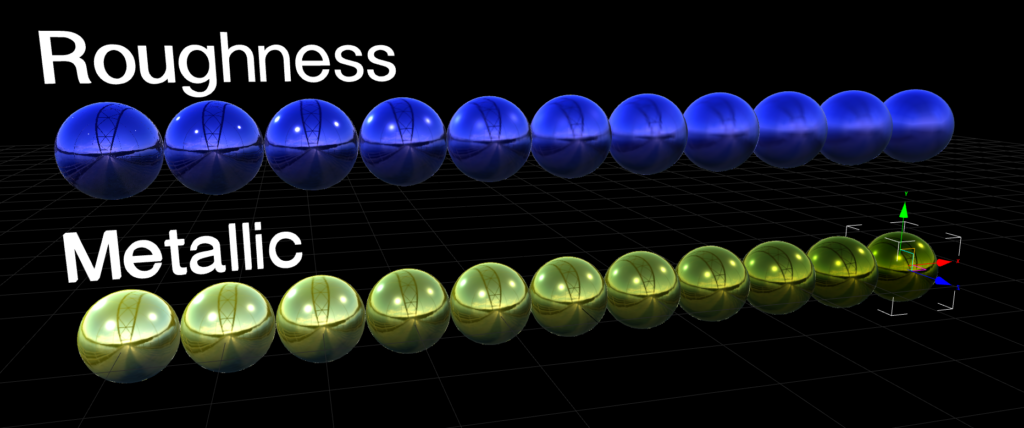
At the heart of PBR are a set of core input textures that describe material properties. They are base color (also known as albedo), metallic, roughness, normal, ambient occlusion (AO) and emission. The base color map provides the color without any light interaction. The metallic map determines whether a surface behaves like metal or not, using a value ranging from 0 to 1. Roughness controls the surface roughness, where a low value would represent a shiny pool ball with reflections and a high value a very dusty rock where light is evenly spread with no visible reflections. Normal maps add fine surface detail that doesn’t need to be modeled such as tiny cracks or even small bolts. Ambient occlusion darkens crevices and simulates indirect shadow. Finally, emissive maps make parts of the surface glow independently of lights.

These input textures are fed into a Bidirectional Reflectance Distribution Function (BRDF) also most commonly known as the microfacet model. Microfacets assume the surface is made of tiny mirror-like facets oriented randomly according to a normal distribution function (NDF), typically GGX. The BRDF combines three terms, the Fresnel effect (view-dependent reflectivity), the geometry term (microfacet shadowing and masking) and the NDF (facet distribution based on roughness).
For metals, the diffuse component is near zero and the specular uses the base color as a tinted mirror, changing the tint of the metal. For non-metals, specular is achromatic white and diffuse uses the base color. This energy-conserving model ensures no more light is reflected than hits the surface.

IBL

To get convincing reflections and indirect light, PBR usually relies on Image-Based Lighting. IBL uses HDRIs to represent light coming from all directions around the object. These maps are prefiltered into different levels of blur so that rough materials sample a more blurred version of the environment. Combined with the BRDF, this allows metals and glossy plastics to respond realistically to their surroundings without the need for many real-time lights in the scene.

Authoring

Authoring PBR textures for the web demands discipline to avoid common pitfalls. Tools like Substance Painter can generate these maps, but exporting them the wrong way can ruin the look. The base color needs to be in sRGB color space, metallic, roughness, normal and AO need to be in a linear color space (non-color data). Roughness should range from around 0.05 for a mirror to 0.9 for matte materials, avoiding the extremes that could look jarring. Metallic usually only uses binary, so either 0 or 1, no in between. There are some exceptions though for materials like metallic paint. Normal maps have to match the tangent space that is expected by the engine. Overly bright HDRIs can wash out scenes and mismatched roughness scales between tools can lead to reflections looking wrong.

Performance Considerations

Performance is a key consideration because PBR shaders are more complex than simple Blinn-Phong (a simple lighting model). Each fragment requires multiple texture lookups, Fresnel calculations, and environment sampling, which can bottleneck on limited devices. Web engines approximate where it is possible. Three.js for example uses a simplified BRDF without full multiple scattering, while Babylon.js’ PBRMaterial supports advanced features like clearcoat but allows disabling reflections or IBL for speed. Optimizations include reducing texture resolution, baking some maps into others such as AO into roughness, and using lower-resolution maps for mobile.

The strength of PBR on the web is portability. Materials authored once look consistent across engines and devices. By mastering the input textures, microfacet BRDF and IBL pipeline, developers can create production quality visuals without proprietary tools. The cost is higher shader complexity but targeted optimizations keep it viable even on modest hardware.

SOURCES

1: https://learnopengl.com/PBR/Theory
2: https://www.cg.tuwien.ac.at/research/publications/2017/OPPITZ-2017-3DM/OPPITZ-2017-3DM-report.pdf
3: https://archdesignmart.in/the-ultimate-guide-to-pbr-materials-understanding-physically-based-rendering/
4: https://www.mathematik.uni-marburg.de/~thormae/lectures/graphics1/code/WebGLShaderMicrofacetBrdf/ShaderMicrofacetBrdf.html
5: https://sbcode.net/threejs/environment-maps/

Morphing Skeletons: Animation Systems for Web

Animation brings 3D scenes to life, turning static models into characters. In web-based 3D, animation is much more than just playing back keyframes. It involves careful management of geometry updates, skinning computations and blending logic to maintain smooth performance. Modern engines like Three.js and Babylon.js support several systems for this, primarily through the glTF format. Each of these systems comes with distinct costs and use cases so it is important for developers to know about them.

Animation Techniques

Skeletal Animation

The most common technique for character animation is skeletal animation, also known as skinning. Here, a model is bound to an armature of bones that define how parts of the mesh move relative to one another. Each vertex is assigned to one or more bones with a weight totaling a value of 1.0 per vertex. When the skeleton is posed, for example by rotating an arm bone, the vertex positions are computed by blending the transforms from all influencing bones according to their set weights. This skinning can happen on the CPU or GPU, although GPU is preferred for web as it can be very performance heavy.

In practice, skeletal animation performs well for characters or articulated objects, but the cost scales with vertex count and bone influence count. A character with 10.000 vertices skinned to 4 bones per vertex is manageable, but with 50.000 vertices and 8 influencing bones, it can lead to a strain on mobile GPUs. Engines mitigate this by limiting influence counts during exports and reusing skeletal data whenever possible.

Morph Target

For deformations that do not fit a skeletal rig, such as organic shape changes or a muscle flexing, morph target animation is ideal. Morph target animation, also known as blend shapes, store multiple vertex position sets representing different shapes of the same topology. An example for facial animations would be a blend shape for a neutral face, one for a smile and one with an angry frown. Animation is then achieved by blending between these morph targets. This is computationally simpler than skinning as it is just a weighted sum of vertex positions with no hierarchy involved.

Morph targets shine for localized deformations but become expensive with a high vertex count, since every target must be stored in memory and blended per vertex. They are perfect for faces or props like inflating balloons, but less suited for full body animation. In glTF exports from Blender, shape keys become morph targets and Three.js can load them directly for playback.

The Cost of Animation

Both of these two systems rely on keyframe data. Animation clips store tracks of changes, such as rotations and influences, sampled at specific points in time. Playing back these poses involves interpolation between keyframes using mathematical curves. The performance cost is generated by updating the skeleton or morph influences every frame and re-skinning the mesh. For smoother playback, engines like Three.js use an “AnimationMixer” that handles time scaling, looping and pausing. Another way to increase performance is to reduce the keyframe density during exports to cut down memory.

Optimizing animations for the web emphasizes reuse and simplification. Reusing rigs and skeletons across characters, baking simple animations to morph targets or to geometry if they do not need blending. Update rates can also be adjusted to increase performance based on the importance of the animation. Similar to LODs, animation can be reduced when it becomes less important or further away, switching from a 60Hz to a 30Hz update rate at higher distances.

Interactivity

Interactive animation adds a whole new world of challenges such as physics integration or procedural posing / animations. Full inverse kinematics for example are very expensive compared to simple bone manipulations via uniforms. Physics based interactive animations such as cloth simulations are so performance heavy that they should only be used for key objects of a scene.

SOURCES

1: https://github.com/akash-coded/mern/discussions/217
2: https://www.tutorialspoint.com/babylonjs/babylonjs_animations.htm
3: https://doc.babylonjs.com/features/featuresDeepDive/mesh/bonesSkeletons
4: https://firxworx.com/blog/code/creating-an-animated-3d-ecard-using-webgl-react-three-fiber-gltf-models-with-animations/
5: https://dev.to/derrickrichard/unlocking-the-web-in-3d-an-introduction-to-threejs-57dn

Lighting and Shadows in the Browser

Lighting is one of the most important tools for making 3D scenes feel believable. A simple model can look convincing with well-designed lighting, while a high-resolution asset can appear flat without it. In web-based 3D this is no different, but lighting comes with a big caveat, a possibly big hit to performance.
Every extra light and reflection typically translates into additional calculations in shaders, so understanding how lighting is implemented helps developers decide where to spend the performance budget.

Types of Lights

Most real time engines for the web support several types of lights. Directional lights, point lights, spot lights and ambient lights among others. Directional lights represent the most common light source – the sun, with light rays moving parallel to one another. They are often used to define a main light direction for outdoor scenes. Point lights emit light equally in all directions starting from a single point, similar to a light bulb. Spot lights on the other hand emit light in the form of a cone, similar to stage lights. Ambient lights emit lights evenly everywhere, providing a base level of brightness so that shadows are not 100% black. Additionally there are HDRI maps that can be used to simulate real lighting scenarios without the use of a single “physical” light. HDRI maps are most important for reflections and physically based rendering.

How do Lights light?

Lights are implemented in shaders as mathematical models. The vertex or fragment shader takes the light positions, directions and colors, combines them with surface normals and material properties, and computes a lighting contribution at each pixel. For directional lights, this often involves a simple dot product between the light direction and the surface normal. Point and spot lights add distance-based falloff, which are more expensive on performance because of the additional equations. Environment lighting relies on a preprocessed environment texture, which is more costly that a single directional light but can dramatically increase realism.

To add shadows, the renderer needs to determine which parts of the scene are blocked from the light. The most common real-time technique is shadow mapping. In a shadow map pass, the scene is rendered from the light’s point of view into a depth texture, which stores how far each visible point is from the light. Then this map is transformed into the light’s coordinate space and compared do the depth value. If the fragment is farther away then the stored depth, it is considered occluded and rendered in shadow. This technique is widely used in WebGL and other real time APIs as it works with any geometry and doesn’t require a special kind of processing.

For global illumination, many modern engines use Image-Based Lighting (IBL). IBL relies on environment maps (HDRI) that represent the lighting of a full 360 degree environment. For web development, these HDR maps are often converted into specular and diffuse textures that can be applied to the environment to provide both reflections and indirect light.

Because lighting affects performance so much, many real-time pipelines use a mix of baked and dynamic techniques. Baked lighting is a precomputed light interaction that is stored in lightmap textures. These lightmaps are then sampled at runtime, with shaders performing minimal calculations. Dynamic lighting on the other hand, is computed every frame and is necessary for moving objects or lights. A common strategy is to use baked lightmaps for static indirect light and large-scale ambient effects while reserving the performance heavy real-time shadows for characters, moving props or user-driven interactions. Baked lightmaps consume some texture memory but almost no runtime completion, making them a good fit for low end devices such as mobile.

Good lighting design for the web starts with restraint. Often, a single directional light with shadows and an environment map can provide enough richness for product visualization. More complex setups should be justified by clear visual needs, such as interactive environments or game-like experiences. When targeting a wide range of devices, it is wise to provide different lighting tiers depending on the available hardware.

SOURCES

1: https://webglfundamentals.org/webgl/lessons/webgl-shadows.html
2: https://sbcode.net/threejs/environment-maps/
3: https://dev.to/joseph7f/tutorial-building-a-simple-pbr-scene-with-shadows-and-fps-controls-in-threejs-19oj
4: https://star.global/posts/introduction-to-webgl/
5: https://www.chinedufn.com/webgl-shadow-mapping-tutorial/
6: https://pingpoli.de/sparrow-9-shadows
7: https://docs.godotengine.org/en/stable/tutorials/3d/global_illumination/using_lightmap_gi.html

GPU Buffers: How 3D Data Reaches the Screen

When working with WebGL or WebGPU through engines like Three.js or Babylon.js, it is easy to think of models as abstract objects that just make the scenes “appear” on screen. Underneath the hood of these engines, there is however a very concrete flow of data from JavaScript into GPU memory. Understanding how buffers, attributes and uniforms work, helps explain why certain operations are cheap and others can quickly lead to performance issues, especially in complex 3D scenes.

What are Buffers

At the core of GPU data flow are buffer objects, which is a block of memory on the GPU that stores raw data such as vertex positions, normals, texture coordinates or indices. Instead of sending vertex data for every frame, WebGL and WebGPU allow developers to upload this data into a buffer and then reference it many times during rendering. This is critical for performance because communicating with the GPU from JavaScript is pretty expensive compared to the GPU reading data that is already on it.

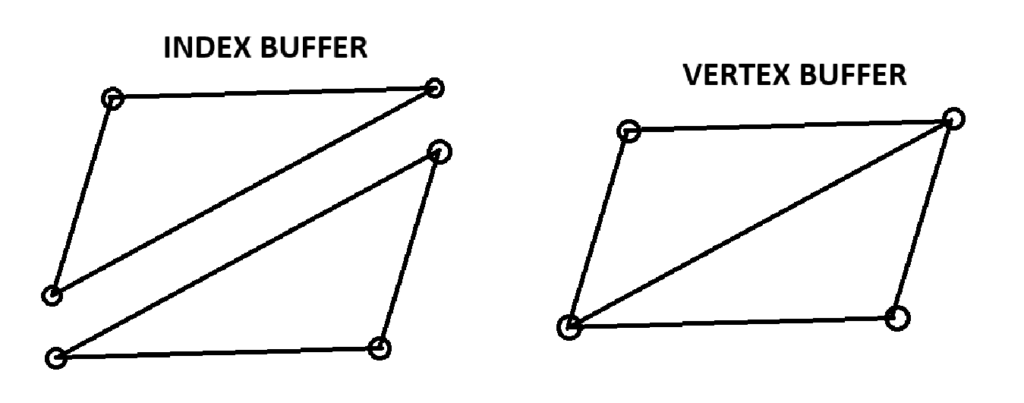
Most meshes rely on two main types of buffers, vertex buffers and index buffers. A vertex buffer holds attributes for each vertex, such as 3D position, surface normal and UV coordinates. An index buffer holds integer indices that reference those vertices in a specific order, allowing the GPU to reuse vertex data when constructing triangles. For example, a rectangle drawn with two triangles can use four unique vertices but six indices, avoiding duplication in the vertex buffer and reducing memory usage.

Using index buffers becomes increasingly important as meshes grow more complex. Without indices, every triangle must define all three of its vertices independently, even if those vertices are shared with neighboring triangles. With the help of indices, a vertex that belongs to multiple triangles can be stored once inside of a vertex buffer and referenced multiple times from the index buffer.

It also matters how the data is laid out inside of the buffers. Attributes can be stored in an interleaved fashion or in separate buffers. Interleaved buffers pack normal and UV data together for each vertex individually, which often reduces state changes because the GPU can fetch all attributes for a vertex in one swoop. Separate buffers can be beneficial when different passes only need a subset of data or if some attributes change more frequently than others, but they might lead to a larger overhead.

Blocks and UBOs

On top of vertex data, the GPU also needs per-draw and per-material parameters. These include transformation matrices, colors and light properties and are provided through uniforms. Uniforms represent constant values across all vertices or fragments in a single draw call. For example, the model-view-projection matrix, a base color, and a light direction might be sent as uniforms and then read in both the vertex and fragment shaders. As scenes become more and more complex, managing dozens of individual uniforms across multiple shaders can also become a bottleneck. This is where uniform blocks and UBOs (Uniform Buffer Objects) enter the picture. Instead of setting a large number of uniforms one by one, a UBO allows developers to pack related uniform data (for example all lighting parameters) into a dedicated buffer on the GPU. Then, multiple programs can then share that UBO which drastically reduces the number of calls needed to update data each frame. WebGL and WebGPU both support this pattern, and real-world projects use it to centralize camera and lighting information for many draw calls.

Attribute layouts, strides and offsets control how the GPU interprets data inside of a vertex buffer. When setting up attributes, the number of components each attribute has, the stride between consecutive vertices and the offset of each attribute within the vertex structure is determined. This is vital as a single mistake in stride or offset can produce corrupted geometry. Once attribute bindings are configured, they are often stored in Vertex Array Objects (VAO), making it possible to re-bind all attribute and index changes with a single draw call.

Static and Dynamic Data

From a performance standpoint, the important distinction for data is between static and dynamic data. Static geometry, such as the environment, should be uploaded once and reused across frames, with buffers created with specific notations for a static element. Dynamic geometry on the other hand, such as particle systems, may require buffer updates every frame, which is more expensive. In these cases, careful strategies like updating only parts of a buffer or offloading some updates to the GPU with compute or transform feedback can help keep performance in check.

SOURCES

1: https://learnwebgl.brown37.net/rendering/buffer_object_primer.html
2: https://www.geeksforgeeks.org/javascript/how-to-create-and-use-buffers-in-webgl/
3: https://www.siltutorials.com/opentkbasics/4
4: https://webgpufundamentals.org/webgpu/lessons/webgpu-vertex-buffers.html
5: https://webgl2fundamentals.org/webgl/lessons/webgl2-whats-new.html
6: https://webglfundamentals.org/webgl/lessons/webgl-how-it-works.html

The Freedom of Animated Music Videos

Throughout the history of media, music has always been a driving force for innovation and inspiration. With the rise of music video production, the need to stand out from others became increasingly important. One of the main purposes of a music video is to capture attention. It should enhance the music and support its emotional tone and message. There is not necessarily a need for a clear storyline, although one can be present. Music videos can also be seen as a form of short film. Their production usually does not take as long as feature films, and therefore new ideas, experimental styles, and emerging technologies are more likely to be explored.

Animation offers a particularly high level of creative freedom in this context. It allows artists to visualize abstract concepts, emotions, and rhythms that would be difficult or impossible to portray through live-action footage alone. Because animated music videos are not bound by physical reality, they can push visual boundaries and create unique worlds that directly respond to the music.

The Lyric Video

A lyric video is often used as a placeholder until the official music video is released. Despite this, it still takes time and effort to animate the lyrics of a song in a visually appealing way. Creating an engaging lyric video can be considered an art form, as timing, typography, and motion must work together with the rhythm and mood of the music. Sometimes it is paired with simple animated characters. In recent years, AI-based tools have emerged that can automatically generate lyric videos. While these tools increase efficiency and accessibility, they often lack the intentional design decisions and artistic individuality of handcrafted lyric videos.

Mixed Media

Mixed media is a broad field that combines different techniques, materials, and styles. A well-known early example is Take On Me by a-ha, which blends live-action film footage with 2D animation to create a romantic storyline between a comic book character and a real girl. The creative possibilities of mixed media are virtually endless. Stop motion can be combined with photography, 2D animation can be layered over live-action footage, or text and graphic animations can be integrated into filmed scenes. This flexibility makes mixed media especially appealing for music videos.

Virtual Bands

Animation also enables the creation of virtual bands. One of the most well-known examples is Gorillaz, a band founded in 1998 that exists primarily through animated characters. Their music videos are animated, and the band has performed using holograms and large-scale digital projections. A similar but even more extreme case is the virtual singer Hatsune Miku. She was originally developed as a mascot and voicebank for the Vocaloid software. Since her release in 2007, Hatsune Miku has gained massive popularity and has become a worldwide pop icon, performing live as a projected hologram.

Music Visualizers

Music visualizers are usually generated using specialized software. Based on sound waves, frequencies, or beats, animated visuals are created in real time. Designers can influence color schemes, shapes, and movement styles, but certain aspects of the visuals depend directly on the music itself.

Animated Short Films

Just like live-action videos, animated music videos can tell stories. They may directly visualize the lyrics or present an entirely different narrative. The level of abstraction is entirely up to the designer and animator. In animation, there are few limitations, making it a powerful medium for musical storytelling.

Conclusion

Music videos are one of the least limiting forms of media. As long as it enhances the music, gains attention and fits to the image of the band, everything is possible. Especially animation is less limitation and more experimental.

Setting up for laughter

The style of an animation can strongly influence the expectations of its viewers. This effect is especially apparent in comedy and satire. Stylization prepares the audience not to take everything literally and signals that exaggeration and humour are part of the experience. Exaggerated facial features, distorted proportions and simplified character designs are commonly used, frequently resembling caricatures.

Caricatures are an old technique dating at least back to the Renaissance. Some of Leonardo DaVinci’s drawings showed exaggerated facial features. The impression of a face was more important than reality or beauty. Around the 18th century caricatures were an established art form, especially in England. The themes often depicted politics combined with satire. Around the 19th century cartoons were gaining popularity in print media. A cartoon usually consisted of a small sequence of images and often had humorous intent. While caricatures and cartoons are not identical, their themes and visual styles often overlap, and both rely heavily on exaggeration and simplification to convey meaning quickly and effectively.

Many contemporary animated series maintain this longstanding tradition. Take shows like The Simpsons, South Park, Big Mouth, and Family Guy, for instance. The characters in The Simpsons don’t exactly mirror real humans. With their distinctive yellow skin, oversized googly eyes, and over-the-top hairstyles—like Marge’s towering blue beehive or Lisa’s star spikes, they clearly embrace a unique style. Even their four-fingered hands emphasize this departure from realism. Yet, paradoxically, these characters feel relatable. They encounter familiar challenges, family dynamics, and societal issues that viewers can easily recognize from their own experiences.

The visual disconnect makes the series’ tone clear right from the start. Audiences quickly understand they are in an exaggerated, whimsical world. While the topics tackled might be serious – corruption, inequality, or ethical dilemmas, they become more palatable thanks to humor. The stylized animation creates a buffer that allows viewers to engage with intense themes without feeling bogged down. This detachment also grants creators liberty to stretch conventions, critique society, and amplify flaws for laughs.

For example. Homer strangles his son Bart on various occasions. In the series it is done to show Homers short temper and for a quick laugh from the audience. In reality, it would be horrible and no one would enjoy watching a father abuse his child. Yet the distance created through the stylization and the over exaggerated cartoon violence as well as the lack of real consequences changes the context for the viewers from a horrible action to a joke.

Even though these shows provoke thought, their distinctive visual style acts as a cushion against the heavier subjects. The exaggerated character designs cue viewers to approach the content with irony and an open mind. Thus, animation isn’t just about aesthetics. It significantly influences the tone, mood, and audience expectations right from the opening scene.

https://en.wikipedia.org/wiki/Animated_sitcom

https://en.wikipedia.org/wiki/Cartoon

https://en.wikipedia.org/wiki/Caricature

Shaders: Balancing Quality and Cost

In real-time 3D graphics, shaders are where most of the visual magic happens. They control how geometry is transformed, how lights interact with surfaces and finally, what every pixel on the screen is colored. At the same time, shaders are also one of the easiest ways to accidentally destroy performance. Writing efficient shaders for WebGL or WebGPU means understanding what work is done where, and the effect of small choices, when they are scaled up across millions of pixels.

How do they work?

There are two core shader stages, that matter most in web-based 3D, the vertex shader and the fragment shader, also called the pixel shader. The vertex shader runs once per vertex, transforming positions from object space into clip space and preparing any per-vertex data that needs to be passed along, such as normals or texture coordinates. The fragment shader runs for every pixel that is covered by a single triangle and is responsible for computing the final image that can be seen on the screen. It does this by combining textures, lighting and material properties. Because fragment shaders execute once for each visible pixel, they usually need to run for almost every pixel every frame. This is often about 100 times more than vertex shaders. For this reason, most of the work is pushed onto the vertex stage and letting the GPU interpolate the values instead of computing heavy operations for each pixel.

Shader complexity matters, as every extra operation (at least in fragment shaders) multiplies across every single visible pixel. Per-pixel lighting calculations, multiple texture look ups and mathematical expressions add up and decrease performance. Techniques like physically based shading, soft shadows and screen-space effects can be visually impressive, but implemented incorrectly, they can easily overwhelm weaker GPUs. Thus keeping fragment shaders simple and avoiding unnecessary work is crucial to achieve high framerates on the web.

Light Baking

One of the most effective strategies to balance visual quality and performance is to implement baked lighting whenever possible. Instead of computing complex lighting setups or dynamic lights in the shader at runtime, lighting can be pre-computed into lightmaps or baked textures using special lightmap bakers. These lightmaps are then sampled in relatively simple fragment shaders, giving the appearance of detailed and realistic lighting without the cost of real-time light rendering. This approach is especially useful for static environments, where lights and geometry do not change.

Dynamic Lighting

Dynamic lighting is often used when objects or lights need to move or respond to interaction. However, every dynamic light contributes to per-pixel shading further increasing the workload of the fragment shaders. Many real-time engines impose limits on how many lights can affect a single object, or use approximations like clustered shading to keep the process simple. In web-based 3D, a baked base lighting solution and a small number of carefully chosen dynamic lights are often combined to save on performance. This still enables the users to get real time light changes through the dynamic lights for specific use cases such as moving objects or user feedback, and decrease the load on the GPU.

Branching

Another factor that can significantly affect performance is branching. Branching is the use of if/else statements inside the code. The GPU always calculates every single branch possibility and then only discards the unused results. Doing this for every single pixel can be draining on the performance even though modern hardware handles some branching pretty effectively. For example, branches based on uniforms, where every pixel makes the same choice, tend to be much cheaper than branches that are based on per-pixel values. Because of this, it is often better to replace branches with cheaper operations whenever possible. For example, instead of using a complex if tree that selects many shading modes, separate shader variants can be used. In some cases, using mathematical blends can approximate conditional behavior without loosing performance due to branching.

SOURCES

1: https://webglfundamentals.org/webgl/lessons/webgl-fundamentals.html
2: https://web.dev/articles/webgl-fundamentals
3: https://developer.mozilla.org/en-US/docs/Web/API/WebGL_API/WebGL_best_practices
4: https://star.global/posts/introduction-to-webgl/

Draw Calls: The Invisible Bottleneck

Building performant 3D experiences on the web requires understanding how browsers, GPUs, and JavaScript interact. Even with optimized models and textures, poor draw call management causes stuttering.

What is a Draw Dall and why is it Important?

A draw call is the communication between the CPU and the GPU, more like single commands from the CPU saying “make this” or “draw this”. Each visible mesh generates one draw call. When issuing a draw call, the CPU prepares render state, binding vertex buffers, setting shaders, configuring textures, and managing memory. GPUs themselves are extremely efficient, rendering the triangles that make up models almost in an instant, but CPUs often cannot handle that much information, especially in such short time. Every draw call between creates a communication overhead, basically a cost required to make the communication between CPU and GPU happen. And if there are too many draw calls, the CPU is overwhelmed by the amount of data while the GPU sits there, doing nothing and waiting for instructions from the CPU.

This is why the resolution of a model does not matter as much as draw call count. A mesh with 200.000 triangles could render smoothly while 200 small meshes with 1.000 triangles each could overload the CPU leading to stuttering due to the overhead. Three.js projects usually maintain 60fps with around 100 draw calls per frame and at 500+ calls, even powerful hardware starts to struggle.

By focusing on draw calls, web developers can fix many performance issues that are not obvious from looking at mesh density or material count alone. Keeping the number of calls low through these steps ensures that the CPU can keep up with the GPU, resulting in smoother interaction and a more responsive 3D experience.

How to Reduce Draw Calls?

Merging

One of the most effective optimization methods is to merge static geometry. The objects in the environments that do not need to move, for example pieces of a building, such as floor tiles, wall segments, furniture can often be combined into a single larger mesh. This simple step turns many small draw calls into one large one. Even though the total amount of information has not changed, the scene will run much smoother as the communication overhead only needs to happen once for the combined mesh instead of once for each of the individual pieces.

The only drawback of this method is, that these parts need to be fully static, so it is not a good method for pieces that need to move individually or that can be interacted with. After merging only the whole merged mesh can be transformed, not the smaller parts of it.

Instanced Mesh

Another powerful tool is instancing. If the scene features 200 small meshes for example that are identical, these meshes can be instanced instead of duplicated. This allows the CPU to only send a single draw call, with the GPU handling the positioning of the object afterwards. This technique is ideal for repeated objects like trees, chairs, street lamps, bolts, and many more that share the same mesh and material but appear in different positions and rotations. A real estate visualization demo reduced draw calls from 9000 to 300 by converting chairs and props to instances, improving performance from 20 to 60 frames per second.

Batched Mesh

When focusing on draw calls, not only meshes are important, materials and textures are too. Every time the renderer needs to switch materials, it disrupts batching and usually triggers a new draw call. Sharing materials across meshes and using texture atlases where possible can help keep the draw calls lower. For example, several props that could be represented with a single atlas can be drawn together using the same material, with the UVs selecting the appropriate part of the texture for each object. This reduces both material state changes and draw call counts, especially in engines like Three.js that can batch geometry sharing a material, enabling them to combine multiple different geometries that share a single material into a single draw call.

Vision

Another reduction method that is often forgotten is on the visibility side through techniques like frustum culling. Most engines automatically skip objects that are not visible to the camera’s view frustum (the are that is currently visible to the camera) but manually culling or grouping specific objects together can help reduce calls. For example, hiding entire sections of a scene when the user is in a different area. This is especially useful in large scenes with different rooms or zones that the user cannot see all at once.

SOURCES

https://www.utsubo.com/blog/threejs-best-practices-100-tips
https://velasquezdaniel.com/blog/rendering-100k-spheres-instantianing-and-draw-calls/
https://stackoverflow.com/questions/41783047/how-many-webgl-draw-calls-does-three-js-make-for-a-given-number-of-geometries-ma
https://discourse.threejs.org/t/three-js-instancing-how-does-it-work/32664

Sound Design and Scoring as Emotional Architecture

In film, sound is often perceived as a supportive layer to the image. Yet in practice, sound design and music are central to how a film feels alive. Long before viewers consciously interpret narrative or visual composition, they respond to rhythm, texture, tension and release created through sound. Film sound does not merely accompany images; it animates them, gives them weight and shapes how time, space and emotion are perceived.

Film sound operates on multiple levels simultaneously. Dialogue conveys explicit information, sound design establishes environment and physical presence, and music shapes emotional interpretation. What makes film feel alive is not the presence of these elements individually, but their precise coordination. Subtle shifts in texture, timing and dynamics can transform a static image into a living moment. A nearly imperceptible low-frequency drone can create unease, while a slight delay between image and sound can suggest disorientation or emotional distance.

The book Creative Strategies in Film Scoring published by Berklee Press emphasizes that effective film music is not about illustrating what is already visible, but about revealing what is unseen. Music can express internal states, foreshadow events or connect scenes across time and space. Rather than reacting directly to visual action, contemporary film scoring often works against the image, creating contrast or tension. This approach prevents redundancy and allows sound to function as an interpretive layer rather than a decorative one.

This philosophy is particularly evident in the work of Hans Zimmer, whose approach to film scoring has reshaped contemporary sound aesthetics. Zimmer frequently blurs the boundary between music and sound design, integrating synthesized textures, processed orchestral elements and rhythmic pulses into a single sonic system. His scores are often built around evolving textures rather than traditional melodic themes, allowing sound to function as atmosphere, momentum and emotional pressure at once.

In films such as Dunkirk or Blade Runner 2049, sound becomes inseparable from the visual experience. Time-based structures like ticking clocks, accelerating pulses or continuous drones create a bodily sense of urgency. These sonic elements do not simply underscore action; they condition how the viewer’s body responds to the image. Breathing, heart rate and attention are subtly guided by sound, creating a visceral sense of immersion.

What is especially relevant for design-oriented research is the way film sound operates as a system rather than a sequence of isolated cues. Sound designers and composers often work with modular elements that can expand, contract or transform depending on narrative context. This systemic thinking parallels approaches in audiovisual design and live visuals, where parameters are defined and relationships are established rather than fixed outcomes produced. Sound becomes adaptive, responsive and temporally fluid.

Another key aspect discussed in film sound theory is the idea of “invisible work.” When sound design functions well, it often goes unnoticed. Silence, restraint and reduction play a crucial role in making moments feel alive. Removing sound can heighten attention, while minimal sonic gestures can carry more emotional weight than complex compositions. This sensitivity to absence and space reinforces the idea that liveliness does not depend on constant stimulation, but on carefully designed contrast.

Examining film sound production highlights how deeply sound shapes perception and meaning. It demonstrates that sound is not an accessory to image, but a structuring force that animates narrative, space and emotion. For audiovisual design beyond cinema, this perspective suggests that making visuals feel alive may depend less on visual complexity and more on how sound and image are choreographed as a unified emotional architecture.

Sources:

Berklee Press. (2016). Creative strategies in film scoring. Berklee College of Music.

Karlin, F., & Wright, R. (2004). On the track: A guide to contemporary film scoring (2nd ed.). Routledge.

Lehman, F. (2018). Hollywood harmony: Musical wonder and the sound of cinema. Oxford University Press.