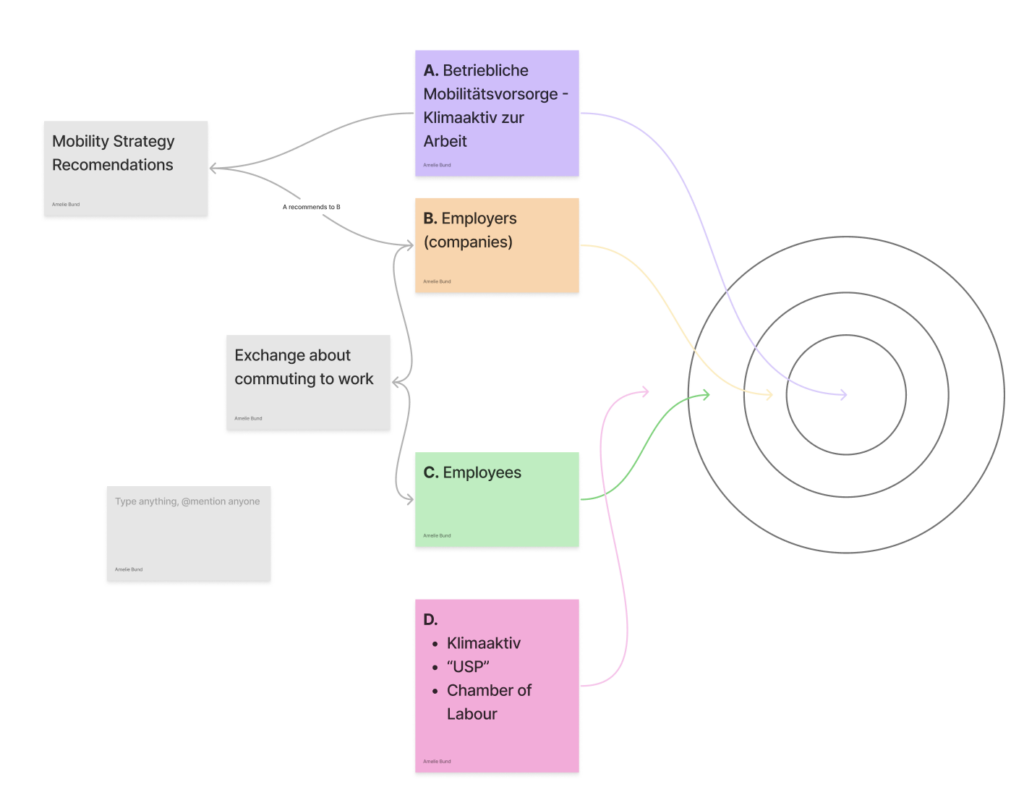
[DesRes 2 @KaterinaSedlackova] System Map 1/3 – DesRes 2
I spent around 3 hours of my tutorial with learning basic constraints. I have used quite a few of them in the past and therefore I only listened to it as a reminder. I also feel like I learn it better when I actually see them used in a real example.
Constraints such as: (sourse 250 page documentation of the course)
The clamp to constraints forces a bone location to stick to a selected curve.
The damped track axis makes the owner targeting (aiming) at a target.
The Locked track allows the owner to aim at a target but limits its rotation to only one axis.
The stretch to constraint allows the owner to aim at a target, and alsochanges its length and width based on the target distance.
The track to constraint is great for cameras.
The Copy location constraint forces its owner to have the same location as its target.
The Copy rotation constraint, as all the other transform constraints, uses world space to world space by default. The owner gets the same orientation as the target.
Then it was time for my first rig.
I began where everyone begins. With a basic ball. Everything was still quite simple, however I don’t think I ever did a good working squash and stretch. The main focus of this lecture was to get into good habits. As an example, renaming your bones as soon as you create them by pressing F2.
Generarally the ball needed a total of 5 bones. The rig consists of a root bone, a deformer bone, a rotation bone, a mechanical bone and two squash or stretch bones. The root bone is above all the other bones in the hierarchy and every other bone follows the root. The deformation bone is the only bone directly influencing the ball model However, the deformation is depending on the mechanical bone, which stretches from (a constraint) the base to the top squash.
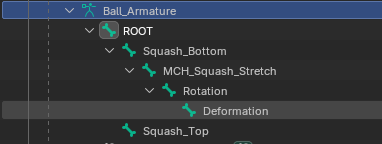
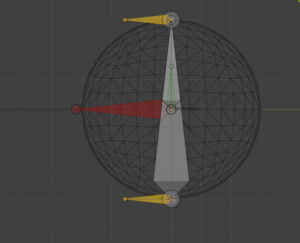
I had a few brief moments of confusion due to the fact that I work in Blender 5.0 and the tutorials are in a 3 or 4 version of it. The general instructions were clear and easy to follow with a few pauses in between.
The finished rig is clear structured and read to be animated with.
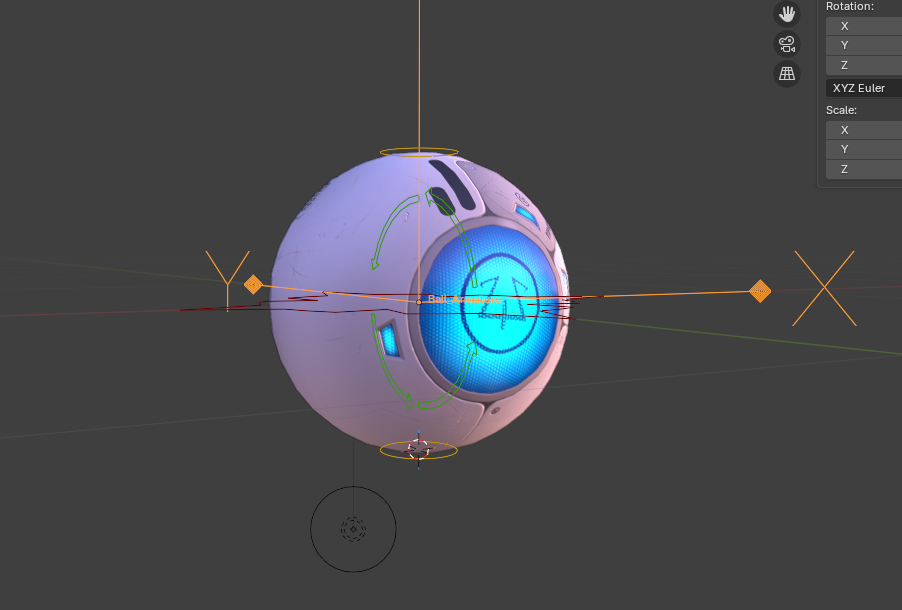
Here is the rig in movement.
The next project in the tutorial is a spider ball. It is essentially a little robot which can hide its head and legs to look like a ball. It jumps from 5 lessons for the ball rig to 28 lessons for the spider ball rig. I assume I will have more to write about next time. Stay tuned!
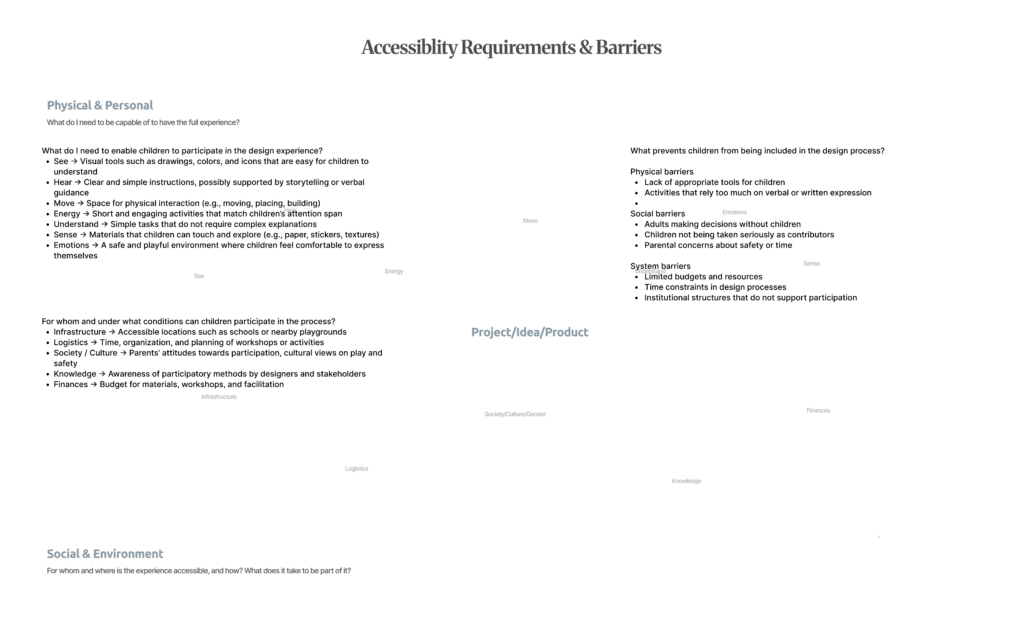
On a physical and personal level, participation requires tools and environments that match children’s abilities and ways of expression. Visual materials, simple instructions, and tactile elements such as stickers or drawing tools help make ideas more understandable and engaging. Equally important is creating a safe and playful atmosphere where children feel comfortable expressing themselves. Participation is not only about capability, but also about emotion and confidence.
At the same time, participation is shaped by broader social and systemic factors. Access to appropriate spaces, time for workshops, and available resources all influence whether children can be included. Cultural attitudes towards play and children’s roles in decision-making also play a significant part. In many cases, adults still dominate design processes, limiting children’s involvement.
Identifying barriers made this even more evident. These barriers are not only physical, such as the lack of suitable tools, but also social and institutional. Time constraints, limited budgets, and established decision-making structures often prevent participatory approaches from being implemented. Additionally, children are frequently not taken seriously as contributors, which further reduces their involvement.
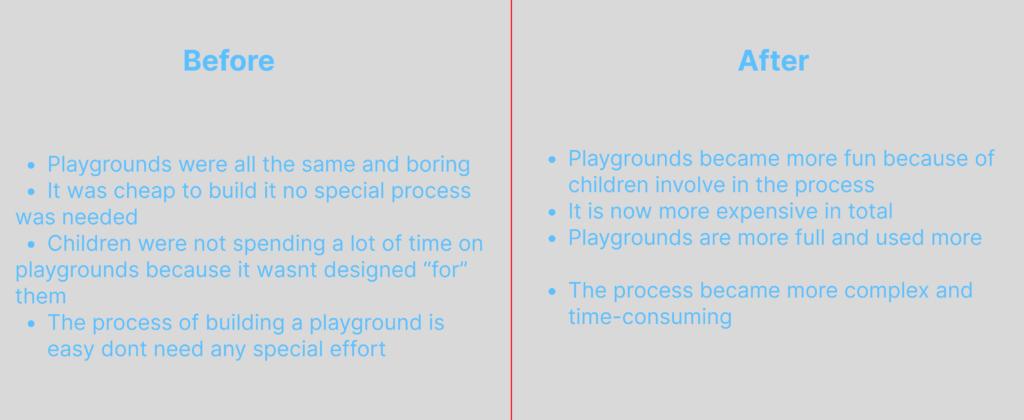
In the “before” scenario, playgrounds were often standardized, repetitive, and primarily driven by efficiency and cost. Design decisions were made without involving children, resulting in spaces that did not fully respond to their needs. As a consequence, children were less engaged, and playgrounds were not used to their full potential. The process itself was straightforward and inexpensive, but it lacked depth in terms of user experience.
In contrast, the “after” scenario highlights what changes when children are included in the design process. Playgrounds become more engaging, diverse, and meaningful, as they reflect children’s real experiences and desires. This leads to increased use, longer engagement, and a stronger sense of ownership among children. However, this shift also introduces new challenges. The design process becomes more complex, time-consuming, and resource-intensive.
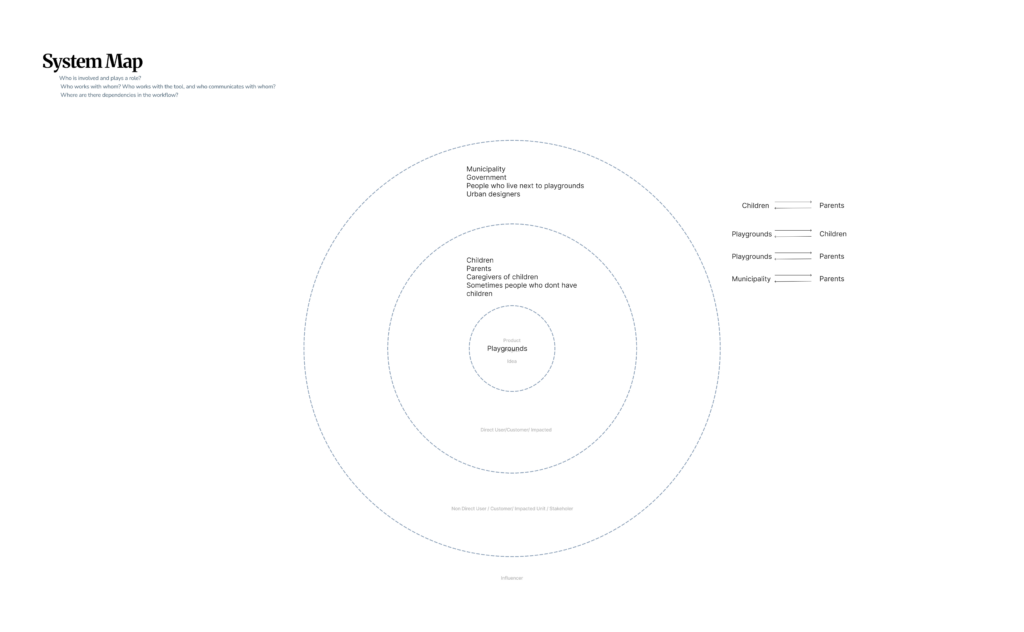
At the center of the system are playgrounds. Surrounding them are primary users such as children, parents, and caregivers, who actively engage with these spaces. Beyond this immediate layer, broader stakeholders like municipalities, urban designers, and local communities influence how playgrounds are designed, built, and maintained.
The map also highlights key relationships, such as the connection between children and parents, and the role of municipalities in shaping decisions that affect both groups. These interactions reveal that playgrounds are not isolated spaces but part of a larger social and institutional system.
Playgrounds is not only about physical structures, but about navigating a network of stakeholders, needs, and influences. This perspective reinforces the importance of including children’s voices within a complex design ecosystem.
For my design and research blog posts I chose to return to rigging. To start off what is rigging? Rigging is the process of creating a mechanism on how something should move. It is comparable to building a skeleton. This is also the reason why some of the used terms are joints and bones. As soon as one object moves or influences another it can be called rigging.
Rigging is a general term used for both 2D and 3D animation. It is the step between creating for example a character and the animation afterwards. In other words, it is the step most people would rather skip, as do I. However, since it is one of the steps that keeps me from creating my own animations with my own models I want to get better at it. I have some experience in rigging for 3D programs. In my bachelor’s I learned some basics in maya. The lessons were very quick and hard to follow along. I learned the most in my internship at a tiny indie game studio where I got to model, rig and animate a grey heron as well as a badger. The most complex rig was a crow I made for bachelor project. However, half of it was with an auto rigging tool. I still had to do a lot of manual corrections and that bird had so many feathers I had to rig one by one.
Still, I feel like there was never a very solid base of knowledge for the rig and I only applied what I needed now. This caused some problems later with the rigs and I had to redo a lot. I want to change that. This is why I searched for an extensive course on rigging. I found “The Art of Effective Rigging 2” by Pierrick Picaut on his Website p2design academy. I have watched some of his free content on Youtube bevor and figured it would be a great fit. The lessons are detailed, files for every step are provided as well as a pdf document were everything is documented in written form. The course is spilt into 6 major parts, which get longer and more complex. The parts are: rigging fundamentals, my first rig, spider ball rig, simple character rig, advanced character rig and full character rig.
So far, I browsed through the first chapter of rigging fundamentals. For me most of it is just repetition of what I already know. I still listen to the lessons because the course is for Blender and I have less experience with Blender than Maya. The repetitions should also help with the basics I might have forgotten parts of it. So far, I enjoy the course, even though it is nothing new to me. Basics such as what is rigging, parenting, constraints, armature objects or bones where covered. I will not go too much into the detailed explanations.
As for my goal of the blog posts, I want to follow along the course as much as possible and make a short video of the rigs created. The result will probably not be looking very pretty. Rigging feels to me a little bit like coding. It is a lot of thinking work, which can be annoying but very rewarding when it finally works out.
Es folgt ein recht kurzer Blogartikel, in dem ich meine Idee erläutere, sowie meine nächsten Schritte. Es wird noch nix spannendes passieren, doch das Niederschreiben meiner Ideen, soll mir einfach mal dabei helfen, meine Gedanken zu organisieren und mich auf eine konkrete Idee festzulegen. Es folgt: Gedankenchaos.
Ich möchte die Zeit in diesem Semester dafür nutzen, mir weiteres Können rund um 2D Animation anzueignen. Möchte ich in der Wissenschaftskommunikation bleiben, ist das Erstellen von Erklärvideos wichtig für mich zu beherrschen. Wie aus meinen Blogbeiträgen aus dem Vorsemester herauszulesen ist, gehe ich die ganze Sache mit der Darstellung wissenschaftlicher Inhalte unüblich an. Ich will, neben der korrekten Darstellung wissenschaftlicher Informationen, auch einen großen Fokus auf Storytelling und Humor legen. Wie bereits beschrieben sind diese beiden Komponenten entscheidend dafür, dass Inhalte verstanden und sich besser gemerkt werden können.
Was ist nun also mein Ziel für dieses Semester?
Ich werde mich in den nächsten Blogbeiträgen damit beschäftigen ein Erklärvideo-Skript zu verfassen. Ich werde mich in ein Thema einlesen und dazu eine Geschichte schreiben, sowie ein Storyboard und ein Storyboard-Animatic. Und dann beginnt der für mich gruselige Teil: Animieren.
Ich beherrsche ein paar Basics von After Effects. Animate habe ich auch schon mal geöffnet. Ja. Soweit so gut.
Ich werde mich damit auseinandersetzen, mit welchen Programmen ich was am besten animieren kann. Charakteranimation steht auch auf meiner Liste, das würde ich gerne lernen. Sowie das Animieren von Mundbewegungen.
Ein Referenzstil sind die Videos von JaidenAnimations. Jaiden verfolgt dabei zwar keinen Bildungsauftrag, in ihren Videos geht es eher um mehr oder weniger spannende Themen aus ihrem Leben, die sie humorvoll und erzählerisch in ca. 10- bis 15-minütigen Videos aufarbeitet. Dabei geht es oft um Videospiele, sehr häufig um Pokemon. Obwohl das nicht genau zu meinen Interessen zählt, sehe ich mir trotzdem jedes Video an, denn Jaiden trifft genau meinen Humor. Ihre Videos sind sehr fast-paced, ihr Voiceover ist schnell eingesprochen, ist laut, emotional, sehr akzentuiert und on-point. Das sind auch die Gags. In der Animation trifft sie, wie ich finde, den Sweet-Spot zwischen „zu viel Bewegung“ und „zu wenig Bewegung“. Sie animiert, was nötig ist, niemals zu viel.
Ich mag den reduzierten Einsatz von Farben, das lenkt die Aufmerksamkeit auf Wichtiges. In meiner Bachelorarbeit habe ich dies ebenfalls als gezieltes Stilmittel eingesetzt, damals basierend auf den Comixplain-Comics der FH St. Pölten. Auch dort wird Farbe nur reduziert und sehr gezielt eingesetzt, um Wichtiges hervorzuheben.
Ich werde mir also ein Themengebiet auswählen, vermutlich bleibe ich wieder in der Naturwissenschaft, und versuche dann ein Erklärvideo in Jaidens Stil zu entwickeln. Das Nachbauen eines Stils soll mir dabei helfen, erst einmal die Skills zu entwickeln, einen eigenen Stil aufbauen zu können. Vielleicht für mein Masterprojekt.
Und jetzt zum Spaß noch ein Video von JaidenAnimations:
(Schaut es euch an, es ist lustig)
Inclusion and accessibility are essential considerations in contemporary design and innovation. Considering diverse user groups and varying physical and cognitive abilities should not be an afterthought, but rather an integral part of the design process from the very beginning. By doing so, designers can develop solutions that are inclusive by default, rather than needing later adjustments. One useful method to support this approach is the creation of a map that outlines what is required for users to fully experience a product, considering not only personal and physical aspects, but also social and environmental factors. Such a map was developed for this project, which focuses on improving the UX design of German train platforms. It highlights the various conditions that must be met to ensure an optimal and inclusive user experience.
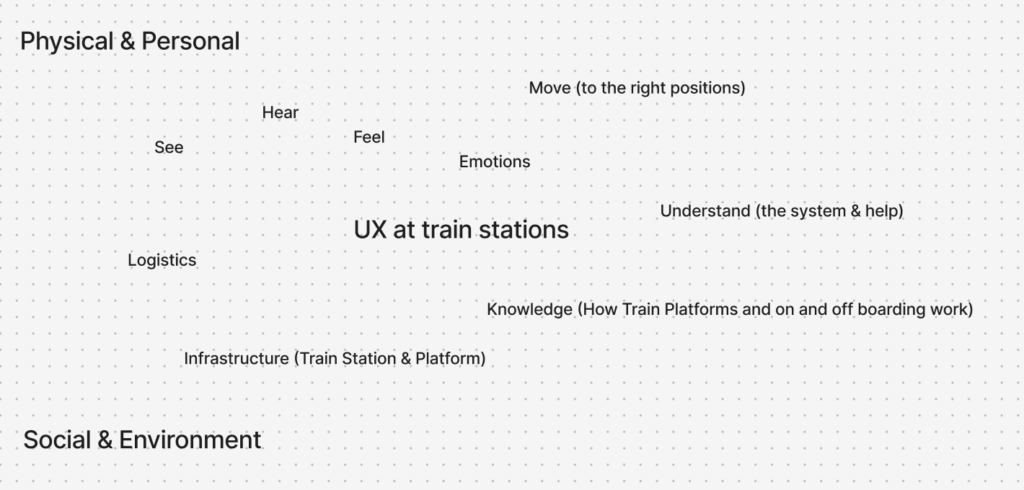
Building on this, a second mapping method was used to specifically analyze inclusion, problems, and barriers. This map takes a closer look at potential obstacles the design might create, identifies which user groups are included or excluded, and explores the problems that arise from these barriers. Most importantly, it also considers possible solutions to reduce or eliminate them. In this project, many of the identified barriers particularly affect people with disabilities or impairments, who may not be able to fully perceive or interact with certain elements of a physical design.
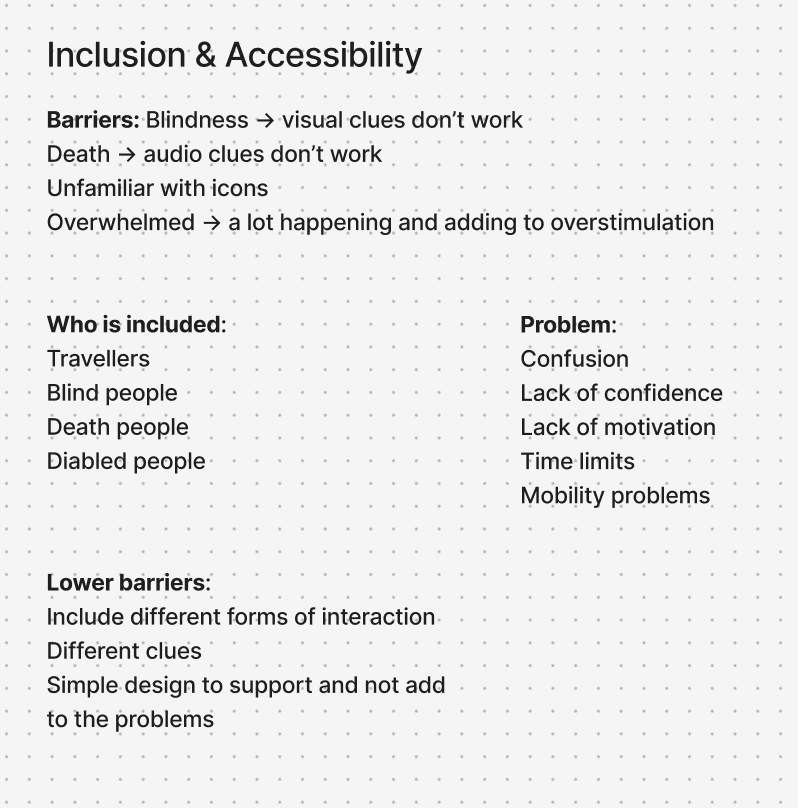
To address this, the goal is to provide multiple ways for users to experience and understand the design, ensuring accessibility for as many people as possible. At the same time, a clear and minimal design approach is prioritized to avoid adding further complexity or confusion to already busy train platform environments.
Overall, inclusion has been explored through these mapping methods as a foundational step in the design process. While further refinement is necessary, this work provides valuable insights into user needs and establishes a strong basis for developing more inclusive solutions moving forward.
Yesterday, I tried out the 3 prototypes with 3 different participants (henceforth referred to as P1, P2, and P3) of intermediate aerial silks level. The following are the findings of the research through design process.
This prototype was not really useful for the intermediate aerialist, since they all have knowledge of the basic knots used in most figures (e.g. footlock, hip key, russian climb, etc.) There was no use case for this object in their case. I tried to use it to teach catcher’s pose to P3, but it didn’t really help. This is because catcher’s pose is not a mentally complex knot, rather a physically complex one. She understood what she had to do, but she mentioned she didn’t have the proper bodily proportions (her arm is not long) to do it properly, nor was she strong enough to hold herself in an inverted position for a long time to try out other solutions.
However, an interesting finding when talking with P3 is that she uses a longer (3m) piece of old silk to teach these same knots to kids. She explains that while it’s a useful tool for base knots, when it comes to kids, the problem becomes that she doesn’t know how to get them to stop playing with the silk and use it in a serious manner. As such, this made me reformulate my intended audience to exclude kids. This is because kids pose an extra challenge in their interaction with physical objects, and it’s outside of the scope of this investigation, even if I hadn’t explicitly known it before.
P2 and P3 seemed the most interested in this prototype, since they both mentioned they have trouble remembering to distinguish between left and right, both when watching the teacher and when in the air. P2 mentioned that, when both her and the teacher wore it on the same arm, it made communication easier and faster. Not only could she visibly see the teacher’s colored vs bare arm, but also when there were errors in P2’s attempts, it was easier to identify and correct. It removed the extra layer of thinking for her. P2 noted that it sped up the learning process for her, since she was able to copy the teacher’s moves without too much mental load. Plus, after 2 times practicing the move with the sleeves on, she managed to do the 3rd try all on her won without any mistakes.
I had high hopes for the little guy, hoping he would be the star of the show. However, when externalizing the internal bodily sensations, little guy proved to be somewhat of a nuisance rather than a help. This doesn’t mean to say that this kind of 3d model is not useful; rather, that the framing of the model was lacking, and the fact that it was a quick-and-dirty prototype made the model itself harder to use in practice.
The first problem encountered was the fact that one person can’t manipulate both the little guy and the mini-silks. Luckily, P3 had a camera tripod to lend me, which made the usage of the little guy much easier (a second, smaller learning through this process was the fact that we had to tie the mini-silks to the tripod, as they can’t balance on their own).
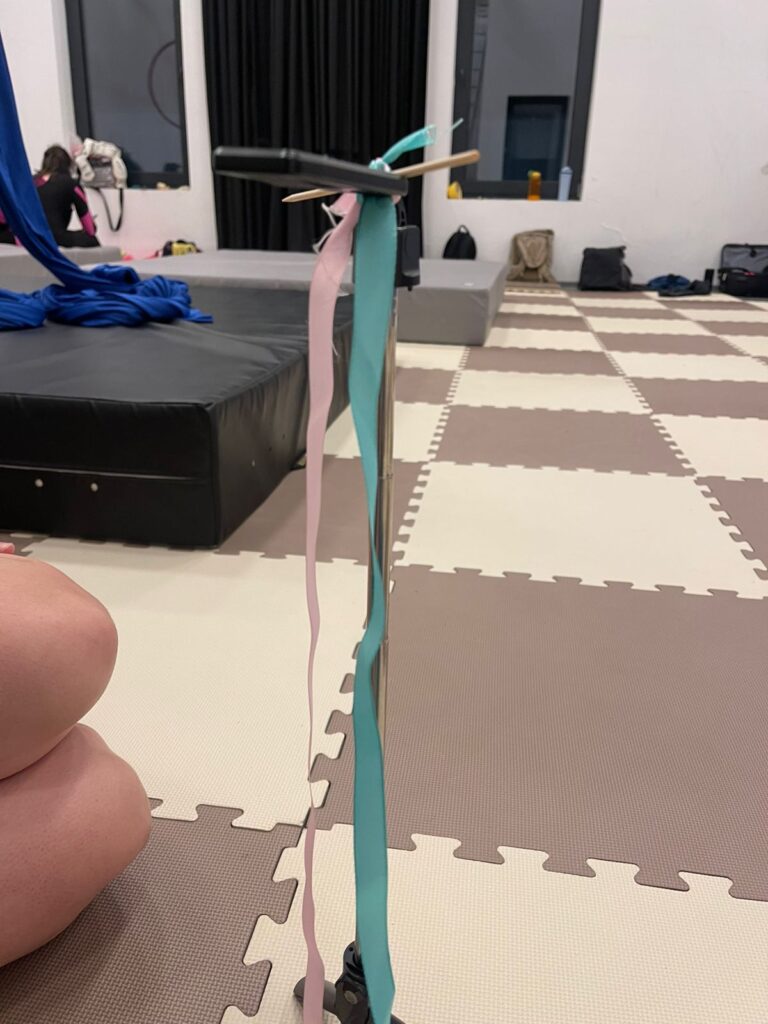
Own image.
In using the little guy to teach a new sequence to P1, we found that the characteristics of the mini-silk didn’t quite match up with the intended use – the ribbons used in the prototype are much too big (width wise), too short (length wise) and don’t allow for the flowiness that real silks have. This made smaller moves like a footlock harder to display on the little guy, and it made it hard to use as a teaching tool for footlock-based sequences. Another learning was the fact that he’s missing a clearly identifiable front and back, something that both P1 and P3 agreed they would like for him to have.
P1, a very good aerialist, mentioned she wanted to play around with the little guy and make him do a hip key. Despite being able to do this skill in her sleep, she failed to understand what she was doing wrong that made the little guy unable to hold the hip key in the mini-silks. In reality, what was missing was the fact that even if she knew what to do when she herself was up on the silk, she forgot to fold the little guy inward. This step is critically important – as I showed a few weeks ago in the prototype video, the “lock” on the hip key that makes you not fall is the physical act of folding yourself inward. When I told her what she forgot, she mentioned that she “didn’t want to break the prototype”, which is another piece of evidence supporting the fact that for the little guy to work, his model form must be easy to manipulate and visibly tough. Through this process, however, P1 mentioned that she found it much easier to learn from the little guy when it was not just the teacher showing a figure through him, but when she was actually able to touch and manipulate his figure.
—
Sources:
Own research.
The Change and Impact map I developed is structured around two key perspectives: “Before” and “After.” These two sides represent the situation prior to and following the introduction of the proposed product. This comparative approach is intended not only to highlight the potential improvements the design aims to achieve, but also to critically reflect on any negative consequences or challenges that may arise as a result of its implementation. By placing both aspects side by side, the map encourages a balanced and realistic evaluation of the design intervention.
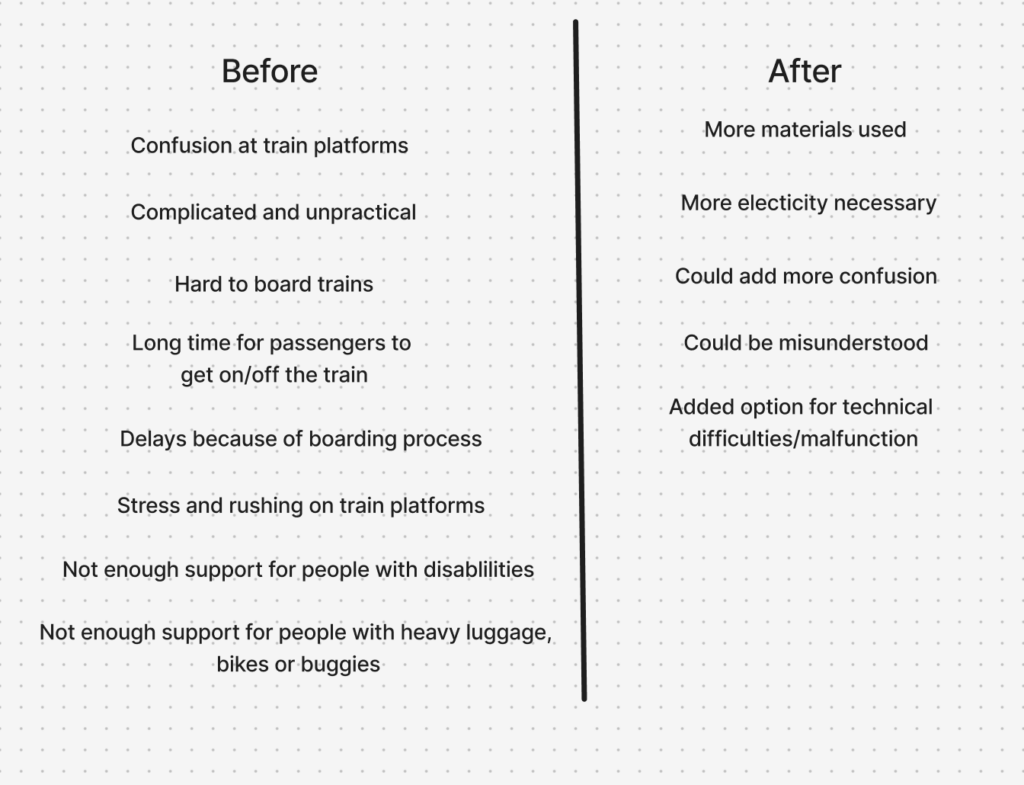
In my project, the “Before” section focuses on the current issues experienced at German train platforms. These include challenges faced by passengers, such as confusion, lack of orientation, or limited accessibility, as well as difficulties encountered by train conductors and Deutsche Bahn (DB), including time inefficiencies and operational constraints. This side of the map serves as a diagnostic tool, clearly outlining the pain points within the existing system and establishing a foundation for targeted improvements.
The “After” section, in contrast, explores the potential outcomes following the introduction of a physical UX solution at train platforms. It considers possible side effects, including shifts in user behavior, increased reliance on technological systems, additional resource requirements, or the emergence of technical issues. This ensures that the proposal is not viewed in an overly idealistic way, but rather as part of a complex system with both benefits and trade-offs.
When analyzing the map, it becomes evident that the “Before” side contains more negative aspects than the “After” side. This imbalance can be interpreted as a positive indicator, suggesting that the proposed solution has strong potential to improve the current situation.
Overall, the Change and Impact map provides a valuable framework for assessing both the opportunities and limitations of the design, supporting more thoughtful and responsible decision-making.