How many times have bought a plant for their house? How many times have you ended up killing it?
This research is about finding a simple way to help people take better care of their plants—using technology to support us where we usually fail
But the goal isn’t just to add more tech. We’re already surrounded by it.
My goal as an interaction designer is to create something a simple object like a lamp that naturally fits into your home. Something that can also create a cozy athosphere engaged the senses with lights and sounds., tracking the health of the plant.
Because in the future, we would have more technological device. So it’s important to start designing systems that are not only efficient, but also comforting. It’s been proven to indoors plants have a really postivie impact on our mental health.
So this project is not about using tehcnology to keep our plant alive but using it to built a better relationship with the nature itself
Following the user testing session, several design improvements were implemented in the product design.
The main objective was to develop a smaller and more ergonomic design that could be placed directly inside a plant pot, while also creating a more playful and aesthetically appealing appearance.
Paper Protyping
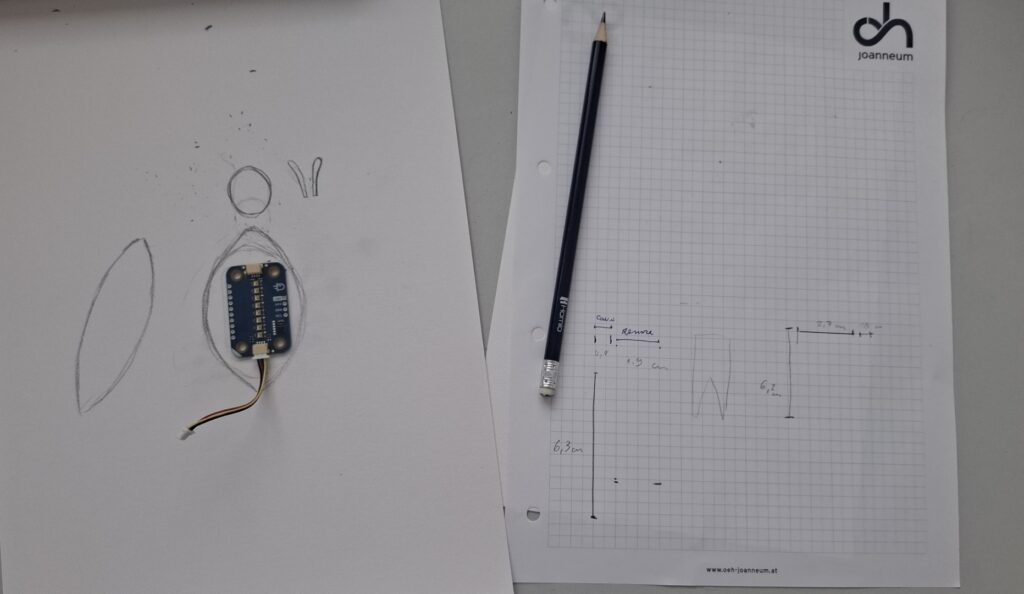
To explore new design ideas, a paper prototype was created. Using simple paper materials made it possible to quickly test different shapes, sizes, and configurations before investing time in more advanced prototypes.
Figure 1: Initial sketches and dimensional studies
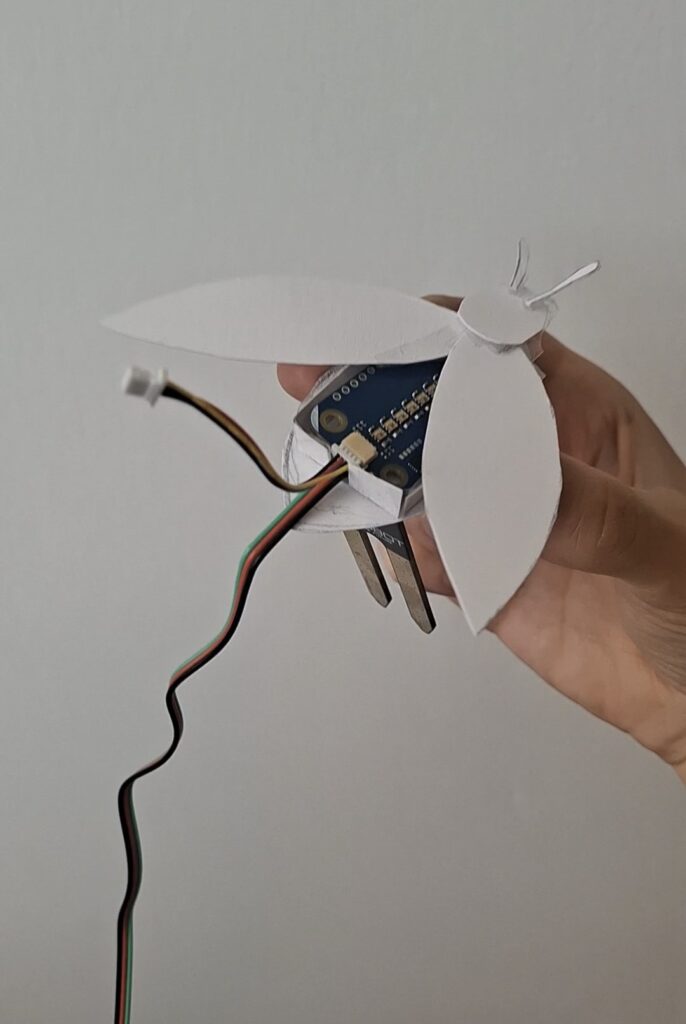
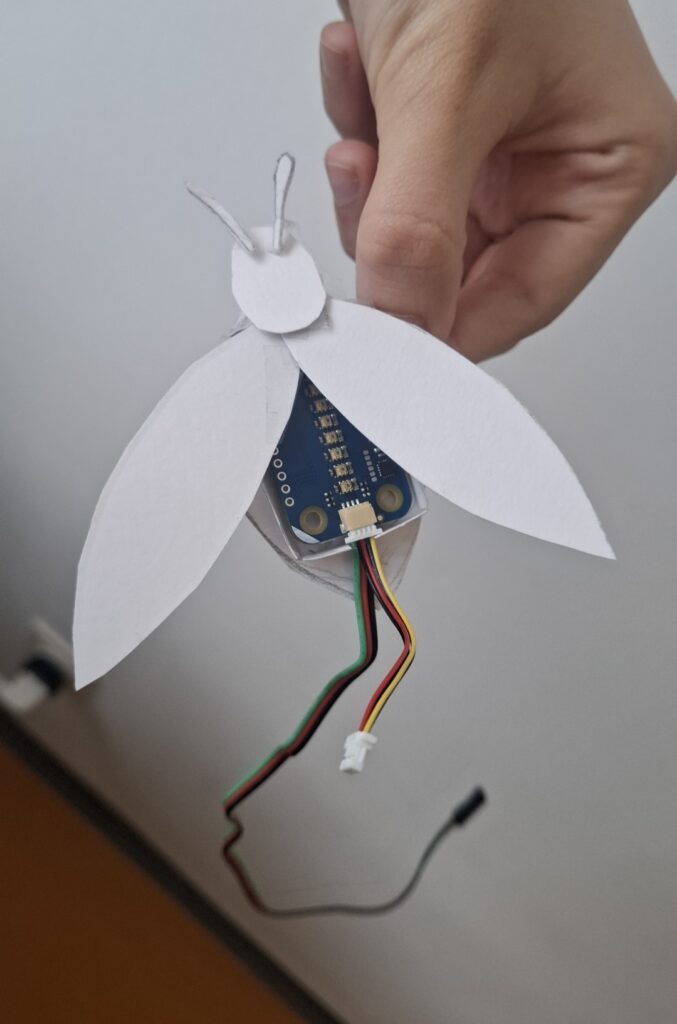
The chosen design was inspired by a firefly. This insect was selected because it naturally produces light, making it a fitting inspiration for the LED-based system. At the same time, fireflies are becoming increasingly rare in many parts of the world, creating a link between the project and environmental awareness.
Figure 2 &3: Final prototype design
While the first prototype takes the form of a firefly, the concept can easily be adapted into other nature-inspired shapes, such as a butterfly or a bee, allowing users to choose different aesthetic variations according to their preferences.
After the development of the functional prototype, the device was brought into the classroom for a user testing session. The objective of the test was twofold:
to evaluate the functionality of the system
to collect feedback on the overall design and user experience
Functionality Testing
The first goal was to verify whether the system could reliably measure soil moisture and provide visual feedback through the LEDs.
The results were very positive. During all testing sessions, the system worked correctly and the code performed as expected. The sensor successfully detected changes in soil moisture, while the LEDs updated in real time.
Participants found the color transition easy to understand and appreciated the immediate feedback provided by the light.
Improvements
One important observation emerged during testing: the need to also indicate when the soil becomes excessively wet. Since, overwatering can be as harmful to plants as underwatering.
Design Evaluation
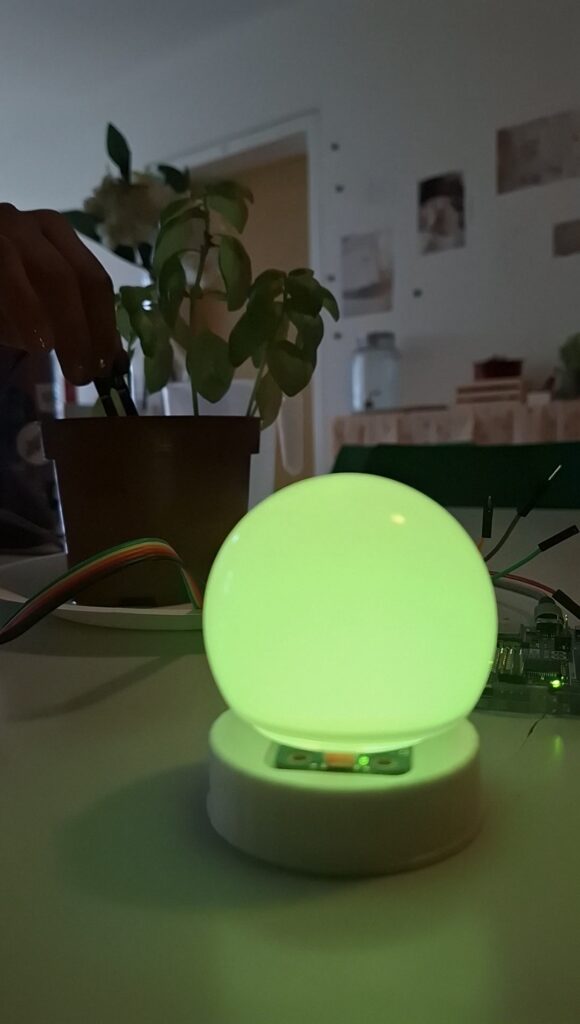
The second objective was to evaluate the physical appearance of the prototype.Participants generally appreciated the visual effect created by the colored light and the lamp-like shape
Figure 1: Bulb lamp design
However, feedback also suggested that the design could become more playful. So, to explore different possibilities, several alternative 3D-printed shapes were produced and tested. These elements could be positioned above the LEDs to create different visual effects and appearances.
Video 1: User testing with different 3D printed component
Although participants appreciated these variations, the most promising direction identified during the testing phase was a different approach: reducing the size of the sensor itself. A smaller sensor could be integrated directly into the plant pot and designed as an ornamental object rather than a visible technical component.
Conclusion
The user testing session confirmed the reliability of the system. However, the testing also highlighted the need to improve the design of the object by reducing its size and creating a decorative element that could be placed directly inside the plant pot.
The next step was to develop a functional version of the system, following the design developed during the first paper prototyping phase (see the articleConcept and Low-Fi Prototyping).
The device was imagined as a lantern-shaped object containing LED lights capable of changing color according to the moisture level of the soil.
Hardware Component
The prototype was built using the following components:
Arduino R4 Wi-fi Board
Soil moisture sensor
Modulino Pixels LED module
Power supply
Wi-Fi network connection
Circuit Setup
Figure 1. Circuit setup for the soil moisture sensor.
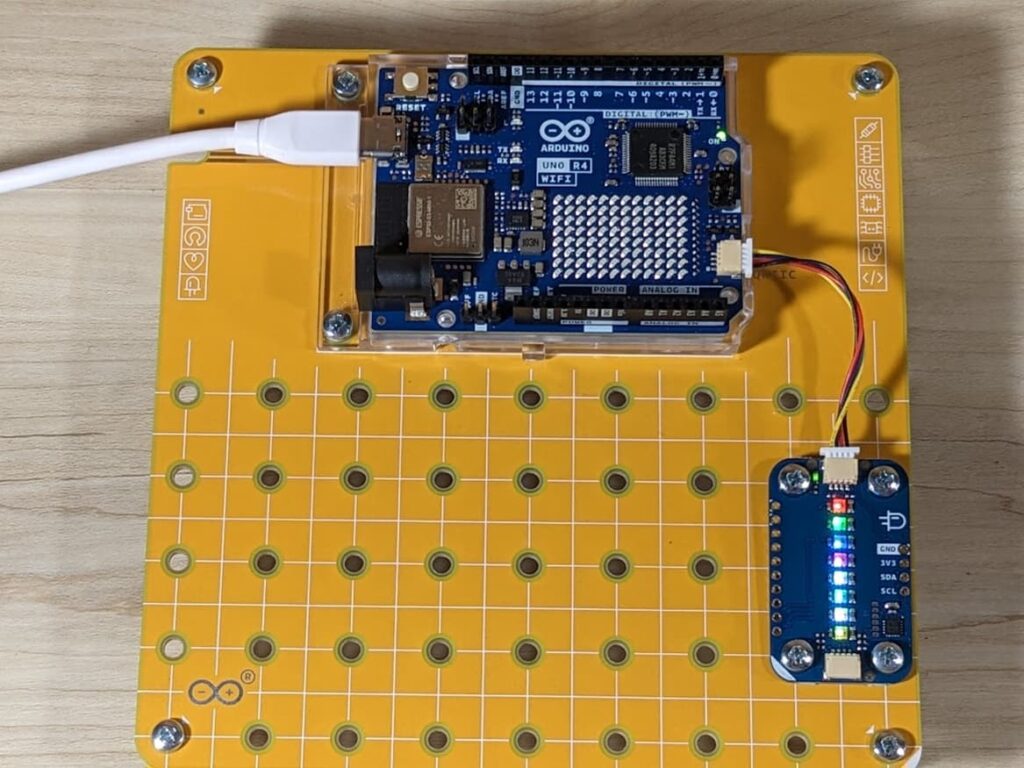
Figure 2. Circuit setup for the Modulino Pixels module.
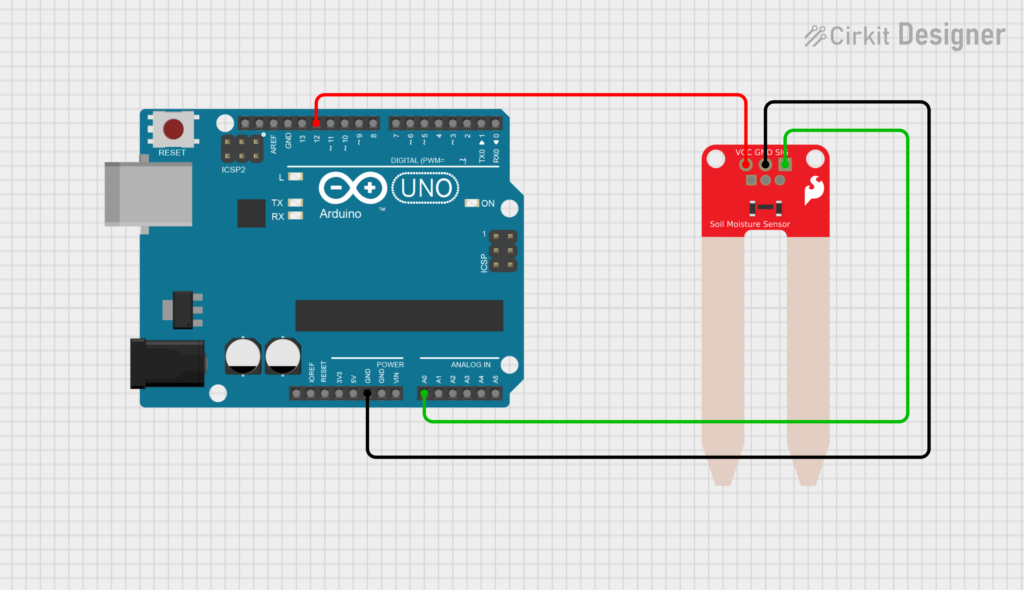
The soil moisture sensor (Fig. 1) is connected to:
Analog pin A0 for reading the sensor value.
Digital pin 12 for powering the sensor.
The sensor is powered only when a measurement is taken. This prevents it from being continuously powered, which could accelerate electrode corrosion and reduce the sensor’s lifespan. It also helps reduce power consumption. In addition, The Modulino Pixels module (Fig. 2) is connected directly to the Arduino board
Code Structure
Soil Moisture Measurement
The soil moisture sensor monitors the condition of the soil: Every sampling cycle, the system activates the sensor, waits a short time for the signal to stabilize, reads the analog value, and then immediately turns the sensor off.
The measured value is converted into a moisture percentage using calibration values obtained during testing. In this prototype, a value of 0 corresponds to dry soil, while a value of 685 corresponds to wet soil. The result is then mapped to a percentage between 0% and 100%, making the data easier to interpret and use for the visual feedback system
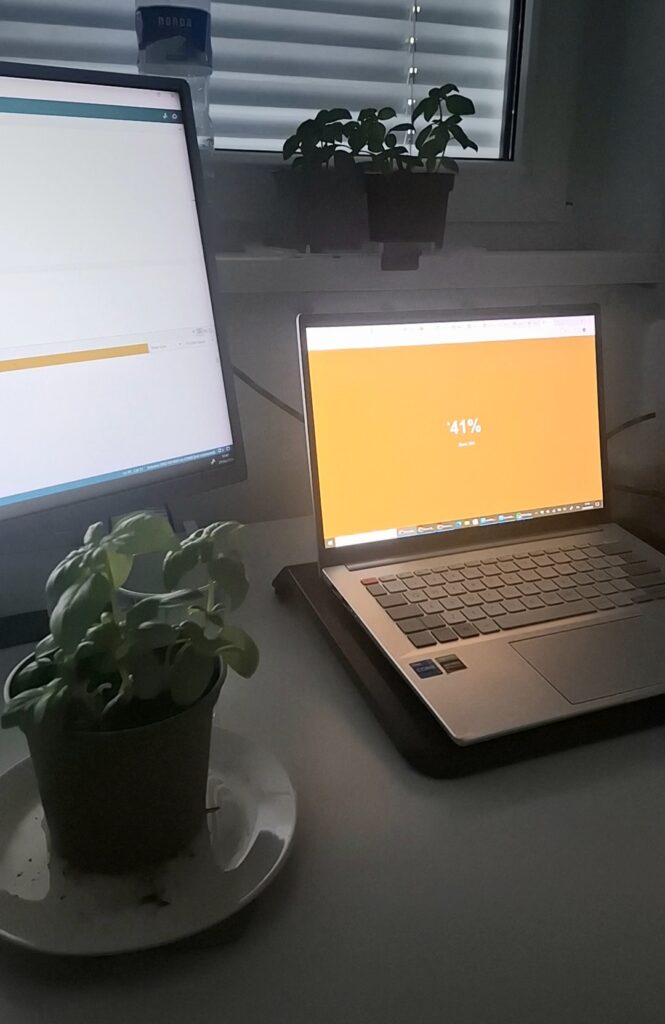
Figure 3. Real-time soil moisture reading displayed through the web interface, showing the current humidity percentage and sensor value
LED visualisation
After each measurement, the LEDs change gradually as the moisture percentage increases. When the soil is very dry, the LEDs appear red. As the moisture level rises, the colour progressively shifts through orange and yellow tones, eventually becoming green when the soil is sufficiently wet.
Video 1. LED feedback system setup
Wi-Fi Connection
The device connects to a local Wi-Fi network using the WiFiS3 library. Once connected, it starts a web server and creates a local address using mDNS. This allows users to access the device through a web browser by typing:
http://light-plant.local
without needing to know the device’s IP address.
Digital Interface
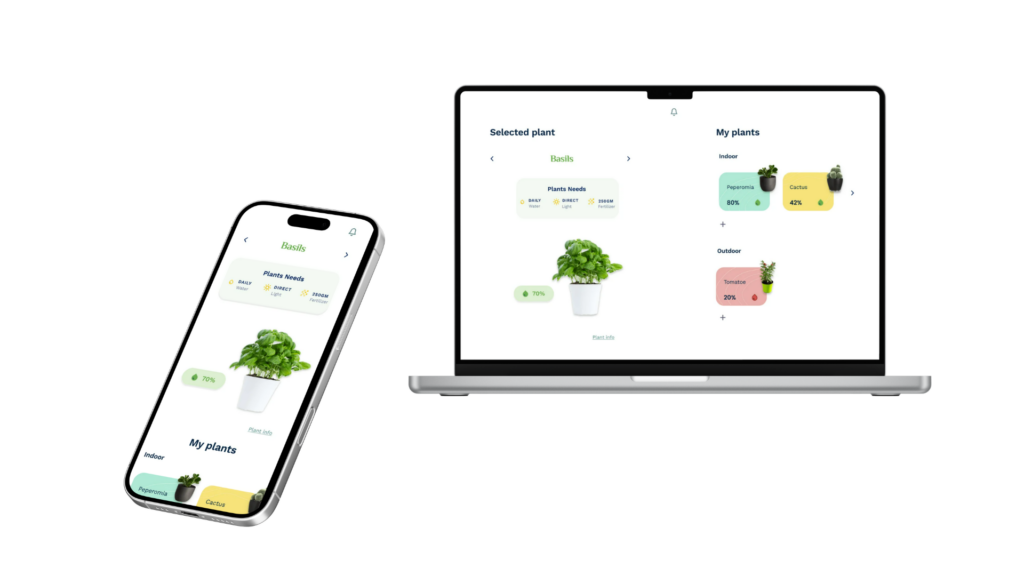
A responsive web application was designed to monitor and manage multiple plants. The home screen highlights the plant connected to the moisture sensor, displaying its soil moisture level together with its care requirements, including watering, light exposure, and fertilization. The app also contain an overview of all the connected plants, organized by indoor and outdoor categories, allows users to quickly monitor their status and access more detailed information.
UI Design – Design System
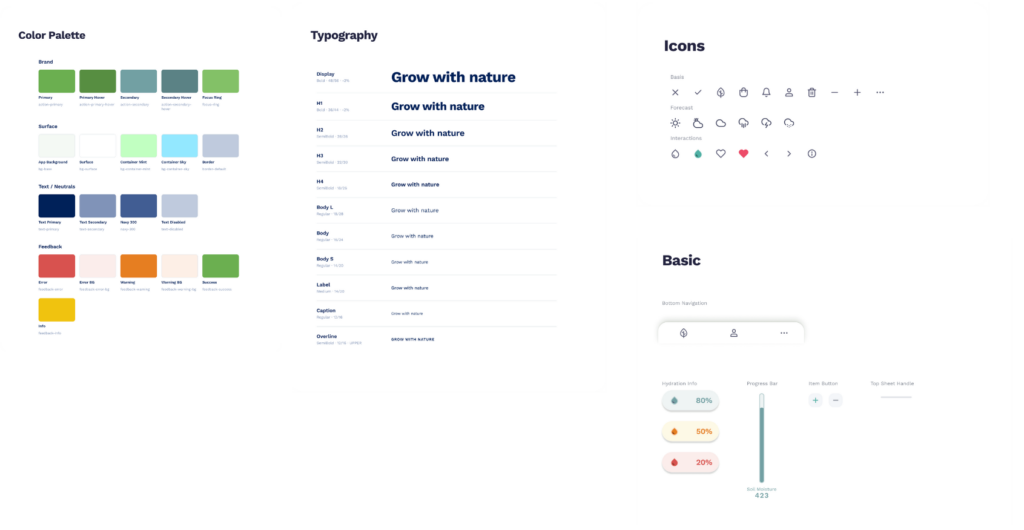
Figure 4. Design system for the digital Interface inlcuding: color palette, typography, icons and basic components
After the paper prototyping phase, discussed in the previous article: Concept and Low-Fi Prototyping for an Interactive Plant Care System,the next step was to analyse the different types of sensors and boards available in order to develop a first testable version of the prototype.
Main Goal
The goal of the project is to create a simple and intuitive system capable of providing visual feedback about the health status of plants. In particular, the system integrates:
capacitive soil moisture sensors placed inside plant pots to detect the percentage of soil humidity;
a lighting system able to provide real-time visual feedback on the plant’s condition;
a minimal digital interface (website/app) useful for configuring the system and displaying information.
The idea behind the digital interface is not to create a complex app, but an essential tool mainly useful for configuring the sensors, accessing plant information, or customising some design elements such as the lamp’s colour palette. The main interaction should therefore happen through the physical object rather than through screens or continuous notifications.
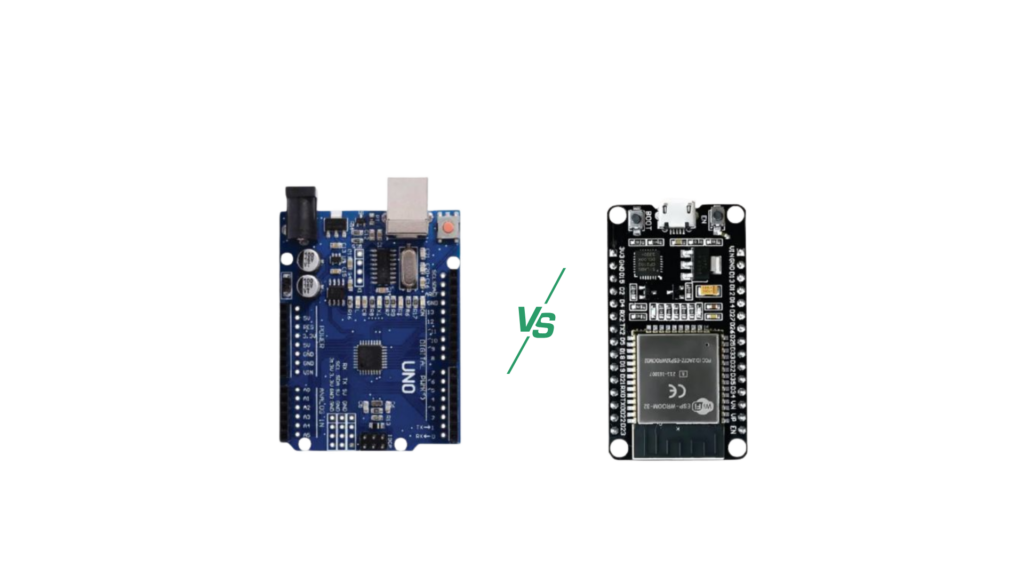
Fig. 1: Comparison between Arduino Uno and ESP32-S3
Technical Comparison: ESP32 vs Arduino Uno
Feature
ESP32 Solution (Recommended)
Arduino Uno Solution (Not Recommended)
Connectivity
Integrated: Wi-Fi and Bluetooth (BLE) are included in the same chip.
Absent: Requires external modules (HC-05 for Bluetooth, ESP01 for Wi-Fi).
Web Interface
Can host an internal Web Server (HTML/JS) for the minimal app.
Impossible alone. Requires extra hardware and very complex code.
LED Management
Can manage thousands of WS2812B LEDs without slowing down the system.
Limited memory (RAM); managing many LEDs and sensors together can crash the system.
Power Supply
Supports Deep Sleep mode (ideal for battery-powered sensors).
High and constant power consumption (not optimised for batteries).
Dimensions
Compact: thumb-sized, fits inside the lamp base.
Bulky: credit-card sized, plus external modules and cables.
Total Cost
~15–20€ (all-in-one chip + sensor + LED).
~40–50€ (Arduino + Wi-Fi module + Bluetooth module + cables).
The analysis showed that the ESP32-S3 represents the most modern and suitable choice for an integrated design, since it reduces the cost of external components and allows the creation of a more compact system.
At the same time, this comparison highlighted some important aspects related to the accessibility of the project.
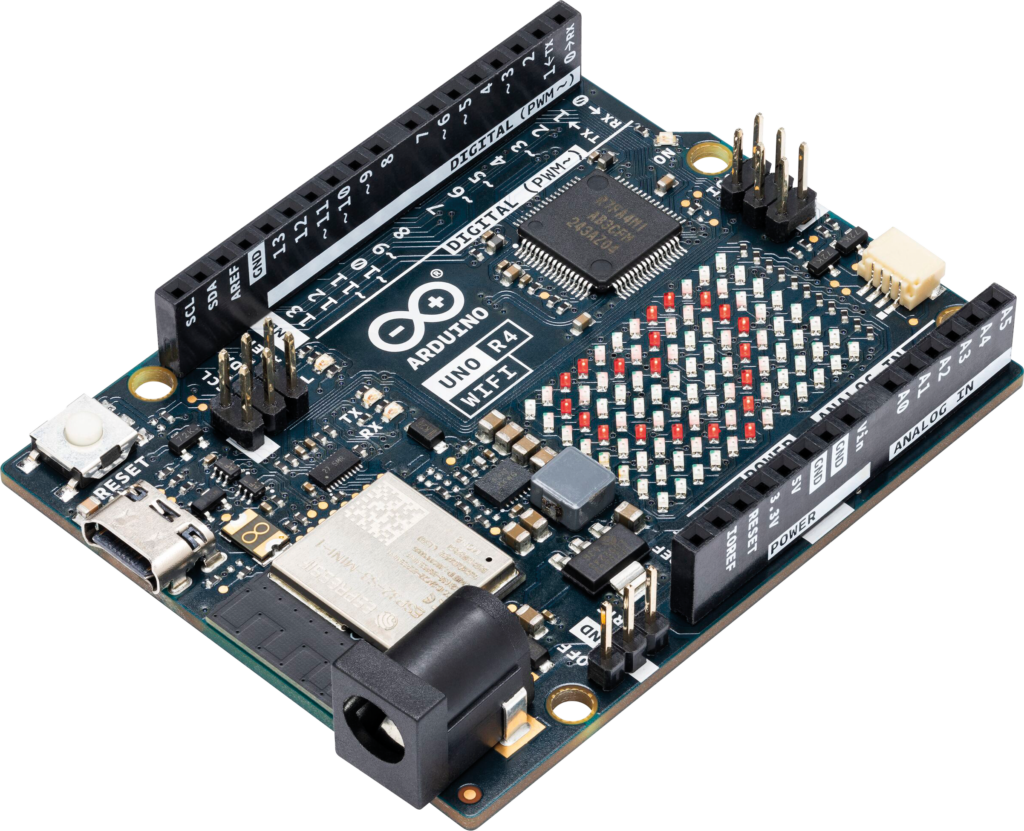
Figure 2: Arduino R4 Wi-Fi board used for the first prototype development.
Although the ESP32-S3 is more powerful, for an initial prototype it was preferable to use a more intuitive system. One of the project goals is in fact to keep the system understandable and replicable even for users with basic electronic skills.
The final choice was Arduino R4 Wi-Fi, mainly because it is more intuitive for beginners and more accessible from a learning perspective.
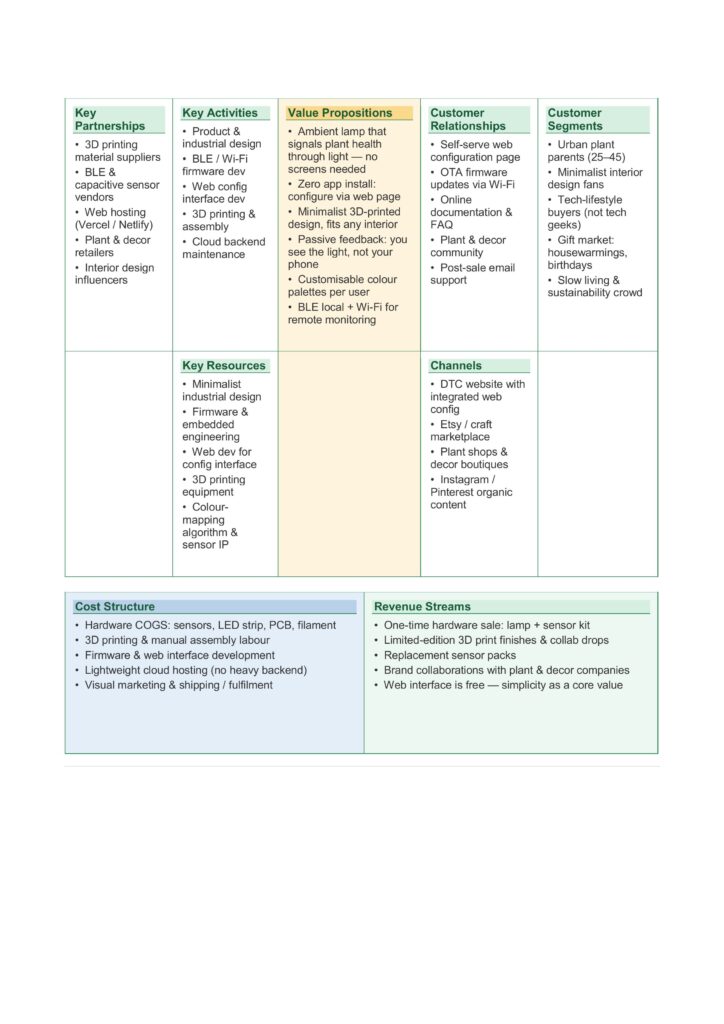
This business model canvas shows how Lumina Terra combines plant care and ambient lighting in a simple and accessible way. The main idea is a minimal lamp that uses light to communicate plant health, without the need for screens or complex apps. The product is developed through design, prototyping, and basic technology integration, supported by partners such as material suppliers, sensor providers, and plant shops. It is aimed at people who like indoor plants, simple design, and a calm home environment. The product is mainly distributed online and through design or plant-related stores. The costs are related to hardware production, development, and shipping, while revenues come from selling the lamp and sensor kits, as well as possible collaborations.
To develop an effective product, it is essential to start from an understanding of users’ needs, difficulties, and expectations.
Costumer jobs
Users want to take care of their plants, keep them healthy, and understand their needs without spending too much time or effort. At the same time, they want to create a cozy home environment where objects are not only functional but also aesthetic.
Costumer pains
However, several pains emerge. People often forget to water their plants or do not know when and how much water to give. It can be difficult to understand the real condition of the soil, especially for non-expert users. In addition, many smart solutions require continuous use of apps and screens, making them intrusive or not suitable for a home environment. There is also a sense of uncertainty, linked to the fear of damaging the plants.
Costumer gains
Users are looking for a simple and immediate way to understand the health of their plants. They want to reduce uncertainty and make plant care easier and more enjoyable. At the same time, they appreciate products that integrate well into the home space, contributing to a warm and relaxing atmosphere. A sense of satisfaction and connection with nature is also an important value.
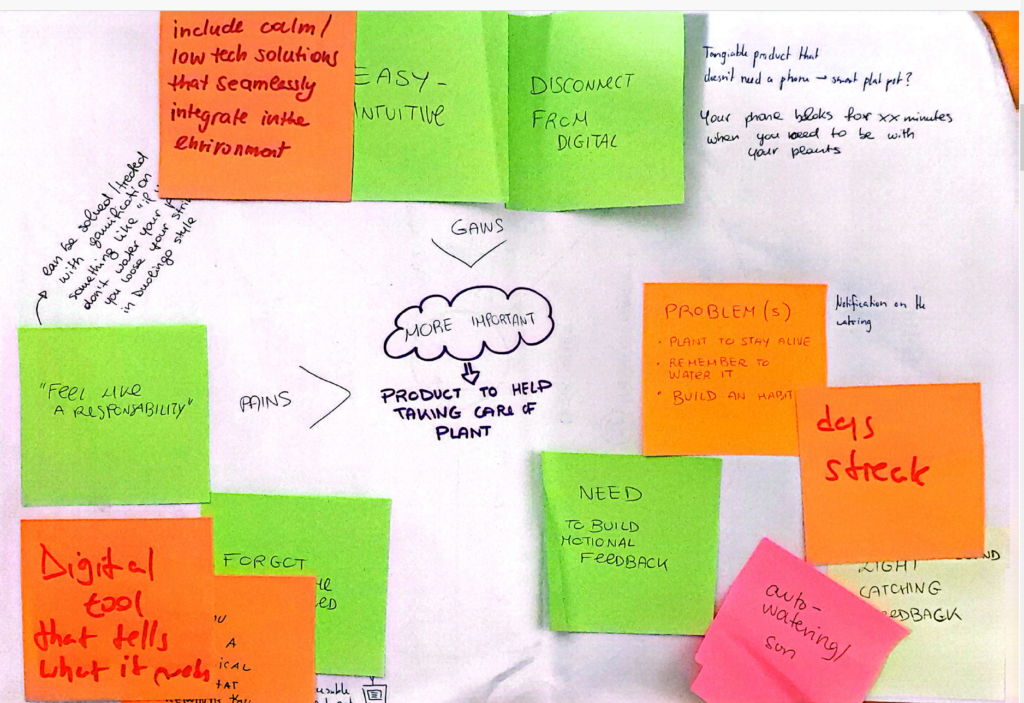
Fig 1: Feedbacks collected during a consultation workshop
Value Map
The value map translates these needs into design solutions.
Regarding the product & services, the idea is to develop a lamp as a first product, capable of combining ambient lighting and plant care. The lamp is connected to soil moisture sensors placed in plant pots and communicates via Bluetooth Low Energy, while Wi-Fi connectivity allows monitoring and configuration through a minimalist mobile app.
It is also important to consider the pain relievers, which in this case are mainly focused on reducing uncertainty for first-time users, as well as reducing the effort and time required to take care of plants. The goal is to design a slow, consistent, and non-intrusive feedback system that does not rely too much on digital technologies or continuous smartphone use.
The analysis of the gain creators helped identify which aspects to integrate in order to improve the overall experience. Users are looking for a simple and immediate way to understand the health of their plants. They want to reduce uncertainty and make plant care easier and more enjoyable. At the same time, they appreciate products that integrate well into the home space, contributing to a warm and relaxing atmosphere. A sense of satisfaction and connection with nature is also an important value.
Recently, I came across the research “Entangling with Light and Shadow: Layers of Interaction with the Pattern Organ” by Jasmine Butt, Nathan Renney, Benedict Gaster, and Maisie Palmer, developed within the Expressive Computer Interaction Research Group at UWE Bristol.
RESEARCH OBJECTIVE
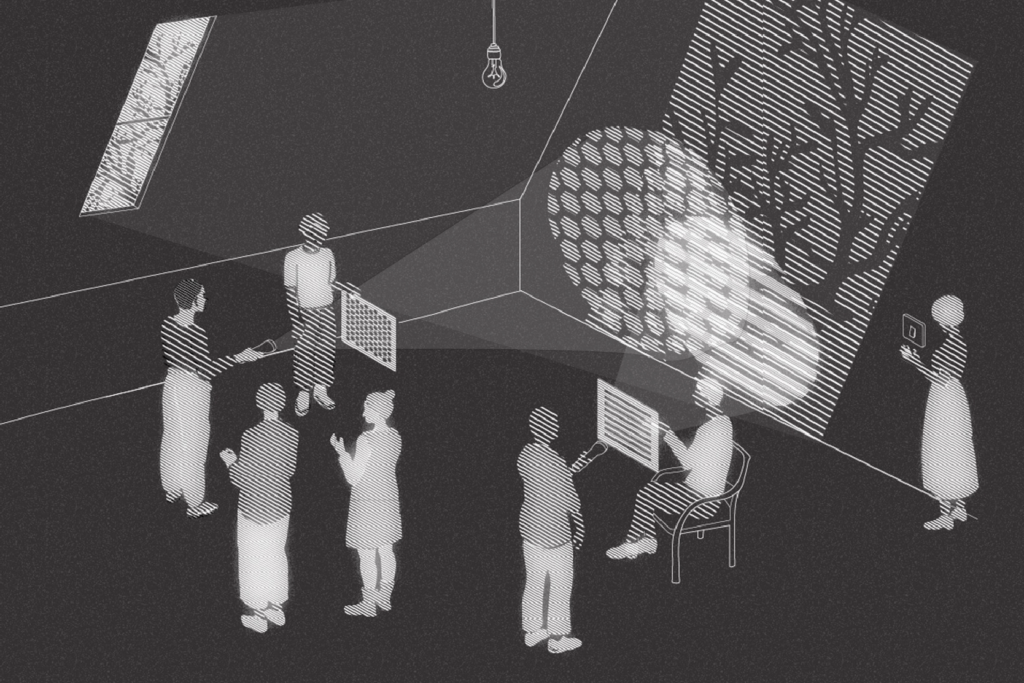
Figure 1: Illustration of an interface pattern
This research explores the design and use of a camera-based digital musical instrument called the Pattern Organ. This visual-audio synthesis artifact investigates new ways of interacting through light and shadow.
Users can modify a waveform by placing their hands or objects in front of the instrument’s camera, creating shadows and patterns. Through this interaction, they can perceive how both the environment and the sound change in real time.
The project initially started as a digital tool to represent the process of optical sound technology. However, during the workshop sessions, this idea evolved further. The focus shifted from a purely visual-audio synthesis system to a more open, participatory, and exploratory process.
THEORETICAL BACKGROUND
A matter of finding the grain of the world
Bruna Goveia Da Rocha and Kristina Andersen [2]
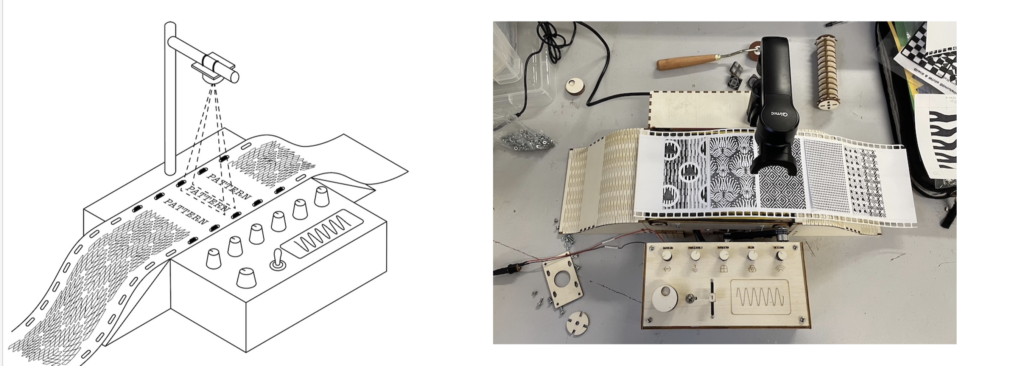
Figure 2: Design of the original Instrument
Drawing from analogue optical sound technologies used in early cinema, the research reinterprets these practices through a post-human perspective. Two main theoretical perspectives are considered. The first is from N. Katherine Hayles, who describes the world as a complex and highly interconnected syste[3]m. In this view, cognition is not limited to humans but moves dynamically across humans, animals, and technological systems. The second perspective is Karen Barad’s Agential Realism [4]. This theory describes reality as something continuously shaped by the interaction between material and meaning. Matter and information are not separate but constantly influence each other.
A strong emphasis is also placed on material thinking and hands-on experimentation with different materials.
CONSIDERATIONS
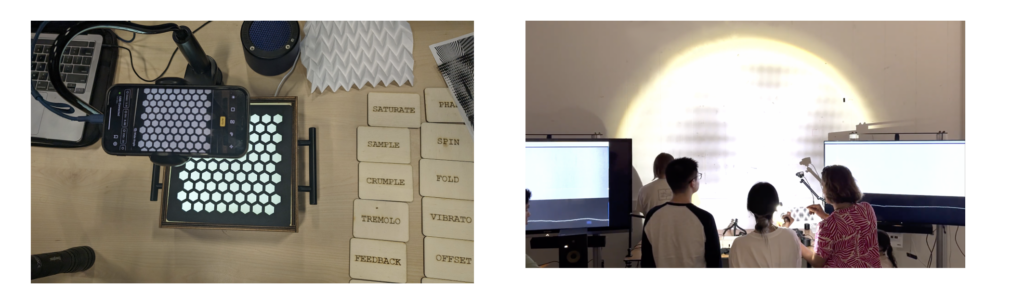
Figure 3: Images from the first workshop’s exploration
Throughout this process, there are two aspects that I personally find particularly interesting.
From a theoretical perspective, I find the idea of an entangled and participatory workshop very powerful. In this context, three elements—human, machine, and materials—are in constant dialogue. They continuously influence each other during the creative process. This approach is very effective in stimulating critical thinking, both in design, where each input can generate new ideas or solutions, and in educational contexts.
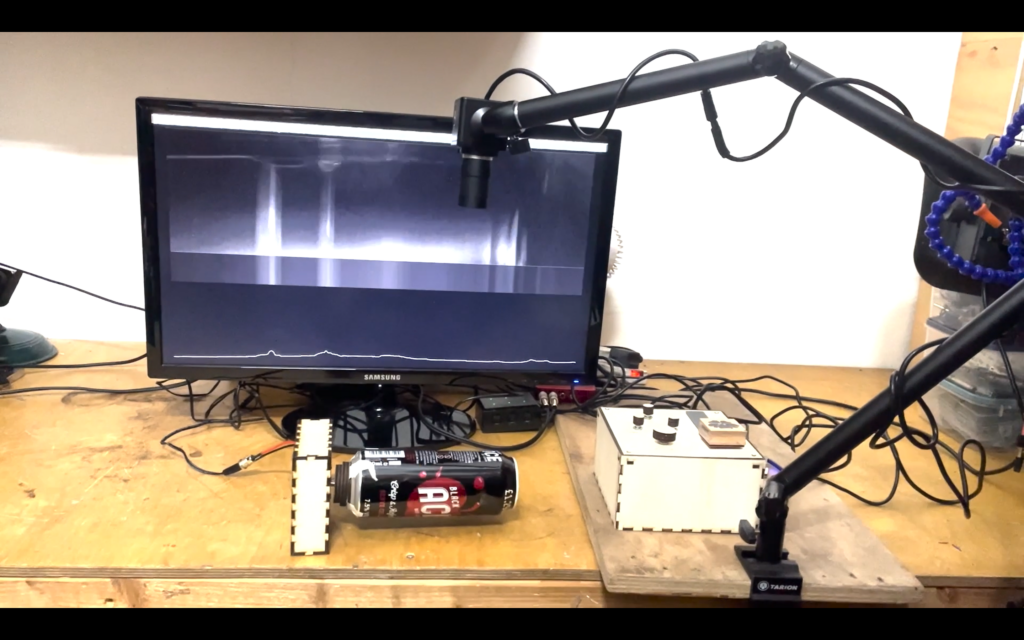
Figure 3: Sperimentation using a rotating can
From a practical perspective, I was particularly interested in the use of raw data. This concept influenced the method of sonification used in the project. Rawness can be understood as a choice to avoid interpreting or transforming the data through complex digital processing. Instead, the data produced by the system is used more directly, without adding layers of interpretation.
This does not necessarily mean that raw data is more accurate or more realistic. Rather, it means that the measurements are not modified or filtered, allowing a more immediate connection with the original signal.
In the case of camera-based sonification, two main approaches can be identified:
Extracting features from image data to control or modulate sound
Using a more direct method, where pixel brightness values are translated into sound signals with minimal processing
CONCLUSION
This research opens important questions about how data should be treated and interpreted. It challenges the idea that data always needs to be processed, optimized, or controlled.
It also highlights the role of human intervention and how our decisions shape the way systems behave. At the same time, it shows how the physical and material nature of interaction—light, shadow, objects—can influence digital processes in meaningful ways.
More broadly, it invites us to rethink the relationship between humans, technology, and the material world. Instead of separating them, this work suggests that meaningful interaction emerges from their continuous entanglement.
REFERENCES
[1] J. Butt, N. Renney, B. Gaster, and M. Palmer, “Entangling with light and shadow: Layers of interaction with the pattern organ,” in Proceedings of the International Conference on New Interfaces for Musical Expression (NIME ’25), Canberra, Australia, June 24–27, 2025.
[2] Bruna Goveia Da Rocha and Kristina Andersen. 2020. Becoming Travelers: Enabling the Material Drift. In Companion Publication of the 2020 ACM Design ing Interactive Systems Conference. ACM, Eindhoven Netherlands, 215–219. https://doi.org/10.1145/3393914.3395881
[3] Katherine Hayles. 2006. Unfinished Work: From Cyborg to Cognisphere. Theory, Culture Society 23 (2006), 159–166. https://doi.org/10.1177/0263276406069229
[4] Karen Barad. 2007. Meeting the universe halfway: quantum physics and the entanglement of matter and meaning. Duke University Press, Durham London.
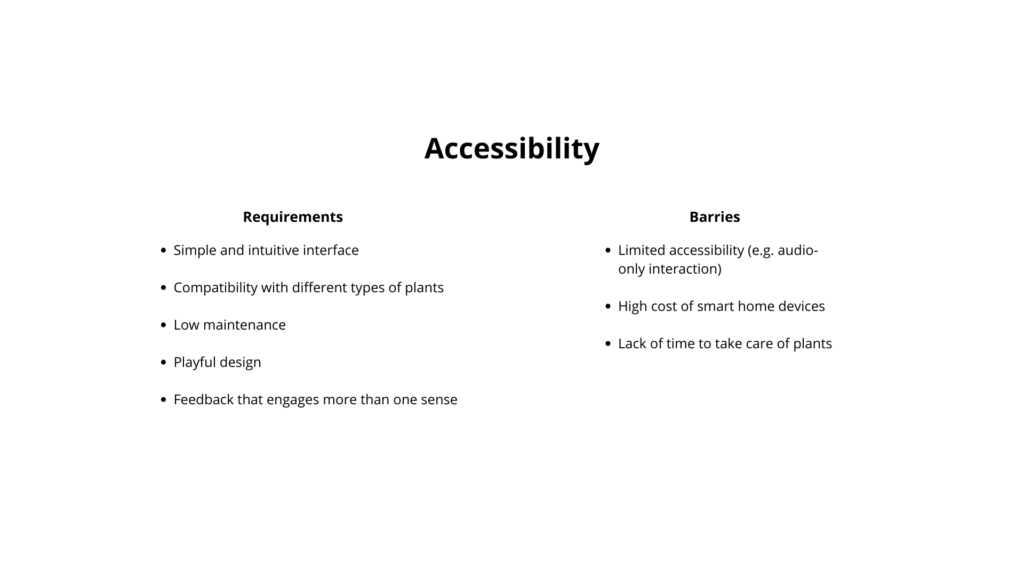
The accessibility analysis focuses on both requirements and possible barriers.
The main requirements include a simple and intuitive interface, so that the product can be used without instructions. It should be compatible with different types of plants and require low maintenance, so it does not add extra effort for the user. A playful design is also important, especially to engage children and make the experience enjoyable. Finally, the feedback should involve more than one sense, combining light and sound to create a clearer and more inclusive interaction.
At the same time, some barriers need to be considered. For example, if the interaction relies too much on sound, it may limit accessibility for some users. Smart home devices can also be expensive, which may reduce accessibility for a wider audience. Another common issue is the lack of time people have to take care of plants.
In coclusion, the product should find a balance between these different needs.
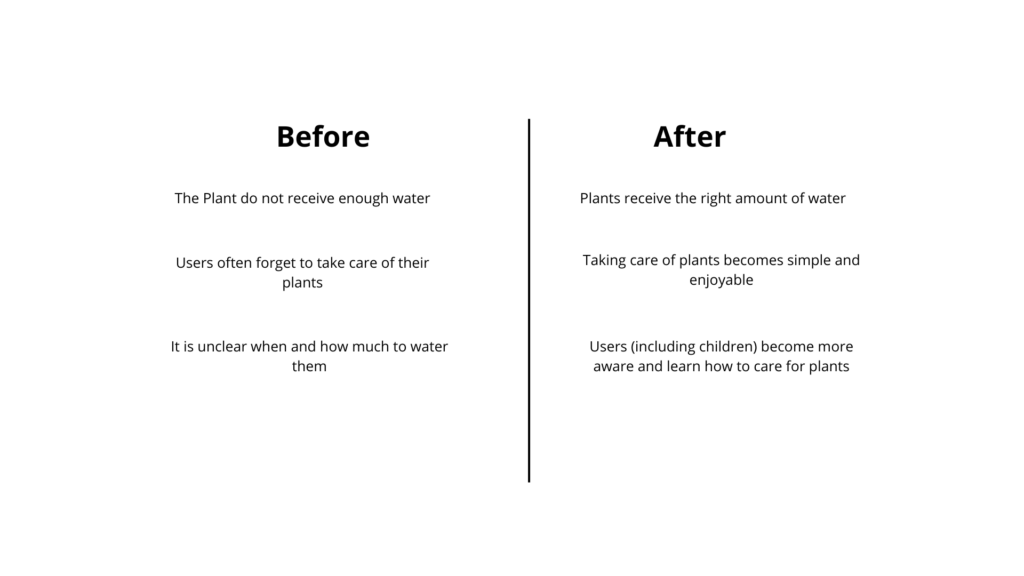
This phase explores the impact of the product by comparing situations before and after its use.
Before using the device, plants often do not receive enough water. After using it, plants receive the right amount of water. Another issue is that users frequently forget to take care of their plants, while with the device, plant care becomes simpler and more enjoyable. Finally, it is often unclear when and how much to water plants, but with the device, users — including children — become more aware and learn how to take care of them.
However, some important considerations emerge. There are many different types of plants, and not all of them need the same amount of water. In some cases, the soil may appear dry, but the plant does not need to be watered yet. For this reason, the system should not give overly simplified feedback, but should consider different plant needs.
It is also important to understand what really motivates people. Users often struggle with consistency and knowledge rather than intention. They may want to take care of plants, but forget or feel unsure about what to do.
The device should therefore not only inform, but also support and encourage users, making plant care feel easy, clear, and rewarding.