Documentaries, especially ones about history, use often a combination of scenes with actors and actresses, interviews with experts and animation. The further back in time the historical topic of the documentary plays, the less actual footage of the time period will exist. For example, when portraying the life of dinosaurs or showing a depiction of the big bang there is no way around some form of animation. 3D animation of dinosaurs is necessary to portray a realistic interpretation of scientist findings about their life. These animations are expansive and time consuming which is why the same scenes may be played multiple times. As soon as the historical period includes humans scenes with actors or actresses are used more often. Animation becomes less important, however, it is still used.
As an example in an TerraX episode called “Eine kurze Geschichte über … – mit Mirko Drotschmann – Das Alte Ägypten” produced by ZDF all three styles are combined. There is a section with actors and actresses, one with the reporter and experts as well as short animated sequences. The animated sequences are kept close to the style of the drawings of ancient Egypt if not used directly as reference. The animation is kept simple and does not have complicated movements or effects. It is in 2D and only a few elements are moved. The most important factor is the information they convey to the viewer in combination with the narration. In one scene some legends as well as gods are described with their powers shown. In this simple animation style this can be shown instead of simply told. While the usage of actors and actresses would be possible, using VFX or SFX would be more expansive and time consuming. Meanwhile getting the information from an interview section would be less impactful.
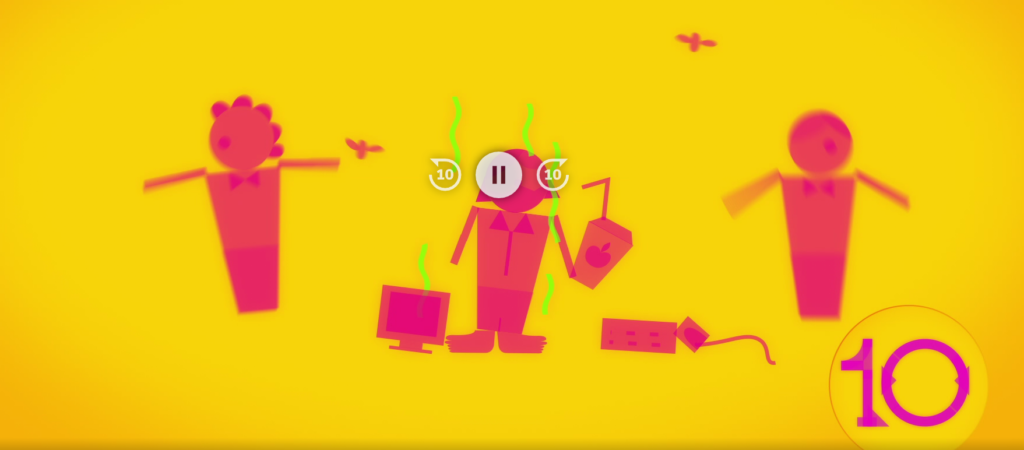
In another ZDF production “Die glorreichen 10“ 10 historical facts are put together in a top 10 video. They use footage from other ZDF productions in combination with their own animation. In this case characters of this animation consist of base shapes like circles and rectangles, resembling pictograms. With simple movements a humorous fact is being told to the viewer. The art style enhances comedy with help of exaggeration and fun sound effects. With these sections and the humorous approach to the story telling overall it catches a different target group, while still telling historical facts.
“Die Sendung mit der Maus“ is a TV show for children. They always have some sort of documentary included in the program between different animations. If it is a longer section about the production of for example ski, the documentary is interrupted by a short animation of their mascot the orange mouse. The mouse will often interact with something similar to the subject, for example skiing in a little skit. The theme therefore is not fully dropped, yet there is a pause from the fact and explanation.
Overall animation can enhance a documentary with a visual and tonal change. Dry facts can be broken down into digestible animated portions.
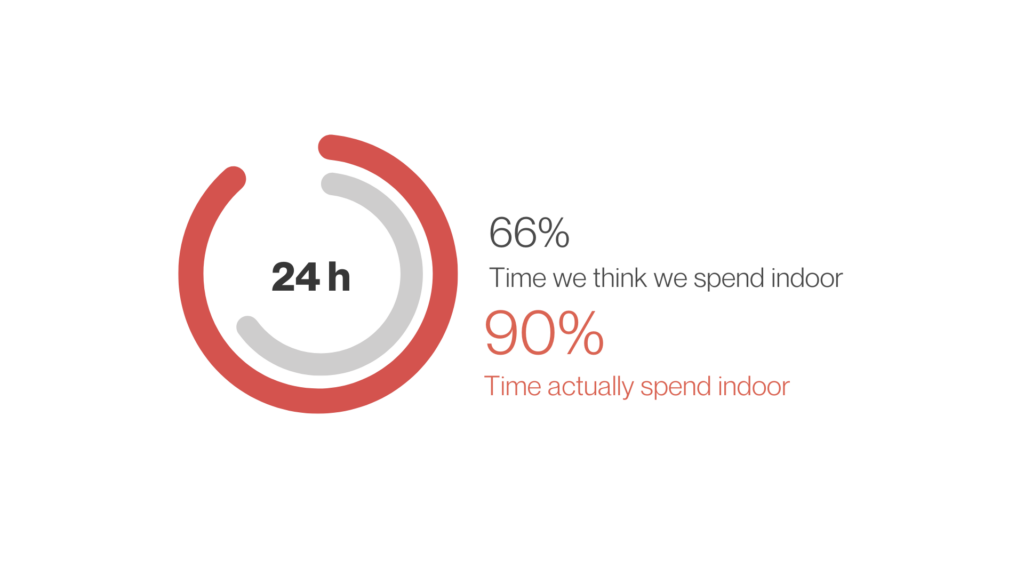
We have become an indoor generation. We spend most of our lives inside buildings, on public transportation, and in enclosed spaces. Home, school, office, gym, and shops: we rarely spend time outdoors, even though we often think otherwise. Recent studies show that people believe they spend about 60–70% of their time indoors, but the reality is very different: on average, we spend up to 90% of our day indoors. This change has occurred in a very short time compared to the history of human evolution, which has seen us live outdoors for hundreds of thousands of years, following the natural cycles of light and dark. This distance from nature affects the body, the mind, and the way we relate to the environment. In this context, caring for plants becomes a simple yet meaningful gesture, especially for certain generations more sensitive to these issues.
The Physical and Mental Effects of an Indoor Lifestyle
Living primarily indoors has concrete consequences.
Indoor air is often more polluted than outdoor air, even in cities.
Building materials, furniture, cleaning products, and simple daily activities like cooking or breathing increase levels of CO₂ and harmful substances.
The lack of natural light also has a significant impact. Our bodies use daylight to regulate our sleep-wake cycles. Spending little time outdoors can cause sleep problems, fatigue, difficulty concentrating, and mood swings. In many cases, it also contributes to stress, anxiety, and seasonal depression.
Despite this, we’re often unaware of how little contact we have with nature. This creates a gap between perception and reality that makes it difficult to change habits.
Fig 2. Graph showing average time spent indoors over 24 hours – from Bauenmitholz
Why Millennials and Gen Z Are More Drawn to Plant Care
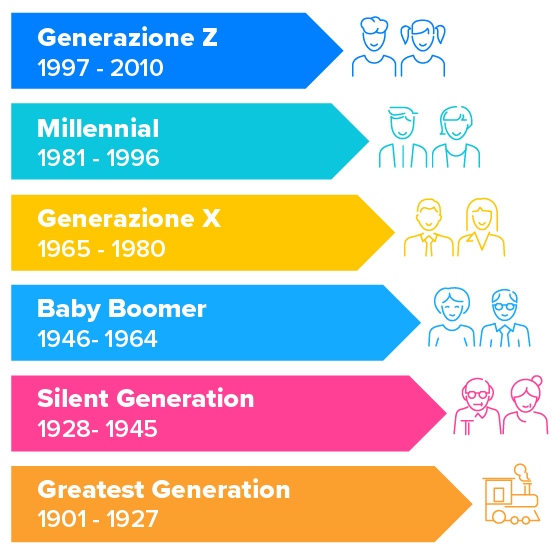
Fig 3. Graph with the different generations divided by age group- from Fineco Bank
Research shows that millennials and Gen Z are currently the generations most involved in caring for indoor plants. This doesn’t mean they have more plants than other generations, but they purchase and care for them more frequently and with greater attention. There are several reasons:
They more often live in apartments without gardens
They have a strong connection to mental well-being
They are more sensitive to environmental issues
They use plants as a form of self-care For many young adults, caring for a plant isn’t just a hobby, but a way to slow down, take responsibility, and reconnect with something alive. It’s no coincidence that a large percentage of millennials say that plants make them happier and more optimistic about the future.
Indoor Plants as a Response to Disconnection from Nature
Indoor plants can mitigate some typical problems of indoor living:
They improve the perception of air quality
They introduce natural variations into the space
They make the passage of time visible
They promote routine and attention Even when the biological impact is limited, the psychological effect is strong. A plant changes, grows, and reacts. It’s the opposite of a screen that’s always the same. This opens up an interesting space for interaction design.
Nature-Based Interaction Design: From Screens to Living Interfaces
We are the indoor generation, but that doesn’t mean we have to give up contact with nature. Younger generations, accustomed to complex digital interfaces, seem to increasingly appreciate simple, natural interactions. Plants offer just that: interaction based on observation, time, and slow feedback. For interaction design, this means rethinking the role of interfaces:
fewer screens
more living objects
more relationships, less control Nature-based user interfaces can help rebuild a connection with the environment, especially for those who mostly live indoors.
[2] A. Author et al., “Article title,” International Journal of Environmental Research and Public Health, vol. 19, no. 12, Art. no. 7454, 2022. [Online]. Available: https://www.mdpi.com/1660-4601/19/12/7454
[5] P. Ahmmadi, M. Rahimian, and R. G. Movahed, “Theory of planned behavior to predict consumer behavior in using products irrigated with purified wastewater in Iran,” Journal of Cleaner Production, vol. 296, 2021, Art. no. 126359, doi: 10.1016/j.jclepro.2021.126359.
[6] P. T. Thuy, N. T. Hue, and L. Q. Dat, “Households’ willingness-to-pay for mangrove environmental services: Evidence from Phu Long, Northeast Vietnam,” Trees, Forests and People, vol. 15, Art. no. 100474, 2024, doi: 10.1016/j.tfp.2023.100474.
[7] C. J. Armitage and M. Conner, “Efficacy of the theory of planned behaviour: A meta-analytic review,” British Journal of Social Psychology, vol. 49, no. 3, pp. 471–499, 2010.
[8] X. Liu, H. Lindhjem, K. Grimsrud, E. Leknes, and E. Tvinnereim, “Is there a generational shift in preferences for forest carbon sequestration versus preservation of agricultural landscapes?” Climatic Change, vol. 176, no. 9, 2023, doi: 10.1007/s10584-023-03588-z.
[9] B. Satinover, J. Nichols, and J. W. Holt, “A comparison of sustainability attitudes and intentions across generations and gender: A perspective from U.S. consumers,” Cuadernos de Gestión, vol. 23, no. 1, pp. 51–62, 2023, doi: 10.5295/cdg.211647bs.
[10] X. Li, J. Dai, X. Zhu, J. Li, J. He, Y. Huang, X. Liu, and Q. Shen, “Mechanism of attitude, subjective norms, and perceived behavioral control influence the green development behavior of construction enterprises,” Humanities and Social Sciences Communications, vol. 10, no. 1, p. 266, 2023.
[11] W. J. Fisk, “Health and productivity gains from better indoor environments and their relationship with building energy efficiency,” Annual Review of Energy and the Environment, vol. 25, pp. 537–566, 2000. [Online]. Available: https://www.annualreviews.org/doi/pdf/10.1146/annurev.energy.25.1.537
This topic of designing for better connections has also been studied in relation to videogames. Johnson and Mitchell (2016) reviewed different kinds of matchmaking systems in videogames that go beyond matchmaking based on skills. Overdog was a matchmaking service for Xbox One that matched players based on their interest, although it seems as though its activity was low. They also found that matchmaking based on location was important for the gaming community (Johnson & Mitchell, 2016). Most matchmaking applications do follow the location principle either restricting users to see people in their area based on their location data or a location picked by their choice. Although the latter makes it possible for users to choose locations in which they are actually not in, losing some of its purpose.
In one way matchmaking apps that are available today are not that different from a game. The swiping almost feels like a game in the way that one is making rapid decisions based on brief and direct information, and receiving celebratory animations once there is a match. From some interviews about Bumble and Bumble BF some found this rapid swiping positive in order to find compatible people based on interests, and “eliminating” those who do not share the same interests, while others felt like there is too little information. Although the function already existed, some wished it would be possible to filter who you see based on their interest tags. This comes to show that this function has not been designed to be visible enough for users to easily find in the app (Capelli, 2025).
This rapid swiping and having to send a message 72 hours after matching made the participant feel stressed while using the app. Participants felt like they did not take the time to get to know people properly as one would in real life. Based on this, and more, Capelli suggests that this suggests that the participants wished for the interactions of the app to be closer to what one would normally do in real life settings. Some participants that were interviewed tried to meet as early as possible offline and move the connection from being digital to more real (Capelli, 2025). Perhaps these applications should get better in pushing and supporting meetings quicker, than simply opening up a chat and letting the people themselves take it from there. As taking this next step is not as easy for everyone.
Bumble does actually offer a function that allows for offline meetups. Here users can create and join events. Some participants said they enjoyed this function as it allowed for meeting a more varied group of people, instead of just getting stuck on swiping people with the same interest. Leaving people more open to meet more people beyond their own hobbies, and doing so in real life (Capelli, 2025). Such functions should definitely be more included in matchmaking apps in order to bridge the offline and online connection better. What is also something that should be more looked into is how to design the matchmaking to feel more like how you meet people in the offline world to make it feel less like a game and another task to do.
Horton, E., Johnson, D., & Mitchell, J. (2016, November). Finding and building connections: moving beyond skill-based matchmaking in videogames. In Proceedings of the 28th Australian Conference on Computer-Human Interaction (pp. 656-658). https://doi.org/10.1145/3010915.3011857
While the last few blog entries were focused on supermarkets and the overall topic of cash registers this time I would like to once again talk about the other aspect of my research topic: How to balance design ideas with IT and business goals.
What is agile?
One focal point I would like to discuss today is agile management. Agile is the opposite of the waterfall method. In waterfall requirements are defined and the design happens before the development of any code. As the term waterfall already promotes: there’s no going back. Once the requirements are set there’s no possibility of exploring new ones. However, especially in the human centered context new pain points of a product could be discovered in various stages of the research and design process. In contrast agile makes early involvement with the dev team possible. Small teams are working on a project and the objectives are being discussed in smaller steps and iterated within so called Design Sprints. [1]
Jira
A major tool teams are using to enable agile work and collaboration is Jira, developed by Atlassian. This tool has a wide range of possibilities. For the sake of this blog entry I will keep it short and simple and outline how one specific aspect within Jira works: User Stories.[2]
Structure of a user story
As a [function of the person] I want to [goal/perform an action] so that [benefit/value]
Example:
As the design team, we want to create a prototype for the MVP supermarketchain #1 so that we can gather feedback from potential users.
A user story consists of a simple statements that outlines the goals to be reached – It has to be mentioned that user stories are the smallest unit of work within a sprint.
From Initiative to Epics to User Stories
The largest units are initiatives, these represent the overall goals over a long time span. Initiatives are commonly defined over periods such as a year. Epics are the next smaller unit and usually define the goals for quarter of a year.
Personals thoughts
According to Jon Yablonski, who looks at different psychological practices from a designers point of view, users can easier digest information once it’s broken down into smaller “chunks”, as he calls them.[3] If we keep this in mind I think that managing tasks via user stories is a powerful tool to keep everyone in a project team focused on their tasks.
After diving into several high-profile autism awareness projects recently, I began a targeted search for similar resources dedicated to ADHD. My goal was simple: find a tool that doesn’t just explain ADHD, but allows the user to experience it. However, I’ve found that there isn’t much out there yet—or at least, very little that bridges the gap between clinical explanation and lived reality.
The Current Landscape: Between Expert Talks and Stereotypes
If you search for ADHD content today, you’ll find a wealth of information, but most of it sits at two extremes. On one side, we have “Expert Talks”, clinical, detached, and educational. On the other, we have “Stereotypes”, media that often reinforces the outdated image of ADHD as “The Fidgety Young Boy.”
A prominent example is the video about Max (A Day with Max and Lisa). While it is a decent educational starting point, it remains a passive experience. Max describes his internal world, but the audience remains a distant observer. Furthermore, it leans into that classic trope of the hyperactive child, often overlooking the internal restlessness, executive dysfunction, and emotional dysregulation that characterize ADHD in adults and girls.
Another frequently cited resource is the YouTube video Falling Letters. To its credit, it portrays the struggle with reading and focus quite well. However, the video is now nearly a decade old. As a standard 2D video format, it only captures a tiny, flat snippet of a multi-dimensional reality. It’s like trying to understand the ocean by looking at a photo of a wave; you see it, but you don’t feel the weight of the water.
The Immersion Gap: Why Video is No Longer Enough
The core problem with current ADHD awareness tools is the “Empathy Gap.” In design, we know that data rarely changes behavior; experience does. The 3D and 360-degree experiences produced by The Guardian regarding autism (which I discussed in my previous post) set a high bar. They move the user from “watching a story” to “being in the story.”
This level of immersion is exactly what is missing for ADHD. During my research, I discovered Impulse: Playing with Reality, a VR game that uses a mix of gameplay and documentary storytelling to explore the “inner world” of those with ADHD. It is an incredibly exciting project because it treats the neurological condition as a dynamic landscape to be navigated, not just a list of symptoms.
The downside? Accessibility. Currently, many of these high-fidelity experiences are location-based or tied to specific festivals. For a designer, this reveals a massive “State of the Art” gap: we have the technology to simulate these experiences, but we haven’t yet democratized them into tools that a teacher, employer, or family member can easily access to foster true understanding.
My Vision: Bridging Worlds with Mixed Reality (MR)
This brings me to my current concept: A Mixed RealityExperience. Why MR instead of pure VR? Because ADHD doesn’t happen in a vacuum; it happens in the “real” world. In a VR headset, you are in a different world. In Mixed Reality, you are in your world, your desk, your living room, but that world is filtered through a neurodivergent lens.
Imagine a game where a user is tasked with a simple chore, like sorting mail or preparing a coffee. As they move through their actual room, MR allows us to strategically manipulate their environment:
Visual Distractions: Virtual “pop-ups” or shifting colors on real-world objects could simulate the difficulty of filtering out irrelevant stimuli.
The Internal Voice: Using spatial audio, we can simulate the “internal monologue” or the “mental noise” that many with ADHD experience—a constant stream of thoughts that can be distracting, self-critical, or overwhelming.
Time Distortion: We could incorporate “Time Blindness” by having a clock on the wall that appears to speed up or slow down, making the user lose track of the time they’ve spent on a task.
By overlaying these digital stressors onto the user’s physical reality, the frustration becomes personal. It is no longer “Max is struggling”; it is “I am struggling.”
Next Steps:
While MR is a one direction, I am also considering other formats to see what works best. My upcoming steps include:
Targeted Research: Conducting surveys and interviews with those affected. I want to find out both: how they actually feel in specific situations and what they want or need from an awareness tool to feel truly understood.
Deep Analysis: A more in-depth look at existing projects to identify what is still missing in the current state of the art.
Note: This text was developed with the assistance of artificial intelligence for research purposes and to refine the linguistic clarity and flow of the final draft.
In an age of perpetual connectivity, digital fatigue has become one of the biggest silent obstacles to creative performance — especially for video editors. While software and devices enable powerful workflows, constant visual stimulation and interruptions slowly erode deep focus. The more time we spend in interfaces that demand our attention, the less capacity we have for sustained creative effort. But what if the solution isn’t just working harder, but designing smarter?
Visual design isn’t just about aesthetics — it’s about cognitive load, workflow clarity, and the brain’s ability to sustain attention. For video editors, understanding how digital environments shape focus is essential to performing at a high level.
Visual Clutter = Cognitive Overload
Every open panel, bouncing notification, and highlighted icon competes for attention. Cognitive load theory tells us that the human brain has a limited capacity for processing information at any moment; when interfaces demand too much, working memory becomes strained and creative judgment falters. Editors often juggle timelines, effects panels, bins, preview windows, and plugin panels — and each visual element adds to the load.
Designers of professional editing software recognize this: many tools now offer collapsible UI panels, custom workspace layouts, and distraction-free modes so editors can minimize what’s visible in critical moments. These design choices aren’t just cosmetic — they directly reduce the amount of visual information the brain must process, preserving mental energy for creative decisions.
Temporal Design: When You See Matters
[1]„It’s not just what you see, but when you see it. Micro-interruptions — pop-ups, alerts, animated icons — break focus continuously and fragment attention. Research shows that it takes an average of 23 minutes and 15 seconds to regain full concentration after an interruption“ (“The Cost of Interrupted Work,” University of California, Irvine, 2008).
Designing temporal buffers — such as batching notifications or scheduling uninterrupted focus sessions — helps reduce these context switches. When editors enter deep work, disabling or hiding non-essential UI components can safeguard focus.
The Power of Well-Designed Focus Tools
Editors who understand how visual design influences attention often turn to focus-blocking apps. These tools aren’t just silencers — they are experience designers that shape how we interact with the digital world. Good focus apps use visual feedback and simple interfaces to support attention, rather than just punish distraction.
Take Forest, for example. In this app, you plant a virtual tree and it grows as you stay focused — if you leave the app, the tree dies. By turning focus into a visual story of growth rather than a strict prohibition, Forest makes sustained attention feel rewarding.
Other apps like Freedom or AppBlock let users define schedules for blocking distracting sites or apps across devices, reducing visual noise during workflow sessions.
Research supports the effectiveness of these tools. Studies on digital distraction apps show they can train focused attention by structuring uninterrupted periods and minimizing habitual phone checking behavior, leading to improved task performance.
Gamification vs. Deep Focus: A Design Balance
Many focus apps incorporate gamification elements — points, levels, badges — to make concentration feel fun. These visual rewards can increase positive engagement and encourage sustained use. However, research and UX critiques warn that if gamified elements become the focus itself, they may distract from the real goal: deep work. Designers must balance motivational visuals with support for intrinsic motivation to concentrate without external reward.
Notifications Aren’t the Enemy — Poor Timing Is
Notifications aren’t inherently bad. They can help us keep commitments, communicate quickly, and respond to emergencies. But automatic, poorly timed alerts fragment attention and interrupt creative states. As researchers have noted, [2]“Notifications are not inherently bad or good: they can help us get to our meetings as much as they can derail them.”
Good design lets you choose when to receive these alerts — often by grouping them or pushing them to scheduled breaks. This preserves mental momentum rather than shattering it.
Designing Your Workspace for Cognitive Rest
True recovery from digital fatigue doesn’t come from scrolling while on break. Attention Restoration Theory explains that the brain recovers best through environments that require “soft fascination” — activities that gently engage attention without demanding effort, like nature walks or sketching without screens. Link: Kaplan & Kaplan, The Experience of Nature, 1989.
If breaks are still spent on phones, the mental state remains one of stimulation rather than rest. Thoughtfully designed break rituals — physical movement, analog tasks, or screen-free activities — help restore focus and reduce burnout.
Practical Steps for Editors
Minimize Visual Clutter: Customize your workspace; hide panels you don’t need.
Batch Notifications: Use app settings or focus tools to limit alerts during editing blocks.
Use Visual Focus Tools: Choose apps with simple, rewarding designs that support attention.
Create Break Rituals: Step away from screens; use soft-fascination activities to rest the brain.
Reflect on Interface Design: Evaluate how your tools either support or drain your attention.
Conclusion
Digital fatigue isn’t just a feeling — it’s a design problem. The way information is presented, interrupted, and sequenced affects your cognitive performance more than most editors realize. By embracing thoughtful visual design — both in your tools and your environment — you can shape focus instead of losing it. Creativity thrives not in constant connectivity, but in intentional, distraction-designed workflows.
It’s not only what you see, but when you see it. Micro-interruptions — pop-ups, alerts, or even animated icons — break focus repeatedly. Designing “temporal buffers,” such as batching notifications or scheduling focus sessions in editing software, reduces context switching. Some professional tools now allow editors to hide nonessential UI elements during critical cuts — a subtle but powerful design intervention against fatigue.
When editors for example, are in a deep work state they make sure most of the distractions are turned off or removed from their sight. Designing a tool or an app for blocking notifications for example became necessary. Most creators are visual types and like something that is appealing to their eye. Apps that block distractions make it easy and fun to use. The design of the app is mostly simple to minimize the entertainment and maximize productivity. I have tried an app and it was designed to relax me and make me think about my actions. I had the option to activate my session that will block apps that are taking my attention. They made it into a game. With each session that is completed without you using the apps you level up and collect crystals that break out of a stone (pretty fun if you ask me). There is also an option to use breaks if you need to get into an app but your maximum limit is 15 minutes. First it asks you to breath in and breath out before you get the option to pause the session.
We respond and react to notifications immediately which can be good and bad at the same time. In case of an emergency it helps us or someone else. But it can distract us from important tasks that need doing. By distracting I mean looking at least important things like who broke up with whom. [1]“Notifications are not inherently bad or good: They can help us get to our meetings as much as they can derail them. But because we typically attend to them within minutes, they regularly interrupt ongoing activities”
This is where design matters: the when and how of notifications. Good focus‑blocking tools don’t just silence alerts — they design the interruption flow so users become aware of their habits before reacting. Some modern focus apps use subtle psychological design to make blocking distractions engaging. [2]For example, Forest gamifies focus by rewarding sustained attention with a growing digital forest — if you leave the app, your tree dies. This visual, game‑like feedback turns resisting distraction into an achievement, not a chore.
Other tools like Freedom and AppBlock let users define rules and schedules that block websites and apps across devices, reducing the visual noise that triggers reflexive checking. These design choices aren’t accidental — they take advantage of how visual systems and reward loops drive behavior. Instead of only punishing distraction, they reward focus and progress.
However, gamification isn’t a silver bullet. Recent commentary on focus apps warns that playful mechanics can improve engagement yet sometimes shift attention to the game‑like rewards instead of actual deep work. If designers rely too heavily on dopamine loops (points, visuals, badges), intrinsic motivation to concentrate may suffer over time.
Research on digital distraction tools supports this nuanced view: apps that monitor and limit phone use help train focused attention by creating structured periods where the user is encouraged to avoid habitual checks. These apps often include timers, subtle feedback, and even background sound or noise options to sustain attention over blocks of time.
The design implication is clear: blocking distractions is as much a UX challenge as a productivity strategy. Tools that smartly integrate visual cues, time‑based rules, and user feedback can help editors enter deeper focus states without relying on sheer willpower alone. The goal isn’t merely silence — it’s designing a digital environment that supports intention over impulse.
In the modern creative world, smartphones have become both a blessing and a curse. For video editors, filmmakers, and digital creators, the phone is often a tool of inspiration, connection, and convenience. However, as with most modern technologies, its constant presence has quietly begun to affect focus, efficiency, and physical health — especially among those who spend long hours editing videos or working on visual projects.
Phones have revolutionized the way we work. They allow instant communication with clients, access to tutorials and editing forums, and the ability to monitor social media trends. In theory, this should make the life of a video editor easier and more productive. Yet, in practice, it often does the opposite. Constant notifications, messages, and the irresistible urge to scroll can break concentration and disrupt the flow state that is essential for any creative professional. According to a study published by the University of California, Irvine, “it takes an average of 23 minutes and 15 seconds to get back to a task after being interrupted.” This means that every quick glance at your phone may cost nearly half an hour of lost productivity.
In video editing, where precision, rhythm, and timing are everything, such interruptions can be devastating. Editors often work with layers of audio and video that require deep focus and attention to micro-details. When that concentration is broken, not only does the editing process slow down, but the overall quality of work may suffer. Moreover, the creative flow — that rare and valuable state where ideas seem to come naturally — becomes harder to achieve. As researcher Mihaly Csikszentmihalyi described, “Flow is being completely involved in an activity for its own sake. The ego falls away. Time flies.” Smartphones, unfortunately, are one of the biggest barriers to entering that state.
Beyond focus, the physical effects of smartphone use are another major concern. Many video editors already spend long hours in front of screens, sitting in positions that strain the neck, back, and eyes. Add to that constant phone checking — often done by bending the neck forward — and you get what experts call “tech neck.” According to the Cleveland Clinic, “Neck muscles, in their proper position, are designed to support the weight of your head, which is about 10 to 12 pounds. But for every 15 degrees you flex your neck forward from a neutral position, the load on your neck muscles nearly doubles in weight. So, if you’re looking down at your smartphone with your chin near your chest, it can put about 60 pounds of force on your neck.” Over time, this leads to chronic pain, stiffness, and fatigue, all of which negatively impact focus and motivation.
For editors, this physical strain can be particularly harmful. The combination of prolonged sitting, repetitive mouse movements, and poor posture already puts stress on the musculoskeletal system. The frequent act of checking phones amplifies that strain. This discomfort can turn into distraction — it’s hard to focus on color grading or audio balance when your neck is aching or your eyes are dry. Over time, such habits not only slow work down but also lead to burnout and decreased enthusiasm for the craft.
The problem is that smartphones have become so integrated into the workflow that it’s hard to separate work-related use from mindless scrolling. A message from a client can appear right next to a notification from Instagram, and without discipline, both get the same amount of attention. This blurred boundary between work and leisure creates mental clutter. A report from Harvard Business Review notes that “the mere presence of one’s smartphone reduces available cognitive capacity,” even when it’s not being actively used. Simply having your phone nearby — face down on the desk — can make you less focused.
So, what can video editors do to regain their focus, health, and energy? The first step is awareness. Recognizing that smartphones, though essential, can harm productivity and posture is crucial. Setting strict boundaries helps: turning off non-essential notifications during editing sessions, scheduling phone breaks, or keeping the device in another room while working. Some professionals even use the “Pomodoro technique” — 25-minute focused sessions followed by 5-minute breaks — to stay productive without constantly reaching for their phones.
Physically, small changes make a big difference. Maintaining a neutral neck position, stretching between editing sessions, and using ergonomic furniture can reduce strain. Apps that remind you to take breaks or limit screen time can also be useful allies in developing healthier habits.
Ultimately, creativity thrives in focus, and focus requires intention. The phone, while a tool of connection and creativity, must not control the rhythm of our attention. For video editors, the key lies in finding balance — using technology as a means, not a master. Because at the end of the day, a focused mind and a healthy body produce not just better work, but also a more fulfilling creative life.
—
Sources: 1. University of California, Irvine. “The Cost of Interrupted Work: More Speed and Stress,” Gloria Mark et al., 2008. [https://www.ics.uci.edu/~gmark/chi08-mark.pdf](https://www.ics.uci.edu/~gmark/chi08-mark.pdf) 2. Cleveland Clinic. “The Weight of Text Neck,” 2023. [https://health.clevelandclinic.org/text-neck](https://health.clevelandclinic.org/text-neck) 3. Harvard Business Review. “Having Your Smartphone Nearby Takes a Toll on Your Thinking,” 2017. [https://hbr.org/2017/04/having-your-smartphone-nearby-takes-a-toll-on-your-thinking](https://hbr.org/2017/04/having-your-smartphone-nearby-takes-a-toll-on-your-thinking)
In today’s hyperconnected world, creative professionals such as video editors face a new form of exhaustion that goes beyond physical tiredness — digital fatigue. The constant connectivity enabled by smartphones, editing software, and online communication platforms can severely affect cognitive performance, focus, and creativity. While smartphones and digital tools have revolutionized modern workflows, they have also created an environment of perpetual distraction, impacting not only productivity but also mental health.
For video editors, the job often demands long hours of concentration, decision-making, and creative flow. Yet, this focus is continuously interrupted by digital stimuli — from messages and notifications to algorithm-driven feeds that are designed to capture attention. According to research from the University of California, Irvine, it takes an average of 23 minutes and 15 seconds to regain full concentration after an interruption (“The Cost of Interrupted Work,” 2008). When multiplied by the countless micro-distractions that occur in a single workday, it becomes clear how connectivity can slowly erode productivity.
This constant switching between tasks, also known as “context switching,” places immense strain on the brain’s prefrontal cortex — the region responsible for decision-making and creative problem-solving. Neuroscientists have found that multitasking doesn’t make us more efficient; instead, it lowers overall productivity by up to 40% (American Psychological Association, 2016). For editors who rely on precision and timing, even small lapses in attention can disrupt creative momentum and lead to inconsistent results.
Beyond attention loss, digital fatigue also alters the reward system in the brain. Every time a notification appears or a message is received, the brain releases a small amount of dopamine — the neurotransmitter associated with pleasure and motivation. Over time, this creates a feedback loop where the brain begins to crave constant stimulation, making it harder to sustain long periods of focus without external input. As Dr. Anna Lembke, a psychiatrist at Stanford University, explains, “We’ve turned the world into a digital dopamine casino, and our brains are paying the price” (Lembke, *Dopamine Nation*, 2021).
For creative professionals, this phenomenon can be particularly harmful. The creative process depends on deep work — a term popularized by author Cal Newport to describe periods of undistracted focus that allow for meaningful output. However, the culture of “always online” work threatens this state by promoting responsiveness over reflection. In video editing, where artistic choices require both technical skill and intuitive timing, the inability to enter deep focus can drastically affect the quality of the final product.
The problem is not simply the amount of screen time, but the *type* of attention being used. According to attention restoration theory, our brains can recover from mental fatigue through exposure to activities that require soft fascination — such as nature walks, creative sketching, or listening to music without screens (Kaplan & Kaplan, *The Experience of Nature*, 1989). Yet, for many editors, even breaks are spent scrolling through social media or watching short-form videos, keeping the brain in a constant state of stimulation and preventing true cognitive rest.
This digital overload doesn’t only impact creativity; it also takes a toll on emotional well-being. A 2022 study from the University of Gothenburg found that individuals who frequently use digital devices for work reported higher levels of stress, sleep problems, and symptoms of anxiety (Thomée, *International Journal of Environmental Research and Public Health*, 2022). For editors working under tight deadlines, these symptoms can quickly escalate into burnout — a state where both creativity and motivation collapse.
Fortunately, there are practical ways to mitigate digital fatigue. The first step is awareness: recognizing that multitasking and constant connectivity come with hidden costs. Setting boundaries, such as defining phone-free editing hours or using focus apps that block notifications, can help preserve mental energy. Many editors also find success in scheduling “analog breaks” — moments spent away from screens that allow the brain to recharge naturally.
The concept of *digital minimalism*, proposed by Cal Newport (2019), suggests a conscious effort to use technology only when it truly supports one’s values and goals. For video editors, this might mean using digital tools purposefully — for creation, collaboration, or learning — rather than mindless consumption. Incorporating mindfulness techniques, short meditations, or physical activity during breaks can also enhance focus and reduce stress.
Ultimately, creativity flourishes when the mind is rested, focused, and free from constant digital noise. The path to better video editing, therefore, isn’t found in new software or faster computers, but in reclaiming the mental space needed for deep, meaningful work. The challenge for today’s creative professionals is not just to master technology, but to master their relationship with it.
—
Sources: 1. Mark, Gloria et al. “The Cost of Interrupted Work: More Speed and Stress.” University of California, Irvine, 2008. [https://www.ics.uci.edu/~gmark/chi08-mark.pdf](https://www.ics.uci.edu/~gmark/chi08-mark.pdf) 2. American Psychological Association. “Multitasking: Switching Costs.” 2016. [https://www.apa.org/research/action/multitask](https://www.apa.org/research/action/multitask) 3. Lembke, Anna. *Dopamine Nation: Finding Balance in the Age of Indulgence.* Dutton, 2021. 4. Kaplan, Stephen & Kaplan, Rachel. *The Experience of Nature: A Psychological Perspective.* Cambridge University Press, 1989. 5. Thomée, Sara. “Mobile Phone Use and Mental Health: A Review of the Research That Takes a Psychological Perspective.” *International Journal of Environmental Research and Public Health*, 2022. [https://www.mdpi.com/1660-4601/19/5/2815](https://www.mdpi.com/1660-4601/19/5/2815) 6. Newport, Cal. *Digital Minimalism: Choosing a Focused Life in a Noisy World.* Portfolio, 2019.
Wenn wir über Cookies sprechen, geht es nicht nur um „kleine Textdateien“, sondern um Technologien, die genutzt werden, um Informationen auf dem Gerät eines Nutzers zu speichern oder auszulesen.[1] Sie merken welche Seite wir besuchen und was uns interessiert. Wann wir auf den „Accept Cookies“ klicken geben wir win bissen von unseren Privatsphare auf. Viele leute sehen das nicht als ein gefarlich. Zum beispiel TikTok kann deine aktivitat an andere seite sehen. „TikTok tracking pixels are small 1-pixel x 1-pixel invisible image files that are used to track website pages, visited by users. Tracking pixels allow to know, if the user visited specific pages.“[2] Ich finde das gefarlich veil wir haben kein privat leben mehr und alles was wir machen ist uberwacht. In Europa sprechen sie von Accept Cookies limit. Wen wir zu viel Genehmigungen geben haben wir kein Genehmigungen mehr. Wir lessen nicht mehr was auf die Seite stehet. „…make sure users can set their preferences on cookies once (for example, in their browser settings) instead of every time they visit a website.“[3] In die ende mochte ich sagen das wir sollen reden was wir akzeptieren und aufpassen welche Apps oder Seiten wir nutzen
AI Video generation
In todays world there is a lot of tools that can help you with everyday tasks specially in a digital surrounding. Video editors use specific tools and not a lot of tools are good enough for complex tasks. One tool that is getting better day by day is AI video generator. A loto f people are saying it is going to change the business completly and it will take video editors jobs. As it is said in Zaiper article, “The best AI tools for video creation help you increase your production quantity and value without increasing the time spent working on it. They cut the time it takes from script to final result by providing templates, tools to speed up editing, and shortcuts to polish audio and video.”[4]. The point of AI is to help you and make you more productive not take your spot in any job. A lot of people tought the same for the Internet or the computer and most of the jobs adapted to the change. To conclude this topic I would like to add that in my expirience AI helped me with other things from video editing. Everytime it was a tool and I had to do most of the work by my self. The difference between a human and AI is still easily recognizable.
Text Neck: How Your Phone Habits Are Harming Your Neck
As we all know phones are the addiction of modern time. Everyone ha sit and it is on every step. Phones have a good and a bad side to them as most things do. Good sides are mostly why people use them. For example phones connect people from around the world in seconds, it is a knowledge base in your pocket and it has tools most people do not need in everyday life. The bad sides of the everyday phone use are lack of concentration, lack of social skills and headache. Those problems are really bad but I want to focus on a specific problem that I have not heard being talked about. Iti s the position of your neck during the usage of a phone. Somtimes after long phone usage I feel a lot of pain in my neck, why is that?. At the Clevland Clinic they said: “Neck muscles, in their proper position, are designed to support the weight of your head, which is about 10 to 12 pounds. But for every 15 degrees you flex your neck forward from a neutral position, the load on your neck muscles nearly doubles in weight. So, if you’re looking down at your smartphone with your chin near your chest, it can put about 60 pounds of force on your neck. That takes a toll.”[5]. Poor posture from prolonged device usage can also lead to rounded shoulders and upper back issues, further exacerbating musculoskeletal problems. The problem is compounded by frequent and long durations of smartphone use in daily life. Concluding this topic I think we should be aware of the risks that can affect our health and we will realize it too late.