Communication: what is it, what makes it good, and how does it present itself? 

[1] states that “a central puzzle that people face, from a design perspective, is how to make communication possible that was once difficult, impossible or unimagined.” This problem is exacerbated when the communication topic is one’s own body awareness and proprioception – and it’s an even bigger problem when you add the extra element of being suspended in the air. 

I believe that a possible solution to my identified design problem is redesigning the communication strategies used in aerial silks teaching, but to do so, we must first understand what communication design actually is. [1] defines it as “an intervention into some ongoing activity through the invention of techniques, devices, and procedures that aim to redesign interactivity and thus shape the possibilities for communication.” We, as designers, must design communication strategies in the preferred form of interactivity of the receiver, eliminating the nonpreferred forms [1]. 

According to [2], good communication must be effective (achieving the objective), appropriate (conforming to the rules of a situation), satisfying (fulfilling expectations), efficient (achieving the valued outcomes relative to the amount invested), verisimilar (having clearly understood symbol-referent links), and task-achieving (accomplishing the correct interpretation). It is also located in perception rather than in behavior [2]. This means that good communication is evaluated by people’s subjective perception that a communicator and their performance are appropriate and effective [2]. 

Communication can be classified by channel (i.e., the medium, means, manner, and methods): verbal or non-verbal [3]. Verbal communication can be either oral (either face-to-face or via a distance) or written, whereas non-verbal communication is more subtle [3]. Non-verbal communication consists of facial expressions, gestures, body language, eye contact, touch, space, and personality [3]. Communication can also be classified by style: formal (as in, within the professional environment) or informal (also called word-of-mouth) [3]. 

In the context of aerial silks, effective communication must: 

  • Reference mutually understood signifiers for basic movements (e.g. Footlock, hip key, S-wrap, etc.) 
  • Be both visual (observation of a teacher/video) and verbal (naming the steps) 
  • Be memorable (or in its defect, have a communicator repeating the steps while the aerialist does the figure) 

Plus, I would add that communication in aerial silks does not terminate once the communicator gives the steps to the aerialist; but rather, it ends once the aerialist has climbed the silk and actually felt the figure in the air. 

– 

Sources:  

[1] M. Aakhus, “Communication as Design,” Communication Monographs, vol. 74, pp. 112-117, March 2007. 

[2] B. H. Spitzberg, “What is Good Communication?,” Journal of tbe Association for Communication Administration, vol. 29, pp. 103-119, January 2000. 

[3] R. Kapur, “The Types of Communication,” Multidisciplinary International Journal, vol. 6, pp. 1-7, December 2020. 

Technology at Home: From Domotics to Smart Plant Care

Can technology be limited to only reproducing or simulating nature? In many fields, it has been shown that technology can interact directly with real living organisms, influencing their care, growth, and management. For the purpose of this research, we explore some of these interactions, focusing in particular on those that take place within the domestic environment.

Today, technology no longer mediates only our relationship with nature, but also shapes the way we live in, organize, and care for our homes.

The term domotics, or home automation, refers to a set of technologies designed to automate private homes and provide services that improve comfort, safety, energy efficiency, and system management.
In addition to common functions such as lighting and climate control, domotics also includes applications like multimedia entertainment systems, automatic plant irrigation, and systems for feeding pets.

From a structural point of view, domotic systems can be organized according to different architectures: v

  • Centralized – a single central device collects data from sensors and decides which actions to activate.
  • Distributed – each device has its own “intelligence”: sensors and actuators make local decisions and communicate with each other without a single central controller.
  • Mixed – a combination of both systems, where some devices process data locally while being coordinated by central units.

A more advanced definition is that of the smart home, as described by the European Commission. A smart home is a dwelling where an organized home automation system connects electrical devices to manage lighting, heating, cooling, ventilation, security, audio-video systems, energy control, door and window automation, presence sensors, and technical alarms. [2]

By connecting previously separate systems into a single network, the smart home reduces the need for human intervention and increases comfort and safety. A smart home therefore represents a more advanced stage of domotics

We can distinguish five levels of home automation, [1] but the term smart home applies only from the third level onward. This evolution from domotics to smart homes can be clearly understood by observing how plant care changes within the domestic environment.

Level 1 – Homes with intelligent objects

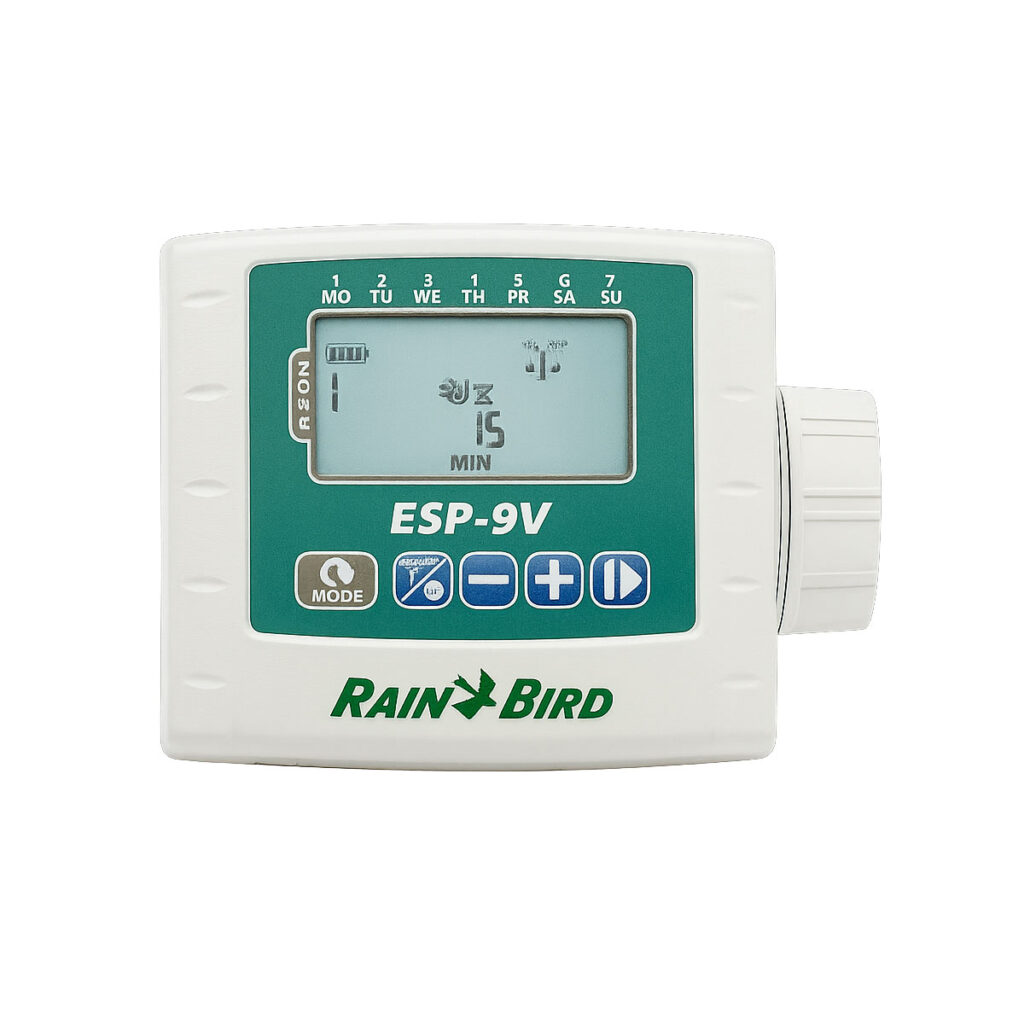
At the simplest level, an automatic irrigation system performs a repetitive task by watering plants at fixed times, without sensors or environmental feedback.

Level 2 – Homes with communicating intelligent objects

At this level, soil moisture sensors can indicate when a plant needs water, but irrigation still happens in a mostly autonomous and isolated way.

Level 3 – Connected homes

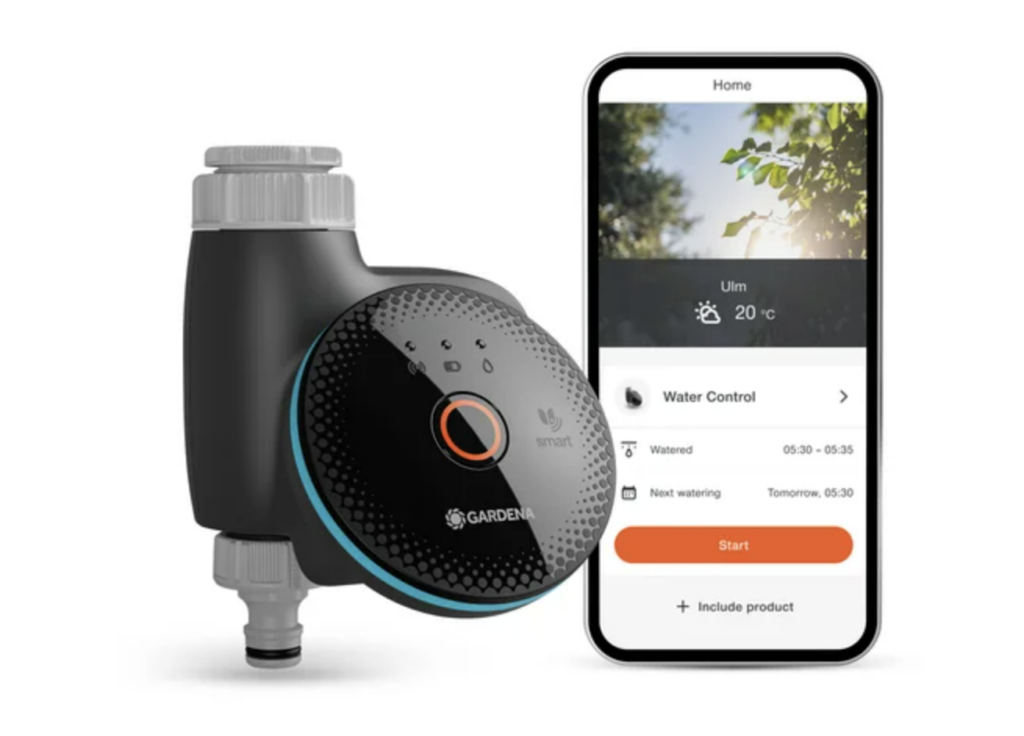
Sensors and irrigation actuators coordinate with each other, and users can control plant watering remotely, for example through a mobile application.

Level 4 – Learning homes

At this stage, irrigation systems can self-regulate by analyzing data over time, adapting watering patterns based on user behavior, climate conditions, and seasonal changes.

Level 5 – Attentive homes

In the most advanced systems, the activity and location of people and objects are constantly monitored. This information is used to anticipate needs, such as advanced sensors that monitor plant conditions and provide real-time feedback, automatically adjusting irrigation, light, and environmental conditions.

[DesRes 1] Agile_x_SelfCheckout No. 4: Creating User-Centred Strategies that align with Business and IT Goals in an innovative Agile Environment – Focus Cash Registers

This week I have come across a paper by Christina C. Mendat and Christopher B. Mayhorn [1] from the North Carolina State University outlining Human Factors as well as ergonomics in terms of self-checkout registers. Even though the entry discusses the topic within 3 simple pages only I could get more insights and tangible data on the topic that opened new possibilities and perspectives to me. With that being said, I would like to mention that the paper was published in 2007. I’m aware that this was almost twenty years ago. Needless to say, it has to be noted that Self-Checkout Registers gained popularity in American supermarkets, a long time before they did so in Austria.

The most surprising fact that I found out comes from a historic point of view. It turns out that libraries were the first enabler for what we are now referring to as self-checkout registers. It allowed librarians to focus more on e.g. reorganizing the bookshelves instead of making sure the counters are frequently occupied.

Furthermore, the paper discusses the top issues related to self-checkout cash registers, uncovered through a survey. The top two issues are:

  • Barcodes and scanning: certain products are more difficult to scan than other products*
  • Chain reactions: a lot of the participants mentioned that they have experienced slower customers in front of them, which resulted in them having to wait longer.

*simply judging from what I’ve seen in my personal daily life, there has been a lot of improvement on this topic. Let alone the fact, that certain stores nowadays are known for being so fast, you might not be able to catch up with putting the purchased items into your shopping bag. I’m interested

Planning a research plan & focus groups

While these issues, that have already been uncovered, are of course of relevance, my goal is to uncover more insights, specific to Austrian supermarkets and costumers.

I’m planning on doing first observations in different supermarkets. With the Christmas holidays ahead though, I fear that this might not be as easy, as the stores are sometimes packed to the limit.

Furthermore, I will be using the informal gatherings with friends and family during the holidays to open conversations concerning cash registers. I might already conduct a first survey or focus group (at least to test the first draft of questions).

A few thoughts on accessibility

Additionally, I am planning on having a discussion about this topic with an ambulatory wheelchair user to get a first grasp of her challenges.

Outline of the first research questions/goals:

  • What are the biggest obstacles when using a self-checkout register in a supermarket? How does it differentiate between different supermarket chains?
  • What needs to be considered in terms of accessibility? What’s the general experience of wheelchair users in a supermarket?
  • Did the process of paying via the self-checkout register ever take longer than paying via the typical checkout lane. if yes: how did this inconvenience happen?
  • Technology of Scanning **

** this topic is simply interesting for general purposes

References

[1] Mendat, Christina & Mayhorn, Christopher. (2007). An Evaluation of Self-Checkout Systems. Proceedings of the Human Factors and Ergonomics Society Annual Meeting. 51. 1011-1014. 10.1177/154193120705101703.

Biophilia and Technological Nature: How Technology tries to Fill the Gap

When we talk about biophilia, we refer to the definition proposed by the Biophilic Society:

However, recent technological advances, such as virtual and augmented reality, can offer benefits that are similar to those gained from direct contact with nature. The technologies that mediate, simulate, or enhance our experience of nature are commonly called technological nature. Virtual reality, for example, can help people experience nature when access to real natural environments is limited. Recent studies show that older adults who used VR nature experiences felt less socially isolated, had a better mood, and reported improved overall well-being.

This raises an important question:

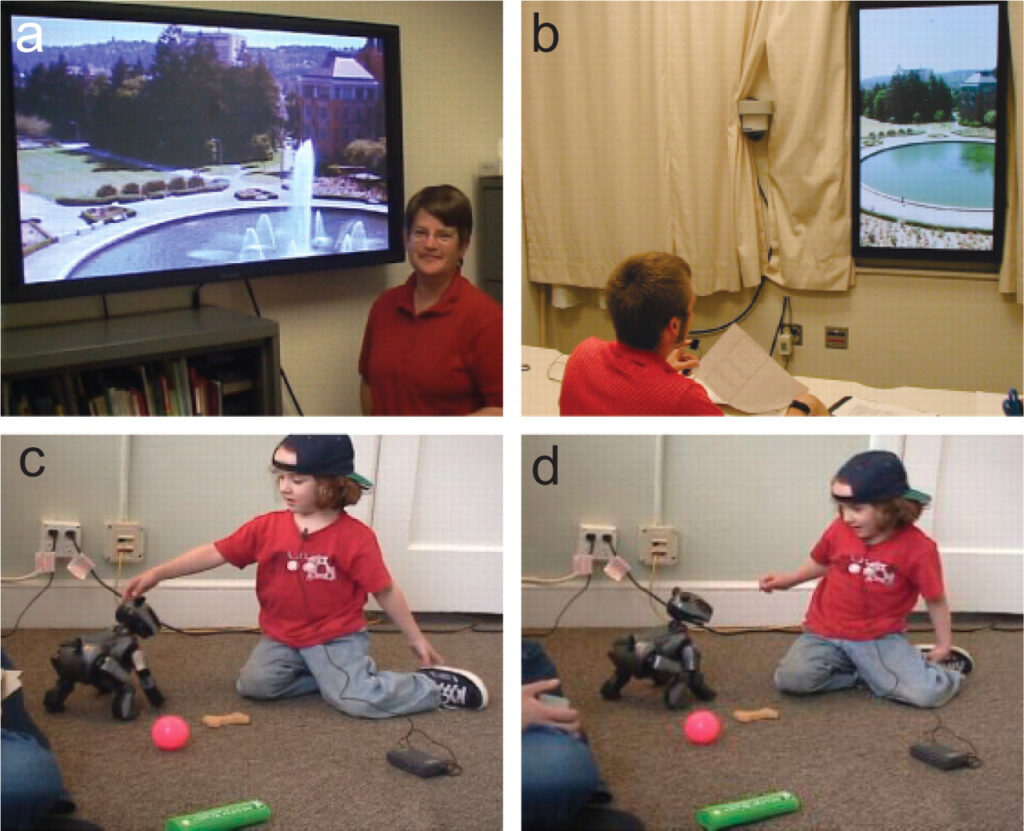
Important insights into both the strengths and limits of technological nature come from research by Peter Kahn and his colleagues. In one study, large plasma screens showing real-time natural scenes were placed in windowless university offices. Over 16 weeks, participants reported better psychological well-being, improved cognitive performance, and a stronger sense of connection to nature. This suggests that a digital view of nature can be better than having no nature at all.

However, a second study revealed clear limitations. When researchers compared a real window with a nature view, a digital window showing the same scene, and a blank wall, only the real window helped people recover from stress more quickly. The digital window did not perform better than the blank wall. Overall, these results show that technological nature can be helpful when nature is absent, but it is not as restorative as real nature [5].

Further research confirms that technological nature cannot fully replace direct contact with the natural world. Without physical and multisensory experiences—such as wind, temperature, and natural smells—these digital experiences can become repetitive over time. Easy access to technological nature may also reduce people’s attention to real nature and lead to a simplified idea of what “nature” is [3].

This is important because current VR nature experiences cannot provide all the benefits of real nature. Some of these benefits depend on natural biochemical processes that technology cannot recreate. Relying too much on technological nature may also reduce spontaneous social interactions in natural spaces, which are important for well-being and social connection.

Technological nature is a useful resource in a world where access to real nature is often limited or uneven. However, research shows that it cannot replace real, living nature. Instead of asking whether technological nature can take the place of real nature, we should focus on how it can work together with it and support it.

Blog Post 5: The method of observation

Planned observation

Since I’m travelling by train a lot myself and I planned on a trip from Graz to Hamburg via train, I wanted to use the opportunity to conduct some research.

For that, I chose the method of observation, which is an effective and easy to realize way of gathering information and qualitative data. To do that effectively, the preparation beforehand should consist of defining goals, choosing the right setting without causing disruption and prepare tools for documentation. First, the research objective must be defined. For the project, the focus point is the observation of people’s actions in the surrounding of a German train station and also the physical design of those spaces. Additionally, the research goals must be defined under consideration of the research objective. There the goals are to find out more about user behavior, especially at train platforms, observe spatial organization and how the stations are designed, how signage systems are incorporated and used and lastly where potential pain points might lay.

Next is the selection of the right setting. Due to my travel plans my locations are going to be the train station in Augsburg and Hamburg. Those two match the description of German train stations and bring the advantages that I get to conduct my observations in two very different setting in size and location, and I might be able to compare my findings afterward. Since there are a lot of people going to be at the setting, the selection of participants won’t be necessary. Conducting the observations with not knowing participants will provide realistic and diverse output that reflects the real-life situation.

The last step is to plan the observation and to record data. The date for the research will be my travel days and to document my findings I plan to take notes both in physical and digital ways, but also to take pictures of the locations and their design and layout. After my trip has ended, I’m going to analyze my results and see if I can generate some general assumptions that will help my in the further course of the project (Williams, 2025).

Information Gathered

Through my research on the topic of observation I’m now able to conduct this method usefully and intentional to gather primary data that I can use for the further stretch of the project.

Next Steps

The next planned step is to conduct research by observing the train stations in Augsburg and Hamburg and documenting my findings.

Reference

Williams, B. (2025). Step-by-step guide to conducting observational research. Von Insight 7: https://insight7.io/step-by-step-guide-to-conducting-observational-research/ abgerufen

Communication in the air: An observational study 

For the last blog post, I conducted interviews to figure out aerialists’ attitudes toward learning body awareness. For this one, I would like to see their behavior rather than their attitude, in order to be able to compare and contrast what they say versus what they do. 

This time, I decided to make a video blog (vlog) for this week’s entry, chronicling the different ways that teachers and students have tried to explain new figures to me (the constant participant in all of this). 

Own video. 

In the video, you can see how the Slovenian teacher, who focuses on making the figures look pretty and performative, moves my body in order to try to make me understand how I should move. This is directly contrasting what the Ukrainian teacher does, since she only uses verbal input while I’m in the air (since it’s also higher up). You can also see how the lack of a standardized language makes it hard to understand each other. In the video, I translate literally the name of one movement in Spanish (“camiseta” – “shirt”) and the teacher doesn’t understand me. For context, I had to learn the English names for some basic moves (“hip key”, which is used in the video, was not a word I knew before coming here; I called that move “tijera” or in English, “scissor”).  

In the video, you can also see how the learning process in silks doesn’t go in incremental steps. Since it’s in the air, people have to try out the full figure immediately. Unlike in silks, in gymnastics, you can see that there’s different prerequisites before fully trying out a new move. This helps in understanding what the body must do to successfully complete it without help (even though I still haven’t been able to figure out the 2nd move). 

What’s not shown in the video, however, is that throughout the past few weeks’ class observation, I’ve noticed a pattern present in novice explainers (read: when it’s not the teacher, but another student explaining a figure or correction). Usually, they would say “left hand”, and when they see it’s the wrong hand, they correct it with “no, the other left”. If it’s a move where the person must go into the silks or wrap around them, and the apprentice doesn’t do it correctly, novice explainers usually say “no, the other way”, even when there’s many “other ways to wrap around (sometimes, novice explainers go as far as to say “no, the other other way”). When asked about this, they all agreed that learning new skills in aerial silks is half about trial and error in learning how their body is supposed to move, and half about trial and error in learning how to communicate the steps from person to person. 

– 

Source: own observation. 

2. ADHD – More than just a lack of concentration

The Paradox of Procrastination

A lot of people think ADHD is just the little boy that can’t sit still in the classroom and can’t focus on the lecture. But in reality there is so much more than that.

I have ADHD myself, which is probably also why I find the topic so fascinating. I speak from experience here – the best example is the publication date of this blog post (Number 2), which was long overdue.

Why didn’t I do it? I definitely didn’t forget. On the contrary: I thought about it constantly. The knowledge that I hadn’t written the post yet stressed me out. I worried much more than if I had just done it. But I just couldn’t start.

It’s often difficult to explain this state whether to myself or to others. I rationally know that a task needs to be done, but I’m simply unable to begin. The good news: There is a scientific explanation. The problem is not laziness or lack of motivation, but rather procrastination and Executive Dysfunction.

The brain of people with ADHD simply works differently. Three main factors from neurobiology and cognitive functions are responsible:

1. The Dysregulated Dopamine System: The Kick Is Missing

Dopamine is an important neurotransmitter responsible for motivation, reward, and drive. In ADHD, this system is dysregulated. This means the kick is missing: tasks that are perceived as too boring, too complex, or associated with a distant reward lead to insufficient dopamine release to provide the initial impulse to start

2.Executive Dysfunction: The Freeze Mode

The Executive Functions in our brain are essentially the control centre, responsible for planning, organizing, and initiating action. When the ADHD brain faces a huge project, it shuts down. This leads to a mental block and absolute overwhelm. It feels “frozen”, also known as ADHD Paralysis. You want to, you must, but you are emotionally and cognitively paralyzed. The fear of making mistakes or not completing the task perfectly can intensify this paralysis.

3. Time Blindness

The difficulty in perceiving and estimating time realistically is very challenging for the ADHD brain. Dr. Russell Barkley, a leading ADHD expert, popularized the concept Time Blindness. It’s is a neurological impairment in time perception. As a result, individuals with ADHD feel stuck in the “Now,” which leads to unpunctuality, avoidance behavior, and an underestimation of task duration.

The Consequences

This might be annoying when writing a blog post, but this behaviour can also have serious consequences, such as:

  • Health Neglect: Failing to follow medication schedules or postponing doctor’s appointments, which can worsen conditions.
  • Financial Problems: Like failing to file tax returns, not paying bills, or resulting job losses and dropping out of studies.

But why does it eventually work after all?

Because of the Deadline Dopamin Turbo.

The stress generated by extreme time pressure just before the deadline massively releases adrenaline and cortisol (stress hormones). These stress levels then generate a Dopamine Kick. This sudden, powerful, emotional kick is often the only way the dysregulated dopamine system enters the working mode. The body unconsciously seeks this strong stimulation to become capable of action at all.

The Cost: Chronic Stress

Sure, the turbo works, but at what price? The constantly high stress level is harmful. The following problems can occur:

  • Brainfog, because high cortisol levels can damage the memory center, the hippocampus, which for example, explains the memory problems.
  • Psychological Consequences, this is also an emotional burden due to constant stress, guilt, and anxiety, which can lead to depressive moods and anxiety disorders.
  • Physical Consequences, it can also lead to physical consequences such as sleep disorders, headaches, and circulatory problems.

The whole thing is a vicious cycle, as avoidance leads to more stress, which in turn reinforces procrastination.

Strategies

ADHD procrastination is not a character flaw but a neurological symptom. The Deadline Turbo is a short-term survival strategy, but not a solution.

What helps? There are various strategies that can assist:

  • Body Doubling, that means working alongside someone else.
  • The use of gamification.
  • Breaking down tasks into small steps.
  • Routines, exercise, and mindfulness.
  • External aids: Like timers, to-do lists, and visual planning.

However, there is one big catch: Although we know the strategies, the application often fails due to ADHD itself. Why? Because the Executive Dysfunction that stops us from working also blocks the ability to even begin with the strategies. You essentially have to motivate yourself to be motivated. A frustrating vicious circle.

These were just a few examples of the challenges people with ADHD can face. There are other symptoms such as internal restlessness, lack of focus, distractibility, forgetfulness, disorganization, impulsivity, or emotional dysregulation.

And ADHD is just one type of Neurodivergence.

References

  • Barkley, R. A. (2015). Attention-Deficit Hyperactivity Disorder: A Handbook for Diagnosis and Treatment.
  • McEwen, B. S. (2017). Physiology and neurobiology of stress and adaptation: central role of the brain.
  • Volkow, N. D., et al. (2009). Dopamine in ADHD: The Role of Dopamine Transporter and Receptor Availability.
  • Rozanski, A., et al. (1999). The epidemiology, pathophysiology, and management of psychosocial risk factors in cardiac practice: the emerging field of behavioral cardiology.
  • Dhabhar, F. S. (2014). Effects of stress on immune function: the good, the bad, and the beautiful.

Note: This text was developed with the assistance of artificial intelligence for research purposes and to refine the linguistic clarity and flow of the final draft.

Blog Post 4: Jakob Nielsen’s Ten Usability Heuristics

As mentioned in the previous blog post, I decided to examine my project through the lens of established UX heuristics. I chose Jakob Nielsen’s Ten Usability Heuristics and began interpreting them in a way that makes them applicable to my topic:

1. Visibility of system status
A system should keep users informed about what is happening through timely and appropriate feedback. In physical spaces, this can be implemented through clear, easily visible signage that shows users where they are and how they can move to their desired location. Real-time updates, such as waiting times, delays, and recent changes, should be displayed clearly on timetables, information screens, or digital boards to keep travelers constantly informed.

2. Match between the system and the real world
A system should communicate in a way that feels familiar and intuitive to users. This involves using established mental models to create environments that are easy to interpret. In the real world, this can be achieved through concise text, clear instructions, and comprehensible audio announcements. Additionally, pathways, iconography, and layout patterns should align with users’ expectations of how public spaces typically function.

3. User control and freedom
Users should be able to easily undo mistakes or exit processes when necessary. This can be interpreted quite literally in real-world environments: users need multiple accessible and clearly marked entry and exit routes. The ability to navigate freely and safely through a space is essential for maintaining a sense of control.

4. Consistency and standards
Consistency reduces cognitive load by allowing users to apply previously learned knowledge to new situations. In spaces, this may mean maintaining similar structures, layouts, and visual identities across different areas of a environment or even across multiple locations. Consistent color schemes, typography, signage design, audio cues, and general spatial organization help create a cohesive and predictable experience.

5. Error prevention
Systems should anticipate common errors and be designed in ways that reduce the likelihood of users making them. In public places, implementing this heuristic can be challenging due to the diversity of users and the unpredictability of human behavior. Nevertheless, strategies such as well-marked pathways, abundant signage, and clear audio guidance can help. Visual guidance that subtly limits or directs user choices may also prevent confusion or missteps.

6. Recognition rather than recall
Users should not have to rely heavily on memory. Instead, relevant information should be visible or easily accessible. Implementing this into physical spaces, may involve a thoughtful combination of visual, audio, and tactile cues placed strategically to support user decision-making. Careful placement is essential: the goal is to make important information visible while avoiding overwhelming users with unnecessary details.

7. Flexibility and efficiency of use
Systems should cater to users with varying levels of skill and experience. For physical environments, one might consider shortcuts or direct routes for experienced users, while providing clearly signposted pathways and supportive instructions for newcomers, or people with disabilities. This dual structure ensures efficient navigation for all.

8. Aesthetic and minimalist design
Design should avoid unnecessary complexity and visual clutter, highlighting only essential information. This heuristic is highly relevant to physical UX design. Elements such as color, lighting, object placement, spatial layout, and even sound can contribute to an environment that is visually calm and easy to interpret. Within signage systems, information should be organized hierarchically, so users can quickly identify the most important elements.

9. Help users recognize, diagnose, and recover from errors
When errors occur, information about them should be clearly communicated. In real-world scenarios, this could involve visual and audio feedback that describes the problem in plain language and offers instructions for resolving it. The messaging should be constructive, explanatory, and free of blame, helping users navigate disruptions confidently.

10. Help and documentation
Documentations might be necessary for complex systems. Make help resources easily accessible, searchable and focused on helping users accomplish their goals. While extensive documentation is not always realistic in physical environments, support should still be available. Digital systems, help points, and on-site staff can provide accessible and goal-oriented assistance to users when they require additional guidance (Nguyen, 2025).

These interpretations provide a foundation for adapting Nielsen’s heuristics to physical spaces. The next step will be to refine these concepts and apply them specifically to the context of train stations.

Information Gathered

By going through the heuristics step by step I’ve seen how many different challenges can appear in physical spaces and how deeply considered solutions have to be. This preparation will make it easier in the future of this project to apply the heuristics to actual challenge.

Next Steps

My next steps will focus more directly on German train stations and platforms. This will include investigating user behavior, spatial organization, signage systems, and potential pain points specific to railway environments. Based on this research, I aim to define the primary areas of interest for the project and identify opportunities for targeted design interventions.

References

Coughenour, A. (2025). User Experience in Physical Spaces. Von Orbis Cascade Alliance: https://www.orbiscascade.org/programs/dux/documentation/user-experience-in-physical-spaces/ abgerufen

Dengiz, C. (10. February 2024). The power of Physical User Experience Design (PUXD). Von LinkedIn: https://www.linkedin.com/pulse/power-physical-user-experience-design-puxd-cansu-dengiz-zv9pe/ abgerufen

heurio. (2023). Nielsen’s 10 Usability Heuristics. Von heurio: https://www.heurio.co/nielsens-10-usability-heuristics abgerufen

Kaarwan, T. (18. June 2025). How Does UI-UX Design Transform User Experience in Physical Spaces. Von Kaarwan: https://www.kaarwan.com/blog/ui-ux-design/ui-ux-design-transform-user-experience-in-physical-spaces?id=541 abgerufen

Nguyen, S. (05. June 2025). Applying Jakob Nielsen’s 10 Usability Heuristics for Better UX Design. Von DevBlog: https://shiftasia.com/community/applying-jakob-nielsens-10-usability-heuristics-for-better-ux-design/ abgerufen
How an Immersive (3D) Mixing Bottleneck Inspired Me

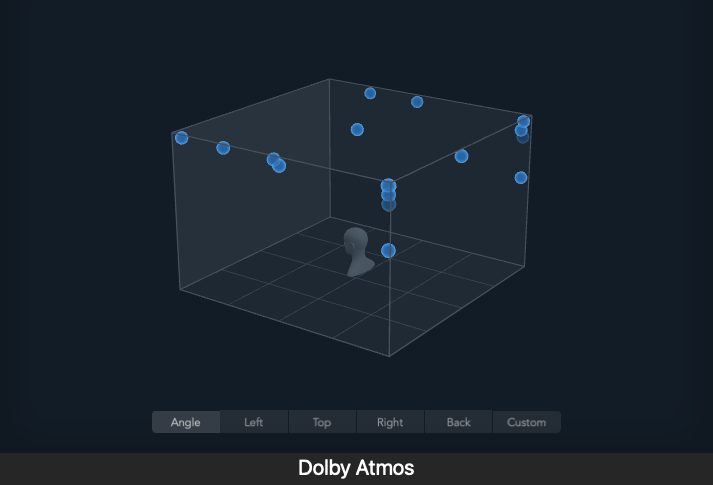
After a decade of producing electronic music, I understood that a great mix is about creating a sense of space. When I transitioned into object-based audio (like Dolby Atmos), I encountered a paradox: While I could place a vocal perfectly in 3D space using precise coordinates, the next step getting the reverb right felt like stepping back into the Stone Age.

The Bottleneck of Spatial Incoherence

In spatial mixing, we use digital metadata (x,y,z) to define an object’s location. However, to make that object sound physically plausible far away, close, or high up the Reverb Send Level must be manually adjusted to match that coordinate.

I discovered that this manual adjustment was the core problem:

  1. Inconsistency: What sounds right in Scene A might be wrong in Scene B. Maintaining spatial realism across a two hour film or album tracklist became a massive, repetitive task.
  2. Subjectivity: The decision relied entirely on my ears, not physics. This meant spending creative hours tweaking parameters that should be calculated, not guessed.

The Revelation: If the “correct” reverb level is a function of the sound’s position and the room’s acoustics, it is an objective, solvable problem.

The Solution Concept: We could use AI (Deep Learning) to perform this complex, repetitive DRR calculation instantly. My thesis idea was born: Train an AI to map a vocal’s characteristics and its 3D position directly to the DRR-derived Reverb Send Level.

This project is the culmination of my journey turning creative frustration into a rigorous technical solution that aims to inject speed, consistency, and scientific backing into the art of spatial vocal mixing.

Overcoming the body awareness problem through empirical means: the layman’s approach 

In the past blog post, I talked about scientific studies that proved that externalizing the internal sensations of proprioception through sound and sight helped increase athletic performance and artistic expression. 

However, this week, I decided to take a different approach to answering the question I proposed 2 blog posts ago: have there been experimental tests to try to overcome [learning body and silk awareness off the ground] in a different way? 

Instead of looking to scientific papers, I turned to my aerial silks colleagues, conducting informal group and individual interviews (n=10(+1) participants) that yielded interesting results. I asked them if they ever experienced the problem of trying to both communicate and understand body awareness and proprioception in a new figure, and what they empirically found to be solutions to this. 

One participant (female, 38, Austrian) said she had a lot of problem differentiating left from right (even in normal life). Since this participant knew how to sew, she created her own unitard she uses for training, in which one half of the body is blue, and the other half is red. She also created one for her daughter (female, 7, Austrian), who is also learning silks and has the same problem. The participant cited that both her and her daughter have found success with this method, as it’s easier to both see and communicate if they have the correct leg and arm placements when learning a new figure. 

Another participant (female, 36, Mexican) is a teacher, and says she takes magnetic bracelets to class. When she finds students struggling with body orientation, she gives these bracelets to them and asks them to put them on one side of their body. This way, when they’re up in the air, she can refer to left and right as “the side with/without the bracelet”. She also explains that in her 7 years of teaching, she has found that with every new student, she learns different ways of explaining the same figure, since everyone has their own understanding of their body in space. However, she mentions that since she’s very cautious, she makes sure that every student first feels comfortable doing new figures close to the floor, and then she tells them they can finally try them out higher up. Her teaching assistant (female, 24, Mexican) echoes this sentiment, and adds that when she herself learns new figures, she likes to analyze and experiment different ways to get in and out of it while she’s on the silk, rather than in theory outside of it. 

A second teacher (female, 33, Slovakian) had a completely different experience. In her words, some people just aren’t meant to be aerialists, and if they can’t learn through copious practice then maybe it isn’t for them. Her approach to teaching proprioception centered more around diligent practice and repetition rather than finding novel ways to teach, which she says has worked for her students. She also incorporates “floorial” (aerial on the floor) exercises at the beginning of her workshops, to increase artists’ body awareness and get them in tune with the silk.  

One student (female, 25, Austrian) said she would like to be able to have a video of the figure she’s referencing while she’s in the air, for example by projecting it on a wall. However, another student (female, 26, Austrian) said she wouldn’t like that, since she would still struggle with orientation if she’s upside down. This student also said she prefers communicating with references relative to her position (e.g. “the free leg” or “the upper arm”), instead of left and right. A third student (female, 23, Austrian) contradicted this sentiment, as she said, “my right leg will always be my right leg, and the upper/lower reference confuses me”. Both of these 2 last students, however, agreed that most of the time, while being in the air, they move one leg/arm slightly and ask, “this one?” to confirm if it’s the correct one. 

Two students (female, 33, Mexican; and female, 42, Mexican) echoed the same sentiment: they first watch the teacher do the figure, and then watch someone else. The first student (33-year-old) said she repeats the steps verbally to the teacher to confirm, while the second one said she likes to take a video of the demostration in order to watch it multiple times. The second student says, “When I’m on the silk, after the first two or three steps, I find it difficult to relate what I saw in front of me to what I have to do when I’m the one who’s tangled up. I take the steps I can and go back to watch a recording.” What’s also interesting to note is that this second student separates new figures into 2 categories: hard mental process and hard corporal process. She says, “When the physical corporal process is complicated and not just the mental one, then there are other challenges, which I usually address with repetition. Front balance, for example, I added to the preparations/warm-up to better position my hands, support myself, etc. The same goes for the double bracelet (unstandardized name).”’ 

Finally, a third teacher (female, 39, Ukrainian), while teaching a new figure, said “the first time you just do something, and then after you can figure out what to do.” This directly contrasts the teaching philosophy of the Mexican teacher interviewed, who is more methodical and splits up each figure into smaller steps, always on the floor, before allowing students to try something new in the air. 

– 

Source: own interviews.