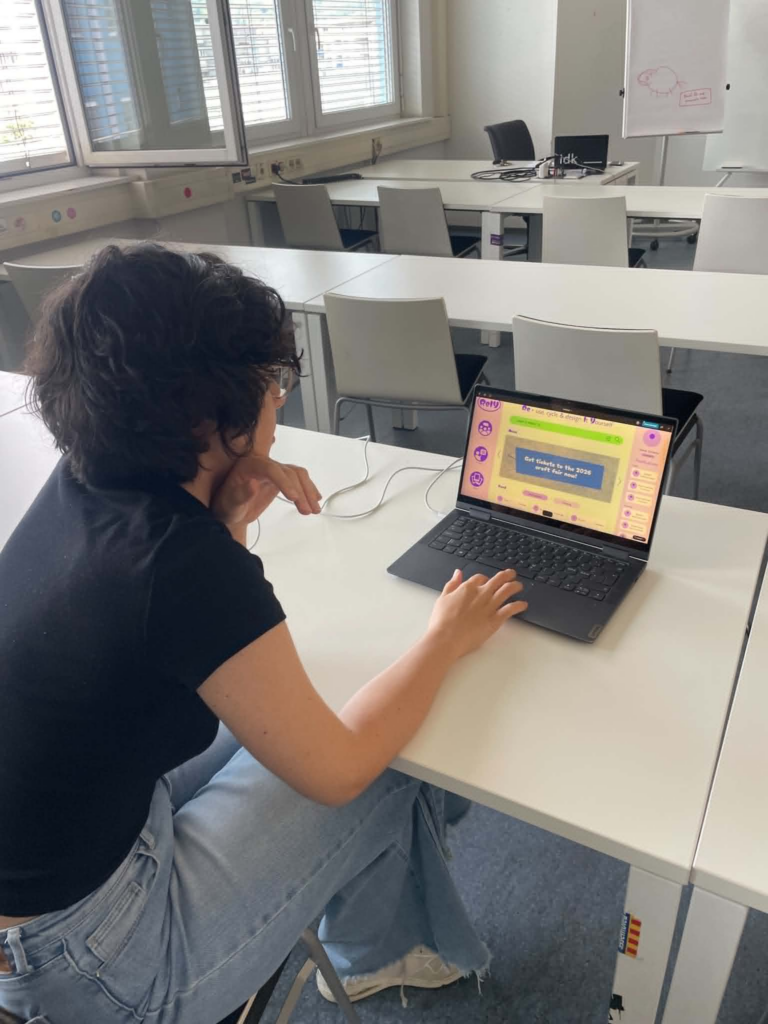
I had two user testings with my figma prototype in the last design and research class. Both of the testers had realy helpful feedback and knowledge I will use to improve my project.
First user test:
Comments:
“would like to have a filter style / esthetic eks. Cottage core etc for the gallery”
Should add a way to easily access your saved content
“Don’t really understand the headline in the home page, feels like a title when it’s actually an explanation”
Found the tutorial intuitive
Second user test:
Comments:
the forum page is not very intuitive, it does not make sense to have the comment displayed two times, and the one with more content being smaller. Maybe pop down or entering the comments in a new page would be better.
Maybe add more visualization to the tutorial
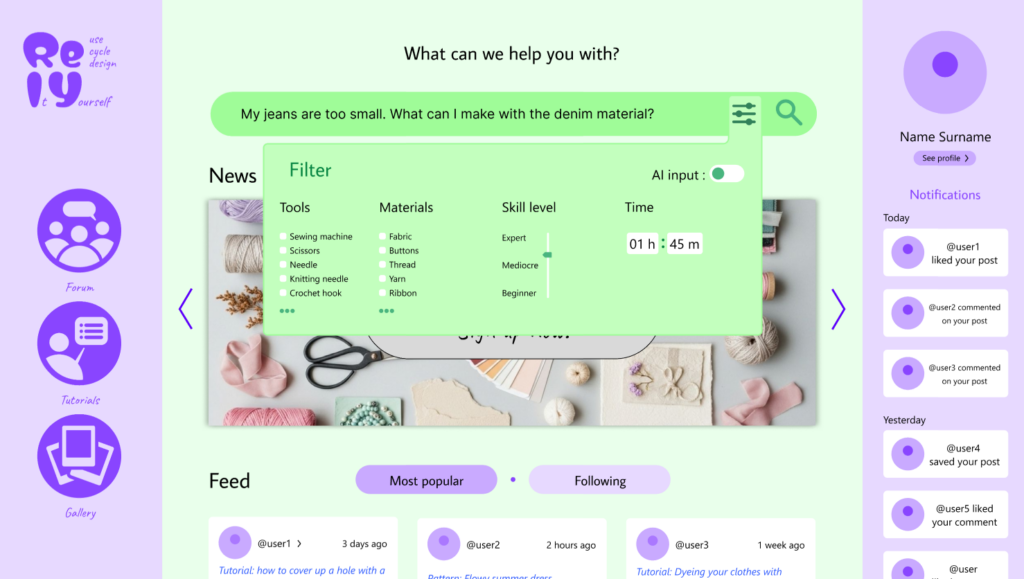
It can be smart to change the selection buttons in the filter from round to square, as the universal rule is that round means that you can only choose one and square means you can choose multiple.
For the time filter the clock interface feels unnecessary
Gallery and feed feels similar, maybe combine them?
Maybe stylize the headline in the home page more would make it more intuitive
Key takeaways from the testings:
changing bullet points from round to square when you can slect more than one
fixing the layout of the forum page
Try to make the headline more intuitive
Based on the feedback, I will prioritize making the prototype overall higher fidelity, redesigning the forum page to create a more intuitive user flow, improving the homepage headline to better communicate the platform’s purpose, and updating the filter components to follow established UI conventions. If I have time I will also try to add visual elememts to the tutorials, making saved content easier to find, and add aesthetic filters in the gallery to make inspiration easier to browse.
Updated wireframes:
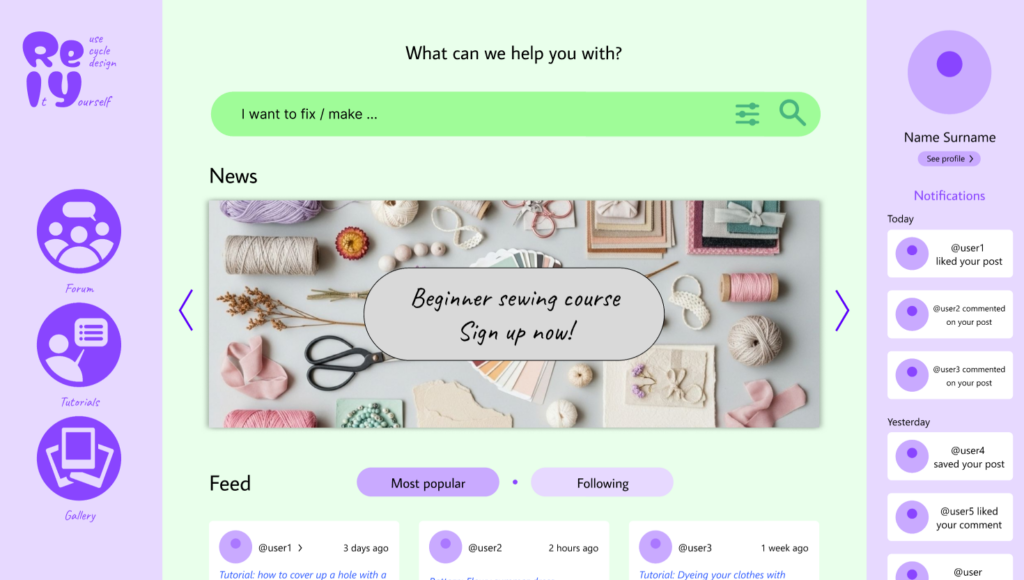
I updated the logo and the header on the homepage. I removed the description from the header and replaced it with “What can we help you with?” to make it clearer what the website is for. I also made the logo more descriptive by adding the “Re-use, Cycle and Design It Yourself” in the logo in the upper-left corner.
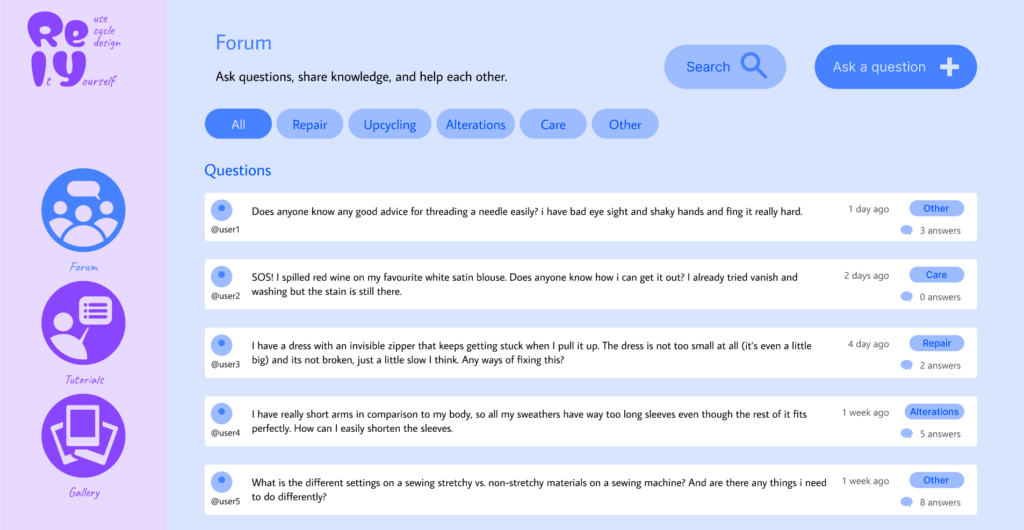
I updated the forum layout to at first display only the question, only showing the replies dropping down when clicked. This simplifies interface, making it easier for users to browse questions and access the information they are looking for.
I added a “saved” option in the header of both the Tutorials and Gallery pages to make it easier to acces.
Following the user testing session, several design improvements were implemented in the product design.
The main objective was to develop a smaller and more ergonomic design that could be placed directly inside a plant pot, while also creating a more playful and aesthetically appealing appearance.
Paper Protyping
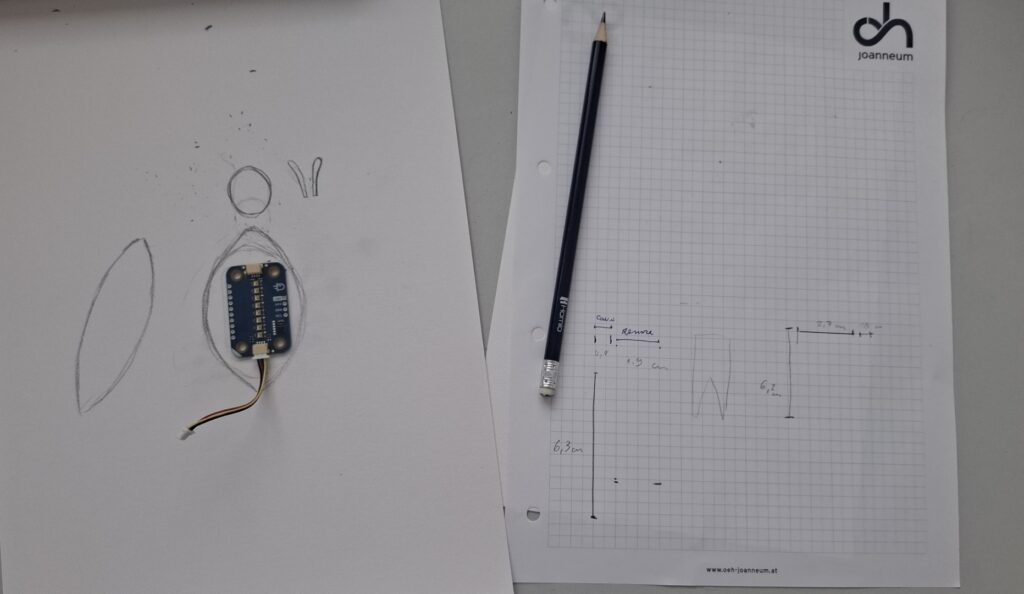
To explore new design ideas, a paper prototype was created. Using simple paper materials made it possible to quickly test different shapes, sizes, and configurations before investing time in more advanced prototypes.
Figure 1: Initial sketches and dimensional studies
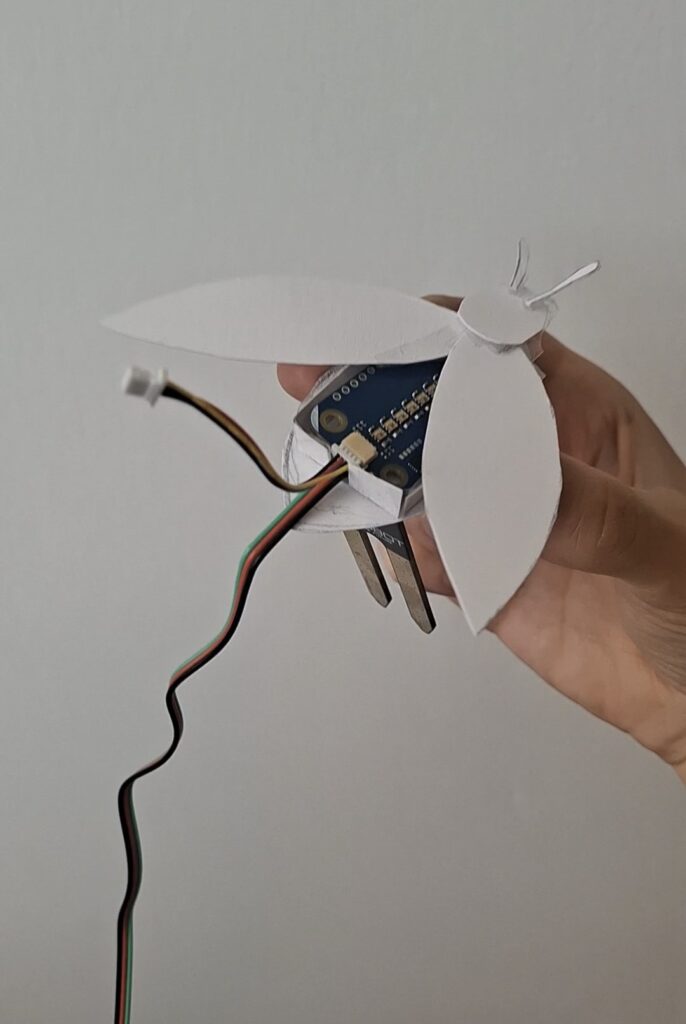
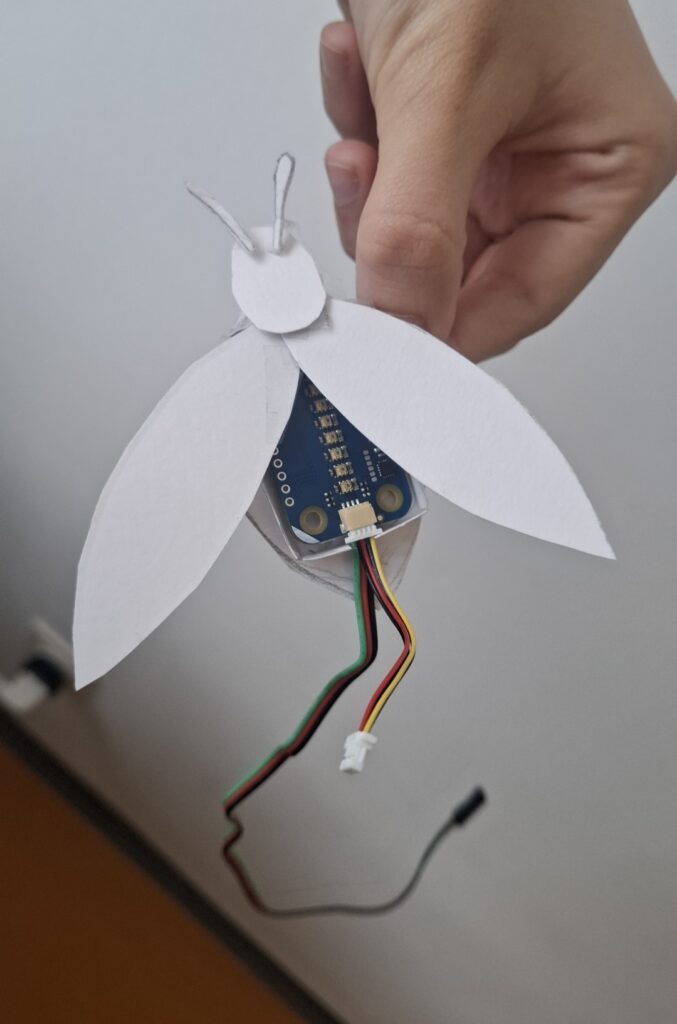
The chosen design was inspired by a firefly. This insect was selected because it naturally produces light, making it a fitting inspiration for the LED-based system. At the same time, fireflies are becoming increasingly rare in many parts of the world, creating a link between the project and environmental awareness.
Figure 2 &3: Final prototype design
While the first prototype takes the form of a firefly, the concept can easily be adapted into other nature-inspired shapes, such as a butterfly or a bee, allowing users to choose different aesthetic variations according to their preferences.
After the development of the functional prototype, the device was brought into the classroom for a user testing session. The objective of the test was twofold:
to evaluate the functionality of the system
to collect feedback on the overall design and user experience
Functionality Testing
The first goal was to verify whether the system could reliably measure soil moisture and provide visual feedback through the LEDs.
The results were very positive. During all testing sessions, the system worked correctly and the code performed as expected. The sensor successfully detected changes in soil moisture, while the LEDs updated in real time.
Participants found the color transition easy to understand and appreciated the immediate feedback provided by the light.
Improvements
One important observation emerged during testing: the need to also indicate when the soil becomes excessively wet. Since, overwatering can be as harmful to plants as underwatering.
Design Evaluation
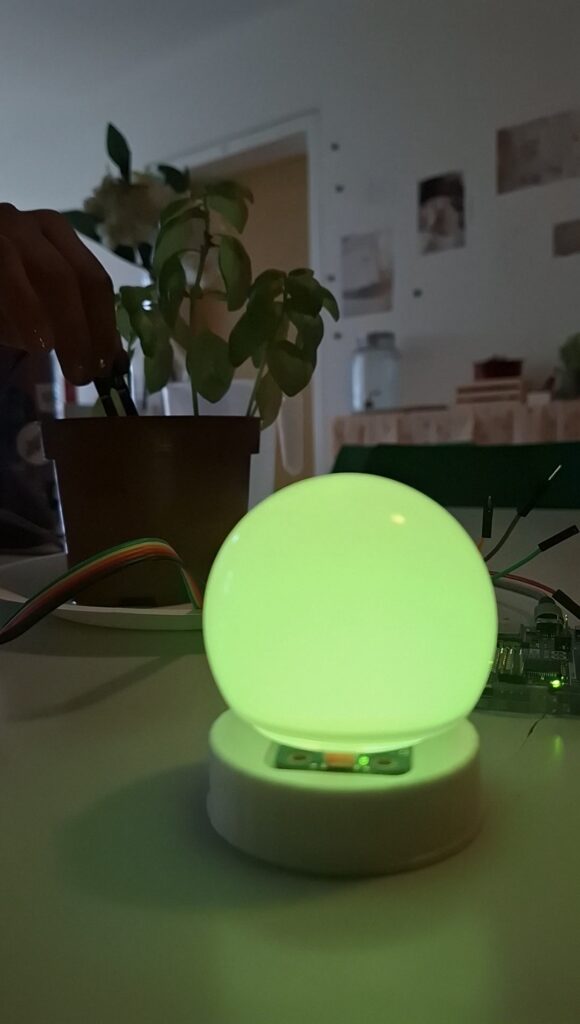
The second objective was to evaluate the physical appearance of the prototype.Participants generally appreciated the visual effect created by the colored light and the lamp-like shape
Figure 1: Bulb lamp design
However, feedback also suggested that the design could become more playful. So, to explore different possibilities, several alternative 3D-printed shapes were produced and tested. These elements could be positioned above the LEDs to create different visual effects and appearances.
Video 1: User testing with different 3D printed component
Although participants appreciated these variations, the most promising direction identified during the testing phase was a different approach: reducing the size of the sensor itself. A smaller sensor could be integrated directly into the plant pot and designed as an ornamental object rather than a visible technical component.
Conclusion
The user testing session confirmed the reliability of the system. However, the testing also highlighted the need to improve the design of the object by reducing its size and creating a decorative element that could be placed directly inside the plant pot.
The next step was to develop a functional version of the system, following the design developed during the first paper prototyping phase (see the articleConcept and Low-Fi Prototyping).
The device was imagined as a lantern-shaped object containing LED lights capable of changing color according to the moisture level of the soil.
Hardware Component
The prototype was built using the following components:
Arduino R4 Wi-fi Board
Soil moisture sensor
Modulino Pixels LED module
Power supply
Wi-Fi network connection
Circuit Setup
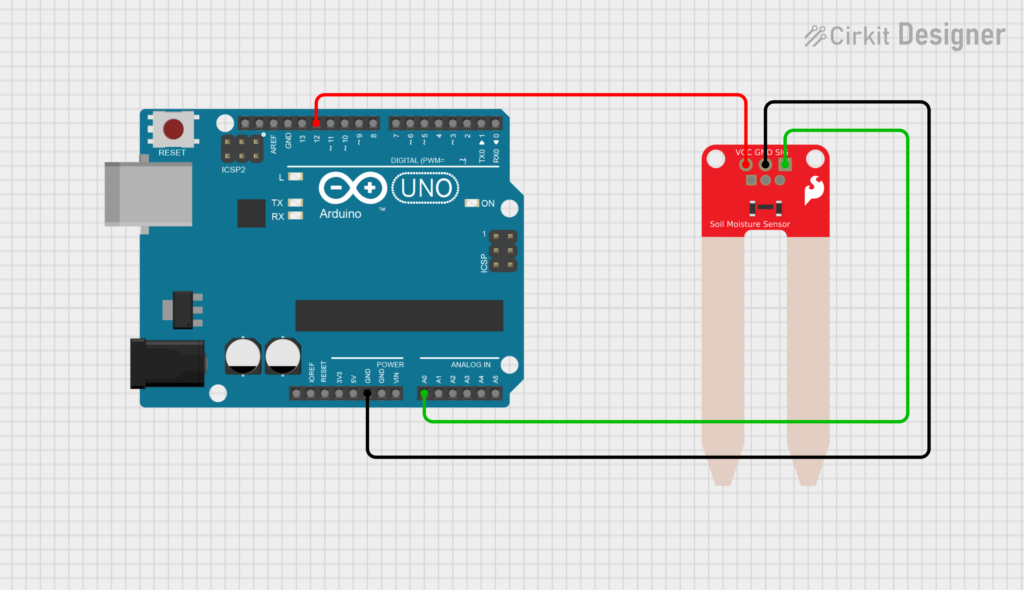
Figure 1. Circuit setup for the soil moisture sensor.
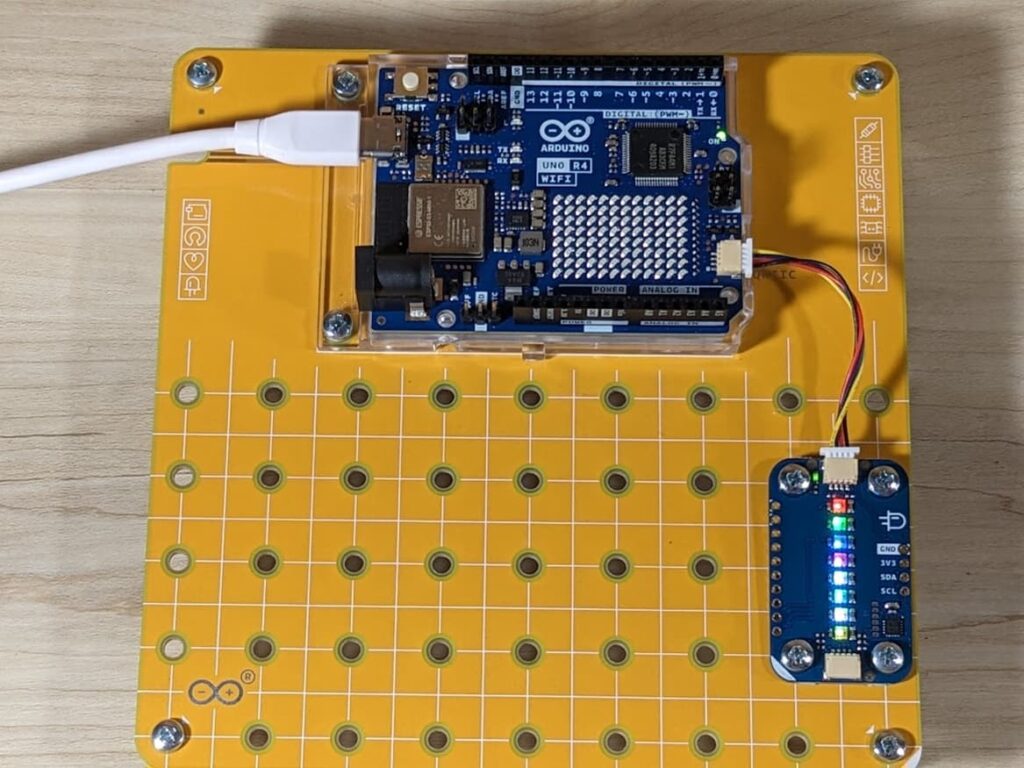
Figure 2. Circuit setup for the Modulino Pixels module.
The soil moisture sensor (Fig. 1) is connected to:
Analog pin A0 for reading the sensor value.
Digital pin 12 for powering the sensor.
The sensor is powered only when a measurement is taken. This prevents it from being continuously powered, which could accelerate electrode corrosion and reduce the sensor’s lifespan. It also helps reduce power consumption. In addition, The Modulino Pixels module (Fig. 2) is connected directly to the Arduino board
Code Structure
Soil Moisture Measurement
The soil moisture sensor monitors the condition of the soil: Every sampling cycle, the system activates the sensor, waits a short time for the signal to stabilize, reads the analog value, and then immediately turns the sensor off.
The measured value is converted into a moisture percentage using calibration values obtained during testing. In this prototype, a value of 0 corresponds to dry soil, while a value of 685 corresponds to wet soil. The result is then mapped to a percentage between 0% and 100%, making the data easier to interpret and use for the visual feedback system
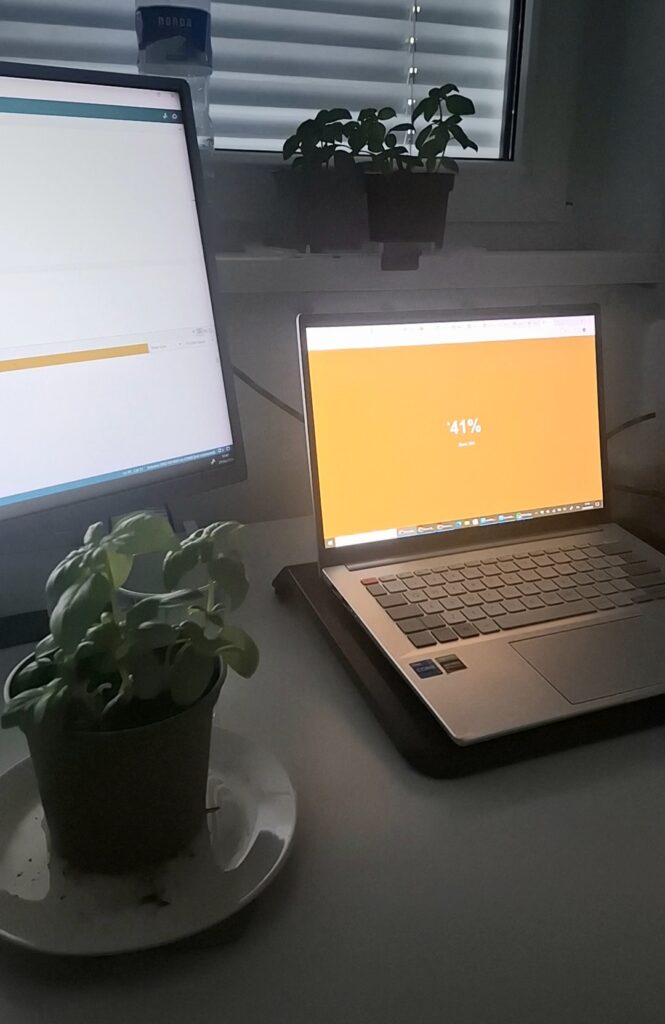
Figure 3. Real-time soil moisture reading displayed through the web interface, showing the current humidity percentage and sensor value
LED visualisation
After each measurement, the LEDs change gradually as the moisture percentage increases. When the soil is very dry, the LEDs appear red. As the moisture level rises, the colour progressively shifts through orange and yellow tones, eventually becoming green when the soil is sufficiently wet.
Video 1. LED feedback system setup
Wi-Fi Connection
The device connects to a local Wi-Fi network using the WiFiS3 library. Once connected, it starts a web server and creates a local address using mDNS. This allows users to access the device through a web browser by typing:
http://light-plant.local
without needing to know the device’s IP address.
Digital Interface
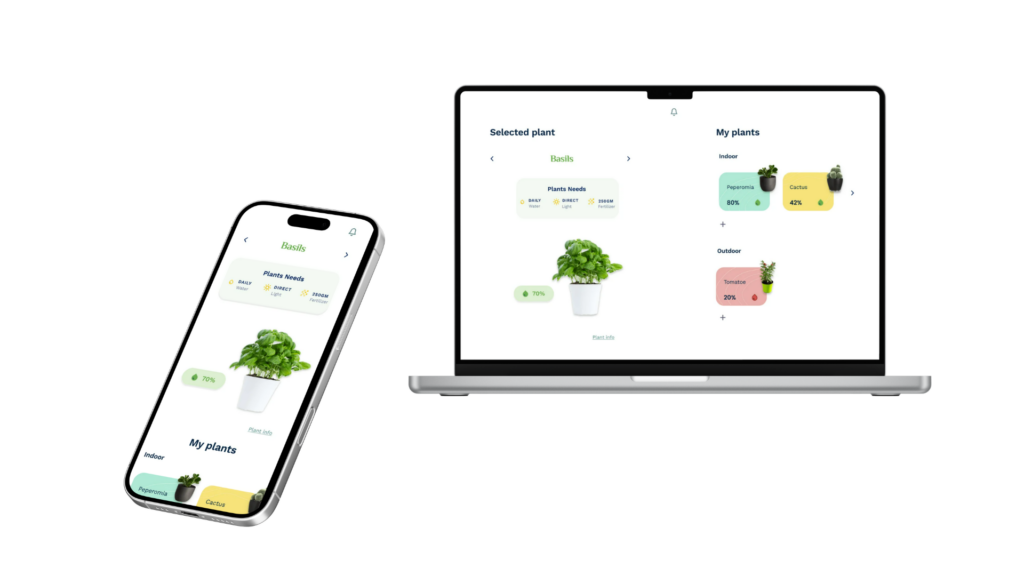
A responsive web application was designed to monitor and manage multiple plants. The home screen highlights the plant connected to the moisture sensor, displaying its soil moisture level together with its care requirements, including watering, light exposure, and fertilization. The app also contain an overview of all the connected plants, organized by indoor and outdoor categories, allows users to quickly monitor their status and access more detailed information.
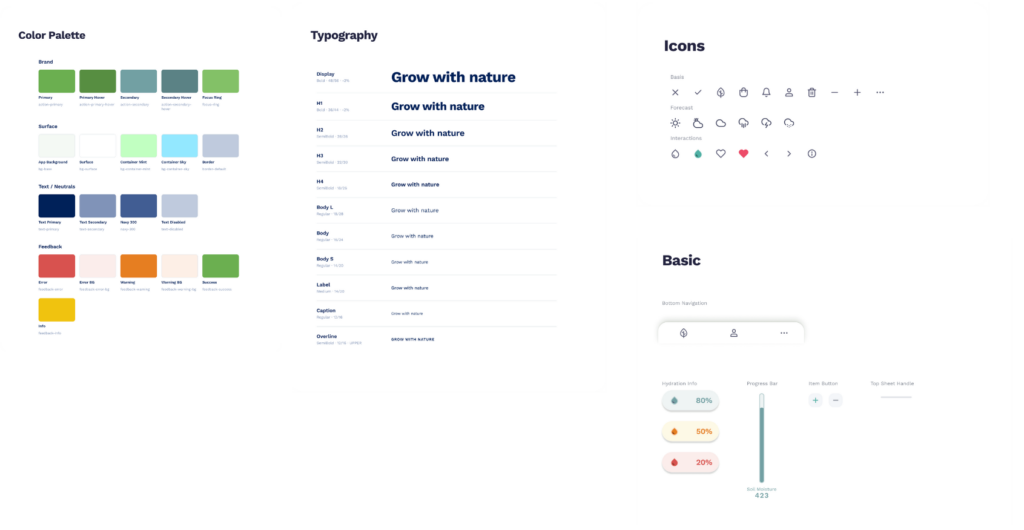
UI Design – Design System
Figure 4. Design system for the digital Interface inlcuding: color palette, typography, icons and basic components
S. E. Thomas [1] states that “interviews with experienced people are useful in UX research because they provide nuanced insight, reveal blind spots, and reduce assumptions when making design decisions.” Since I didn’t want to be in a vacuum I decided to do a short interview with a fellow UX/UI designer who is also currently studying Interaction Design while working in an AI startup.
Interviewee
The interviewee is a 28-year-old UX/UI designer working in a small startup here in Graz. Their role includes the full process from early research and structuring user flows to final UI design and prototyping for development handoff. This already shows how blurred the boundaries of UX roles are, where “designing screens” is only a small part of the expected responsibilities.
Do you use AI in your workflow?
When talking about AI in their workflow, they described it as something that increases productivity rather than replacing their actual design thinking. They use AI mostly for UX writing and for exploring variations when they feel less confident with wording. In that situation AI becomes a kind of assistant, but not something they would rely on for final decisions. They also mentioned that AI-generated interfaces (like from Figma Make) are “not to great” at the moment and therefore not ready to immediately go online.
From this answer it seemed that the final judgment still lies with the designer.
What is the future of UX/UI design?
When confronted with their feelings about the future of UX/UI design, the interview said that real creativity may actually become more valuable and that designers will still be needed for high quality and original interfaces but AI might take over more standardised or repetitive design tasks and typical products. This makes it clear that there’s a tension between efficiency and originality as well.
So when talking about the role of designers she believes that we won’t become “approval machines” or get replaced. Rather than becoming obsolete, the role seems to be shifting toward refining, filtering or curating AI-generated interfaces.
Designers vs Developers using AI
One of the more interesting points came up when comparing designers and developers using AI tools. The interviewee said that it’s okay for developers to use AI for user interface design but only if they are also trained in it. One can very easily spot when a design is made by a developer and it’s very obvious. It’s always functional but not always usable. This emphasised how usability isn’t the same as functionality and that disconnect comes from lack of knowledge. However, this goes both ways, as they mentioned that understanding both the tech and design side is a big advantage for designers.
They also mentioned that they haven’t had an experience like mine (with AI being used to replace her), because “the developers want to keep their jobs too”.
Conclusion/Reflection
The interview made the main tension in my research feel more tangible. AI can definitely speed up parts of the design process, but it doesn’t replace the kind of contextual thinking that human-centered design is built upon. At the same time, it didn’t feel like a simple story of replacement. It felt more like things are still changing and designers are figuring out how to work with these tools in practice, especially within a team. I found the “we want to keep our jobs” comment really interesting as well, because it also points to a sort of on-purpose reduced usage for the sake of job security.
For this post I wanted to sit down and do some good old fashioned literature and resource research. I want to understand what I’m talking about, start with building a bibliography and also research into resources I hadn’t thought of before as a junior designer because I didn’t have the time to sit down and research about my profession in such a way. I find research fun!
AI in the workplace
The World Economic Forum reports that UX/UI designers are among the fastest-growing professions globally, with a 45% projected growth by 2030, while Graphic Designers are on the decline . When it comes to generative AI, they state that it “enables users to interact with it as though they were conversing with a human, considerably reducing barriers to usage and the need for specialized technical knowledge”. It also states however, that “without appropriate decision-making frameworks, economic incentive structures and, possibly, government regulations, there remains a risk that technological development will be focused on replacing human work, which could increase inequality and unemployment.” [1].
What I took out of this is that AI isn’t something I can just ignore, especially as someone who works in close proximity of developers. But it also validates my feelings of uncertainty, especially with the lack of government regulations. I’m also conflicted about the ethics of it all as well considering the replacing human work part. This isn’t something I’m alone in.
I found another paper on this topic where the authors state that while AI helps new employees, when it comes to high-skill employees, they tend to see small gains in speed and small declines in quality [2]. This all the more proves that for good quality results, there has to be extra care taken when working with it.
DesignOps + Resources
As I’ve already worked for a while and am currently in my masters, I found it important to take my workflow more seriously and evolve. After some research into streamlined workflows I came across the term Design Ops (short for Design Operations). Kate Kaplan of the Nielsen Norman Group describes it as “the orchestration and optimization of people, processes, and craft in order to amplify design’s value and impact at scale.” [3].
The way I understood this is that it’s the “behind the scenes” teamwork organisation that helps designers do their best work. This means organising files, design systems and taking care of handovers between designers and developers. I only recently noticed just how messy and hard to navigate my file is now to developers, because it grew in size exponentially.
C. R. A. Nisslmüller provided this useful checklist [4] in his article about design system mastery which goes into the organisational value of Design Ops:
Are all scalable values defined as variables (no hardcoded values left)?
Are variable names systematic, semantic, and globally unique?
Are all variables type-correct (Number, Color, String, etc.)?
Is there a String variant for every variable that needs direct CSS or output?
Are composite/array variables grouped and documented?
Is accessibility covered (contrast, motion, focus, scaling)?
Are tokens versioned and audit logs maintained?
Is there a governance structure and regular review cycle?
Are APIs/automation in place for handoff and code sync?
Is AI/automation used for linting, doc generation, and compliance?
I also researched for Figma resources for easier implementation. I found this workbook on Figma’s community page which I’d like to try implementing at an appropriate time: https://www.figma.com/community/file/1246508925181507765
[2] E. Brynjolfsson, D. Li, and L. R. Raymond, “Generative AI at Work,” arXiv preprint, Apr. 2023. [Online]. Available: https://arxiv.org/abs/2304.11771
[3] K. Kaplan, “Design Operations 101,” Nielsen Norman Group, Jul. 21, 2019. [Online]. Available: https://www.nngroup.com/articles/design-operations-101/. [Accessed: Jul. 3, 2026].
I’d like to take this opportunity to do a reintroduction into the direction I’d like to take my masters topic after much deliberation. My bachelors topic had a lot to do with how it actually is to do a job as an UX/UI designer, since all the confusion around our profession was overwhelming even at the time.
Recently, something happened at my workplace where I had to take a step back ask myself that question all over again. The lead programmer fed my Figma design file into Claude Design, without asking me or even consulting with me. The design that came out wasn’t even bad! To be frank, I was quite shocked and I asked myself the question: “If AI can generate UI instantly, what even is my job anymore?
The Human Element: AI and the Evolving UX/UI Designer
The relationship between generative AI and product design is moving and changing constantly at a scary pace. Teams are adopting these tools fast in the name of efficiency and results. While these technologies really do make a difference in time spent, they often don’t take corporate design consistency and human experience into account. This thesis would explore how this would change the responsibilities, workflows and attitudes of the human designer within a team.
Research questions
How can AI-generated design outputs be responsibly reviewed and refined within a professional UX/UI workflow?
How can generative AI be integrated into professional UX/UI design workflows while maintaining human-centered design principles?
What does a healthy co-creation workflow look like between a designer, a developer and an AI agent?
How can UX/UI designers maintain a human-centered approach in AI-assisted design workflows?
How do we navigate the ethics of feeding proprietary design assets into models for quick corporate efficiency?
Design Relevance
This topic is very relevant to the design field, as it’s becoming a core part of most workplaces. In workplaces where UX efforts aren’t supported already, UI designers have essentially switched gears from tinkering in Figma and looking at every pixel for perfection, to kind of auditors or reviewers of AI-generated designs. This change is new and deserves addressing in the academic field, where we were taught that manual work that is now seems to be becoming obsolete (or is it?).
This isn’t just my own personal crisis, it’s an important moment for the entire design field. If we let non-designers or developers blindly push out pure AI outputs just because it’s faster, we’re gonna to end up with an internet full of broken, generic and not human-centered websites and interfaces. I actually really like the internet so I’d like to research and navigate this newfound blunder somehow.
Challenges
I see a lot of challenges with this topic, but the most obvious one to me is navigating questions of ethics. What’s ethical within design and workplaces, does it matter? Those theoretical or philosophical questions pique my interest, but are hard to visualise scientifically. Another challenge is finding a fair perspective myself with developers and business owners. Developers love AI because it helps with tedious manual coding tasks and bosses love it because of the efficiency and features going online faster and faster. I want to make sure that my point is helpful to future designers, because I do believe we’re still needed and not replaceable.
Upcoming Research Steps
My upcoming research steps are as follows:
guerrilla testing and/or interviews with my peers to gather primary data
keeping an “AI interaction diary“, where I write down my experiences with AI in the workplace and if they help me save or lose time in different contexts
researching papers and facts to help me out when writing the thesis in the future by building a bibliography already
developing the idea of the “governance framework” or something which acts as my work piece in the end
Personal Motivation
My personal motivation was briefly touched upon in the first two paragraphs of this blog and it’s all about my reality as a designer shifting. This topic would also compliment my bachelor’s thesis nicely, given it was all about the hard skills of from-scratch, manual UI design. It was focused on UI design and making a pretty prototype, but totally missed out on the UX part thanks to workplace constrains. This time I want to use my workplace experience and do it properly (with UX methods too) while ensuring that the human empathy doesn’t become “automated away”.
Relevant Institutions
The Interaction Design Foundation: This academic website is something I’ve used before, but now has a big “Get the skills that employers want most: Combine AI skills with timeless design expertise that AI can’t replace.” tagline.
Since my last blog post, I’ve been thinking about the issue of women and observation. What sparked this was an Instagram post I saw a few days ago that made me very angry. It was about a hidden camera found in the women’s restroom at a climbing park that had been used to film the private parts of women and girls. Some of the affected women banded together and turned the camera over to the police. An investigation against persons unknown is currently underway. Unfortunately, I couldn’t find the post later on, and there’s not much information about it online either. I found a similar case on the website of the Saxon Mountaineering Association [1], but I’m not sure if it’s the same one. I did some research on the legal situation for hidden cameras on toilets, because I remember that the post said something about the legal situation not being very clear, and found that in Germany § 201a StGB and § 184 k StGB apply for such cases [2].
§ 201a StGB constitutes a violation of one’s most private sphere and of personal rights through the taking of photographs [3]. The text in German reads as follows:
“ Mit Freiheitsstrafe bis zu zwei Jahren oder mit Geldstrafe wird bestraft, wer (1.) von einer anderen Person, die sich in einer Wohnung oder einem gegen Einblick besonders geschützten Raum befindet, unbefugt eine Bildaufnahme herstellt oder überträgt und dadurch den höchstpersönlichen Lebensbereich der abgebildeten Person verletzt (…)“ § 201a Absatz 1 StGB [3]
Which translates to: Any person who (1) without authorization takes or transmits an image of another person who is in a dwelling or a space specially protected from view, thereby infringing upon the highly personal sphere of the person depicted, shall be punished by imprisonment for up to two years or a fine.
§ 184k StGB refers to the violation of a person’s private parts through photography [4]. This is the original text from StGB:
“Mit Freiheitsstrafe bis zu zwei Jahren oder mit Geldstrafe wird bestraft, wer
1. absichtlich oder wissentlich von den Genitalien, dem Gesäß, der weiblichen Brust oder der diese Körperteile bedeckenden Unterwäsche einer anderen Person unbefugt eine Bildaufnahme herstellt oder überträgt, soweit diese Bereiche gegen Anblick geschützt sind,
2. eine durch eine Tat nach Nummer 1 hergestellte Bildaufnahme gebraucht oder einer dritten Person zugänglich macht oder
3. eine befugt hergestellte Bildaufnahme der in der Nummer 1 bezeichneten Art wissentlich unbefugt einer dritten Person zugänglich macht.
(2) Die Tat wird nur auf Antrag verfolgt, es sei denn, dass die Strafverfolgungsbehörde wegen des besonderen öffentlichen Interesses an der Strafverfolgung ein Einschreiten von Amts wegen für geboten hält.
(3) Absatz 1 gilt nicht für Handlungen, die in Wahrnehmung überwiegender berechtigter Interessen erfolgen, namentlich der Kunst oder der Wissenschaft, der Forschung oder der Lehre, der Berichterstattung über Vorgänge des Zeitgeschehens oder der Geschichte oder ähnlichen Zwecken dienen.
(4) Die Bildträger sowie Bildaufnahmegeräte oder andere technische Mittel, die der Täter oder Teilnehmer verwendet hat, können eingezogen werden. § 74a ist anzuwenden.“ § 184k StGB [4]
The first part is the one most relevant and translates to: Any person who commits any of the following acts shall be punished by imprisonment for up to two years or a fine: 1. intentionally or knowingly taking or transmitting, without authorization, an image of another person’s genitals, buttocks, female breasts, or the underwear covering these body parts, provided that these areas are shielded from view
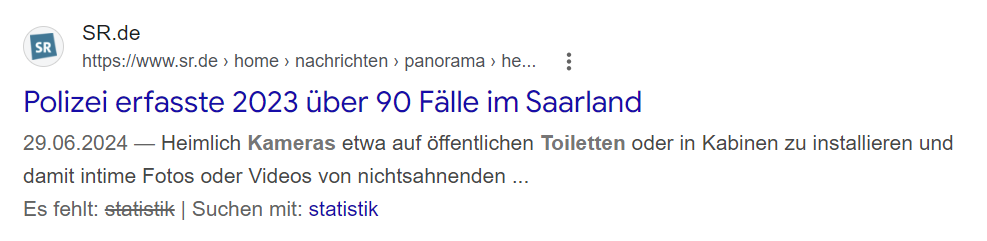
Unfortunately, incidents like this are not isolated cases. I couldn’t find any meaningful statistics on this, but the number of unreported cases is likely very high. During my Google search, I came across a headline stating that, according to the police, there were 90 cases in Saarland in 2023. Unfortunately, the page no longer loads, so I couldn’t read any more details about it. If you search for “camera found in restroom,” numerous articles about incidents in a wide variety of cities and facilities pop up.
1) Screenshot of Google search result
There are several websites online with tips on how to find hidden cameras. There are also some apps that can detect cameras via Wi-Fi or radio signals. In my opinion, however, it’s not fair to shift the responsibility onto the victims. The question is rather how the installation of hidden cameras could be prevented, what role design could play in this, and how restrooms could be designed overall to make women feel safer there. It might be helpful to identify and analyse interactions in a public restroom to identify pain points and determine how these interactions could be improved. Can public spaces ever feel truly private? In addition, it makes sense to examine the architecture of restrooms and identify which architectural elements facilitate the installation of cameras, so that measures can be determined to prevent this from happening. This also sheds new light on the question of responsibility. In the end, is it the architects of restroom facilities who are responsible for making it difficult to install cameras? Or does the responsibility lie with the operators? With lawmakers? Or with the manufacturers of miniature cameras?
Potential observation and the feeling of being safe
Observing people while they use the restroom reveals interesting parallels to the concept of the panopticon explained earlier. The most obvious aspect is the feeling of being constantly watched, which, on the one hand, constitutes a massive invasion of privacy (as was also the case with the original Panopticon, where inmates had no way to withdraw from observation). At the same time, however, this leads to a loss of the feeling of security. This, combined with the constant possibility of being watched, has a major impact on the behaviour of those being observed. The constant uncertainty can foster a deep mistrust of public places. Moreover, precisely because of this uncertainty, invisible observation often feels more threatening than overt observation. This raises the question of what role the fact that there is no way to return the observer’s gaze plays. In my opinion, control and the loss of control play a major role here. In the Panopticon as well, the observer in the tower cannot be seen from the cells, which means that power clearly lies with the observer, and the inmates lose all control over the situation and are at the mercy of the observer. I would like to research in greater detail the effects this constant tension has on the psyche. I have already identified Michel Foucault’s “Überwachen und Strafen” (English: Discipline and Punish) as a source for this, which I will be able to access tomorrow at the university library in Ulm. In his work, Michel Foucault examined penal systems and power relations in 18th-century Europe [5] and, among other things, discusses the concept of the Panopticon and its implications. There is also a chapter in which he develops the concept of panoptism, which I’m already very curious about [6].
Hidden observation from an interaction point of view
The question that rises in the context of observation as a form of interaction is, whether or not it is still an interaction if only one side of the interaction knows of it’s existence. I found this definition of interaction in the Cambridge Dictionary:
“An occasion when two or more people or things communicate with or react to each other” [7]
This definition leaves some room for interpretation: if taken very literally, the criteria for an interaction would no longer be met, since the parties involved would have to react to one another. However, the person being observed does not actively react to the camera or the person who installed it, since they are unaware of its existence. On the other hand, in my view, the person is nonetheless unknowingly involved in an interactional relationship with the camera or the observer, even though they never consented to this. So the question cannot be answered unequivocally.
Follow Up Post
Other topics I’d like to explore in relation to women and observation include the objectification of women, the male gaze, voyeurism, and stalking, as well as why women observe and judge one another.
With regard to observation in general, I’d also like to examine digital observation and data collection, as well as live-streaming culture and the television show *Big Brother* as a pop-cultural digression.
[3] Bundesministerium der Justiz. (n.d.). German Criminal Code (Strafgesetzbuch, StGB), Section 201a: Violation of the highly personal sphere of life and personal rights through image recordings. Retrieved July 3, 2026, from https://www.gesetze-im-internet.de/stgb/__201a.html
[4] Bundesministerium der Justiz. (n.d.). German Criminal Code (Strafgesetzbuch, StGB), Section 184k: Violation of the intimate sphere through image recordings. Retrieved July 3, 2026, from https://www.gesetze-im-internet.de/stgb/__184k.html
This post takes a step back and puts together everything written so far about my idea of the app to report and learn about light pollution, to review the context the project sits in and start to think about the materials it involves.
Context review
What is the core concept
Light pollution has a big effect on biodiversity and human health, but it stays mostly invisible as an issue. Most people living in cities have lost contact with the night sky, and this leads to energy waste and to disrupted biological rhythms in humans and wildlife. Compared to other, more visible forms of pollution, light pollution does not have the public awareness, the monitoring tools or the advocacy structures that would let people understand it or act on it.
The core concept of my project is a mobile app that merges reporting and instruction. Users can fill out a simple form about the condition of the sky they see, look at a light pollution map, discover the sky through augmented reality, sign petitions and connect with others through a social media function. The app is meant to make light pollution reporting and research easy and accessible, both for normal citizens and for scientists, in order to raise awareness on the issue and inform people, so the problem can be fought collectively.
Finding the gap
Light pollution is an issue that has been growing invisibly, without the monitoring tools or advocacy infrastructure that more visible pollution types already have.
Last semester I analysed the Globe at Night Project during a usability test. It is a light pollution awareness campaign, where anyone can submit measurements of the night sky brightness. I focused on discoverability and usability and concluded that people generally do not know where and how to report light pollution when they notice it and that the reporting form of Globe at Night is difficult to understand for people with limited knowledge about astronomy.
I suppose that reporting platforms like the Globe at Night Project are usually used by people with a shared mindset: environmental consciousness, curiosity about science and value placed on outdoor experience. But a lot of people are unaware of the issue, due to their social and geopolitical background.
Patterns and missing areas
Light pollution is not talked about a lot, and there is no central platform to report it. The platforms that do exist are described as difficult to use. This is really the starting gap the whole project is trying to answer: not enough public awareness, not enough easy to use reporting tools, and not enough of a bridge between citizen reporters and the scientists and institutions who could act on the data.
The project positions itself as trying to close this gap now, giving people a central platform in an accessible form.The goals of the project can be summed up in these points:
Reaching a broad audience, evenpeople who are not environmentally educated or conscious.
Educate and map: closing the gap between abstract data and real life experience by presenting information and measurements in a way people understand, free of complex language
Citizen advocacy: letting users report light pollution in their community, sign and circulate petitions directly, routing community backed concerns to local institutions
Engagement through gamification, social features and education
Behavioral change: motivating people to reduce light pollution in their daily lives
User-friendly interface for researchers: possibility to verify reports for data quality, compare them and organise them and export data in standard formats
Material studies
These are the smartphone sensors that the project might include:
Phone light sensors, compared to a dedicated hardware like a Sky Quality Meter for measuring sky brightness
GPS and compass/gyroscope, for an AR sky view
Camera sensor and its performance in low light, to check if it is a valid measurement tool
Continuing my research on the topic of “Slowness”from last semester, I will be doing further work on this topic as part of the Design & Research II course with Birgit Bachler PhD.
For the final assignment, I will need to record a 2-minute video of the final prototype — in my case, I plan to use prototyping in Figma, which each of you will be able to test. The research will again focus more on contextual analysis, as well as user testing, bibliography, and heuristic evaluation.
Social geography and who the city is for 🤼🏻
The next important question for my project is: who is “slow navigation” actually designed for? At first glance, it might seem that “slow routes” are suitable for everyone: tourists, locals, people who love to walk, or those who want to explore the city. But if we look deeper, the city isn’t the same for everyone. Different people move through it in different ways, and this falls under the umbrella of social geography.
Social geography helps us think of the city not only as a physical space but also as a social experience. The same route can be pleasant for one person and inconvenient or even unsafe for another. For example, a tourist might be looking for beautiful streets and cafes, a local resident might be looking for a peaceful route after work, someone walking a dog might be looking for green spaces, and a person with limited mobility might be looking for a flat route without steep inclines or stairs.
Social geography is a subfield of human geography that examines the relationship between society and space. While there is no universally accepted definition, it is generally understood as the study of societal dynamics from a spatial perspective, exploring how people interact with their environment across time and place. This area of study encompasses various topics, including the differences between locations and their residents, the transformations of places, and the ways individuals perceive and alter landscapes. [1]
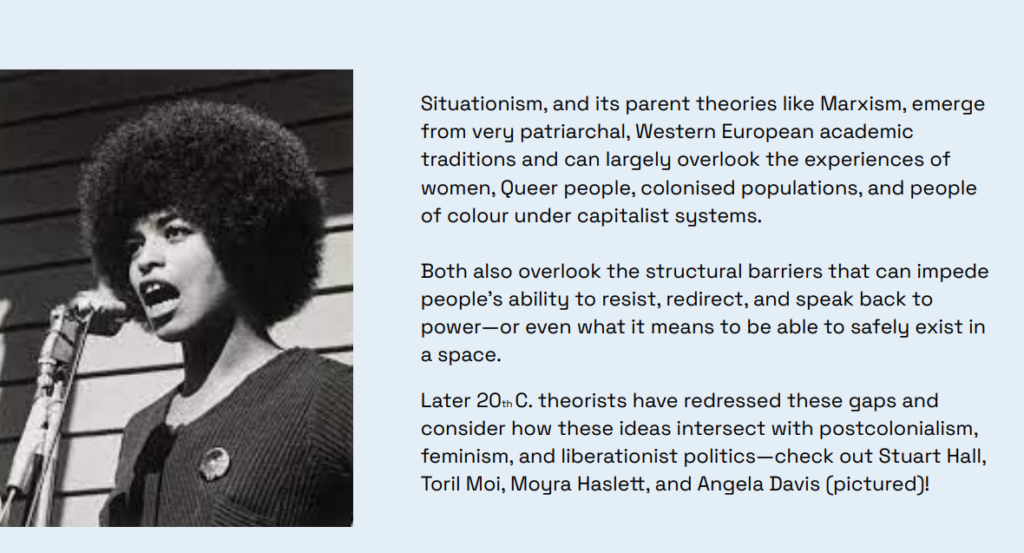
The PDF [2] includes an important note that Situationism and similar theories often stemmed from a Western, male, and academic tradition and may not have taken into account the experiences of women, queer people, colonized populations, and people of color. It also states that it is important to consider structural barriers and the fact that not everyone can “wander” through the city with the same degree of freedom.
This is a very important point for my app. If I use the ideas of dérive and free exploration of the city, I can’t simply say, “Let people go wherever they want.” For some, this truly represents freedom, while for others, it means stress, risk, or physical limitations. Therefore, slow navigation must take into account not only mood and interests, but also safety, accessibility, physical exertion, lighting, proximity to public transportation, and the user’s personal boundaries.
Here, I also find the idea from data feminism useful. Authors Catherine D’Ignazio and Lauren Klein [3] suggest thinking about data through the lens of power, context, and inequality. For my project, this means that a map shouldn’t pretend to be neutral. If an app shows the “best route,” we need to ask: best for whom? For a young tourist? For an older person? For someone with anxiety? For someone who doesn’t speak the language? For a young woman walking alone at night?
That’s why, in the future prototype, I want to focus more on modes and settings – not just “fast/slow,” but more specifically: quiet, safe, green, accessible, dog-friendly, low-stairs, familiar, and exploratory. This makes the app not just a pretty alternative to Google Maps[4], but a more human-centered system that acknowledges the different ways of experiencing the city.
For me, the main takeaway from this phase is this: slow navigation shouldn’t romanticize walking. It should take into account that a city can be inspiring, but also challenging, noisy, inaccessible, or unsafe. If the app wants to create higher-quality routes, it must consider not only the beauty of the path but also the user’s social context.